
Wie Sie eine 802.1X-Authentifizierung mit Cloud RADIUS implementieren
Dieser technische Leitfaden bietet einen umfassenden Rahmen für die Implementierung der 802.1X-Authentifizierung mit Cloud RADIUS in verteilten Unternehmensstandorten. Er beschreibt die Architektur, die Auswahl der EAP-Methode, die Bereitstellungssequenzierung und die Strategien zur Risikominderung, die erforderlich sind, um den Netzwerkzugriff zu sichern und gleichzeitig den operativen Aufwand für eine On-Premises-Infrastruktur zu eliminieren.
Diesen Leitfaden anhören
Podcast-Transkript ansehen
Teil unserer Kernserie: Enterprise WiFi Security Guide →
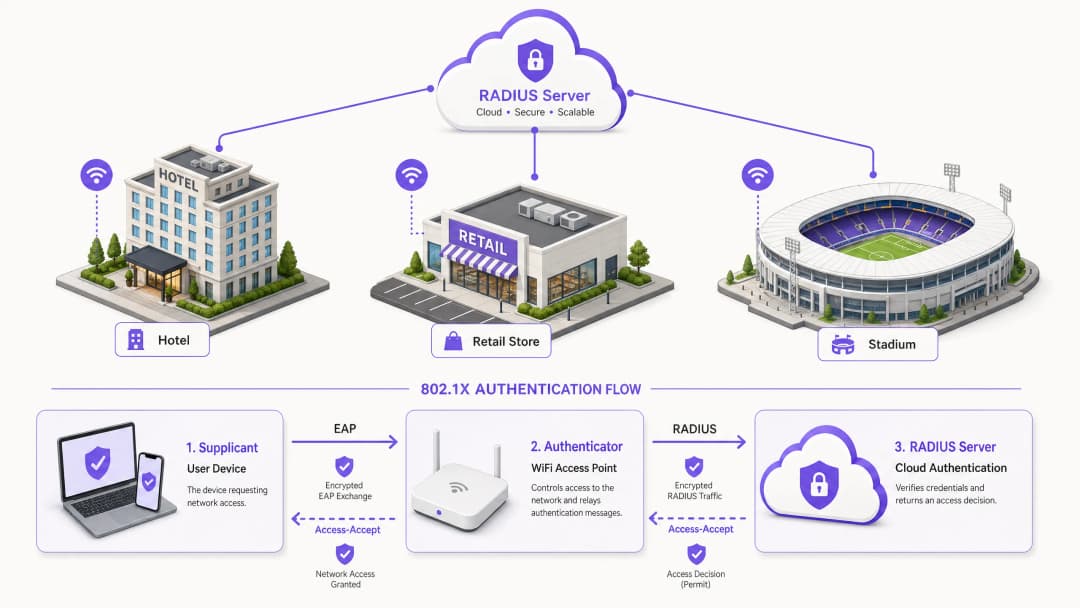
Management Summary
Für IT-Entscheidungsträger, die verteilte Netzwerkinfrastrukturen in den Bereichen Gastgewerbe, Einzelhandel und im öffentlichen Sektor verwalten, hat sich die Sicherung des Netzwerkzugriffs von einer betrieblichen Präferenz zu einer strengen Compliance-Vorgabe entwickelt. Die Verwendung von Pre-Shared Keys (PSKs) birgt unakzeptable Risiken, entspricht nicht modernen Audit-Standards wie PCI-DSS und setzt das Unternehmen bei einer Kompromittierung von Zugangsdaten der Gefahr einer lateralen Schadsoftware-Ausbreitung aus. Der Übergang zur portbasierten Netzwerkzugriffskontrolle nach IEEE 802.1X minimiert diese Risiken effektiv, indem Geräte authentifiziert werden, bevor eine IP-Verbindung hergestellt wird.
In der Vergangenheit scheiterte die Bereitstellung von 802.1X in standortübergreifenden Umgebungen oft an der Notwendigkeit einer lokalen RADIUS-Infrastruktur zur Steuerung von Latenzzeiten und Verfügbarkeit. Die Weiterentwicklung der Cloud RADIUS-Architektur hat dieses Bild grundlegend verändert. Durch die Zentralisierung von Authentifizierungsentscheidungen und die direkte Integration mit Cloud-Identitätsanbietern (wie Azure AD oder Okta) können Unternehmen robuste Zugriffsrichtlinien einheitlich an allen Standorten durchsetzen - ohne die Investitionskosten und den Wartungsaufwand von On-Premises-Servern. Dieser Leitfaden beschreibt die technische Architektur, die Bereitstellungsmethode und die bewährten Betriebspraktiken für die erfolgreiche Implementierung der 802.1X-Authentifizierung mit Cloud RADIUS, um sicherzustellen, dass sowohl das Enterprise Guest WiFi als auch die Unternehmensnetzwerke sicher und skalierbar bleiben.
Technische Vertiefung
Das Fundament moderner drahtloser Netzwerksicherheit in Unternehmen basiert auf dem Standard IEEE 802.1X. Im Gegensatz zur Authentifizierung auf Anwendungsebene arbeitet 802.1X auf Schicht 2 des OSI-Modells. Wenn ein Gerät (der Supplicant) versucht, sich mit einem Access Point (dem Authenticator) zu verbinden, bleibt der Port in einem nicht autorisierten Zustand und lässt nur Datenverkehr des Extensible Authentication Protocol (EAP) zu. Dieser Datenverkehr wird in RADIUS-Pakete gekapselt und an den Authentifizierungsserver - die Cloud RADIUS-Instanz - weitergeleitet. Erst nach Erhalt einer Access-Accept-Nachricht versetzt der Authenticator den Port in einen autorisierten Zustand und gewährt den Netzwerkzugriff.
Cloud RADIUS-Architektur
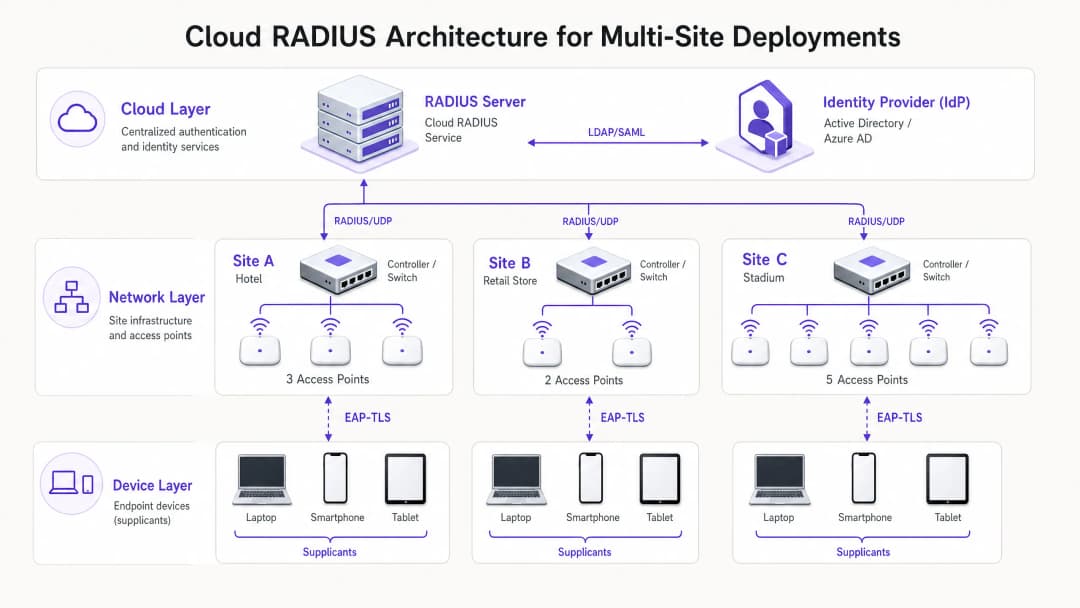
Der architektonische Wechsel von On-Premises-Systemen zu Cloud RADIUS macht verteilte FreeRADIUS- oder Microsoft NPS-Server überflüssig. Im Cloud-Modell kommunizieren Access Points oder Wireless-LAN-Controller direkt über das Internet mit einem global verteilten RADIUS-Service. Um diese Übertragung zu sichern, ist die Implementierung von RadSec (RADIUS über TLS) unerlässlich, wodurch die Authentifizierungs-Nutzdaten verschlüsselt und vor dem Abfangen geschützt werden. Der Cloud RADIUS-Service fungiert als Vermittler, der die Anmeldedaten über LDAP, SAML oder native API-Integrationen mit einem zentralen Identity Provider (IdP) abgleicht. Dies ermöglicht eine dynamische Richtliniendurchsetzung, wie z. B. die Zuweisung von VLANs basierend auf der Azure AD-Gruppenmitgliedschaft, wodurch der Netzwerkzugriff nahtlos in die breitere Identity-Management-Strategie des Unternehmens integriert wird.
EAP-Methodenauswahl
Die Wahl der EAP-Methode bestimmt das Sicherheitsniveau und die betriebliche Komplexität der Bereitstellung.
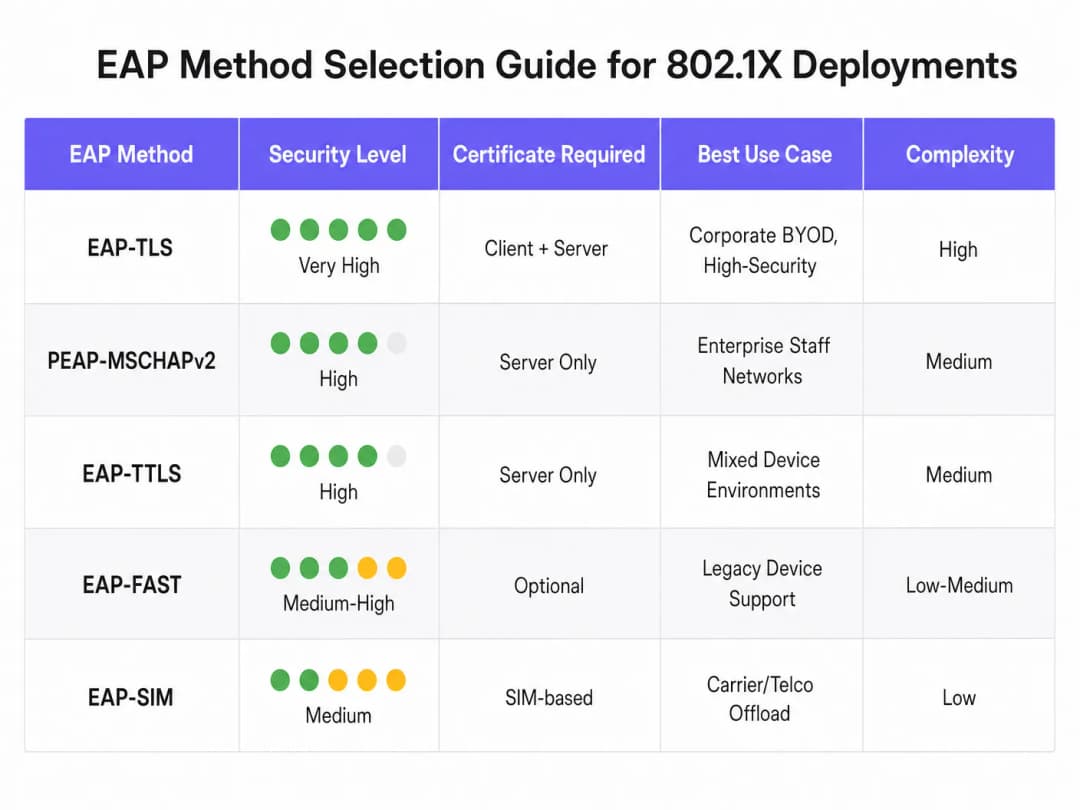
- EAP-TLS (Transport Layer Security): Die sicherste Methode, die sowohl Server- als auch Client-Zertifikate für eine gegenseitige Authentifizierung erfordert. Da keine Passwörter ausgetauscht werden, entfällt das Risiko des Diebstahls von Anmeldedaten. Sie erfordert jedoch eine Public Key Infrastructure (PKI) und ein Mobile Device Management (MDM), um Client-Zertifikate zu verteilen. Dringend empfohlen für Unternehmensgeräte.
- PEAP-MSCHAPv2 (Protected EAP): Weit verbreitet dank nativer Unterstützung in Windows und der ausschließlichen Nutzung eines serverseitigen Zertifikats. Der Austausch von Anmeldedaten wird innerhalb einer TLS-Sitzung getunnelt. Obwohl einfacher bereitzustellen, ist diese Methode anfällig für Angriffe zum Abgreifen von Anmeldedaten, wenn die clientseitige Zertifikatsprüfung nicht strikt erzwungen wird.
- EAP-TTLS: Ähnlich wie PEAP, bietet jedoch eine größere Flexibilität beim inneren Authentifizierungsprotokoll, wodurch sie sich für Umgebungen mit einer vielfältigen Mischung von Client-Betriebssystemen eignet.
Haben Sie Fragen zu Ihrem spezifischen Setup?
Unser Team arbeitet mit Standortbetreibern, IT-Managern und Netzwerktechnikern an über 80.000 Standorten zusammen. Buchen Sie ein 20-minütiges Gespräch und wir zeigen Ihnen, wie andere diese Herausforderungen gelöst haben.
Implementierungsleitfaden
Die Bereitstellung von 802.1X mit Cloud RADIUS erfordert einen schrittweisen, systematischen Ansatz, um Unterbrechungen des laufenden Geschäftsbetriebs zu minimieren.
- Integration des Identity Providers: Richten Sie die Verbindung zwischen dem Cloud RADIUS-Service und dem Unternehmens-IdP ein und überprüfen Sie diese. Stellen Sie sicher, dass die Verzeichnissynchronisierung korrekt ist und die erforderlichen Benutzerattribute (wie die Gruppenmitgliedschaft) für Richtlinienentscheidungen verfügbar sind.
- Zertifikatsmanagement: Beziehen Sie für PEAP-Bereitstellungen ein Serverzertifikat von einer vertrauenswürdigen öffentlichen Zertifizierungsstelle (CA). Konfigurieren Sie die Clients per MDM oder Gruppenrichtlinie so, dass sie dieser CA explizit vertrauen und den Namen des Serverzertifikats validieren. Stellen Sie für EAP-TLS eine interne CA-Infrastruktur bereit und beginnen Sie mit der Ausstellung von Client-Zertifikaten für verwaltete Geräte.
- Netzwerkinfrastruktur-Konfiguration: Konfigurieren Sie Wireless-Controller und Access Points so, dass sie auf die Cloud RADIUS-Endpunkte verweisen. Implementieren Sie RadSec, sofern der Hardware-Hersteller dies unterstützt. Definieren Sie RADIUS Shared Secrets mit starken, kryptografisch sicheren Zeichenfolgen und stellen Sie sicher, dass das Secret pro Standort oder Controller-Cluster eindeutig ist.
- Richtliniendefinition: Erstellen Sie die Authentifizierungsrichtlinien innerhalb der Cloud RADIUS-Plattform. Definieren Sie Bedingungen basierend auf Benutzergruppe, Gerätetyp oder Standort, um nach erfolgreicher Authentifizierung dynamisch VLANs zuzuweisen oder Access Control Lists (ACLs) anzuwenden.
- Pilotprojekt und schrittweise Einführung: Wählen Sie eine repräsentative Gruppe von Benutzern und Geräten für das erste Pilotprojekt aus. Überwachen Sie die Authentifizierungsprotokolle genau, um Latenzprobleme, Fehler bei der Zertifikatsüberprüfung oder fehlerhafte VLAN-Zuweisungen zu identifizieren. Führen Sie nach einem erfolgreichen Pilotprojekt eine schrittweise Einführung durch, wobei Sie Hochrisikostandorte wie Chefbüros oder Standorte, die sensible Daten verarbeiten, priorisieren.
Best Practices
- Clientseitige Zertifikatsvalidierung erzwingen: Die häufigste Schwachstelle bei PEAP-Bereitstellungen ist das Versäumnis, die Serverzertifikatsvalidierung auf dem Client zu erzwingen. Wenn Clients blind jedem präsentierten Zertifikat vertrauen dürfen, sind sie ungeschützt gegenüber Angriffen durch betrügerische Access Points.
- Implementieren Sie MAC-Authentifizierungs-Bypass (MAB) mit Vorsicht: Für gerätelose Systeme, die keinen 802.1X-Supplicant ausführen können (wie Drucker und IoT-Sensoren), kann MAB verwendet werden. MAC-Adressen können jedoch leicht gefälscht werden. MAB-Geräte müssen in stark eingeschränkten VLANs isoliert werden, mit strengen Firewall-Regeln, die ihren Netzwerkzugriff beschränken.
- Nutzen Sie 802.11r für Roaming: In Umgebungen, in denen sich Geräte häufig zwischen Access Points bewegen, kann der vollständige 802.1X-Authentifizierungsprozess zu inakzeptablen Latenzen führen, die Echtzeitanwendungen wie Sprache stören. Die Implementierung von 802.11r (Fast BSS Transition) optimiert das Roaming durch das Zwischenspeichern von Authentifizierungsschlüsseln.
- Integration mit Analytics: Für Standorte, die sowohl ein internes 802.1X-Netzwerk als auch ein öffentliches Zugangsnetzwerk betreiben, bietet die Integration der Authentifizierungsinfrastruktur mit WiFi Analytics eine umfassende Übersicht über die Netzwerkauslastung und das Geräteverhalten im gesamten Bestand.
Fehlerbehebung und Risikominderung
Authentifizierungsfehler in einer 802.1X-Umgebung können weitreichende Verbindungsausfälle verursachen. Ein robuster Prozess zur Fehlerbehebung ist unerlässlich.
- Ablauf von Zertifikaten: Ein abgelaufenes Server- oder Client-Zertifikat führt zu einem sofortigen Authentifizierungsfehler. Implementieren Sie eine automatisierte Überwachung und Alarmierung für Zertifikatsgültigkeitsdauern, um sicherzustellen, dass Verlängerungen lange vor dem Ablaufdatum durchgeführt werden.
- Latenz und Timeouts: Wenn der Cloud RADIUS-Dienst oder IdP eine hohe Latenz aufweist, kann der Authentifikator das Zeitlimit überschreiten und die Verbindung trennen. Konfigurieren Sie geeignete Timeout-Werte auf den Wireless-Controllern (normalerweise 5 - 10 Sekunden) und stellen Sie Backup-RADIUS-Server bereit, um Redundanz zu gewährleisten.- RADIUS shared secret mismatch: Ein auf dem Authentifikator konfiguriertes Shared Secret, das nicht mit dem auf dem RADIUS-Server übereinstimmt, führt dazu, dass Pakete kommentarlos verworfen werden. Standardisieren Sie das Secret-Management und vermeiden Sie manuelle Eingaben, wo immer es möglich ist.
ROI und geschäftlicher Nutzen
Der Übergang zu 802.1X mit Cloud RADIUS bietet messbaren geschäftlichen Mehrwert. Durch den Verzicht auf gemeinsam genutzte Passwörter wird die Angriffsfläche drastisch reduziert, was die Einhaltung der PCI-DSS-Anforderungen (Anforderungen 1 und 8) sowie der GDPR-Datenschutzvorgaben direkt unterstützt. Aus betrieblicher Sicht ermöglicht es eine zentralisierte Zugriffskontrolle: IT-Teams können den Zugriff eines Benutzers an jedem Standort weltweit sofort sperren, indem sie einfach sein Konto im zentralen Verzeichnis deaktivieren. Darüber hinaus senken Unternehmen durch die Außerbetriebnahme veralteter On-Premises RADIUS-Server die Hardware-Wartungskosten, Software-Lizenzgebühren und den administrativen Aufwand für das Patchen und Verwalten verteilter Infrastrukturen. Für standortübergreifende Bereitstellungen in Branchen wie Retail und Hospitality ist diese zentralisierte Sicherheitsarchitektur ein entscheidender Wegbereiter für eine sichere digitale Transformation.
Hören Sie sich unser umfassendes Briefing zu diesem Thema an:
Schlüsseldefinitionen
Supplicant
Der Software-Client auf einem Endgerät (Laptop, Smartphone), der den Netzwerkzugriff über EAP aushandelt.
IT-Teams müssen sicherstellen, dass der Supplicant (häufig über MDM) korrekt konfiguriert ist, um Serverzertifikate zu validieren und so den Diebstahl von Anmeldedaten zu verhindern.
Authenticator
Das Netzwerkgerät (in der Regel ein WiFi Access Point oder Switch), das den physischen oder logischen Zugriff auf das Netzwerk basierend auf dem Authentifizierungsstatus steuert.
Der Authenticator fungiert als Vermittler und leitet EAP-Nachrichten zwischen dem Supplicant und dem RADIUS-Server weiter.
Cloud RADIUS
Ein zentralisierter, in der Cloud gehosteter Authentifizierungsdienst, der RADIUS-Anfragen von verteilten Netzwerkinfrastrukturen verarbeitet, ohne dass Server vor Ort erforderlich sind.
Unerlässlich für Organisationen mit mehreren Standorten, die eine Sicherheit der Enterprise-Klasse implementieren möchten, ohne den Aufwand für die Hardwarewartung tragen zu müssen.
EAP (Extensible Authentication Protocol)
Das Framework, das verwendet wird, um Authentifizierungsnachrichten zwischen dem Supplicant und dem Authentifizierungsserver zu kapseln.
Die Wahl der richtigen EAP-Methode (z. B. PEAP vs. EAP-TLS) bestimmt die Sicherheitsstärke und die Komplexität bei der Bereitstellung des drahtlosen Netzwerks.
RadSec
Ein Protokoll, das RADIUS-Daten über einen TLS-Tunnel überträgt und so die Verschlüsselung des Authentifizierungsverkehrs während der Übertragung gewährleistet.
Entscheidend bei der Verwendung von Cloud RADIUS, da es den Austausch sensibler Anmeldedaten vor dem Abfangen über das öffentliche Internet schützt.
Dynamische VLAN-Zuweisung
Der Prozess, bei dem der RADIUS-Server den Authenticator anweist, ein Gerät basierend auf der Identität oder Gruppenzugehörigkeit des Benutzers in ein bestimmtes virtuelles Netzwerksegment einzustufen.
Ermöglicht es der IT, eine einzige SSID auszustrahlen und gleichzeitig den Datenverkehr sicher zu segmentieren (z. B. HR-Mitarbeiter und IT-Mitarbeiter in verschiedenen Subnetzen zu platzieren).
Gegenseitige Authentifizierung
Ein Sicherheitsprozess, bei dem sowohl der Client die Identität des Servers als auch der Server die Identität des Clients überprüft (normalerweise mithilfe von Zertifikaten).
Das bestimmende Merkmal von EAP-TLS, das es äußerst widerstandsfähig gegen Man-in-the-Middle-Angriffe macht.
MAC Authentication Bypass (MAB)
Eine Fallback-Authentifizierungsmethode, die die MAC-Adresse eines Geräts als Anmeldedaten verwendet, wenn dieses keinen 802.1X-Supplicant unterstützen kann.
Wird für ältere Hardware wie Drucker oder IoT-Geräte verwendet, erfordert jedoch aufgrund der einfachen Möglichkeit von MAC-Spoofing eine strikte Netzwerksegmentierung.
Ausgearbeitete Beispiele
Ein Hotel mit 200 Zimmern, das ein veraltetes PSK-Netzwerk für interne Abläufe (Reinigungstablets, Kassenterminals, Laptops der Manager) betreibt, muss vor einem bevorstehenden Audit die PCI-DSS-Konformität erreichen. Es fehlt an IT-Personal vor Ort und lokale Server können nicht bereitgestellt werden.
Das Hotel sollte eine Cloud RADIUS-Lösung implementieren, die direkt in den zentralen Azure AD-Mandanten integriert ist. Für Manager-Laptops (Windows/macOS) sollte PEAP-MSCHAPv2 implementiert werden, wobei ein MDM-Profil verwendet wird, um das vertrauenswürdige Serverzertifikat zu verteilen und die Validierung zu erzwingen. Für Kassenterminals, die möglicherweise keine robusten Supplicants unterstützen, sollte MAC Authentication Bypass (MAB) genutzt werden, wobei diese Geräte jedoch strikt einem isolierten VLAN zugewiesen werden müssen, das nur die Kommunikation mit dem Payment Gateway erlaubt. Die Bereitstellung erfordert die Konfiguration der vorhandenen, in der Cloud verwalteten Access Points, um auf die IP-Adressen von Cloud RADIUS zu verweisen, wobei die Verbindung mit RadSec gesichert wird.
Eine nationale Einzelhandelskette führt eine neue Flotte von firmeneigenen Tablets für die Bestandsverwaltung in 500 Filialen ein. Sie möchte sicherstellen, dass ein Tablet selbst bei Diebstahl nicht für den Zugriff auf das Netzwerk verwendet werden kann, und sie möchte passwortbezogene Helpdesk-Tickets eliminieren.
Der Einzelhändler muss EAP-TLS implementieren. Er wird eine interne Zertifizierungsstelle (CA) einrichten und diese in seine MDM-Plattform integrieren. Wenn ein Tablet bereitgestellt wird, überträgt das MDM ein eindeutiges Client-Zertifikat auf das Gerät. Der Cloud RADIUS-Dienst wird so konfiguriert, dass er Geräte ausschließlich auf der Grundlage des Vorhandenseins eines gültigen Client-Zertifikats authentifiziert. Wird ein Tablet als gestohlen gemeldet, widerruft das IT-Team einfach dieses spezifische Zertifikat in der CA. Der Cloud RADIUS-Dienst, der die Zertifikatwiderrufsliste (CRL) oder über OCSP prüft, verweigert sofort den Netzwerkzugriff.
Übungsfragen
Q1. Ihre Organisation migriert von einem gemeinsamen PSK zu 802.1X unter Verwendung von PEAP-MSCHAPv2. Während der Pilotphase berichten Benutzer, dass sie eine Verbindung herstellen können, aber ein Sicherheitsaudit zeigt, dass Geräte stillschweigend jedes ihnen präsentierte Serverzertifikat akzeptieren. Was ist das unmittelbare Risiko und wie muss es behoben werden?
Hinweis: Überlegen Sie, was passiert, wenn ein Angreifer einen Access Point einrichtet, der Ihre Unternehmens-SSID ausstrahlt.
Musterlösung anzeigen
Das unmittelbare Risiko ist ein Man-in-the-Middle (MitM) -Angriff über einen gefälschten Access Point. Ein Angreifer kann die Unternehmens-SSID ausstrahlen, ein selbstsigniertes Zertifikat präsentieren und Benutzerdaten abgreifen, während die Geräte versuchen, sich zu authentifizieren. Um dies zu beheben, muss das IT-Team die Profile des Supplicants (über MDM oder Gruppenrichtlinien) so konfigurieren, dass sie das Serverzertifikat explizit validieren. Dies beinhaltet die Angabe der genauen vertrauenswürdigen Root-CA, die das Zertifikat des RADIUS-Servers ausgestellt hat, und die strikte Definition des erwarteten Server-Hostnamens.
Q2. Eine entfernte Einzelhandelsfiliale hat ihre Internetverbindung verloren. Die lokalen Access Points sind weiterhin eingeschaltet. Bleiben die derzeit mit dem 802.1X-Netzwerk verbundenen Geräte der Mitarbeiter verbunden und können sich neue Geräte authentifizieren? Gehen Sie von einer Standard-Cloud-RADIUS-Architektur ohne lokale Ausfallsicherheitsknoten aus.
Hinweis: Denken Sie an den Weg, den eine Authentifizierungsanfrage nehmen muss, und an den Zustand bereits autorisierter Ports.
Musterlösung anzeigen
Geräte, die bereits authentifiziert und verbunden sind, bleiben in der Regel so lange verbunden, bis ihr Sitzungstimeout abläuft oder sie die Verbindung trennen, da sich der Port des Authenticators bereits im autorisierten Zustand befindet. Neue Geräte, die versuchen, eine Verbindung herzustellen, oder Geräte, die eine erneute Authentifizierung versuchen, schlagen jedoch fehl. Da die Internetverbindung unterbrochen ist, können die Access Points den Cloud-RADIUS-Server nicht erreichen, um den EAP-Austausch zu verarbeiten. Dies unterstreicht die Bedeutung robuster WAN-Verbindungen, wenn man sich auf eine Cloud-basierte Authentifizierung verlässt.
Q3. Sie müssen den Netzwerkzugriff für eine Flotte älterer Barcodescanner in einem Lager sichern. Diese Scanner unterstützen keine 802.1X-Supplicants und unterstützen nur WPA2-Personal (PSK). Sie können die Hardware nicht aktualisieren. Wie integrieren Sie diese Geräte neben Ihren 802.1X-Unternehmensgeräten in eine sichere Netzwerkarchitektur?
Hinweis: Sie benötigen eine Alternative zu 802.1X, die dennoch eine Zugriffskontrolle in Kombination mit einer Isolierung auf Netzwerkebene bietet.
Musterlösung anzeigen
Der empfohlene Ansatz besteht darin, MAC Authentication Bypass (MAB) für die Barcodescanner zu nutzen. Der Access Point verwendet die MAC-Adresse des Scanners als Identität und sendet diese an den RADIUS-Server. Da MAC-Adressen leicht gefälscht werden können, bietet dies nur eine schwache Authentifizierung. Daher muss der RADIUS-Server so konfiguriert werden, dass er nach erfolgreicher MAB-Authentifizierung ein bestimmtes VLAN-Attribut zurückgibt. Dieses VLAN muss über Firewalls oder ACLs stark eingeschränkt werden, sodass die Scanner nur mit den spezifischen Inventarservern kommunizieren können, die sie benötigen, und jeglicher andere laterale Netzwerkzugriff blockiert wird.
Weiterlesen in dieser Reihe
Die Sicherheitsvorteile von RADIUS as a Service für hybride Belegschaften
Dieser technische Leitfaden erklärt, wie RADIUS as a Service den Netzwerkzugriff für hybride Belegschaften an verteilten Standorten sichert. Er behandelt die Architektur, die Sicherheitsvorteile und die Bereitstellungsschritte für den Ersatz von On-Premises-RADIUS-Infrastrukturen durch einen cloudverwalteten Authentifizierungsdienst. Für IT-Manager und Netzwerkarchitekten in Hotels, Einzelhandelsketten, Stadien und Organisationen des öffentlichen Sektors liefert dieser Leitfaden die notwendigen Argumente, um eine Migration zu Cloud-RADIUS in diesem Quartal zu bewerten und umzusetzen.
Integration von RADIUS as a Service mit Cloud-Verzeichnissen (Azure AD & Google Workspace)
Dieser technische Referenzleitfaden beschreibt detailliert, wie Sie RADIUS as a Service mit Cloud-Verzeichnissen – Microsoft Entra ID und Google Workspace – für die WiFi-Authentifizierung in Unternehmen integrieren. Er behandelt den architektonischen Wechsel von On-Premises-NPS zu Cloud-nativem RADIUS, die Bereitstellung der zertifikatsbasierten EAP-TLS-Authentifizierung sowie die bewährten Betriebsmethoden zur Absicherung des drahtlosen Zugangs in den Bereichen Gastgewerbe, Einzelhandel und im öffentlichen Sektor. Für IT-Manager und Netzwerkarchitekten, die bereits in Cloud-Identitäten investieren, schließt dieser Leitfaden die Lücke zwischen Verzeichnisverwaltung und physischer Netzwerksicherheit.
Was ist Cloud RADIUS? Ein umfassender Leitfaden zu RADIUS-as-a-Service
Dieser umfassende Leitfaden befasst sich mit Cloud RADIUS (RADIUS-as-a-Service) und erläutert dessen Architektur, EAP-Methoden und Implementierungsstrategien. Er bietet IT-Entscheidern praxisnahe Einblicke für die Migration von lokalen Servern zu einem skalierbaren, sicheren und konformen cloudbasierten Authentifizierungsmodell.
Haben Sie Fragen zu Ihrem spezifischen Setup?
Unser Team arbeitet mit Standortbetreibern, IT-Managern und Netzwerktechnikern an über 80.000 Standorten zusammen. Buchen Sie ein 20-minütiges Gespräch und wir zeigen Ihnen, wie andere diese Herausforderungen gelöst haben.