
I vantaggi in termini di sicurezza di RADIUS-as-a-Service per il personale ibrido
Questa guida tecnica di riferimento spiega come RADIUS-as-a-Service protegge l'accesso alla rete per il personale ibrido in sedi distribuite. Copre l'architettura, i vantaggi in termini di sicurezza e i passaggi di implementazione per sostituire l'infrastruttura RADIUS on-premise con un servizio di autenticazione gestito in cloud. Per i responsabili IT e gli architetti di rete di hotel, catene di vendita al dettaglio, stadi e organizzazioni del settore pubblico, questa guida fornisce le prove necessarie per valutare e agire su una migrazione a un cloud RADIUS in questo trimestre.
Video overview
Ascolta questa guida
Visualizza trascrizione del podcast
Parte della nostra serie principale: Guida alla sicurezza WiFi aziendale →

Sintesi Esecutiva
Il passaggio a una forza lavoro ibrida ha esposto una debolezza fondamentale nella sicurezza di rete tradizionale: i server RADIUS on-premises sono stati progettati per un mondo in cui i dipendenti sedevano in un unico edificio e si connettevano a una singola rete. Quel mondo non esiste più. Oggi, i tuoi dipendenti si autenticano da camere d'albergo, aree di vendita, uffici remoti e sedi di eventi. I tuoi identity provider sono nel cloud. I tuoi access point sono sparsi in centinaia di sedi. Eppure molte organizzazioni si affidano ancora a server RADIUS fisici che richiedono patch manuali, non possono integrarsi nativamente con Microsoft Entra ID o Google Workspace e si guastano senza preavviso quando l'hardware si deteriora.
RADIUS-as-a-Service sostituisce questa infrastruttura con un motore di autenticazione cloud-native. Indirizzi i tuoi access point verso endpoint cloud. Il provider gestisce i server, l'applicazione delle patch e l'elevata disponibilità. Tu gestisci le policy. Per i team IT nei gruppi del settore hospitality, nelle catene di retail e nei luoghi pubblici, questo passaggio elimina i costi hardware, impone la segmentazione della rete basata sull'identità e fornisce la traccia di controllo richiesta per PCI-DSS e GDPR.
Approfondimento Tecnico
Perché il RADIUS On-Premises è in Difficoltà
Il RADIUS, definito nella specifica RFC 2865, fornisce autenticazione, autorizzazione e contabilità (AAA) centralizzate per l'accesso alla rete. Ogni organizzazione che esegue il WiFi WPA2-Enterprise o WPA3-Enterprise si affida ad esso. Il protocollo in sé è robusto. Il problema risiede nel modello infrastrutturale che si è evoluto intorno ad esso.
Implementare, proteggere e mantenere FreeRADIUS su Linux richiede competenze significative. Microsoft Network Policy Server (NPS) è strettamente accoppiato con Active Directory e non ha un supporto nativo per Microsoft Entra ID, Okta o Google Workspace. Cisco Identity Services Engine (ISE) offre funzionalità di policy di livello enterprise ma richiede hardware dedicato, licenze complesse e un team di esperti per la gestione. Per tutti e tre, è necessario creare e mantenere manualmente l'elevata disponibilità, in genere eseguendo due server con replica del database e un bilanciatore di carico a monte.
Per un'organizzazione con una singola sede e un Active Directory statico, questo modello è gestibile. Per un gruppo alberghiero con 50 proprietà, una catena di retail con 400 negozi o un'università con un campus disperso, diventa impossibile. O si centralizzano i server RADIUS accettando la latenza di autenticazione dalle sedi remote, oppure si distribuiscono server in ogni località gestendoli singolarmente. Nessuna delle due opzioni è scalabile.
L'Architettura di RADIUS-as-a-Service
RADIUS-as-a-Service è un modello di distribuzione basato sul cloud per il protocollo RADIUS. Il protocollo stesso rimane invariato, aderendo alla specifica RFC 2865 e alle sue estensioni. Ciò che cambia è chi gestisce l'infrastruttura. Quando un dispositivo si connette alla tua rete WiFi, l'access point (client RADIUS) inoltra la richiesta di autenticazione attraverso un tunnel sicuro e crittografato agli endpoint cloud RADIUS. Il servizio cloud verifica le credenziali con il tuo provider di identità e restituisce un messaggio Access-Accept o Access-Reject insieme agli attributi di policy, come l'assegnazione dinamica della VLAN. Dal punto di vista dell'access point, il flusso di autenticazione è identico a quello di un RADIUS on-premises.

Il cloud provider gestisce i server RADIUS in diversi data center dislocati geograficamente. Il failover è automatico. Se un endpoint non è più disponibile, il traffico viene instradato verso l'endpoint attivo successivo senza alcun intervento da parte del tuo team. Per le organizzazioni con uffici in più regioni, l'autenticazione avviene presso l'endpoint cloud più vicino, mantenendo la latenza bassa indipendentemente dalla posizione geografica.
Metodi IEEE 802.1X ed EAP
Lo standard IEEE 802.1X è lo standard per il controllo dell'accesso alla rete basato su porte (NAC). Impone a un dispositivo di autenticarsi prima di poter ottenere un indirizzo IP e ricevere il permesso di trasmettere il traffico. In una distribuzione 802.1X, RADIUS funge da server di autenticazione.
L'Extensible Authentication Protocol (EAP) definisce la modalità di scambio delle credenziali. Cloud RADIUS supporta tutti i metodi EAP:
| Metodo EAP | Tipo di Autenticazione | Livello di Sicurezza | Uso Consigliato |
|---|---|---|---|
| EAP-TLS | Basato su certificato mutuo | Massimo | Dispositivi aziendali con certificati gestiti tramite MDM |
| PEAP-MSCHAPv2 | Nome utente e password | Medio | Dispositivi legacy o BYOD senza MDM |
| EAP-TTLS | Credenziali in tunnel | Medio | Ambienti misti |
| MAC Authentication Bypass | Indirizzo MAC del dispositivo | Basso | Dispositivi IoT che non supportano lo standard 802.1X |
Il metodo EAP-TLS, definito nella specifica RFC 5216, è considerato lo standard di riferimento. Sia il dispositivo client che il server RADIUS si presentano reciprocamente i certificati digitali. Questa autenticazione reciproca elimina completamente la necessità di password dal processo di accesso alla rete. Il certificato è legato crittograficamente al dispositivo e, a differenza di una password, non può essere oggetto di phishing, indovinato o rubato. Per le organizzazioni che hanno subito violazioni di dati basate sulle credenziali, questo rappresenta il rimedio tecnico più diretto.
Assegnazione Dinamica della VLAN
Oltre all'autenticazione, il server RADIUS applica l'autorizzazione. Quando accetta una connessione, restituisce gli attributi di policy all'access point, incluso l'ID della VLAN da assegnare al dispositivo. Questa assegnazione dinamica della VLAN è il meccanismo chiave che abilita le reti basate sull'identità.Un addetto alla reception di un hotel si autentica e viene inserito in una VLAN front-of-house con accesso al sistema di gestione della struttura. Un membro del personale addetto alle pulizie viene inserito in una VLAN limitata con accesso solo a Internet. Il dispositivo di un ospite viene inserito in una VLAN Guest WiFi, completamente isolato dalle risorse aziendali. Un dispositivo IoT, come una telecamera di sicurezza, viene inserito in una VLAN IoT dedicata. Tutto questo avviene automaticamente in base all'identità verificata dal server RADIUS, senza alcuna configurazione manuale della VLAN per ciascun dispositivo.
Questo è il principio del privilegio minimo applicato all'accesso alla rete. Non ti stai fidando di un dispositivo semplicemente perché si è connesso a un SSID specifico. Stai concedendo l'accesso in base a un'identità verificata e limitando tale accesso solo a ciò che è necessario per tale identità. Per un'analisi più approfondita di come questo si inserisca in una strategia di controllo dell'accesso alla rete più ampia, consulta la nostra guida sui sistemi di controllo dell'accesso alla rete.
Integrazione nativa dell'identità cloud
Il vantaggio operativo più significativo di cloud RADIUS è la sua integrazione nativa con i moderni provider di identità. Cloud RADIUS si connette direttamente a Microsoft Entra ID, Okta e Google Workspace tramite protocolli standard come OIDC, SAML e LDAP. Quando inserisci un nuovo dipendente nel tuo provider di identità, questo può autenticarsi immediatamente sulla rete WiFi. Quando disattivi un dipendente, disattivi il suo account nella directory e il suo accesso alla rete WiFi viene revocato istantaneamente su ogni access point in ogni sede.
Questa sincronizzazione in tempo reale elimina una delle vulnerabilità di sicurezza più difficili nel WiFi aziendale: gli ex dipendenti che possiedono ancora una chiave PSK condivisa o i cui account RADIUS non sono stati eliminati manualmente al momento della loro partenza. Con il cloud RADIUS e un provider di identità cloud, la disattivazione di un dipendente diventa un'unica azione con effetto immediato su tutta la rete.
-
Hai domande sulla tua configurazione specifica?
Il nostro team collabora con gestori di sedi, responsabili IT e ingegneri di rete in 80.000 sedi. Prenota una chiamata di 20 minuti e ti mostreremo come altri professionisti come te hanno risolto il problema.
Guida all'implementazione
Passaggio 1: Connetti il tuo provider di identità
Connetti il servizio cloud RADIUS al tuo provider di identità. Per Microsoft Entra ID o Google Workspace, questo in genere comporta l'autorizzazione di un'applicazione aziendale tramite OAuth o la configurazione di un connettore LDAP. Mappa i tuoi gruppi di directory su politiche di rete specifiche. Definisci la tassonomia dei ruoli prima di iniziare: quali gruppi corrispondono a quali VLAN e quali diritti di accesso ha ciascuna VLAN. Eseguire questa operazione correttamente all'inizio consente di risparmiare molto lavoro in seguito.
Passaggio 2: Distribuisci i certificati per i dispositivi aziendali
Per i dispositivi di proprietà dell'azienda, configura la tua piattaforma di gestione dei dispositivi mobili (MDM), come Microsoft Intune o Jamf, per inviare i certificati client ai dispositivi. Ciò consente l'autenticazione EAP-TLS. Assicurati che l'autorità di certificazione (CA) radice che ha emesso il certificato del server RADIUS sia attendibile da tutti i dispositivi client. Una catena non attendibile è la causa più comune di errori di autenticazione silenziosi.
Passaggio 3: Configura l'hardware di rete
Aggiungi gli indirizzi IP e i shared secret del RADIUS in cloud al tuo controller wireless o ai tuoi access point. Configura sempre sia l'endpoint primario che quello secondario per utilizzare la ridondanza integrata del provider. Assicurati che le porte UDP 1812 (autenticazione) e 1813 (accounting) siano aperte in uscita dagli access point verso gli endpoint del RADIUS in cloud. Verifica questo passaggio prima di andare online. Le regole del firewall configurate in modo errato sono la seconda causa più comune di fallimento della distribuzione.
Il RADIUS in cloud funziona con Cisco Meraki, HPE Aruba, Ruckus, Juniper Mist, Ubiquiti UniFi, Cambium, Extreme e Fortinet. I passaggi di configurazione variano a seconda del fornitore, ma il protocollo RADIUS è standardizzato, quindi i parametri principali (IP del server, shared secret, porta di autenticazione) rimangono coerenti.
Passaggio 4: Definisci le policy VLAN
Configura l'assegnazione dinamica delle VLAN nel motore delle policy RADIUS. Associa ogni ruolo utente o tipo di dispositivo a un ID VLAN specifico. Testa ogni policy prima di passare alla produzione. Una matrice di test semplice - un dispositivo per ruolo, una VLAN per ruolo, verificando il posizionamento - rileva la maggior parte degli errori di configurazione prima che impattino gli utenti.
Best Practice
Imponi EAP-TLS per tutti i dispositivi aziendali. Abbandona PEAP-MSCHAPv2 non appena la distribuzione del tuo MDM lo consente. PEAP si affida alle password, che possono essere compromesse. EAP-TLS si affida ai certificati, che non possono esserlo.
Segmenta tutto. Non posizionare mai dipendenti, ospiti e dispositivi IoT sulla stessa subnet. Utilizza RADIUS per imporre rigidi confini VLAN. Questo è fondamentale per gli ambienti retail che gestiscono i dati delle carte di pagamento secondo lo standard PCI-DSS e per gli ambienti sanitari che proteggono i dati dei pazienti.
Allineati con WPA3-Enterprise. WPA3-Enterprise, l'attuale standard di sicurezza WiFi, richiede l'autenticazione 802.1X. Assicurati che i tuoi access point supportino WPA3-Enterprise e configuralo come standard di sicurezza minimo per le reti dei dipendenti.
Controlla regolarmente i log RADIUS. Il RADIUS in cloud fornisce log di controllo centralizzati. Esamina i fallimenti di autenticazione settimanalmente. Un picco improvviso di fallimenti da un dispositivo o da una posizione specifica è un indicatore precoce di una configurazione errata o di un potenziale attacco.
Esegui test di failover. Almeno una volta al trimestre, simula un guasto dell'endpoint RADIUS primario e verifica che l'autenticazione continui senza interruzioni tramite l'endpoint secondario. Documenta il risultato. Questo è un test semplice che la maggior parte dei team non esegue mai finché non è costretta a farlo.
Per le sedi che distribuiscono il WiFi in ambienti complessi, comprese imbarcazioni o località remote, consulta la nostra guida su come configurare un captive portal su Starlink per considerazioni relative alla dipendenza dalla rete WAN.
Risoluzione dei problemi e mitigazione dei rischi
Timeout di autenticazione
Se un dispositivo non riesce ad autenticarsi, verificare innanzitutto la connettività tra i punti di accesso e gli endpoint RADIUS nel cloud. Verificare che le porte UDP 1812 e 1813 siano aperte in uscita. L'ispezione approfondita dei pacchetti (DPI) sui firewall moderni può ritardare o scartare i pacchetti RADIUS. Se si riscontrano timeout, controllare le policy del firewall per verificare la presenza di regole che potrebbero ispezionare o limitare la velocità del traffico UDP verso gli endpoint RADIUS.
Errori della catena di attendibilità dei certificati
Se si utilizza EAP-TLS, assicurarsi che i dispositivi client considerino attendibile la CA radice che ha emesso il certificato del server RADIUS. Se la catena di attendibilità è interrotta, il dispositivo rifiuterà silenziosamente la connessione per prevenire un attacco man-in-the-middle. Questo si manifesta come un errore di connessione senza alcun messaggio di errore chiaro. Controllare i log del server RADIUS per individuare eventuali handshake EAP-TLS non riusciti. Distribuire il certificato della CA radice a tutti i dispositivi gestiti tramite MDM.
Dipendenza dalla rete WAN
Il RADIUS in cloud richiede una connessione Internet attiva. Se il collegamento WAN si interrompe, le richieste di autenticazione non possono raggiungere il server. Per le risorse locali critiche, valutare punti di accesso che supportino la sopravvivenza locale o il caching dell'autenticazione. Per la maggior parte delle implementazioni, la dipendenza dalla WAN è accettabile poiché un sito senza Internet non può comunque accedere alle applicazioni SaaS in cloud.
Mancata corrispondenza del segreto condiviso
Ogni punto di accesso o controller wireless deve essere configurato come client RADIUS con il segreto condiviso corretto. Una mancata corrispondenza comporta lo scarto automatico e silenzioso di tutte le richieste di autenticazione provenienti da quel dispositivo. Se un punto di accesso specifico non funziona mentre gli altri hanno successo, verificare la configurazione del segreto condiviso su quel dispositivo.
-
ROI e impatto aziendale
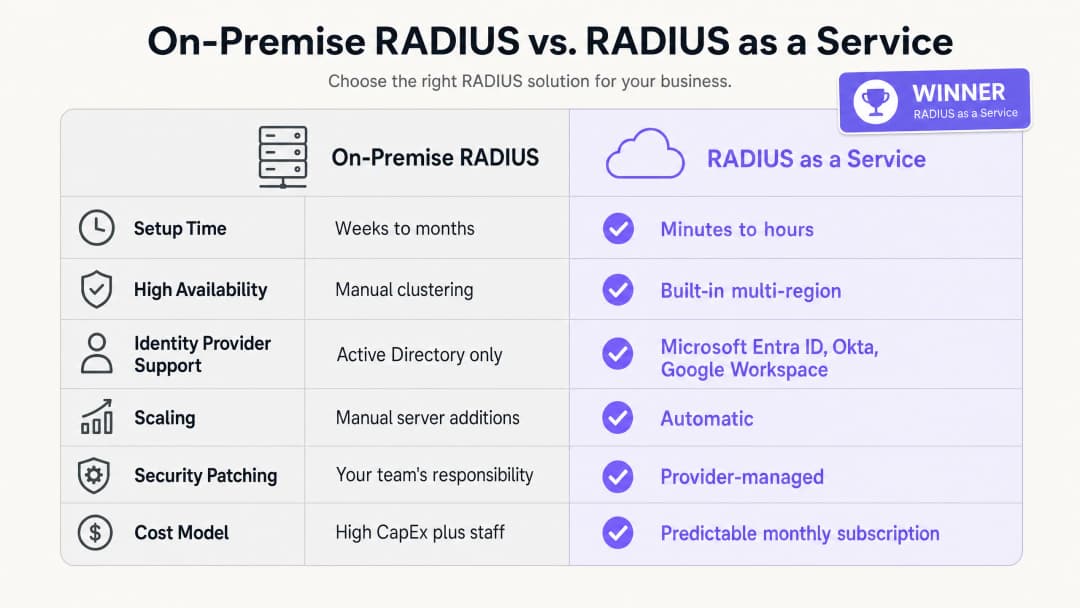
I vantaggi aziendali di RADIUS-as-a-Service si basano su tre pilastri: riduzione delle spese in conto capitale (CapEx), minori costi operativi (OpEx) e una migliore postura di sicurezza.
In termini di spese in conto capitale, si elimina completamente il costo di acquisto, licenza e rinnovo dei server fisici. Un'implementazione RADIUS on-premises minima richiede due server per l'alta affidabilità, licenze del sistema operativo e il rinnovo dell'hardware ogni tre-cinque anni. Per un gruppo alberghiero di 50 proprietà, questo rappresenta un investimento hardware significativo su tutto il patrimonio immobiliare.
In termini di costi operativi, il team di ingegneri non deve più dedicare tempo ad applicare patch ai server Windows, a risolvere gli errori di configurazione di FreeRADIUS o a gestire i rinnovi dei certificati sulle infrastrutture fisiche. Questo tempo può essere reindirizzato verso attività di policy di sicurezza che migliorano direttamente la vostra postura di sicurezza.Esaminando la postura di sicurezza, il passaggio a EAP-TLS e all'assegnazione dinamica della VLAN riduce significativamente la superficie di attacco della rete. Il furto di credenziali è una delle cause principali delle violazioni di rete. L'eliminazione delle password dal processo di autenticazione di rete affronta direttamente questa minaccia. La registrazione centralizzata dei log di audit facilita la conformità con PCI DSS v4.0 e GDPR, riducendo i costi e la complessità degli audit di conformità. Per le organizzazioni che gestiscono hub di trasporto o spazi ad alta densità, la capacità di applicare policy di sicurezza coerenti in tutte le sedi da un'unica dashboard rappresenta un miglioramento operativo tangibile. Purple è attivo in oltre 80.000+ sedi live e ha gestito 440 milioni di accessi nel 2024 (dati interni Purple, 2024). L'infrastruttura che supporta questa scala è cloud-native per definizione.
Per una panoramica più ampia su come la WiFi analytics e la network intelligence si collegano ai risultati aziendali, consulta la nostra piattaforma di WiFi Analytics.
-
Riferimenti
[1] Standard IEEE per reti locali e metropolitane - Controllo dell'accesso alla rete basato su porta. IEEE Std 802.1X-2020. [2] IETF. Remote Authentication Dial In User Service (RADIUS). RFC 2865. 1997. [3] IETF. Il protocollo di autenticazione EAP-TLS. RFC 5216. 2008. [4] IronWiFi. Vantaggi di un server Cloud RADIUS: perché le aziende stanno spostando l'autenticazione online. Febbraio 2026. [5] SecureW2. Cloud vs. RADIUS On-Site: qual è il migliore? Maggio 2026. [6] Portnox. RADIUS-as-a-Service. 2026. [7] PCI Security Standards Council. PCI DSS v4.0. Marzo 2022. [8] Purple. Dati della piattaforma interna: 440 milioni di accessi, oltre 80.000 sedi. 2024.
Definizioni chiave
RADIUS
Remote Authentication Dial-In User Service. Un protocollo di rete definito in RFC 2865 che fornisce una gestione centralizzata di autenticazione, autorizzazione e tracciabilità (AAA) per gli utenti che si connettono a un servizio di rete.
I team IT utilizzano RADIUS come motore decisionale centrale per verificare se un dispositivo o un utente è autorizzato ad accedere alla rete WiFi aziendale. Si colloca tra l'access point e l'identity provider.
802.1X
Uno standard IEEE per il Network Access Control basato su porte. Fornisce un meccanismo di autenticazione ai dispositivi che desiderano connettersi a una LAN o WLAN, obbligandoli ad autenticarsi prima di ricevere un indirizzo IP.
Questo è lo standard che è alla base della sicurezza WiFi aziendale. Senza 802.1X, qualsiasi dispositivo che si connette all'SSID ottiene l'accesso alla rete. Con 802.1X, ogni dispositivo deve prima dimostrare la propria identità.
EAP-TLS
Extensible Authentication Protocol - Transport Layer Security. Un metodo di autenticazione definito nella RFC 5216 che richiede sia al dispositivo client che al server RADIUS di presentare certificati digitali, fornendo un'autenticazione reciproca senza password.
Considerato lo standard di riferimento per la sicurezza WiFi aziendale. I certificati vengono distribuiti ai dispositivi aziendali tramite MDM. EAP-TLS elimina il rischio di furto di credenziali e attacchi di phishing sulla rete.
PEAP
Protected Extensible Authentication Protocol. Un metodo EAP che incanala uno scambio di nome utente e password all'interno di una sessione TLS. Meno sicuro rispetto a EAP-TLS poiché si affida alle password.
PEAP-MSCHAPv2 è ampiamente utilizzato negli ambienti legacy. I team IT dovrebbero pianificare una migrazione a EAP-TLS per i dispositivi aziendali, utilizzando PEAP solo come soluzione di emergenza per i dispositivi non gestiti o BYOD.
Dynamic VLAN assignment
Un processo in cui il server RADIUS indica all'access point in quale Virtual LAN inserire un dispositivo, in base all'identità e al ruolo verificati dell'utente, anziché all'SSID a cui si è connesso.
Essenziale per la segmentazione della rete in ambienti con ruoli multipli. Un singolo SSID 'Staff' può separare in modo sicuro il traffico del personale di servizio, della reception e della direzione in diverse VLAN con differenti diritti di accesso.
AAA
Authentication, Authorisation, and Accounting. Le tre funzioni eseguite da un server RADIUS: verifica dell'identità (autenticazione), determinazione dell'accesso consentito (autorizzazione) e registrazione dei dati di sessione a scopo di audit (accounting).
I team IT e i revisori utilizzano l'AAA come framework per valutare il controllo degli accessi alla rete. Cloud RADIUS offre tutte e tre le funzioni da un servizio gestito.
WPA3-Enterprise
L'attuale standard di sicurezza WiFi per le reti aziendali, che richiede l'autenticazione 802.1X tramite un server RADIUS. Offre una crittografia avanzata rispetto a WPA2-Enterprise, inclusa la modalità di sicurezza a 192 bit per ambienti ad alta sicurezza.
I responsabili IT dovrebbero configurare WPA3-Enterprise come standard minimo di sicurezza per le reti del personale. Le reti ospiti possono utilizzare WPA2 o l'autenticazione aperta con un captive portal.
Network Access Control (NAC)
Un approccio alla sicurezza che applica policy sui dispositivi che cercano di accedere alle risorse di rete, combinando la valutazione della sicurezza degli endpoint, l'autenticazione dell'identità e l'applicazione delle regole di rete.
RADIUS è un componente fondamentale del NAC. Cloud RADIUS estende il NAC ad ambienti distribuiti e multi-sede senza richiedere un'infrastruttura on-premise in ciascuna sede.
Captive portal
Una pagina web con cui un utente di una rete ad accesso pubblico deve interagire prima che gli venga concesso l'accesso a Internet. Utilizzata tipicamente per il WiFi ospiti per raccogliere il consenso o mostrare le condizioni d'uso.
I captive portal gestiscono l'accesso degli ospiti non autenticati, mentre l'802.1X gestisce l'accesso del personale autenticato. I due meccanismi operano su SSID e VLAN separati.
Esempi pratici
Un hotel da 200 camere deve proteggere la rete del proprio personale tra pulizie, reception e direzione, mantenendo il Guest WiFi completamente separato. Attualmente utilizzano una PSK condivisa per la rete del personale, che non viene modificata da due anni.
Implementare RADIUS-as-a-Service integrato con Microsoft Entra ID. Configurare gli access point Cisco Meraki per utilizzare WPA3-Enterprise con 802.1X. Il personale delle pulizie si autentica utilizzando le proprie credenziali Entra ID; il server RADIUS legge il loro gruppo di directory e li assegna dinamicamente alla VLAN 10 (solo accesso al sistema delle attività di pulizia). Il personale della reception viene assegnato alla VLAN 20 (accesso al sistema di gestione della proprietà). La direzione viene assegnata alla VLAN 30 (accesso più ampio). Il Guest WiFi rimane su un SSID separato con un Captive Portal, isolato sulla VLAN 40. Quando un membro del personale stagionale se ne va, il suo account Entra ID viene disattivato, revocando istantaneamente l'accesso WiFi su tutti gli access point della proprietà.
Una catena nazionale di vendita al dettaglio con 400 negozi deve garantire la conformità PCI-DSS per i suoi terminali punto vendita. Attualmente gestiscono 400 istanze FreeRADIUS separate su server dei negozi locali, ognuna delle quali richiede patch individuali.
Migrare a una singola istanza RADIUS-as-a-Service. Configurare gli access point HPE Aruba in tutti i 400 negozi per autenticare i dispositivi POS utilizzando EAP-TLS con certificati della macchina distribuiti tramite Microsoft Intune. Il server RADIUS cloud autentica i certificati e inserisce i dispositivi POS in una VLAN conforme a PCI-DSS (VLAN 30), isolata da tutto l'altro traffico di rete. Il personale del negozio utilizza un SSID separato autenticato tramite Okta, che lo inserisce in una VLAN generale del personale (VLAN 20). Gli acquirenti sulla rete guest sono isolati sulla VLAN 40. Il team di sicurezza gestisce tutti i criteri da un'unica dashboard.
Domande di esercitazione
Q1. Il campus della tua università utilizza attualmente Microsoft NPS su Windows Server per autenticare gli studenti tramite PEAP-MSCHAPv2. L'istituto sta migrando a Google Workspace e desidera dismettere tutti i server on-premise entro 12 mesi. Qual è la modifica architetturale più sicura ed efficiente dal punto di vista operativo per l'infrastruttura di autenticazione WiFi?
Suggerimento: Microsoft NPS non supporta nativamente Google Workspace. Considera cosa sostituisce sia il server che il metodo di autenticazione.
Visualizza risposta modello
Eseguire la migrazione a un servizio RADIUS-as-a-Service con integrazione nativa con Google Workspace. Il servizio RADIUS in cloud si collega direttamente a Google Workspace tramite LDAP o OIDC, eliminando la necessità di Active Directory o NPS. Allo stesso tempo, trasferire i dispositivi gestiti di studenti e personale da PEAP-MSCHAPv2 a EAP-TLS distribuendo certificati client tramite la piattaforma MDM dell'istituto. Questo elimina le password dal processo di autenticazione e garantisce che solo i dispositivi gestiti e attendibili possano accedere alle reti del personale e degli studenti. La migrazione può essere graduale: distribuire il RADIUS in cloud affiancandolo a NPS, migrare un SSID alla volta, quindi dismettere NPS una volta che tutti i dispositivi utilizzano il nuovo servizio.
Q2. Uno stadio con una capacità di 80.000 persone richiede un sistema WiFi sicuro per il personale aziendale, i terminali di biglietteria, i membri della stampa e i collaboratori esterni durante il giorno dell'evento. Come deve essere configurata la rete utilizzando il RADIUS in cloud per applicare l'accesso appropriato per ciascun gruppo?
Suggerimento: Considera come RADIUS gestisce l'autorizzazione, non solo l'autenticazione. Ogni gruppo ha bisogno di diritti di accesso diversi.
Visualizza risposta modello
Distribuire un unico SSID 802.1X per tutti i gruppi autenticati. Configurare il servizio RADIUS in cloud per utilizzare l'assegnazione dinamica della VLAN in base al ruolo dell'utente nel provider di identità. Al personale aziendale viene assegnata la VLAN 10 con accesso ai sistemi interni. I terminali di biglietteria, autenticati tramite certificati macchina (EAP-TLS), sono inseriti in una VLAN 20 limitata con accesso esclusivo alla piattaforma di biglietteria. Ai membri della stampa viene assegnata la VLAN 30 con accesso a internet ad alta larghezza di banda ma nessun accesso ai sistemi interni. Ai collaboratori esterni del giorno dell'evento viene assegnata la VLAN 40 con solo accesso a internet limitato. Un SSID aperto separato con un Captive Portal gestisce l'accesso degli ospiti e dei tifosi sulla VLAN 50, isolato da tutto l'altro traffico.
Q3. Durante un audit di sicurezza, si scopre che il server FreeRADIUS della tua organizzazione non riceve una patch di sicurezza da otto mesi. Il team è stato riluttante ad applicarla perché l'ultimo aggiornamento ha causato un'interruzione dell'autenticazione di due ore. In che modo la migrazione a RADIUS as a Service risolve sia il rischio di sicurezza sia il rischio operativo?
Suggerimento: Considera la divisione delle responsabilità in un modello di servizio gestito e il modo in cui i provider gestiscono l'applicazione delle patch senza tempi di inattività.
Visualizza risposta modello
RADIUS as a Service trasferisce la responsabilità della gestione delle patch del sistema operativo e delle vulnerabilità al provider. Il provider gestisce cluster multi-regione ad alta disponibilità, consentendo di applicare patch ai singoli endpoint e distribuire gli aggiornamenti in modo progressivo senza causare tempi di inattività per l'autenticazione. Il tuo team non deve più pianificare finestre di manutenzione o accettare il rischio di un'interruzione causata da una patch. Il rischio di sicurezza viene eliminato perché il provider applica le patch all'infrastruttura non appena le vulnerabilità vengono rese note, spesso prima che la CVE venga ampiamente pubblicizzata. Il rischio operativo viene eliminato perché lo SLA del provider garantisce l'operatività indipendentemente dalle attività di patching. Il ruolo del tuo team passa dalla manutenzione dell'infrastruttura alla gestione delle policy.
Continua a leggere questa serie
Integrazione di RADIUS-as-a-Service con directory cloud (Azure AD e Google Workspace)
Questa guida di riferimento tecnico descrive in dettaglio come integrare RADIUS-as-a-Service con le directory cloud - Microsoft Entra ID e Google Workspace - per l'autenticazione WiFi aziendale. Copre il passaggio architetturale da NPS on-premises a RADIUS nativo del cloud, l'implementazione dell'autenticazione EAP-TLS basata su certificati e le migliori pratiche operative per proteggere l'accesso wireless negli ambienti di hospitality, vendita al dettaglio e settore pubblico. Per i manager IT e gli architetti di rete che hanno già investito nell'identità cloud, questa guida colma il divario tra la gestione delle directory e la sicurezza della rete fisica.
Come implementare l'autenticazione 802.1X con Cloud RADIUS
Questa guida di riferimento tecnico fornisce un quadro completo per l'implementazione dell'autenticazione 802.1X con Cloud RADIUS in proprietà aziendali distribuite. Descrive dettagliatamente l'architettura, la selezione del metodo EAP, la sequenza di implementazione e le strategie di mitigazione del rischio necessarie per proteggere l'accesso alla rete eliminando al contempo i costi operativi dell'infrastruttura locale.
Cos'è Cloud RADIUS? Una Guida Completa a RADIUS-as-a-Service
Questa guida completa esplora Cloud RADIUS (RADIUS-as-a-Service), descrivendone in dettaglio l'architettura, i metodi EAP e le strategie di implementazione. Offre ai leader IT approfondimenti pratici sulla migrazione dai server on-premises a un modello di autenticazione basato su cloud scalabile, sicuro e conforme.
Hai domande sulla tua configurazione specifica?
Il nostro team collabora con gestori di sedi, responsabili IT e ingegneri di rete in 80.000 sedi. Prenota una chiamata di 20 minuti e ti mostreremo come altri professionisti come te hanno risolto il problema.