
Uu PPSK: comparing features and deployment models
This authoritative guide explores Unique per-User Pre-Shared Key (UU PPSK) architecture for multi-tenant environments like Build to Rent (BTR) and student accommodation. It details how UU PPSK provides per-resident network isolation, automates key lifecycle management, and delivers a secure, home-like WiFi experience at scale.
Listen to this guide
View podcast transcript

Executive Summary
For property developers, BTR operators, and landlords, delivering reliable WiFi across multi-tenant buildings is no longer an optional amenity; it is a critical utility. The traditional approach of issuing a single shared password creates a massive security vulnerability and offers zero isolation between residents. Conversely, deploying a full 802.1X enterprise authentication framework requires complex certificate management and RADIUS infrastructure that most property operations teams lack the resources to maintain. Unique per-User Pre-Shared Key (UU PPSK) bridges this gap. It allows operators to issue a distinct, cryptographically unique WiFi key to every resident, all connecting to a single building-wide SSID. This architecture delivers per-resident network isolation, supports headless IoT devices, and automates the key lifecycle from move-in to move-out. This reference guide examines the technical mechanics of UU PPSK, compares it against alternative models, and provides actionable deployment strategies for residential operators.
Technical Deep-Dive
The Problem with Shared PSK and 802.1X
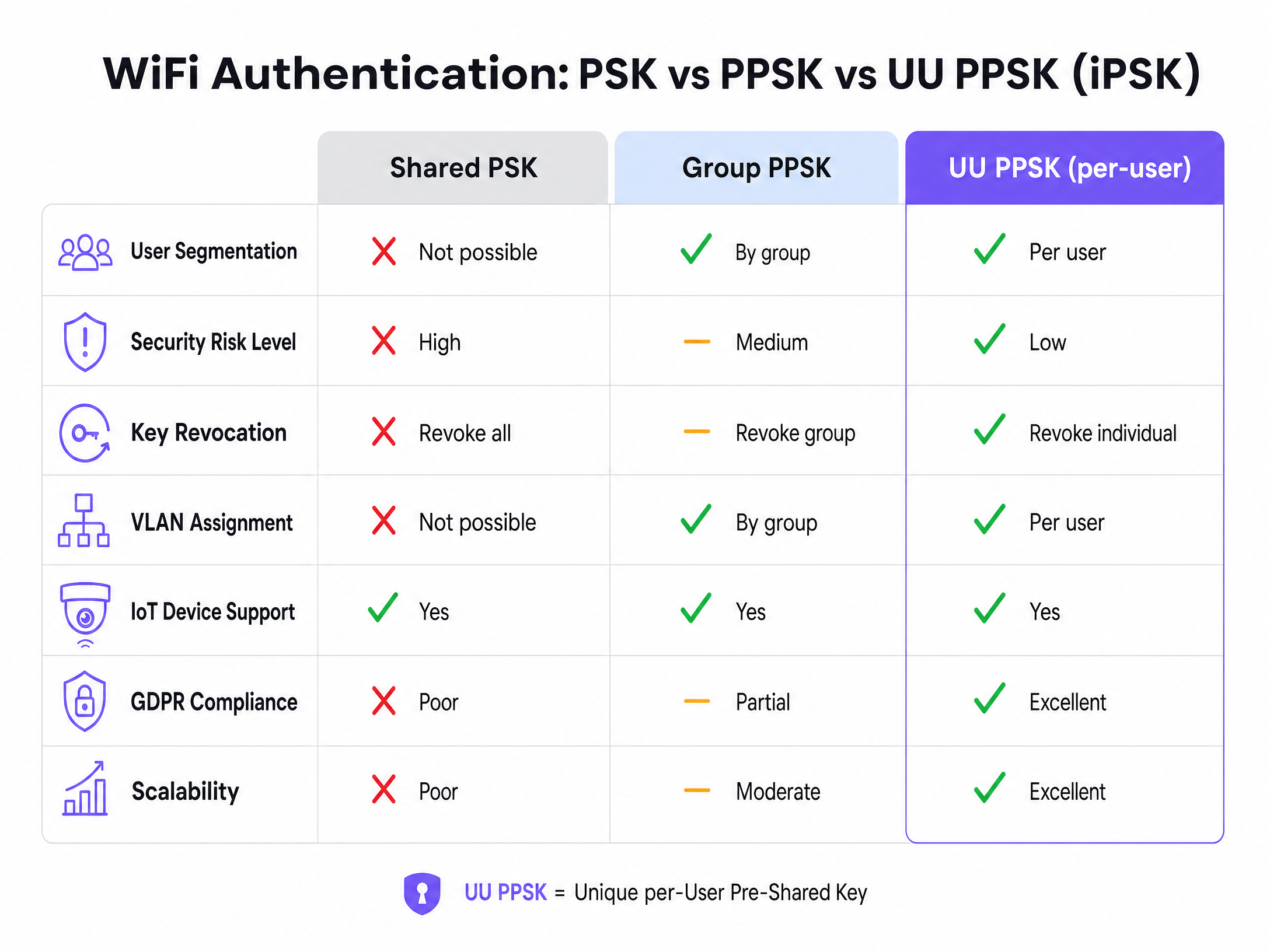
In a multi-tenant environment, such as a 200-unit Build to Rent block, residents expect a private network experience. Their smart speakers must communicate with their lighting systems, and their phones must discover their casting devices. A standard WPA2-Personal shared password places all residents on the same Layer 2 segment. If one resident shares the password, the entire network is exposed. Revoking access for a single departed tenant requires rotating the password for the entire building, causing unacceptable disruption.
WPA3-Enterprise using IEEE 802.1X authentication solves the security issue by requiring individual credentials or certificates. However, it introduces significant complexity. Many consumer devices, including gaming consoles, smart TVs, and IoT sensors, lack the necessary supplicants to handle certificate-based authentication. Consequently, 802.1X is unsuitable for the diverse device fleets found in residential settings.
The Mechanics of UU PPSK
UU PPSK, also referred to as Identity Pre-Shared Key (iPSK) by Cisco, Dynamic PSK (DPSK) by Ruckus, and Multi-PSK (MPSK) by HPE Aruba, provides the simplicity of a standard password with the granular control of enterprise authentication.
When a resident connects to the building's SSID, the Wireless LAN Controller intercepts the MAC address and forwards it to a RADIUS server. The RADIUS server queries its identity store and returns an Access-Accept response containing the resident's unique pre-shared key and specific RADIUS attributes, such as VLAN assignment and bandwidth policies. The controller validates the key and places the device onto the resident's dedicated VLAN.
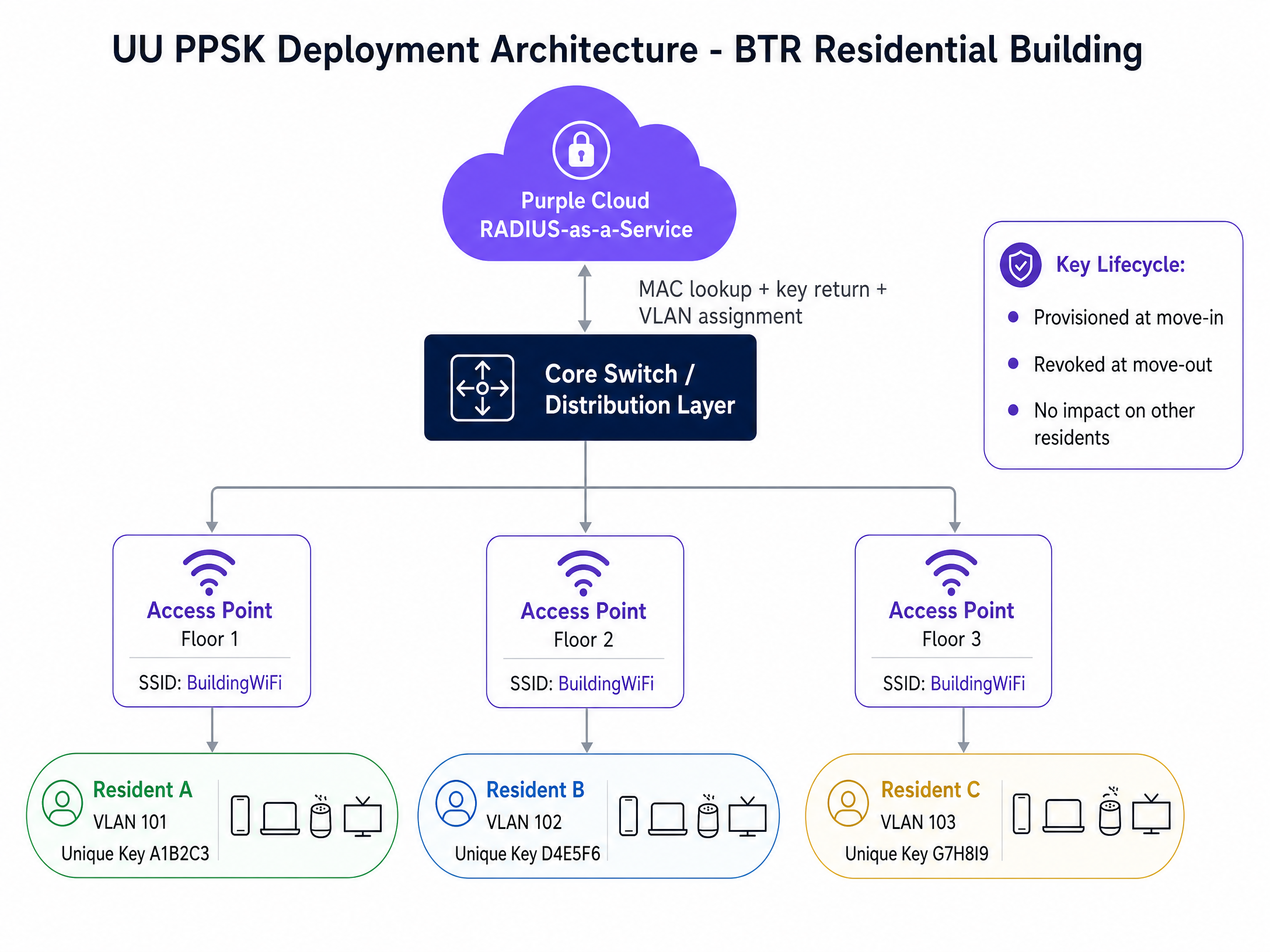
This creates a "WiFi bubble." Devices belonging to Resident A can communicate with each other via mDNS reflection, but they are completely isolated from Resident B's devices at the network layer.
Overcoming MAC Randomisation
Modern operating systems, including iOS 14+, Android 10+, and Windows 11, employ MAC address randomisation by default. Because UU PPSK relies on MAC address lookups, a randomised MAC will cause authentication to fail. To mitigate this, operators must configure the network to request permanent hardware MAC addresses or implement a pre-registration captive portal workflow where residents register their devices before gaining full network access.
Implementation Guide
Deploying UU PPSK requires selecting the right architectural model based on building size and operational capacity.
Controller-Local PPSK
Keys are stored directly on the wireless controller. This model requires no external RADIUS server and is straightforward to configure. However, it scales poorly, typically capping at a few hundred entries, and lacks automated lifecycle management. It is suitable only for small deployments under 50 units.
RADIUS-Backed PPSK
Keys are managed within an external RADIUS server (e.g., Cisco ISE, Aruba ClearPass). The controller queries the server for every connection. This model scales to thousands of units and supports dynamic VLAN assignment. It requires significant IT resources to maintain the RADIUS infrastructure.
Cloud RADIUS-as-a-Service
The RADIUS infrastructure is hosted in the cloud, acting as an overlay on top of existing hardware. This model provides the scalability of a dedicated RADIUS server without the on-premises maintenance burden. Purple's platform integrates with property management systems to automate key provisioning at move-in and revocation at move-out. This is the recommended architecture for BTR and student accommodation providers.
Best Practices
- Automating Key Lifecycle Management: Manual key provisioning is unsustainable at scale. Integrate your WiFi management platform with your Property Management System (PMS) to automatically generate keys when a lease begins and revoke them when it ends.
- Implement Strict Inter-VLAN Routing: VLANs provide logical separation, not security. Ensure your core switch and firewall policies explicitly deny traffic between resident VLANs while permitting outbound internet access.
- Plan for High Device Density: The average BTR household connects 15 to 25 devices. Provision your DHCP scopes and subnet sizes accordingly. A /24 subnet per resident is often excessive; a /28 is typically sufficient.
- Isolate Building Management Systems: IoT infrastructure, such as HVAC controllers and access control systems, must reside on dedicated VLANs with strict egress filtering, completely separate from resident traffic.
Troubleshooting & Risk Mitigation
- Symptom: Devices fail to authenticate despite using the correct key.
- Cause: The device is presenting a randomised MAC address not found in the RADIUS database.
- Mitigation: Implement a device registration portal that captures the permanent MAC address or provides instructions for disabling MAC randomisation for the building's SSID.
- Symptom: Residents cannot cast to their smart TVs.
- Cause: mDNS (Multicast DNS) traffic is being dropped between wireless clients.
- Mitigation: Ensure mDNS reflection or Bonjour gateway services are enabled on the wireless controller specifically within the boundaries of each resident's VLAN.
- Symptom: Network performance degrades significantly during peak hours.
- Cause: Co-channel interference or excessive SSID broadcasting.
- Mitigation: Conduct an active RF site survey. Limit the number of broadcasted SSIDs to a maximum of three per access point. Rely on dynamic VLAN assignment rather than broadcasting separate SSIDs for different tenant groups.
ROI & Business Impact
Treating WiFi as a managed amenity rather than a tenant-procured utility delivers measurable returns for BTR operators.
- Increased Net Operating Income (NOI): Operators can charge a rent premium for day-one, high-speed connectivity. The per-door cost of a centrally managed UU PPSK network is significantly lower than individual broadband contracts.
- Reduced Void Periods: Move-in ready WiFi is a major differentiator that accelerates leasing and reduces void periods between tenancies.
- Reduced Support Overhead: By eliminating shared password rotations and enabling seamless IoT pairing within isolated VLANs, operations teams see a dramatic reduction in IT support tickets.
- Compliance Posture: UU PPSK provides a clear audit trail. Every connection is tied to a specific resident key, enabling operators to respond accurately to law enforcement requests or GDPR subject access requests, a capability impossible with shared PSK networks.
For more information on integrating these solutions, explore our core products including Guest WiFi and WiFi Analytics , or review our related guides such as the Managed WiFi service: a comprehensive guide for businesses .
Key Definitions
UU PPSK (Unique per-User Pre-Shared Key)
An authentication method that assigns a unique, cryptographically secure passphrase to every individual user or tenant on a single shared SSID.
Replaces vulnerable shared passwords in multi-tenant buildings, providing enterprise-grade isolation without requiring complex certificate management.
RADIUS (Remote Authentication Dial-In User Service)
A networking protocol that provides centralised Authentication, Authorisation, and Accounting (AAA) management for users connecting to a network service.
The engine behind UU PPSK that stores the unique keys and tells the wireless controller which VLAN to assign to a specific device.
VLAN (Virtual Local Area Network)
A logical subnetwork that groups a collection of devices from different physical LAN segments into a single broadcast domain.
Used in MDU deployments to logically separate Resident A's traffic from Resident B's traffic on the same physical switch and access point.
MAC Randomisation
A privacy feature in modern operating systems that generates a temporary, randomised MAC address when connecting to a WiFi network.
A significant hurdle for UU PPSK deployments, requiring operators to implement pre-registration workflows to capture permanent hardware addresses.
mDNS (Multicast DNS)
A protocol that resolves hostnames to IP addresses within small networks that do not include a local name server.
Essential for enabling IoT devices like Chromecasts and Apple TVs to be discovered by smartphones within a resident's isolated VLAN.
BTR (Build to Rent)
Purpose-built residential developments designed specifically for renting rather than for sale.
The primary target market for UU PPSK, where operators seek to monetise WiFi as a premium managed amenity.
MDU (Multi-Dwelling Unit)
A classification of housing where multiple separate housing units for residential inhabitants are contained within one building or several buildings within one complex.
The physical environment that necessitates multi-tenant network architecture and per-resident isolation.
802.1X
An IEEE Standard for Port-Based Network Access Control that provides an authentication mechanism to devices wishing to attach to a LAN or WLAN.
The enterprise alternative to PPSK, highly secure but often too complex for residential deployments due to its lack of support for headless IoT devices.
Worked Examples
A 250-unit Build to Rent development in Manchester requires a secure WiFi solution. The developer has specified Cisco Meraki access points. Residents need a private network experience with full IoT support (Chromecasts, smart speakers) and same-day move-in readiness. How should the network be architected?
Deploy a single building-wide SSID using UU PPSK backed by a Cloud RADIUS-as-a-Service platform. Integrate the platform with the building's Property Management System. At move-in, the PMS triggers the generation of a unique key, which is delivered to the resident via an app. The RADIUS server dynamically assigns the resident's devices to a dedicated VLAN. Enable mDNS reflection within each VLAN to support IoT pairing.
A 400-bed purpose-built student accommodation block experiences high turnover every August, with hundreds of students moving in and out simultaneously. The current shared PSK model requires a building-wide password rotation, causing significant disruption. How can UU PPSK resolve this?
Implement UU PPSK using the existing Ruckus SmartZone controllers integrated with an external RADIUS server. Issue unique keys to incoming students via email during pre-arrival registration. Configure the keys to automatically expire on the exact date the student's tenancy contract ends.
Practice Questions
Q1. A landlord managing a 15-unit apartment building wants to upgrade from a shared WiFi password to improve security. They have a limited budget and no dedicated IT staff. Which deployment model is most appropriate?
Hint: Consider the scale of the deployment and the available IT resources.
View model answer
Controller-Local PPSK. For a deployment of only 15 units, the scalability limitations of controller-local storage are not a factor. This model avoids the ongoing costs and complexity of an external RADIUS server or cloud subscription, making it ideal for a small, budget-constrained environment.
Q2. During a UU PPSK deployment at a student accommodation site, several students report they cannot connect their new iPhones to the network, despite entering the correct unique key provided to them. What is the most likely cause?
Hint: Think about default privacy settings on modern mobile operating systems.
View model answer
The iPhones are likely using MAC address randomisation. The RADIUS server is expecting the device's permanent MAC address (which was likely captured during a previous registration step), but the device is presenting a temporary, randomised MAC. The students must disable 'Private Wi-Fi Address' for that specific SSID.
Q3. A BTR operator wants to deploy UU PPSK but is concerned about compliance with PCI DSS, as they operate a small cafe in the lobby that uses wireless payment terminals on the same physical network infrastructure. How does UU PPSK address this?
Hint: Consider how UU PPSK handles network segmentation.
View model answer
UU PPSK allows the operator to assign a unique key specifically to the cafe's payment terminals, which maps to a dedicated, cryptographically isolated VLAN. Because this VLAN is logically separated from all resident and guest traffic at the controller level, it satisfies the PCI DSS requirement for segmenting payment processing environments, even on shared access points.
Continue reading in this series
Power probe PPSK: comparing features and deployment models
Power Probe PPSK (Private Pre-Shared Key) is the authentication architecture that sits between a shared WiFi password and full 802.1X Enterprise - issuing each user or device a unique passphrase while keeping a single SSID. This guide compares PPSK against PSK and 802.1X across security, deployment complexity, IoT support, and VLAN assignment, then delivers actionable deployment models for Build-to-Rent operators, retail chains, and hospitality venues. Property developers, landlords, and BTR operators will find a clear framework for choosing the right model, integrating with identity providers, and automating key lifecycle management at scale.
Power probe PPSK: comparing features and deployment models
Power Probe PPSK (Private Pre-Shared Key) is the authentication architecture that sits between a shared WiFi password and full 802.1X Enterprise - issuing each user or device a unique passphrase while keeping a single SSID. This guide compares PPSK against PSK and 802.1X across security, deployment complexity, IoT support, and VLAN assignment, then delivers actionable deployment models for Build-to-Rent operators, retail chains, and hospitality venues. Property developers, landlords, and BTR operators will find a clear framework for choosing the right model, integrating with identity providers, and automating key lifecycle management at scale.
Cloud-managed WiFi solutions: a comprehensive guide for businesses
This guide gives property developers, BTR operators, and IT leaders a technical framework for deploying cloud-managed WiFi solutions across multi-tenant residential and commercial buildings. It covers iPSK network architecture, tenant isolation, VLAN design, and the business case for treating connectivity as a managed amenity that drives measurable NOI uplift.