You've got five sites, three guest login methods, a stack of legacy APs, and someone upstairs still asks why WiFi troubleshooting takes longer than payroll. That's the problem cloud WiFi management solves. It gives you one control plane for access, policy, and visibility, so you're not chasing credentials, controller logs, and guest complaints in separate places.
The shift to cloud oversight isn't a theory. IDC said cloud-managed enterprise WLAN accounted for just under 20% of the total enterprise WLAN infrastructure market in 2015 and forecast it would exceed one-third by 2020. IDC also said the market for cloud-managed enterprise WLAN infrastructure and managed services would grow from $1.1 billion in 2015 to $3.3 billion in 2020, which reflects how quickly organisations moved from local controller sprawl to centrally managed wireless operations. IDC's cloud-managed WLAN business case makes the underlying trend clear, cloud is where enterprise wireless has been heading for years.
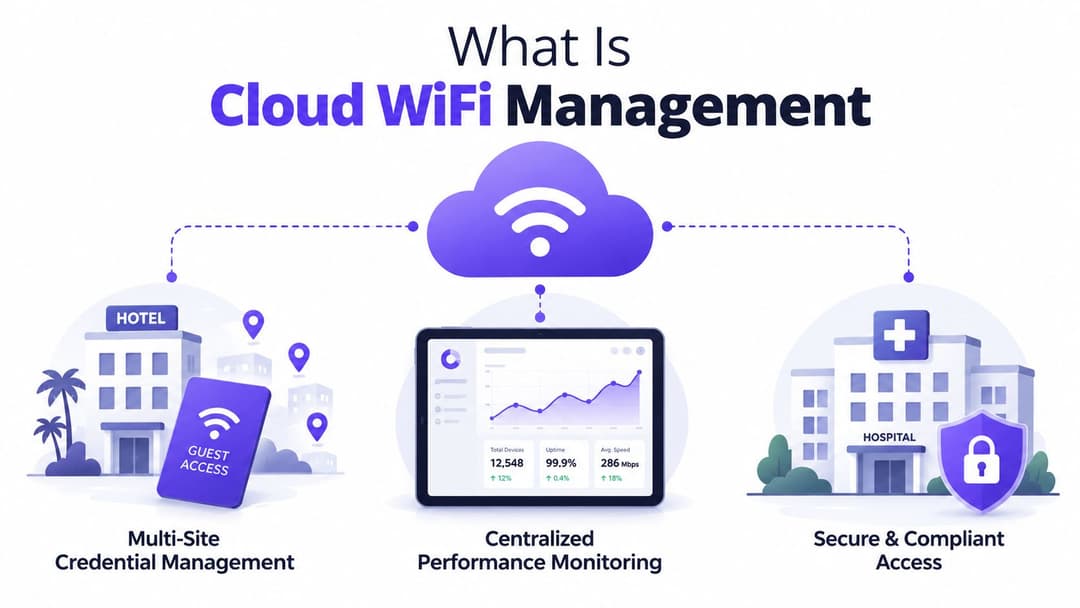
What Is Cloud WiFi Management
Cloud WiFi management is the practice of running wireless configuration, monitoring, and policy from a central cloud platform instead of from a controller sitting in a comms room. In practical terms, it lets an engineer change SSIDs, push security policy, review client health, and trace faults across multiple sites from a browser, without logging into each location separately.
The older model is easy to recognise. A site has a shared password, a local controller, maybe a captive portal bolted on later, and troubleshooting starts when a user complains or a dashboard turns red. That works until the organisation grows, because every new site adds another place where credentials, firmware, and policies can drift.
Cloud-managed wireless changes the control point, not the physics. Access points still serve traffic locally, but the management layer sits in the cloud, so configuration, telemetry, and access rules stay standardised across branches, hotels, clinics, or housing blocks. For distributed organisations, that is the difference between one operating model and a pile of local exceptions.
From shared passwords to identity-based access
Shared passwords are the blunt instrument most networks start with. They are easy to deploy, but they are also hard to revoke cleanly, difficult to segment properly, and awkward when staff, guests, contractors, and tenants all need different access outcomes.
Cloud platforms let you replace that mess with identity-aware policy. A receptionist, a nurse, and a guest can all connect through the same wireless fabric, but they should not land in the same place or carry the same permissions. In production, that means the access layer has to understand who the user is, what device they are on, and what type of session they are trying to start.
Practical rule: if your wireless design still depends on everyone knowing the same password, you are managing convenience, not access control.
The value of cloud WiFi management is consistency. Once the organisation defines how users authenticate, where traffic is segmented, and how usage is logged, those rules can be applied across every site from one place. That matters when you are trying to keep guest access, staff access, and regulated traffic aligned across a mixed estate. It also creates a cleaner path for business-specific authentication choices such as OpenRoaming , SSO, or iPSK , because those methods can be tied to the access outcome you need. A hotel may care most about fast guest onboarding, a clinic may care about tighter identity control, and a multi-tenant site may care about separating one tenant from another without building a custom wireless exception for each floor. The cloud control plane gives you one place to enforce that logic, while still leaving the access point traffic local.
Cloud WiFi management also raises a question enterprise buyers cannot ignore, especially in the UK. If the platform processes authentication data, client logs, or location-related telemetry outside your preferred jurisdiction, you need to know where that data is stored, who can access it, and how the vendor handles privacy and retention. In practice, that is part of the architecture decision, not a legal footnote. The network team should be able to explain the trade-off between operational convenience and data residency before the rollout starts.
Cloud Versus On-Premises WiFi Management
A branch office goes down, users keep connecting, and the question is not whether the WLAN is working. The question is who has to touch it, where the policy lives, and how long it takes to correct the next site that drifts out of line. On-premises wireless management still has a place, but it asks for a lot. You buy controllers, maintain them, patch them, secure them, and replace them when capacity or support runs out. Cloud-managed WiFi moves those responsibilities into a service model, which changes both the cost structure and the workload for the network team.
The most obvious trade-off is capital versus operating expense. On-prem deployments usually mean local hardware, rack space, firmware maintenance, and a lifecycle you own end to end. Cloud-managed systems trade that for subscription-based control and central administration, which is easier to justify when you are rolling out new sites or supporting a dispersed estate.
What changes operationally
Analysts at IDC have linked the shift to managed wireless with the pressure to reduce controller complexity and make monitoring easier across more sites. That does not remove the need for network engineering, but it does change where the work happens. Instead of staging changes on local boxes, the team spends more time on policy, visibility, and rollout discipline. A useful summary of that business case is available in Purple's overview of cloud RADIUS providers .
The practical difference shows up when you add locations. On-premises management tends to scale by adding more boxes or by stretching central control over weaker links. Cloud management scales by adding sites to the same policy model, which is a cleaner fit for retail, hospitality, and multi-tenant estates.
| Criterion | On-premises | Cloud-managed |
|---|---|---|
| Control point | Local controller | Central cloud dashboard |
| Hardware burden | Higher | Lower |
| Multi-site consistency | Harder to maintain | Easier to standardise |
| Operational staffing | More hands-on | Less repetitive admin |
| Expansion | Hardware-led | Policy-led |
The hard part is not getting WiFi online. It is keeping five, fifty, or five hundred locations aligned when the network changes every week.
Connectivity resilience is the part buyers often worry about most, and fairly so. In a well-designed cloud setup, user traffic stays local, so an outage in the management layer does not stop the APs from passing traffic with their last-known configuration. That means cloud management changes how you control the network, not whether the network can keep serving users.
Security and Authentication Methods
Security is where cloud WiFi management earns its keep. The platform choice matters less than the authentication model underneath it, because the wrong onboarding flow will create support tickets, compliance friction, and weak access controls no matter how polished the dashboard looks.
OpenRoaming, Passpoint, and seamless guest access
OpenRoaming and Passpoint , also known as Hotspot 2.0, are the cleanest option for guest and roaming access when the environment supports them. Instead of making users type a password or stare at a splash page every time they return, the device authenticates automatically using enterprise-grade WPA2 or WPA3 security.
That matters in hospitality and public-facing venues because the guest experience starts before the first click. A returning guest, conference attendee, or loyalty member should connect without friction, and the connection should still be protected from the first packet. For organisations using identity-based guest journeys, that's a big step up from the old shared-code model.
SSO and directory-backed staff access
For employees, single sign-on is the cleaner path. When WiFi authentication ties into Microsoft Entra ID, Google Workspace, or Okta, staff use the same identity they already rely on for other business apps. That cuts password sprawl and makes revocation far easier, because access can be tied to directory status instead of a manually maintained local list.
This is the wireless version of zero trust in practice. The network stops assuming that being physically on-site equals being trusted, and it starts checking identity every time a device connects.
iPSK for legacy and mixed-device estates
Not every device can do 802.1X . Printers, scanners, older terminals, and some building systems still need a more pragmatic path, and that's where iPSK, individual pre-shared keys, fits well. It gives each device or group a separate credential without forcing everything into one shared password.
That's especially useful in mixed estates, where operational technology and guest devices sit alongside fully managed laptops. You get isolation without pretending every endpoint is modern enough for certificate-based authentication.
If you're evaluating authentication architectures in a cloud RADIUS context, the technical split is worth reading alongside this cloud RADIUS provider overview .
Practical rule: use Passpoint for frictionless guest access, SSO for staff, and iPSK for the stubborn devices that can't speak 802.1X yet.
The UK spectrum angle matters too. Ofcom's 5 GHz rules split the band into lower and upper sub-bands, and the upper 5.8 GHz block allows higher maximum radiated power, up to 1 W e.i.r.p. indoors for equipment meeting the relevant standard. Cloud controllers that support per-band power and channel policy can use that flexibility to improve coverage planning and reduce interference risk in dense deployments. Ofcom's 5 GHz framework, as summarised in this guide is one of the reasons RF policy shouldn't be treated as a generic checkbox.
There's also a governance issue that gets ignored too often. Public material on cloud-managed WiFi tends to highlight analytics and central monitoring, but it usually doesn't answer whether location analytics, captive-portal data, or identity records stay in the UK, move to the EU, or get processed elsewhere. For UK buyers in hospitality, retail, healthcare, or housing, that's not a side note, it's part of the buying decision.
Multi-Tenant and Staff Guest WiFi Flows
The strongest cloud WiFi deployments don't just authenticate users, they separate journeys cleanly. A hotel guest, a staff member, and a tenant can all walk into the same building and have completely different network outcomes without anyone touching a controller at reception.
Guest, staff, and tenant flows in practice
A guest arrives at a hotel, opens a laptop, and the device connects through Passpoint if the guest is enrolled for that kind of frictionless access. If not, the guest lands on a branded splash page, accepts terms, and gets online quickly. The point isn't the portal itself, it's that the experience can be standardised across properties without handing every front desk team a different playbook.
A staff member follows a different path. They authenticate with Entra ID or Okta, the system checks their directory status, and access is granted or revoked automatically as their account changes. That's a clean operational win, because you're not relying on someone to remember to delete a WiFi password when HR closes an account.
A tenant in student housing or a build-to-rent block has a third requirement. They need personal access, stable performance, and isolation from neighbours, without making the network feel like a corporate VPN. Cloud-managed policy can map those users to separate segments and keep billing, support, and usage records distinct.
The operational takeaway is simple. Cloud WiFi management turns three manual workflows into one policy framework. That's where the time savings come from, and it's why the model works well in venues where the network is part of the service, not just an IT utility.
Purple's multi-tenant approach is one example of this kind of flow handling, with separate guest, staff, and resident access patterns under one cloud-managed layer. Their multi-tenant WiFi guide is useful if you're comparing how different platforms think about isolation.
Operational tip: if the guest journey and the staff journey look identical in your design docs, the configuration isn't mature enough yet.
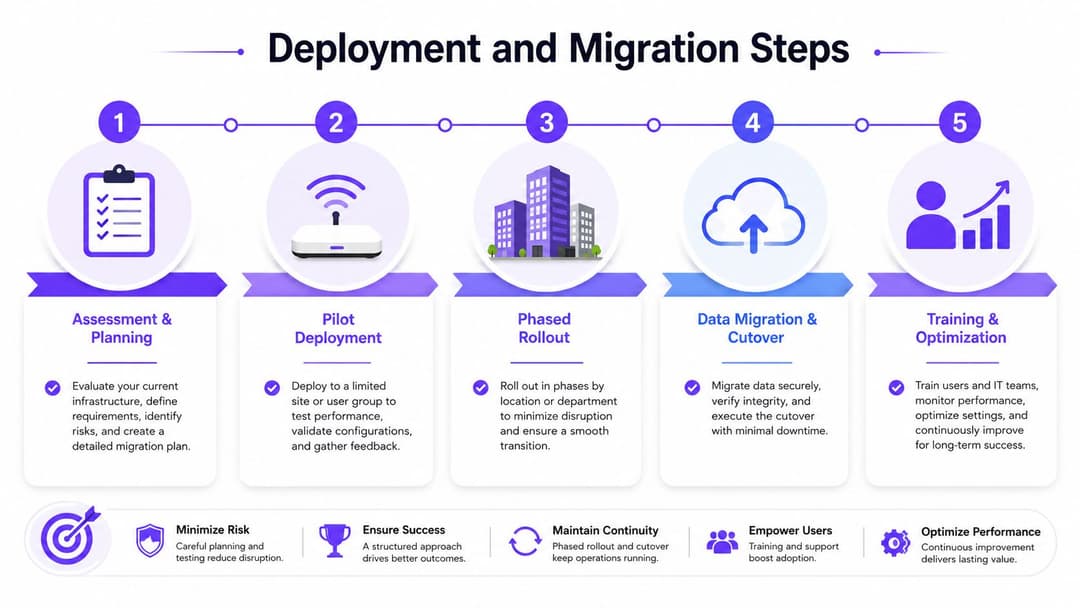
Deployment and Migration Steps
A cloud migration goes badly when teams treat it like a swap-out of hardware. In reality, the cleanest rollouts are staged, boring, and heavily verified. The less drama you create during cutover, the less likely you are to spend the next month fixing avoidable mistakes.
Start with the environment, not the dashboard
The first job is assessment. Inventory the access points, note which ones are worth reusing, map your identity sources, and document the SSIDs that need to survive the move. If you miss the dependency chain here, the migration becomes guesswork.
Pilot deployment comes next. Purple works with vendors including Meraki, Aruba, Ruckus, Mist, and UniFi, which reduces hardware friction when you want to keep the existing estate rather than rip everything out. That's useful when the goal is a cloud-managed control layer rather than a wholesale network replacement.
Cut over in waves
Parallel run is the safest pattern. Keep the old system alive while the cloud platform is tested against a small group of users, then move sites one at a time. The pilot should include normal staff traffic, guest onboarding, and any legacy devices that usually trigger edge cases.
Practical rule: don't declare a migration successful until authentication, roaming, and analytics all work together at the same site.
The common mistakes are predictable. Teams assume every AP can be re-used, underestimate directory integration work, or forget to check UK data handling before they sign the contract. Those are preventable errors, but only if you review them before rollout, not after.
The deployment process should end with validation, not enthusiasm. Confirm that the portal works, the directory sync behaves as expected, and the dashboard is collecting the right telemetry before you decommission anything old. That's what keeps the migration from becoming an expensive experiment.
Analytics and Business Value
Wireless analytics only matter when they change a decision. A dashboard full of graphs is noise if it doesn't help a hotel manager spot service issues, a retail team understand dwell patterns, or a healthcare operator segment devices more safely.
What good analytics actually tell you
A UK survey of 175 organisations found that 49% of respondents spend less than 100 hours maintaining their WiFi networks each year, and the report says hospitality was the sector spending the most time on maintenance. The same report found that over half of organisations check WiFi network status several times a day, 98% conduct surveys before and after installation, and 91% use spectrum analysis. OpenReality's State of WiFi 2018 report shows that cloud visibility and centralized diagnostics weren't fringe ideas, they were already part of normal operations.
That operational pattern explains why analytics are valuable. If your team is checking network health repeatedly throughout the day, a cloud dashboard can cut the time between symptom and diagnosis. If you're already validating before and after installation, central analytics help you compare sites instead of treating each one as a one-off.
KPIs by vertical
Hospitality teams usually care about guest experience, return visits, dwell time, and whether onboarding feels branded rather than clumsy. Retail teams want to know which zones get attention, how WiFi engagement lines up with physical movement, and whether campaigns drive behaviour. Healthcare needs device density visibility, compliance logging, and a clean view of patient or visitor flows. Property teams tend to focus on occupancy, amenity use, and whether the network supports a resident experience that doesn't trigger support calls all day.
The value comes from stitching those signals into other systems. CRM connectors and marketing automation tools let venues turn first-party WiFi data into follow-up journeys, consent-based engagement, and cleaner attribution. That doesn't replace the network team's job, but it does make the network part of the business conversation instead of a back-office utility.
You can see how vendors frame this in more detail in Purple's WiFi analytics guide , especially if you're comparing what the dashboard surfaces versus what the business can use.

The useful dashboard is the one that shortens a decision, not the one that just decorates a wall.
Choosing the Right Platform
The right cloud WiFi platform is the one that fits your authentication model, your hardware reality, and your compliance burden. That sounds obvious, but plenty of teams still buy on demo polish and only later discover they need features the platform doesn't support.
What to check before you sign
Start with authentication. If you need Passpoint or OpenRoaming for guests, SSO for staff, and iPSK for legacy devices, the platform has to support all three cleanly. If it only does one of them well, you'll end up bolting on another system and rebuilding the complexity you were trying to remove.
Then check the identity and compliance side. Look at Entra ID, Google Workspace, and Okta integration, ask where telemetry and portal data are stored, and verify how the vendor handles UK residency and GDPR expectations. Data location isn't a legal footnote when your wireless platform doubles as a first-party data source.
Hardware compatibility matters too. A good platform shouldn't force a rip-and-replace unless you've already decided that's the right move. It should also work with your current mix of APs, because most real environments aren't neat homogeneous greenfield installs.
A practical selection mindset
Purple is one option in this space. It provides cloud RADIUS management, a single cloud dashboard for authentication and policy, and support for guest, staff, and multi-tenant flows across existing access point estates. If a platform can't describe how it handles identity, isolation, analytics, and data governance in one conversation, keep looking.
The simplest buying rule is this. Choose a platform that reduces manual work without creating new blind spots. If it improves authentication, centralises policy, and gives you a defensible answer on data handling, it's doing the job.
If you're planning a cloud WiFi rollout, use Purple to compare authentication flows, multi-site policy control, and analytics against your current setup. Visit Purple to see how cloud-managed wireless can support guest access, staff identity, and multi-tenant isolation without forcing a hardware rip-and-replace.