

Passpoint WiFi architecture configurator
Select your wireless hardware, identity model, and venue scale to calculate 802.11u ANQP parameters, Roaming Consortium OIs, and RADIUS authentication specifications.
Wireless > Configure > Access control > Hotspot 2.0
Method: EAP-TLS / EAP-TTLS (WBA Passpoint Release 2)
Subnet: /20 Subnet pool (4,094 host addresses across VLANs) | Lease: 4 hours (optimised for roaming staff & visitors)
Planning an enterprise Passpoint or OpenRoaming deployment?
Copy your calculated Passpoint architecture blueprint or schedule a technical session with Purple wireless solutions engineers to review AAA proxying, carrier offload, and client profile distribution.
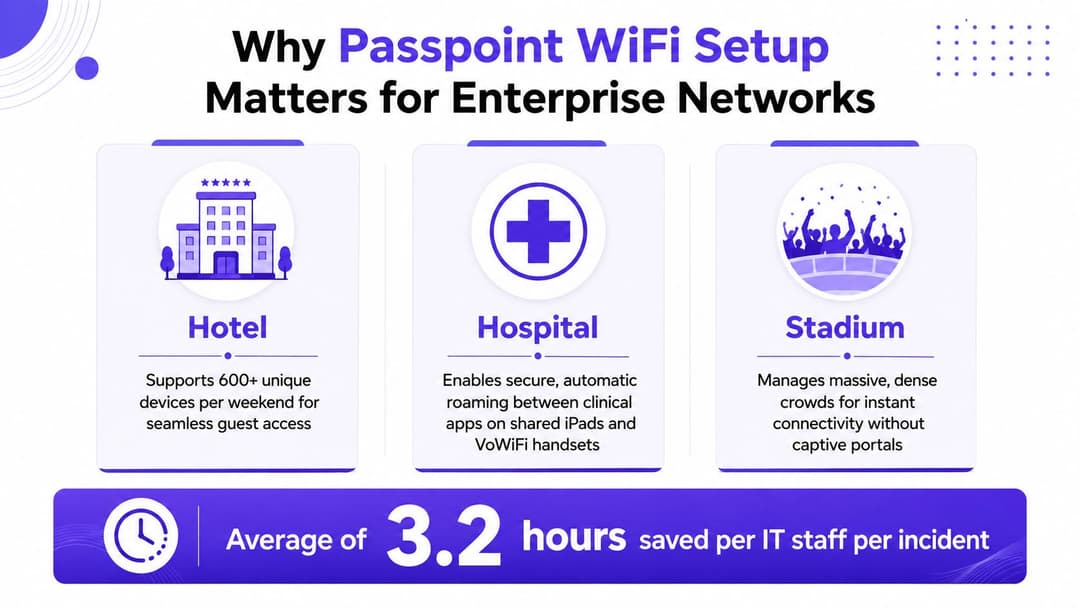
A guest arrives at a hotel, selects the property's WiFi, waits for a captive portal, accepts terms, enters an email address, and repeats the process at the conference centre next door. In a hospital, a clinician's managed iPad and VoWiFi handset may move between access points while carrying different profiles. At a stadium, thousands of devices compete for airtime while the login page becomes another point of failure.
Passpoint WiFi setup addresses that friction by moving access decisions into the identity layer. Compatible devices discover the network, evaluate its advertised credentials and roaming information, then authenticate through enterprise WiFi security rather than relying on a shared password or a splash page. The result can be automatic onboarding and roaming across multiple venues that trust the same identity provider.
That outcome isn't produced by ticking a Hotspot 2.0 checkbox. It depends on AP firmware, 802.11u and ANQP advertisements, EAP methods, certificates, NAI realms, RADIUS capacity, device support and fallback design. The practical approach is to audit the estate, pilot a controlled slice, capture what fails, and expand only when the evidence supports it.
Why Passpoint WiFi Setup Matters for Enterprise Networks
Hotels, hospitals and stadiums expose the weaknesses of conventional guest WiFi quickly. A hotel may need to support hundreds of different devices across repeated visits, while a hospital has shared clinical devices, staff handsets and visitors with unrelated identity providers. A stadium has dense, unpredictable demand and little tolerance for a login flow that fails when users are moving through entrances or changing seating areas.
Captive portals are useful when an operator needs consent or marketing data, but they create a separate operational burden. Per-venue SSIDs make users choose networks manually, shared passwords spread beyond their intended audience, and portal redirects can fail because of browser behaviour, certificate warnings or poor radio conditions. Reauthentication becomes especially disruptive when a user crosses from one controller or building to another.
What a working deployment replaces
Passpoint uses 802.11u discovery, ANQP network information and EAP-based authentication to let a device determine whether it has a valid profile before it associates. With the correct credentials, the device can connect without a repeated password entry. WPA2-Enterprise or WPA3-Enterprise then provides the security model expected for identity-based access.
The operational benefits are practical rather than cosmetic:
- Less credential administration: Staff aren't resetting a shared guest password every time it appears in a public notice.
- Fewer portal dependencies: A supported device doesn't need to load a splash page before obtaining network access.
- Better multi-site continuity: A profile can recognise trusted networks associated with the same realm or roaming relationship.
- Cleaner access control: RADIUS policies can distinguish users, devices and identity providers instead of treating every client as an anonymous member of one SSID.
The UK already has a relevant public-sector benchmark. The official GovWifi service provides one username and password for staff and visitors across the public sector, and the Government Property Agency says it serves more than 850,000 people across the UK. GovWifi also connects users automatically in thousands of buildings that offer the service. It isn't the same implementation as Passpoint, but it demonstrates that centralised authentication and multi-site access are established operational practices, not laboratory ideas.
Treat the project as identity engineering
The first design decision is whether Passpoint serves managed staff devices, public guest access, carrier offload, or a federation such as OpenRoaming. Each use case changes the credential source, EAP method, policy model and fallback experience.
The Wireless Broadband Alliance reporting covered by Comms Business found that 81% of respondents planned OpenRoaming deployments, with motivations including WiFi and cellular access, improved security, frictionless access and continuity across networks. Those figures don't remove the engineering work. They show why operators are investing in it, while the implementation still depends on exact identity and trust configuration.
Understanding the Passpoint Stack
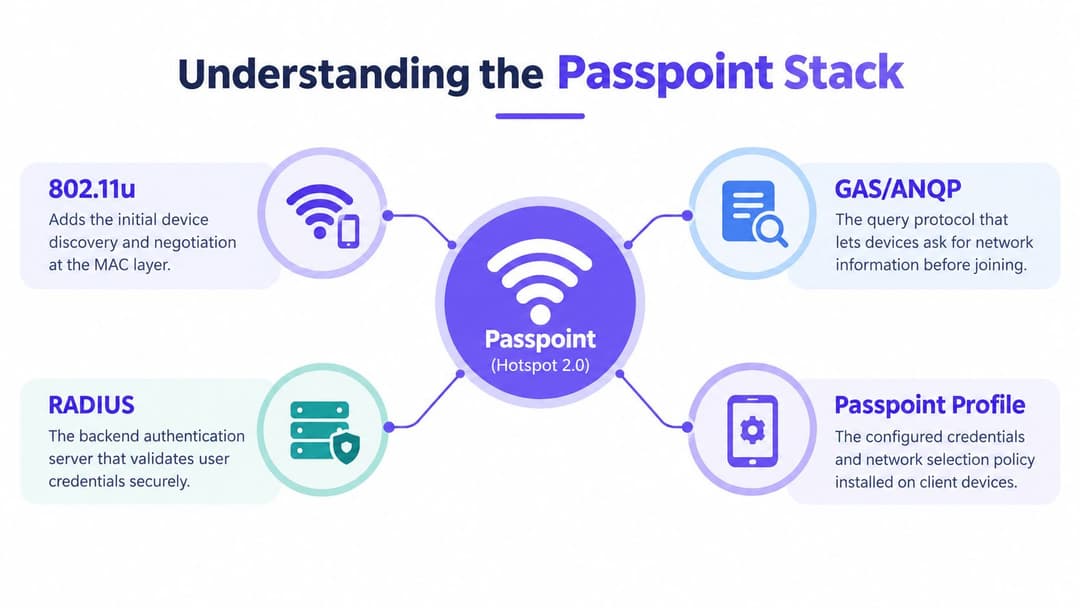
Passpoint is an identity-layer system, not a checkbox on the wireless controller. Troubleshooting becomes much faster when each layer has a defined job. The access point advertises enough information for a device to decide whether the network matches an installed profile. The device selects a compatible credential and begins enterprise authentication. RADIUS makes the authorisation decision, while certificates and realms determine whether the client and server trust each other.
At the radio and discovery layer, IEEE 802.11u provides network discovery before normal association. The access point uses GAS to carry ANQP queries and responses. ANQP can publish the network's access type, domain names, NAI realms, roaming identifiers, venue information, cellular-related data and WAN metrics. The client compares those values with the profiles already installed on the device.
The practical path is:
- Beacon and 802.11u indication: The AP signals that Hotspot 2.0 information is available.
- GAS and ANQP exchange: The client asks which identities, realms, roaming partners and services the network supports.
- Profile matching: The device compares the advertised values with its Passpoint profile.
- EAP authentication: The device authenticates through 802.1X, commonly using EAP-TLS, EAP-TTLS, EAP-SIM or EAP-AKA, depending on the deployment.
- RADIUS authorisation: The AP or controller forwards the request and applies the returned policy.
- Encrypted association: The client joins through WPA2-Enterprise or WPA3-Enterprise, without relying on a captive portal.
The WiFi Alliance deployment guidance identifies the HS2.0 indication in the AP beacon as a prerequisite. If a client cannot detect that indication, it will not start Passpoint discovery, regardless of how carefully RADIUS has been configured.
EAP-TLS uses client certificates and generally fits managed fleets because the organisation can issue, rotate and revoke device credentials. EAP-TTLS supports username and password workflows, but the inner identity and server certificate still require careful protection. SIM-based EAP methods suit carrier or federated deployments where the mobile subscription supplies the credential.
The NAI realm identifies the identity domain responsible for a request. RCOIs identify roaming consortia and help clients decide whether a network belongs to a trusted service relationship. An OSU server can provision credentials for supported enrolment flows, while a policy server can connect the venue to a federation and apply partner rules.
Passpoint releases extend beyond discovery. Hotspot 2.0 Release 2 and Release 3 support online sign-up and policy provisioning, but each added feature creates another configuration point. A malformed OSU URI, incomplete certificate chain, or realm that differs by one character can stop association. Captive-portal settings can also conflict with an identity flow that expects encrypted enterprise access.
Engineering rule: Draw the path from beacon to ANQP, profile, EAP, RADIUS and policy decision before configuring the production SSID. If one handoff is unclear, run the pilot there first.
Pre-Flight Checks Before You Touch the Controller
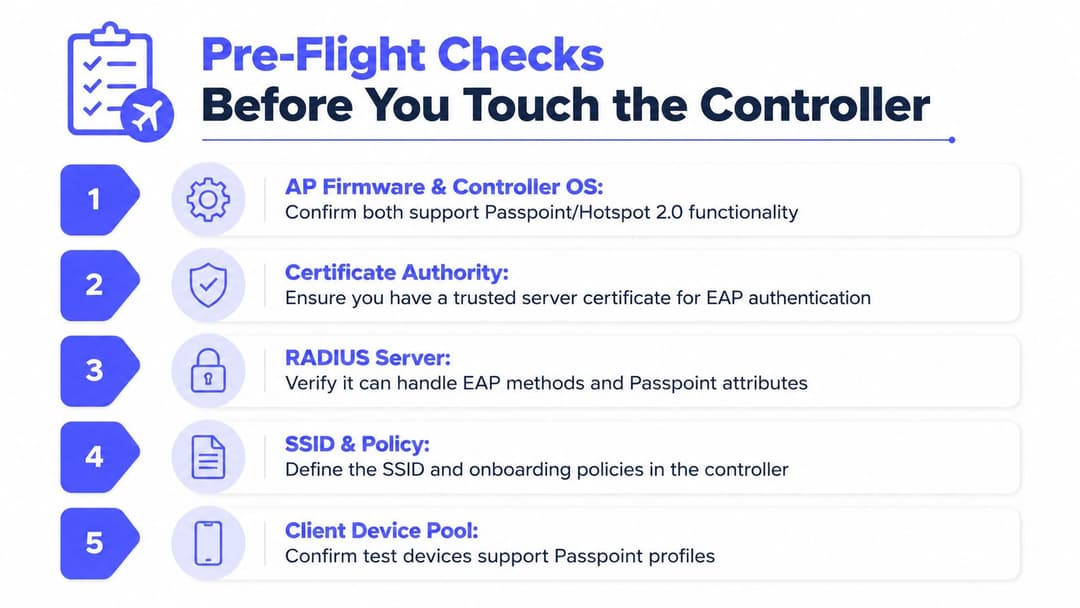
A Passpoint pilot can fail before anyone opens the controller. Start with the dependency chain: AP firmware, controller release, identity services, certificates, client profiles and operations capacity. Confirm the exact AP model and software branch support Hotspot 2.0, ANQP, the selected WPA mode and every required Passpoint field. Product-family compatibility is not enough.
Build a small written baseline rather than copying settings between sites. Confirm that the AAA platform supports the chosen EAP methods, Passpoint attributes, accounting and policy responses. Test reachability from each AP or controller source that will participate in the pilot. Size RADIUS for authentication and accounting bursts, not just average traffic. A realm mismatch will still fail on an oversized platform, while an undersized service can obscure otherwise correct configuration.
The certificate plan needs the same treatment. Record the issuing CA, trust anchors, renewal owner and revocation path. Ensure the server certificate is trusted by every test device. If the organisation controls device certificates and wants passwordless access, EAP-TLS is usually the appropriate choice. EAP-TTLS fits a controlled username and password process. EAP-SIM or EAP-AKA belongs in carrier or SIM-backed federation designs, rather than replacing an enterprise certificate strategy.
Use a known-good client pool that represents the site, including operating systems, handset vendors and managed profiles. Add unmanaged or unsupported devices to check what users see when automatic authentication is unavailable. Captive-portal behaviour belongs in this test, because a portal policy can interfere with an identity flow intended to use encrypted enterprise access.
Before configuration, freeze the identity values. Write the NAI realm exactly as the identity provider expects it, including case, punctuation and suffixes. Record the OSU server decision, federation relationship, RCOI requirements, certificate owner and fallback SSID in one checklist. These values should not live only in an engineer's notes.
Plan the radio estate from the actual venue, then validate AP count and design with an access point calculator. Capacity planning exposes an overloaded design before cutover, but it cannot correct a mismatched realm or an invalid certificate.
Disable WEP and TKIP. Keep the Passpoint design on WPA2-Enterprise or WPA3-Enterprise, with legacy security modes excluded.
Vendor-Specific Setup for Meraki, Aruba, Ruckus, Mist and UniFi
The standards are shared, but the administrative experience isn't. Vendors expose the same primitives in different profiles, and some platforms hide validation behind generic WLAN settings. Treat the configuration below as a map of where to look, then confirm every field against the exact release documentation in use.
| Vendor | Native Passpoint Support | Certificate Upload Location | OSU / Onboarding | Common Gotcha |
|---|---|---|---|---|
| Meraki | Hotspot 2.0 settings on the SSID | Network-wide certificate area | OSU provider fields in the SSID profile | A profile can appear complete while realm or access network values remain inconsistent |
| Aruba | Hotspot 2.0 profile attached to an 802.1X SSID | Controller or mobility certificate store | Profile and AAA integration | AAA-derived realm values need verification, not assumption |
| Ruckus | Passpoint settings in the WLAN | SmartZone certificate configuration | Venue and OSU fields in WLAN settings | Older AP firmware can silently omit ANQP elements |
| Juniper Mist | Passpoint through WLAN templates | Organisation identity and certificate configuration | Identity provider and template workflow | A malformed OSU URI can create ANQP anomalies |
| UniFi | Limited native object support | External RADIUS and platform-specific certificate handling | Usually external or improvised | Custom workarounds are difficult to govern as production federation |
Where implementations diverge
Meraki is comparatively direct for a cloud-managed deployment. Enable Hotspot 2.0 on the SSID, set the access network type, domain, realm and EAP method, then populate OSU provider information where required. Upload the certificate through the network certificate workflow and inspect the resulting ANQP advertisement rather than trusting the dashboard summary. Organisations standardising on Meraki should also review the Cisco Meraki access point range against the planned firmware and client profile requirements.
Aruba normally starts with an 802.1X WLAN, a Hotspot 2.0 profile and an imported CA chain. The important check is the relationship between the AAA server's derived realm and the realm advertised through the profile. Mobility Conductors and distributed controllers add another place for configuration inheritance to go wrong.
Ruckus SmartZone requires close attention to WLAN and AP firmware alignment. Add the Passpoint profile, signed certificate and venue details, then capture ANQP responses from a current AP. A dashboard showing enabled settings doesn't prove that an older AP is transmitting the same elements.
Juniper Mist puts the work into WLAN templates and organisation-level identity configuration. It can be clean when the identity provider and OSU values are valid, but malformed enrolment URIs tend to surface as discovery anomalies rather than a clear configuration error.
UniFi is the difficult case. Without a complete native Passpoint object, teams often assemble external RADIUS, custom hostnames and partial policy workarounds. That may be acceptable for experimentation, but it creates too many ownership boundaries for a regulated hospital, large hotel group or roaming federation.
Vendor reality: A green configuration status means the object was accepted by the controller. It doesn't prove that a client can discover, trust, authenticate and roam through it.
Certificates, RADIUS and Identity Layer Configuration
A Passpoint rollout can associate successfully while failing at the identity layer. Start with the server identity that client devices will validate. Generate a CSR with the required subject alternative names for the service domain and identity namespace. Use a public CA already trusted by the device population, or distribute a private trust chain through managed device tooling.
Import the certificate and intermediate chain in the sequence required by the controller. A missing intermediate commonly appears to the user as a bad password. After each certificate change, test from an actual client device, inspect the presented chain, and correlate the result with controller authentication logs. A lab browser check is not enough.
Build the RADIUS path
RADIUS is the policy decision point for Passpoint identity, not merely a password validator. FreeRADIUS, Cisco ISE, ClearPass and Microsoft NPS differ in EAP support and policy syntax. Record the selected method, certificate checks, realm handling and attribute mapping before implementation.
- EAP-TLS: Map the client certificate subject or SAN to the device or user record, enforce issuer trust and define revocation handling.
- EAP-TTLS: Protect the outer exchange with the server certificate, then map the inner identity to the correct realm and policy.
- SIM-backed EAP: Confirm that the carrier or federation supplies subscriber validation and that the RADIUS tier can process it.
- Realm policy: Ensure a value such as
@corp.example.comreaches the intended identity provider without case or formatting drift.
RADIUS capacity needs a separate review. Certificate authentication and accounting produce different request patterns from ordinary 802.1X. Onboarding and reconnect bursts can expose latency, queueing and timeout problems, especially in a hotel, hospital or stadium. Use redundant servers, measure response latency, and test failure behaviour rather than assuming the existing staff WLAN tier has spare capacity.
A managed RADIUS as a Service model can reduce operational ownership, but verify support for the required EAP methods, policy controls, logging and certificate lifecycle before choosing it.
Add federation details deliberately
OpenRoaming requires the venue, service provider identity and federation identifiers to agree across the profile, policy system and roaming relationship. The Passpoint deployment and implementation guidelines cover NAI realms, certificate deployment and RCOI registration as identity-layer tasks. Common roaming identifiers include settlement-free RCOI 5A-03-BA and legacy Cisco RCOI 00-40-96 where broader compatibility is required.
After uploading the profile, reload the relevant controller components and inspect live beacon and ANQP responses. Confirm that the advertised realm, venue information, RCOI and OSU NAI are correct. Also check for a captive portal attached to the same service path, because it can intercept onboarding or conflict with a profile that expects direct authentication.
The configuration file is only an input. The packet transmitted over the air is the final check.
Pilot, Validation and Go-Live Thresholds
Run the pilot as a measurement exercise. Select one floor, department or concourse, keep a legacy 802.1X path available, and use a fixed cohort of devices whose ownership and operating system versions are known. Include both certificate-managed clients and the visitor devices that are likely to expose profile and fallback problems.
Before enabling the SSID, define the acceptance criteria in writing:
- Discovery: Every test AP must advertise the HS2.0 indication and required ANQP elements.
- Association: Cached credentials should associate in under three seconds during the controlled test.
- Authentication: The RADIUS tier should show no timeouts at expected peak demand.
- Fallback: Devices that lack a compatible profile should receive a documented alternative, rather than looping through a broken portal.
- Roaming: Test AP-to-AP movement at regular intervals, then repeat across controllers with the mobility domain configured.
Capture evidence at three points. Use a monitor-mode AP or equivalent packet capture to inspect beacon, GAS and ANQP traffic. Export RADIUS logs with request identifiers and response attributes. Collect operating-system logs from each test device, especially where one handset vendor succeeds and another refuses the same profile.
The WiFi Alliance guidance supports verifying AP and controller capability, RADIUS readiness and EAP compatibility before deployment. A practical expert playbook recommends a pilot on 10% to 20% of APs, with more than 98% connection success and authentication latency below 300 milliseconds as go-or-no-go indicators. Those thresholds should be tested against the organisation's own risk tolerance, but they provide a concrete discipline for expansion.
Don't expand because the first morning looked good. Keep the pilot running through normal busy periods, review roaming and failure logs, then carry the documented fixes to the next site.
Troubleshooting and Last-Mile Failure Modes
The hardest failures appear after the configuration looks finished. Passpoint depends on the client, AP, profile, trust chain and RADIUS policy agreeing at the same moment. A captive portal can't repair a failed Passpoint exchange because Passpoint-enabled SSIDs don't support portal redirects as their authentication mechanism.
| Failure Mode | Symptom | Diagnostic Signal | Remediation |
|---|---|---|---|
| Realm mismatch | The client ignores the network or falls back to another SSID | Compare the advertised NAI realm in ANQP with the realm in the RADIUS request | Normalise realm strings and profile values, including case and suffixes |
| Broken certificate chain | EAP-TLS fails despite a valid client certificate | RADIUS EAP logs show trust or chain validation errors | Rebuild the served chain, confirm intermediate certificates and test from the client OS |
| Missing ANQP elements | Devices don't recognise the SSID as a suitable Passpoint network | Packet capture shows absent HS2.0 indication or incomplete ANQP response | Check AP firmware, controller inheritance and the live beacon |
| RADIUS saturation | Authentication slows or fails during onboarding bursts | Rising request latency, retransmits or queue depth in RADIUS logs | Add capacity and redundancy, then retest certificate and accounting load |
| Captive-portal conflict | Supported clients connect inconsistently or never complete access | Controller debug shows portal policy attached to the Passpoint SSID | Separate Passpoint and portal policies, with an explicit legacy SSID |
| Device variance | One handset family roams while another stays attached or refuses | Compare OS logs, profile support and RCOI handling by device type | Maintain a tested device matrix and publish fallback instructions |
Check the live radio advertisement first, then the client profile, certificate trust, RADIUS request and policy response. That order prevents hours of changing server rules when the AP never advertised the required HS2.0 indication.
Mixed fleets need an intentional transition. Keep legacy WPA2-Enterprise or EAP-TTLS access available for devices that can't consume the Passpoint profile, but don't place captive-portal logic on the Passpoint SSID. The DSIT public engagement survey for 2025 to 2026 reports that 31% of adults use mobile data or a hotspot at home, while 3% rely on it as their primary home access method. That suggests users are familiar with mobile-assisted connectivity, but venue operators still need a simple fallback for clients whose handset, carrier identifier or operating system doesn't support the intended profile consistently.
Apple and Android devices can also interpret roaming hints differently. Test each supported family, don't infer compatibility from the presence of a Passpoint setting. When a previously healthy deployment breaks, compare the last certificate, profile, firmware, realm and RADIUS policy changes before rebuilding the WLAN.
Purple offers Passpoint WiFi through its SecurePass platform, using profile and certificate-based onboarding for automatic authentication across supported networks. If you want to assess that identity-layer approach alongside your existing AP and RADIUS design, visit Purple and discuss the pilot scope, device mix and fallback requirements with its team.



