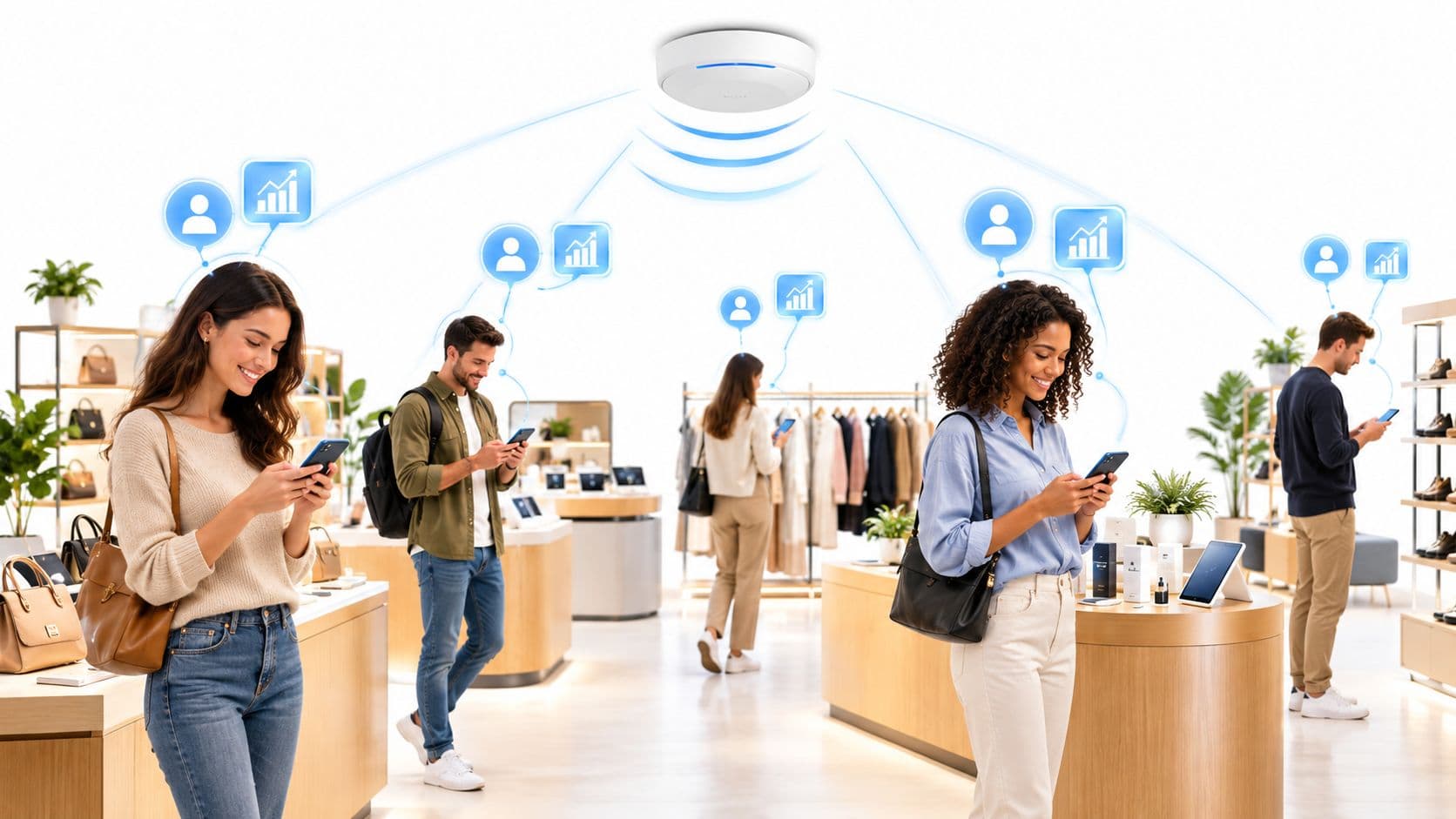
Retail WiFi ROI and network sizing planner
Model access point density, bandwidth requirements, customer data capture rates, and projected revenue lift across your retail estate.
Four-tier retail wireless architecture blueprint
Retail stores require strict traffic separation. Never bridge guest mobile devices onto the same broadcast domain as inventory scanners or payment hardware.
- VLAN 10 - Guest WiFi: Captive portal authentication with Layer 2 client-to-client isolation enabled at the AP. Bandwidth capped at 5 Mbps down / 2 Mbps up per device to prevent video streaming bottlenecks.
- VLAN 20 - Associate & Mobile POS: WPA3-Enterprise (802.1X) authentication with Cloud RADIUS for 6 clienteling tablets and queue-busting card readers per store. High Quality of Service (QoS) queue priority.
- VLAN 30 - Operations & Electronic Shelf Labels (ESL): Multi-PSK (MPSK) authentication mapped to individual MAC addresses for headless barcode scanners and ESL base stations.
- VLAN 40 - Store Security & CCTV: Wired/wireless isolated subnet with zero internet access outside encrypted cloud NVR connections.
Request a custom retail WiFi architecture blueprint
Connect with Purple retail networking architects to review your store estate, access point density, captive portal customer journeys, and PCI DSS compliance posture.
A Saturday afternoon exposes weak retail WiFi quickly. The queue-management app stops refreshing, a handheld scanner loses sync, a loyalty offer fails to load, and customers start asking staff for the password. The duty manager sees separate symptoms, but the store is dealing with one shared failure in the wireless layer.
That's why WiFi for retail should be treated as identity and operations infrastructure, not a free amenity bolted onto an internet circuit. It now supports guest access, staff workflows, point-of-sale dependencies, clienteling, electronic shelf labels, sensors, and the data needed to understand what happens inside a shop. The practical question for a retail CIO is no longer whether to provide WiFi. It's which traffic, devices, identities, and business events the network must support, and how those layers should be separated.
Why In-Store WiFi Is Now a Store Operations Question
Retailers once measured WiFi by coverage and speed. That definition is obsolete. A store's wireless network now carries the operational signals that keep the shop floor moving, from handheld stock checks and queue tools to clienteling tablets, digital price tags, and customer engagement applications.
When that layer fails, the impact isn't limited to shoppers losing internet access. Colleagues can't retrieve product information, stock data arrives late, and payment or fulfilment workflows may become slower. Marketing teams lose the moment when a customer is physically present, while managers have less visibility into queue pressure, zone activity, and service quality.
Operational rule: If a device helps someone sell, serve, replenish, price, or secure the store, classify its wireless dependency as a store operations concern.
The commercial case for guest WiFi is also stronger than the old “nice-to-have” argument. UK retail research found that 88% of respondents named free WiFi the top technology priority for shopping centres, while only 29% of the top 50 UK retailers offered complimentary WiFi and just 20% of those displayed visible signage, according to Retail Week's analysis of UK retail WiFi adoption. The same research recorded an average connection time of 2 minutes and 1 second, a sign that older registration journeys created avoidable friction.
The gap between expectation and execution matters. Customers may assume connectivity is available, but a retailer still has to design reliable coverage, an intelligible onboarding flow, secure segmentation, and a useful way to connect activity with loyalty or CRM records. A password printed behind the till doesn't solve those problems.
Marketing teams should also resist treating guest WiFi as a standalone campaign tool. The better model is a controlled identity exchange, where a visitor receives access and the retailer collects only consented information that can support a known business purpose. Purple's overview of WiFi for marketing teams is useful context, but the strategic decision belongs jointly to operations, security, marketing, and data teams.
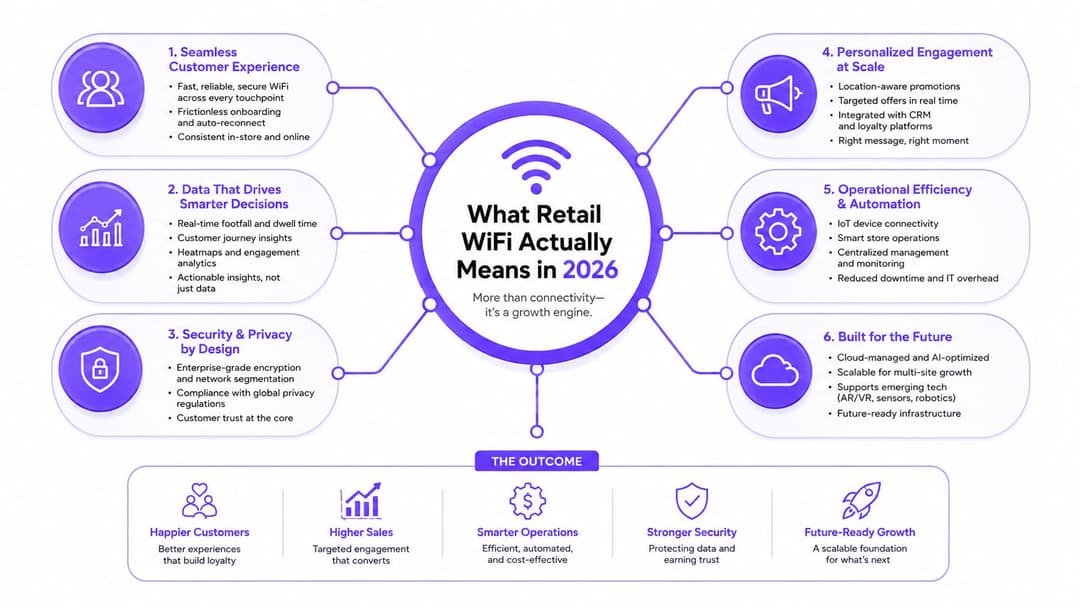
What Retail WiFi Actually Means in 2026
Retail WiFi is best understood as a controlled tap system inside a busy store. The radio network is shared, but the destinations, permissions, and identities must be separated. A shopper should reach the public internet, a colleague should reach approved corporate services, and an electronic shelf label should communicate only with its management platform.
That makes retail WiFi a layered service rather than a collection of access points. The layers include:
- Radio coverage, designed around shelves, walls, fixtures, density, interference, and roaming.
- Access policy, which decides who or what can connect.
- Identity resolution, linking a person, device, certificate, or credential to an access decision.
- Telemetry, recording network health and approved presence or association events.
- Integration, sending relevant events to identity providers, CRM, CDP, SIEM, POS, or service platforms.
Separate the three jobs
Guest access prioritises a fast, clear customer experience. It needs internet access, client isolation, sensible bandwidth controls, content protections where appropriate, and a consent journey that doesn't ask for unnecessary information.
Staff access needs stronger identity assurance and dependable roaming. Handheld scanners, tablets, mobile tills, and back-office devices may need access to internal applications, so staff authentication should be tied to the retailer's identity model rather than a password shared across a shift.
IoT access has a different profile again. Electronic shelf labels, environmental sensors, vending controllers, printers, and other devices may transmit small amounts of data but still create material security and availability risks. Device-specific credentials and narrow network permissions matter more than raw bandwidth. Guidance on IoT security for vending machines provides a useful reminder that connected equipment needs its own control model.
The most common design mistake is collapsing these jobs onto one SSID and hoping firewall rules will compensate. They won't. Use separate SSIDs or dynamic role assignment, dedicated VLANs, central authentication, and role-based access control. The network team should be able to answer, for every device category, what it can reach, how it authenticates, and what happens when its identity is revoked.
Architectures That Separate Guest, Staff, and Devices
Retailers have four practical access patterns to choose from. They aren't interchangeable, and the right answer depends on whether the estate already has an identity provider, a loyalty app, managed corporate devices, or multi-tenant locations.
| Architecture | Onboarding Friction | Identity Assurance | Device Support | Best-Fit Retail Context |
|---|---|---|---|---|
| Captive portal | Moderate, because the visitor completes a branded sign-in flow | Consent and portal identity, with variable verification | Broad support across phones and laptops | A single store or low-volume estate that wants straightforward guest access and marketing capture |
| Individual Pre-Shared Keys, iPSK | Low to moderate, depending on provisioning | Per-user or per-device accountability without full 802.1X | Useful for managed and legacy devices | Corporate handhelds, printers, labels, and other devices needing distinct credentials |
| Passpoint, Hotspot 2.0 | Low after initial enrolment | Strong, certificate or credential-based access | Strong support on modern phones and computers | Loyalty or membership programmes that justify automatic secure reconnection |
| OpenRoaming | Very low for visitors whose provider or credential is supported | Federated identity with policy controls | Best for compatible phones and roaming clients | Malls, transport sites, and multi-tenant venues where visitors expect immediate access |
A captive portal remains the pragmatic choice when the priority is a branded guest journey and a simple data exchange. Keep the form short, separate WiFi access from marketing consent, and avoid forcing a repeat visitor through the same process.
Choose iPSK when the retailer needs accountability but has devices that won't support a full enterprise authentication workflow. Each device or user group receives a distinct key, so revocation doesn't require changing a shared password across the store.
Passpoint is the better architecture when the retailer has a loyalty app or membership relationship worth preserving across visits. It removes repeated portal friction while maintaining encrypted, identity-based access. OpenRoaming extends that logic across participating venues and networks, which makes it particularly relevant to shopping centres and other multi-tenant environments.
The design still needs VLANs, role-based policy, and central authentication underneath. A guest credential must not inherit staff permissions because both devices use the same physical access point. Tenant networks should also be isolated from the centre's management plane, with clear ownership of authentication, logging, and incident response.
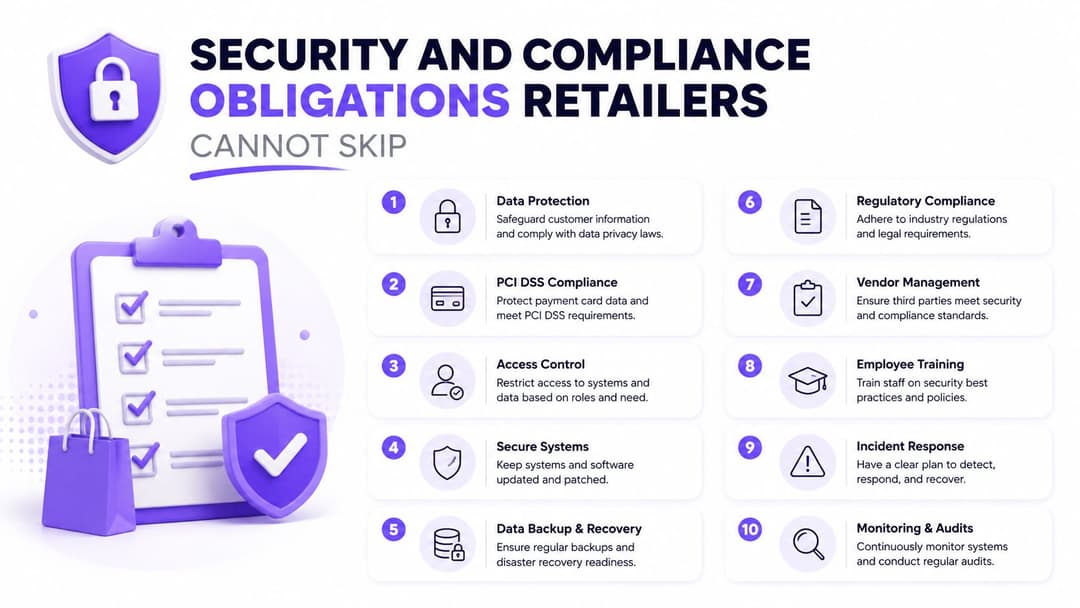
Security and Compliance Obligations Retailers Cannot Skip
Guest WiFi creates a trust boundary. Corporate WiFi, payment systems, inventory applications, and device networks create several more. A retailer that treats them as one flat network is making a security decision, even if nobody documented it.
For payment environments, the cleanest position is direct separation. Put guest traffic on a dedicated VLAN with no route to POS, payment, inventory, or management systems. Staff devices should use WPA3-Enterprise or an equivalent enterprise authentication design, with individual identities and role-based permissions. A shared staff password is convenient only until an employee leaves, a credential leaks, or an incident needs investigation.
Guest isolation must operate at more than one level. The firewall should block access to internal networks, while client isolation prevents one shopper device from reaching another. Add rogue access-point detection, protected management interfaces, secure firmware practices, and a walled-garden DNS policy that limits what unauthenticated clients can resolve or reach.
Treat guest data as personal data
A splash page can collect an email address, phone number, device identifier, or consent record. Under UK GDPR and PECR, the retailer needs a clear purpose, transparent notice, an appropriate lawful basis, and a way to honour access, deletion, and marketing opt-out requests. Consent for connectivity shouldn't be bundled with consent for promotional messages.
The privacy risk is broader than the person who clicks “connect”. UK coverage has highlighted that shopping-centre WiFi can be used to observe behaviour, including passers-by who don't enter the venue, which makes proportionality and public communication essential. The UK government's connected places and IoT consumer research also shows that connected-place data collection remains a policy concern.
Don't retain identifiers indefinitely. Define a documented period based on the stated purpose, minimise what you capture, and aggregate or delete data when individual-level detail is no longer necessary. A privacy notice should explain passive sensing separately from authenticated guest access.
Auditors and internal reviewers usually look for evidence, not assurances:
- Segmentation evidence, including diagrams, firewall rules, and test results.
- Consent records, showing the wording, timestamp, purpose, and opt-out state.
- Controller administration controls, including MFA and individual admin accounts.
- Patch discipline, with a recorded firmware review and remediation process.
Retail teams can use Purple's enterprise WiFi security guide as a reference point, but the retailer remains accountable for its architecture, contracts, notices, and operating controls.
Analytics, Identity, and CRM Integration Where ROI Lives
Connectivity alone rarely justifies a strategic retail WiFi programme. The return appears when the network becomes a consented first-party identity and event layer that the commercial team can use.
That requires realism about measurement. Modern iOS and Android devices use MAC randomisation, which weakens the reliability of raw device counts and repeated-visit assumptions. Passive probe-request data can still support directional zone analysis, but it shouldn't be treated as a perfect customer ledger. A University College London study describes retail sensor networks that aggregate WiFi observations into 5-minute intervals, hash identifiers, and send information through encrypted channels for footfall estimation, illustrating the privacy and validation trade-off in its research on Britain's retail landscape.
Measure commercial outcomes, not dashboard activity
Start with a narrow event model. Capture authenticated connection, consent state, location or zone where justified, visit timing, dwell estimate, offer exposure, redemption, and CRM match. Then send those events to systems that already run customer activity.
The integration checklist should include:
- SAML or OIDC, connecting staff and approved customer journeys to the existing identity provider.
- RADIUS, supporting staff authentication and policy assignment.
- SCIM, automating staff provisioning and deprovisioning from the HR or directory system.
- Webhooks or server-side events, delivering connection, consent, and campaign signals to the CRM or CDP.
- Exportable data, so the retailer can validate counts and move records without depending on a vendor dashboard.
| Metric | What It Measures | Realistic Range |
|---|---|---|
| Splash opt-in rate | How many connecting visitors accept the stated data or marketing choice | Establish a baseline, then improve the journey rather than assume a universal target |
| Dwell time by zone | Directional time spent in defined areas | Compare like-for-like zones and store layouts |
| Campaign redemption | Whether a WiFi-triggered message or offer led to a recorded action | Use unique codes or POS-linked identifiers |
| Identity match rate | The share of usable events connected to a known customer record | Track against consent quality and data hygiene |
Don't confuse an impressive footfall map with ROI. The commercial team must use the output for a decision, such as changing a display, improving staffing, triggering a welcome journey, or measuring an offer. A practical guide to retail analytics for small retailers can help smaller operators define that use case before buying a platform.
The strongest programme connects guest WiFi to CRM and CDP records while keeping anonymous analytics aggregated. Purple's first-party data approach for guest WiFi is one example of the identity layer retailers can evaluate. The requirement is broader than any one product: exportable events, explicit consent, usable identity resolution, and a marketing owner who acts on the data.
Vendor Compatibility and Integration Checklist
Hardware selection should follow the store's operating model, not a presentation deck. The major platforms can all support credible retail deployments, but they differ in management style, RF behaviour, ecosystem depth, and cost structure.
| Vendor | Best Fit | Key Limitation | Retail-Grade? | Passpoint Support |
|---|---|---|---|---|
| Cisco Meraki | Multi-site estates wanting central cloud management and straightforward operations | Strong ecosystem dependence and licensing considerations | Yes | Evaluate current hardware and cloud feature support |
| HPE Aruba | Dense retail environments requiring mature RF controls and enterprise policy | More complex design and administration | Yes | Available on supported enterprise platforms |
| Ruckus CommScope | High-density venues and challenging RF conditions | Can require specialist tuning and ecosystem expertise | Yes | Available on supported deployments |
| Juniper Mist | Estates prioritising cloud management, automation, and assurance telemetry | Best value appears when the wider Mist stack is adopted | Yes | Confirm model and release support |
| Ubiquiti UniFi | Small footprints with tight budgets and simpler requirements | Fewer enterprise controls and less extensive retail integration depth | Suitable for selected small deployments | Verify exact product and controller support |
The frank verdict is straightforward. UniFi wins on cost for a small, uncomplicated footprint. Meraki and Mist win on multi-site manageability when a lean central team needs consistent templates, monitoring, and remote troubleshooting. Aruba and Ruckus win in dense or difficult RF environments, provided the design team does proper surveying and tuning.
Test the integration path before signing
Ask each vendor or integrator to demonstrate:
- Staff authentication, using RADIUS or SAML/OIDC against the existing identity provider.
- Guest onboarding, including OAuth or social login only where it serves a defined purpose.
- Employee lifecycle, with SCIM or an equivalent process for joining and leaving staff.
- Security operations, including syslog or streaming telemetry into the SIEM.
- Location and engagement events, delivered through documented APIs or webhooks.
- Standards support, including WPA3-Enterprise, Passpoint, OpenRoaming, and relevant security validation.
Don't overlook the migration cost. Switching vendors mid-cycle often means rebuilding RADIUS policies, captive portal integrations, APIs, dashboards, certificates, and operational runbooks. A lower access-point price can become expensive if the retailer has to recreate the identity and data layer later.
Two Retail Scenarios That Show the Stakes
Consider a 40-store fashion chain with a loyalty app, a central CRM, and a marketing team that wants to understand store visits. It uses a captive portal for first-time guest authentication, connects consented records to a CDP, and offers Passpoint enrolment through the loyalty journey. Staff handhelds and label printers use separate iPSK credentials, while guest, staff, IoT, and payment traffic remain independently controlled.
That chain can compare footfall with authenticated visits, examine dwell directionally by zone, measure offer redemption, and inspect whether staff devices remain connected during busy periods. It still needs careful validation because passive identifiers aren't perfect, but the commercial team has a path from network event to customer action.
Now consider a single high-end boutique that chooses OpenRoaming only, relies on staff cellular connectivity, and doesn't connect WiFi events to analytics or CRM. Its guest experience may be smooth for compatible visitors, but the retailer can't explain whether a campaign changed dwell, whether returning visitors increased, or whether a busy period reflected browsers or buyers.
| Dimension | 40-Store Fashion Chain | Single High-End Boutique |
|---|---|---|
| Guest access | Captive portal with a loyalty-linked path | OpenRoaming only |
| Staff devices | Segmented iPSK credentials for approved equipment | Cellular connectivity for staff |
| Data layer | CDP and CRM events with consent controls | No connected analytics workflow |
| Measurement | Footfall, dwell direction, redemption, and identity matches | No WiFi-attributed commercial view |
| Main cost | Integration, segmentation, rollout, and operational governance | Lower initial complexity, but weaker campaign diagnosis |
| Strategic position | WiFi operates as identity and store infrastructure | WiFi operates mainly as a utility |
The boutique's simpler approach isn't automatically wrong. If it has low device dependency and no appetite for in-store analytics, it may be sensible. The problem appears when marketing investment rises but the retailer still can't distinguish a weak offer from a weak audience, poor placement, or a service issue.
Deployment Checklist and How to Measure ROI
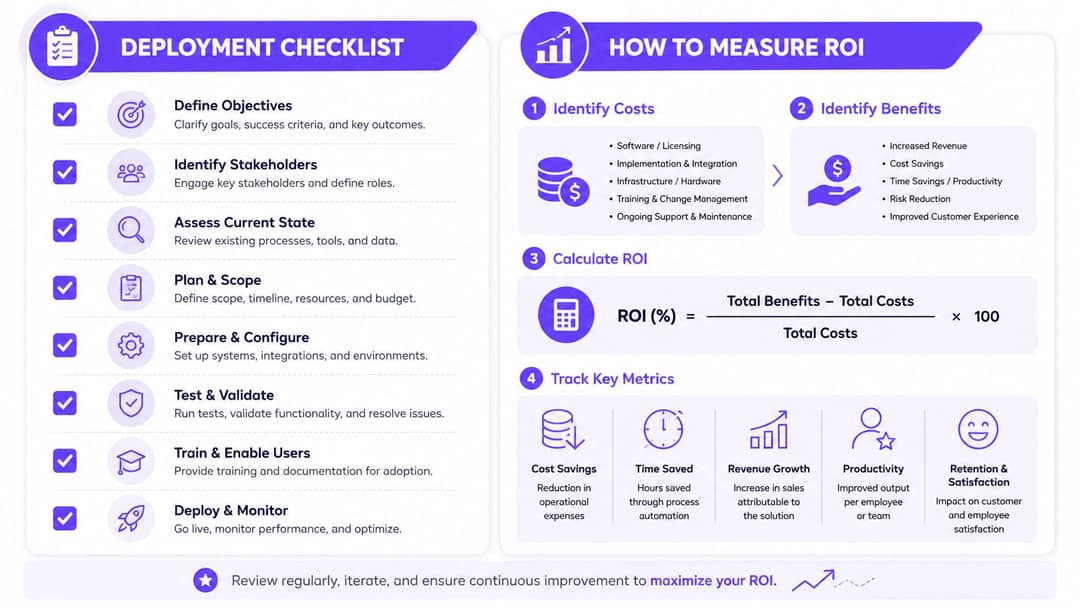
Treat deployment as a commercial infrastructure programme. Start with a site survey and capacity model by zone, then check cabling, PoE, switching, backhaul, and internet resilience. Coverage that looks acceptable in an empty shop may fail around dense fixtures, queues, tills, and peak customer load.
A practical sequence is:
- Survey each site, recording coverage, interference, materials, fixtures, and high-density areas.
- Size capacity by zone, separating guest demand from staff, POS, and IoT requirements.
- Refresh cabling and switches where power, uplinks, or segmentation cannot support the design.
- Onboard the controller or cloud platform, then apply consistent site templates.
- Create the access plan, separating guest, staff, IoT, and POS traffic.
- Integrate the portal and identity provider, with consent and role policies tested before launch.
- Wire CRM, CDP, SIEM, and analytics events, then confirm that records are exportable.
- Cut over store by store, using a controlled four-week operating window for monitoring, fixes, and staff feedback.
Store fit-outs can create unexpected sequencing pressure, so it's useful to understand how modular construction speed-ups affect access, cabling, and installation planning. The network team needs a confirmed handover standard, not an assumption that builders will leave suitable infrastructure behind.
Build the measurement plan before launch
Instrument connected device counts, consent or opt-in rate, loyalty enrolment lift, dwell by zone, conversion attributable to WiFi sessions, staff handheld uptime, and any measurable reduction in cellular dependency. Define how each event reaches the CRM or POS, and assign an owner for reviewing it.
Use a 90-day baseline window before making performance claims, as recommended in the project brief, and use a control store where possible. Compare like-for-like stores and periods, not one exceptional location against the estate average.
Four failure modes appear repeatedly:
- Under-sized backhaul, which turns guest demand into an operational bottleneck.
- Overly restrictive portals, which discourage return visits and create support work.
- Analytics without CRM wiring, leaving marketing with a dashboard but no action.
- IT-only ownership, which produces a technically sound network nobody uses commercially.
The CIO should approve the architecture, security, and lifecycle plan. Store operations should validate workflows. Marketing should own the use cases. Data protection should approve collection and retention. Without those owners, WiFi remains an expense even when the hardware works.
Purple offers identity-based guest, staff, and multi-tenant WiFi across retail environments, with captive portal and first-party data workflows, Passpoint and OpenRoaming options, and integrations for identity, CRM, and analytics systems. If you're planning a store refresh or need to turn guest connectivity into a controlled data layer, visit Purple to assess the fit for your estate.