
What is an 802.1X Supplicant? Client Types and Device Configuration
This guide explains the role of the 802.1X supplicant in enterprise WiFi authentication. It covers the technical architecture, compares native OS supplicants with third-party clients, and provides practical configuration guidance for IT teams deploying EAP-TLS and PEAP.
Video overview
Listen to this guide
View podcast transcript
Part of our core series: Enterprise WiFi Security Guide →

Executive Summary
When a device connects to an enterprise network, the 802.1X supplicant is the software component responsible for proving its identity. For IT managers and network architects at large venues, understanding how the supplicant works is vital to securing network access without generating helpdesk tickets. This guide demystifies the device-side agent in IEEE 802.1X authentication, contrasting native OS capabilities with third-party supplicant software. We will examine how to configure supplicants for EAP-TLS and PEAP-MSCHAPv2, explore real-world deployment scenarios across hospitality and retail, and detail how proper supplicant configuration integrates with Identity-Based Networks to optimise access. Whether you manage a 200-room hotel or an active venue with over 80,000 seats, correct supplicant configuration is a cornerstone of building secure, reliable WiFi.
Deep Tech Dive
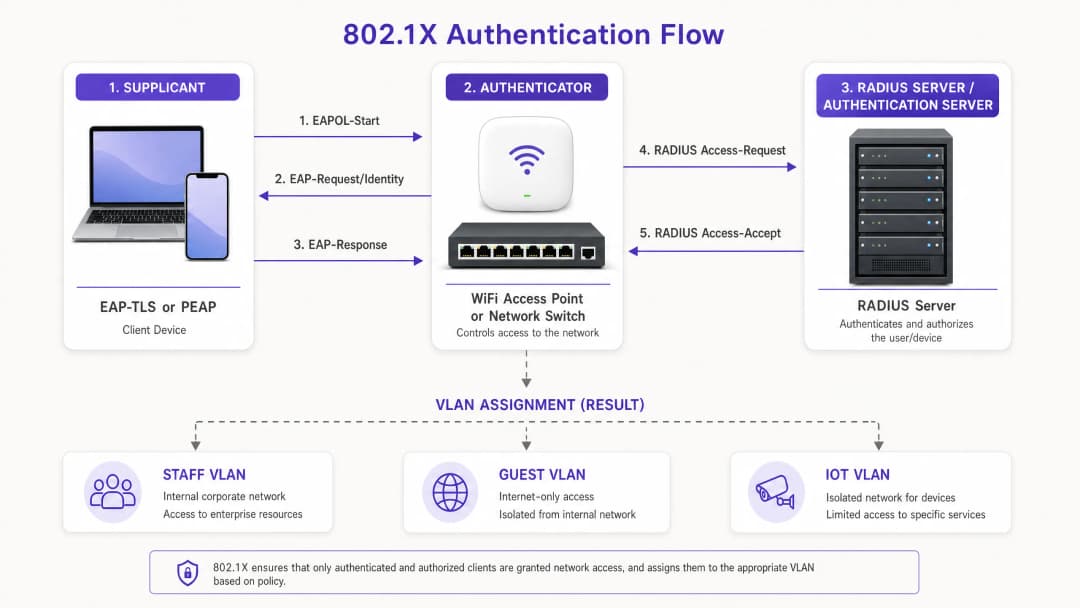
The IEEE 802.1X standard defines port-based network access control. It operates on a simple premise: block all traffic at the network edge until a device proves its identity. The supplicant is the client-side participant in this process.
The Three Components of 802.1X
Authentication requires three distinct entities:
- Supplicant: The client device (laptop, smartphone, or tablet) requesting network access.
- Authenticator: The network access device, such as a Cisco Meraki, HPE Aruba, Ruckus, or Juniper Mist access point.
- Authentication Server: The RADIUS server that validates credentials against an identity provider like Microsoft Entra ID or Okta.
Prior to authentication, the authenticator's port is in an unauthorised state, permitting only Extensible Authentication Protocol over LAN (EAPOL) traffic. The supplicant initiates the process with an EAPOL-Start frame. The authenticator requests identity, and the supplicant responds. This identity is forwarded to the RADIUS server, which determines the EAP method to be used. Upon successful validation, the RADIUS server sends an Access-Accept message, the port transitions to an authorised state, and the device is typically assigned to a specific VLAN.
EAP Methods: The Language of the Supplicant
The supplicant and the RADIUS server must agree on an Extensible Authentication Protocol (EAP) method. The choice of EAP method dictates the security posture and the configuration burden on the supplicant.
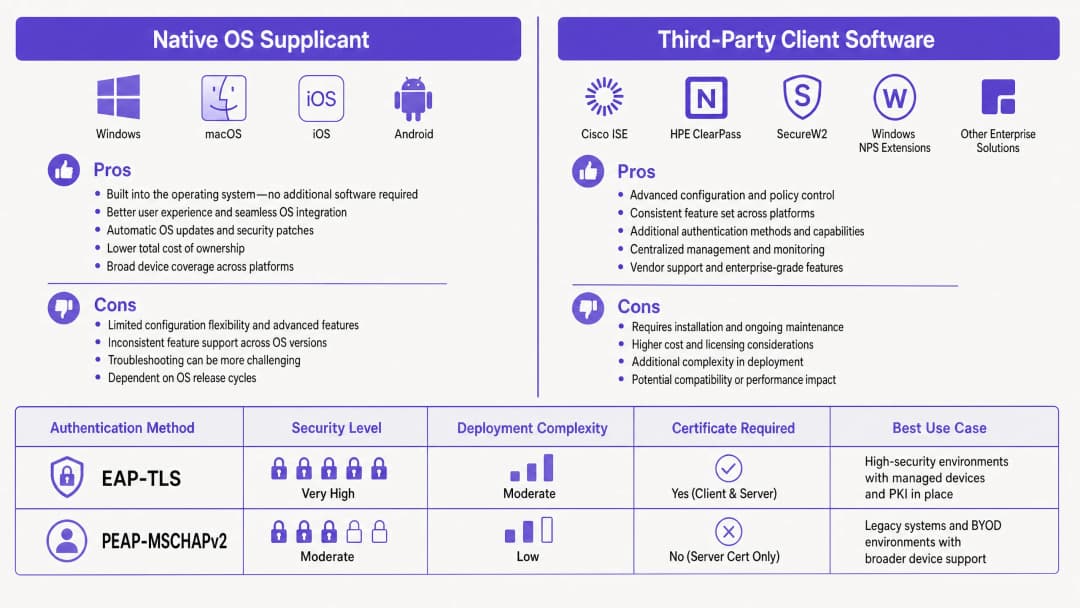
EAP-TLS (Transport Layer Security) EAP-TLS requires certificate-based mutual authentication. The supplicant provides a client certificate to prove its identity, and the RADIUS server provides a server certificate to prove the legitimacy of the network. This passwordless method eliminates credential theft and is required by strict security frameworks such as NIST SP 800-171. The supplicant must be configured to trust the issuing Certificate Authority (CA) and possess a valid client certificate.
PEAP (Protected EAP) In scenarios where a full Public Key Infrastructure (PKI) is not feasible, PEAP is widely used. It encapsulates an inner authentication method (typically MSCHAPv2) within a secure TLS tunnel. The RADIUS server provides a certificate, but the supplicant only needs to provide a username and password. While PEAP is easier to deploy, it is highly vulnerable to credential harvesting if the supplicant is not strictly configured to validate the server certificate.
Got questions about your specific setup?
Our team works with venue operators, IT managers, and network engineers across 80,000 venues. Book a 20-minute call and we will show you how others like you solved it.
Implementation Guide
When deploying 802.1X, IT teams must decide between using the native supplicant built into the operating system or deploying third-party supplicant software.
Native OS Supplicants
Every modern operating system includes a native 802.1X supplicant. Windows utilises the Wired AutoConfig and WLAN AutoConfig services. Apple devices utilise Network Profiles. Android integrates this within its WiFi settings.
Native supplicants are ideal for managed fleets. Using Mobile Device Management (MDM) platforms like Microsoft Intune or Jamf, IT admins can silently push configuration profiles that define the SSID, EAP method, trusted root CAs, and certificate enrolment processes via SCEP. The user experience is seamless; the device authenticates in the background.
Third-Party Supplicant Software
Third-party supplicants, such as Cisco AnyConnect Network Access Manager or SecureW2 JoinNow, are necessary in specific scenarios:
- Proprietary Protocols: Using Cisco EAP-FAST requires a Cisco supplicant.
- BYOD Onboarding: Third-party tools often act as onboarding wizards, guiding users to install certificates on unmanaged devices where native configuration is complex (particularly in fragmented Android environments).
- Strict Configuration Control: Third-party supplicants can lock down settings, preventing users from disabling server certificate validation.
Configuring Server Certificate Validation
Regardless of the chosen supplicant, configuring server certificate validation is critical, especially for PEAP. If the supplicant does not validate the RADIUS server's certificate, it will blindly send credentials to a rogue access point mimicking your SSID.
In Windows, this means ticking "Verify the server's identity by validating the certificate" in PEAP properties, selecting the Trusted Root Certification Authority (Root CA), and specifying the exact server names the client should expect. On Apple devices, the configuration profile must explicitly list the trusted certificates.
Best Practices
- Enforce Server Validation: When deploying PEAP, never do so without configuring supplicants to validate the RADIUS server certificate. This is the primary line of defence against "evil twin" attacks.
- Automate Certificate Lifecycle: When using EAP-TLS, automate client certificate enrolment and renewal through MDM using SCEP or NDES. Manual certificate management does not scale and leads to sudden authentication failures.
- Segregate by Identity: Use RADIUS attributes to assign VLANs based on the validated identity. Employee devices and POS terminals should authenticate to the same SSID but land on entirely different VLANs.
- Plan for IoT: Most IoT devices lack 802.1X supplicants. For these devices, use MAC Address Bypass (MAB), but ensure they are strictly isolated on a dedicated IoT VLAN.
Troubleshooting and Risk Mitigation
When a device fails to connect, the issue is almost always within the client configuration or the certificate chain.
- "Connected, No Internet": This usually points to a VLAN assignment failure or post-authentication DHCP issues. Check RADIUS logs to verify that the Access-Accept message contains the correct Tunnel-Private-Group-Id.
- Silent Failures on Windows 11: Recent Windows 11 feature updates (such as 24H2) have changed how the native supplicant handles EAP-TLS fallback. Always test profiles against new OS builds before widespread deployment.
- Certificate Expiry: If a batch of devices suddenly drops offline, check the validity period of the client certificates. Ensure your MDM successfully renews them before they expire.
ROI and Business Impact
Migrating to 802.1X with correctly configured supplicants delivers measurable business value. By eliminating shared passwords (Pre-Shared Keys/PSK), you completely remove the operational overhead of rotating passwords when employees leave. Moving to EAP-TLS can entirely eliminate password-reset tickets, freeing up significant productivity hours for the service desk.
Furthermore, 802.1X enables identity-based network isolation on a single SSID. Instead of broadcasting separate networks for Guest WiFi, staff, and operations, a single SSID can securely route traffic based on client credentials. This reduces channel interference and improves overall network performance, directly supporting Purple's cloud overlay approach to hardware-agnostic network management. For deeper analytical insights, explore our WiFi Analytics feature.
Key Definitions
802.1X Supplicant
The software component on a client device that handles the authentication process required to join an IEEE 802.1X protected network.
IT teams configure the supplicant to define how a device proves its identity to the network.
Authenticator
The network device (switch or access point) that blocks traffic until the supplicant successfully authenticates.
Hardware from vendors like Cisco Meraki or HPE Aruba acts as the authenticator, relaying messages between the device and the server.
RADIUS
Remote Authentication Dial-In User Service. The server that verifies the credentials provided by the supplicant.
The RADIUS server checks the identity against directories like Okta or Microsoft Entra ID before granting access.
EAP-TLS
Extensible Authentication Protocol with Transport Layer Security. An authentication method requiring both client and server digital certificates.
Considered the most secure method for enterprise networks, eliminating the need for passwords.
PEAP
Protected Extensible Authentication Protocol. An authentication method that creates a secure TLS tunnel to protect password-based authentication.
Commonly used in BYOD environments where deploying client certificates to unmanaged devices is too complex.
EAPOL
Extensible Authentication Protocol over LAN. The protocol used to encapsulate EAP messages between the supplicant and the authenticator.
Before authentication, EAPOL is the only type of traffic the authenticator allows through the port.
MAC Authentication Bypass (MAB)
A fallback authentication method where the network uses the device's MAC address as its identity.
Used for printers, cameras, and IoT devices that lack an 802.1X supplicant.
VLAN Assignment
The process of dynamically placing an authenticated device onto a specific virtual network segment.
The RADIUS server tells the authenticator which VLAN to assign based on the supplicant's identity.
Worked Examples
A 200-room hotel needs to secure its staff network. Currently using WPA2-Personal with a shared password, they want to move to 802.1X. The staff use a mix of corporate-owned Windows laptops and personal Android phones for scheduling. How should they configure the supplicants?
The hotel should deploy a hybrid approach. For the corporate Windows laptops, they should use the native Windows supplicant configured via Microsoft Intune. The MDM profile should push EAP-TLS settings, install the Root CA, and automate client certificate enrolment via SCEP. For the personal Android phones, they should deploy a third-party onboarding agent (like SecureW2) via a self-service portal. The staff member logs into the portal using their Microsoft Entra ID credentials, and the agent automatically configures the native Android supplicant for PEAP-MSCHAPv2, ensuring the server certificate validation is locked in.
A large retail chain with 50 stores is rolling out new mobile point-of-sale (POS) tablets. PCI DSS requires strict network isolation. How should the supplicant configuration ensure compliance?
The tablets should be managed via MDM. The MDM pushes a native supplicant configuration profile enforcing EAP-TLS. Each tablet receives a unique client certificate containing an attribute identifying it as a POS device. When the tablet's supplicant authenticates, the RADIUS server reads this attribute and returns a VLAN assignment specifically for the PCI-compliant network segment. The supplicant configuration must be locked down so store staff cannot modify the network settings.
Practice Questions
Q1. Your organisation is deploying PEAP-MSCHAPv2 for a new staff BYOD network. During testing, you notice that devices can connect to a test access point broadcasting the same SSID, even though it is not connected to your RADIUS server. What supplicant configuration step was missed?
Hint: Consider how the supplicant verifies the identity of the network before sending the MSCHAPv2 credentials.
View model answer
The supplicant was not configured to validate the server certificate. In PEAP, the supplicant must be explicitly configured to trust the specific Root CA that issued the RADIUS server's certificate, and to verify the server's domain name. Without this, the supplicant will establish a TLS tunnel with any server presenting a certificate, exposing the user's credentials to a rogue access point.
Q2. A university is migrating its managed Windows laptop fleet from PEAP to EAP-TLS. They push the new configuration profile via MDM, but all devices fail to authenticate. The RADIUS logs show 'EAP-TLS failed SSL/TLS handshake'. What is the most likely cause?
Hint: EAP-TLS requires mutual authentication. What does the client need that it didn't need for PEAP?
View model answer
The client devices lack a valid client certificate. EAP-TLS requires the supplicant to present a certificate to the RADIUS server. The MDM profile must be configured not just to set the EAP method to TLS, but also to trigger a protocol like SCEP to request and install a client certificate from the organisation's PKI before attempting to authenticate.
Q3. You need to connect 50 smart TVs to the network in a [Healthcare](/industries/healthcare) environment. The TVs only support WPA2-Personal (Pre-Shared Key) and do not have an 802.1X supplicant. How do you secure their access while maintaining 802.1X for staff devices?
Hint: If the device cannot speak EAP, the authenticator must identify it another way.
View model answer
You should use MAC Authentication Bypass (MAB). The authenticator will use the smart TV's MAC address as the username and password sent to the RADIUS server. Because MAC addresses can be spoofed, the RADIUS server must be configured to assign these devices to a highly restricted, isolated IoT VLAN that only allows necessary traffic.
Continue reading in this series
A Network Administrator’s Guide to Configuring RADIUS Authentication for Guest WiFi
A comprehensive technical reference for network administrators on deploying RADIUS authentication for guest WiFi. Covers architecture, vendor-neutral configuration steps, security best practices, and troubleshooting common deployment failures.
Implementing SCEP for Secure BYOD and 802.1X WiFi in Higher Education
This technical guide details how higher education IT teams can automate 802.1X certificate enrollment for thousands of BYOD devices using SCEP. It covers the architecture, security benefits, and practical deployment steps to replace manual onboarding with a secure, zero-touch network access model.
Configuring RADIUS Authentication for Guest and Staff WiFi Networks
This technical reference guide outlines the architecture, configuration, and deployment of RADIUS authentication for enterprise guest and staff WiFi networks. It provides network architects and IT managers with the exact protocols, security standards, and troubleshooting methodologies required to build secure, scalable wireless access control systems.
Got questions about your specific setup?
Our team works with venue operators, IT managers, and network engineers across 80,000 venues. Book a 20-minute call and we will show you how others like you solved it.