
Café WiFi: How to Set Up, Secure and Monetise Your Guest Network
A comprehensive technical reference for IT managers and venue operators on designing, securing, and monetising café WiFi networks. It covers essential network segmentation, WiFi 6 hardware deployment, GDPR-compliant captive portals, and marketing automation to drive measurable ROI.
Video overview
Listen to this guide
View podcast transcript
Part of our core series: Guest WiFi Guide →
Executive summary
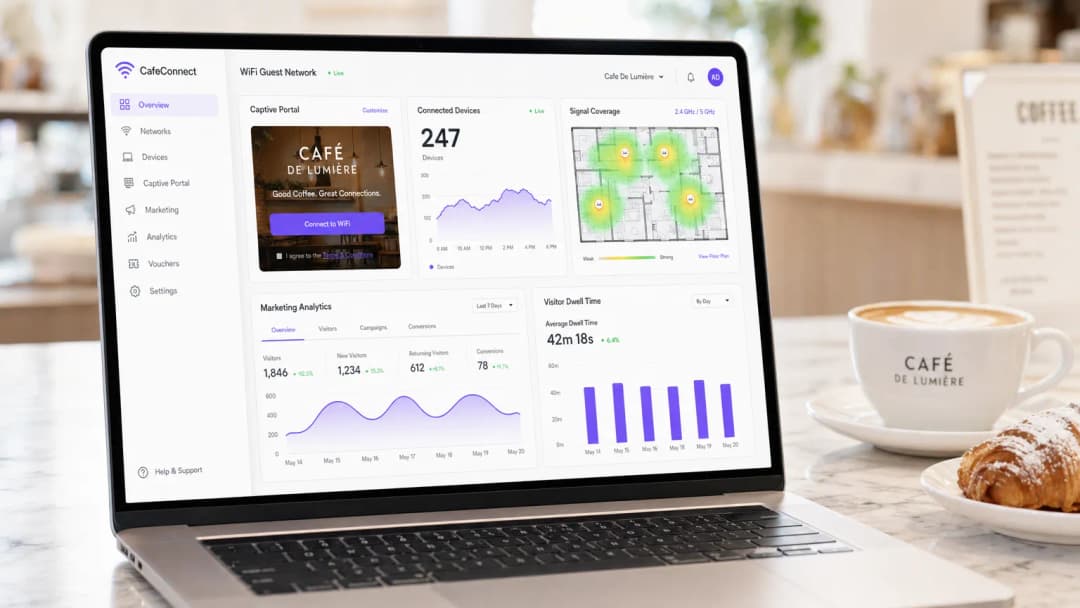
For the modern hospitality venue, café WiFi is no longer merely an operational utility - it is a critical first-party data asset, a marketing automation channel, and a strict compliance obligation. This technical reference guide provides IT managers, network architects and venue operations directors with a comprehensive framework for designing, deploying and monetising a guest network.
From independent coffee shops to multi-site enterprise chains, the architectural principles remain consistent. You must enforce strict network segmentation to maintain PCI DSS compliance, deploy enterprise-grade 802.11ax (Wi-Fi 6) hardware to handle high-density client environments, and implement a robust captive portal to capture explicit, GDPR-compliant marketing consent.
By transitioning from unmanaged consumer-grade routers to an enterprise guest WiFi platform, venues can turn a cost centre into a measurable revenue driver. This guide outlines the exact hardware specifications, security standards, bandwidth calculations and marketing automation workflows required to build a resilient, profitable guest network.
Technical deep-dive
Network architecture and segmentation
The foundational principle of any public-facing network is absolute logical separation from operational infrastructure. Deploying a single flat network that carries both your point-of-sale (POS) systems and guest traffic is a serious failure in both security and compliance terms.
VLAN implementation: Your routing and switching infrastructure must support IEEE 802.1Q VLAN tagging. A standard deployment requires a minimum of two virtual LANs:
- VLAN 10 (Operational): dedicated to POS terminals, back-office PCs and IoT devices.
- VLAN 20 (Guest): dedicated to the café WiFi guest network.
Traffic between these VLANs must be blocked at the firewall level. Access points (APs) will broadcast distinct Service Set Identifiers (SSIDs) that map directly to their respective VLANs. This isolation is a mandatory requirement for PCI DSS compliance, ensuring the cardholder data environment (CDE) cannot be compromised by a malicious actor connected to the guest network.
Wireless standards and hardware selection
For environments with high device density - such as a busy café where 40-80 clients may be simultaneously streaming, browsing and syncing data - consumer-grade hardware will degrade rapidly.
802.11ax (Wi-Fi 6) requirements: Modern deployments should use Wi-Fi 6 access points exclusively. The key advantage of Wi-Fi 6 in hospitality environments is Orthogonal Frequency-Division Multiple Access (OFDMA). Unlike older standards that serve clients sequentially, OFDMA allows a single AP to communicate with multiple devices simultaneously by dividing the channel into smaller subcarriers. This dramatically reduces latency and improves throughput in congested environments.
Hardware sizing:
- Single site (50-150 square metres): 1-2 ceiling-mounted Wi-Fi 6 APs, a PoE+ managed switch, and a business-grade firewall/router.
- Multi-site deployments: cloud-managed infrastructure is mandatory for centralised visibility, firmware management and remote troubleshooting across distributed retail outlets.
Security protocols
The era of open, unencrypted public WiFi is drawing to a close. While WPA2-Personal remains common, new deployments should leverage WPA3.
For guest networks using a captive portal, the underlying wireless transport should still be encrypted. WPA3-SAE (Simultaneous Authentication of Equals) provides forward secrecy and mitigates offline dictionary attacks. If deploying an open network with a captive portal (often done for maximum compatibility), ensure client isolation is enabled at the AP level so devices cannot communicate with each other on the local subnet.
Got questions about your specific setup?
Our team works with venue operators, IT managers, and network engineers across 80,000 venues. Book a 20-minute call and we will show you how others like you solved it.
Implementation guide
Deploying a secure, monetisable café WiFi network requires a structured approach. Follow this vendor-neutral deployment sequence:
Step one: site survey and bandwidth planning
Before purchasing hardware, conduct a physical site survey to identify sources of RF interference (such as microwave ovens and steel structures) and determine optimal AP placement.
Calculate your bandwidth requirements. A standard rule of thumb is 2 Mbps per concurrent user for general browsing, or 5 Mbps where video streaming is common. For a café expecting 50 concurrent users, a minimum 100 Mbps symmetrical connection is recommended. If your venue hosts business events or requires guaranteed uptime, see our guide on What is a leased line? Dedicated business internet connectivity for enterprise connectivity options. For detailed bandwidth calculations, refer to our Hotel WiFi speed: what guests expect and how to deliver it guide.
Step two: infrastructure configuration
Install your router, managed switch and access points. Configure your VLANs and firewall rules before connecting the APs. Ensure the DHCP address pool for the guest VLAN is appropriately sized (for example, a /23 subnet providing 510 IP addresses) and set short lease times (for example, 2 hours) to prevent IP address exhaustion during peak footfall.
Step three: captive portal deployment
The captive portal is the critical interface between the network and the marketing database.

Rather than hosting a portal server on site, integrate your APs with a cloud-based guest WiFi platform such as Purple via RADIUS or API. Configure the welcome page with your venue's branding and set up the authentication methods (for example, email, social login, or profile-based seamless authentication such as OpenRoaming).
Step four: compliance and consent management
Configure the data capture fields. Under GDPR, marketing consent must be explicit, informed and unambiguous. Ensure your captive portal includes an unticked marketing opt-in checkbox. The platform must record the timestamp, IP address, MAC address and the exact consent language shown to the user, providing a verifiable audit trail.
Step five: marketing automation integration
Connect the WiFi platform to your CRM, or use the platform's native WiFi analytics tools to build automated campaigns. Set up triggers for:
- First-time visitors: send a welcome email containing a loyalty discount.
- Lapsed visitors: send a re-engagement offer after 30 days of absence.
- Regulars: send a VIP programme invitation.
Best practices
- Enable client isolation: always enable Layer 2 client isolation on the guest SSID. This prevents connected devices from seeing or communicating with each other, reducing the risk of lateral malware propagation or packet sniffing.
- Implement Quality of Service (QoS): configure QoS rules on the router to prioritise operational traffic (POS, VoIP) over guest traffic. Implement per-client bandwidth limits (for example, capping guests at 5 Mbps down/up) to prevent a single user from saturating the WAN link.
- Shorten DHCP leases: in high-turnover environments such as cafés, set DHCP lease times to 1-2 hours rather than the standard 24 hours to prevent IP pool exhaustion.
- Leverage profile-based authentication: for multi-site chains or retail environments, implement seamless authentication protocols (such as Passpoint/OpenRoaming) that allow returning customers to connect automatically without re-authenticating at the portal, significantly improving the user experience while maintaining data tracking.
Troubleshooting and risk mitigation
| Failure mode | Root cause | Mitigation strategy |
|---|---|---|
| IP address exhaustion | Customers cannot connect because the DHCP server has run out of available IP addresses. | Widen the subnet mask (for example, from /24 to /23) and shorten DHCP lease times to 1-2 hours. |
| Co-channel interference | Multiple APs broadcasting on the same channel, causing high latency and packet loss. | Implement dynamic channel assignment on the wireless controller; avoid 2.4GHz channels other than 1, 6 and 11. |
| Captive portal bypass | Devices connect but the welcome page redirect never fires, leaving users offline. | Ensure the firewall allows DNS and HTTP/HTTPS traffic to the portal's walled-garden IP addresses prior to authentication. |
| Compliance breach | Emails collected via an open form with no explicit consent record. | Use a certified captive portal platform that natively handles GDPR consent records and data retention policies. |
ROI and business impact
Transitioning from unmanaged WiFi to an enterprise guest network turns IT infrastructure from a sunk cost into a measurable marketing asset.
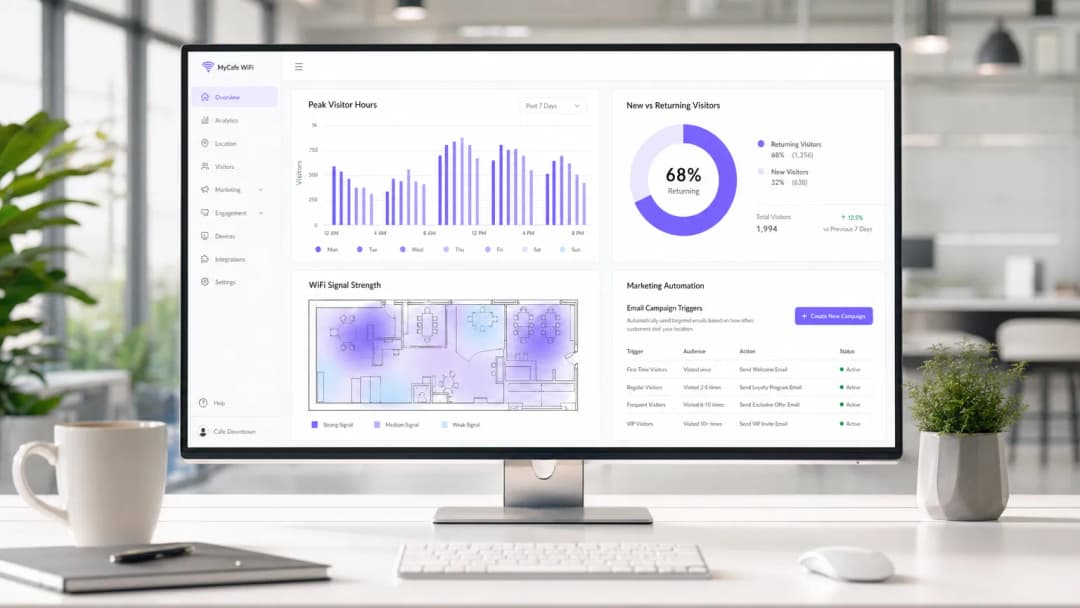
Measuring success: The return on investment for a café WiFi deployment is calculated through three primary metrics:
- Data capture rate: the percentage of connected users who opt in to marketing communications. A well-optimised portal should achieve a 30-40% capture rate.
- Campaign conversion: footfall generated by automated email/SMS campaigns triggered by the WiFi platform. For example, tracking how many users return within 7 days of receiving a "we miss you" offer.
- Dwell time optimisation: using analytics to correlate guest dwell time with average transaction value, enabling operational teams to optimise seating and speed of service.
By capturing first-party data and driving repeat visits through targeted marketing, a managed guest WiFi solution typically achieves return on investment within 3-6 months of deployment, particularly in competitive hospitality environments.
Key Definitions
VLAN (Virtual Local Area Network)
A logical subnetwork that groups a collection of devices from different physical LANs. Used to securely separate guest traffic from operational traffic.
Essential for maintaining PCI DSS compliance and preventing guests from accessing back-office systems.
Captive Portal
A web page that the user of a public-access network is obliged to view and interact with before access is granted.
The primary mechanism for capturing user data, presenting terms of service, and securing GDPR marketing consent.
Client Isolation
A wireless security feature that prevents devices connected to the same AP from communicating with each other.
Crucial for public networks to prevent malicious users from scanning or attacking other guests' devices.
OFDMA (Orthogonal Frequency-Division Multiple Access)
A feature of WiFi 6 that allows an AP to subdivide a channel to communicate with multiple devices simultaneously.
Solves the 'latency' problem in dense café environments where dozens of devices are competing for airtime.
PCI DSS
Payment Card Industry Data Security Standard. A set of security standards designed to ensure that all companies that accept, process, store or transmit credit card information maintain a secure environment.
The regulatory reason why network segmentation between POS and guest WiFi is legally required.
First-Party Data
Information a company collects directly from its customers and owns entirely.
The core asset generated by a guest WiFi platform, insulating venues from the deprecation of third-party cookies.
QoS (Quality of Service)
Technologies that manage data traffic to reduce packet loss, latency and jitter on the network.
Used to prioritise critical business traffic (like payment processing) over guest Netflix streaming.
Walled Garden
A restricted environment that controls user access to web content and services.
Required configuration on the firewall to allow unauthenticated users to access the captive portal and its associated resources (like social login APIs) before granting full internet access.
Worked Examples
A growing independent café chain with 3 locations is experiencing network dropouts during peak hours. Their POS terminals frequently disconnect, and guests complain about slow speeds. They are currently using consumer-grade routers provided by their ISP, broadcasting a single SSID for both staff and guests.
- Replace consumer routers with a cloud-managed business gateway and WiFi 6 access points at each location.
- Implement VLAN tagging: VLAN 10 for POS/Staff, VLAN 20 for Guests.
- Configure firewall rules to block inter-VLAN routing, securing the POS network.
- Set up QoS to prioritise VLAN 10 traffic over VLAN 20, and implement a 5 Mbps per-client bandwidth cap on the guest network.
- Deploy a centralised captive portal to manage guest access and collect GDPR-compliant marketing data.
A large conference centre café needs to provide seamless WiFi for returning delegates without forcing them to log in via the captive portal every day, while still tracking their presence for analytics.
Deploy a profile-based authentication system utilising Passpoint (Hotspot 2.0) or OpenRoaming. Guests authenticate via the captive portal on their first visit, downloading a secure profile to their device. On subsequent visits, their device authenticates automatically via WPA2/3-Enterprise using EAP-TTLS, bypassing the splash page while still registering their MAC address and presence in the analytics dashboard.
Practice Questions
Q1. A retail café chain wants to implement a guest WiFi network. The marketing director insists on making email collection mandatory for access to maximise database growth. The IT director is concerned about compliance. What is the correct architectural approach?
Hint: Consider the specific requirements of GDPR regarding 'freely given' consent.
View model answer
Under GDPR, consent for marketing cannot be a precondition for service. The captive portal must allow users to access the WiFi without opting into marketing emails. The correct approach is to offer a clear, unticked checkbox for marketing consent, while allowing users to connect simply by accepting the terms and conditions. The marketing team should instead incentivize opt-ins by offering a clear value exchange (e.g., 'Sign up for 10% off your next coffee').
Q2. During peak hours (12:00 PM - 2:00 PM), guests at a busy city-centre café report that they can see the WiFi network with strong signal, but cannot connect or obtain an IP address. The network works perfectly in the morning and evening. What is the most likely cause and solution?
Hint: Think about the lifecycle of a connection in a high-turnover environment.
View model answer
The most likely cause is DHCP IP pool exhaustion. Because the café has high footfall but short dwell times, the default 24-hour DHCP leases are tying up IP addresses long after the guests have left. The solution is to reduce the DHCP lease time for the guest VLAN to 1 or 2 hours, and potentially expand the subnet from a /24 (254 addresses) to a /23 (510 addresses).
Q3. A venue operator wants to deploy a single unified network for both their EPOS systems and guest WiFi to save on hardware costs, using a standard consumer broadband router. What are the specific technical and business risks of this approach?
Hint: Evaluate the scenario against PCI DSS requirements and wireless performance standards.
View model answer
- Compliance Failure: A flat network violates PCI DSS requirements for isolating the Cardholder Data Environment, risking heavy fines and loss of card processing abilities. 2. Security Risk: Without client isolation and VLANs, guests can potentially access or attack the EPOS systems. 3. Performance Degradation: Consumer routers lack QoS to prioritise EPOS traffic, meaning guest streaming could cause payment processing to time out. 4. Device Limitations: Consumer routers cannot handle the concurrent connections typical in a café, leading to network crashes.
Continue reading in this series
How to Set Up Guest WiFi: A Secure Enterprise Configuration Guide
This authoritative guide provides IT leaders and network architects with a definitive blueprint for deploying secure enterprise guest WiFi. It covers essential architecture, WPA3 migration, VLAN segmentation, and captive portal integration to protect internal systems while capturing compliant first-party data.
How to Fix Slow WiFi Without Upgrading Your Internet Plan
A comprehensive technical reference guide for IT managers and network architects on optimising enterprise WiFi performance without increasing ISP bandwidth. Covers RF tuning, client density management, QoS implementation, and how to leverage WiFi analytics to diagnose and resolve bottlenecks.
How to Build a Campus WiFi Network: A University IT Guide
This technical guide provides a comprehensive blueprint for designing and deploying high-density campus WiFi networks, covering everything from active site surveys and access point placement to controller architecture, seamless roaming, and secure guest onboarding. It is written for IT managers, network architects, and CTOs at universities and large venues who need actionable guidance to plan and execute a wireless deployment this quarter. The guide also maps Purple's Guest WiFi and analytics platform to real integration points within the deployment lifecycle.
Got questions about your specific setup?
Our team works with venue operators, IT managers, and network engineers across 80,000 venues. Book a 20-minute call and we will show you how others like you solved it.