
How to Safely Segregate Staff and Guest WiFi Networks
This authoritative technical guide provides IT leaders with actionable strategies for safely segregating staff, guest, and IoT WiFi networks using VLANs and 802.1X. It details how to secure enterprise infrastructure, maintain PCI DSS compliance, and leverage captive portals to capture first-party data.
Video overview
Listen to this guide
View podcast transcript
📚 Part of our core series: Guest WiFi Guide →
Executive Summary
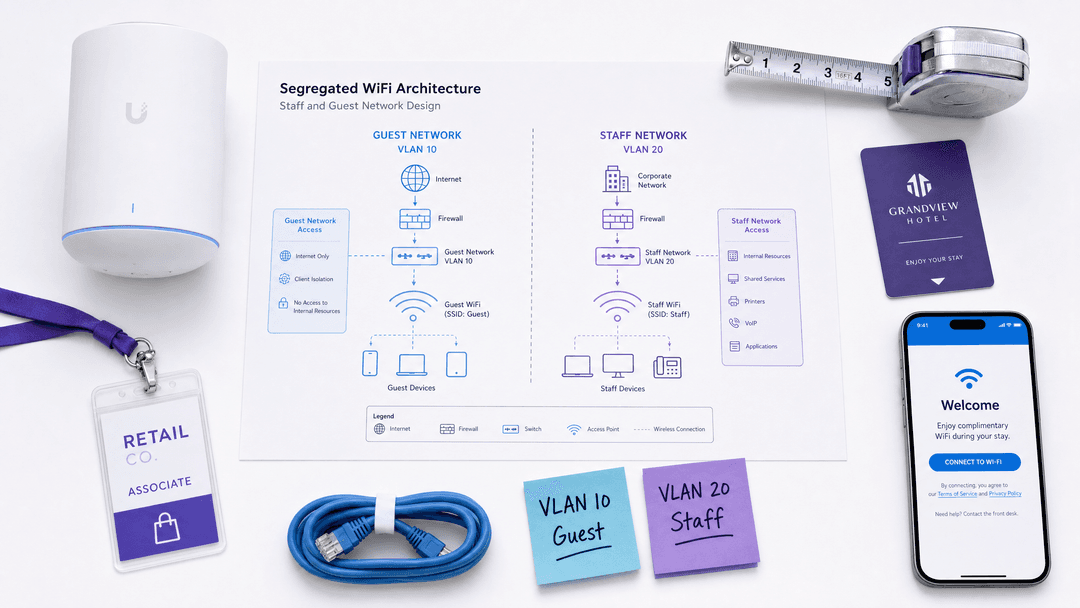
For enterprise venues spanning hospitality, retail, stadiums, and the public sector, the wireless network is no longer just a utility. It is a critical data platform and a core operational requirement. However, serving both public guests and internal staff on the same physical infrastructure introduces significant security and compliance risks. A flat, unsegmented network allows lateral movement, meaning a compromised guest device can potentially access point-of-sale terminals or staff laptops.
This authoritative technical reference guide provides IT managers, network architects, and CTOs with actionable strategies for safely segregating Staff WiFi, Guest WiFi, and IoT networks. By implementing proper VLAN architecture, role-based authentication, and strict firewall policies, organisations can secure their infrastructure, satisfy PCI-DSS and GDPR requirements, and leverage platforms like Purple to capture valuable first-party data.
Technical Deep-Dive
The Architecture of Segregation
The fundamental mechanism for safely operating multiple networks over shared physical hardware is the Virtual Local Area Network (VLAN). A VLAN is a Layer 2 construct defined by the IEEE 802.1Q standard that allows a single physical switch or access point to carry multiple, logically separate broadcast domains.
In an enterprise deployment, modern access points from vendors like Cisco Meraki, HPE Aruba, Ruckus, and Juniper Mist broadcast multiple Service Set Identifiers (SSIDs) simultaneously. Each SSID maps directly to a specific VLAN. This ensures that traffic entering the network via the guest SSID is tagged differently from traffic entering via the staff SSID, forcing the packets down separate logical paths.
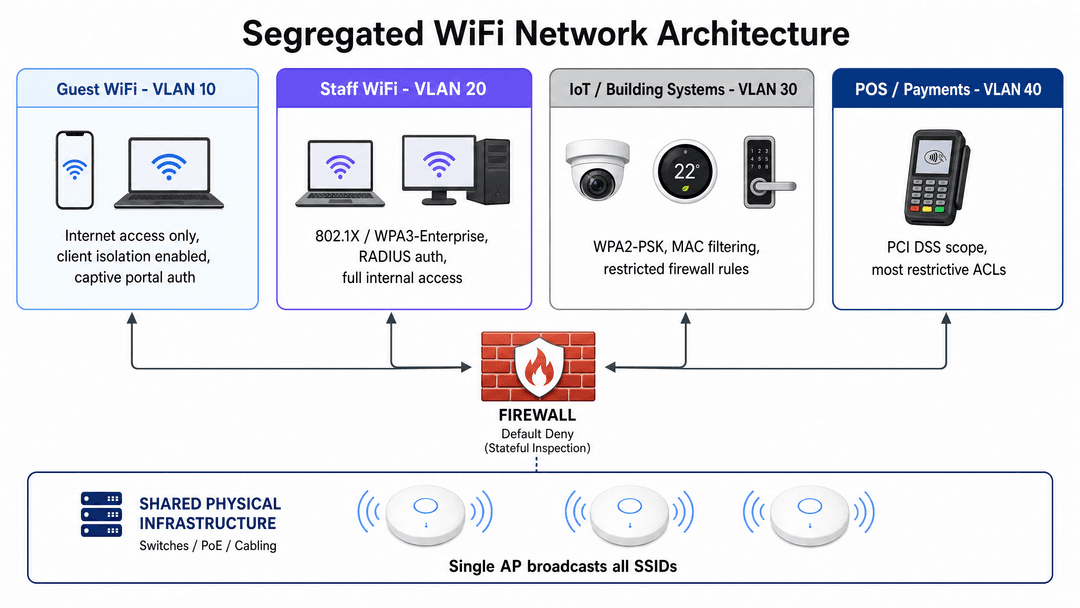
A robust enterprise architecture typically requires at least four distinct segments:
- Guest Network (VLAN 10): Dedicated to public visitors. This segment requires internet access only. Client isolation must be enabled at the access point level to prevent guest devices from communicating directly with one another.
- Staff Network (VLAN 20): Dedicated to corporate employees. This segment provides access to internal resources, shared drives, and corporate applications based on role-based access controls.
- IoT and Building Systems (VLAN 30): Dedicated to headless devices like CCTV cameras, smart thermostats, and digital signage. This segment requires strict firewall rules limiting outbound access to specific required services.
- Point-of-Sale (POS) Network (VLAN 40): Dedicated to payment terminals and cash registers. This segment falls under PCI-DSS scope and requires the most restrictive access control lists (ACLs).
Authentication and Encryption Standards
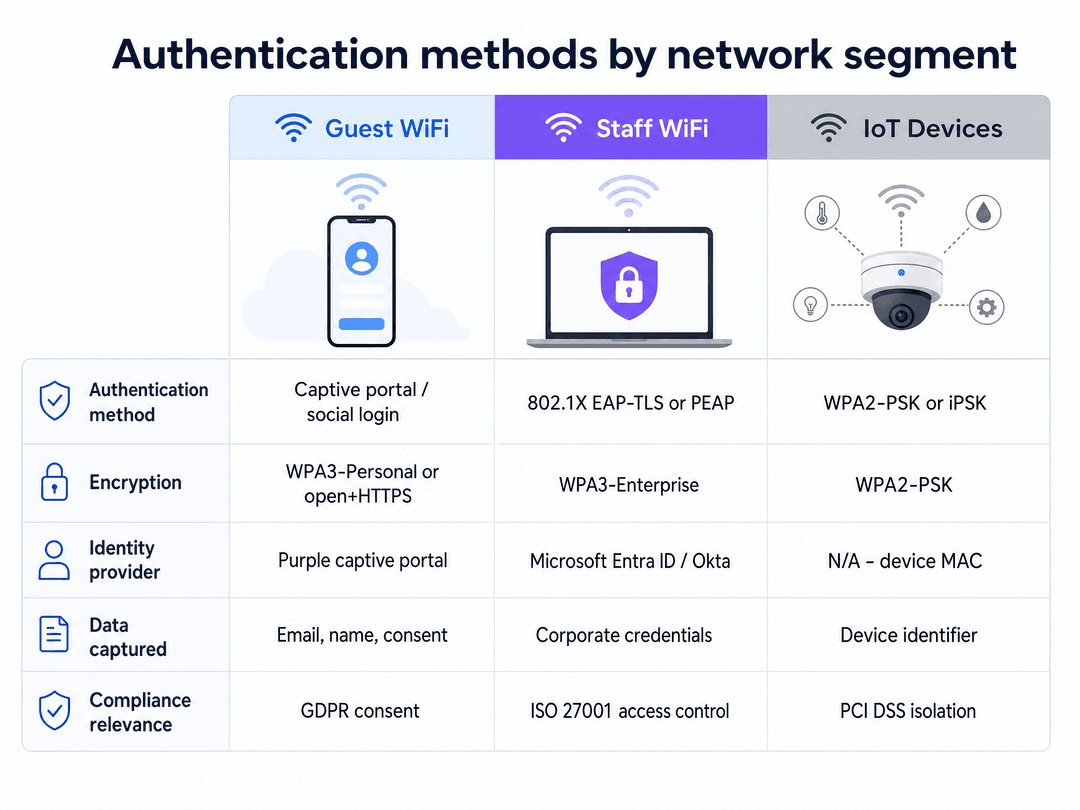
Segregation at the network layer must be paired with appropriate authentication at the wireless edge. Different user populations require different authentication mechanisms.
Staff Authentication: IEEE 802.1X
For corporate staff, WPA3-Enterprise with IEEE 802.1X is the required standard. This protocol uses a RADIUS server to authenticate each user against a central identity provider like Microsoft Entra ID or Okta. Rather than sharing a single password, each staff member uses their corporate credentials or a client certificate to access the network.
The Extensible Authentication Protocol (EAP) facilitates this exchange. EAP-TLS, which uses mutual certificate-based authentication, is the most secure method as it eliminates passwords entirely. PEAP (Protected EAP) is also widely deployed, using a server-side certificate alongside username and password credentials.
Guest Authentication: Captive Portals and First-Party Data
For public visitors, the network serves a dual purpose: providing connectivity and capturing first-party data. The standard approach is an open network or WPA3-Personal, placed behind a captive portal.
When guests connect, they are redirected to a branded splash page where they authenticate via email, SMS, or social login. This is where Purple's Guest WiFi platform delivers significant value. By handling the authentication flow, Purple captures verified identities, associates them with device MAC addresses, and builds a rich, GDPR-compliant dataset. Guests provide explicit consent for marketing, transforming the network from a cost centre into a revenue-generating asset for Retail and Hospitality venues.
IoT Authentication: iPSK
Internet of Things (IoT) devices rarely support 802.1X supplicants. Historically, this meant relying on WPA2-PSK with a single shared password. Modern deployments should leverage Identity Pre-Shared Key (iPSK) or Multiple Pre-Shared Key (MPSK) technologies. These allow network administrators to assign unique passphrases to individual devices or groups of devices on the same SSID, providing granular visibility and the ability to revoke access for a single compromised camera without changing the password for the entire building.
Implementation Guide
Deploying a segregated wireless architecture requires disciplined execution. Follow this vendor-neutral implementation sequence:
Phase 1: Traffic Classification and VLAN Design
Before configuring hardware, document every device type operating in the venue. Assign a dedicated VLAN ID and IP subnet to each traffic class. Ensure the guest VLAN subnet is sized generously to prevent DHCP exhaustion during peak periods. For high-density environments, review our guide on Three SSIDs to rule them all: guest, Passpoint, and IoT WiFi .
Phase 2: SSID Configuration
Configure your wireless LAN controller or cloud dashboard to broadcast the required SSIDs. Map each SSID to its corresponding VLAN. Crucially, enable "Client Isolation" (sometimes called Layer 2 Isolation or Guest Isolation) on the guest SSID. Limit the total number of broadcasted SSIDs to a maximum of four per radio band to preserve wireless airtime.
Phase 3: Firewall Policy Enforcement
The VLAN architecture is only effective if enforced by the firewall. Implement a default-deny policy for all inter-VLAN routing. Explicitly permit only documented, necessary traffic flows. The guest VLAN must have an explicit deny rule blocking access to all internal subnets (RFC 1918 addresses), with a permit rule allowing outbound HTTP and HTTPS traffic to the internet. To further secure guest traffic, implement robust content filtering as detailed in our guide on the Best DNS filtering: a comprehensive guide for businesses .
Phase 4: Captive Portal Integration
Integrate the guest SSID with your captive portal provider. For Purple deployments, configure the RADIUS authentication and accounting settings to point to Purple's cloud servers, and set the walled garden (allowed domains) to permit access to the splash page resources before authentication is complete.
Best Practices
- Minimise SSID Count: Every broadcasted SSID consumes management overhead and reduces available airtime. Consolidate networks where possible. Do not broadcast separate SSIDs for different staff departments; use 802.1X dynamic VLAN assignment to place users on the correct subnet based on their identity profile.
- Enforce Client Isolation: Always enable client isolation on guest networks. This prevents a compromised guest device from scanning or attacking other guest devices on the same access point.
- Secure the Wired Edge: WiFi segregation is easily bypassed if the wired network remains flat. Ensure all physical ethernet ports in public areas (like hotel rooms or conference spaces) are either disabled or assigned to the guest VLAN.
- Implement Rate Limiting: Apply per-client bandwidth limits on the guest network (e.g., 5-10 Mbps) to prevent a single user from saturating the venue's internet uplink.
Troubleshooting & Risk Mitigation
Failure Mode: Misconfigured Trunk Ports
The Risk: If a switch port connecting an access point is accidentally configured as an access port rather than a trunk port (802.1Q), all traffic from all SSIDs will collapse onto a single native VLAN, destroying the segregation silently. Mitigation: Standardise switch port configurations using templates. Regularly audit switch configurations and run penetration tests from the guest network to verify isolation.
Failure Mode: Firewall Rule Sprawl
The Risk: Over time, temporary firewall rules added for troubleshooting are left in place, creating unintended pathways between the guest and corporate networks. Mitigation: Implement a strict change management process for firewall rules. Conduct quarterly reviews of all access control lists, removing any rules that lack clear documentation or current business justification.
Failure Mode: DHCP Exhaustion
The Risk: In high-footfall venues like stadiums or transport hubs, the sheer volume of transient guest devices can exhaust the available IP addresses in the DHCP pool, preventing new users from connecting even when WiFi signal is excellent. Mitigation: Size the guest VLAN subnet generously (e.g., a /16 subnet providing 65,000 addresses) and configure short DHCP lease times (30 to 60 minutes) to rapidly reclaim IP addresses from devices that have left the venue.
ROI & Business Impact
Implementing secure WiFi segregation is a foundational requirement, but it also unlocks significant commercial value.
By confidently isolating guest traffic, venues can offer free, high-performance WiFi without compromising corporate security. This connectivity drives guest satisfaction and dwell time. More importantly, routing that secure guest traffic through a captive portal transforms the network into a data acquisition engine.
Purple's WiFi Analytics platform leverages this infrastructure to provide actionable insights into visitor behaviour, footfall patterns, and demographic profiles. For a retail chain, this means understanding cross-store loyalty. For a hospitality brand, it means capturing verified emails to drive direct bookings. The ROI of the network infrastructure is measured not just in uptime, but in the volume of first-party data captured and the subsequent marketing revenue generated.
Listen to our comprehensive technical briefing podcast below:
Key Definitions
VLAN (Virtual Local Area Network)
A logical grouping of network devices that appear to be on the same local network, regardless of their physical location, separated by 802.1Q tags.
The foundational technology used to separate guest, staff, and IoT traffic over shared physical switches and access points.
SSID (Service Set Identifier)
The public name of a wireless network that devices see and connect to.
IT teams map different SSIDs (e.g., 'VenueGuest' and 'VenueStaff') to different VLANs to enforce segregation at the wireless edge.
IEEE 802.1X
A port-based network access control standard that requires devices to authenticate against a central server before gaining network access.
The gold standard for staff WiFi authentication, ensuring only authorised corporate users can access internal resources.
Client Isolation
A wireless controller setting that prevents devices connected to the same SSID from communicating directly with one another.
A mandatory security control for guest networks to prevent lateral movement and peer-to-peer attacks between strangers.
Captive Portal
A web page that users must view and interact with before being granted full access to a public WiFi network.
Used by Purple to authenticate guests, capture first-party data, and secure GDPR consent before providing internet access.
iPSK (Identity Pre-Shared Key)
A security method that allows different devices to use unique passphrases while connecting to the same SSID.
The optimal way to secure IoT devices that do not support 802.1X, providing device-level visibility and access control.
PCI DSS
Payment Card Industry Data Security Standard; a set of requirements designed to ensure all companies that process credit card information maintain a secure environment.
Requires strict network segregation to isolate point-of-sale terminals from guest WiFi traffic.
RADIUS
Remote Authentication Dial-In User Service; a networking protocol that provides centralised authentication, authorisation, and accounting.
The server that validates staff credentials for 802.1X and handles captive portal authentication requests for guest networks.
Worked Examples
A 250-room hotel needs to deploy WiFi for guests, back-office staff, and a restaurant with card payment terminals. How should the network be segregated to ensure security and PCI DSS compliance?
Deploy four distinct VLANs across the shared physical access points. VLAN 10 (Guest) uses an open SSID with a Purple captive portal for data capture, with client isolation enabled and internet-only firewall rules. VLAN 20 (Staff) uses WPA3-Enterprise with 802.1X authentication against Microsoft Entra ID. VLAN 30 (IoT) handles building systems using iPSK with strict outbound-only rules. VLAN 40 (POS) handles the payment terminals and is completely isolated from all other VLANs via a default-deny firewall policy.
A national retail chain with 150 stores is experiencing poor WiFi performance and frequent disconnects on their guest network during busy weekend trading, despite having modern WiFi 6 access points.
The issue is likely DHCP exhaustion or SSID proliferation, not RF coverage. First, verify the DHCP pool size for the guest VLAN; increase it to a /16 subnet and reduce the lease time to 30 minutes to reclaim addresses from shoppers who have left. Second, audit the broadcasted SSIDs. Reduce the total number of SSIDs to a maximum of three (Guest, Staff, IoT) to free up wireless airtime.
Practice Questions
Q1. A stadium IT director wants to broadcast 8 different SSIDs to accommodate various vendor and sponsor requirements. What is the technical implication of this request?
Hint: Consider the impact of beacon frames on the wireless medium.
View model answer
Broadcasting 8 SSIDs will severely degrade network performance due to management frame overhead. Every SSID requires beacon frames to be transmitted at the lowest basic data rate, consuming valuable airtime even when no clients are connected. The recommended approach is to consolidate to 3 - 4 SSIDs and use 802.1X dynamic VLAN assignment to place different vendors onto their respective secure subnets while connecting to a single 'VenueStaff' SSID.
Q2. During a network audit, you discover that the Guest WiFi VLAN can ping the IP address of the property management server. What is the most likely configuration failure?
Hint: Think about where inter-VLAN routing is controlled.
View model answer
The most likely failure is a missing or misconfigured access control list (ACL) on the core firewall or Layer 3 switch. While the devices are on separate VLANs, the routing device is permitting traffic to flow between them. A default-deny rule must be implemented between the Guest VLAN and all internal subnets.
Q3. A hospital needs to connect 500 smart infusion pumps to the network. The devices only support WPA2-Personal (pre-shared key). How can you secure these devices without putting them on the guest network?
Hint: Consider how to identify and isolate headless devices that lack enterprise authentication capabilities.
View model answer
Create a dedicated IoT/Clinical Device VLAN. Broadcast a hidden SSID specifically for these devices. Use Identity Pre-Shared Key (iPSK) to assign unique passphrases to specific groups of pumps, or use standard WPA2-PSK combined with MAC address profiling. Crucially, apply strict firewall ACLs to this VLAN, permitting the pumps to communicate only with the specific clinical server they require, and denying all other internal and internet access.
Continue reading in this series
India DPDP Act: Guest WiFi Compliance for Indian Venues
This authoritative technical reference guide unpacks the Digital Personal Data Protection (DPDP) Act 2023 for Indian venues operating guest WiFi. It provides actionable compliance strategies, architectural considerations for captive portals, and practical frameworks for data retention and cross-border transfers.
Brazil LGPD and Guest WiFi: A Compliance Guide
This technical reference guide details how Brazil's LGPD applies to enterprise guest WiFi deployments, focusing on captive portal compliance, lawful bases for processing, and the intersection with the Marco Civil da Internet. It provides actionable implementation guidance for IT leaders and network architects to mitigate regulatory risk while maintaining network utility.
EU AI Act and Guest WiFi: What Marketers Need to Know
The EU AI Act (Regulation 2024/1689) introduces a risk-based framework that directly affects how venue operators deploy AI-driven WiFi marketing, captive portals, and guest analytics. This guide maps the Act's four risk tiers against real-world Guest WiFi use cases, identifies prohibited practices including emotion inference and social scoring, and provides actionable compliance steps for IT teams and marketing directors operating across hospitality, retail, events, and public-sector environments. Understanding where your deployment sits on the risk spectrum — and implementing the Article 50 transparency obligations for AI chatbots and conversational portals — is no longer optional: prohibited practice enforcement began in February 2025.