
How to Implement SCEP for Secure BYOD and Network Enrolment in Higher Education
This technical guide provides network architects and IT managers with a vendor-neutral blueprint for deploying SCEP-based certificate enrolment to secure higher education campus networks. It details how to migrate from password-based PEAP to 802.1X EAP-TLS, automate BYOD onboarding, and enforce robust VLAN segmentation.
Video overview
Listen to this guide
View podcast transcript
📚 Part of our core series: Enterprise WiFi Security Guide →
Executive Summary
Higher education networks face a unique set of challenges: massive seasonal onboarding spikes, high device churn, pervasive credential sharing, and stringent compliance requirements. Traditional password-based authentication models (like PEAP-MSCHAPv2) fail to meet modern security standards and generate significant IT support overhead.
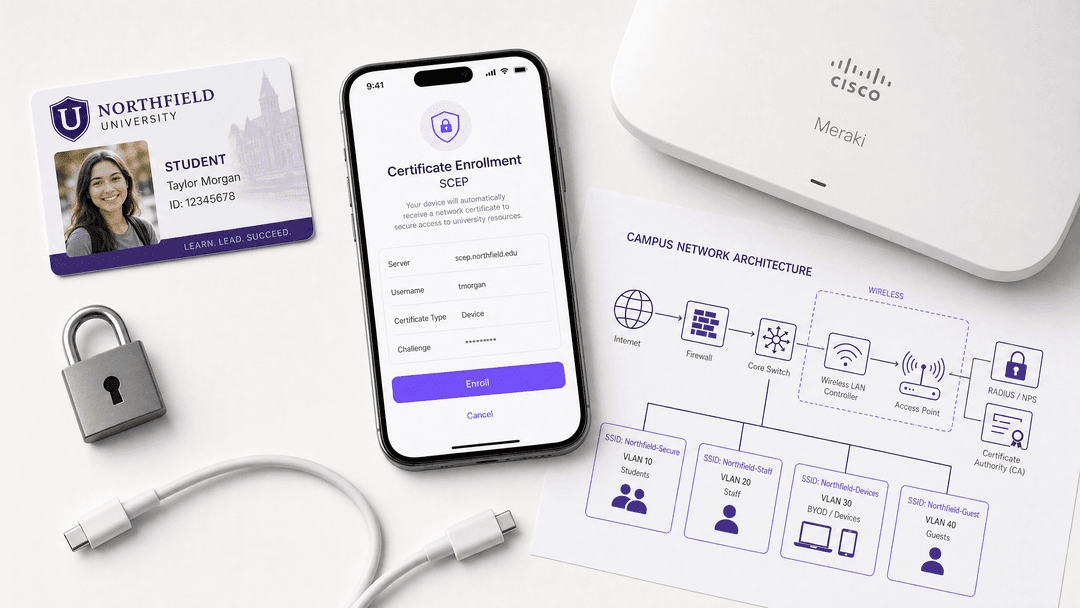
This guide details how to implement the Simple Certificate Enrollment Protocol (SCEP) to automate the delivery of X.509 digital certificates to both managed staff devices and unmanaged student BYOD (Bring Your Own Device) endpoints. By moving to certificate-based 802.1X EAP-TLS authentication, universities can eliminate shared passwords, neutralise credential phishing, and establish a cryptographically verifiable audit trail. We cover the underlying protocol mechanics, reference architectures for multi-VLAN segmentation, integration with Mobile Device Management (MDM) platforms, and the operational transition required to secure campus WiFi at scale.
Technical Deep-Dive
The Limitations of Legacy Authentication
Many university networks still rely on PEAP (Protected Extensible Authentication Protocol) with university credentials. This trust-on-first-use model presents severe risks:
- Credential Harvesting: Attackers can broadcast spoofed SSIDs to capture student credentials.
- Password Sharing: Students frequently share credentials, undermining network access control and bandwidth allocation.
- Support Overhead: Password resets and manual configuration errors drive peak helpdesk volume during the start of the academic year.
SCEP and EAP-TLS Architecture
SCEP, defined in RFC 8894, automates the lifecycle of digital certificates. Instead of authenticating the user via a password, the network authenticates the device via a unique X.509 certificate. This enables EAP-TLS (Extensible Authentication Protocol with Transport Layer Security), which requires mutual authentication between the client device and the RADIUS server.
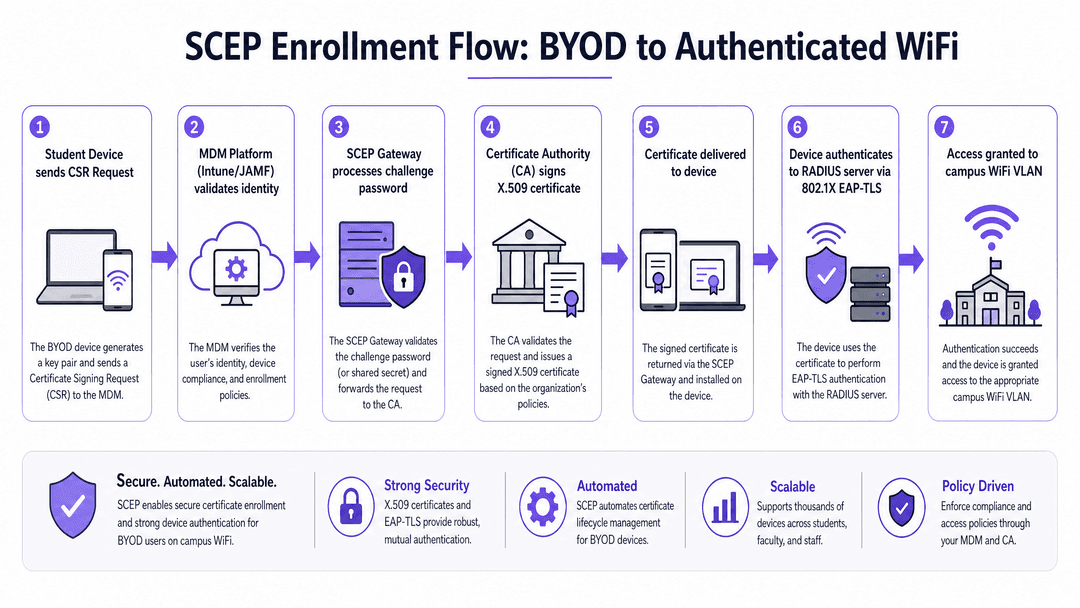
The SCEP enrolment flow operates as follows:
- Initial Connection: The device connects to an onboarding portal or receives an MDM profile.
- CSR Generation: The device generates a key pair and creates a Certificate Signing Request (CSR).
- Challenge Validation: The SCEP gateway validates a dynamic, one-time challenge password provided by the MDM or onboarding portal.
- Certificate Issuance: The Certificate Authority (CA) signs the CSR and returns the X.509 certificate.
- Authentication: The device presents the certificate to the RADIUS server via 802.1X EAP-TLS to gain access to the secure VLAN.
Infrastructure Components
Deploying SCEP requires several integrated components:
- Certificate Authority (CA): The root of trust issuing the certificates (e.g., Microsoft AD CS, a cloud PKI).
- SCEP Gateway: The intermediary that validates requests before forwarding them to the CA (e.g., Microsoft NDES, SecureW2, IronWiFi).
- MDM / Onboarding Platform: Manages the deployment of SCEP profiles (e.g., Microsoft Intune, JAMF Pro, Google Workspace).
- RADIUS Server: Enforces network access policy based on certificate validity (e.g., Cisco ISE, HPE Aruba ClearPass, Microsoft NPS).
- Wireless Infrastructure: The access points and controllers enforcing 802.1X (e.g., Cisco Meraki, HPE Aruba, Ruckus, Juniper Mist).
Implementation Guide
Step 1: Establish the PKI and SCEP Gateway
If your university uses Microsoft Entra ID, integrating Intune with a cloud PKI or an on-premises NDES server is the standard approach. The SCEP gateway must be accessible externally if you intend to provision devices before they arrive on campus.
Step 2: Configure the MDM Profiles
For managed devices (staff laptops, lab machines), configure SCEP profiles in your MDM. Ensure the profile specifies:
- Subject Name Format: CN={{AAD_Device_ID}} or similar, to uniquely identify the device.
- Key Usage: Digital Signature and Key Encipherment.
- Extended Key Usage: Client Authentication.
- Challenge Type: Dynamic (one-time password), never static.
Step 3: Deploy the BYOD Onboarding Portal
For unmanaged student devices, deploy a self-service onboarding portal. Students authenticate via the university's single sign-on (SSO) provider (e.g., Microsoft Entra ID, Okta). The portal verifies their active enrolment status and pushes a lightweight SCEP profile to their device, automating the certificate request without requiring full MDM management.
Step 4: Implement VLAN Segmentation
Configure your RADIUS server to assign VLANs dynamically based on the certificate attributes or the user group in your directory.
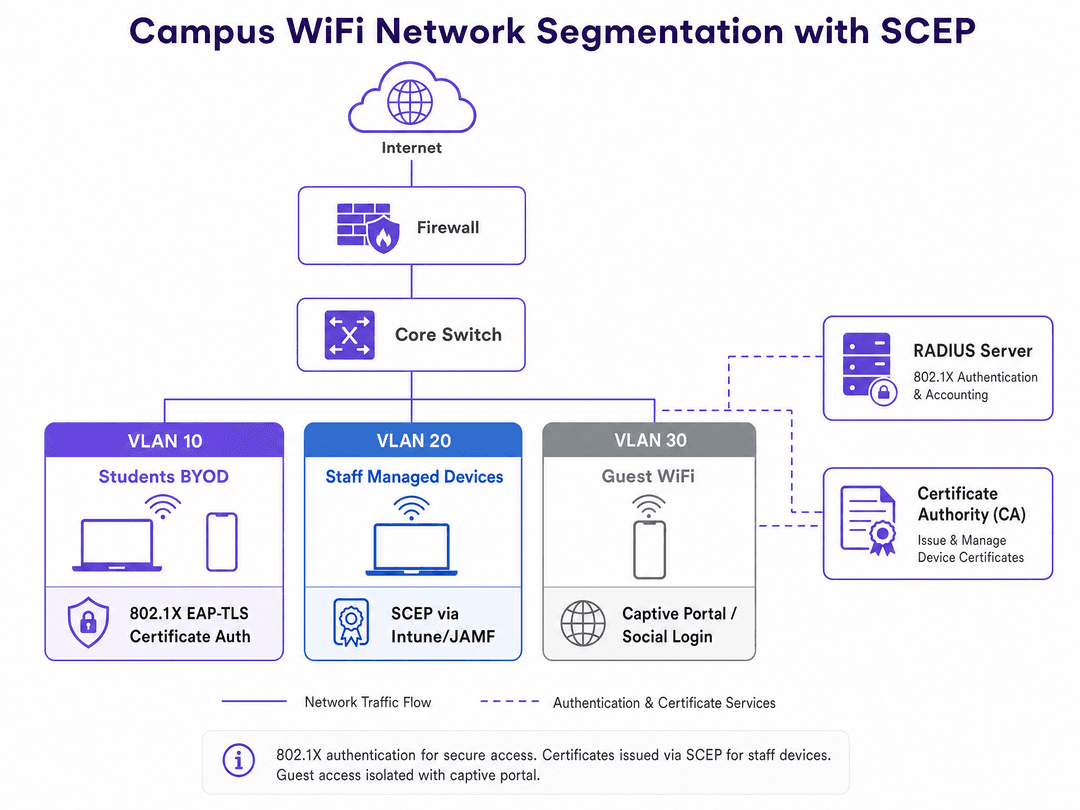
- VLAN 10 (Student BYOD): EAP-TLS authenticated. Access to academic resources and internet.
- VLAN 20 (Staff Managed): EAP-TLS authenticated. Access to administrative systems and internal servers.
- VLAN 30 (Guest WiFi): Captive Portal authenticated. Internet access only, isolated from the core network.
Best Practices
- Dynamic Challenge Passwords: Never use a static shared secret for your SCEP gateway. Ensure your MDM or onboarding platform generates one-time challenge passwords for every enrolment request.
- Automated Renewal: Configure certificates to renew automatically at 80% of their validity period. This prevents mass expirations during critical academic periods.
- Device Compliance: Use MDM conditional access policies to ensure devices meet security baselines (e.g., OS version, encryption) before the SCEP profile is delivered.
- Revocation Checking: Ensure your RADIUS server is configured to check the Certificate Revocation List (CRL) or use the Online Certificate Status Protocol (OCSP) to block access immediately if a device is reported lost or stolen.
Troubleshooting & Risk Mitigation
Common Failure Modes
- NDES/SCEP Gateway Unreachable: If the SCEP gateway is not externally accessible, devices cannot enrol off-campus. Ensure the gateway is published securely via an application proxy.
- Certificate Chain Trust Errors: The client device must trust the Root CA that issued the RADIUS server's certificate. Ensure the Root CA certificate is pushed alongside the SCEP profile.
- RADIUS Timeout: EAP-TLS requires multiple round trips. Ensure your wireless controllers and RADIUS servers are configured with adequate timeout values to accommodate latency, especially during peak onboarding.
ROI & Business Impact
Migrating to SCEP and EAP-TLS delivers measurable business outcomes for university IT departments:
- Reduced Support Costs: By automating enrolment, universities typically see a 50-70% reduction in WiFi-related helpdesk tickets during the start of the academic year.
- Enhanced Security Posture: Eliminating shared passwords and migrating to cryptographic device identity neutralises credential harvesting attacks.
- Regulatory Compliance: Certificate-based authentication provides a robust, attributable audit log, supporting GDPR Article 32 requirements for technical security measures.
Purple's platform integrates with this architecture at the guest WiFi layer. While your academic and staff networks remain secured via SCEP and EAP-TLS, Purple provides seamless captive portal onboarding for visitors, capturing first-party data and delivering analytics without compromising the security of the core network.
Key Definitions
SCEP (Simple Certificate Enrollment Protocol)
An IETF protocol that automates the process of requesting, issuing, and installing digital certificates on network devices without manual intervention.
Used by IT teams to deploy certificates at scale to thousands of student and staff devices simultaneously.
EAP-TLS (Extensible Authentication Protocol with Transport Layer Security)
The most secure 802.1X authentication method, requiring both the client device and the RADIUS server to prove their identities using digital certificates.
The target authentication standard for universities looking to eliminate password-based WiFi access.
CSR (Certificate Signing Request)
A block of encrypted text generated by the client device containing its public key and identifying information, sent to the CA to apply for a certificate.
The first technical step in the SCEP enrolment process after the device connects to the gateway.
MDM (Mobile Device Management)
Software platforms like Microsoft Intune or JAMF Pro used to manage device configurations, enforce compliance, and deploy SCEP profiles.
The administrative control plane for staff devices and the integration point for dynamic SCEP challenges.
RADIUS (Remote Authentication Dial-In User Service)
A networking protocol that provides centralised Authentication, Authorization, and Accounting (AAA) management for users who connect and use a network service.
The server (like Cisco ISE or ClearPass) that validates the device's certificate and assigns it to the correct VLAN.
NDES (Network Device Enrollment Service)
A Microsoft Windows Server role that acts as a SCEP gateway, allowing devices without Active Directory credentials to obtain certificates from an Enterprise CA.
The traditional on-premises SCEP gateway used in Microsoft environments, often integrated with Intune.
VLAN (Virtual Local Area Network)
A logical subnetwork that groups a collection of devices from different physical LANs, isolating broadcast traffic and enforcing security boundaries.
Used to separate student BYOD traffic from staff devices, guest access, and IoT infrastructure.
BYOD (Bring Your Own Device)
The practice of allowing students and staff to use their personal laptops, smartphones, and tablets to access the university network.
The primary driver for implementing automated onboarding portals and SCEP in higher education.
Worked Examples
A university with 30,000 students is migrating from PEAP to EAP-TLS. They use Microsoft Entra ID and Intune for staff, but need a solution for unmanaged student BYOD laptops and smartphones. How should they architecture the enrolment?
Deploy a self-service onboarding portal integrated with Microsoft Entra ID for SSO. Staff devices receive SCEP profiles automatically via Intune during device provisioning. Students connect to an open 'Onboarding' SSID, authenticate via the portal using their university credentials, and the portal pushes a temporary SCEP profile to the device. The device generates a CSR, the SCEP gateway validates the dynamic challenge, and the CA issues the certificate. The device then automatically reconnects to the secure 'eduroam' or 'Student' SSID using EAP-TLS.
A further education college needs to secure shared Windows lab computers and IoT devices (projectors, smart boards) alongside their BYOD network. How should they handle authentication for devices without a specific user?
For shared lab computers, deploy machine certificates via SCEP using SCCM or Intune. The devices authenticate to the network using EAP-TLS at the machine level, allowing any student to log in without triggering a separate network authentication event. For IoT devices that do not support 802.1X or SCEP, implement Identity PSK (iPSK) or MAC Authentication Bypass (MAB), and segment them onto a dedicated, isolated IoT VLAN with no access to the academic network.
Practice Questions
Q1. Your university is deploying SCEP via Microsoft NDES and Intune. During testing, Windows laptops enrol successfully, but iOS devices fail to receive a certificate. The NDES server logs show no incoming requests from the Apple devices. What is the most likely architectural issue?
Hint: Consider the network location of the devices during the initial enrolment phase.
View model answer
The NDES server (SCEP gateway) is likely not published externally. Windows devices might be enrolling while on the internal network or VPN, whereas iOS devices are attempting to enrol over cellular data or an external network. The SCEP gateway must be securely published to the internet (e.g., via Azure AD Application Proxy) to allow off-campus enrolment.
Q2. A student reports they cannot connect to the campus WiFi. Their device has a certificate issued via SCEP two years ago. The CA is functioning, and the RADIUS server is online. What configuration best practice was likely missed?
Hint: Digital certificates have a defined lifespan.
View model answer
Automated certificate renewal was likely not configured or failed. The student's certificate has expired. Best practice dictates configuring the MDM or SCEP profile to automatically request a renewal when the certificate reaches 80% of its validity period.
Q3. You are designing the network segmentation for a new campus building. You have implemented EAP-TLS for staff and students. The facilities team needs to connect 50 new wireless HVAC sensors that do not support 802.1X or certificates. How do you secure these devices?
Hint: These devices cannot use SCEP. Consider alternative authentication methods and network isolation.
View model answer
Implement Identity PSK (iPSK) or MAC Authentication Bypass (MAB) for the HVAC sensors. Crucially, segment these devices onto a dedicated IoT VLAN. Configure firewall rules to block this VLAN from accessing the internet or the academic/staff subnets, restricting traffic only to the specific internal HVAC management server.
Continue reading in this series
Configuring RADIUS Authentication for Guest and Staff WiFi Networks
This technical reference guide outlines the architecture, configuration, and deployment of RADIUS authentication for enterprise guest and staff WiFi networks. It provides network architects and IT managers with the exact protocols, security standards, and troubleshooting methodologies required to build secure, scalable wireless access control systems.
Passpoint and OpenRoaming: Complete Guide
This technical reference guide provides a comprehensive analysis of Passpoint (Hotspot 2.0) and WBA OpenRoaming frameworks within enterprise WiFi networks. It details the underlying authentication protocols, architectural components, and deployment strategies required to establish secure, frictionless guest connectivity. Network architects and IT leaders will learn how to design, implement, and troubleshoot these standards to eliminate manual login barriers while maintaining enterprise-grade security.
Server RADIUS: a comprehensive guide for businesses
This guide provides IT managers, network architects, and CTOs with a definitive technical reference on server RADIUS authentication for enterprise WiFi. It covers the AAA framework, 802.1X architecture, EAP method selection, cloud versus on-premises deployment trade-offs, and dynamic VLAN assignment. Venue operators across hospitality, retail, events, and the public sector will find actionable implementation guidance, real-world case studies, and the decision frameworks needed to migrate from insecure pre-shared keys to a secure, identity-driven network access control architecture.
Got questions about your specific setup?
Our team works with venue operators, IT managers, and network engineers across 80,000 venues. Book a 20-minute call and we will show you how others like you solved it.