
Understanding WiFi Speed Meaning: Throughput vs Bandwidth
This authoritative technical reference guide demystifies WiFi speed metrics for enterprise IT leaders, clearly distinguishing between link speed, bandwidth, and throughput. It provides actionable methodologies for measuring real-world performance, mitigating RF congestion, and optimising WLAN infrastructure across high-density venue deployments. IT managers, network architects, and venue operations directors will leave with concrete frameworks for aligning infrastructure investments with measurable business outcomes.
Video overview
Listen to this guide
View podcast transcript
Part of our core series: Guest WiFi Guide →
WiFi throughput vs bandwidth and link speed calculator
Calculate real-world application throughput (goodput), protocol overhead, and per-client capacity based on IEEE 802.11 standards, channel width, and active concurrency.
- Advertised PHY rate (1200.8 Mbps) is physical layer modulation, not payload data rate. Half-duplex turn-around and 802.11 headers automatically account for ~42% protocol overhead.
- In enterprise deployments, real-world application throughput (goodput) is typically 50% to 65% of the link speed displayed on device WiFi settings.
- Under 20 concurrent active stations, each device receives a fair-share average of 30.1 Mbps.
Sizing high-density enterprise WiFi or guest captive portals?
Purple integrates with Cisco Meraki, Aruba HPE, Ruckus CommScope, Ubiquiti UniFi, and Juniper Mist networks to manage guest bandwidth tiers, dynamic VLAN assignment, and venue analytics across 80,000+ customer locations.

Executive Summary
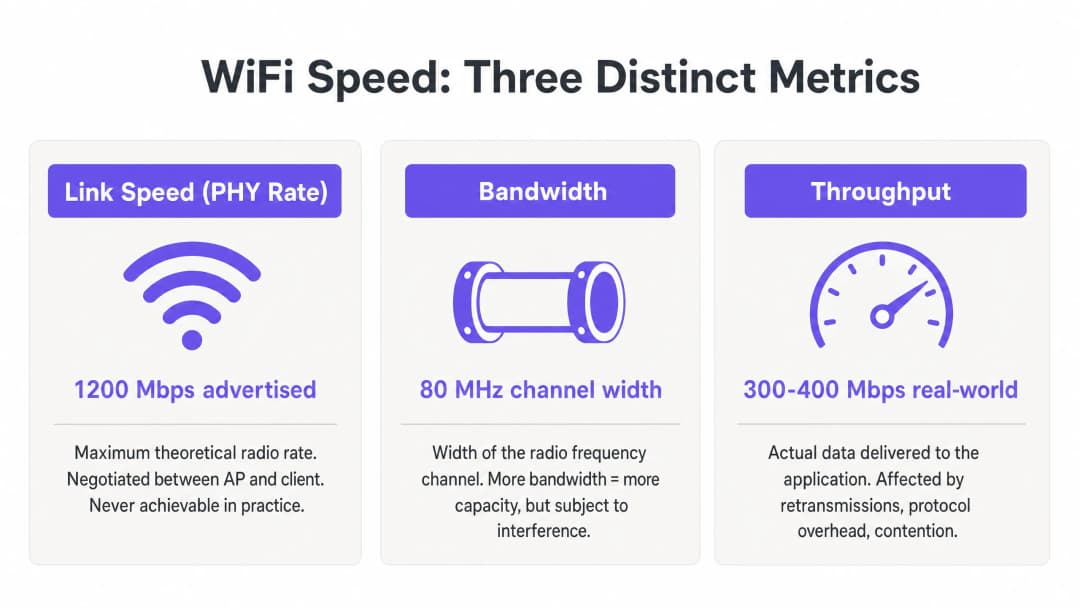
For IT managers and network architects deploying enterprise WLANs, the gap between advertised WiFi speed and the actual user experience is a constant operational challenge. The root cause is almost always a misunderstanding of three distinct metrics: link speed (PHY rate), bandwidth, and throughput. While vendors market maximum theoretical link speeds - for example, 1200 Mbps on 802.11ax - the actual throughput delivered to an application is typically 40-60% of that figure due to protocol overhead, half-duplex radio operation, and environmental contention.
This technical reference guide provides a definitive framework for understanding the WiFi speed meaning in enterprise environments. It equips IT teams in hotels, retail chains, and large venues with the knowledge to accurately measure real-world performance, design for capacity rather than coverage, and align infrastructure investments with measurable business outcomes. By shifting the focus from theoretical maximums to sustained throughput and optimal bandwidth allocation, venue operators can deliver the reliable connectivity that modern Guest WiFi and WiFi Analytics platforms demand.
Technical Deep Dive: Decoding WiFi Speed Metrics
To engineer a robust WLAN, IT professionals must differentiate between the theoretical capabilities of the RF medium and the practical delivery of data payloads. Three metrics - link speed, bandwidth, and throughput - are frequently conflated in vendor marketing, procurement discussions, and even internal IT reporting. Getting this right is fundamental to every subsequent optimisation decision.
Link Speed (PHY Rate): The Theoretical Limit
Link speed, or physical layer (PHY) rate, represents the maximum theoretical data transfer rate between an Access Point (AP) and a client device at the radio level. This rate is dynamically negotiated at the time of association based on the Modulation and Coding Scheme (MCS), the number of spatial streams, and the Signal-to-Noise Ratio (SNR).
Crucially, link speed is practically never achievable. It represents the gross bit rate, which includes all 802.11 management frames, control frames (RTS/CTS and ACK), and inter-frame spacing (AIFS/DIFS). In enterprise deployments across retail or hospitality environments, a client reporting an 866 Mbps link speed on an 802.11ac network is actually only capable of transferring around 400-500 Mbps of real data under ideal, isolated conditions - and far less in shared, multi-client environments.
Bandwidth: RF Channel Capacity
Bandwidth refers to the width of the radio frequency channel allocated for transmission, typically measured in Megahertz (MHz). In the 5 GHz and 6 GHz bands, channels can be 20, 40, 80, or 160 MHz wide. Wider channels provide higher potential link speeds - doubling the channel width approximately doubles the potential data rate - but they increase the noise floor by 3 dB per doubling and significantly reduce the number of available non-overlapping channels.
In high-density environments such as stadiums, conference centres, or hotel corridors, deploying 80 MHz channels often leads to catastrophic co-channel interference (CCI). Therefore, enterprise best practice dictates using 20 MHz or 40 MHz channels to maximise spectral reuse and overall system capacity rather than chasing individual peak speeds. This is a design philosophy that prioritises the total throughput of all users rather than the theoretical maximum for any single user.
Throughput: The Real-World Measurement
Throughput is the actual payload data successfully delivered to the application layer (Layer 7), measured in Megabits per second (Mbps). It is the only metric that truly matters to the end-user, and it is the only metric that should drive network design decisions.
Throughput is fundamentally constrained by the half-duplex nature of WiFi - only one device can transmit on a given channel at a time. When multiple devices compete for airtime, throughput drops proportionally. Furthermore, legacy clients transmitting at lower data rates consume a disproportionate amount of airtime, dragging down faster clients sharing the same channel. Understanding the true cost of airtime consumption is critical when evaluating the impact of background data collection on your WLAN, as explored in-depth in The Hidden Cost of Telemetry Data on Corporate WLANs.
The table below summarises the practical relationship between these three metrics:
| Metric | Definition | Typical Value (802.11ax) | What IT Teams Must Do |
|---|---|---|---|
| Link Speed (PHY Rate) | Gross theoretical radio rate | Up to 9.6 Gbps | Use only as a baseline indicator; never as a performance target |
| Bandwidth (Channel Width) | RF channel width in MHz | 20, 40, 80, or 160 MHz | Default to 40 MHz in the enterprise; 20 MHz in high-density |
| Throughput | Real application-layer data rate | 300-500 Mbps per client (ideal) | This is the primary KPI for all WLAN performance assessments |
Got questions about your specific setup?
Our team works with venue operators, IT managers, and network engineers across 80,000 venues. Book a 20-minute call and we will show you how others like you solved it.
Implementation Guide: Measuring and Optimising Performance
Transitioning from theory to practice requires rigorous measurement methodology and systematic tuning. The following steps outline vendor-neutral best practices applicable across all major WLAN platforms.
Step 1: Establish an Accurate Baseline
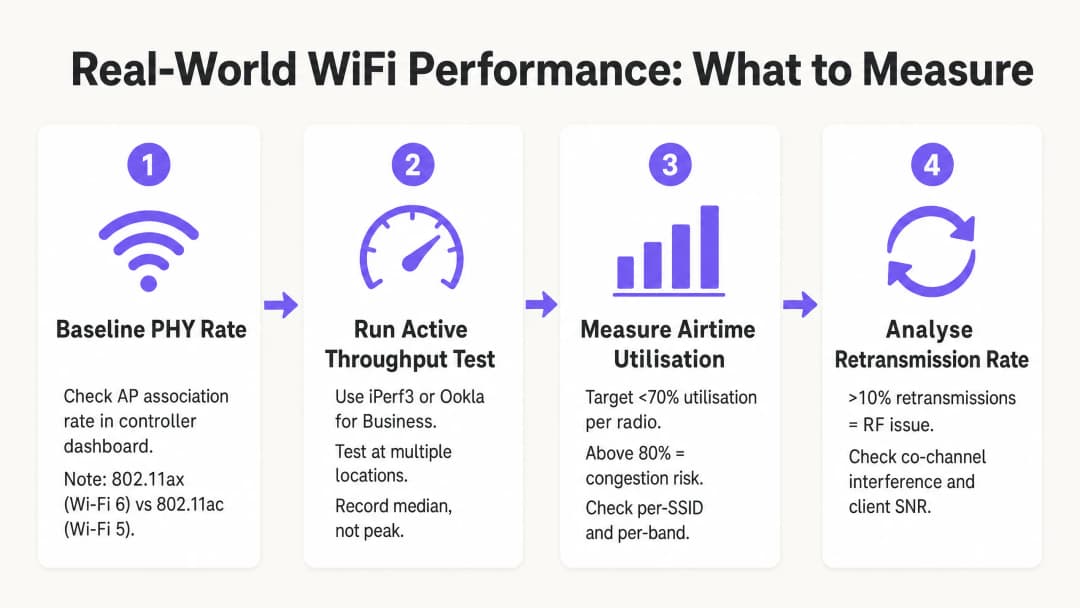
Do not rely on consumer internet speed tests (like fast.com or Speedtest.net) to measure WLAN performance. These tests introduce WAN latency, ISP routing variables, and server-side bottlenecks that are entirely unrelated to your wireless network. Instead, deploy a local iPerf3 server on the same VLAN as the AP management interface to isolate the RF segment. Run UDP throughput tests to assess raw channel capacity, and TCP throughput tests to evaluate application-level performance - TCP is highly sensitive to packet loss and latency, making it an accurate proxy for real application behaviour.
Step 2: Design for Airtime Efficiency
Airtime is the most valuable resource in any WiFi deployment. To maximise throughput across the venue, three configuration changes yield the highest impact:
Disable low basic rates. Disable 802.11b rates (1, 2, 5.5, 11 Mbps) and mandate a minimum basic rate of 12 Mbps or 24 Mbps. This forces clients to transmit management frames faster, freeing up airtime for data payloads. A single management frame sent at 1 Mbps consumes 54 times more airtime than the same frame sent at 54 Mbps.
Enable Airtime Fairness (ATF). Where supported by the vendor, enable ATF to allocate equal transmission time to clients rather than equal packet counts. This prevents slow legacy clients from monopolising the channel at the expense of fast, modern devices.
Optimise channel width. Stick to 20 MHz channels in the 2.4 GHz band (always channels 1, 6, and 11) and 40 MHz in the 5 GHz band by default for high-density enterprise deployments. Reserve 80 MHz channels only for isolated, low-density environments.
Step 3: Implement Modern Authentication and Security
Security protocols affect throughput via encryption overhead and roaming latency. Implement WPA3 where the client estate supports it, or WPA2-Enterprise (IEEE 802.1X) with Fast BSS Transition (802.11r) to reduce roaming delays to under 50 ms. For guest networks, robust network segmentation is required to comply with GDPR and PCI DSS - guest traffic must be isolated from corporate and payment infrastructure via dedicated VLANs and firewall policies. Modern onboarding solutions that minimise authentication friction while maintaining compliance are discussed in How a WiFi Assistant Enables Passwordless Access in 2026.
Best Practices and Industry Standards
The following principles represent the consensus of IEEE 802.11 working group recommendations and enterprise WLAN deployment experience across healthcare, transport, and large venue environments.
Capacity over coverage. In modern enterprise environments, APs must be deployed to handle client density, not just to provide a signal. A strong signal (coverage) does not guarantee high throughput (capacity) if the channel is congested. These two are completely different engineering objectives.
Band steering. Aggressively steer dual-band and tri-band clients to 5 GHz and 6 GHz bands to reduce congestion on the narrow 2.4 GHz spectrum. The 2.4 GHz band offers only three non-overlapping channels (1, 6, 11) and is subject to significant interference from non-WiFi devices.
Minimum SNR threshold. Configure AP radios to reject client association below a minimum SNR threshold (typically 20 dB). This prevents distant, weak clients from associating and transmitting at low MCS rates, which would consume excessive airtime.
Regular RF audits. Conduct spectrum analysis and active throughput testing at least quarterly, and immediately following any significant physical environment changes (new partitions, AV equipment, or tenant changes). The RF environment is dynamic; a channel plan that worked at deployment time may be sub-optimal six months later.
Troubleshooting and risk mitigation
When throughput drops, IT teams should systematically diagnose the RF environment rather than immediately upgrading hardware. Most enterprise WLAN performance issues are configuration and design issues, not hardware limitations.
High retransmission rates. Retransmission rates above 10% typically indicate RF interference, hidden node issues, or poor client SNR. Use spectrum analysis tools to identify non-WiFi interference sources - microwave ovens, AV equipment, and neighbouring networks are common culprits in hospitality and retail environments.
Co-channel interference (CCI). If multiple APs on the same channel can hear each other at -85 dBm or stronger, they share the same collision domain, significantly reducing throughput for all clients on that channel. Mitigate this by reducing AP transmit power, narrowing channel width, and ensuring dynamic channel assignment (DCA) algorithms are functioning correctly.
Sticky clients. Clients that fail to roam from a distant AP to a closer AP maintain a low SNR, forcing the AP to use a lower MCS rate and consuming excessive airtime. Mitigate this with minimum RSSI thresholds for association, 802.11v BSS Transition Management, and 802.11r fast roaming.
Client driver issues. Outdated wireless drivers on end-user devices can cause incorrect MCS negotiation, failure to use MIMO spatial streams, or aggressive power-saving behaviour that disrupts throughput. Maintain a client device management policy that includes wireless driver version standards.
ROI and Business Impact
Optimising WiFi for throughput rather than theoretical link speed directly impacts the bottom line in every vertical. In transport hubs and large venues, reliable connectivity is essential for operational efficiency - from mobile point-of-sale (mPOS) systems to digital signage and access control.
For venue operators, high-throughput networks enable advanced location-based services and analytics. Ensuring consistent, reliable connectivity is a prerequisite for features like Purple launches offline maps mode for seamless, secure navigation of WiFi hotspots, which enhance the guest experience and drive measurable engagement. Purple's public sector expansion, detailed in Purple appoints Iain Fox as VP Growth - Public Sector to drive digital inclusion and smart city innovation, further underlines the importance of reliable, high-throughput public WiFi infrastructure as the foundation for smart city services.
The business case for throughput-focused WLAN design is straightforward: a network that consistently delivers 200 Mbps per client during peak hours is more valuable than one delivering 866 Mbps link speed with 85% airtime utilisation and unpredictable real-world performance. By aligning IT metrics - throughput, airtime utilisation, retransmission rates - with business outcomes - guest satisfaction scores, mPOS transaction reliability, operational uptime - IT leaders can justify infrastructure investments and demonstrate clear, measurable ROI.
Key Definitions
Link Speed (PHY Rate)
The maximum theoretical physical layer data rate negotiated between a client and an AP, measured in Mbps. Determined by MCS index, spatial streams, and channel width.
Frequently cited in vendor marketing and procurement documents. IT teams must understand this is a gross rate that includes massive protocol overhead and is never achievable as application throughput.
Throughput
The actual rate of successful payload data delivery over a communication channel to the application layer, measured in Mbps.
The primary KPI for any WLAN performance assessment. The only metric that accurately reflects end-user experience and application performance.
Bandwidth (RF Channel Width)
The width of the frequency spectrum allocated for a transmission channel, typically 20, 40, 80, or 160 MHz in the 5 GHz band.
Determines the potential capacity of the channel. Wider bandwidths increase peak link speed but reduce the number of non-overlapping channels and increase susceptibility to interference in dense deployments.
Co-Channel Interference (CCI)
Performance degradation caused when multiple APs operate on the same frequency channel and can detect each other's transmissions, forcing them to share airtime via the CSMA/CA contention mechanism.
The primary cause of poor throughput in dense enterprise deployments. Mitigated by proper channel planning, reduced transmit power, and narrower channel widths.
Airtime Utilisation
The percentage of time a specific RF channel is occupied with transmissions (data, management, or control frames).
A critical operational metric. Sustained utilisation above 70-80% indicates severe congestion and impending throughput collapse. Should be monitored per-radio and per-SSID.
Half-Duplex
A communication mode where data can be transmitted in both directions, but only one direction at a time on a shared medium.
The fundamental characteristic of WiFi that limits throughput to significantly below the theoretical link speed. Unlike wired Ethernet (full-duplex), WiFi requires all devices to take turns transmitting.
Spatial Streams (MIMO)
Multiple independent data signals transmitted simultaneously using Multiple Input Multiple Output (MIMO) antenna technology, increasing throughput without requiring wider bandwidth.
A key differentiator between 802.11ac (up to 8 spatial streams) and 802.11ax (WiFi 6). Effective only when both the AP and client device support multiple antennas.
Basic Rates
The mandatory data rates that all clients must support to associate with a BSS. Management and control frames are transmitted at the lowest enabled basic rate.
Disabling low basic rates (1, 2, 5.5, 11 Mbps) is a standard and highly effective IT configuration practice. A frame sent at 1 Mbps consumes 54 times more airtime than the same frame at 54 Mbps.
MCS (Modulation and Coding Scheme)
An index value that defines the combination of modulation technique (e.g., 256-QAM, 1024-QAM) and forward error correction coding rate used for a given transmission.
Higher MCS indices deliver higher throughput but require a stronger signal-to-noise ratio. The AP and client negotiate the highest feasible MCS based on current RF conditions.
Worked Examples
A 400-room hotel is experiencing guest complaints about slow WiFi speeds during the evening peak (7 PM - 10 PM). The IT manager notes that the APs are reporting link speeds of 866 Mbps, but guests are struggling to stream video. The network uses 80 MHz channels on the 5 GHz band with APs deployed in corridors at maximum transmit power.
- Conduct an airtime utilisation assessment during peak hours using the WLAN controller's built-in analytics or a dedicated tool such as Ekahau Sidekick. Expect to find utilisation above 80% on the primary 5 GHz channels, confirming Co-Channel Interference (CCI). 2. Reconfigure the WLAN controller to reduce channel widths on the 5 GHz band from 80 MHz to 40 MHz. This doubles the number of available non-overlapping channels from 6 to 12 in the UNII-1/UNII-3 bands, significantly reducing CCI. 3. Reduce AP transmit power to approximately 11-14 dBm to shrink cell sizes and reduce the number of APs that can hear each other on the same channel. 4. Enable dynamic channel assignment (DCA) to allow the controller to optimise channel allocation automatically. 5. Implement per-client bandwidth throttling (e.g., 15 Mbps downstream per device) to prevent individual users from monopolising the internet uplink during peak hours.
A large retail chain is deploying mobile Point-of-Sale (mPOS) tablets across 50 stores. The tablets require reliable, low-latency connections for payment processing, but are frequently dropping sessions when staff move between aisles. The WLAN uses WPA2-Personal with default basic rates enabled.
- Implement IEEE 802.11r (Fast BSS Transition) on the corporate mPOS SSID to reduce roaming authentication delays from 300-500 ms to under 50 ms. This is critical for session-sensitive payment applications. 2. Adjust the AP minimum mandatory basic rate to 12 Mbps. This reduces the effective cell size, encouraging tablets to roam to closer APs sooner rather than maintaining a weak connection to a distant AP (sticky client behaviour). 3. Migrate the mPOS SSID from WPA2-Personal to WPA2-Enterprise (802.1X) with certificate-based authentication to meet PCI DSS requirements for cardholder data environments. 4. Apply WMM (WiFi Multimedia) QoS tags to the mPOS SSID, prioritising traffic in the Voice or Video queue to protect throughput during periods of high guest network usage. 5. Implement 802.11k (Neighbour Reports) and 802.11v (BSS Transition Management) to assist tablets in identifying and roaming to optimal APs proactively.
Practice Questions
Q1. You are designing the WLAN for a high-density university lecture theatre with 300 seats. Your goal is to maximise aggregate throughput for all users simultaneously. The venue has 8 APs deployed in the ceiling. Should you configure the 5 GHz radios to use 20 MHz, 40 MHz, or 80 MHz channel widths?
Hint: Consider the number of non-overlapping channels available in the 5 GHz UNII-1 and UNII-3 bands, and the impact of Co-Channel Interference in a single open room with multiple APs.
View model answer
Use 20 MHz channels. In a high-density, single-room environment with 8 APs, you need each AP to operate on a distinct, non-overlapping channel to avoid CCI. The 5 GHz band offers approximately 24 non-overlapping 20 MHz channels (in regions with full UNII band access), but only 6 non-overlapping 40 MHz channels and 3 non-overlapping 80 MHz channels. With 8 APs using 80 MHz channels, at least 5 APs would be sharing channels, creating severe CCI. By using 20 MHz channels, you can assign unique channels to all 8 APs, allowing them to transmit simultaneously without contention. The individual link speed per client will be lower, but the aggregate throughput across all 300 users will be dramatically higher.
Q2. A client complains that their new 802.11ax (WiFi 6) laptop only achieves 480 Mbps on a local iPerf3 test, despite Windows reporting a link speed of 1.2 Gbps. The client believes the AP is faulty. How do you assess and explain this situation?
Hint: Apply the Rule of Half and consider the relationship between PHY rate and TCP throughput in a half-duplex medium.
View model answer
The AP is almost certainly functioning correctly. The 1.2 Gbps is the negotiated Link Speed (PHY rate) - the gross theoretical radio rate. Because WiFi is half-duplex, and because the 802.11 protocol requires significant overhead (management frames, ACKs, inter-frame spacing), actual TCP throughput is typically 40-60% of the link speed. 480 Mbps from a 1.2 Gbps link represents a 40% efficiency ratio, which is within the expected range and indicates the network is performing well. To confirm, check the retransmission rate (should be below 5%) and airtime utilisation (should be below 50% for a single-client test). If both are healthy, the result is excellent and the AP should not be replaced.
Q3. During a site survey in a busy retail warehouse, you notice the airtime utilisation on channel 6 (2.4 GHz) is consistently at 88%, but there are only 6 active clients connected to the AP. The AP is a modern 802.11ax device. What are the two most likely causes, and what is the remediation for each?
Hint: Think about how legacy data rates affect airtime consumption, and consider sources of non-WiFi interference common in warehouse environments.
View model answer
Cause 1: Legacy basic rates are enabled. If the AP is transmitting management frames (beacons, probe responses) at 1 Mbps, each frame takes 54 times longer than at 54 Mbps, consuming enormous amounts of airtime even with few clients. Remediation: Disable 802.11b rates and set the minimum basic rate to 12 Mbps or 24 Mbps. Cause 2: Non-WiFi interference in the 2.4 GHz band. Warehouses commonly contain microwave ovens, Bluetooth devices, and older industrial wireless equipment that generate broadband interference in the 2.4 GHz band, artificially inflating airtime utilisation figures. Remediation: Conduct a spectrum analysis using a tool such as Ekahau Sidekick or a dedicated spectrum analyser to identify the interference source, and where possible migrate clients to the 5 GHz band.
Continue reading in this series
How to Scan for WiFi Interference and Find the Best Channel
This comprehensive technical guide provides enterprise IT leaders with actionable methodologies for identifying RF interference and selecting the optimal 5GHz channels. It covers spectrum analysis, DFS considerations, and practical deployment strategies to maximise throughput and reduce latency without requiring new hardware investments.
How to Improve WiFi Speed Without Buying New Access Points
This guide details how enterprise venues can reclaim 30%+ of their WiFi bandwidth without purchasing new access points. By implementing DNS filtering, band steering, and QoS policies, IT teams can extend hardware lifespans, reduce CapEx, and improve network performance and security.
Reducing Latency on High-Density WiFi Networks
This guide details how eliminating unnecessary DNS lookups for tracking domains drastically lowers latency on high-density WiFi networks. It provides actionable architecture, implementation, and ROI guidance for IT leaders managing congested venue environments.
Got questions about your specific setup?
Our team works with venue operators, IT managers, and network engineers across 80,000 venues. Book a 20-minute call and we will show you how others like you solved it.