
EAP-TLS vs EAP-TTLS: Which Certificate-Based WiFi Protocol Should You Choose?
This guide provides a definitive head-to-head comparison of EAP-TLS and EAP-TTLS for enterprise WiFi authentication under IEEE 802.1X. It explains the architectural difference between mutual certificate authentication and server-only certificate tunnelling, and gives IT managers, network architects, and CISOs a clear decision framework based on device management capabilities and compliance requirements. Purple supports both EAP-TLS and EAP-TTLS authentication paths for Staff WiFi, and this guide helps organisations understand the infrastructure trade-offs before committing to either approach.
Video overview
Listen to this guide
View podcast transcript
Part of our core series: Enterprise WiFi Security Guide →

Executive Summary
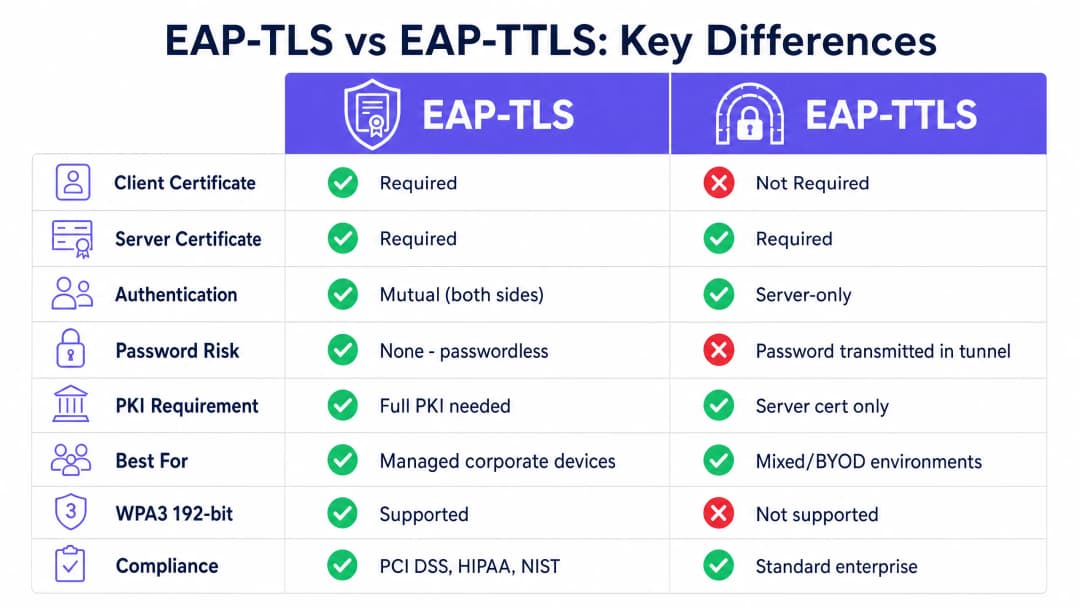
Choosing the right EAP method for your 802.1X deployment determines whether your enterprise Wi-Fi is truly secure or merely compliant on paper. EAP-TLS (Extensible Authentication Protocol - Transport Layer Security), defined in RFC 5216, requires mutual certificate authentication: both the client device and the RADIUS server present valid X.509 certificates before network access is granted. At no point are passwords exchanged. EAP-TTLS (Tunneled Transport Layer Security), defined in RFC 5281, requires only a server-side certificate to establish an encrypted TLS tunnel, inside which the client authenticates using existing directory credentials.
For CTOs and network architects managing infrastructure across retail chains, hospitality venues, and public sector organisations, this decision boils down to one question: do you manage the devices? If you control the device fleet via MDM, EAP-TLS is the definitive choice. If you support a diverse BYOD environment or lack a robust Public Key Infrastructure (PKI), EAP-TTLS provides a pragmatic, highly secure alternative. Purple supports both authentication paths for Staff Wi-Fi across 80,000+ live venues.
Technical Deep-Dive
Architecture of EAP-TLS
EAP-TLS operates on a mutual authentication model within the IEEE 802.1X port-based access control framework. Every authentication exchange involves three core components: the supplicant (client device), the authenticator (wireless access point), and the authentication server (RADIUS server). The access point does not make the authentication decision itself. It acts as a transparent relay, encapsulating EAP messages into RADIUS packets and forwarding them to the authentication server. The EAP-TLS handshake proceeds as follows. The access point sends an EAP-Request/Identity to the connecting device. The device responds with its identity. The RADIUS server initiates the TLS handshake with an EAP-TLS/Start message. The client sends a ClientHello, advertising its supported TLS cipher suites. The RADIUS server responds with a ServerHello, its X.509 server certificate, and a certificate request. The client validates the server certificate against its trusted root CA store. If validation fails, the handshake terminates - providing protection against rogue access points. The client then presents its own X.509 certificate. The RADIUS server validates the client certificate, checking the signature chain up to the trusted root CA, verifying that the certificate has not expired, and checking the certificate revocation list (CRL) or querying OCSP. Only when both parties are satisfied is the TLS tunnel established and network access granted.
Since no passwords are exchanged, EAP-TLS is secure from offline dictionary attacks, credential stuffing, and phishing. It is the only EAP method that meets WPA3-Enterprise 192-bit (Suite B) requirements, and it is mandated or strongly recommended by PCI DSS 4.0 for cardholder data environments and by NIST SP 800-120 for high-security wireless deployments.
EAP-TLS requires a PKI. You need at least an offline root CA and an online issuing CA. The root CA must be air-gapped, as its private key is the master trust anchor for your entire certificate hierarchy. The issuing CA handles daily certificate issuance and publishes CRLs. Client certificates are issued to individual devices, not users - this is a device-identity model. This distinction is critical for IoT devices, shared terminals, and headless systems.
Structure of EAP-TTLS
EAP-TTLS was designed to provide robust 802.1X security without the operational burden of deploying certificates on every client device. It works in two phases. In the first phase, the RADIUS server presents its certificate and establishes a secure TLS tunnel. Only the server requires a certificate. In the second phase, the client is authorised within that encrypted tunnel using an internal authentication method. Common internal methods include PAP (Password Authentication Protocol), CHAP, and MS-CHAPv2. The client sends its username and password, but because this exchange occurs within the TLS tunnel, credentials are encrypted in transit and never exposed over the air.
EAP-TTLS provides excellent cross-platform support across macOS, Linux, Android, and iOS. The caveat is with Windows: the built-in Windows supplicant does not natively support EAP-TTLS for wireless 802.1X out of the box. Environments with a high volume of Windows devices may require a third-party supplicant, which increases operational complexity. For Windows-centric environments, PEAP with MS-CHAPv2 is often the more pragmatic choice.
The biggest limitation of EAP-TTLS is that it does not eliminate the inherent risks of passwords. If a user chooses a weak password, it remains vulnerable to offline brute force attacks. If the inner authentication uses PAP, the password is sent in plaintext within the tunnel - which is acceptable if you trust your RADIUS infrastructure, but remains an essential trust model to understand.
Side-by-Side Comparison
| Feature | EAP-TLS | EAP-TTLS |
|---|---|---|
| RFC Standard | RFC 5216 | RFC 5281 |
| Client Certificate Required | Yes | No |
| Server Certificate Required | Yes | Yes |
| Authentication Model | Mutual (Both Sides) | Server-Only |
| Password Risk | None - Passwordless | Password in Encrypted Tunnel |
| PKI Requirement | Full PKI (Root CA + Issuing CA + MDM) | Server Certificate Only |
| WPA3-Enterprise 192-bit | Required Method | Not Supported |
| PCI DSS 4.0 Alignment | Strongly Recommended | Acceptable with Strong Inner Authentication |
| BYOD Suitability | Low (Requires Client Cert) | High (Credentials Only) |
| IoT Device Suitability | High (Cert Provisioned on Staging) | Low (No UI for Credential Input) |
| Windows Native Support | Yes | Partial (Often Requires Third-Party Supplicant) |
| macOS/Linux/Android Support | Yes | Yes |
| Deployment Complexity | High | Medium |
Implementation Guide
Deploying EAP-TLS for Managed Fleets
Deploying EAP-TLS requires a functional PKI and an MDM platform. Manual certificate installation is not viable at enterprise scale. You must integrate your PKI with your MDM using SCEP (Simple Certificate Enrolment Protocol) or EST (Enrolment over Secure Transport). When a corporate device is enrolled, it automatically requests and receives its certificate without user intervention.
For identity management, Purple acts as a free identity provider for services like OpenRoaming under the Connect licence, facilitating secure roaming across different locations using underlying certificate and identity frameworks.
On the RADIUS side, configure your server to validate client certificates against your internal CA and check CRLs or use OCSP for real-time revocation checking. Supported RADIUS platforms include FreeRADIUS, Microsoft NPS, and Cisco ISE. Purple's cloud overlay integrates with Cisco Meraki, HPE Aruba, Ruckus, Juniper Mist, Ubiquiti UniFi, Cambium, Extreme, and Fortinet hardware.
Deploying EAP-TTLS for Mixed Environments
EAP-TTLS is the optimal choice for environments with unmanaged devices. You only need to deploy a trusted certificate on your RADIUS server. Ensure that your RADIUS server integrates directly with your directory service - Microsoft Entra ID, Okta, or Google Workspace - to validate internal authentication credentials. Configure your MDM-deployed WiFi profiles to enforce server certificate validation against your specific trusted CA. Without this step, the TLS tunnel provides no protection against rogue access points.

Got questions about your specific setup?
Our team works with venue operators, IT managers, and network engineers across 80,000 venues. Book a 20-minute call and we will show you how others like you solved it.
Best Practices
Enforce Server Certificate Validation on Every Client
The most critical configuration step for both EAP-TLS and EAP-TTLS is to enforce server certificate validation on client devices. If a device does not validate the RADIUS server's certificate against a specific trusted CA, it will connect to any server presenting any certificate - including a rogue access point. Always specify the trusted CA and expected server name in your MDM-deployed WiFi profiles. This single configuration check is the most effective security improvement you can implement today.
Automate Certificate Lifecycle Management
Certificates expire. If you do not have an automated renewal process, you will face mass authentication failures when certificates expire simultaneously. Use SCEP or EST to automate renewals, and configure monitoring alerts well ahead of expiry dates. If a device is lost or an employee leaves, revoke the certificate immediately. Configure your RADIUS server to check CRLs or use OCSP for real-time validation.
Segment Your Network by Authentication Method
In large or distributed environments, consider running both protocols on separate SSIDs. Corporate managed devices authenticate via EAP-TLS on a dedicated staff WiFi SSID. Contractors and BYOD devices authenticate via EAP-TTLS on a separate SSID with appropriate VLAN segmentation. This pattern is common in hospitality groups like Premier Inn and Whitbread, where staff devices are managed and issued certificates, whilst guest infrastructure uses a separate authentication path. For more details on SSID architecture, see our guide Three SSIDs to rule them all: the WiFi design for guest, staff and IoT.
Synchronise Time Across All Infrastructure
Certificate validation relies on accurate system time. Clock drift on client devices or RADIUS servers generates 'not yet valid' or 'expired' certificate errors that are difficult to diagnose. Ensure all infrastructure components are synchronised with reliable NTP servers.
Troubleshooting and Risk Mitigation
Unknown CA Errors
If RADIUS logs show 'unknown CA', the client device does not trust the CA that issued the RADIUS server's certificate. Verify that your MDM profile includes the root CA certificate and the supplicant is configured to trust it. Following a CA rotation or certificate renewal, re-push the updated CA bundle to all devices.
EAP Method Mismatch
If devices connect to the access point but authentication fails, check that the EAP method configured on the client matches the method accepted by the RADIUS server. A device profile set for EAP-TLS will fail on a RADIUS server configured only for PEAP.
Mass Failures Due to Expired Certificates
If a large number of devices fail to authenticate simultaneously, first check the certificate expiry dates. This is the most common cause of mass 802.1X failures in EAP-TLS deployments. Implement a monitoring system that sends alerts 60 days, 30 days and seven days prior to expiry.
RADIUS Client Misconfiguration
Each access point or wireless controller must be defined as a RADIUS client with the correct IP address and shared secret. Mismatches cause authentication timeouts that are often incorrectly attributed to the EAP method. Enable detailed RADIUS logging from day one. For further WiFi troubleshooting guidance, see our guide Troubleshooting Public WiFi: Fixing 'Connected, No Internet' and Splash Page Redirection Failures.
Compliance and Regulatory Alignment
For CISOs and network architects, understanding the regulatory landscape is essential when deciding between EAP-TLS and EAP-TTLS. The choice of EAP method directly impacts your compliance posture across several key frameworks.
PCI DSS 4.0 (Payment Card Industry Data Security Standard) requires strong cryptographic authentication for wireless networks in cardholder data environments. Requirement 8.3 mandates multi-factor authentication for all access to the CDE, and in-scope wireless networks must utilise strong authentication mechanisms. EAP-TLS, with certificate-based mutual authentication, definitively meets this requirement. EAP-TTLS with MS-CHAPv2 is acceptable if the inner authentication is properly secured and server certificate validation is enforced, but EAP-TLS is the more robust and auditor-friendly choice. HIPAA (Health Insurance Portability and Accountability Act) requires covered entities to implement technical safeguards that protect electronic protected health information (ePHI) transmitted over electronic communications networks. The HIPAA Security Rule does not mandate specific protocols, but the expectation of encryption and access control for wireless networks carrying ePHI leans heavily in favour of EAP-TLS for managed medical device fleets and EAP-TTLS with enforced server certificate validation for staff devices.
WPA3-Enterprise 192-bit (also known as Suite B or CNSA mode) is the highest security level of the Wi-Fi Alliance's WPA3 certification. It mandates EAP-TLS as the only permitted authentication method, requires TLS 1.2 or higher with specific cipher suites (ECDHE with P-384, AES-256-GCM), and requires ECDSA or RSA-3072 certificates. Organisations deploying WPA3-Enterprise 192-bit for government, defence, or critical infrastructure applications must use EAP-TLS. ISO/IEC 27001 does not mandate specific protocols, but requires organisations to implement appropriate access controls for network resources. An 802.1X deployment with either EAP-TLS or EAP-TTLS (with enforced server certificate validation) satisfies the network access control requirements of Annex A.9.1 and A.13.1.
ROI and Business Impact
Migrating to EAP-TLS requires an initial investment in PKI and MDM integration, but it eliminates the operational overhead of password resets and the financial risk of network breaches due to compromised credentials. For a retail chain with 400 stores, a single compromised password on a shared PSK network can jeopardise the entire estate. EAP-TLS completely eliminates that attack vector.
For multi-tenant environments and travel hubs, secure authentication ensures that only authorised users access network bandwidth, thereby optimising infrastructure utilisation. Dynamic VLAN assignment via RADIUS certificate attributes enables cryptographically enforced network segmentation, ensuring devices are placed on the correct network segment based on certificate properties rather than relying on SSID selection or MAC address filtering.
Purple's WiFi Analytics platform integrates with both authentication paths, providing visibility into device counts, session durations, and network utilisation across your entire estate. For sector-specific deployment guidance, explore our resources for Hospitality, Retail, Healthcare, and Transport.
Key Definitions
EAP-TLS (Extensible Authentication Protocol - Transport Layer Security)
An 802.1X authentication method defined in RFC 5216 that requires both the client device and the RADIUS server to present valid X.509 certificates. No passwords are exchanged. Authentication is mutual and cryptographically bound.
The gold standard for enterprise wireless security. Required for WPA3-Enterprise 192-bit and strongly recommended for PCI DSS 4.0 cardholder data environments.
EAP-TTLS (Extensible Authentication Protocol - Tunneled Transport Layer Security)
An 802.1X authentication method defined in RFC 5281 that requires only a server-side certificate to establish an encrypted TLS tunnel. The client authenticates inside the tunnel using a secondary inner authentication method, typically a username and password.
The preferred choice for BYOD environments and mixed-OS networks where deploying client certificates is operationally impractical.
802.1X
An IEEE standard for port-based network access control that provides an authentication mechanism for devices connecting to a LAN or WLAN. It defines the roles of supplicant, authenticator, and authentication server.
The foundational framework that enables enterprise networks to authenticate individual devices rather than relying on a single shared password. Both EAP-TLS and EAP-TTLS operate within this framework.
RADIUS (Remote Authentication Dial-In User Service)
A networking protocol that provides centralised authentication, authorisation, and accounting management for users connecting to a network service. In 802.1X deployments, the RADIUS server is the authentication server that verifies certificates or credentials.
The server component that verifies the certificates or passwords and instructs the access point whether to grant or deny network access. Supported platforms include FreeRADIUS, Microsoft NPS, and Cisco ISE.
PKI (Public Key Infrastructure)
A set of roles, policies, hardware, software, and procedures needed to create, manage, distribute, use, store, and revoke digital certificates. A typical enterprise PKI consists of an offline root CA and an online issuing CA.
The backend infrastructure required to issue the client and server certificates used in EAP-TLS authentication. Without a PKI, EAP-TLS cannot be deployed.
MDM (Mobile Device Management)
Software used by IT departments to monitor, manage, and secure employees' mobile devices and laptops. MDM platforms like Microsoft Intune and Jamf can automate the deployment of certificates and WiFi profiles to enrolled devices.
Essential for automating the deployment of client certificates for EAP-TLS at scale. Without MDM integration, manually installing certificates on thousands of devices is operationally impossible.
SCEP (Simple Certificate Enrollment Protocol)
A protocol used to automate the issuance of digital certificates to network devices. MDM platforms use SCEP to silently request and install certificates on enrolled corporate devices without user interaction.
The standard mechanism for zero-touch certificate provisioning in EAP-TLS deployments. Supported by Microsoft Intune, Jamf, and most enterprise MDM platforms.
CRL (Certificate Revocation List)
A list of digital certificates that have been revoked by the issuing Certificate Authority before their scheduled expiry date. RADIUS servers check the CRL to verify that a connecting device's certificate is still valid.
The mechanism that allows you to immediately block a stolen or compromised device from the network by revoking its certificate. RADIUS servers should be configured to check the CRL frequently, or use OCSP for real-time validation.
X.509
An ITU-T standard defining the format of public key certificates. EAP-TLS and EAP-TTLS both use X.509 certificates for server authentication. EAP-TLS also requires X.509 certificates on the client device.
The certificate format used in all enterprise PKI deployments. When IT teams refer to 'digital certificates' in the context of 802.1X, they mean X.509 certificates.
Inner authentication method
The secondary authentication protocol used inside the encrypted TLS tunnel established by EAP-TTLS. Common inner methods include PAP (Password Authentication Protocol), CHAP, and MS-CHAPv2.
The choice of inner authentication method affects the security properties of an EAP-TTLS deployment. PAP sends the password in plaintext inside the tunnel; MS-CHAPv2 uses a challenge-response mechanism. The tunnel encrypts all inner authentication traffic.
Worked Examples
A national retail chain with 400 stores needs to secure its point-of-sale (POS) terminals and staff handheld scanners. The environment is in scope for PCI DSS 4.0. All devices are enrolled in Microsoft Intune. Which protocol should they deploy, and what are the key configuration steps?
Deploy EAP-TLS. Step 1: Establish a two-tier PKI with an air-gapped offline root CA and an online issuing CA. Step 2: Configure Microsoft Intune with a SCEP certificate profile targeting all POS and scanner devices. Step 3: Deploy a RADIUS server (Microsoft NPS or cloud RADIUS) and configure it to validate client certificates against the internal CA. Step 4: Enable CRL checking or OCSP on the RADIUS server. Step 5: Push a WiFi profile via Intune specifying the SSID, EAP-TLS as the authentication method, the trusted root CA, and the expected RADIUS server name. Step 6: Test with a pilot group of 10 devices before rolling out to all 400 sites. Step 7: Establish a certificate expiry monitoring process with alerts at 60, 30, and seven days before expiry.
A large university campus needs to provide secure WiFi for 20,000 students using a mix of personal laptops, smartphones, and tablets (BYOD). The IT team cannot install certificates on personal devices. The university uses Microsoft Entra ID for identity management. Which protocol should they deploy?
Deploy EAP-TTLS with MS-CHAPv2 as the inner authentication method, integrated with Microsoft Entra ID via RADIUS. Step 1: Obtain a server certificate from a public CA trusted by all major operating systems, or deploy an internal CA and distribute the root certificate via the university's device management tools for managed devices. Step 2: Configure the RADIUS server to authenticate against Microsoft Entra ID using LDAP or RADIUS proxy. Step 3: Create a WiFi onboarding guide for students specifying the SSID, EAP-TTLS, MS-CHAPv2, and the trusted CA. Step 4: Enforce strong password policies at the Entra ID level and consider enabling multi-factor authentication for initial enrolment. Step 5: Configure the WiFi profile to enforce server certificate validation and specify the trusted CA and RADIUS server name.
Practice Questions
Q1. You are deploying EAP-TLS for a fleet of 5,000 corporate laptops across 50 office locations. After pushing the WiFi profile via Microsoft Intune, devices are failing to connect. The RADIUS server logs show 'Unknown CA' for every failed authentication attempt. What is the most likely cause, and how do you resolve it?
Hint: Consider the certificate validation chain on the client side, and what the MDM profile must include beyond just the EAP method setting.
View model answer
The client devices are not configured to trust the internal Certificate Authority that issued the RADIUS server's certificate. The MDM WiFi profile must include the root CA certificate (and any intermediate CA certificates) and configure the supplicant to trust them for server validation. Without this, the client rejects the RADIUS server's certificate and terminates the handshake. Resolution: update the Intune WiFi profile to include the trusted root CA certificate under the 'Root certificate for server validation' setting, and re-push the profile to all devices.
Q2. Your organisation has deployed EAP-TTLS for a mixed BYOD environment. During a security review, your penetration testing team demonstrates that they can capture user credentials by setting up a rogue access point with a self-signed certificate. How do you remediate this vulnerability without migrating to EAP-TLS?
Hint: Think about what happens before the inner authentication and what configuration on the client side prevents the TLS tunnel from establishing with an untrusted server.
View model answer
The vulnerability exists because client devices are not configured to validate the RADIUS server's certificate. Remediation: update all WiFi profiles (via MDM for managed devices, and via a new onboarding guide for BYOD) to enforce server certificate validation. Specify the trusted CA and the expected RADIUS server name in the profile. Clients configured this way will refuse to establish the TLS tunnel with any server that cannot present a certificate signed by the specified trusted CA, eliminating the rogue access point attack vector.
Q3. A hospital IT director wants to deploy 802.1X for their medical IoT devices (infusion pumps, patient monitors, environmental sensors). They are considering EAP-TTLS because they believe certificate management is too complex. Why is this reasoning flawed, and what is the correct approach?
Hint: Consider how headless IoT devices handle authentication prompts and what happens when a device cannot input credentials.
View model answer
The reasoning is flawed for two reasons. First, most headless medical IoT devices do not have a user interface to input credentials, making EAP-TTLS with username/password inner authentication operationally impossible. Second, EAP-TLS is actually simpler for IoT in practice: certificates can be provisioned during device staging before deployment, and the device authenticates automatically with no user interaction. The correct approach is EAP-TLS with certificates provisioned via the device management system used during staging. This also satisfies HIPAA requirements for strong wireless authentication in healthcare environments.
Q4. You are the network architect for a hotel group with 200 properties. You need to secure Staff WiFi for 3,000 managed staff devices (enrolled in Intune) and also provide secure WiFi for contractors and third-party vendors who bring their own laptops. Design the authentication architecture.
Hint: Consider whether a single SSID with a single EAP method can serve both populations, and what network segmentation implications arise from the two user types.
View model answer
Deploy two separate SSIDs with different authentication methods and VLAN assignments. SSID 1 (Staff WiFi): EAP-TLS, certificates pushed via Intune SCEP, VLAN assigned to the staff network segment with full access to hotel management systems. SSID 2 (Contractor WiFi): EAP-TTLS with MS-CHAPv2, credentials validated against a separate directory or a time-limited contractor account in Microsoft Entra ID, VLAN assigned to an isolated internet-only segment with no access to internal systems. Both SSIDs must enforce server certificate validation. This architecture gives staff the highest security while providing contractors with a practical authentication method, and network segmentation ensures that a compromised contractor credential cannot reach internal hotel management systems.
Continue reading in this series
A Network Administrator’s Guide to Configuring RADIUS Authentication for Guest WiFi
A comprehensive technical reference for network administrators on deploying RADIUS authentication for guest WiFi. Covers architecture, vendor-neutral configuration steps, security best practices, and troubleshooting common deployment failures.
Implementing SCEP for Secure BYOD and 802.1X WiFi in Higher Education
This technical guide details how higher education IT teams can automate 802.1X certificate enrollment for thousands of BYOD devices using SCEP. It covers the architecture, security benefits, and practical deployment steps to replace manual onboarding with a secure, zero-touch network access model.
Configuring RADIUS Authentication for Guest and Staff WiFi Networks
This technical reference guide outlines the architecture, configuration, and deployment of RADIUS authentication for enterprise guest and staff WiFi networks. It provides network architects and IT managers with the exact protocols, security standards, and troubleshooting methodologies required to build secure, scalable wireless access control systems.
Got questions about your specific setup?
Our team works with venue operators, IT managers, and network engineers across 80,000 venues. Book a 20-minute call and we will show you how others like you solved it.