
eduroam and 802.1X: Secure WiFi Authentication for Higher Education
This authoritative technical reference guide explains the architecture, deployment, and security of eduroam and 802.1X authentication. Designed for IT managers and network architects, it covers practical implementation steps, EAP method selection, and how venue operators can securely support academic roaming.
Video overview
Listen to this guide
View podcast transcript
Part of our core series: Enterprise WiFi Security Guide →

Executive Summary
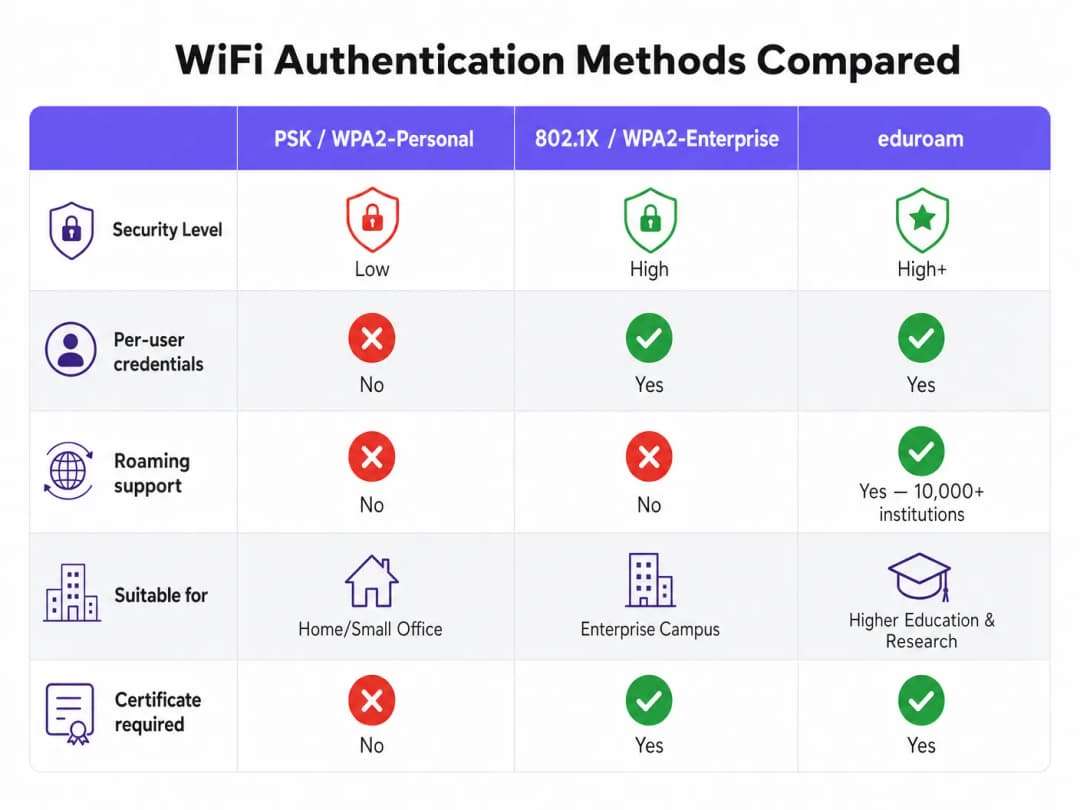
For higher education institutions, and for the venues that serve their staff and students, providing secure, seamless wireless connectivity is no longer a luxury—it is an operational requirement. The standard for this connectivity is eduroam, a global roaming service built on the IEEE 802.1X framework.
This guide provides IT managers, network architects, and venue operations directors with a comprehensive, vendor-neutral reference for understanding, deploying, and troubleshooting 802.1X and eduroam. We go beyond the basic theoretical models to examine how enterprise-grade campus WiFi actually operates in practice, including certificate management, RADIUS proxy architecture, and integration with a broader guest network strategy.
Whether you are upgrading an ageing university network or configuring a conference centre to support academic visitors, implementing 802.1X correctly significantly reduces security risk—particularly credential theft—while dramatically cutting support overhead. For venues outside traditional higher education, understanding these standards is essential for evaluating commercial roaming federations such as OpenRoaming, which share the same underlying architecture.
Technical Deep Dive: 802.1X and eduroam Architecture
At its core, eduroam is an implementation of IEEE 802.1X, the port-based network access control standard. 802.1X was originally designed for wired networks, but it forms the foundation of WPA2-Enterprise and WPA3-Enterprise security.
The 802.1X Triangle Model
The 802.1X framework relies on the interaction of three distinct components to authorise access:
- Supplicant: The client device requesting network access (for example, a student's laptop or smartphone).
- Authenticator: The network access device (for example, a wireless access point or managed switch). It acts as a gatekeeper, blocking all traffic except authentication messages until the device is authorised.
- Authentication Server: The back-end system that validates credentials, almost universally a RADIUS (Remote Authentication Dial-In User Service) server.
When a device connects, the authenticator establishes a controlled port. It relays Extensible Authentication Protocol (EAP) messages between the supplicant and the authentication server. If the credentials are valid, the server returns a RADIUS Access-Accept message, and the authenticator opens the port to allow standard IP traffic through.

eduroam's RADIUS Proxy Hierarchy
What makes eduroam unique is its federated architecture. It allows users to authenticate at any participating institution using their home credentials, without the host institution ever holding a copy of those credentials.
This is achieved through a hierarchical chain of RADIUS proxies. When a user from username@university.ac.uk connects to the eduroam SSID at a host venue:
- The user's device sends an authentication request in the form
username@university.ac.uk. - The host venue's RADIUS server inspects the realm (the part after the
@symbol). Recognising it as an external domain, it proxies the request to the national top-level RADIUS server (operated by the National Research and Education Network, or NREN). - The national server routes the request to the home institution's RADIUS server (
university.ac.uk). - The home institution validates the credentials and returns an
Access-AcceptorAccess-Rejectmessage back along the chain.
The entire process typically completes in under two seconds. Crucially, the user's password is never exposed to the host institution or to the intermediate proxy servers; it is protected inside an encrypted EAP tunnel established directly between the supplicant and the home RADIUS server.
EAP Methods: The Trade-off Between Security and Deployability
The choice of EAP method determines how the encrypted tunnel is formed and how credentials are exchanged. The eduroam policy service definition strictly limits the permissible methods to ensure security.
- PEAP (Protected EAP): The most common deployment method. It uses a server-side certificate on the RADIUS server to establish a TLS tunnel. The client then authenticates inside that tunnel, typically using MSCHAPv2 (username and password). It is relatively easy to deploy, but it is vulnerable to rogue access point attacks if clients are not configured to strictly validate the server certificate.
- EAP-TLS: The gold standard for security. It requires mutual authentication, meaning both the RADIUS server and the client device must present valid certificates. While immune to credential phishing, it requires a robust public key infrastructure (PKI) to issue and manage client certificates, making large-scale deployment more complex.
Got questions about your specific setup?
Our team works with venue operators, IT managers, and network engineers across 80,000 venues. Book a 20-minute call and we will show you how others like you solved it.
Implementation Guide
Deploying 802.1X and eduroam requires careful coordination between network infrastructure, identity management, and client configuration.
1. Infrastructure Preparation
Ensure your wireless access points and controllers support WPA2-Enterprise/WPA3-Enterprise and 802.1X. Any modern enterprise-grade hardware (Cisco, Aruba, Juniper, and others) will meet this requirement. You must also deploy a robust RADIUS infrastructure (such as FreeRADIUS, Cisco ISE, or Aruba ClearPass) capable of handling the expected authentication load and proxying requests.
2. Certificate Management
For PEAP deployments, your RADIUS server needs a TLS certificate issued by a certificate authority (CA) trusted by your clients. Never use self-signed certificates in a production eduroam deployment. Certificates must be renewed regularly to prevent authentication outages.
3. Client Configuration (the CAT Tool)
The most common point of failure in eduroam deployments is client misconfiguration. When users connect manually, they often fail to configure certificate validation, leaving them exposed to credential-harvesting attacks.
To mitigate this risk, institutions must use the eduroam Configuration Assistant Tool (CAT) or an MDM solution to distribute pre-configured profiles. These profiles automatically configure the correct EAP method, pin the expected RADIUS server certificate, and set the appropriate inner authentication protocol.
4. VLAN Assignment and Segmentation
A mature deployment uses RADIUS attributes to assign VLANs dynamically based on user identity.
- Internal users: Assigned to internal VLANs with appropriate access to campus resources.
- Visiting users: Assigned to a restricted guest VLAN offering internet access only.
This segmentation is critical for security and compliance, ensuring visiting devices cannot reach sensitive internal networks.
Best Practices and Vendor-Neutral Recommendations
- Prioritise WPA3: For new deployments, enable WPA3-Enterprise to gain mandatory 192-bit encryption and better protection against offline dictionary attacks.
- Enforce certificate validation: Require the use of configuration profiles (via CAT or MDM) to ensure the supplicant strictly validates the RADIUS server certificate before transmitting credentials.
- Use RadSec: When configuring RADIUS proxy connections to the national federation, use RadSec (RADIUS over TLS) rather than plain UDP. This encrypts proxy traffic and improves reliability over wide-area links.
- Integrate with a guest solution: eduroam only serves users with academic credentials. You must maintain a separate, secure Guest WiFi solution for contractors, members of the public, and event attendees.
- Review related infrastructure: Ensure your underlying network is secure. Read our guide Securing your network with robust DNS and security for more detail. If deploying temporary infrastructure for university events, see Event WiFi: Planning and Deploying Temporary Wireless Networks or the Portuguese-language version Event WiFi: Planeamento e Implementação de Redes Sem Fios Temporárias.
Troubleshooting and Risk Mitigation
When authentication fails, systematic troubleshooting is essential.
- Isolate the failure domain: Determine whether the fault is local (affecting users on your own network), remote (affecting your users elsewhere), or inbound (affecting visitors on your network).
- Check the RADIUS logs: The RADIUS server logs are the authoritative source of truth. Look for
Access-Rejectmessages (indicating bad credentials or policy violations) or timeouts (indicating proxy connectivity issues). - Verify certificate validity: Ensure the RADIUS server certificate has not expired and that the full certificate chain is being presented to clients.
- Monitor upstream latency: High latency to the national RADIUS proxy can cause client timeouts, resulting in failed connections even when credentials are correct.
ROI and Business Impact
For higher education institutions, the return on a properly deployed eduroam implementation shows up in dramatically reduced support tickets. By eliminating captive portals and manual password entry, IT helpdesks see a significant drop in connectivity-related calls. (Purple's commitment to this sector is clear; see Purple appoints Tim Peers as VP of Education, underlining its higher education ambitions).
For commercial venues—such as hospitality, retail, healthcare, or transport—supporting eduroam Visitor Access (eVA) or similar federations such as OpenRoaming provides a frictionless experience for a high-value demographic. It ensures academic visitors connect automatically and securely, improving satisfaction while allowing the venue to maintain strict network segmentation. If your venue needs dedicated bandwidth to support this demand, consider reading What is a leased line? Internet built for business.
When planning network upgrades, integrating 802.1X capability ensures your infrastructure is ready for modern identity-driven networking, laying the foundation for advanced WiFi Analytics and location-based services.
Key Definitions
802.1X
An IEEE standard for port-based Network Access Control (PNAC). It provides an authentication mechanism to devices wishing to attach to a LAN or WLAN.
The foundational protocol for enterprise-grade WiFi security, replacing shared passwords (PSKs) with individualised authentication.
RADIUS (Remote Authentication Dial-In User Service)
A networking protocol that provides centralised Authentication, Authorisation, and Accounting (AAA) management for users who connect and use a network service.
The backend server in an 802.1X deployment that actually checks the user's credentials against a directory (like Active Directory).
EAP (Extensible Authentication Protocol)
An authentication framework frequently used in wireless networks and point-to-point connections. It provides for the transport and usage of various authentication mechanisms.
The language spoken between the client device and the RADIUS server during the 802.1X handshake.
Supplicant
The client device (e.g., laptop, smartphone) or the software on that device attempting to authenticate to a network using 802.1X.
The entity requesting access. Its configuration (especially regarding certificate validation) is critical for security.
Authenticator
The network device (e.g., wireless access point, Ethernet switch) that facilitates the 802.1X authentication process by passing messages between the Supplicant and the Authentication Server.
The gatekeeper that blocks network traffic until the RADIUS server gives the green light.
PEAP (Protected Extensible Authentication Protocol)
An EAP method that encapsulates the EAP transaction within a TLS tunnel established using a server-side certificate, protecting the inner authentication (usually a password).
The most common authentication method for eduroam, balancing security with ease of deployment.
RadSec
A protocol for transmitting RADIUS data over TCP and TLS, rather than the traditional UDP.
Recommended for securing the proxy connections between institutions and the national eduroam federation, preventing interception of authentication traffic.
Realm
The portion of a user's identity following the '@' symbol (e.g., 'university.ac.uk' in 'user@university.ac.uk').
Used by RADIUS proxy servers to determine where to route the authentication request in a federated environment like eduroam.
Worked Examples
A 400-room conference hotel adjacent to a major university frequently hosts academic symposiums. The IT Director wants to allow visiting academics to connect automatically without using the hotel's standard Captive Portal, but must ensure these visitors cannot access the hotel's corporate network or the standard guest network VLAN.
The hotel should implement eduroam Visitor Access (eVA) or join a commercial federation like OpenRoaming.
- The hotel configures a new SSID ('eduroam' or 'OpenRoaming') on their enterprise access points.
- The APs are configured to use WPA2-Enterprise/802.1X.
- The hotel deploys a local RADIUS server configured to proxy authentication requests for external realms to the national federation (for eduroam) or the OpenRoaming hub.
- Crucially, the local RADIUS server is configured to return a specific VLAN ID attribute in the
Access-Acceptmessage for all proxied authentications. - The access points place these authenticated users onto an isolated, internet-only VLAN, completely segmented from the hotel's corporate and standard guest traffic.
A university IT team notices a spike in compromised student accounts. Investigation reveals that students are connecting to a rogue access point broadcasting the 'eduroam' SSID at a local coffee shop. The rogue AP is using a self-signed certificate to harvest credentials via PEAP.
The IT team must immediately enforce strict certificate validation on all client devices.
- They must stop advising students to manually connect to the SSID and 'accept the certificate warning'.
- They deploy the eduroam Configuration Assistant Tool (CAT) for BYOD devices and update MDM profiles for managed devices.
- These profiles configure the supplicant to only trust the specific Certificate Authority (CA) that issued the university's RADIUS server certificate, and to verify the server's Common Name (CN).
- Once configured, if a student's device encounters the rogue AP, the EAP tunnel establishment will fail because the rogue certificate does not match the pinned CA/CN, preventing the transmission of credentials.
A retail chain wants to offer OpenRoaming across 50 locations using their existing guest WiFi infrastructure, which currently relies on an open SSID with a Captive Portal.
The retail chain must upgrade their network to support 802.1X and RADIUS proxying.
- The network team enables a new SSID broadcasting the OpenRoaming Consortium OI (Organisation Identifier).
- They configure the access points to authenticate via 802.1X.
- They configure their central RADIUS server to proxy requests to the OpenRoaming federation hub.
- They ensure their internet backhaul can support the expected increase in automated connections, potentially upgrading to dedicated leased lines if necessary.
Practice Questions
Q1. Your university is deploying a new wireless network. The CISO mandates that credential phishing via rogue access points must be mathematically impossible. Which EAP method must you select?
Hint: Consider which method relies on passwords versus which relies entirely on cryptographic keys.
View model answer
You must select EAP-TLS. Unlike PEAP, which relies on a password inside a TLS tunnel, EAP-TLS requires mutual certificate authentication. Because the client device authenticates using a cryptographic certificate rather than a password, there are no credentials for a rogue access point to phish.
Q2. A visiting researcher from another university complains they cannot connect to your eduroam network. Your local users are connecting fine. You check your local RADIUS server logs and see the request arriving, but it times out before an Access-Accept is received. What is the most likely cause?
Hint: Think about the path the authentication request takes for a visiting user versus a local user.
View model answer
The most likely cause is a connectivity or latency issue between your local RADIUS server and the national NREN RADIUS proxy. Because local users authenticate directly against your server, they are unaffected. The visiting user's request must be proxied upstream, and a timeout indicates the response from the home institution is not returning in time.
Q3. You are a network architect for a retail chain located near a large university. You want to offer seamless WiFi to students using eduroam Visitor Access (eVA), but you must comply with PCI DSS for your point-of-sale terminals. How do you securely integrate eVA?
Hint: How does 802.1X allow the network access point to differentiate traffic after authentication?
View model answer
You integrate eVA by configuring your RADIUS server to assign all successful eVA authentications to a dedicated, internet-only guest VLAN. The Access-Accept message from the RADIUS server must include the specific VLAN ID. This ensures student devices are completely segmented from the PCI-compliant VLAN used by the point-of-sale terminals, satisfying compliance requirements.
Continue reading in this series
A Network Administrator’s Guide to Configuring RADIUS Authentication for Guest WiFi
A comprehensive technical reference for network administrators on deploying RADIUS authentication for guest WiFi. Covers architecture, vendor-neutral configuration steps, security best practices, and troubleshooting common deployment failures.
Implementing SCEP for Secure BYOD and 802.1X WiFi in Higher Education
This technical guide details how higher education IT teams can automate 802.1X certificate enrollment for thousands of BYOD devices using SCEP. It covers the architecture, security benefits, and practical deployment steps to replace manual onboarding with a secure, zero-touch network access model.
Configuring RADIUS Authentication for Guest and Staff WiFi Networks
This technical reference guide outlines the architecture, configuration, and deployment of RADIUS authentication for enterprise guest and staff WiFi networks. It provides network architects and IT managers with the exact protocols, security standards, and troubleshooting methodologies required to build secure, scalable wireless access control systems.
Got questions about your specific setup?
Our team works with venue operators, IT managers, and network engineers across 80,000 venues. Book a 20-minute call and we will show you how others like you solved it.