
Enterprise WiFi authentication without Active Directory or an on-prem server
This guide explains how to deploy secure WPA2/3-Enterprise WiFi authentication without an on-premises Active Directory, Windows NPS, or RADIUS server. It covers the protocol mismatch between cloud identity providers and 802.1X, the case for EAP-TLS over PEAP-MSCHAPv2, and how to deploy cloud RADIUS with MDM-issued certificates against Microsoft Entra ID, Okta, or Google Workspace. Written for IT leads at cloud-first and Mac/Chromebook-heavy organisations that are ready to retire on-premises infrastructure.
Video overview
Listen to this guide
View podcast transcript
Part of our core series: Enterprise WiFi Security Guide →
Management-Summary
Die meisten Unternehmen haben ihre Identitätsverwaltung in die Cloud verlagert. Microsoft Entra ID, Okta und Google Workspace verwalten heute Benutzer, Gruppen und Zugriffsrichtlinien für E-Mails, SaaS-Apps und die Geräteverwaltung. Doch das Enterprise-WiFi hat nicht Schritt gehalten. Access Points erwarten immer noch einen RADIUS-Server. Dieser RADIUS-Server war in der Vergangenheit meist ein Windows Network Policy Server (NPS), der mit einem lokalen Active Directory-Domänencontroller verbunden war.
Diese Diskrepanz zwingt IT-Teams dazu, eine redundante lokale Infrastruktur zu unterhalten, nur um das WiFi am Laufen zu halten. Die Lösung ist Cloud-RADIUS: ein vollständig verwalteter Authentifizierungsdienst, der RADIUS mit Ihren Access Points und OAuth2, SCIM sowie SAML mit Ihrem Cloud-Identity-Provider spricht. Kombinieren Sie dies mit der Bereitstellung von EAP-TLS-Zertifikaten über Ihr MDM, und Sie erhalten eine vollständige 802.1X-Bereitstellung – ganz ohne lokale Server, ohne OS-Patching und mit sofortigem Entzug von Zugriffsrechten direkt über Ihr Cloud-Verzeichnis.
Purple betreibt Cloud-RADIUS an über 80.000 Standorten weltweit mit einer Ausfallsicherheit von 99,999 % (interne Daten von Purple, 2024) und nativen Integrationen für Microsoft Entra ID, Okta und Google Workspace. In weniger als einer Stunde können Sie auf Ihren bestehenden Access Points von Cisco Meraki, HPE Aruba, Ruckus, Juniper Mist, Ubiquiti UniFi, Cambium, Extreme oder Fortinet live gehen.
Technischer Deep-Dive
Die Protokoll-Diskrepanz als Kern des Problems
Die grundlegende Herausforderung besteht darin, dass Cloud-Identity-Provider und WiFi-Access-Points völlig unterschiedliche Sprachen sprechen. Microsoft Entra ID (ehemals Azure AD) authentifiziert Benutzer über SAML, OIDC und OAuth2 – also die Protokolle, die Browser und SaaS-Apps nutzen. WiFi-Access-Points verwenden RADIUS (Remote Authentication Dial-In User Service, RFC 2865), ein UDP-basiertes Protokoll aus den 1990er-Jahren, das für Wählleitungen und VPNs entwickelt wurde. Microsoft hat nie einen nativen RADIUS-Endpunkt für Entra ID bereitgestellt. Sie können einen Meraki- oder Aruba-Access-Point nicht direkt auf Azure verweisen und erwarten, dass 802.1X funktioniert.
Das ist die Hürde, an die jedes Cloud-First-IT-Team stößt, wenn es versucht, das Mitarbeiter-WiFi mit WPA2-Enterprise oder WPA3-Enterprise zu sichern. Es braucht eine Brücke zwischen dem Access Point und dem Cloud-Identity-Provider. Diese Brücke ist Cloud-RADIUS.
Warum PEAP-MSCHAPv2 ohne Active Directory scheitert
In der Vergangenheit basierten 802.1X-Bereitstellungen auf PEAP-MSCHAPv2 (Protected Extensible Authentication Protocol mit Microsoft Challenge Handshake Authentication Protocol Version 2). Der Benutzer gab seinen Benutzernamen und sein Passwort ein, der Access Point leitete die Anfrage an den RADIUS-Server weiter und der RADIUS-Server glich das Passwort mit einem in Active Directory gespeicherten NTLM-Hash ab.
Microsoft Entra ID speichert keine NTLM-Hashes. Dies ist keine Konfigurationslücke, sondern eine bewusste architektonische Entscheidung. Entra ID ist ein moderner Cloud-Identity-Provider, kein Domänencontroller. Folglich kann ein RADIUS-Server, der auf Entra ID verweist, eine PEAP-MSCHAPv2-Anfrage nicht validieren. Der einzige Weg, PEAP mit Entra ID zu nutzen, besteht darin, Entra Domain Services bereitzustellen – ein kostenpflichtiges, verwaltetes Active Directory, das mit Entra ID synchronisiert wird – und NPS darauf aufzusetzen. Damit führen Sie genau das wieder ein, was Sie eigentlich abschaffen wollten: Windows Server-VMs, OS-Patching, NTLM-Hash-Speicherung und manuelle Zertifikatsverwaltung.
EAP-TLS: Die richtige Lösung für Cloud-First-Unternehmen
EAP-TLS (Extensible Authentication Protocol-Transport Layer Security, RFC 5216) ersetzt Passwörter durch digitale X.509-Zertifikate. Das Gerät legt dem RADIUS-Server ein Zertifikat vor. Der RADIUS-Server validiert das Zertifikat anhand einer vertrauenswürdigen Zertifizierungsstelle (Certificate Authority, CA). Da bei diesem Austausch kein Passwort übertragen wird, benötigt der RADIUS-Server keinen NTLM-Hash-Speicher. Er muss lediglich der CA vertrauen und die Gruppenmitgliedschaft des Benutzers im Identity-Provider prüfen, um das richtige VLAN und die passende Zugriffsrichtlinie anzuwenden.
EAP-TLS ist von Haus aus phishing-resistent. Es gibt keine Anmeldedaten, die gestohlen werden könnten. Es erfüllt die CISA-Richtlinien für phishing-resistente Multi-Faktor-Authentifizierung und entspricht den PCI-DSS-Anforderungen für starke Authentifizierung in Netzwerken, die Karteninhaberdaten verarbeiten. Es ist die von IEEE 802.1X empfohlene Authentifizierungsmethode für verwaltete Geräteflotten.
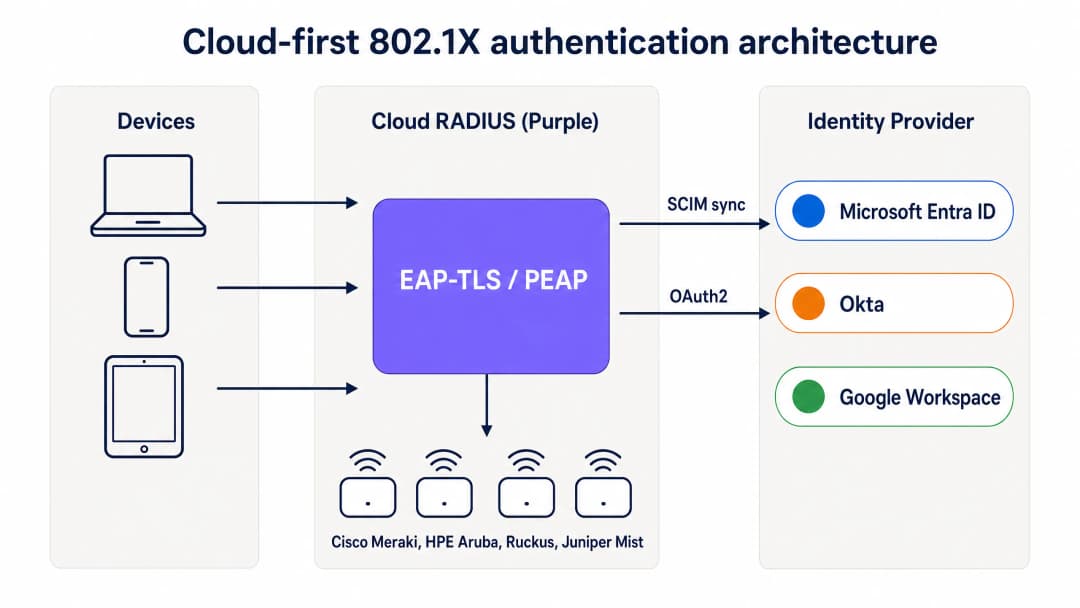
Cloud-First-802.1X-Authentifizierungsarchitektur: Geräte authentifizieren sich über EAP-TLS über den Cloud-RADIUS von Purple, der Zertifikate validiert und gruppenbasierte Richtlinien von Entra ID, Okta oder Google Workspace anwendet.
Wie MDM die lokale CA ersetzt
In einer traditionellen 802.1X-Bereitstellung wurden Zertifikate von einer lokalen Zertifizierungsstelle ausgestellt, auf der Active Directory Certificate Services (AD CS) lief. In einer Cloud-First-Bereitstellung übernimmt das MDM diese Rolle mithilfe von SCEP (Simple Certificate Enrollment Protocol). Microsoft Intune, Jamf Pro und andere MDM-Plattformen können Zertifikate von einer in der Cloud gehosteten CA anfordern und diese geräuschlos auf verwaltete Geräte übertragen.
Der Ablauf sieht wie folgt aus: Der IT-Administrator erstellt im MDM ein SCEP-Zertifikatsprofil, das auf die Gerätegruppen ausgerichtet ist, die WiFi-Zugriff benötigen. Das MDM pusht das Zertifikat automatisch auf Windows-, macOS-, iOS-, iPadOS-, Android Enterprise- und ChromeOS-Geräte. Der Benutzer bemerkt davon nichts. Das Zertifikat ist an die Geräteidentität im MDM gebunden und verlängert sich vor dem Ablauf automatisch. Wenn sich das Gerät mit dem WiFi verbindet, legt es das Zertifikat dem Cloud-RADIUS-Server vor. Dieser validiert es anhand der CA und wendet die entsprechende Netzwerkrichtlinie an.
Für Unternehmen, die Microsoft Intune nutzen, bietet Microsoft Cloud PKI eine vollständig verwaltete CA, die sich direkt in Intune-SCEP-Profile integrieren lässt. Dadurch wird ein lokaler NDES-Server (Network Device Enrollment Service) überflüssig. Für von Jamf verwaltete Mac- und iOS-Flotten erfüllt die integrierte CA von Jamf oder eine Cloud-CA eines Drittanbieters denselben Zweck.
SCIM und sofortiger Entzug von Zugriffsrechten
Einer der betrieblich wichtigsten Aspekte von Cloud-RADIUS ist das SCIM-Provisioning (System for Cross-domain Identity Management). SCIM is ein offener Standard, der Identitätsänderungen in Echtzeit von der Single Source of Truth – Ihrem Cloud-Identity-Provider – an abhängige Systeme überträgt. Wenn ein Mitarbeiter in Entra ID oder Okta deaktiviert wird, überträgt SCIM diese Änderung sofort an den Cloud-RADIUS-Dienst. Beim nächsten Authentifizierungsversuch des Geräts gibt der RADIUS-Server ein Access-Reject zurück. Wenn auf dem Access Point ein kurzes Sitzungs-Timeout konfiguriert ist, wird das Gerät innerhalb weniger Minuten nach der Deaktivierung des Kontos aus dem Netzwerk entfernt.
Dies ist eine erhebliche Sicherheitsverbesserung gegenüber Netzwerken mit gemeinsam genutzten PSKs (wo der Zugriff nur durch Ändern des Passworts auf allen Geräten entzogen werden kann) und gegenüber älteren RADIUS-Bereitstellungen, die auf periodischen LDAP-Synchronisierungen mit einem Zeitfenster von Stunden oder Tagen basieren.
RadSec: Sicherung des RADIUS-Verkehrs über das Internet
Klassisches RADIUS verwendet UDP und bietet nur eine grundlegende Nachrichtenauthentifizierung. Wenn sich Ihr RADIUS-Server im selben Rechenzentrum wie Ihre Access Points befindet, ist das akzeptabel. Wenn Ihr RADIUS-Server jedoch ein Cloud-Dienst ist, läuft der Authentifizierungsverkehr über das öffentliche Internet. RadSec (RADIUS over TLS, RFC 6614) verschlüsselt den RADIUS-Austausch mittels TLS und sorgt so für Vertraulichkeit und Integrität des Authentifizierungsverkehrs. Purple unterstützt RadSec nativ, mit einem IPsec-Fallback für Access Points, die RadSec noch nicht unterstützen.
Got questions about your specific setup?
Our team works with venue operators, IT managers, and network engineers across 80,000 venues. Book a 20-minute call and we will show you how others like you solved it.
Implementierungsleitfaden
Die Bereitstellung von Cloud-RADIUS mit EAP-TLS erfordert vier koordinierte Schritte. Eine Pilot-SSID kann in weniger als einer Stunde live gehen, wenn Entra ID und ein MDM bereits vorhanden sind.
Schritt 1: Cloud-RADIUS mit Ihrem Identity-Provider verbinden
Verbinden Sie Purple über die OAuth2-Admin-Zustimmung (für Entra ID) oder ein API-Token (für Okta und Google Workspace) mit Ihrem Identity-Provider. Dies autorisiert Purple, Benutzer, Gruppen und Gruppenmitgliedschaften aus dem Verzeichnis auszulesen. Konfigurieren Sie das SCIM-Provisioning, um Änderungen des Benutzerstatus in Echtzeit an Purple zu übertragen. Es werden keine Anmeldedaten von Dienstprinzipalen auf der Festplatte gespeichert. Gruppenänderungen werden beim nächsten Authentifizierungsereignis wirksam, nicht nach einem festen Synchronisierungszeitplan.
Schritt 2: MDM und SCEP-Profil konfigurieren
Erstellen Sie in Microsoft Intune ein Profil für vertrauenswürdige Zertifikate für den CA-Root und anschließend ein SCEP-Zertifikatsprofil, das auf die von Purple verwaltete CA verweist. Richten Sie beide Profile auf die Gerätegruppen aus, die WiFi-Zugriff benötigen. Konfigurieren Sie für Jamf eine SCEP-Payload in einem Konfigurationsprofil. Das MDM pusht die Zertifikate geräuschlos. Überprüfen Sie die Zertifikatsbereitstellung im MDM-Compliance-Dashboard, bevor Sie fortfahren.
Schritt 3: Netzwerkrichtlinien im Cloud-RADIUS-Dashboard definieren
Erstellen Sie RADIUS-Richtlinien, die Gruppen des Identity-Providers bestimmten VLANs und Zugriffskontrollen zuweisen. Weisen Sie beispielsweise der Entra ID-Gruppe „Staff-Finance“ das VLAN 20 mit vollem Internetzugriff zu und der Gruppe „Staff-Contractors“ das VLAN 30 mit zeitlich begrenztem Zugriff, der automatisch abläuft. Das Dashboard von Purple wendet diese Richtlinien direkt beim Authentifizierungsvorgang an, ohne dass Änderungen an der Firewall erforderlich sind.
Schritt 4: Access-Point-Konfiguration aktualisieren
Aktualisieren Sie die SSID-Konfiguration auf Ihren Access Points, um WPA2-Enterprise oder WPA3-Enterprise mit 802.1X zu verwenden. Geben Sie die Hostnamen oder IP-Adressen der primären und sekundären Cloud-RADIUS-Endpunkte von Purple zusammen mit dem Shared Secret ein. Konfigurieren Sie die Access Points so, dass sie eine dynamische VLAN-Zuweisung basierend auf den von Purple zurückgegebenen RADIUS-Attributen nutzen. Testen Sie dies mit einer einzelnen SSID auf einer Auswahl von Access Points, bevor Sie den Rollout für den gesamten Standort durchführen.

Cloud-RADIUS vs. lokaler RADIUS: Ein direkter Vergleich in Bezug auf Bereitstellungszeit, Active Directory-Abhängigkeit, Hochverfügbarkeit, OS-Patching, Identitätsintegration und Zertifikats-Lebenszyklusmanagement.
Best Practices
Diese Empfehlungen spiegeln die IEEE-802.1X-Standards, die PCI-DSS-v4.0-Anforderungen und die Betriebserfahrung an den über 80.000 Standorten von Purple wider.
Schreiben Sie EAP-TLS für verwaltete Geräte vor. Passwörter sind anfällig für Phishing und Credential Stuffing. Zertifikate bieten einen kryptografischen Identitäts- und Geräte-Compliance-Nachweis. EAP-TLS ist die einzige 802.1X-Methode, die von Haus aus phishing-resistent ist.
Nutzen Sie SCIM für den sofortigen Entzug von Zugriffsrechten. Periodische LDAP-Synchronisierungen lassen ein Zeitfenster offen, in dem ein ausgeschiedener Mitarbeiter weiterhin Netzwerkzugriff hat. SCIM stellt sicher, dass der Zugriff in dem Moment entzogen wird, in dem das Konto im Identity-Provider deaktiviert wird.
Stellen Sie Multi-Region-RADIUS bereit. Konfigurieren Sie Ihre Access Points mit mindestens zwei RADIUS-Endpunkten in verschiedenen geografischen Regionen. Purple bietet standardmäßig ein Active-Active-Multi-Region-Failover, das in Sekundenschnelle umschaltet.
Segmentieren Sie den Datenverkehr mit dynamischen VLANs. Nutzen Sie die Gruppenmitgliedschaften des Identity-Providers, um Benutzer dynamisch bestimmten VLANs zuzuweisen. Dies isoliert sensiblen Datenverkehr und begrenzt das Schadensausmaß eines kompromittierten Geräts, ohne dass manuelle Änderungen an der Firewall erforderlich sind.
Aktivieren Sie RadSec. Wenn Ihre Access Points RadSec unterstützen, aktivieren Sie es, um den Authentifizierungsverkehr zwischen dem Access Point und dem Cloud-RADIUS-Server zu verschlüsseln. Dies ist besonders wichtig für Filialen und Standorte, an denen sich der Access Point in einem nicht vertrauenswürdigen Netzwerksegment befindet.
Überwachen Sie den Zertifikats-Lebenszyklus. Stellen Sie die automatische MDM-Verlängerung so ein, dass sie bei 80 % der Zertifikatslaufzeit ausgelöst wird. Bei einem einjährigen Zertifikat beginnt die Verlängerung nach 10 Monaten. Richten Sie Warnmeldungen für Geräte ein, bei denen die Verlängerung vor Ablauf des Zertifikats fehlschlägt.
Für eine umfassendere Betrachtung von Sicherheitsstandards und Frameworks für Enterprise-WiFi lesen Sie unseren Leitfaden Enterprise WiFi Security: A Complete Guide for 2026 .
Fehlerbehebung und Risikominimierung
Der Übergang zu Cloud-RADIUS bringt neue Abhängigkeiten mit sich. Bereiten Sie sich auf diese häufigen Fehlerszenarien vor, bevor sie den Produktivbetrieb beeinträchtigen.
Ablauf von Zertifikaten. Wenn ein Gerätezertifikat abläuft, bevor das MDM es verlängert, schlägt die Authentifizierung des Geräts geräuschlos fehl. Der Benutzer sieht eine Fehlermeldung ohne Erklärung. Beugen Sie dem vor, indem Sie die automatische MDM-Verlängerung auf 80 % der Zertifikatslaufzeit einstellen und das MDM-Compliance-Dashboard auf Geräte mit bald ablaufenden Zertifikaten überwachen.
MDM-Synchronisierungsfehler. Ein Gerät, das die MDM-Compliance-Richtlinien nicht mehr erfüllt oder sich nicht meldet, erhält möglicherweise kein verlängertes Zertifikat. Implementieren Sie Compliance-Richtlinien, die fehlerhafte Geräte kennzeichnen und Administratoren warnen, bevor das Zertifikat abläuft.
Firewall blockiert RADIUS-Verkehr. Die Access Points müssen die Cloud-RADIUS-Endpunkte über den UDP-Port 1812 (Authentifizierung) und den UDP-Port 1813 (Accounting) oder über den TCP-Port 2083 für RadSec erreichen können. Ausgehende Firewall-Regeln in Filialen blockieren diese Ports häufig. Testen Sie die Erreichbarkeit aus dem Management-VLAN des Access Points vor der Bereitstellung.
SCIM-Provisionierungsfehler. Wenn die SCIM-Verbindung zwischen dem Identity-Provider und Purple unterbrochen wird, werden Änderungen des Benutzerstatus nicht übertragen. Überwachen Sie den SCIM-Synchronisierungsstatus sowohl im Identity-Provider als auch im Purple-Dashboard. Richten Sie Warnmeldungen für Synchronisierungsfehler ein.
Altsysteme ohne Zertifikatsunterstützung. IoT-Geräte, Drucker und ältere Hardware unterstützen EAP-TLS möglicherweise nicht. Verwenden Sie für diese Geräte iPSK (individual pre-shared keys) anstelle eines gemeinsam genutzten PSK. Purple unterstützt iPSK nativ, weist jedem Gerät einen eindeutigen Schlüssel zu und platziert jedes Gerät im richtigen VLAN, ohne dass eine 802.1X-Supplicant-Unterstützung erforderlich ist.
ROI und geschäftliche Auswirkungen
Die migration von lokalem RADIUS zu Cloud-RADIUS bietet messbaren Mehrwert für Infrastruktur, Betrieb und Sicherheit.
| Dimension | Lokaler NPS | Cloud-RADIUS (Purple) |
|---|---|---|
| Infrastrukturkosten | Windows Server-Lizenzen, VM-Rechenleistung, Speicher | Abonnement pro AP, keine Server-Hardware |
| Bereitstellungszeit | Tage bis Wochen | Unter einer Stunde |
| Hochverfügbarkeit | Manuell – zwei Server plus Replikation | Multi-Region Active-Active, Standard |
| OS-Patching | Monatlich, durch Ihr Team | Vom Anbieter verwaltet |
| WiFi-Helpdesk-Tickets | Hoch – Passwort-Resets, manuelles Onboarding | Um 80 % reduziert (Kundendaten von Purple) |
| Entzug von Zugriffsrechten | Stunden bis Tage via LDAP-Sync | Sekunden via SCIM |
IT-Teams, die das Mitarbeiter-WiFi von Purple nutzen, verzeichnen in der Regel einen Rückgang der WiFi-Support-Tickets um 80 % (interne Daten von Purple, 2024), was auf den Wegfall von Passwort-Resets und manuellem Geräte-Onboarding zurückzuführen ist. Die zertifikatsbasierte Authentifizierung erfüllt zudem die PCI-DSS-Anforderung 8.3 für starke Authentifizierung und die ISO 27001-Maßnahme A.9.4 für die System- und Anwendungszugriffskontrolle, was den Audit-Aufwand für Ihr Sicherheitsteam verringert.
Für Unternehmen in den Bereichen Einzelhandel und Gastgewerbe reduziert die Möglichkeit, Mitarbeiter-WiFi und Gäste-WiFi über ein einziges Cloud-Dashboard mit einer einheitlichen Identitätsebene zu verwalten, die betriebliche Komplexität an mehreren Standorten. Für Transportunternehmen und Gesundheitsdienstleister erfüllen der sofortige Entzug von Zugriffsrechten und der vollständige Audit-Trail regulatorische Anforderungen ohne zusätzliche Tools.
Die WiFi Analytics -Ebene von Purple ergänzt die Authentifizierungsinfrastruktur um Belegungsdaten und Daten zum hybriden Arbeiten. So wird das Mitarbeiter-WiFi von einer Kostenstelle zu einer Quelle für betriebliche Erkenntnisse.
Weiterführende Literatur: Enterprise WiFi Security: A Complete Guide for 2026 – OpenWrt Custom Firmware Integration with Purple WiFi
Key Definitions
802.1X
An IEEE standard (IEEE 802.1X-2020) for port-based network access control. It requires devices to authenticate before the access point grants network access, using an EAP exchange mediated by a RADIUS server.
IT teams use 802.1X to ensure only authorised users and devices connect to the corporate network. It provides per-user encryption, per-session keys, and a full audit trail of every connection event.
RADIUS
Remote Authentication Dial-In User Service (RFC 2865). A networking protocol that provides centralised Authentication, Authorisation, and Accounting (AAA) management for network access.
Access points forward every connection request to the RADIUS server, which decides whether to admit the device and which VLAN to assign it to. Cloud RADIUS replaces on-premises NPS or FreeRADIUS servers.
EAP-TLS
Extensible Authentication Protocol-Transport Layer Security (RFC 5216). An 802.1X authentication method that uses mutual X.509 certificate exchange instead of passwords.
EAP-TLS is the gold standard for managed device fleets. It is phishing-resistant, requires no password hash store, and is the only 802.1X method that satisfies CISA phishing-resistant MFA guidance.
PEAP-MSCHAPv2
Protected Extensible Authentication Protocol with Microsoft Challenge Handshake Authentication Protocol version 2. A legacy 802.1X method that validates passwords against NTLM hashes stored in Active Directory.
PEAP-MSCHAPv2 fails in cloud-only environments because Entra ID does not store NTLM hashes. Organisations migrating from on-premises AD must replace PEAP with EAP-TLS.
SCEP
Simple Certificate Enrollment Protocol. A protocol used by MDM platforms to request and install digital certificates on devices automatically, without user interaction.
IT teams use SCEP with Intune or Jamf to silently provision WiFi certificates to employee devices. SCEP replaces the on-premises NDES (Network Device Enrollment Service) server in cloud-first deployments.
SCIM
System for Cross-domain Identity Management (RFC 7644). An open standard that automates the real-time exchange of user identity information between IT systems.
SCIM ensures that when an employee is disabled in Entra ID or Okta, that change is pushed to the cloud RADIUS service immediately, revoking WiFi access within seconds rather than hours.
NPS
Network Policy Server. Microsoft's RADIUS implementation, typically run on Windows Server as part of an on-premises Active Directory environment.
Cloud-first organisations are retiring NPS to eliminate Windows Server VMs, OS patching, and the dependency on on-premises Active Directory. Cloud RADIUS is the direct replacement.
RadSec
RADIUS over TLS (RFC 6614). A protocol that encrypts RADIUS authentication traffic using TLS, replacing the UDP-based cleartext transport used by traditional RADIUS.
RadSec is essential when using cloud RADIUS, as authentication traffic must traverse the public internet between the access point and the cloud service. Purple supports RadSec natively.
iPSK
Individual Pre-Shared Key. A variant of WPA2-Personal that assigns a unique pre-shared key to each device, rather than a single shared key for all devices.
iPSK is used for IoT devices, printers, and other hardware that cannot support 802.1X EAP-TLS. It provides per-device accountability and VLAN assignment without requiring certificate support.
Dynamic VLAN
A network segmentation technique where the RADIUS server returns a VLAN identifier in the Access-Accept response, and the access point places the device on that VLAN automatically.
Dynamic VLANs allow IT teams to segment staff, contractors, IoT devices, and guests onto separate network segments based on identity provider group membership, without manual firewall changes.
Worked Examples
A 400-site retail chain needs to secure Staff WiFi across all locations. They run Cisco Meraki access points and use Microsoft Entra ID with Intune for device management. They currently use a shared WPA2-Personal PSK because they have no on-premises Active Directory to run NPS. A recent internal audit flagged the shared PSK as a PCI DSS compliance gap.
The chain deploys Purple's cloud RADIUS. First, they connect Purple to Entra ID via OAuth admin consent and configure SCIM provisioning. In Intune, they create a Trusted Certificate Profile for the Purple CA root and a SCEP certificate profile scoped to the 'Staff-Retail' device group. Intune silently pushes certificates to all managed point-of-sale terminals and staff tablets. In the Meraki dashboard, they update the Staff SSID to WPA2-Enterprise, enter the Purple cloud RADIUS primary and secondary endpoints, and enable dynamic VLAN assignment. When a device connects, it presents its Intune-issued certificate, Purple validates it against the CA and checks the Entra ID group, and the device is placed on VLAN 10 (staff network) or VLAN 20 (management network) based on group membership. The shared PSK is retired. Rollout across 400 sites takes one weekend, as no on-site hardware is deployed - only SSID configuration changes in Meraki.
A 15,000-student university uses Google Workspace as its primary identity provider. The IT team wants to provide secure WiFi for staff and students on a BYOD estate of MacBooks, Chromebooks, and Android phones. They have no on-premises Active Directory and no appetite to run servers.
The university integrates Purple's cloud RADIUS with Google Workspace. For managed Chromebooks, they use Google Admin to push a WiFi certificate profile via SCEP, silently enrolling each device. For BYOD MacBooks and Android phones, they deploy a lightweight onboarding application that authenticates the user with their Google credentials and installs a certificate on the device in a single tap. Subsequent connections use EAP-TLS silently. Purple maps Google Workspace Organisational Units to VLANs: staff land on VLAN 10, students on VLAN 20, and guest visitors on a Captive Portal SSID. When a student graduates and their Google account is suspended, SCIM pushes the change to Purple and their WiFi access is revoked within minutes.
Practice Questions
Q1. Your organisation has fully migrated from on-premises Active Directory to Microsoft Entra ID. Your current Staff WiFi uses PEAP-MSCHAPv2 against an NPS server that was joined to the old domain. After decommissioning the domain controller, staff report they can no longer connect to the WiFi. What is the root cause, and what is the correct long-term fix?
Hint: Consider what PEAP-MSCHAPv2 requires from the directory, and whether Entra ID provides it.
View model answer
The root cause is that PEAP-MSCHAPv2 requires the RADIUS server to validate the user's password against an NTLM hash stored in Active Directory. With the domain controller decommissioned, NPS has no directory to validate against. Entra ID does not store NTLM hashes, so NPS cannot be redirected to Entra ID. The correct long-term fix is to replace NPS with a cloud RADIUS service, migrate from PEAP-MSCHAPv2 to EAP-TLS, and use the MDM (Intune) to issue device certificates via SCEP. This eliminates the dependency on any on-premises directory.
Q2. You are deploying cloud RADIUS for a 200-device fleet of corporate MacBooks managed by Jamf Pro. Your identity provider is Okta. What is the most secure and operationally efficient way to provision the WiFi credentials to these devices?
Hint: Look for a method that requires no user interaction, avoids passwords, and integrates with your existing MDM.
View model answer
Configure Jamf Pro to use SCEP to silently push device certificates to the MacBooks. Create a SCEP payload in a Jamf configuration profile, pointing at the CA managed by your cloud RADIUS provider. Scope the profile to the relevant device group. Jamf will push the certificate to each MacBook automatically, with no user interaction. Configure the WiFi profile in the same configuration profile to use EAP-TLS with the SCEP-issued certificate. Connect the cloud RADIUS service to Okta via SCIM to ensure that when an employee is disabled in Okta, their WiFi access is revoked immediately.
Q3. An employee is terminated at 9am on a Monday. Their Entra ID account is disabled by HR at 9:05am. At 9:30am, a security alert shows the employee's laptop is still connected to the corporate WiFi from the car park. What configuration is missing, and how do you fix it?
Hint: How does the RADIUS server learn that the user's status has changed in the identity provider?
View model answer
The deployment is relying on periodic LDAP syncs rather than SCIM provisioning. The LDAP sync has not yet run since the account was disabled, so the cloud RADIUS service still considers the user active. The fix is to enable SCIM provisioning between Entra ID and the cloud RADIUS service. SCIM pushes user state changes in real time, so when the account is disabled in Entra ID at 9:05am, the RADIUS service receives the change immediately. The next time the device attempts to re-authenticate (controlled by the session timeout on the access point), it receives an Access-Reject. Setting a short session timeout (15 to 30 minutes) on the access point limits the maximum window between account disable and network eviction.
Q4. Your venue has 50 IoT devices - digital signage players, environmental sensors, and printers - that do not support 802.1X EAP-TLS. How do you secure these devices on the same WiFi infrastructure as your EAP-TLS staff network?
Hint: Consider what authentication method provides per-device accountability without requiring certificate support.
View model answer
Use iPSK (individual pre-shared keys) for the IoT devices. Assign a unique pre-shared key to each device in the cloud RADIUS dashboard, along with a VLAN assignment. Each device authenticates with its unique key, which the RADIUS server validates and uses to place the device on the IoT VLAN, isolated from the staff network. If a device is compromised or decommissioned, you revoke only that device's key without affecting any other device. This approach provides per-device accountability and network segmentation without requiring 802.1X supplicant support on the IoT hardware.
Continue reading in this series
How to revoke WiFi access when an employee leaves
This guide shows IT and venue operations teams how to remove Staff WiFi access when an employee leaves without disrupting the rest of the workforce. It compares certificate-based 802.1X, identity-specific iPSK and SCIM-driven deprovisioning, then provides a same-day runbook, test method and audit evidence model.
Secure BYOD WiFi: Passpoint certificate onboarding vs xPSK (iPSK)
A comprehensive technical guide for IT teams on securing unmanaged employee and student devices (BYOD) using zero-touch Passpoint EAP-TLS certificates vs vendor-specific xPSK (iPSK/easyPSK, DPSK, PPSK, MPSK).
WPA2 Personal vs Enterprise: what is the difference and which should you use?
This technical reference guide provides a comprehensive comparison of WPA2 Personal and WPA2 Enterprise security protocols within enterprise WiFi environments. It outlines the architectural differences, deployment methodologies, and security implications of each standard to help network architects and IT leaders make informed deployment decisions.
Got questions about your specific setup?
Our team works with venue operators, IT managers, and network engineers across 80,000 venues. Book a 20-minute call and we will show you how others like you solved it.