
Hotel Guest WiFi Management: Integrating PMS, Portals, and Brand Standards
This technical guide details how to architect enterprise-grade hotel WiFi networks, focusing on VLAN segmentation, PMS integration for automated session management, and captive portal optimisation for GDPR-compliant data capture.
Video overview
Listen to this guide
View podcast transcript
Part of our core series: Guest WiFi Guide →
Executive Summary
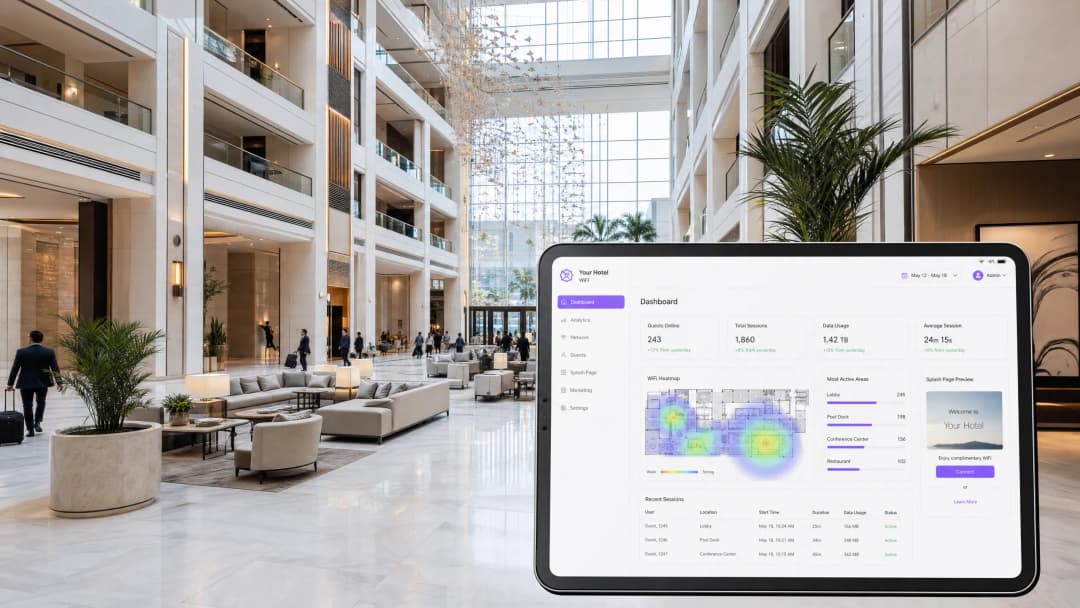
Hotel guest WiFi is no longer a utility; it is a critical operational system and a primary channel for first-party data capture. This technical reference guide details how to architect, deploy, and manage enterprise-grade WiFi across hospitality environments. It covers network segmentation, Property Management System (PMS) integration, captive portal optimisation, and chain-wide brand standard enforcement. For IT directors, network architects, and venue operations directors, the goal is clear: deliver a fast, secure connection that integrates seamlessly with your Guest WiFi infrastructure while capturing compliant data to feed your WiFi Analytics platform.
Whether you manage a boutique hotel or a global portfolio of 500 properties, the technical requirements are the same: isolate traffic, automate session management via the PMS, and enforce consistent security policies. Purple provides the hardware-agnostic cloud overlay that makes this possible across Cisco Meraki, HPE Aruba, Ruckus, Juniper Mist, Ubiquiti UniFi, Cambium, Extreme, and Fortinet deployments.
Technical Deep-Dive
Network Segmentation and VLAN Architecture
A flat network in a hotel environment is a severe security vulnerability and a compliance failure. A hotel network must serve distinct populations: guests, staff, building management systems, and IoT devices. The foundation of secure hotel WiFi is logical segmentation using Virtual Local Area Networks (VLANs) as defined by IEEE 802.1Q.
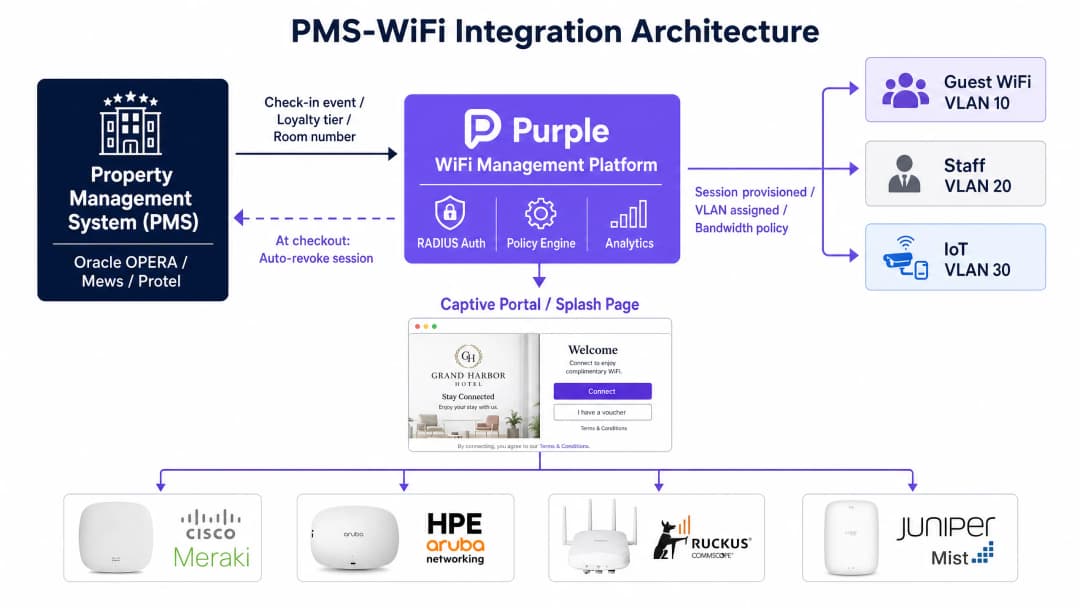
You must assign a dedicated VLAN to each traffic class. A standard deployment requires at least four VLANs: Guest WiFi, Staff, IoT/Building Systems, and a PCI-scoped network for payment terminals. Your firewall must enforce a default-deny policy between these segments. Guest traffic must route directly to the internet, completely isolated from the property management system, point-of-sale (POS) terminals, and staff communications.
For the wireless edge, each Service Set Identifier (SSID) maps to a specific VLAN. On the guest SSID, you must enable client isolation. Client isolation prevents devices on the same SSID from communicating directly with each other, mitigating the risk of a compromised device probing other guests.
PMS Integration and Automated Session Management
The integration between your WiFi management platform and your Property Management System (PMS) - such as Oracle OPERA, Mews, or Protel - is the linchpin of a modern hospitality network. The PMS holds the ground truth regarding guest identity, room assignment, check-in status, and loyalty tier.
When a guest checks in, the PMS sends an API call or webhook to the WiFi platform. The platform pre-provisions the guest session, applying the correct bandwidth policy based on their loyalty tier. When the guest connects, authentication is seamless. Crucially, when the guest checks out, the PMS signals the WiFi platform to revoke access immediately. This eliminates the security risk of lingering credentials and prevents former guests from consuming bandwidth.
Captive Portals and First-Party Data Capture
The captive portal is the gateway where infrastructure investment converts into commercial value. It is not merely an access control mechanism; it is your primary engine for first-party data capture.
Guests authenticate via email, social login, or SMS verification. This captures a verified identity, which is then linked to their device MAC address, visit timestamp, and dwell time. This data feeds directly into your CRM, enabling targeted pre-stay emails, post-stay surveys, and location-based offers.
Compliance is non-negotiable. A GDPR-compliant captive portal must present a clear privacy notice and capture explicit, unbundled consent for marketing communications. Consent to access the WiFi must not be conditional on consent to receive marketing. Purple handles this natively, maintaining detailed audit trails for every user profile.
Got questions about your specific setup?
Our team works with venue operators, IT managers, and network engineers across 80,000 venues. Book a 20-minute call and we will show you how others like you solved it.
Implementation Guide
Phase 1: Site Survey and Capacity Planning
Before configuring any hardware, conduct a thorough RF site survey using predictive modelling tools. For hotel environments, the target is in-room coverage. Deploy one access point (AP) per room, or one AP per two rooms at minimum. Avoid corridor placement, which creates coverage shadows and degrades performance. Size your internet uplink for peak concurrent usage. Plan for 5 to 10 Mbps per room; a 200-room property requires an 800 Mbps to 1.6 Gbps committed leased line.
Phase 2: Architecture and Policy Design
Map every device type to a dedicated VLAN. Document your inter-VLAN routing rules and default-deny firewall policies. Determine your authentication standards: WPA3-Enterprise with IEEE 802.1X for staff networks, and WPA3-Personal or an open network with HTTPS enforcement and client isolation for guests.
Phase 3: PMS and Portal Integration
Configure the API connection between your PMS and the WiFi platform. Design the captive portal to align with brand standards. Test the end-to-end guest journey across iOS, Android, and Windows devices. Verify that session revocation triggers correctly upon checkout in the PMS.
Best Practices
- Enforce Client Isolation: Always enable client isolation on guest-facing SSIDs to prevent lateral movement between devices.
- Automate Role-Based Access: Use IEEE 802.1X and RADIUS authentication for staff networks. Integrate with Microsoft Entra ID, Okta, or Google Workspace to assign VLANs and QoS policies dynamically based on user roles.
- Centralise Brand Standards: Use a cloud-managed platform with a hierarchical policy engine. Define SSIDs, security protocols, and captive portal branding at the headquarters level, allowing regional or property-level inheritance without breaking brand standards.
- Separate IoT Traffic: Isolate smart TVs, thermostats, and voice assistants on a dedicated IoT VLAN with strict egress filtering.

Troubleshooting & Risk Mitigation
- Slow Speeds: The most common cause of slow hotel WiFi is an under-provisioned WAN uplink, not RF interference. Monitor your internet circuit utilisation. If the uplink is saturated, upgrading access points will not improve the guest experience.
- Segmentation Failure: Misconfigured switch trunk ports can collapse multiple VLANs onto a single broadcast domain, silently breaking your segmentation. Audit switch configurations regularly.
- Authentication Friction: A captive portal that requires excessive data entry will cause guests to abandon the connection process. Keep the form concise.
ROI & Business Impact
A correctly architected hotel WiFi network delivers measurable returns. It reduces IT support tickets related to connectivity issues, driving operational efficiency. It improves guest satisfaction scores, which correlate directly with RevPAR. Most importantly, it generates a compliant, first-party database of verified guests, reducing reliance on Online Travel Agencies (OTAs) and powering direct-booking marketing campaigns.
Key Definitions
VLAN (Virtual Local Area Network)
A logical subnetwork that groups a collection of devices from different physical LANs. Essential for isolating guest traffic from operational systems.
Used to separate guest WiFi, staff devices, IoT hardware, and payment terminals onto isolated broadcast domains for security and PCI compliance.
PMS (Property Management System)
The central software platform used by hotels to manage reservations, check-ins, billing, and room status.
Integrating the PMS with the WiFi platform allows for automated session provisioning, loyalty tier bandwidth allocation, and immediate access revocation upon checkout.
Captive Portal
A web page that users must view and interact with before access is granted to a public WiFi network.
Used in hospitality to authenticate guests, present terms of service, and capture first-party marketing data.
Client Isolation
A wireless network security feature that prevents connected devices from communicating directly with each other.
Mandatory on guest SSIDs to stop a compromised device from scanning or attacking other guests on the same network.
IEEE 802.1X
An IEEE Standard for port-based Network Access Control, providing an authentication mechanism to devices wishing to attach to a LAN or WLAN.
The gold standard for staff network authentication, allowing dynamic VLAN assignment based on the user's role defined in an identity provider like Microsoft Entra ID.
RADIUS (Remote Authentication Dial-In User Service)
A networking protocol that provides centralised Authentication, Authorisation, and Accounting management for users who connect and use a network service.
Used in conjunction with 802.1X to verify staff credentials and apply specific network policies.
SSID (Service Set Identifier)
The public name of a wireless network.
Hotels typically broadcast multiple SSIDs (e.g., 'Guest WiFi', 'Staff Network'), each mapped to a specific VLAN.
WPA3-Enterprise
The highest level of WiFi security, requiring each user to authenticate with unique credentials rather than a shared password.
Required for staff and operational networks to ensure individual accountability and enable dynamic policy enforcement.
Worked Examples
A 150-room boutique hotel using Oracle OPERA requires a secure WiFi deployment that differentiates bandwidth for loyalty members and automatically revokes access at checkout.
Deploy one WiFi 6 access point per room. Configure four VLANs: Guest (VLAN 10), Staff (VLAN 20), IoT (VLAN 30), and POS (VLAN 40). Integrate the Purple platform with Oracle OPERA via API. When a guest checks in, OPERA sends the loyalty tier to Purple. Purple provisions the session, applying a 50 Mbps policy for standard guests and a 100 Mbps policy for premium members. At checkout, OPERA triggers an API call that immediately revokes the MAC address session in Purple.
A global hotel brand with 400 properties needs to ensure consistent captive portal branding and GDPR compliance across all venues, despite using different local ISPs and hardware vendors (Cisco Meraki, HPE Aruba, and Ruckus).
Implement a cloud overlay platform like Purple above the heterogeneous hardware layer. Define a global policy template at Brand HQ that dictates the SSID name, the captive portal design, and the specific GDPR consent checkboxes. Apply this template hierarchically to all 400 properties. Local IT teams can manage their specific APs and switches, but they cannot alter the captive portal flow or data capture requirements.
Practice Questions
Q1. A hotel is upgrading its network to support mobile check-in and digital room keys. The IT team plans to put the electronic door locks on the same VLAN as the guest WiFi to simplify routing. What is the primary risk of this approach?
Hint: Consider the principle of logical segmentation and lateral movement.
View model answer
Placing IoT devices like electronic locks on the guest VLAN exposes critical building infrastructure to untrusted devices. A compromised guest smartphone could attempt to probe or attack the locks. The correct approach is to place the locks on a dedicated IoT VLAN (e.g., VLAN 30) with strict ingress/egress filtering, entirely isolated from the guest VLAN.
Q2. A regional manager reports that the WiFi at a 300-room property is 'too slow', despite recent upgrades to WiFi 6 access points in the corridors. What are the two most likely architectural causes of this poor performance?
Hint: Consider both WAN capacity and RF propagation principles.
View model answer
First, the internet uplink is likely under-provisioned. A 300-room property requires a committed leased line of at least 1.5 Gbps to handle peak concurrent streaming. Second, corridor AP placement is a flawed design; the RF signal degrades significantly when passing through heavy fire doors and bathroom plumbing. APs should be relocated to the guest rooms.
Q3. The marketing team wants to automatically assign returning guests to a higher bandwidth tier to reward loyalty. How should the network architecture be designed to support this requirement?
Hint: What system holds the source of truth for guest identity, and how does it communicate with the network?
View model answer
The architecture requires an API integration between the Property Management System (PMS) and the WiFi management platform. When the guest connects, the WiFi platform queries the PMS using the device MAC address or authenticated email. The PMS returns the guest's loyalty status, and the WiFi platform dynamically applies a QoS policy to allocate higher bandwidth.
Continue reading in this series
Staff WiFi vs. Guest WiFi: Best Practices for Corporate Network Segmentation
A comprehensive technical guide for IT leaders on segmenting staff and guest WiFi networks. It covers VLAN architecture, 802.1X authentication, firewall policies, and the business impact of secure network design.
How to Set Up Guest WiFi: A Secure Enterprise Configuration Guide
This authoritative guide provides IT leaders and network architects with a definitive blueprint for deploying secure enterprise guest WiFi. It covers essential architecture, WPA3 migration, VLAN segmentation, and captive portal integration to protect internal systems while capturing compliant first-party data.
How to Fix Slow WiFi Without Upgrading Your Internet Plan
A comprehensive technical reference guide for IT managers and network architects on optimising enterprise WiFi performance without increasing ISP bandwidth. Covers RF tuning, client density management, QoS implementation, and how to leverage WiFi analytics to diagnose and resolve bottlenecks.
Got questions about your specific setup?
Our team works with venue operators, IT managers, and network engineers across 80,000 venues. Book a 20-minute call and we will show you how others like you solved it.