跳至主要内容

酒店访客 WiFi 管理:整合 PMS、门户与品牌标准

本技术指南详细介绍了如何构建企业级酒店 WiFi 网络,重点关注 VLAN 划分、用于自动化会话管理的 PMS 整合,以及用于符合 GDPR 合规要求的数据捕获的 captive portal 优化。

📖 5 分钟阅读📝 1,015 🔧 2 应用实例3 练习题📚 8 关键定义

收听本指南

查看播客转录
Welcome to the Purple Technical Briefing. Today we're covering hotel guest WiFi management - specifically how to integrate your property management system, your captive portals, and your brand standards into a coherent, compliant, and commercially valuable network architecture. If you're the IT manager at a single property, the network architect across a portfolio, or the CTO signing off on a multi-year infrastructure refresh, this briefing is for you. We're going to be direct and practical. No theory for its own sake. Let's start with the problem. Hotel guest WiFi is one of those infrastructure components that looks straightforward on paper and turns into a significant operational headache in practice. The reason is that a hotel network has to serve at least four distinct populations simultaneously - guests, staff, building systems, and increasingly, in-room IoT devices like smart TVs, thermostats, and voice assistants. Each population has completely different security requirements, performance expectations, and compliance implications. Getting this architecture wrong costs you in three ways: guest satisfaction scores drop, your security posture weakens, and you lose the data asset that authenticated WiFi should be generating. So let's talk architecture. The foundation is network segmentation using VLANs - Virtual Local Area Networks. A VLAN is a Layer 2 construct defined in IEEE 802.1Q that lets you run multiple logically separate networks over the same physical infrastructure. Think of it as multiple lanes on the same motorway, each with its own speed limit and access rules. In a hotel, you want at minimum four VLANs: Guest WiFi on VLAN 10, Staff on VLAN 20, IoT and building systems on VLAN 30, and your PCI-scoped payment network on VLAN 40. Each SSID - that's the network name guests see - maps to a corresponding VLAN. Your firewall enforces a default-deny policy between them. Guest traffic routes to the internet only. It never touches your property management system, your point-of-sale terminals, or your staff communications. Now, the integration that changes everything: connecting your WiFi management platform to your Property Management System - your PMS. Whether you're running Oracle OPERA, Mews, Protel, or another system, your PMS is the ground truth about who is in the building, what room they're in, what loyalty tier they hold, and when they check out. If your WiFi platform isn't talking to your PMS, you're operating blind. A well-integrated deployment works like this. A guest checks in - either at the front desk or via a mobile app. The PMS fires a webhook or API call to the WiFi management platform. The platform pre-provisions the guest's profile: their loyalty tier, their preferred SSID, their bandwidth policy. When they connect to the network, the experience is immediate. When they check out, the session is automatically revoked. No lingering credentials. No security exposure from a guest who checked out three hours ago but whose device is still authenticated on your network. The captive portal - sometimes called a splash page - is where the network transitions from a cost centre to a data asset. Done badly, it's an annoyance that guests abandon. Done well, it's your primary mechanism for first-party data capture. The guest authenticates via email, social login, or SMS verification. You capture a verified identity. That identity links to their device, their visit timestamp, their dwell time, and any return visits. Over time, you build a consented, GDPR-compliant dataset of your actual guests - not inferred data, not third-party data, but first-party data you own. GDPR compliance here is non-negotiable. Your splash page must present a clear privacy notice, explicit consent options for marketing, and a straightforward mechanism for guests to exercise their data rights. Critically, consent to use the WiFi is not the same as consent to receive marketing emails. These must be separate, uncoupled choices. Purple's platform handles this natively, with consent records tied to each user profile and audit trails available for regulatory review. On the security side: WPA3-Enterprise with IEEE 802.1X is the gold standard for staff networks. For guest networks, WPA3-Personal or an open network behind a captive portal with HTTPS enforcement is the standard approach. What you must not do is run an open network without client isolation. Client isolation prevents any guest device from communicating directly with another guest device on the same network. Without it, a guest's compromised smartphone can probe every other device on the same SSID. Enable client isolation on every guest-facing SSID. No exceptions. For authentication on staff networks, 802.1X uses the Extensible Authentication Protocol - EAP - to verify identity against a RADIUS server, which in turn queries your identity provider. Purple integrates with Microsoft Entra ID, Okta, and Google Workspace. When a staff member authenticates, the RADIUS server can return not just a pass or fail, but a VLAN assignment and a QoS policy based on their role. That's the technical mechanism that makes role-based network access work automatically, without manual provisioning. Now let's talk about brand standards and chain-wide consistency - because this is where the governance challenge becomes as important as the technical one. A global hotel brand might have hundreds of properties across dozens of countries, each with different local ISPs, different infrastructure vintages, and different franchise arrangements. Delivering a consistent guest WiFi experience across that estate requires a cloud-managed network architecture with centralised policy management. The model that works is a three-tier hierarchy. Brand headquarters defines the policy templates: the SSIDs, the security standards, the loyalty tier bandwidth allocations, the captive portal branding. Regional hubs apply those templates with local variations. Individual properties inherit from the regional hub and can only customise within the parameters the brand has defined. Properties have flexibility, but they cannot break brand standards. From a technology standpoint, this requires a cloud-managed WiFi platform with a hierarchical policy engine. Access points at each property connect to the cloud controller, pull their configuration, and enforce it locally. If a property's internet connection goes down, the APs continue operating in autonomous mode against their last-known-good configuration. That resilience is critical. Let me walk through the practical implementation sequence. Five phases. Phase one: site survey. Before you touch a single cable, walk the property with a spectrum analyser. Use predictive modelling software to finalise your access point placement before you commit to cable runs. In-room coverage is the target. One AP per room, or at minimum one per two rooms. Corridor placement is a common mistake that creates coverage shadows in rooms. Phase two: VLAN architecture design. Map every device type to a dedicated VLAN before you configure anything. Guest, staff, IoT, payment systems. Your firewall inter-VLAN rules are as important as the VLAN architecture itself. Default-deny, explicit-permit. Phase three: PMS integration scoping. Do this before you select your WiFi platform, not after. Confirm that your chosen platform has a pre-built connector for your PMS, and understand the API integration effort before you commit. Phase four: captive portal and authentication flow. Test the full guest journey end-to-end on iOS, Android, and Windows before go-live. Test the consent flows. Test what happens on a return visit. A captive portal that takes 45 seconds to load or asks for ten fields of personal information is a brand failure, not just a technical one. Phase five: analytics and reporting configuration. Connect your WiFi data layer to your CRM and marketing automation tools. The data asset you've built through authenticated WiFi is only valuable if it feeds into downstream workflows. Now the pitfalls. I see the same ones repeatedly. The first is under-provisioning the internet uplink. Nine times out of ten, slow hotel WiFi is a bandwidth problem at the WAN, not a radio frequency problem. For a 200-room hotel at 80% occupancy with guests streaming video, plan for five to ten megabits per second per room at peak. That's 800 megabits to 1.6 gigabits of committed bandwidth. The second pitfall is misconfigured trunk ports. If a switch port carrying multiple VLANs is accidentally configured as an access port, all traffic collapses onto a single VLAN and your segmentation disappears silently. Audit your switch configurations after every change. The third pitfall is deploying a captive portal that collects data but has no downstream marketing workflow. You've built the data asset. Now use it. Rapid-fire questions. Should I charge guests for WiFi? No. In 2026, paid guest WiFi is a guest satisfaction liability. The data and marketing value of free, authenticated WiFi far exceeds any revenue from access fees. Do I need Wi-Fi 6 or will Wi-Fi 5 do? If you're deploying new infrastructure today, always go Wi-Fi 6. The cost delta is minimal and the performance headroom is significant. How do I handle IoT devices in guest rooms? Segment them onto a dedicated IoT VLAN with no lateral movement capability and strict egress filtering. They should never share a network segment with guest devices. To bring this together. Hotel guest WiFi management is not primarily a bandwidth problem. It's an architecture, integration, and governance problem. The properties that get this right have three things in common: a centralised cloud-managed network with a hierarchical policy model, deep PMS integration that makes session management and loyalty tier differentiation automatic, and they treat WiFi performance data as a first-class operational metric. The three things to take away. One: segment your network properly from day one. Guest, staff, and IoT on separate VLANs, with a firewall between them. Two: integrate your WiFi platform with your PMS before go-live. Automatic session provisioning and revocation is not a nice-to-have. Three: treat your captive portal as a marketing platform, not just an access gateway. The first-party data you capture through authenticated WiFi is one of your most valuable commercial assets. Purple operates across 80,000 venues and has processed 440 million logins in 2024. If you want to explore how Purple's Guest WiFi platform handles PMS integration, chain-wide policy management, and guest data analytics, visit purple.ai. Thanks for listening.

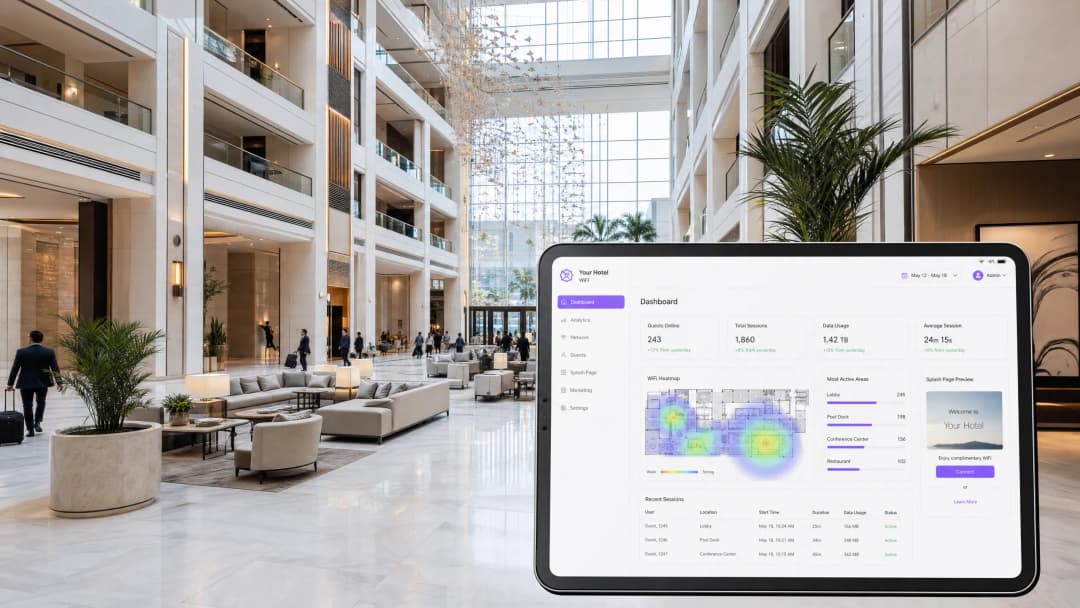
header_image.png

执行摘要

酒店访客 WiFi 不再仅仅是一项公用设施,它已成为关键的业务运营系统和获取第一方数据的主要渠道。本技术参考指南详细介绍了如何在酒店业环境中构建、部署和管理企业级 WiFi。内容涵盖网络划分、物业管理系统(PMS)整合、captive portal 优化以及连锁品牌标准的贯彻执行。对于 IT 总监、网络架构师和场所运营总监而言,目标非常明确:提供快速、安全的连接,与您的 Guest WiFi 基础设施无缝整合,同时捕获合规数据以赋能您的 WiFi Analytics 平台。

无论您管理的是精品酒店,还是拥有 500 家物业的全球投资组合,技术要求都是相同的:隔离流量、通过 PMS 实现会话管理自动化,并执行一致的安全策略。Purple 提供了与硬件无关的云端覆盖网络,使这在 Cisco Meraki、HPE Aruba、Ruckus、Juniper Mist、Ubiquiti UniFi、Cambium、Extreme 和 Fortinet 部署中成为可能。

技术深度解析

网络划分与 VLAN 架构

酒店环境中的扁平网络是严重的安全漏洞,也是合规方面的失败。酒店网络必须服务于不同的群体:访客、员工、楼宇管理系统和 IoT 设备。安全酒店 WiFi 的基石是使用 IEEE 802.1Q 定义的虚拟局域网(VLAN)进行逻辑划分。

您必须为每个流量类别分配一个专用的 VLAN。标准部署至少需要四个 VLAN:Guest WiFi、员工、IoT/楼宇系统,以及用于支付终端的 PCI 范围网络。您的防火墙必须在这些细分网络之间执行默认拒绝策略。访客流量必须直接路由到互联网,与物业管理系统、销售点(POS)终端和员工通信完全隔离。

对于无线边缘,每个服务集标识符(SSID)都会映射到一个特定的 VLAN。在访客 SSID 上,您必须启用客户端隔离。客户端隔离可防止同一 SSID 上的设备直接相互通信,从而降低受损设备探测其他访客的风险。

PMS 整合与自动化会话管理

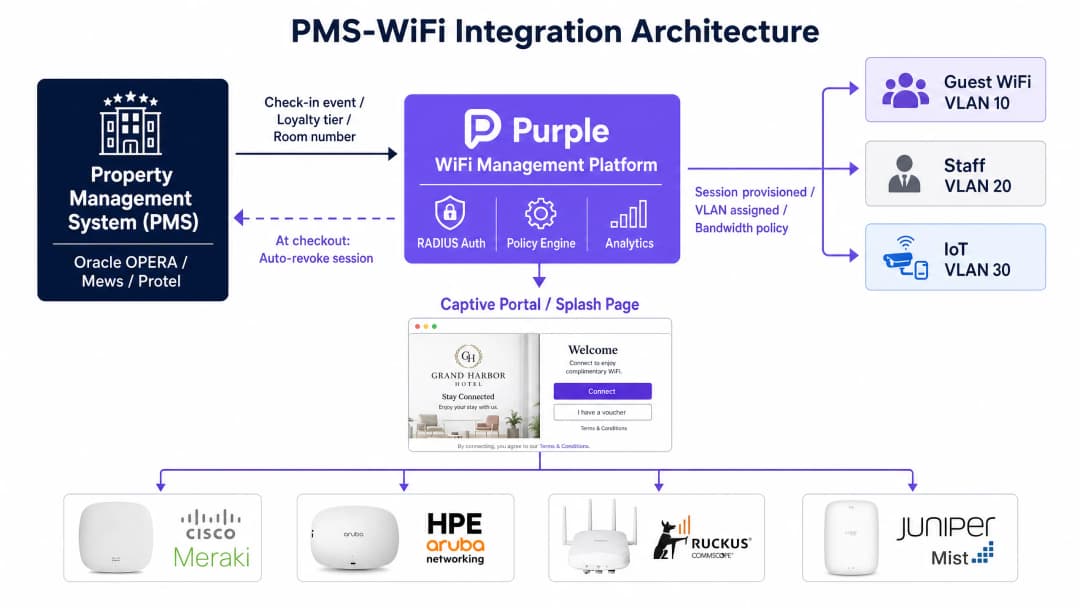
您的 WiFi 管理平台与物业管理系统(PMS)(如 Oracle OPERA、Mews 或 Protel)之间的整合是现代酒店网络的关键纽带。PMS 掌握着关于访客身份、客房分配、入住状态和会员等级的真实数据。

当访客办理入住时,PMS 会向 WiFi 平台发送 API 调用或 Webhook。平台会预先配置访客会话,并根据其会员等级应用正确的带宽策略。当访客连接时,身份验证是无缝的。至关重要的是,当访客退房时,PMS 会向 WiFi 平台发出信号,立即撤销其访问权限。这消除了凭据残留的安全风险,并防止已退房的访客继续消耗带宽。

Captive Portals 与第一方数据捕获

captive portal 是将基础设施投资转化为商业价值的门户。它不仅是一种访问控制机制,更是您捕获第一方数据的主要引擎。

访客通过电子邮件、社交登录或短信验证进行身份验证。这将捕获经过验证的身份,然后将其与他们的设备 MAC 地址、访问时间戳和停留时间相关联。这些数据直接导入您的 CRM,从而实现有针对性的入住前电子邮件、入住后调查和基于位置的优惠推送。

合规性是不容妥协的。符合 GDPR 的 captive portal 必须提供清晰的隐私声明,并针对营销沟通获取明确且非捆绑式的同意。同意访问 WiFi 不得作为同意接收营销信息的先决条件。Purple 原生支持此功能,为每个用户配置文件保留详细的审计追踪。

实施指南

第一阶段:现场勘测与容量规划

在配置任何硬件之前,请使用预测建模工具进行彻底的射频(RF)现场勘测。对于酒店环境,目标是客房内覆盖。每间客房部署一个接入点(AP),或者最少每两间客房部署一个 AP。避免将 AP 部署在走廊,这会产生信号覆盖盲区并降低性能。根据并发使用高峰期规划您的互联网上行链路带宽。计划每间客房 5 至 10 Mbps;一个拥有 200 间客房的物业需要 800 Mbps 至 1.6 Gbps 的承诺专线。

第二阶段:架构与策略设计

将每种设备类型映射到专用的 VLAN。记录您的 VLAN 间路由规则和默认拒绝防火墙策略。确定您的身份验证标准:员工网络采用带有 IEEE 802.1XWPA3-Enterprise,访客网络采用 WPA3-Personal 或强制执行 HTTPS 且启用客户端隔离的开放网络。

第三阶段:PMS 与门户整合

配置您的 PMS 与 WiFi 平台之间的 API 连接。设计 captive portal 以符合品牌标准。在 iOS、Android 和 Windows 设备上测试端到端的访客体验流程。验证在 PMS 中办理退房时是否正确触发了会话撤销。

pms_wifi_integration_architecture.png

最佳实践

  • 强制执行客户端 隔离: 始终在面向宾客的 SSID 上启用客户端隔离,以防止设备之间的横向移动。
  • 自动化基于角色的访问: 对员工网络使用 IEEE 802.1X 和 RADIUS 身份验证。与 Microsoft Entra ID、Okta 或 Google Workspace 集成,以根据用户角色动态分配 VLAN 和 QoS 策略。
  • 统一品牌标准: 使用具有分层策略引擎的云管理平台。在总部层面定义 SSID、安全协议和 Captive Portal 品牌形象,允许区域或酒店层面进行继承,同时不破坏品牌标准。
  • 隔离 IoT 流量: 将智能电视、温控器和语音助手隔离在具有严格出口过滤的专用 IoT VLAN 上。

captive_portal_brand_standards.png

故障排除与风险规避

  • 网速缓慢: 酒店 WiFi 变慢最常见的原因是 WAN 上行链路配置不足,而不是射频(RF)干扰。监控您的互联网线路利用率。如果上行链路饱和,升级接入点并不能改善宾客体验。
  • 隔离失效: 配置错误的交换机中继端口可能会将多个 VLAN 合并到单个广播域中,从而在无形中破坏您的网络隔离。定期审计交换机配置。
  • 身份验证阻碍: 需要填写过多数据的 Captive Portal 会导致宾客放弃连接过程。请保持表单简洁。

投资回报率(ROI)与业务影响

架构合理的酒店 WiFi 网络可带来可衡量的回报。它能减少与连接问题相关的 IT 支持工单,从而提高运营效率。它还能提升宾客满意度评分,而这与每间可售房收入(RevPAR)直接相关。最重要的是,它能生成一个合规的、经过验证的宾客第一方数据库,减少对在线旅行社(OTA)的依赖,并为直接预订营销活动提供支持。

关键定义

VLAN (Virtual Local Area Network)

A logical subnetwork that groups a collection of devices from different physical LANs. Essential for isolating guest traffic from operational systems.

Used to separate guest WiFi, staff devices, IoT hardware, and payment terminals onto isolated broadcast domains for security and PCI compliance.

PMS (Property Management System)

The central software platform used by hotels to manage reservations, check-ins, billing, and room status.

Integrating the PMS with the WiFi platform allows for automated session provisioning, loyalty tier bandwidth allocation, and immediate access revocation upon checkout.

Captive Portal

A web page that users must view and interact with before access is granted to a public WiFi network.

Used in hospitality to authenticate guests, present terms of service, and capture first-party marketing data.

Client Isolation

A wireless network security feature that prevents connected devices from communicating directly with each other.

Mandatory on guest SSIDs to stop a compromised device from scanning or attacking other guests on the same network.

IEEE 802.1X

An IEEE Standard for port-based Network Access Control, providing an authentication mechanism to devices wishing to attach to a LAN or WLAN.

The gold standard for staff network authentication, allowing dynamic VLAN assignment based on the user's role defined in an identity provider like Microsoft Entra ID.

RADIUS (Remote Authentication Dial-In User Service)

A networking protocol that provides centralized Authentication, Authorization, and Accounting management for users who connect and use a network service.

Used in conjunction with 802.1X to verify staff credentials and apply specific network policies.

SSID (Service Set Identifier)

The public name of a wireless network.

Hotels typically broadcast multiple SSIDs (e.g., 'Guest WiFi', 'Staff Network'), each mapped to a specific VLAN.

WPA3-Enterprise

The highest level of Wi-Fi security, requiring each user to authenticate with unique credentials rather than a shared password.

Required for staff and operational networks to ensure individual accountability and enable dynamic policy enforcement.

应用实例

A 150-room boutique hotel using Oracle OPERA requires a secure WiFi deployment that differentiates bandwidth for loyalty members and automatically revokes access at checkout.

Deploy one Wi-Fi 6 access point per room. Configure four VLANs: Guest (VLAN 10), Staff (VLAN 20), IoT (VLAN 30), and POS (VLAN 40). Integrate the Purple platform with Oracle OPERA via API. When a guest checks in, OPERA sends the loyalty tier to Purple. Purple provisions the session, applying a 50 Mbps policy for standard guests and a 100 Mbps policy for premium members. At checkout, OPERA triggers an API call that immediately revokes the MAC address session in Purple.

考官评语: This architecture correctly isolates traffic, satisfying PCI DSS requirements for the POS network. The PMS integration eliminates manual voucher generation and ensures bandwidth is allocated based on commercial value, rather than first-come-first-served contention.

A global hotel brand with 400 properties needs to ensure consistent captive portal branding and GDPR compliance across all venues, despite using different local ISPs and hardware vendors (Cisco Meraki, HPE Aruba, and Ruckus).

Implement a cloud overlay platform like Purple above the heterogeneous hardware layer. Define a global policy template at Brand HQ that dictates the SSID name, the captive portal design, and the specific GDPR consent checkboxes. Apply this template hierarchically to all 400 properties. Local IT teams can manage their specific APs and switches, but they cannot alter the captive portal flow or data capture requirements.

考官评语: This approach solves the governance challenge of multi-vendor, multi-region deployments. By abstracting the captive portal and policy engine away from the underlying hardware, the brand guarantees a uniform guest experience and centralized legal compliance.

练习题

Q1. A hotel is upgrading its network to support mobile check-in and digital room keys. The IT team plans to put the electronic door locks on the same VLAN as the guest WiFi to simplify routing. What is the primary risk of this approach?

提示:Consider the principle of logical segmentation and lateral movement.

查看标准答案

Placing IoT devices like electronic locks on the guest VLAN exposes critical building infrastructure to untrusted devices. A compromised guest smartphone could attempt to probe or attack the locks. The correct approach is to place the locks on a dedicated IoT VLAN (e.g., VLAN 30) with strict ingress/egress filtering, entirely isolated from the guest VLAN.

Q2. A regional manager reports that the WiFi at a 300-room property is 'too slow', despite recent upgrades to Wi-Fi 6 access points in the corridors. What are the two most likely architectural causes of this poor performance?

提示:Consider both WAN capacity and RF propagation principles.

查看标准答案

First, the internet uplink is likely under-provisioned. A 300-room property requires a committed leased line of at least 1.5 Gbps to handle peak concurrent streaming. Second, corridor AP placement is a flawed design; the RF signal degrades significantly when passing through heavy fire doors and bathroom plumbing. APs should be relocated to the guest rooms.

Q3. The marketing team wants to automatically assign returning guests to a higher bandwidth tier to reward loyalty. How should the network architecture be designed to support this requirement?

提示:What system holds the source of truth for guest identity, and how does it communicate with the network?

查看标准答案

The architecture requires an API integration between the Property Management System (PMS) and the WiFi management platform. When the guest connects, the WiFi platform queries the PMS using the device MAC address or authenticated email. The PMS returns the guest's loyalty status, and the WiFi platform dynamically applies a QoS policy to allocate higher bandwidth.