
Museum and Gallery WiFi: Creating a Connected Visitor Experience
This guide provides a comprehensive technical blueprint for deploying high-density WiFi in museums and galleries. It covers network architecture, visitor engagement strategies, and how to leverage WiFi analytics to drive ROI and operational efficiency.
Video overview
Listen to this guide
View podcast transcript
Part of our core series: Guest WiFi Guide →
Executive Summary
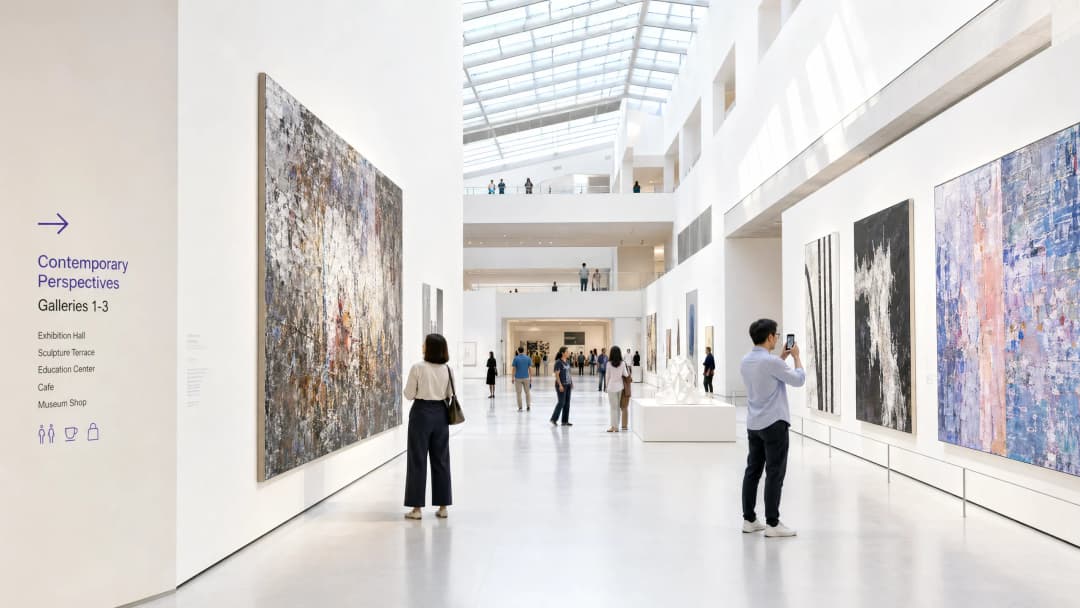
For the modern museum and gallery, WiFi is no longer a passive utility - it is the foundational infrastructure of the digital visitor journey. As cultural institutions transform from static displays into interactive, multimedia-rich environments, the demands placed on the wireless network are growing exponentially. This guide provides IT managers, network architects, and venue operations directors with a practical blueprint for designing and deploying high-density WiFi networks in complex cultural venues.
We will explore the specific RF challenges posed by historic buildings and high footfall, the architectural requirements for seamless connectivity, and how platforms like Purple can transform a cost centre into a strategic asset through Guest WiFi onboarding and advanced WiFi Analytics. By implementing the strategies outlined here, venues can deliver reliable connectivity for digital ticketing, wayfinding, and interactive exhibits, while capturing actionable first-party data to drive membership growth and revenue.
Technical Deep Dive
The RF Challenge in Cultural Institutions
Museums present a unique RF (radio frequency) environment. Unlike standard office spaces, these venues typically feature thick stone walls, extensive metal framing, and sprawling multi-floor layouts. These physical characteristics cause significant signal attenuation and multipath interference.
Furthermore, user density can fluctuate dramatically. A special exhibition can draw thousands of visitors into a confined space, overwhelming a poorly designed network. Mitigating these issues requires a robust, high-density network architecture.
High-Density Network Architecture
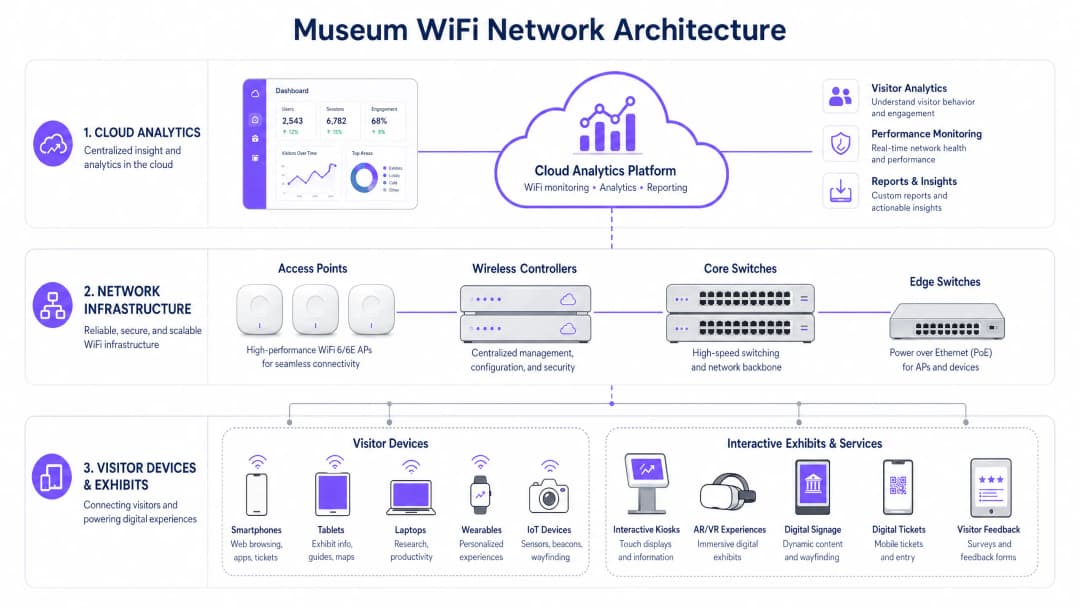
To support a connected visitor experience, the underlying infrastructure must be resilient and scalable.
- WiFi 6/6E standards: Deploying IEEE 802.11ax (WiFi 6) or WiFi 6E is essential. These standards introduce OFDMA (Orthogonal Frequency-Division Multiple Access) and MU-MIMO (Multi-User, Multiple Input, Multiple Output), dramatically improving network efficiency in high-density environments by allowing access points to communicate with multiple devices simultaneously.
- Access point (AP) density and placement: A predictive site survey is indispensable. APs must be strategically positioned to provide overlapping coverage while avoiding co-channel interference. In historic buildings with cabling constraints, mesh networking or point-to-point wireless bridges may be required, although wired connectivity is always preferred for core infrastructure.
- Network segregation: Visitor traffic must be strictly segregated from the corporate network, point-of-sale (POS) systems, and building management systems (BMS). This is typically achieved through VLANs (Virtual Local Area Networks) and robust firewall policies to ensure security and compliance.
Got questions about your specific setup?
Our team works with venue operators, IT managers, and network engineers across 80,000 venues. Book a 20-minute call and we will show you how others like you solved it.
Implementation Guide
Deploying a museum WiFi network requires careful planning to balance performance, aesthetics, and user experience.
Step 1: The Digital Onboarding Experience
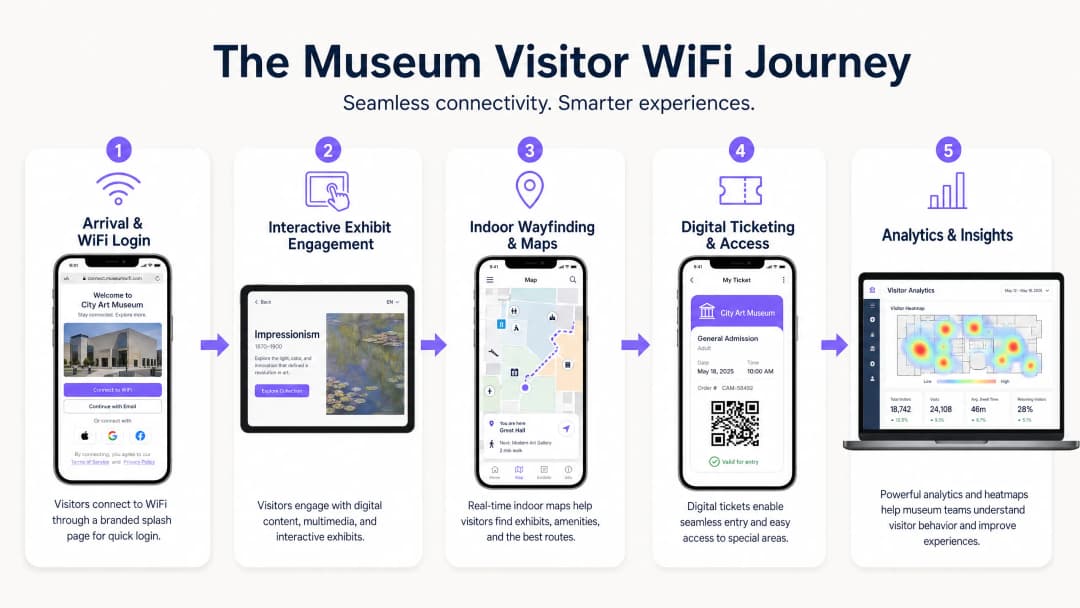
The captive portal is the first digital touchpoint. It must be smooth and secure. Integrating a solution such as Purple's Guest WiFi enables profile-based authentication. Visitors can authenticate via social media, email, or seamless protocols such as OpenRoaming. This reduces friction and encourages network adoption, which is critical for data capture.
Step 2: Enabling the Visitor Journey
Once connected, the network must support the entire visitor journey:
- Digital ticketing and admission: High availability at entry points is essential for scanning digital tickets without delay.
- Interactive exhibits: Dedicated bandwidth must be allocated for exhibit-related multimedia streaming and AR/VR experiences.
- Indoor wayfinding: By using the WiFi network in combination with BLE (Bluetooth Low Energy) beacons, venues can offer precise indoor navigation, guiding visitors through complex gallery layouts.
Step 3: Data Capture and Analytics
The true value of the network lies in the data it generates. Implementing WiFi Analytics allows IT and marketing teams to visualise visitor behaviour. Heatmaps can reveal popular exhibits, dwell times, and flow patterns. This data is invaluable for optimising venue layouts, scheduling staff rotas, and tailoring marketing campaigns.
Best Practices
- Prioritise security and compliance: Ensure the network complies with data protection regulations such as GDPR. When capturing visitor data, opt-in mechanisms must be transparent and clearly communicated. Secure the network with WPA3 encryption wherever possible, and enforce strict segregation between visitor and corporate traffic.
- Implement bandwidth management: Use Quality of Service (QoS) protocols to prioritise critical traffic (such as ticketing scanners) over general visitor browsing. Apply per-user bandwidth limits to prevent a single user from degrading the experience for everyone else.
- Monitor continuously: Network performance is not static. Use cloud management dashboards to monitor AP health, client connection rates, and overall network throughput in real time.
Troubleshooting and Risk Mitigation
Even the best-designed networks encounter issues. Common failure modes include:
- Co-channel interference (CCI): In high-density deployments, APs on the same channel can interfere with one another. Mitigation: Implement dynamic channel assignment and carefully tune transmit power levels.
- Captive portal failures: If the captive portal fails to load, visitors cannot connect. Mitigation: Ensure the DNS infrastructure is robust, and consider implementing "walled garden" access for essential services prior to full authentication. (See: Securing your network with robust DNS and security).
- Device incompatibility: The network must support a huge variety of client devices, including older legacy hardware. Mitigation: While optimising for modern devices, maintain support for older standards (such as 802.11ac), ensuring the lowest common denominator does not drag down overall network performance.
ROI and Business Impact
Deploying an enterprise-grade WiFi network is a significant investment. However, its ROI can be measured across multiple dimensions:
- Operational efficiency: Automated data collection reduces the need for manual visitor surveys. Indoor wayfinding reduces the burden on staff providing directions.
- Increased revenue: Targeted marketing campaigns, driven by first-party data collected through Guest WiFi, can boost membership upgrades, special exhibition ticket sales, and retail/café spend.
- Improved visitor satisfaction: A seamless digital experience correlates directly with higher visitor satisfaction scores and positive online reviews, driving future attendance.
By treating the WiFi network as a strategic platform for engagement and analytics, rather than simply an IT expense, museums and galleries can significantly enhance their operational and commercial success.
Key Definitions
High-Density Environment
A physical space where a large number of client devices are connecting to the network simultaneously, requiring specialised RF design and AP configuration.
Museum atriums, special exhibition halls, and auditoriums are prime examples where standard office WiFi designs will fail.
Captive Portal
A web page that the user of a public-access network is obliged to view and interact with before access is granted.
This is the primary tool for visitor onboarding and data capture in a museum setting, often integrated with CRM systems.
WiFi 6 (802.11ax)
The current standard for wireless networks, designed specifically to improve efficiency and capacity in high-density environments.
Essential for modern museum deployments to handle the multitude of visitor smartphones and interactive exhibit devices.
VLAN (Virtual Local Area Network)
A logical grouping of devices on a network, allowing for the segmentation of traffic even if devices share the same physical infrastructure.
Used to separate visitor WiFi traffic from sensitive corporate or ticketing data, ensuring security.
Band Steering
A feature that encourages dual-band capable clients to connect to the less congested 5GHz or 6GHz bands rather than the crowded 2.4GHz band.
Crucial for optimising performance in crowded museum spaces.
First-Party Data
Information a company collects directly from its customers and owns.
Gathered via the WiFi captive portal, this data is highly valuable for targeted marketing and understanding the visitor demographic.
RSSI (Received Signal Strength Indicator)
A measurement of the power present in a received radio signal.
Used during site surveys and troubleshooting to determine if a visitor has sufficient signal strength to maintain a reliable connection.
OpenRoaming
A roaming federation service enabling an automatic and secure WiFi experience globally.
Allows visitors to seamlessly connect to the museum WiFi without manually interacting with a captive portal, improving the user experience.
Worked Examples
A historic gallery with strict preservation orders needs to deploy WiFi to support a new AR (Augmented Reality) exhibit. Running new CAT6 cabling to the exhibit space is prohibited. How should the network architect proceed?
The architect should design a wireless mesh network or utilise point-to-point wireless bridges. High-capacity APs (WiFi 6) should be placed at the perimeter where cabling is permitted. These edge APs will wirelessly backhaul traffic from mesh APs located near the AR exhibit. The mesh APs should be housed in aesthetically appropriate, non-metallic enclosures to comply with preservation orders.
A large science museum is experiencing network congestion in its main atrium during peak weekend hours, leading to slow captive portal load times and visitor complaints.
The IT team should implement several optimisation steps: 1) Enable band steering to force capable devices onto the less congested 5GHz band. 2) Implement strict per-user bandwidth limits (e.g., 5 Mbps down/up) to prevent bandwidth hogging. 3) Review the AP deployment in the atrium; if APs are maxed out on client connections, additional APs with directional antennas may be required to sectorise the coverage area and increase overall capacity.
Practice Questions
Q1. A museum is planning a temporary outdoor exhibit in an adjacent courtyard. The exhibit will require reliable WiFi for digital interactive kiosks. Running cabling to the courtyard is not feasible. What is the most appropriate wireless architecture?
Hint: Consider the need for reliable backhaul for the kiosks without physical cabling.
View model answer
Deploy a point-to-multipoint wireless bridge from the main building to the courtyard. Use outdoor-rated, directional antennas on the building to establish a strong backhaul link to outdoor APs in the courtyard. These outdoor APs will then provide localised WiFi coverage for the kiosks.
Q2. The marketing director wants to use WiFi analytics to track how many visitors enter a specific, small gallery room (5m x 5m). Currently, there is one AP in the adjacent hallway providing coverage to the room. Will this setup provide accurate location data for that specific room?
Hint: Think about how location tracking works using WiFi and the requirements for accuracy.
View model answer
No, it will likely not provide accurate data. WiFi location analytics generally require trilateration, meaning a client device needs to be heard by at least three APs to accurately determine its position. A single AP in an adjacent hallway can only determine that the device is nearby, not its precise location within a small 5x5m room. Additional APs or BLE beacons would be required for precise indoor location tracking.
Q3. During a busy weekend, the IT dashboard shows that the 2.4GHz band is heavily congested, while the 5GHz band has plenty of capacity. However, many dual-band capable devices are still connecting to 2.4GHz. What configuration change should be implemented?
Hint: What feature forces or encourages capable devices to use a specific frequency band?
View model answer
Enable and aggressively configure 'Band Steering' on the wireless controller. This feature will actively encourage dual-band capable clients to connect to the 5GHz band, freeing up airtime on the 2.4GHz band for legacy devices that only support 2.4GHz.
Continue reading in this series
Staff WiFi vs. Guest WiFi: Best Practices for Corporate Network Segmentation
A comprehensive technical guide for IT leaders on segmenting staff and guest WiFi networks. It covers VLAN architecture, 802.1X authentication, firewall policies, and the business impact of secure network design.
Hotel Guest WiFi Management: Integrating PMS, Portals, and Brand Standards
This technical guide details how to architect enterprise-grade hotel WiFi networks, focusing on VLAN segmentation, PMS integration for automated session management, and captive portal optimisation for GDPR-compliant data capture.
How to Set Up Guest WiFi: A Secure Enterprise Configuration Guide
This authoritative guide provides IT leaders and network architects with a definitive blueprint for deploying secure enterprise guest WiFi. It covers essential architecture, WPA3 migration, VLAN segmentation, and captive portal integration to protect internal systems while capturing compliant first-party data.
Got questions about your specific setup?
Our team works with venue operators, IT managers, and network engineers across 80,000 venues. Book a 20-minute call and we will show you how others like you solved it.