
Museum और Gallery WiFi: एक कनेक्टेड विज़िटर अनुभव बनाना
यह गाइड म्यूज़ियम और गैलरी में हाई-डेंसिटी WiFi को तैनात करने के लिए एक व्यापक तकनीकी खाका प्रदान करती है। इसमें नेटवर्क आर्किटेक्चर, विज़िटर एंगेजमेंट रणनीतियों और ROI और परिचालन दक्षता को बढ़ाने के लिए WiFi एनालिटिक्स का लाभ उठाने के तरीके को शामिल किया गया है।
इस गाइड को सुनें
पॉडकास्ट ट्रांसक्रिप्ट देखें
हमारी मुख्य श्रृंखला का हिस्सा: Guest WiFi Guide →
कार्यकारी सारांश (Executive Summary)
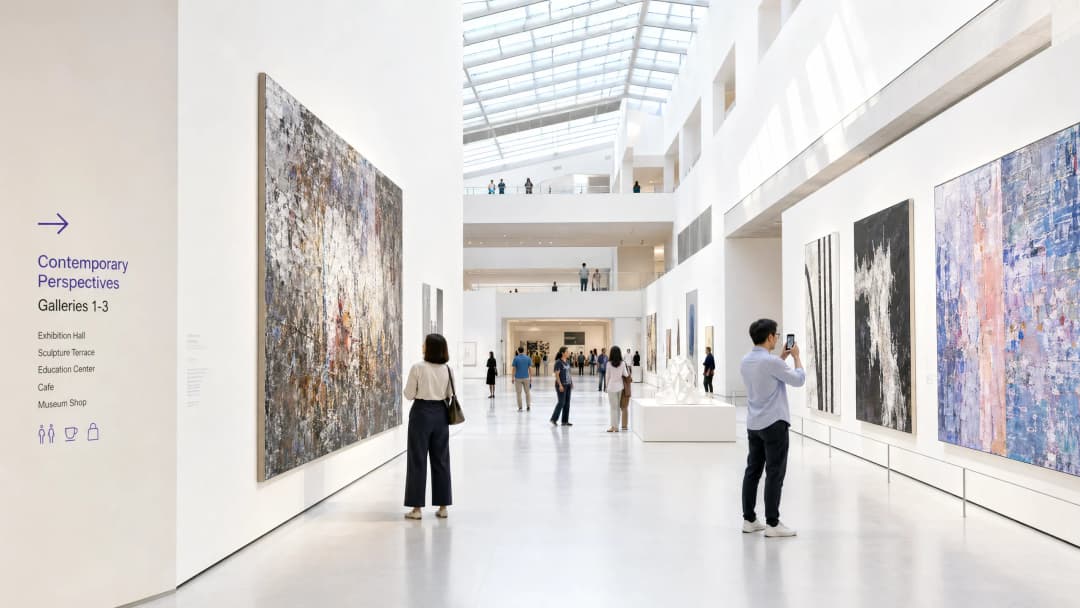
आधुनिक संग्रहालय और गैलरी के लिए, WiFi अब केवल एक निष्क्रिय सेवा नहीं रह गया है - यह डिजिटल विज़िटर यात्रा का एक बुनियादी बुनियादी ढांचा (इन्फ्रास्ट्रक्चर) है। जैसे-जैसे सांस्कृतिक संस्थान स्थिर प्रदर्शनियों से संवादात्मक, मल्टीमीडिया-समृद्ध वातावरण में बदल रहे हैं, वैसे-वैसे वायरलेस नेटवर्क पर मांग तेजी से बढ़ रही है। यह गाइड IT प्रबंधकों, नेटवर्क आर्किटेक्ट्स और वेन्यू ऑपरेशंस निदेशकों को जटिल सांस्कृतिक स्थलों में हाई-डेंसिटी WiFi नेटवर्क को डिज़ाइन और तैनात करने के लिए एक व्यावहारिक ब्लूप्रिंट प्रदान करती है।
हम ऐतिहासिक इमारतों और अत्यधिक भीड़-भाड़ के कारण उत्पन्न होने वाली विशिष्ट RF चुनौतियों, निर्बाध कनेक्टिविटी के लिए आवश्यक आर्किटेक्चरल आवश्यकताओं, और कैसे Purple जैसे प्लेटफ़ॉर्म Guest WiFi ऑनबोर्डिंग और उन्नत WiFi Analytics के माध्यम से एक लागत केंद्र (कॉस्ट सेंटर) को रणनीतिक संपत्ति में बदल सकते हैं, इस पर चर्चा करेंगे। यहाँ बताई गई रणनीतियों को लागू करके, ये स्थल डिजिटल टिकटिंग, वेफाइंडिंग और इंटरैक्टिव प्रदर्शनियों के लिए विश्वसनीय कनेक्टिविटी प्रदान कर सकते हैं, साथ ही सदस्यता वृद्धि और राजस्व बढ़ाने के लिए उपयोगी फर्स्ट-पार्टी डेटा कैप्चर कर सकते हैं।
तकनीकी विश्लेषण (Technical Deep Dive)
सांस्कृतिक संस्थानों में RF की चुनौती
संग्रहालयों में एक विशिष्ट RF (रेडियो फ्रीक्वेंसी) वातावरण होता है। मानक कार्यालय स्थानों के विपरीत, इन स्थलों में आमतौर पर मोटी पत्थर की दीवारें, व्यापक मेटल फ्रेमिंग और कई मंजिलों वाले फैले हुए लेआउट होते हैं। ये भौतिक विशेषताएं महत्वपूर्ण सिग्नल एटेन्युएशन (कमी) और मल्टीपाथ व्यवधान का कारण बनती हैं।
इसके अलावा, उपयोगकर्ताओं की संख्या में भारी उतार-चढ़ाव आ सकता है। एक विशेष प्रदर्शनी एक सीमित स्थान में हजारों विज़िटर्स को आकर्षित कर सकती है, जो एक खराब तरीके से डिज़ाइन किए गए नेटवर्क को ठप कर सकती है। इन समस्याओं को कम करने के लिए एक मजबूत, हाई-डेंसिटी नेटवर्क आर्किटेक्चर की आवश्यकता होती है।
हाई-डेंसिटी नेटवर्क आर्किटेक्चर
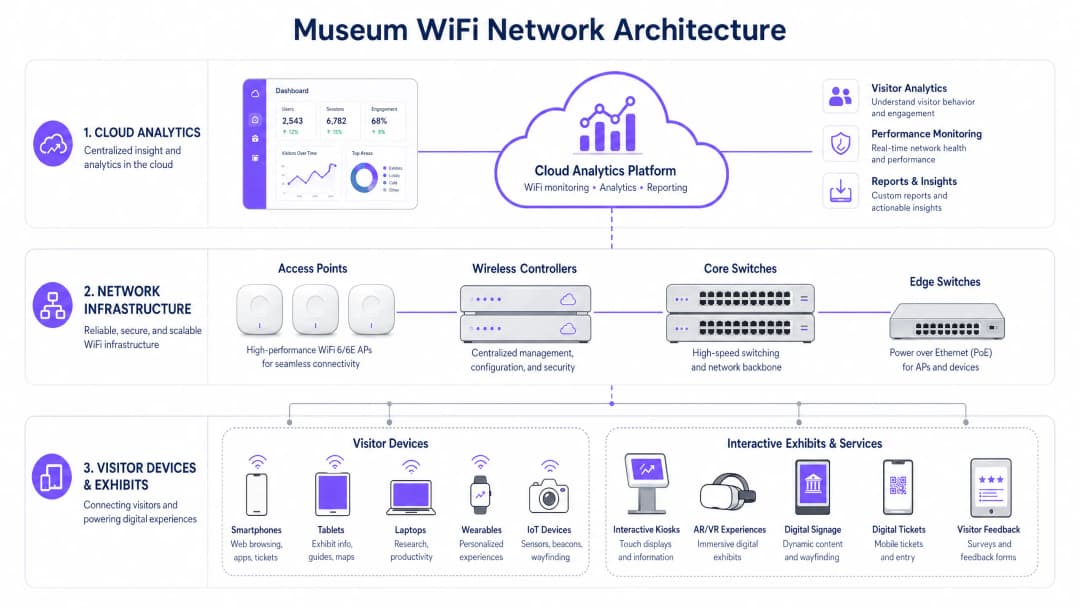
एक कनेक्टेड विज़िटर अनुभव का समर्थन करने के लिए, अंतर्निहित बुनियादी ढांचा लचीला और स्केलेबल होना चाहिए।
- WiFi 6/6E मानक: IEEE 802.11ax (WiFi 6) या WiFi 6E को तैनात करना आवश्यक है। ये मानक OFDMA (ऑर्थोगोनल फ्रीक्वेंसी-डिवीजन मल्टीपल एक्सेस) और MU-MIMO (मल्टी-यूज़र, मल्टीपल इनपुट, मल्टीपल आउटपुट) पेश करते हैं, जो एक्सेस पॉइंट्स को एक साथ कई डिवाइसों के साथ संवाद करने की अनुमति देकर हाई-डेंसिटी वातावरण में नेटवर्क दक्षता में नाटकीय रूप से सुधार करते हैं।
- एक्सेस पॉइंट (AP) घनत्व और प्लेसमेंट: एक प्रेडिक्टिव साइट सर्वे अपरिहार्य है। सह-चैनल हस्तक्षेप (co-channel interference) से बचते हुए ओवरलैपिंग कवरेज प्रदान करने के लिए APs को रणनीतिक रूप से स्थापित किया जाना चाहिए। केबल बिछाने की सीमाओं वाले ऐतिहासिक भवनों में, मेश नेटवर्किंग या पॉइंट-टू-पॉइंट वायरलेस ब्रिज की आवश्यकता हो सकती है, हालांकि कोर इंफ्रास्ट्रक्चर के लिए हमेशा वायर्ड कनेक्टिविटी को प्राथमिकता दी जाती है।
- नेटवर्क पृथक्करण: विजिटर ट्रैफ़िक को कॉर्पोरेट नेटवर्क, पॉइंट-ऑफ-सेल (POS) सिस्टम और बिल्डिंग मैनेजमेंट सिस्टम (BMS) से कड़ाई से अलग किया जाना चाहिए। सुरक्षा और अनुपालन सुनिश्चित करने के लिए इसे आमतौर पर VLANs और मजबूत फ़ायरवॉल नीतियों के माध्यम से प्राप्त किया जाता है।
अपने विशिष्ट सेटअप को लेकर कोई सवाल हैं?
हमारी टीम 80,000 से अधिक वेन्यू में वेन्यू ऑपरेटरों, IT मैनेजरों और नेटवर्क इंजीनियरों के साथ काम करती है। 20 मिनट का कॉल बुक करें और हम आपको दिखाएंगे कि आपके जैसे अन्य लोगों ने इसे कैसे हल किया।
कार्यान्वयन मार्गदर्शिका (Implementation Guide)
संग्रहालय WiFi नेटवर्क को तैनात करने के लिए प्रदर्शन, सौंदर्यशास्त्र और उपयोगकर्ता अनुभव को संतुलित करने के लिए सावधानीपूर्वक योजना बनाने की आवश्यकता होती है।
चरण 1: डिजिटल ऑनबोर्डिंग अनुभव (The Digital Onboarding Experience)
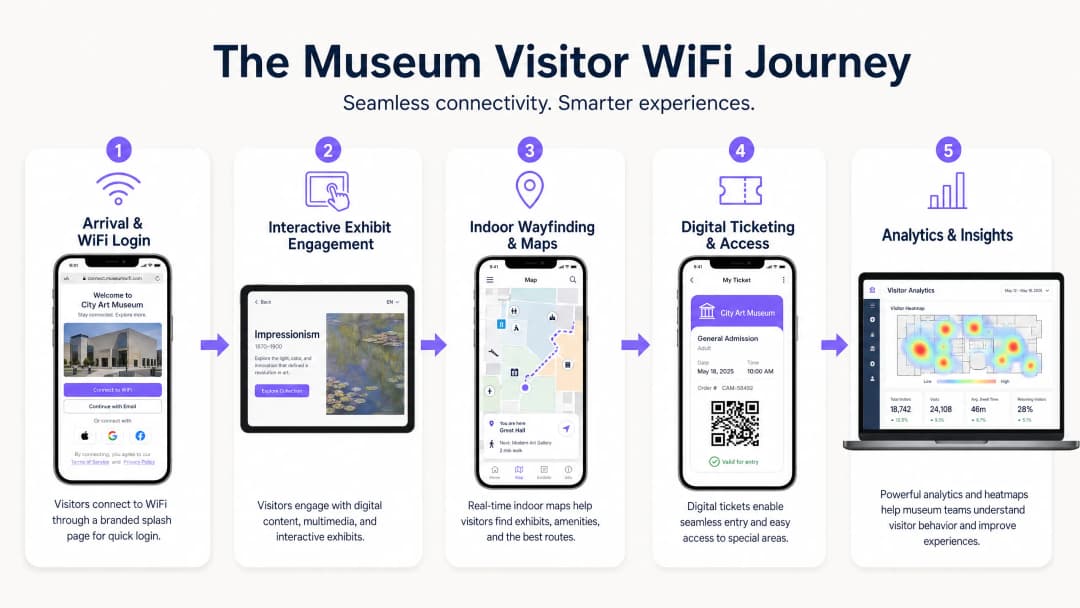
Captive Portal पहला डिजिटल टचपॉइंट है। इसे सुचारू और सुरक्षित होना चाहिए। Purple के Guest WiFi जैसे समाधान को एकीकृत करने से प्रोफाइल-आधारित प्रमाणीकरण सक्षम होता है। विजिटर सोशल मीडिया, ईमेल या OpenRoaming जैसे सहज प्रोटोकॉल के माध्यम से प्रमाणित कर सकते हैं। यह बाधाओं को कम करता है और नेटवर्क अपनाने को बढ़ावा देता है, जो डेटा कैप्चर के लिए महत्वपूर्ण है।
चरण 2: विजिटर यात्रा को सक्षम बनाना (Enabling the Visitor Journey)
एक बार कनेक्ट होने के बाद, नेटवर्क को पूरी विजिटर यात्रा का समर्थन करना चाहिए:
- डिजिटल टिकटिंग और प्रवेश: बिना किसी देरी के डिजिटल टिकटों को स्कैन करने के लिए प्रवेश बिंदुओं पर उच्च उपलब्धता आवश्यक है।
- इंटरैक्टिव प्रदर्शनियां: प्रदर्शनी से संबंधित मल्टीमीडिया स्ट्रीमिंग और AR/VR अनुभवों के लिए समर्पित बैंडविड्थ आवंटित की जानी चाहिए।
- इनडोर वेफ़ाइंडिंग: BLE (ब्लूटूथ लो एनर्जी) बीकन के संयोजन में WiFi नेटवर्क का उपयोग करके, स्थान सटीक इनडोर नेविगेशन की पेशकश कर सकते हैं, जिससे विजिटर्स को जटिल गैलरी लेआउट के माध्यम से मार्गदर्शन मिलता है।
चरण 3: डेटा कैप्चर और एनालिटिक्स (Data Capture and Analytics)
नेटवर्क का वास्तविक मूल्य इसके द्वारा उत्पन्न डेटा में निहित है। WiFi Analytics को लागू करने से IT और मार्केटिंग टीमों को विजिटर व्यवहार की कल्पना करने में मदद मिलती है। हीटमैप लोकप्रिय प्रदर्शनियों, रुकने के समय और विजिटर प्रवाह के पैटर्न को प्रकट कर सकते हैं। यह डेटा स्थान लेआउट को अनुकूलित करने, कर्मचारियों के रोस्टर को शेड्यूल करने और मार्केटिंग अभियानों को तैयार करने के लिए अमूल्य है।
सर्वोत्तम प्रथाएं (Best Practices)
- सुरक्षा और अनुपालन को प्राथमिकता दें: सुनिश्चित करें कि नेटवर्क GDPR जैसे डेटा सुरक्षा नियमों का अनुपालन करता है। विजिटर डेटा कैप्चर करते समय, ऑप्ट-इन तंत्र पारदर्शी और स्पष्ट रूप से संप्रेषित होना चाहिए। जहां भी संभव हो WPA3 एन्क्रिप्शन के साथ नेटवर्क को सुरक्षित करें, और विजिटर और कॉर्पोरेट ट्रैफ़िक के बीच सख्त पृथक्करण लागू करें।* बैंडविड्थ प्रबंधन लागू करें: सामान्य विज़िटर ब्राउज़िंग की तुलना में महत्वपूर्ण ट्रैफ़िक (जैसे टिकटिंग स्कैनर) को प्राथमिकता देने के लिए Quality of Service (QoS) प्रोटोकॉल का उपयोग करें। किसी एक यूज़र को अन्य सभी के लिए अनुभव को खराब करने से रोकने के लिए प्रति-यूज़र बैंडविड्थ सीमाएं लागू करें।
- लगातार निगरानी करें: नेटवर्क का प्रदर्शन स्थिर नहीं रहता है। रियल टाइम में AP स्वास्थ्य, क्लाइंट कनेक्शन दरों और समग्र नेटवर्क थ्रूपुट की निगरानी के लिए क्लाउड प्रबंधन डैशबोर्ड का उपयोग करें।
समस्या निवारण और जोखिम शमन
बेहतरीन रूप से डिज़ाइन किए गए नेटवर्क में भी समस्याएं आती हैं। सामान्य विफलता मोड में शामिल हैं:
- सह-चैनल हस्तक्षेप (CCI): उच्च-घनत्व वाले डिप्लॉयमेंट में, एक ही चैनल पर मौजूद AP एक-दूसरे के साथ हस्तक्षेप कर सकते हैं। शमन: डायनेमिक चैनल असाइनमेंट लागू करें और ट्रांसमिट पावर स्तरों को ध्यान से ट्यून करें।
- कैप्टिव पोर्टल विफलताएं: यदि Captive Portal लोड होने में विफल रहता है, तो विज़िटर कनेक्ट नहीं हो सकते। शमन: सुनिश्चित करें कि DNS इंफ्रास्ट्रक्चर मजबूत है, और पूर्ण ऑथेंटिकेशन से पहले आवश्यक सेवाओं के लिए "walled garden" एक्सेस लागू करने पर विचार करें। (देखें: मजबूत DNS और सुरक्षा के साथ अपने नेटवर्क को सुरक्षित करना)।
- डिवाइस असंगतता: नेटवर्क को पुराने लेगेसी हार्डवेयर सहित कई प्रकार के क्लाइंट डिवाइसेस का समर्थन करना चाहिए। शमन: आधुनिक डिवाइसेस के लिए अनुकूलन करते हुए, पुराने मानकों (जैसे कि 802.11ac) के लिए समर्थन बनाए रखें, यह सुनिश्चित करते हुए कि सबसे कम सामान्य कारक समग्र नेटवर्क प्रदर्शन को कम न करे।
ROI और व्यावसायिक प्रभाव
एक एंटरप्राइज़-ग्रेड WiFi नेटवर्क को डिप्लॉय करना एक महत्वपूर्ण निवेश है। हालांकि, इसके ROI को कई आयामों में मापा जा सकता है:
- परिचालन दक्षता: स्वचालित डेटा संग्रह मैन्युअल विज़िटर सर्वेक्षणों की आवश्यकता को कम करता है। इनडोर वेफाइंडिंग दिशा-निर्देश प्रदान करने वाले कर्मचारियों पर बोझ को कम करती है।
- बढ़ा हुआ राजस्व: लक्षित मार्केटिंग अभियान, जो Guest WiFi के माध्यम से एकत्र किए गए फ़र्स्ट-पार्टी डेटा द्वारा संचालित होते हैं, मेंबरशिप अपग्रेड, विशेष प्रदर्शनी टिकट बिक्री और रिटेल/कैफ़े खर्च को बढ़ावा दे सकते हैं।
- बेहतर विज़िटर संतुष्टि: एक निर्बाध डिजिटल अनुभव सीधे उच्च विज़िटर संतुष्टि स्कोर और सकारात्मक ऑनलाइन समीक्षाओं से संबंधित है, जो भविष्य की उपस्थिति को बढ़ाता है।
WiFi नेटवर्क को केवल एक IT खर्च के बजाय जुड़ाव और एनालिटिक्स के लिए एक रणनीतिक मंच के रूप में मानकर, संग्रहालय और दीर्घाएं अपनी परिचालन और व्यावसायिक सफलता को महत्वपूर्ण रूप से बढ़ा सकते हैं।
मुख्य परिभाषाएं
हाई-डेंसिटी एनवायरनमेंट
एक भौतिक स्थान जहाँ बड़ी संख्या में क्लाइंट डिवाइस एक साथ नेटवर्क से कनेक्ट हो रहे हैं, जिसके लिए विशेष RF डिज़ाइन और AP कॉन्फ़िगरेशन की आवश्यकता होती है।
म्यूज़ियम आलिंद, विशेष प्रदर्शनी हॉल और ऑडिटोरियम इसके प्रमुख उदाहरण हैं जहाँ मानक कार्यालय WiFi डिज़ाइन विफल हो जाएंगे।
Captive Portal
एक वेब पेज जिसे सार्वजनिक-पहुंच नेटवर्क के उपयोगकर्ता को एक्सेस प्रदान किए जाने से पहले देखने और उसके साथ इंटरैक्ट करने के लिए बाध्य होना पड़ता है।
यह म्यूज़ियम सेटिंग में विज़िटर ऑनबोर्डिंग और डेटा कैप्चर के लिए प्राथमिक उपकरण है, जो अक्सर CRM सिस्टम के साथ एकीकृत होता है।
WiFi 6 (802.11ax)
वायरलेस नेटवर्क के लिए वर्तमान मानक, विशेष रूप से हाई-डेंसिटी वाले वातावरण में दक्षता और क्षमता में सुधार के लिए डिज़ाइन किया गया है।
विज़िटर के स्मार्टफोन और इंटरैक्टिव प्रदर्शनी उपकरणों की बहुतायत को संभालने के लिए आधुनिक म्यूज़ियम तैनाती के लिए आवश्यक है।
VLAN (Virtual Local Area Network)
नेटवर्क पर उपकरणों का एक लॉजिकल ग्रुपिंग, जो ट्रैफिक के सेगमेंटेशन की अनुमति देता है, भले ही उपकरण समान भौतिक बुनियादी ढांचे को साझा करते हों।
सुरक्षा सुनिश्चित करते हुए विज़िटर WiFi ट्रैफिक को संवेदनशील कॉर्पोरेट या टिकटिंग डेटा से अलग करने के लिए उपयोग किया जाता है।
बैंड स्टीयरिंग
एक विशेषता जो डुअल-बैंड सक्षम क्लाइंट को भीड़भाड़ वाले 2.4GHz बैंड के बजाय कम भीड़भाड़ वाले 5GHz या 6GHz बैंड से कनेक्ट करने के लिए प्रोत्साहित करती है।
भीड़भाड़ वाले म्यूज़ियम स्थानों में प्रदर्शन को अनुकूलित करने के लिए महत्वपूर्ण है।
फर्स्ट-पार्टी डेटा
वह जानकारी जिसे कोई कंपनी सीधे अपने ग्राहकों से एकत्र करती है और उसकी मालिक होती है।
WiFi Captive Portal के माध्यम से एकत्र किया गया, यह डेटा लक्षित मार्केटिंग और विज़िटर जनसांख्यिकी को समझने के लिए अत्यधिक मूल्यवान है।
RSSI (Received Signal Strength Indicator)
प्राप्त रेडियो सिग्नल में मौजूद शक्ति का माप।
साइट सर्वेक्षण और समस्या निवारण के दौरान यह निर्धारित करने के लिए उपयोग किया जाता है कि विज़िटर के पास एक विश्वसनीय कनेक्शन बनाए रखने के लिए पर्याप्त सिग्नल शक्ति है या नहीं।
OpenRoaming
एक रोमिंग फेडरेशन सेवा जो वैश्विक स्तर पर एक स्वचालित और सुरक्षित WiFi अनुभव सक्षम करती है।
आगंतुकों को Captive Portal के साथ मैन्युअल रूप से बातचीत किए बिना संग्रहालय के WiFi से सहजता से कनेक्ट होने की अनुमति देता है, जिससे उपयोगकर्ता अनुभव में सुधार होता है।
हल किए गए उदाहरण
एक ऐतिहासिक गैलरी जिसे सख्त संरक्षण आदेश प्राप्त हैं, उसे एक नए AR (ऑगमेंटेड रियलिटी) प्रदर्शनी को सपोर्ट करने के लिए WiFi तैनात करने की आवश्यकता है। प्रदर्शनी स्थल तक नई CAT6 केबलिंग ले जाना प्रतिबंधित है। नेटवर्क आर्किटेक्ट को आगे कैसे बढ़ना चाहिए?
आर्किटेक्ट को एक वायरलेस मेश नेटवर्क डिज़ाइन करना चाहिए या पॉइंट-टू-पॉइंट वायरलेस ब्रिज का उपयोग करना चाहिए। उच्च क्षमता वाले APs (WiFi 6) को उस पेरीमीटर पर रखा जाना चाहिए जहां केबलिंग की अनुमति है। ये एज APs AR प्रदर्शनी के पास स्थित मेश APs से वायरलेस तरीके से ट्रैफिक बैकहॉल करेंगे। संरक्षण आदेशों का अनुपालन करने के लिए मेश APs को सौंदर्य के रूप में उपयुक्त, गैर-धातु बाड़ों (enclosures) में रखा जाना चाहिए।
एक बड़े विज्ञान म्यूज़ियम में वीकेंड के व्यस्त घंटों के दौरान अपने मुख्य आलिंद (atrium) में नेटवर्क कंजेशन का सामना करना पड़ रहा है, जिससे Captive Portal लोड होने का समय धीमा हो रहा है और विज़िटर की शिकायतें आ रही हैं।
IT टीम को कई ऑप्टिमाइजेशन कदम लागू करने चाहिए: 1) सक्षम उपकरणों को कम भीड़भाड़ वाले 5GHz बैंड पर जाने के लिए मजबूर करने के लिए बैंड स्टीयरिंग सक्षम करें। 2) बैंडविड्थ की जमाखोरी को रोकने के लिए सख्त प्रति-उपयोगकर्ता बैंडविड्थ सीमाएं (जैसे, 5 Mbps डाउन/अप) लागू करें। 3) आलिंद (atrium) में AP तैनाती की समीक्षा करें; यदि APs क्लाइंट कनेक्शन पर अधिकतम हो गए हैं, तो कवरेज क्षेत्र को सेक्टराइज़ करने और समग्र क्षमता बढ़ाने के लिए दिशात्मक एंटेना वाले अतिरिक्त APs की आवश्यकता हो सकती है।
अभ्यास प्रश्न
Q1. एक संग्रहालय आस-पास के प्रांगण में एक अस्थायी आउटडोर प्रदर्शनी की योजना बना रहा है। प्रदर्शनी के लिए डिजिटल इंटरैक्टिव कियोस्क के लिए विश्वसनीय WiFi की आवश्यकता होगी। प्रांगण में केबल बिछाना व्यावहारिक नहीं है। सबसे उपयुक्त वायरलेस आर्किटेक्चर क्या है?
संकेत: भौतिक केबल बिछाने के बिना कियोस्क के लिए विश्वसनीय बैकहॉल की आवश्यकता पर विचार करें।
मॉडल उत्तर देखें
मुख्य भवन से प्रांगण तक एक पॉइंट-टू-मल्टीपॉइंट वायरलेस ब्रिज तैनात करें। प्रांगण में आउटडोर APs के लिए एक मजबूत बैकहॉल लिंक स्थापित करने के लिए भवन पर आउटडोर-रेटेड, दिशात्मक एंटेना का उपयोग करें। ये आउटडोर APs फिर कियोस्क के लिए स्थानीयकृत WiFi कवरेज प्रदान करेंगे।
Q2. मार्केटिंग निदेशक यह ट्रैक करने के लिए WiFi एनालिटिक्स का उपयोग करना चाहता है कि कितने आगंतुक एक विशिष्ट, छोटे गैलरी कक्ष (5m x 5m) में प्रवेश करते हैं। वर्तमान में, आस-पास के हॉलवे में एक AP है जो कमरे को कवरेज प्रदान करता है। क्या यह सेटअप उस विशिष्ट कमरे के लिए सटीक स्थान डेटा प्रदान करेगा?
संकेत: विचार करें कि WiFi का उपयोग करके स्थान ट्रैकिंग कैसे काम करती है और सटीकता के लिए क्या आवश्यकताएं हैं।
मॉडल उत्तर देखें
नहीं, यह संभवतः सटीक डेटा प्रदान नहीं करेगा। WiFi स्थान एनालिटिक्स के लिए आमतौर पर ट्रिलेटरेशन की आवश्यकता होती है, जिसका अर्थ है कि किसी क्लाइंट डिवाइस की स्थिति का सटीक निर्धारण करने के लिए कम से कम तीन APs द्वारा उसकी आवाज सुनी जानी चाहिए। आस-पास के हॉलवे में एक एकल AP केवल यह निर्धारित कर सकता है कि डिवाइस पास में है, न कि एक छोटे 5x5m कमरे के भीतर उसकी सटीक स्थिति। सटीक इनडोर स्थान ट्रैकिंग के लिए अतिरिक्त APs या BLE बीकन की आवश्यकता होगी।
Q3. एक व्यस्त सप्ताहांत के दौरान, IT डैशबोर्ड दिखाता है कि 2.4GHz बैंड अत्यधिक व्यस्त है, जबकि 5GHz बैंड में पर्याप्त क्षमता है। हालांकि, कई डुअल-बैंड सक्षम डिवाइस अभी भी 2.4GHz से कनेक्ट हो रहे हैं। कौन सा कॉन्फ़िगरेशन परिवर्तन लागू किया जाना चाहिए?
संकेत: कौन सी सुविधा सक्षम उपकरणों को एक विशिष्ट फ़्रीक्वेंसी बैंड का उपयोग करने के लिए मजबूर या प्रोत्साहित करती है?
मॉडल उत्तर देखें
वायरलेस कंट्रोलर पर 'Band Steering' को सक्रिय और आक्रामक रूप से कॉन्फ़िगर करें। यह सुविधा डुअल-बैंड सक्षम क्लाइंट्स को 5GHz बैंड से कनेक्ट करने के लिए सक्रिय रूप से प्रोत्साहित करेगी, जिससे लेगेसी उपकरणों के लिए 2.4GHz बैंड पर एयरटाइम खाली हो जाएगा जो केवल 2.4GHz का समर्थन करते हैं।
इस श्रृंखला में आगे पढ़ें
Staff WiFi बनाम Guest WiFi: कॉर्पोरेट नेटवर्क सेगमेंटेशन के लिए सर्वोत्तम प्रथाएं
IT लीडर्स के लिए स्टाफ और गेस्ट WiFi नेटवर्क को विभाजित करने पर एक व्यापक तकनीकी गाइड। इसमें VLAN आर्किटेक्चर, 802.1X ऑथेंटिकेशन, फ़ायरवॉल नीतियां और सुरक्षित नेटवर्क डिज़ाइन का व्यावसायिक प्रभाव शामिल है।
होटल Guest WiFi Management: PMS, Portals, और ब्रांड मानकों को एकीकृत करना
यह तकनीकी मार्गदर्शिका विस्तार से बताती है कि VLAN segmentation, automated session management के लिए PMS integration, और GDPR-compliant डेटा कैप्चर के लिए captive portal अनुकूलन पर ध्यान केंद्रित करते हुए उद्यम-स्तर के होटल WiFi नेटवर्क का निर्माण कैसे किया जाए।
सुरक्षित गेस्ट WiFi कैसे सेटअप करें: एक सुरक्षित एंटरप्राइज कॉन्फ़िगरेशन गाइड
यह आधिकारिक गाइड IT लीडर्स और नेटवर्क आर्किटेक्ट्स को सुरक्षित एंटरप्राइज गेस्ट WiFi को तैनात करने का एक निश्चित खाका प्रदान करती है। इसमें अनुपालन करने वाले फर्स्ट-पार्टी डेटा को कैप्चर करते हुए आंतरिक प्रणालियों की सुरक्षा के लिए आवश्यक आर्किटेक्चर, WPA3 माइग्रेशन, VLAN सेगमेंटेशन और captive portal इंटीग्रेशन शामिल हैं।
अपने विशिष्ट सेटअप को लेकर कोई सवाल हैं?
हमारी टीम 80,000 से अधिक वेन्यू में वेन्यू ऑपरेटरों, IT मैनेजरों और नेटवर्क इंजीनियरों के साथ काम करती है। 20 मिनट का कॉल बुक करें और हम आपको दिखाएंगे कि आपके जैसे अन्य लोगों ने इसे कैसे हल किया।