
Enterprise SCEP Setup Guide: Certificate-Based Wi-Fi Authentication for Higher Education and Large Networks
This guide provides a comprehensive technical blueprint for deploying certificate-based WiFi authentication using SCEP. It covers the architectural transition from pre-shared keys to EAP-TLS, deployment sequences across MDM platforms, and critical risk mitigation strategies for large-scale networks.
Listen to this guide
View podcast transcript

Executive Summary
For enterprise venues—whether a modern higher education campus, a multi-site retail operation, or a major hospitality group—relying on pre-shared keys for staff and operational WiFi introduces unacceptable security vulnerabilities and operational overhead. Modern network architecture demands 802.1X authentication using EAP-TLS, ensuring every device is cryptographically verified before accessing the network.
The challenge lies in distribution: deploying unique client certificates to thousands of Windows, iOS, and Android devices without burying your helpdesk in support tickets. Microsoft Intune, Jamf, and other MDM platforms solve this through automated certificate lifecycle management. By leveraging SCEP (Simple Certificate Enrolment Protocol), IT teams can push trusted root and client certificates silently to managed endpoints.
This guide provides a definitive architectural blueprint and step-by-step implementation strategy for enterprise SCEP certificate deployment. We will explore the deployment sequence required for success, outline real-world risk mitigation strategies, and detail how Purple's identity-based network approach maps to these requirements.
Technical Deep-Dive: SCEP and 802.1X Architecture
When designing a certificate-based WiFi deployment strategy, understanding the underlying protocol interaction is critical. SCEP is the delivery mechanism; EAP-TLS is the authentication protocol.
SCEP (Simple Certificate Enrolment Protocol)
SCEP is the industry standard for enterprise device enrolment. In a SCEP workflow, the MDM service instructs the endpoint to generate its own private and public key pair. The device creates a Certificate Signing Request (CSR) and sends it via a Network Device Enrolment Service (NDES) server or cloud gateway to your Certificate Authority (CA). The CA signs the request and returns the public certificate to the device.
The critical security advantage of SCEP is that the private key never leaves the device. It is generated locally, stored in the device's secure hardware enclave, and is never transmitted across the network. This makes SCEP the strongly recommended approach for 802.1X authentication.
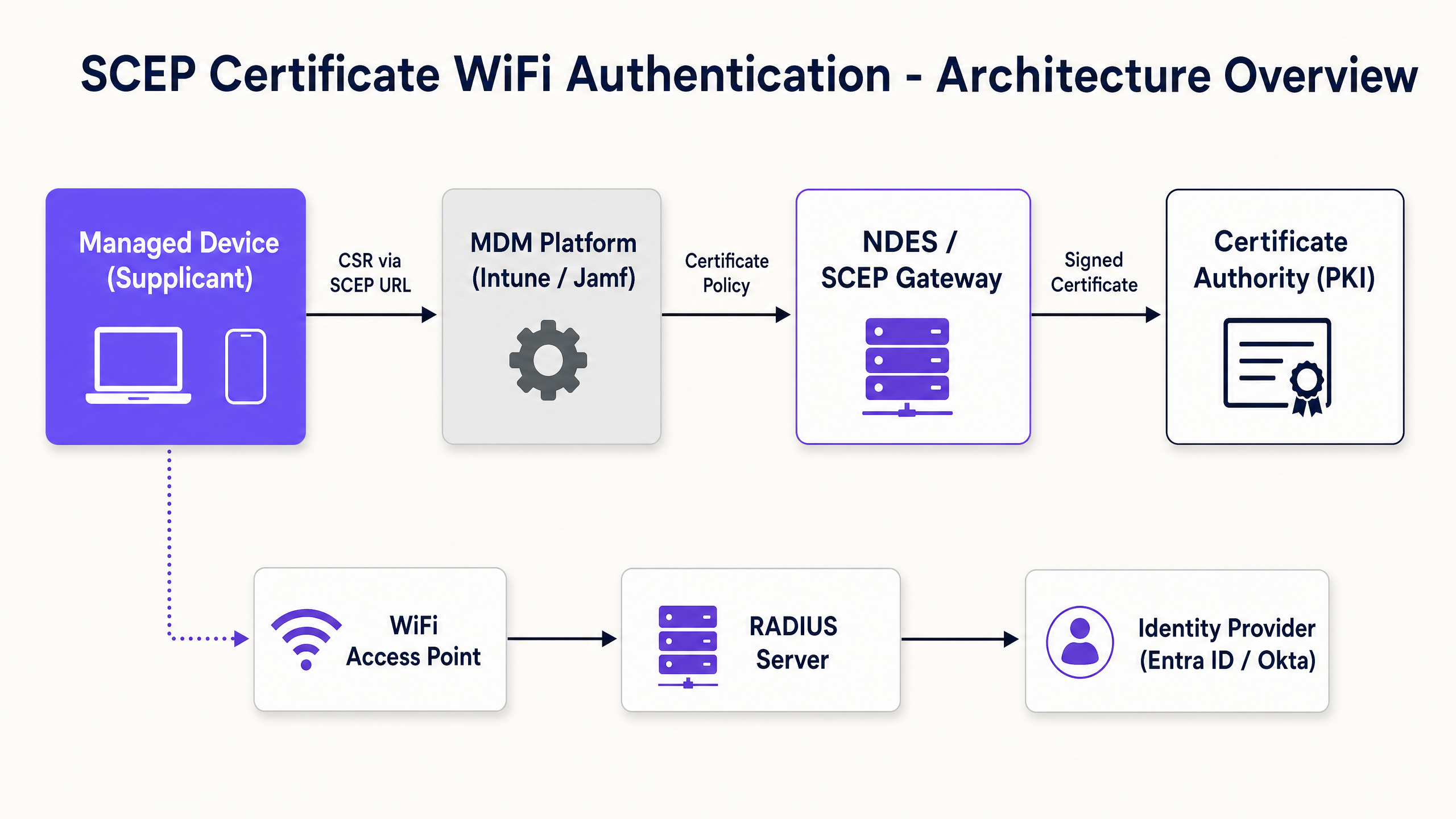
EAP-TLS and Mutual Authentication
EAP-TLS (Extensible Authentication Protocol with Transport Layer Security) sits inside the 802.1X framework. EAP-TLS is widely regarded as the most secure authentication method for enterprise wireless networks because it requires mutual authentication. Both the client device and the RADIUS server must present valid certificates. Neither side trusts the other without cryptographic proof. This mutual authentication protects the network against rogue access points and credential harvesting.
When a device connects to your WiFi SSID, it presents its certificate to the RADIUS server. The RADIUS server validates the certificate against your CA trust chain, checks the Certificate Revocation List (CRL) to confirm the certificate has not been revoked, and if successful, sends an accept message to the access point.
Implementation Guide: The Deployment Sequence
Successfully configuring an MDM WiFi profile for 802.1X requires strict adherence to a specific deployment sequence. Profile dependencies dictate that trust must be established before authentication can be configured.
Step 1: Deploy the Trusted Root Certificate Profile
Before any device can request a client certificate or trust your RADIUS server, it must trust the issuing Certificate Authority.
- Export your Root CA certificate as a .cer file.
- In your MDM (e.g., Intune or Jamf), create a Trusted Certificate profile.
- Upload the .cer file and deploy this profile to your target device groups.
Step 2: Configure the SCEP Certificate Profile
Once trust is established, configure the SCEP profile to instruct devices on how to obtain their client certificate.
- Create a new configuration profile and select SCEP certificate.
- Configure the Subject name format. For user-driven authentication, use the User Principal Name.
- Set the Key usage to Digital signature and Key encipherment.
- Under Extended key usage, specify Client Authentication.
- Link this profile to the Trusted Root certificate profile created in Step 1.
- Provide the external URL of your NDES server or SCEP gateway.
Step 3: Deploy the 802.1X WiFi Profile
The final step is pushing the WiFi configuration that ties the certificates to the network SSID.
- Create a Wi-Fi configuration profile.
- Enter the Network name (SSID) exactly as broadcast by your access points.
- Select WPA2-Enterprise or WPA3-Enterprise as the security type.
- Set the EAP type to EAP-TLS.
- Select the SCEP certificate profile created in Step 2 as the client authentication certificate.
- Specify the Trusted Root certificate for server validation.
Best Practices & Industry Standards
When implementing SCEP certificate deployment, adhere to these vendor-neutral best practices to ensure compliance and reliability.
NDES Server Placement and Security
The NDES server must be accessible from the internet to allow remote devices tto provision certificates before arriving on-site. However, exposing an internal server directly to the internet is a significant security risk. Publish the NDES URL using Azure AD Application Proxy or use a cloud-hosted SCEP gateway. This provides secure remote access without opening inbound firewall ports.
RADIUS and CRL Checking
Certificate deployment is only half the security equation; revocation is equally critical. If an employee leaves, disabling their Active Directory account may not immediately revoke their WiFi access if their client certificate remains valid and the RADIUS server is not strictly checking the Certificate Revocation List (CRL). Configure your RADIUS server to enforce strict CRL checking and ensure your CRL Distribution Points are highly available.
Hardware Agnostic Deployment
SCEP and EAP-TLS are vendor-neutral standards. Your deployment should be hardware-agnostic, working seamlessly across Cisco Meraki, HPE Aruba, Ruckus, Juniper Mist, Ubiquiti UniFi, Cambium, Extreme, and Fortinet infrastructure.
Troubleshooting & Risk Mitigation
Even with meticulous planning, certificate deployment can encounter issues.
Issue: WiFi Profile Fails to Apply
This is almost always caused by a mismatch in group targeting. If the SCEP profile is assigned to a User Group, but the WiFi profile is assigned to a Device Group, the MDM cannot resolve the dependency. Ensure the Trusted Root, SCEP, and WiFi profiles are all deployed to the exact same group.
Issue: NDES 403 Forbidden Errors
Devices fail to retrieve the SCEP certificate. The Intune Certificate Connector service account likely lacks the necessary permissions on the certificate template, or URL filtering on your firewall is blocking the specific query string parameters used by SCEP.
ROI & Business Impact
Transitioning to SCEP 802.1X certificate deployment delivers measurable returns across security and operations.
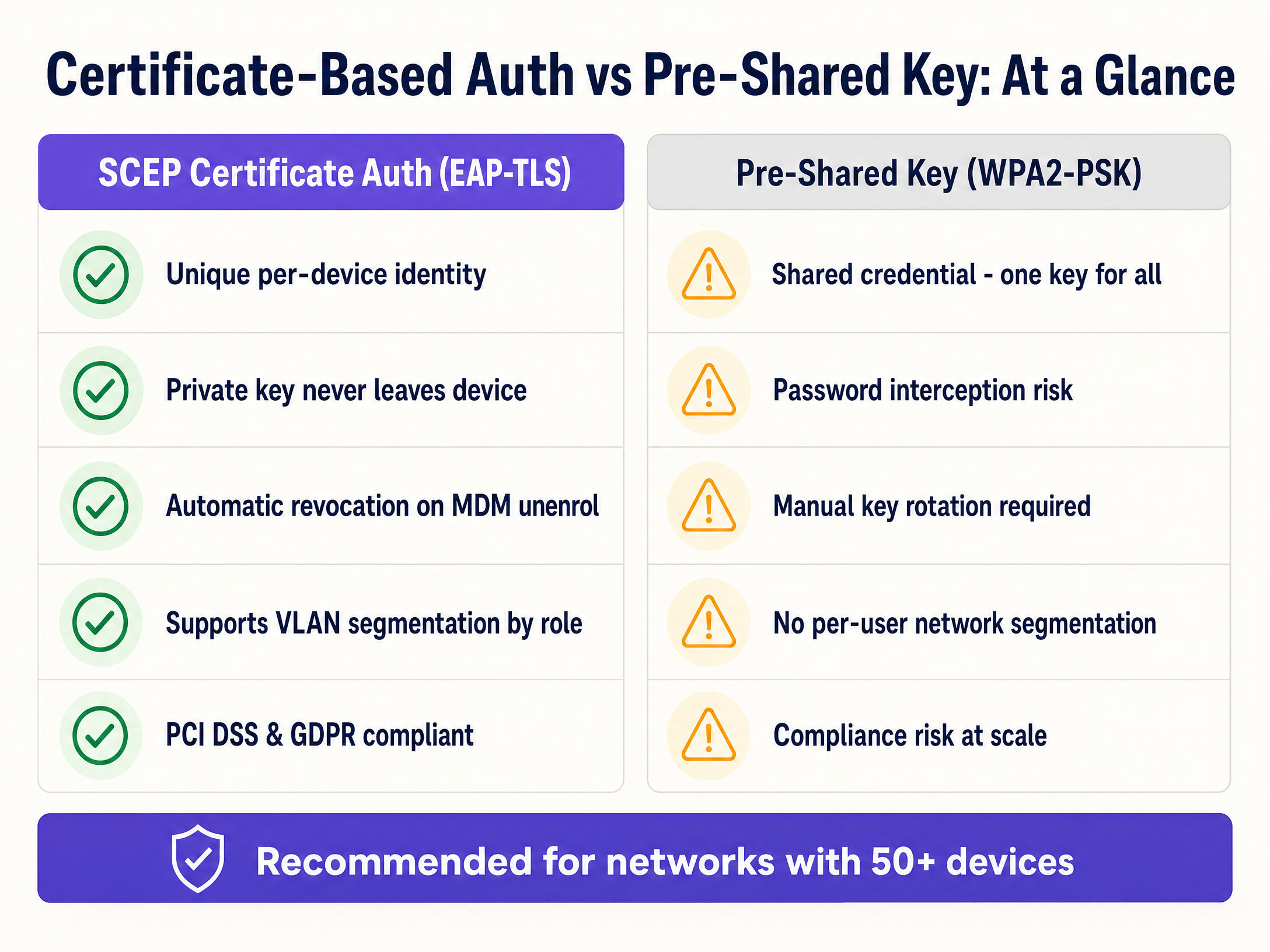
- Helpdesk Ticket Reduction: Password-based WiFi generates a significant volume of support tickets. Certificate-based authentication is invisible to the user, typically reducing WiFi-related helpdesk volume by 70%.
- Enhanced Security Posture: EAP-TLS eliminates the risk of credential harvesting and Man-in-the-Middle attacks. This is critical for compliance with frameworks like PCI DSS and GDPR.
- Seamless Onboarding: For organisations managing large fleets of Apple devices alongside Windows, integrating with existing MDM workflows ensures a unified, zero-touch provisioning experience.
- Dynamic Segmentation: Supports dynamic VLAN assignment based on identity, isolating IoT devices from corporate data without requiring separate SSIDs.
For further reading, explore our related guides on Enterprise WiFi Security: A Complete Guide for 2026 and How to revoke WiFi access when an employee leaves .
Key Definitions
SCEP (Simple Certificate Enrollment Protocol)
A protocol that automates the request and issuance of digital certificates to managed devices without human intervention.
Used by MDM platforms to securely provision unique identities to devices for network authentication.
EAP-TLS (Extensible Authentication Protocol - Transport Layer Security)
The most secure 802.1X authentication method, requiring both the client and the RADIUS server to present valid digital certificates.
The target authentication protocol that SCEP certificates are provisioned to support.
802.1X
An IEEE standard for port-based network access control that provides an authentication mechanism to devices wishing to attach to a LAN or WLAN.
The overarching framework that secures enterprise networks against unauthorized access.
RADIUS
A networking protocol that provides centralized Authentication, Authorization, and Accounting management for users who connect and use a network service.
The server component that validates the client certificate and determines which VLAN the device should join.
CSR (Certificate Signing Request)
A block of encoded text given to a Certificate Authority when applying for an SSL/TLS certificate, containing the public key and identity information.
Generated locally on the device during the SCEP enrollment process.
NDES (Network Device Enrollment Service)
A Microsoft Windows Server role that acts as a bridge, allowing devices to obtain certificates via SCEP.
The gateway that receives the CSR from the device and forwards it to the internal Certificate Authority.
CRL (Certificate Revocation List)
A list published by the Certificate Authority containing the serial numbers of certificates that have been revoked and should no longer be trusted.
Checked by the RADIUS server during authentication to ensure a terminated employee's device cannot connect.
VLAN (Virtual Local Area Network)
A logical subnetwork that groups a collection of devices from different physical LANs.
Used in conjunction with RADIUS to dynamically segment network traffic based on the identity presented in the SCEP certificate.
Worked Examples
A 400-room hotel needs to deploy secure operational WiFi for 150 staff devices (tablets and laptops) while ensuring strict separation from the Guest WiFi network.
The IT team configures a cloud SCEP gateway integrated with their MDM. They deploy a Trusted Root profile, followed by a SCEP profile targeting the 'Hotel Operations' device group. A WiFi profile for the 'Staff-Secure' SSID is then deployed, configured for WPA3-Enterprise and EAP-TLS. The RADIUS server is configured to assign these authenticated devices to VLAN 40, completely isolating them from the Guest WiFi (VLAN 50).
A large university campus with 25,000 students and 3,000 staff needs to secure its 'Edu-Secure' network. They currently use PEAP with usernames and passwords, resulting in 500+ helpdesk tickets per month due to password expirations.
The university migrates staff and faculty devices to EAP-TLS using Intune and SCEP. They deploy the certificate profiles in the strict sequence (Root -> SCEP -> WiFi) to the staff user groups. For unmanaged student BYOD devices, they deploy a separate onboarding portal that provisions temporary certificates, or utilize Purple's Guest WiFi platform with profile-based authentication for seamless, secure access.
Practice Questions
Q1. Your team is deploying a new SCEP certificate profile to a fleet of 500 Windows laptops. The Trusted Root profile was deployed to the 'All Corporate Devices' group. The SCEP profile was deployed to the 'All Corporate Users' group. The WiFi profile is showing as 'Not Applicable' on the laptops. What is the root cause?
Hint: Consider the Intune profile dependency rules and group targeting requirements.
View model answer
The root cause is a mismatch in group targeting. Intune requires that dependent profiles (Root, SCEP, WiFi) be deployed to the exact same group type. Because the Root profile targets devices and the SCEP profile targets users, the dependency chain is broken. All three profiles must target either the same Device group or the same User group.
Q2. A hotel operations director wants to secure the staff WiFi network using EAP-TLS. They suggest using PKCS instead of SCEP because it does not require an NDES server. As the network architect, why should you advise against this for WiFi authentication?
Hint: Think about where the private key is generated and how it travels.
View model answer
You should advise against PKCS for WiFi authentication because it requires the private key to be generated centrally by the CA and transmitted over the network to the device. SCEP is significantly more secure because the device generates the private key locally and stores it in a secure hardware enclave; the private key never leaves the device.
Q3. During a network audit, you discover that the RADIUS server is configured to ignore CRL (Certificate Revocation List) checking errors. What specific security risk does this introduce when an employee is terminated?
Hint: Consider what happens to the validity of the certificate if the MDM unenrols the device but the RADIUS server cannot verify revocation status.
View model answer
If CRL checking is ignored or fails open, a terminated employee whose device has been unenrolled (and certificate revoked by the CA) may still be able to connect to the WiFi network. The RADIUS server will see a cryptographically valid certificate and, without checking the CRL, will grant access, creating a severe security vulnerability.
Continue reading in this series
Measuring the Business ROI of Guest WiFi and Location Analytics
This guide provides a technical and operational framework for measuring the business ROI of guest WiFi and location analytics. It details how to calculate value from hardware investments through dwell time uplift, operational efficiency, and first-party data capture across retail, hospitality, and public venues. IT managers, network architects, CTOs, and venue operations directors will find concrete measurement frameworks, real-world case studies, and compliance guidance to justify and maximise their WiFi investment.
Integrating WeChat WiFi Login: Capturing Engagement via Social Captive Portals
This guide details how to integrate WeChat WiFi authentication into enterprise captive portals, covering the OAuth 2.0 architecture, RADIUS integration, and step-by-step deployment across Cisco Meraki, HPE Aruba, and Juniper Mist hardware. It gives IT managers and network architects a practical framework for capturing first-party data from WeChat's 1.3 billion users while driving engagement via Official Account follows and post-login redirects.
WiFi GDPR Compliance: How to Securely Collect Guest Data via Captive Portals
This technical guide gives IT managers, network architects, and venue operations directors a practical framework for achieving GDPR compliance across guest WiFi deployments. It covers how captive portals collect personal data, how to secure explicit consent, and how to implement automated data retention policies that protect your organisation from regulatory fines of up to 4% of global turnover. Purple's guest WiFi platform maps directly to each compliance requirement, from consent logging to one-click data erasure.