
Hotel WiFi Security: How to Protect Your Guests and Your Reputation
This authoritative guide provides IT managers and venue operations directors with a comprehensive framework for securing hotel WiFi networks. It covers essential technical implementations including network segmentation, robust authentication protocols, and compliance-driven captive portals to protect guest data and safeguard the venue's reputation.
Video overview
Part of our core series: Enterprise WiFi Security Guide →
Executive Summary
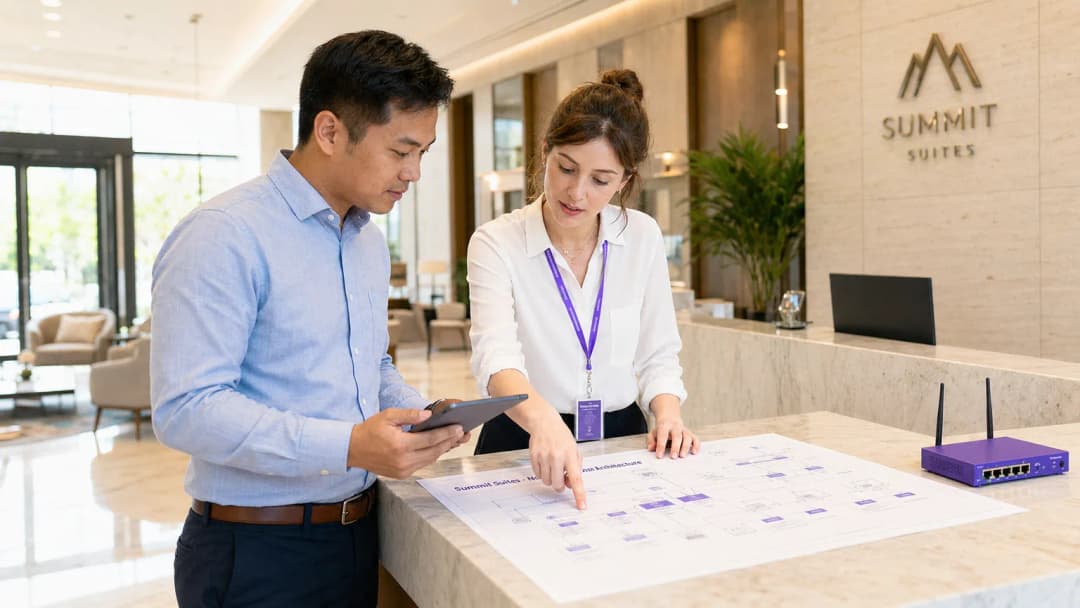
For modern hospitality venues, guest WiFi is no longer merely an amenity - it is a critical operational utility. Yet the convenience of ubiquitous connectivity also introduces a significant attack vector. An unsecured guest network is a prime target for threat actors seeking to intercept sensitive data, deploy malware, or use the hotel's infrastructure as a launchpad for broader intrusions. This technical reference guide provides a vendor-neutral, architecturally sound framework for securing hotel WiFi. We examine the mandatory requirements for network segmentation, the transition to robust authentication standards such as WPA3 and 802.1X, and the critical role of compliance-driven captive portals. Whether you manage a boutique hotel or a global chain, implementing these controls is essential for mitigating risk, ensuring compliance (such as PCI DSS and GDPR), and protecting brand reputation.
Listen to our 10-minute technical briefing podcast for an executive overview:
Technical Deep Dive: Network Architecture and Segmentation
The foundational principle of hotel WiFi security is strict network segmentation. Implementing a flat network where guest traffic, staff applications, and IoT devices coexist is a critical vulnerability. A compromised guest device must never have a pathway to the Property Management System (PMS) or point-of-sale (POS) terminals.

VLAN Architecture
A robust deployment requires the logical isolation of traffic into distinct virtual LANs (VLANs), with a default-deny stance on inter-VLAN routing enforced by firewall policy.
- Guest WiFi VLAN: This zone must be restricted to internet-only access. Client isolation (also known as AP isolation) must be enabled at the wireless controller or access point level. This prevents peer-to-peer communication between guest devices, eliminating lateral movement and man-in-the-middle (MitM) attacks within the guest network.
- Staff and PMS VLAN: Dedicated to internal operations, this VLAN carries the PMS, back-of-house applications, and staff communication tools. Access should require strong authentication, ideally 802.1X.
- IoT and Building Systems VLAN: Modern hotels rely heavily on IoT - smart thermostats, IP cameras, and electronic door locks. These devices typically lack robust native security and have long patch cycles. They must sit in a dedicated VLAN with strictly defined, outbound-only internet access (if required at all) and zero inbound access from other internal zones.
- POS and Payment VLAN: For PCI DSS compliance, payment terminals must be segregated into a dedicated VLAN restricted to communicating only with the payment gateway.
Authentication and Encryption Standards
The era of open, unencrypted guest networks is coming to an end. While open networks maximise ease of use, they expose guests to eavesdropping.
- WPA3-SAE (Simultaneous Authentication of Equals): For guest networks, a transition to WPA3 is strongly recommended. WPA3-SAE provides individualised data encryption even on networks with a shared passphrase, mitigating offline dictionary attacks.
- 802.1X / RADIUS: For staff networks and corporate devices, 802.1X delivers robust identity-based authentication. This ensures that only authorised personnel and managed devices can access internal networks.
- Passpoint (Hotspot 2.0): For a seamless yet secure guest experience, Passpoint allows compatible devices to authenticate and connect to the network automatically using enterprise-grade WPA2/WPA3-Enterprise security, without needing to interact with the captive portal on every visit. Purple's platform acts as a free identity provider for services such as OpenRoaming under the Connect licence, facilitating this secure, frictionless access.
Got questions about your specific setup?
Our team works with venue operators, IT managers, and network engineers across 80,000 venues. Book a 20-minute call and we will show you how others like you solved it.
Implementation Guide: Securing the Guest Access Flow
The captive portal is your first line of defence and the primary mechanism for enforcing compliance. It is not merely a branding exercise; it is a critical security control.
Captive Portal Design and Compliance
When deploying a captive portal, IT teams must ensure it satisfies several operational and legal requirements:
- Terms of Use (ToU) acceptance: The portal must present clear terms of use that guests must explicitly accept before being granted network access. This limits the venue's liability for malicious user behaviour on the network.
- GDPR and privacy compliance: If the portal collects user data (for example, email addresses for marketing), it must comply with data protection regulations such as GDPR. This requires an explicit, opt-in consent mechanism and a clear privacy policy. Using a comprehensive Guest WiFi platform ensures these compliance requirements are met automatically.
- Walled-garden configuration: Prior to authentication, users should only be able to reach the captive portal itself and essential services (such as DNS). Ensure the walled garden is strictly defined to prevent unauthorised internet access via DNS tunnelling or other bypass techniques.
Bandwidth Management and Traffic Shaping
Security also encompasses availability. A single compromised or abusive guest device can consume all available bandwidth, causing a denial of service (DoS) for other users and potentially impacting staff operations.
- Per-user rate limiting: Enforce strict upload and download bandwidth caps per MAC address or authenticated session.
- Application control: Use Layer 7 firewall rules to block or throttle high-bandwidth, non-essential applications (such as peer-to-peer file sharing) on the guest network.
Best Practices and Industry Standards
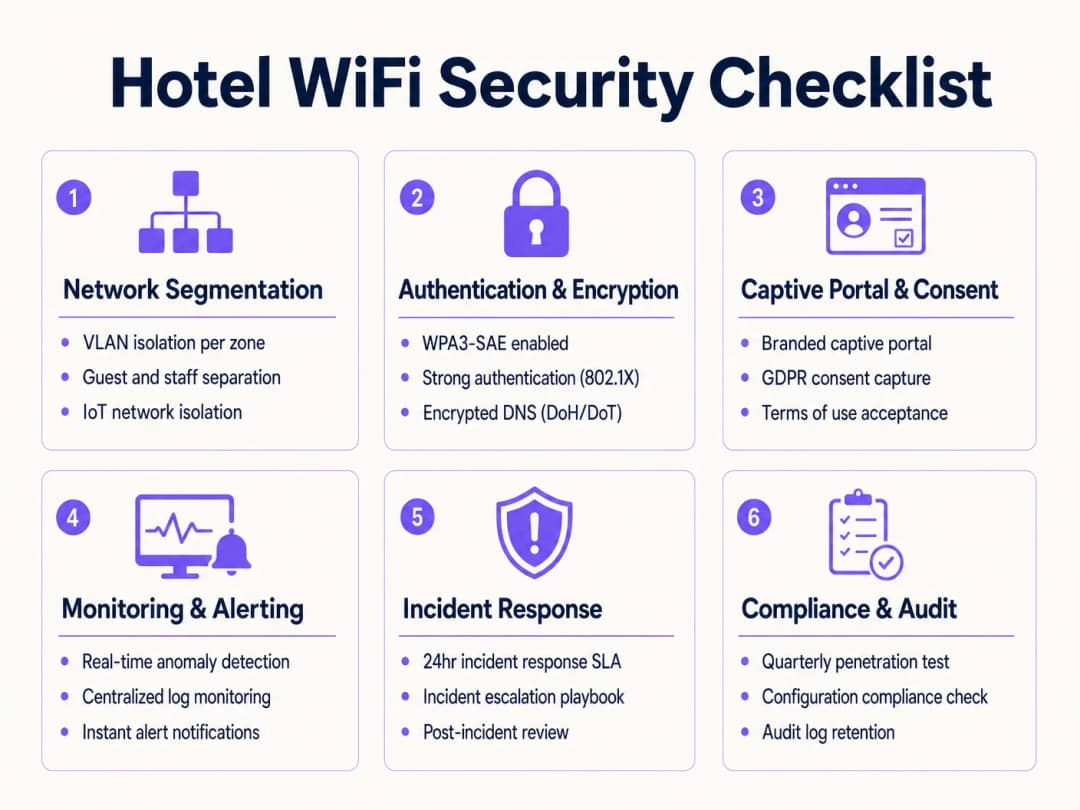
To maintain a strong security posture, IT teams should adhere to the following vendor-neutral best practices:
- Continuous rogue AP detection: Implement a wireless intrusion prevention system (WIPS) to continuously monitor the RF environment for unauthorised access points (rogue APs) and "evil twin" networks designed to steal guest credentials. The system should automatically contain these threats.
- Regular firmware updates: Establish a strict patch management programme for all network infrastructure, including access points, switches, and firewalls. Vulnerabilities in network hardware are frequently exploited.
- DNS filtering: Implement DNS-based content filtering on the guest network to block access to known malicious domains, command-and-control (C2) servers, and illegal content. This provides a critical layer of protection against malware and phishing.
Troubleshooting and Risk Mitigation
Even with a robust architecture, incidents will still occur. A proactive approach to monitoring and response is essential.
Common Failure Modes
- VLAN leakage: Misconfigured switch ports or firewall rules can inadvertently allow traffic to route between segregated VLANs. Mitigation: Conduct regular configuration audits and penetration tests to validate network segmentation.
- Captive portal bypass: Attackers may attempt to bypass the captive portal using MAC spoofing or DNS tunnelling. Mitigation: Implement robust MAC Authentication Bypass (MAB) controls and monitor DNS traffic for anomalies.
- IoT device compromise: An unpatched smart TV or thermostat is breached and used to scan the internal network. Mitigation: Strictly isolate the IoT VLAN and deploy network behaviour anomaly detection.
ROI and Business Impact
Investing in robust WiFi security is not merely a cost centre; it is a critical risk mitigation strategy with tangible business benefits.
- Brand protection: A major data breach originating from a hotel's WiFi network can cause irreparable damage to brand reputation, resulting in lost bookings and diminished customer trust.
- Regulatory compliance: Failure to comply with PCI DSS or GDPR can result in substantial fines and legal liability. A secure architecture simplifies compliance audits and reduces risk exposure.
- Operational continuity: Preventing malware infections and DoS attacks ensures that critical hotel operations (such as the PMS and POS systems) remain available and performant.
- Data monetisation: A secure, compliant captive portal enables the safe collection of first-party guest data. Analysing this data through a powerful WiFi Analytics platform can drive targeted marketing campaigns and improve the overall guest experience, directly impacting revenue.
By prioritising security throughout the WiFi deployment lifecycle, IT leaders in hospitality and retail can transform a potential vulnerability into a secure, value-generating asset.
Key Definitions
Client Isolation (AP Isolation)
A wireless network security feature that prevents devices connected to the same Access Point from communicating directly with each other.
Crucial for guest networks to prevent peer-to-peer attacks like ARP spoofing or unauthorised file sharing.
VLAN (Virtual Local Area Network)
A logical grouping of network devices that behave as if they are on a single, isolated LAN, regardless of their physical location.
The foundation of network segmentation, separating guest traffic from internal hotel systems.
Captive Portal
A web page that a user is prompted to view and interact with before access is granted to a public network.
Used to enforce Terms of Use, capture consent, and authenticate users.
WPA3-SAE
The latest WiFi security standard providing individualised encryption for users on a network with a shared password.
Protects guest data from eavesdropping even on 'open' networks.
802.1X
An IEEE standard for port-based network access control, requiring users to authenticate against a central server (like RADIUS) before gaining access.
The gold standard for securing staff and corporate networks.
Rogue AP
An unauthorised wireless access point connected to a secure network, often installed by an attacker to bypass security controls.
Requires continuous monitoring (WIPS) to detect and mitigate.
Evil Twin
A fraudulent WiFi access point that appears to be legitimate (e.g., using the hotel's SSID) to eavesdrop on wireless communications.
A common attack vector in public spaces, mitigated by strong authentication and WIPS.
PCI DSS
Payment Card Industry Data Security Standard; a set of security standards designed to ensure that all companies that accept, process, store or transmit credit card information maintain a secure environment.
Requires strict isolation of POS terminals from all other network traffic.
Worked Examples
A 300-room resort is upgrading its network infrastructure. The current setup uses a single, flat network for guest WiFi, back-office staff, and the newly installed smart room thermostats. The IT Director needs to design a secure architecture that prevents guest devices from communicating with each other and isolates the thermostats from the internet.
- Implement VLAN Segmentation: Create three distinct VLANs: Guest (VLAN 10), Staff (VLAN 20), and IoT (VLAN 30).
- Configure Firewall Rules: Set a default-deny policy between all VLANs. Allow Staff VLAN access to the internet and specific internal servers. Allow Guest VLAN access only to the internet.
- Isolate IoT: Deny the IoT VLAN access to the internet and all other internal VLANs. Only allow specific, required traffic from the management server to the IoT VLAN.
- Enable Client Isolation: On the wireless controller, enable Client Isolation (AP Isolation) on the Guest SSID to prevent guest devices from communicating with each other.
A hotel chain wants to implement a new captive portal to collect guest email addresses for marketing purposes. They operate in the UK and must comply with GDPR. What are the critical technical and legal requirements for the portal configuration?
- Explicit Consent: The portal must include an unchecked tick box for marketing opt-in. Pre-ticked boxes are not GDPR compliant.
- Clear Privacy Policy: A link to a clear, easily understandable privacy policy must be provided on the portal before the user submits any data.
- Separation of Terms: Acceptance of the Terms of Use (ToU) for network access must be separate from the marketing consent. Guests cannot be forced to accept marketing to use the WiFi.
- Secure Data Handling: All data submitted through the portal must be transmitted over HTTPS and stored securely in a compliant database.
Practice Questions
Q1. A VIP guest complains they cannot cast a video from their phone to the smart TV in their room. Both devices are connected to the 'Hotel_Guest' WiFi network. What is the most likely cause, and how should IT resolve it securely?
Hint: Consider the security controls implemented on the guest network to prevent peer-to-peer communication.
View model answer
The issue is caused by Client Isolation (AP Isolation) being enabled on the guest network, which correctly prevents devices from communicating directly. Disabling Client Isolation globally is a massive security risk. The secure resolution is to implement a dedicated casting solution (like Google Chromecast for Hospitality or similar enterprise gateways) that uses a secure, managed proxy to allow casting between specific devices in a single room without exposing the entire network.
Q2. During a network audit, you discover that the hotel's IP security cameras are on the same VLAN as the back-office staff computers. What are the risks, and what immediate action should be taken?
Hint: Think about the patch frequency and inherent security of IoT devices compared to managed corporate laptops.
View model answer
The risk is that if a vulnerability in an IP camera is exploited, the attacker gains direct access to the staff network, potentially compromising the PMS or sensitive files. The immediate action is to migrate the IP cameras to a dedicated IoT VLAN with strict access control lists (ACLs) that deny access to the staff VLAN and restrict internet access.
Q3. The marketing team wants to replace the current captive portal with a simple 'Click to Connect' button to reduce friction, removing the Terms of Use and Privacy Policy links. As the IT Director, how do you respond?
Hint: Consider the legal and regulatory implications of providing public network access without terms or consent.
View model answer
The request must be denied. Removing the Terms of Use exposes the hotel to legal liability for illegal activities conducted on the network (e.g., copyright infringement). Removing the Privacy Policy violates data protection regulations like GDPR if any data (even MAC addresses) is logged. A frictionless experience can be achieved securely using technologies like Passpoint/OpenRoaming, but initial consent and ToU acceptance are legally mandatory.
Continue reading in this series
CIPA compliance: compliance checklist for venue operators
You will be able to decide whether CIPA binds your WiFi, then segment networks, route DNS through Purple Shield and close bypass routes. You will also know what evidence to keep for Form 486 or Form 479 certification. The checklist assigns every requirement an owner, so your next funding year certification has nothing missing.
WPA3 transition mode connection failures: a deployment checklist for Cisco Meraki, HPE Aruba and Ruckus
Use this checklist to diagnose why devices fail on a WPA3 SAE transition mode SSID and fix it on Cisco Meraki, HPE Aruba or Ruckus. You will match 802.11 status codes to causes, isolate PMF, 802.11r and 6GHz issues, and decide when to move to a WPA3-only SSID.
Best DNS filtering: a comprehensive guide for businesses
This technical reference guide explains how enterprise DNS filtering secures public networks by blocking malicious domains at the resolution layer - before a connection is ever established. It gives IT directors, network architects, and venue operations teams the deployment architecture, firewall configuration, and compliance context they need to protect Guest WiFi across hospitality, retail, and public-sector environments. Purple Shield blocks malware, botnets, and inappropriate content at the DNS level across 80,000+ live venues.
Got questions about your specific setup?
Our team works with venue operators, IT managers, and network engineers across 80,000 venues. Book a 20-minute call and we will show you how others like you solved it.