
Mitigating Rogue Access Points on Enterprise Networks
This technical reference guide details the architecture, deployment, and operational procedures for mitigating rogue access points on enterprise networks using Wireless Intrusion Prevention Systems (WIPS) and Wireless Intrusion Detection Systems (WIDS). It provides actionable frameworks for IT security administrators to detect, classify, and neutralise unauthorised APs across complex physical environments including hospitality, retail, healthcare, and public-sector venues. The guide covers threat classification, automated containment mechanisms, compliance implications (PCI DSS, GDPR, HIPAA), and measurable business outcomes.
Listen to this guide
View podcast transcript
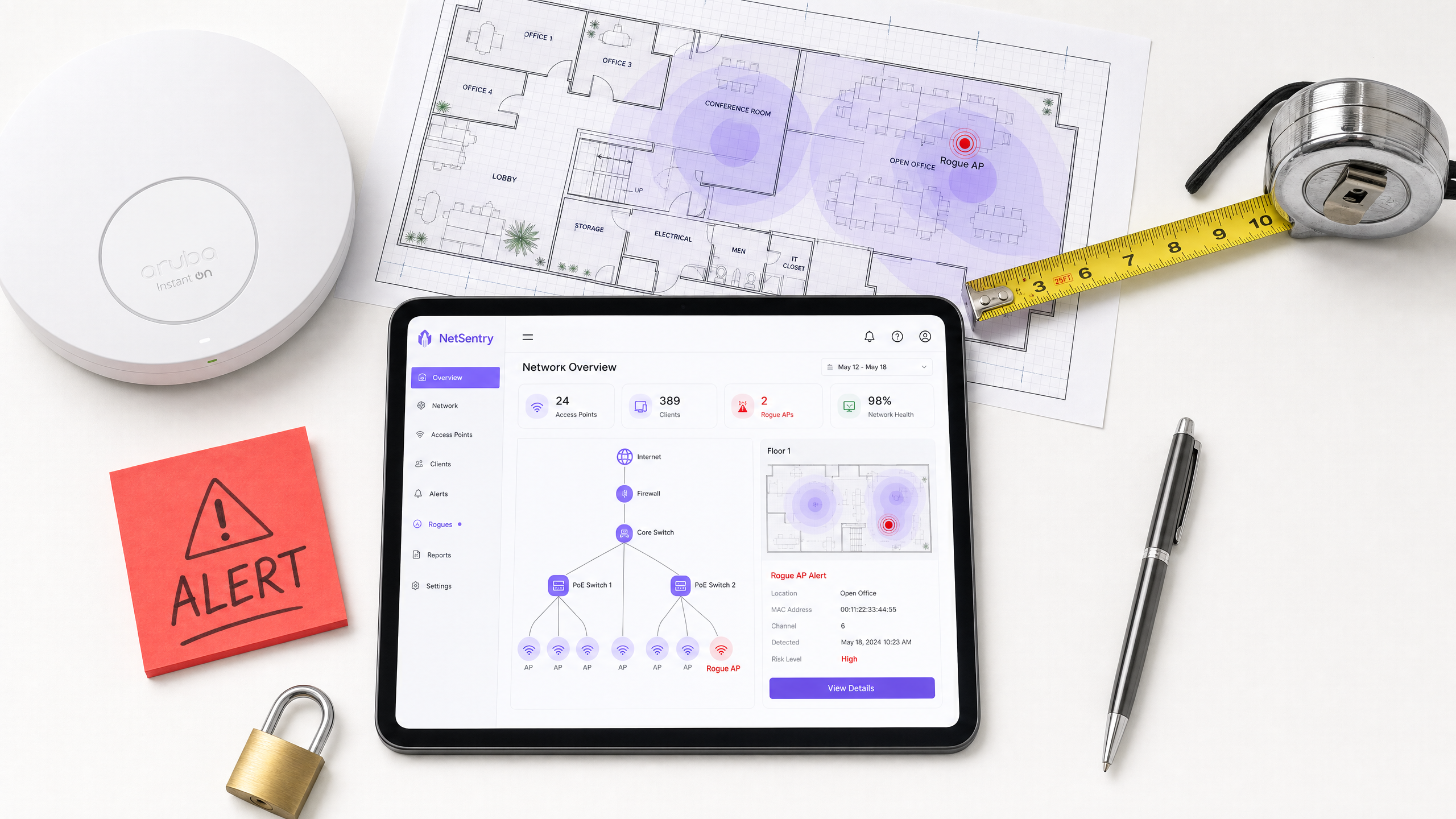
Executive Summary
For enterprise networks spanning distributed environments — Retail footprints, Hospitality venues, Healthcare facilities, and Transport hubs — rogue access points represent one of the most underestimated vectors for data exfiltration, compliance breaches, and network disruption. A rogue AP is any unauthorised wireless access point connected to the corporate network, effectively bypassing edge security controls and creating an unmanaged bridge to the internal LAN.
Mitigating this threat requires a transition from reactive, periodic scanning to continuous, automated Wireless Intrusion Prevention Systems (WIPS). This guide details the technical architecture required to detect, classify, and neutralise unauthorised APs, focusing on integrating WIPS with existing switching infrastructure and Guest WiFi deployments. We cover deployment topologies, automated containment mechanisms including targeted deauthentication and wired port suppression, and the direct business impact of a mature wireless security posture.
Technical Deep-Dive: WIPS Architecture and Threat Vectors
The Anatomy of a Rogue AP Threat
Not all unauthorised wireless devices pose the same risk. IT teams must distinguish between benign interference and active threats to prevent alert fatigue and the accidental automated containment of legitimate neighbouring networks — a legal liability in most jurisdictions.
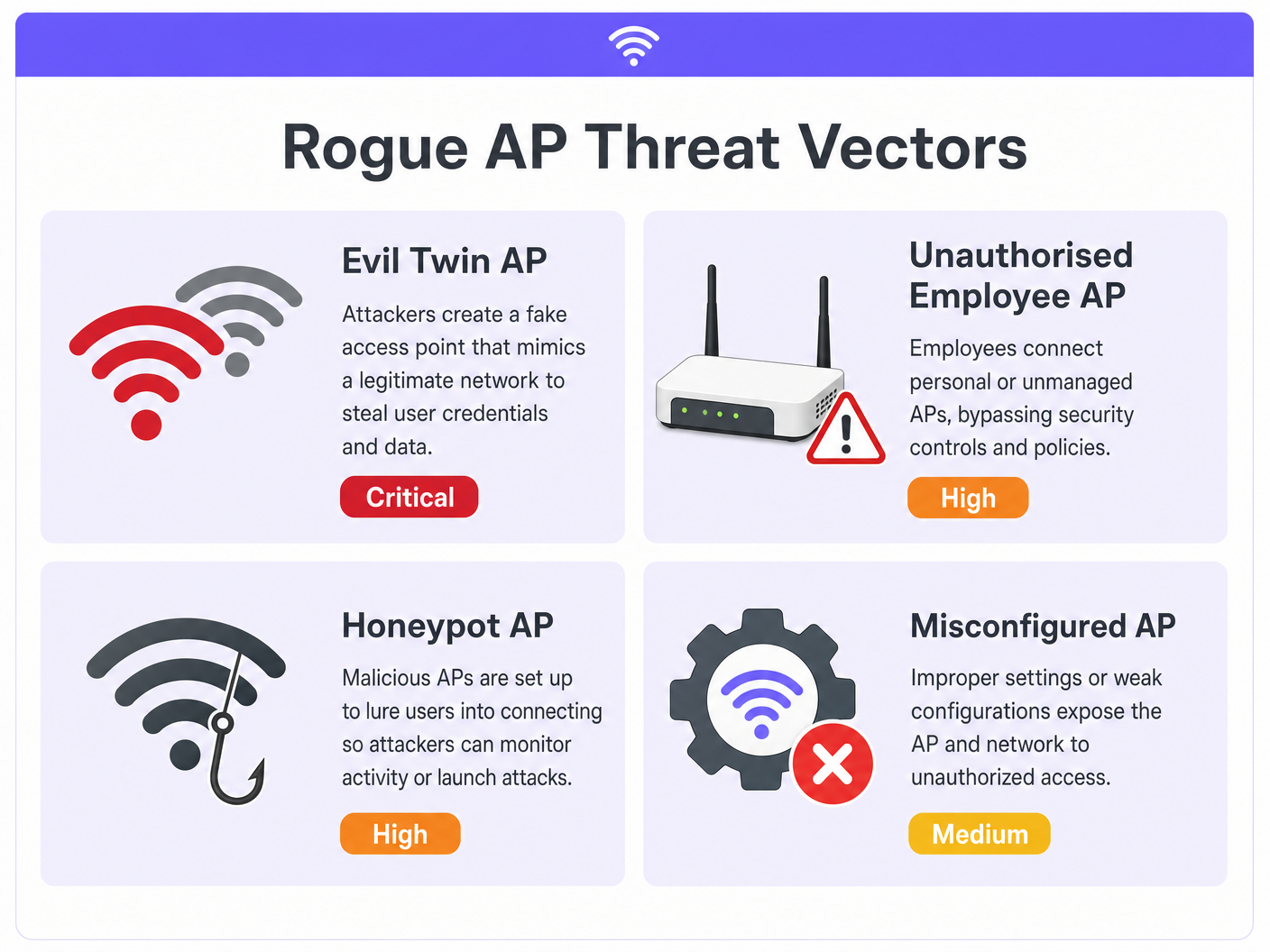
True Rogue (Internal Bridge): An unauthorised AP physically connected to the corporate LAN. This is often an employee seeking better coverage or bypassing restrictive proxy settings, inadvertently exposing the internal network to anyone within RF range. The device bridges wireless traffic directly onto the wired LAN, bypassing the firewall entirely.
Evil Twin (External Spoofing): An attacker sets up an AP outside the physical perimeter but broadcasts the corporate SSID (e.g., "Corp-WiFi") with a stronger signal to force client devices to associate with the malicious AP, enabling Man-in-the-Middle (MitM) attacks. Credentials, session tokens, and unencrypted data are all exposed.
Honeypot AP: Similar to an Evil Twin, but targeting Guest WiFi users by broadcasting common open SSIDs such as "Free Public WiFi" or mimicking the venue's guest network. Particularly prevalent in Hospitality and retail environments.
Misconfigured Corporate AP: A legitimate corporate AP that has lost its secure configuration — for example, dropping from WPA3-Enterprise with 802.1X authentication to an open SSID — due to a provisioning failure, firmware rollback, or unauthorised local configuration change.
WIPS Sensor Overlay Architecture
Effective mitigation relies on continuous spectrum analysis across all operational frequency bands. Modern WIPS deployments utilise either dedicated sensor APs or existing infrastructure APs operating in a dedicated monitor mode or time-slicing (background scanning) mode.
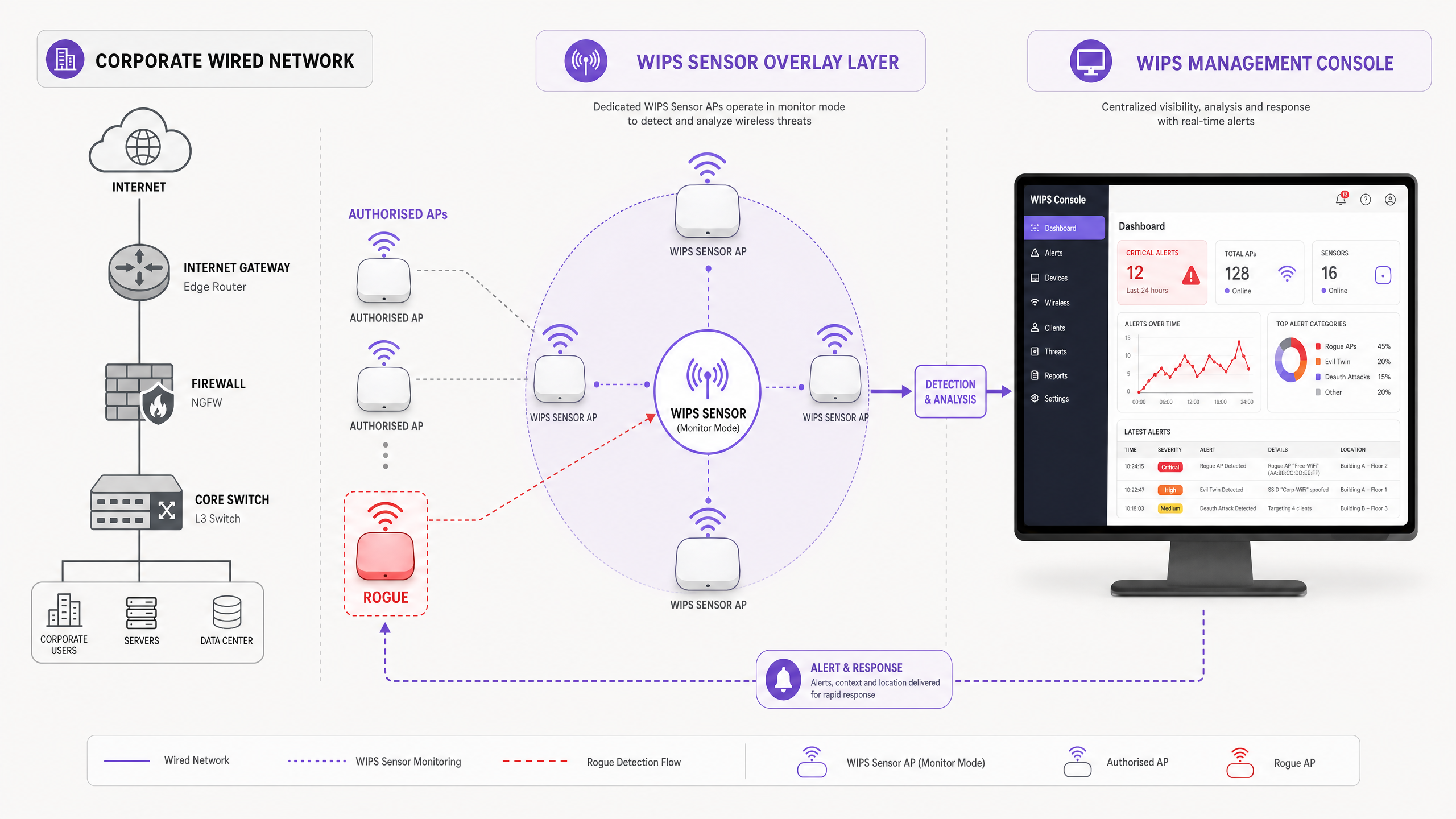
Dedicated Sensor Mode deploys APs solely to monitor the RF spectrum across all 2.4 GHz, 5 GHz, and 6 GHz channels simultaneously. This provides the highest fidelity detection and continuous containment capabilities without impacting client data throughput. For high-security environments — PCI-compliant retail, Healthcare , or financial services — dedicated sensor overlays are the recommended architecture.
Background Scanning (Time-Slicing) allows access points to serve client traffic while periodically switching channels to scan for threats. While cost-effective for distributed deployments, this approach introduces latency to client traffic during scan cycles and provides intermittent visibility, potentially missing transient threats active between scan windows.
| Deployment Mode | Detection Continuity | Client Throughput Impact | Best For |
|---|---|---|---|
| Dedicated Sensor | Continuous | None | High-security, PCI, Healthcare |
| Background Scanning | Periodic | Minor (~5%) | Distributed retail, lower-risk venues |
| Hybrid (Mix) | Near-continuous | Minimal | Large campus, mixed-risk environments |
Implementation Guide: Detection, Classification, and Containment
Phase 1: Baseline and Classification
The first phase of any WIPS implementation is establishing a comprehensive RF baseline. The system must learn the MAC addresses (BSSIDs) of all authorised APs and catalogue legitimate neighbouring networks before automated containment is enabled.
Step 1 — Import Authorised Infrastructure: Synchronise the WIPS management console with the wireless LAN controller (WLC) to import all managed AP MAC addresses, SSIDs, and expected operating channels. This forms the authorised whitelist.
Step 2 — Define Classification Rules: Configure automated policies to classify discovered APs into risk tiers. A robust classification matrix should include:
- If BSSID is not in the authorised list and SSID matches corporate SSID and RSSI > -65 dBm → Classify as Evil Twin (Critical Risk)
- If BSSID is not in the authorised list and WIPS confirms the AP is present on the wired LAN via MAC address correlation → Classify as Rogue on Wire (Critical Risk)
- If BSSID is not in the authorised list and RSSI is between -65 dBm and -75 dBm → Classify as Suspected Honeypot (High Risk — manual investigation)
- If BSSID is not in the authorised list and RSSI < -75 dBm → Classify as Neighbour Network (Low Risk — baseline and ignore)
Step 3 — Validate Before Automating: Run the WIPS in detection-only mode for a minimum of 72 hours before enabling automated containment. This allows the team to review classifications, tune thresholds, and confirm no legitimate devices are being incorrectly flagged.
Phase 2: Automated Containment
Once a threat is positively classified, the WIPS must neutralise it. The choice of containment method depends on whether the rogue AP is physically connected to the corporate LAN.
Wired Port Suppression (Preferred): For confirmed 'Rogue on Wire' scenarios, the WIPS integrates with the core switching infrastructure via SNMP or REST API. Upon detection, the WIPS identifies the specific switch port the rogue is connected to through MAC address table correlation and administratively disables the port. This is definitive — the device loses network connectivity regardless of its wireless configuration.
Wireless Containment (Deauthentication): For Evil Twin and Honeypot threats not connected to the corporate LAN, the WIPS sensor spoofs the MAC address of the rogue AP and transmits targeted IEEE 802.11 deauthentication frames to all associated clients. Simultaneously, it spoofs client MAC addresses and sends deauthentication frames back to the rogue AP. This continuously disrupts the association, forcing clients to seek legitimate APs.
> Important: Automated wireless containment must be configured with strict RSSI boundaries. Containing a legitimate neighbouring network — even accidentally — constitutes intentional jamming and violates telecommunications regulations in most jurisdictions. Only automate containment for threats confirmed to be within your physical premises.
Phase 3: Physical Remediation
WIPS provides the physical location of the rogue AP via RF triangulation using signal strength data from multiple sensors. This location data should automatically generate a work order for IT or facilities staff to physically locate and remove the device. Define a clear SLA for physical response — typically 30 minutes for Critical threats, 4 hours for High.
Best Practices for Enterprise Deployment
Prioritise 802.1X on Wired Edges: IEEE 802.1X Network Access Control (NAC) on all wired switch ports is the single most effective preventative measure. If an employee plugs a consumer router into a wall jack, the switch port demands authentication, the unmanaged device fails, and the port remains in an unauthorised state. The rogue AP never gets an IP address and never appears as an RF threat.
Correlate Wired and Wireless Data: Relying solely on RF signatures is insufficient for accurate threat classification. The most critical WIPS capability is correlating a wireless BSSID with the wired MAC address tables on your switches to confirm whether the device is physically attached to the corporate LAN.
Integrate with Analytics Platforms: Use WiFi Analytics to monitor unexpected drops in legitimate client associations in specific zones. A sudden decline in client count on a particular AP cluster may indicate an Evil Twin attack actively drawing clients to a malicious AP nearby.
Enforce WPA3-Enterprise: Mandate WPA3-Enterprise with 802.1X authentication on all corporate SSIDs. This eliminates the risk of clients connecting to open or WPA2-PSK rogue APs broadcasting the corporate SSID, as the mutual authentication process will fail against an illegitimate AP.
Conduct Regular Physical Audits: Supplement WIPS with periodic physical walkthrough audits, particularly in areas with high visitor traffic or limited CCTV coverage. For guidance on ensuring comprehensive sensor coverage to support WIPS detection accuracy, see our guide on How to Measure WiFi Signal Strength and Coverage .
Maintain a Rogue AP Register: Log every detected rogue AP — including its MAC address, detection timestamp, physical location, classification, and remediation action. This register is essential evidence for PCI DSS and GDPR compliance audits.
Real-World Implementation Scenarios
Scenario 1: Urban Hotel — Evil Twin Attack on Guest Network
A 400-room corporate hotel in a dense urban environment experienced intermittent guest complaints about slow connectivity and one reported credential theft incident. The WLC showed no hardware faults. The hotel was surrounded by restaurants and offices.
Following WIPS deployment in dedicated sensor mode, the system detected an SSID named "Hotel_Guest_Free" broadcasting at -52 dBm from a location triangulated to the fourth-floor corridor. MAC address correlation confirmed the device was not connected to the hotel's wired LAN — it was a cellular-connected hotspot acting as a honeypot.
Automated wireless containment was enabled. Within 48 hours, guest complaints ceased. The physical location was identified and the device — a mobile hotspot left in a housekeeping cupboard — was removed. The hotel subsequently implemented WPA3-Enterprise on its corporate SSID and captive portal authentication on its Guest WiFi network, reducing the attack surface significantly.
Outcome: Zero credential theft incidents in the 12 months following deployment. PCI compliance audit passed without wireless security findings.
Scenario 2: Retail Chain — PCI DSS Compliance Automation Across 500 Locations
A major retail chain was spending approximately £180,000 annually on manual quarterly wireless security assessments across 500 stores to satisfy PCI DSS Requirement 11.1. Each assessment required a specialist engineer to visit each site with a spectrum analyser.
The chain deployed background-scanning WIPS across all locations, centralised under a single management console. Simultaneously, 802.1X was implemented on all wired switch ports in each store. The WIPS management console was configured to auto-generate PCI compliance reports on a monthly basis.
In the first quarter post-deployment, the WIPS detected 23 unauthorised APs across the estate — 18 of which were employee-connected consumer routers. All 18 were contained via port suppression within minutes of detection. The remaining 5 were neighbouring retail networks and were correctly classified as low-risk neighbours.
Outcome: Annual compliance assessment cost reduced from £180,000 to approximately £22,000 (centralised WIPS licensing and management). Audit preparation time reduced by 85%. Zero PCI wireless security findings in two consecutive annual audits.
This kind of infrastructure intelligence is increasingly relevant as Purple expands its public-sector and enterprise capabilities — as highlighted by Purple Appoints Iain Fox as VP Growth – Public Sector to Drive Digital Inclusion and Smart City Innovation .
Troubleshooting & Risk Mitigation
False Positives in Automated Containment
The most significant operational risk in WIPS deployment is the false positive containment of a neighbouring business's WiFi network. This is both a legal liability and a reputational risk.
Mitigation: Implement strict RSSI thresholds for automated containment — typically -65 dBm or stronger. Conduct a thorough neighbour AP survey during the baseline phase and explicitly whitelist all identified neighbouring BSSIDs. Review the classification log weekly during the first month of operation.
Hidden SSIDs and Null Beacons
Attackers often configure rogue APs not to broadcast their SSID (null SSID beacons) to evade basic detection tools.
Mitigation: Modern WIPS do not rely solely on beacon frames. They monitor 802.11 probe requests from client devices and probe responses from APs to identify hidden networks. Ensure your WIPS policy flags any unrecognised BSSID regardless of SSID visibility.
Protected Management Frames (802.11w)
IEEE 802.11w (Protected Management Frames) makes wireless deauthentication attacks harder to execute against clients that support it, as management frames are encrypted and authenticated.
Mitigation: While 802.11w reduces the effectiveness of wireless containment against protected clients, it also protects your legitimate clients from being deauthenticated by attackers. The WIPS can still disrupt the rogue AP's ability to maintain associations. Mandate 802.11w on all corporate SSIDs — this protects your clients while limiting the rogue AP's ability to attract and retain connections.
Sensor Coverage Gaps
In large or architecturally complex venues — multi-storey car parks, basement conference facilities, thick-walled heritage buildings — WIPS sensor coverage may have blind spots.
Mitigation: Conduct a thorough RF survey before finalising sensor placement. Use the triangulation accuracy data from the WIPS to identify zones where location precision is low, and add sensors accordingly. For detailed methodology, refer to How to Measure WiFi Signal Strength and Coverage .
ROI and Business Impact
Deploying a robust WIPS architecture delivers measurable returns across three dimensions: compliance cost reduction, incident response efficiency, and risk mitigation.
| Business Impact Area | Metric | Typical Improvement |
|---|---|---|
| PCI DSS Compliance | Audit preparation time | -80 to -85% |
| Incident Response | Mean Time to Resolution (MTTR) | Hours → Minutes |
| Compliance Assessment Cost | Annual spend on manual scans | -70 to -90% |
| Data Breach Risk | Probability of credential theft via rogue AP | Near-zero with WIPS + 802.1X |
Compliance Automation: Automated WIPS reporting satisfies PCI DSS Requirement 11.1 and supports HIPAA wireless security mandates, reducing audit preparation time significantly and providing continuous evidence of control effectiveness.
Incident Response Time: By pinpointing the physical location of a rogue AP on a floor plan, IT teams reduce MTTR from hours of manual spectrum analysis to minutes. This directly reduces the window of exposure and limits potential data loss.
Brand and Regulatory Protection: Preventing data breaches via Evil Twin attacks protects the organisation from ICO enforcement action under GDPR, PCI fines, and the reputational damage of a publicised breach. The cost of a single significant breach — regulatory fines, forensic investigation, customer notification — typically exceeds the entire multi-year cost of a WIPS deployment.
As enterprise WiFi evolves toward more intelligent, integrated platforms — including passwordless access models as explored in How a WiFi Assistant Enables Passwordless Access in 2026 and seamless navigation features like Purple's Offline Maps Mode — the security of the underlying wireless infrastructure becomes the foundation upon which all of these capabilities depend.
Key Definitions
Rogue Access Point
Any wireless access point connected to a network without explicit authorisation from the network administrator, regardless of the intent of the person who installed it.
The primary wireless threat vector for bypassing perimeter security and exposing the internal LAN to unauthorised access.
Evil Twin AP
A fraudulent access point that broadcasts the same SSID as a legitimate network to deceive clients into connecting, enabling Man-in-the-Middle interception of traffic.
Typically deployed by external attackers near the target premises. Requires wireless containment rather than port suppression.
WIPS (Wireless Intrusion Prevention System)
A network security system that continuously monitors the RF spectrum for unauthorised wireless devices and can automatically take countermeasures including deauthentication and port suppression.
The enterprise standard for automated rogue AP detection and containment. Provides the continuous monitoring required by PCI DSS Requirement 11.1.
WIDS (Wireless Intrusion Detection System)
A passive variant of WIPS that detects and alerts on wireless threats but does not take automated containment actions.
Used in environments where automated containment carries legal or operational risk. Requires manual response to each alert.
Deauthentication Frame (802.11)
An IEEE 802.11 management frame used to terminate a wireless association between a client and an access point. Used by WIPS to disrupt connections to rogue APs.
The primary mechanism for wireless containment. Effectiveness is reduced against clients supporting 802.11w (Protected Management Frames).
BSSID (Basic Service Set Identifier)
The MAC address of a wireless access point's radio interface. Uniquely identifies each AP in the RF environment.
The primary identifier used by WIPS to track, classify, and target specific APs for containment.
Port Suppression
The act of administratively disabling a wired switch port via SNMP or API, cutting network connectivity to any device connected to that port.
The most effective containment method for rogue APs physically connected to the corporate LAN. Preferred over wireless deauthentication.
IEEE 802.1X (Port-Based NAC)
An IEEE standard for port-based Network Access Control that requires devices to authenticate before being granted network access via a wired or wireless port.
The foundational preventative control against rogue APs. An unauthenticated consumer router plugged into an 802.1X-enabled port will be denied network access entirely.
Background Scanning (Time-Slicing)
A WIPS deployment mode where serving APs periodically switch channels to scan for threats, rather than using dedicated sensor hardware.
A cost-effective alternative to dedicated sensor overlays for distributed or lower-risk environments. Provides periodic rather than continuous visibility.
PCI DSS Requirement 11.1
The Payment Card Industry Data Security Standard requirement mandating that organisations implement processes to detect and identify authorised and unauthorised wireless access points on a quarterly basis.
The primary compliance driver for WIPS adoption in retail and hospitality. Automated WIPS reporting directly satisfies this requirement.
Worked Examples
A 400-room corporate hotel in a dense urban environment is experiencing intermittent network performance issues and one confirmed guest credential theft incident. The WLC shows no hardware faults. The hotel is surrounded by cafes, restaurants, and offices. How should the IT team approach detection and containment?
- Deploy WIPS sensors in dedicated monitor mode across all floors to establish a 72-hour RF baseline. Configure RSSI thresholds to filter out neighbouring networks below -75 dBm.
- Review the classification log. The WIPS detects an SSID named 'Hotel_Guest_Free' broadcasting at -52 dBm, triangulated to the fourth-floor corridor.
- Perform MAC address correlation. The WIPS confirms the device is NOT connected to the hotel's wired LAN — it is a cellular-connected mobile hotspot. Port suppression is not available.
- Enable automated wireless containment (deauthentication frames) targeting the specific BSSID. Monitor client association logs to confirm guests are reconnecting to authorised APs.
- Dispatch security to the triangulated location. The device — a mobile hotspot — is found and removed from a housekeeping cupboard.
- Post-incident: implement WPA3-Enterprise on the corporate SSID and captive portal authentication on the guest network to reduce future attack surface.
A major retail chain needs to satisfy PCI DSS Requirement 11.1 across 500 locations. Manual quarterly wireless assessments cost £180,000 annually and are operationally disruptive. What is the recommended architecture?
- Deploy background-scanning WIPS on existing AP infrastructure across all 500 locations. This avoids the capital cost of dedicated sensor hardware while providing near-continuous visibility.
- Centralise WIPS management to a single console with role-based access for regional IT managers.
- Implement IEEE 802.1X on all wired switch ports in each store. This prevents rogue APs from connecting to the LAN, making WIPS the secondary (not primary) control.
- Configure automated monthly PCI compliance reports from the WIPS console, documenting all detected APs, their classification, and remediation actions.
- Define an escalation SLA: Critical rogue (on wire) → 30-minute physical response. High rogue (wireless only) → 4-hour investigation.
- Review and tune classification rules quarterly based on new threat intelligence.
Practice Questions
Q1. Your WIPS alerts you to an AP broadcasting your corporate SSID at -52 dBm. The WIPS cannot correlate the AP's MAC address to any wired switch port. What is the correct automated response, and what is the legal constraint you must consider?
Hint: Consider the difference between wired and wireless containment capabilities, and the RSSI threshold for safe automated containment.
View model answer
Initiate automated wireless containment (deauthentication frames) targeting the specific BSSID. Because the AP is not on the wired LAN, port suppression is impossible. The strong RSSI (-52 dBm) indicates the device is physically within or immediately adjacent to your premises, and spoofing the corporate SSID indicates malicious intent (Evil Twin), justifying immediate wireless containment. The legal constraint is that containment must only target this specific BSSID — not broadcast deauthentication — and the RSSI threshold confirms the device is within your perimeter, not a neighbouring network.
Q2. An employee plugs a consumer WiFi router into a wall ethernet jack in a conference room to provide connectivity for a visiting vendor. The WIPS detects the AP's SSID broadcasting at -48 dBm. Describe the two-layer defence that should prevent this from becoming a critical vulnerability.
Hint: Think about the control that should stop the threat at the wired edge, before the WIPS even detects the RF signal.
View model answer
Layer 1 (Prevention): IEEE 802.1X on the conference room switch port should demand authentication when the consumer router is connected. The unmanaged router will fail authentication, and the switch port will remain in an unauthorised VLAN or blocked state, preventing the rogue AP from obtaining an IP address or bridging traffic to the corporate LAN. Layer 2 (Detection and Containment): If 802.1X is not deployed on that port, the WIPS detects the AP broadcasting at -48 dBm, correlates the MAC address to the wired LAN via switch MAC tables, classifies it as Critical (Rogue on Wire), and triggers automated port suppression — administratively disabling the specific switch port via SNMP or API.
Q3. A neighbouring retail unit upgrades their WiFi infrastructure. Their new APs are now visible to your WIPS sensors at -68 dBm. Your automated containment policy triggers and begins deauthenticating their clients. What went wrong, what is the immediate risk, and how do you prevent recurrence?
Hint: Consider the RSSI threshold configuration and the legal implications of interfering with third-party networks.
View model answer
What went wrong: The automated containment RSSI threshold was set too low (or not configured), causing the WIPS to target a legitimate neighbouring network. The -68 dBm signal is within the containment trigger range but the device is not within the organisation's premises. Immediate risk: This constitutes intentional jamming and denial of service against a third-party network, violating telecommunications regulations (e.g., Ofcom regulations in the UK, FCC rules in the US). The organisation faces significant legal liability and potential regulatory enforcement. Prevention: Raise the automated containment RSSI threshold to -65 dBm or stronger. Conduct a neighbour AP survey and explicitly whitelist all identified neighbouring BSSIDs. Implement a manual review step for any AP between -65 dBm and -75 dBm before containment is authorised.