
OFDMA Explained: How WiFi 6 Handles Dense Environments
Master WiFi 6 OFDMA, Resource Units (RUs), and subcarrier spacing. Learn how 802.11ax eliminates contention latency and optimizes high-density venue capacity.
Video overview
Listen to this guide
View podcast transcript
Part of our core series: WiFi Analytics & Location Intelligence Guide →
WiFi 6 OFDMA Resource Unit (RU) Capacity Calculator
Model how Orthogonal Frequency-Division Multiple Access (OFDMA) divides channel bandwidth into subcarriers and Resource Units to reduce latency in high-density environments.
Design Recommendation for High-Density Stadium / Arena:
✓ Optimal Configuration: 20MHz or 40MHz channels provide maximum non-overlapping channel reuse. With OFDMA enabled on 802.11ax/6E hardware, up to 9 devices communicate in parallel per radio frame, virtually eliminating buffer bloat.
Planning a High-Density WiFi 6 / 6E Venue Deployment?
Purple integrates with Cisco Meraki, HPE Aruba, Ruckus, and UniFi networks to deliver cloud RADIUS authentication, guest engagement, and venue analytics across 80,000+ locations.
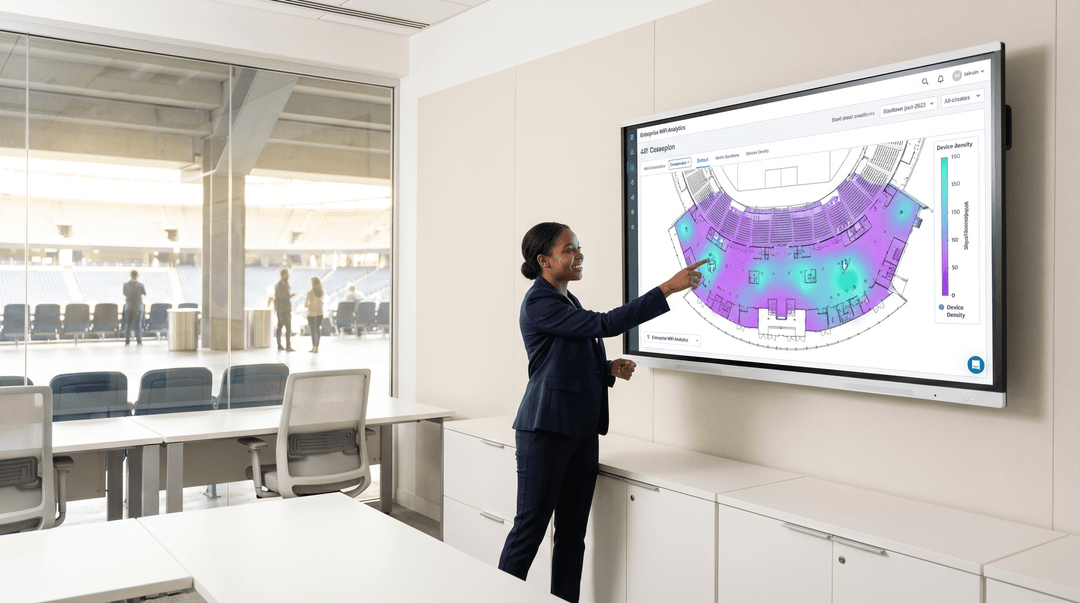
এক্সিকিউটিভ সামারি
এন্টারপ্রাইজ ভেন্যুগুলোর জন্য - তা ৫০,০০০ আসনের স্টেডিয়াম হোক, একটি বিস্তৃত হাসপাতাল ক্যাম্পাস হোক বা একটি ঘন রিটেইল পরিবেশ হোক - ওয়্যারলেস নেটওয়ার্কের প্রধান চ্যালেঞ্জ এখন আর নিছক গতি নয়, বরং স্পেকট্রাল দক্ষতা। Orthogonal Frequency Division Multiple Access (OFDMA) হলো IEEE 802.11ax (WiFi 6) স্ট্যান্ডার্ডের মূল প্রযুক্তি যা ঠিক এই সমস্যার সমাধান করে। একটি একক ট্রান্সমিশনকে একই সাথে একাধিক ক্লায়েন্টের সাথে যোগাযোগ করার অনুমতি দিয়ে, OFDMA নাটকীয়ভাবে লেটেন্সি কমায়, কনটেনশন ওভারহেড হ্রাস করে এবং উচ্চ-ঘনত্বের ডেপ্লয়মেন্টে সামগ্রিক নেটওয়ার্কের ক্ষমতা বৃদ্ধি করে।
এই নির্দেশিকাটি OFDMA-এর প্রযুক্তিগত মেকানিক্স অন্বেষণ করে, কীভাবে এটি লিগ্যাসি OFDM থেকে আলাদা তা দেখায় এবং পরবর্তী প্রজন্মের Guest WiFi অবকাঠামোর পরিকল্পনা করা IT ডিরেক্টর এবং নেটওয়ার্ক আর্কিটেক্টদের জন্য কার্যকর নির্দেশনা প্রদান করে। আপনি কোনো কনফারেন্স সেন্টার, রিটেইল এস্টেট বা পাবলিক-সেক্টর ক্যাম্পাস পরিচালনা করুন না কেন, যেকোনো নির্ভরযোগ্য WiFi 6 ডেপ্লয়মেন্ট কৌশলের জন্য OFDMA বোঝা অত্যন্ত জরুরি।
টেকনিক্যাল ডিপ-ডাইভ: OFDM থেকে OFDMA
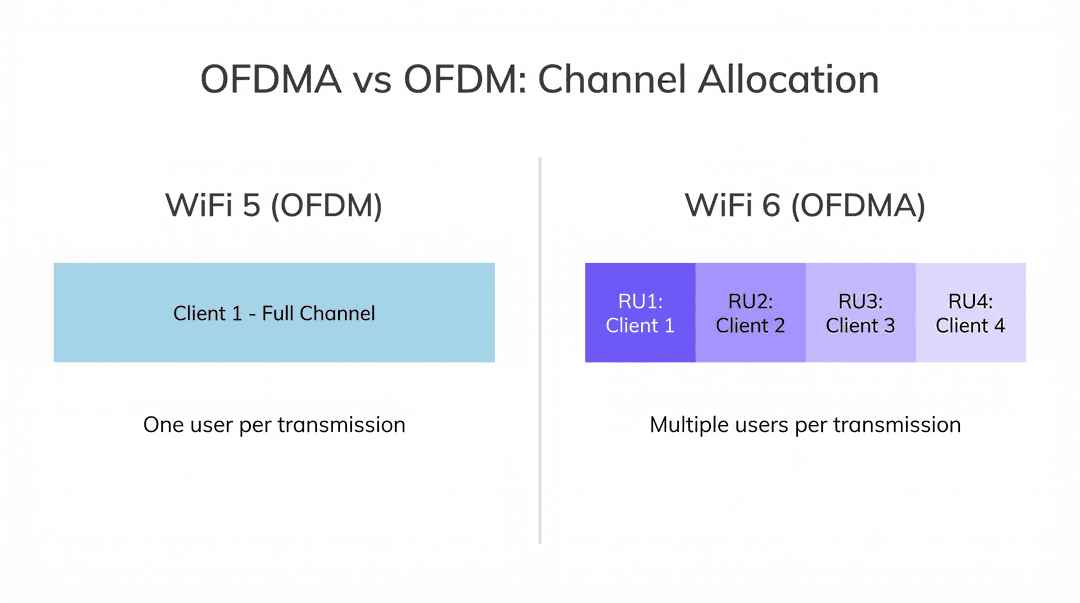
OFDMA বুঝতে হলে আমাদের প্রথমে এর পূর্বসূরির সীমাবদ্ধতাগুলো পরীক্ষা করতে হবে। WiFi 5 (802.11ac) এবং পূর্ববর্তী স্ট্যান্ডার্ডগুলোতে নেটওয়ার্কগুলো Orthogonal Frequency Division Multiplexing (OFDM) ব্যবহার করত। OFDM একটি নির্দিষ্ট ট্রান্সমিশনের জন্য একটি একক ক্লায়েন্টকে সম্পূর্ণ চ্যানেল ব্যান্ডউইথ - তা 20MHz, 40MHz বা 80MHz যাই হোক না কেন - বরাদ্দ করে। এমনকি ক্লায়েন্টের যদি কেবল একটি ক্ষুদ্র পেলোড ট্রান্সমিট করার প্রয়োজন হয়, যেমন একটি DNS রিকোয়েস্ট, একটি TCP অ্যাকনলেজমেন্ট বা একটি IoT সেন্সর পিং, তবুও এটি সেই সময়ের জন্য সম্পূর্ণ চ্যানেলটি একচেটিয়াভাবে দখল করে রাখে।
Retail বা Hospitality -এর মতো ঘন পরিবেশে এটি একটি বিশাল বাধা তৈরি করে। ছোট প্যাকেট ট্রান্সমিট করার জন্য শত শত ডিভাইসের লাইনে দাঁড়ানোর ফলে উল্লেখযোগ্য কনটেনশন ওভারহেড এবং লেটেন্সি স্পাইক ঘটে। সমস্যাটি অপর্যাপ্ত ব্যান্ডউইথ নয় - সমস্যাটি হলো প্রোটোকলটি মূলত সিঙ্গেল-ইউজার।
OFDMA সমাধান: রিসোর্স ইউনিট (RUs)
OFDMA চ্যানেলটিকে রিসোর্স ইউনিট (RUs) নামে পরিচিত ছোট ছোট সাব-চ্যানেলে বিভক্ত করে এই দৃষ্টান্তটিকে মৌলিকভাবে পরিবর্তন করে। একটি 20MHz চ্যানেল একজন ব্যবহারকারীকে উৎসর্গ করার পরিবর্তে, একটি WiFi 6 অ্যাক্সেস পয়েন্ট (AP) সেই 20MHz চ্যানেলটিকে নয়টি পর্যন্ত আলাদা RU-তে বিভক্ত করতে পারে (26-টোন RUs ব্যবহার করে)। এটি AP-কে একটি একক ট্রান্সমিশন সুযোগে (TXOP) একসাথে নয়টি পর্যন্ত ক্লায়েন্টের সাথে যোগাযোগ করার অনুমতি দেয়।
| চ্যানেলের প্রস্থ | সর্বোচ্চ RUs (26-টোন) | সর্বোচ্চ এককালীন ক্লায়েন্ট |
|---|---|---|
| 20 MHz | 9 | 9 |
| 40 MHz | 18 | 18 |
| 80 MHz | 37 | 37 |
| 160 MHz | 74 | 74 |
AP ট্রাফিক কন্ট্রোলার হিসেবে কাজ করে, যা সমস্ত আপলিঙ্ক OFDMA ট্রান্সমিশন পরিচালনা করতে Trigger Frames - 802.11ax-এ প্রবর্তিত একটি নতুন ম্যানেজমেন্ট ফ্রেম টাইপ - ব্যবহার করে। Trigger Frame নির্দিষ্ট ক্লায়েন্টদের জন্য নির্দিষ্ট RUs বরাদ্দ করে, ট্রান্সমিশন পাওয়ার নির্ধারণ করে এবং আপলিঙ্ককে সিঙ্ক্রোনাইজ করে যাতে সমস্ত ক্লায়েন্ট সিগন্যাল একই সাথে AP-তে পৌঁছায়। কনটেনশন-ভিত্তিক модель (CSMA/CA) থেকে একটি নির্ধারিত, সুসংগঠিত মডেলে এই রূপান্তরটিই হলো লোডের অধীনে OFDMA-এর নাটকীয় লেটেন্সি উন্নতির মূল কারণ।
সাবক্যারিয়ার আর্কিটেকচার
WiFi 6 সাবক্যারিয়ার স্পেসিং 312.5 kHz (WiFi 5) থেকে কমিয়ে 78.125 kHz করে - যা চার গুণ হ্রাস। এই কাছাকাছি স্পেসিং দীর্ঘতর সিম্বল ডিউরেশন (12.8μs বনাম 3.2μs) সক্ষম করে, যা মাল্টিপাথ ফেডিংয়ের বিরুদ্ধে প্রতিরোধ ক্ষমতা উন্নত করে। গুদামঘর, Transport হাব বা বড় ওপেন-প্ল্যান রিটেইল ফ্লোরের মতো পরিবেশে যেখানে সিগন্যাল ধাতব শেলফ এবং কংক্রিটের কাঠামো থেকে প্রতিফলিত হয়, সেখানে এটি লিঙ্ক নির্ভরযোগ্যতার ক্ষেত্রে একটি অর্থপূর্ণ উন্নতি।
BSS কালারিং
যদিও এটি কঠোরভাবে OFDMA-এর অংশ নয়, তবুও BSS কালারিং এর সাথে একযোগে কাজ করে। এটি PHY হেডারে একটি 6-বিট আইডেন্টিফায়ার যোগ করে, যা রেডিওগুলোকে তাদের নিজস্ব নেটওয়ার্কের (intra-BSS) এবং পার্শ্ববর্তী নেটওয়ার্কের (inter-BSS) ট্রান্সমিশনের মধ্যে পার্থক্য করতে দেয়। এই স্পেশাল রিইউজ মেকানিজমটি ঘন ডেপ্লয়মেন্টে কো-চ্যানেল ইন্টারফারেন্স উল্লেখযোগ্যভাবে হ্রাস করে যেখানে একাধিক AP সংলগ্ন এলাকায় একই চ্যানেলে কাজ করে।
ইমপ্লিমেন্টেশন গাইড
OFDMA-সক্ষম নেটওয়ার্ক ডেপ্লয় করার জন্য ডিজাইন ফিলোসফিতে একটি পরিবর্তন প্রয়োজন। লিগ্যাসি নেটওয়ার্কগুলো কভারেজ-এর জন্য ডিজাইন করা হয়েছিল; আধুনিক উচ্চ-ঘনত্বের নেটওয়ার্কগুলো অবশ্যই ক্যাপাসিটি-র জন্য ডিজাইন করতে হবে।
১. ক্লায়েন্ট ইকোসিস্টেমের প্রস্তুতি
WiFi 6 ডেপ্লয়মেন্টের সবচেয়ে সাধারণ ভুল হলো ক্লায়েন্ট মিক্স বিবেচনা না করেই তাৎক্ষণিক পারফরম্যান্সের উন্নতি ধরে নেওয়া। OFDMA-এর জন্য উভয় প্রান্তেই 802.11ax হার্ডওয়্যার প্রয়োজন। যদি কোনো ভেন্যুতে ৭০% লিগ্যাসি ক্লায়েন্ট বেস (WiFi 4/5) থাকে, তবে AP-কে তাদের পরিষেবা দেওয়ার জন্য প্রায়শই স্ট্যান্ডার্ড OFDM-এ ফিরে যেতে হবে, যা OFDMA-এর সুবিধাগুলোকে নষ্ট করে দেয়।
আর্কিটেকচার রিফ্রেশ করার আগে ক্লায়েন্ট ইকোসিস্টেমের প্রোফাইল তৈরি করতে WiFi Analytics ব্যবহার করুন। Sensors বা IoT ডিভাইসের ওপর নির্ভরশীল পরিবেশের জন্য, নতুন ক্রয়ের ক্ষেত্রে WiFi 6 কমপ্লায়েন্স বাধ্যতামূলক করা নিশ্চিত করুন। সক্ষম ডিভাইসগুলোকে 5GHz বা 6GHz ব্যান্ডে পাঠাতে আগ্রাসী ব্যান্ড স্টিয়ারিং এবং ক্লায়েন্ট আইসোলেশন প্রয়োগ করুন।
২. চ্যানেলের প্রস্থের কৌশল
ঘন পরিবেশে, চওড়া চ্যানেলগুলো (80MHz বা 160MHz) সাধারণত ক্ষতিকারক হয়। এগুলো উপলব্ধ নন-ওভারল্যাপিং চ্যানেলের সংখ্যা কমিয়ে দেয়, যা কো-চ্যানেল ইন্টারফারেন্স বাড়ায়।
পরামর্শ: অতি-ঘন ডেপ্লয়মেন্টের (স্টেডিয়াম, অডিটোরিয়াম, কনফারেন্স হল) জন্য 20MHz চ্যানেলে স্ট্যান্ডার্ডাইজ করুন। এটি চ্যানেলের পুনঃব্যবহার সর্বোচ্চ করে এবং BSS কালারিংকে সর্বোত্তমভাবে কাজ করতে দেয়। OFDMA ব্যবহার করা একটি 20MHz চ্যানেল প্রায়শই ৫০ জন এককালীন ব্যবহারকারীর জন্য কনটেনশন নিয়ে লড়াই করা একটি 80MHz চ্যানেলের চেয়ে আরও ভাল সামগ্রিক থ্রুপুট এবং কম লেটেন্সি প্রদান করবে।
৩. পাওয়ার এবং PoE বিবেচনা
WiFi 6 AP-গুলোতে অত্যাধুনিক রেডিও রয়েছে যা আরও বেশি পাওয়ার দাবি করে। সমস্ত স্পেশাল স্ট্রিম এবং ফিচারগুলো সম্পূর্ণরূপে পরিচালনা করতে অনেক এন্টারপ্রাইজ AP-এর জন্য 802.3at (PoE+) বা এমনকি 802.3bt (PoE++) প্রয়োজন হয়।
পরামর্শ: ডেপ্লয়মেন্টের আগে আপনার সুইচিং অবকাঠামো অডিট করুন। লিগ্যাসি 802.3af সুইচের সাথে হাই-এন্ড WiFi 6 AP সংযোগ করলে AP-গুলোর সক্ষমতা হ্রাস পাবে - সাধারণত স্পেশাল স্ট্রিমগুলো নিষ্ক্রিয় হবে বা ট্রান্সমিট পাওয়ার কমে যাবে - যা আপনার হার্ডওয়্যার বিনিয়োগের রিটার্নকে মারাত্মকভাবে সীমিত করবে।
Got questions about your specific setup?
Our team works with venue operators, IT managers, and network engineers across 80,000 venues. Book a 20-minute call and we will show you how others like you solved it.
সেরা অনুশীলনসমূহ
১. মিশন-ক্রিটিক্যাল অ্যাপ্লিকেশনের জন্য 6GHz (WiFi 6E) কে অগ্রাধিকার দিন। WiFi 6E, OFDMA-এর সমস্ত সুবিধা আদিম 6GHz স্পেকট্রামে নিয়ে আসে, যা লিগ্যাসি WiFi 4/5 ক্লায়েন্ট থেকে সম্পূর্ণ মুক্ত। এটি Healthcare -এর মিশন-ক্রিটিক্যাল অ্যাপ্লিকেশনগুলোর জন্য বিশেষভাবে মূল্যবান, যেখানে 2.4GHz এবং 5GHz-এ থাকা লিগ্যাসি মেডিকেল ডিভাইসগুলো যাতে ক্লিনিকাল যোগাযোগের ক্ষেত্রে কোনো হস্তক্ষেপ না করে।
২. সমস্ত নতুন ডেপ্লয়মেন্ট জুড়ে WPA3 বাধ্যতামূলক করুন। WiFi 6 সার্টিফিকেশনের জন্য WPA3 বাধ্যতামূলক এবং এটি Simultaneous Authentication of Equals (SAE)-এর মাধ্যমে ক্রিপ্টোগ্রাফিক শক্তিতে উল্লেখযোগ্য উন্নতি প্রদান করে। এটি PCI-DSS এবং GDPR প্রয়োজনীয়তার সাথে সামঞ্জস্যপূর্ণ এবং যেকোনো নতুন ডেপ্লয়মেন্টে এটি একটি অ-আলোচনাযোগ্য মান হওয়া উচিত। নিরাপদ অথেন্টিকেশনের প্রেক্ষাপটে নেটওয়ার্ক অনবোর্ডিং সংক্রান্ত নির্দেশনার জন্য, Network onboarding UX: Designing a frictionless WiFi setup experience দেখুন।
৩. ওয়্যারলেস এবং WAN কৌশল একীভূত করুন। একটি উচ্চ-পারফরম্যান্স ওয়্যারলেস এজের জন্য একটি নির্ভরযোগ্য WAN এজ প্রয়োজন। আপনার ব্যাকহল যাতে সঠিকভাবে কাজ করা একটি OFDMA নেটওয়ার্কের তৈরি করা বর্ধিত সামগ্রিক থ্রুপুট পরিচালনা করতে পারে তা নিশ্চিত করুন। আপনার ওয়্যারলেস এবং WAN বিনিয়োগকে সামঞ্জস্যপূর্ণ করার একীকরণ কৌশলের জন্য The core SD WAN benefits for modern businesses পর্যালোচনা করুন।
৪. একই অবকাঠামোতে Wayfinding ডেপ্লয় করুন। OFDMA-এর কম-লেটেন্সি বৈশিষ্ট্যগুলো WiFi 6-কে রিয়েল-টাইম লোকেশন সার্ভিস এবং ওয়েফাইন্ডিংয়ের জন্য একটি চমৎকার ভিত্তি করে তোলে। গেস্ট কানেক্টিভিটি উন্নতকারী একই অবকাঠামো বিনিয়োগ একই সাথে ইনডোর নেভিগেশনকে সচল করতে পারে, যা মালিকানার সামগ্রিক খরচ কমিয়ে দেয়।
ট্রাবলশুটিং এবং ঝুঁকি প্রশমন
লক্ষণ: WiFi 6 AP ডেপ্লয় করা সত্ত্বেও উচ্চ লেটেন্সি।
সবচেয়ে সম্ভাব্য মূল কারণ হলো উচ্চ শতাংশের লিগ্যাসি ক্লায়েন্ট যা AP-কে লিগ্যাসি OFDM মোডে যেতে বাধ্য করছে, অথবা সংলগ্ন AP-গুলোর মধ্যে অতিরিক্ত চ্যানেল ওভারল্যাপ। আপনার নেটওয়ার্ক ম্যানেজমেন্ট প্ল্যাটফর্ম ব্যবহার করে ক্লায়েন্ট মিক্স অডিট করার মাধ্যমে শুরু করুন। যদি লিগ্যাসি ক্লায়েন্ট সমস্যা হয়, তবে ব্যান্ড স্টিয়ারিং প্রয়োগ করুন এবং এন্ডপয়েন্ট রিফ্রেশ চক্র ত্বরান্বিত করার কথা বিবেচনা করুন। যদি চ্যানেল ওভারল্যাপ সমস্যা হয়, তবে চ্যানেলের প্রস্থ কমিয়ে 20MHz করুন এবং BSS কালারিং সক্ষম করুন।
লক্ষণ: AP রিবুট হচ্ছে, রেডিও নিষ্ক্রিয় হচ্ছে, বা পারফরম্যান্স স্পেসিফিকেশনের চেয়ে অনেক নিচে।
এটি প্রায় সবসময়ই একটি PoE পাওয়ার ঘাটতির সমস্যা। LLDP নেগোসিয়েশন লগের মাধ্যমে সুইচ পোর্ট পাওয়ার বরাদ্দ যাচাই করুন। AP কম-পাওয়ার মোডে কাজ করছে কিনা তা পরীক্ষা করুন। এর সমাধানের জন্য PoE+ বা PoE++ সুইচে আপগ্রেড করা প্রয়োজন, অথবা অন্তর্বর্তীকালীন ব্যবস্থা হিসেবে মিড-স্প্যান PoE ইনজেক্টর ডেপ্লয় করতে হবে।
লক্ষণ: ম্যানেজমেন্ট ড্যাশবোর্ডে OFDMA ব্যবহারের মেট্রিক্স প্রায় শূন্য দেখাচ্ছে।
এটি নির্দেশ করে যে AP, OFDMA ট্রান্সমিশন নির্ধারণ করার জন্য পর্যাপ্ত WiFi 6 ক্লায়েন্ট পাচ্ছে না। ক্লায়েন্ট অ্যাসোসিয়েশন টেবিলটি পর্যালোচনা করুন। যদি অ্যাসোসিয়েট করা বেশিরভাগ ক্লায়েন্ট লিগ্যাসি ডিভাইস হয়, তবে OFDMA নিষ্ক্রিয় থাকবে। এটি একটি ক্লায়েন্ট ইকোসিস্টেমের সমস্যা, AP কনফিগারেশনের সমস্যা নয়।
ROI এবং ব্যবসায়িক প্রভাব
CTO এবং ভেন্যু অপারেটরদের জন্য, OFDMA-এর ROI পরিমাপ করা হয় ব্যবহারকারীর অভিজ্ঞতা, পরিচালনগত দক্ষতা এবং অবকাঠামোর লাইফসাইকেল বৃদ্ধির মাধ্যমে।
একটি Retail পরিবেশে, কম লেটেন্সি মানে দ্রুত পয়েন্ট-অফ-সেল লেনদেন, নির্ভরযোগ্য ইনভেন্টরি স্ক্যানিং এবং প্রতিক্রিয়াশীল Wayfinding অ্যাপ্লিকেশন যা গ্রাহকের অভিজ্ঞতা উন্নত করে। একটি Hospitality পরিবেশে, OFDMA নিশ্চিত করে যে গেস্টদের 4K ভিডিও স্ট্রিমিং যাতে হোটেল কর্মীদের করা VoIP কলের লেটেন্সিকে প্রভাবিত না করে - যা লিগ্যাসি WiFi 5 ডেপ্লয়মেন্টের একটি সাধারণ অভিযোগ। হসপিটালিটি-নির্দিষ্ট ডেপ্লয়মেন্ট কৌশলের বিস্তারিত নির্দেশনার জন্য, Modern Hospitality WiFi Solutions Your Guests Deserve দেখুন।
RF স্পেকট্রামের ক্ষমতা বৃদ্ধি করে, OFDMA ওয়্যারলেস অবকাঠামোর লাইফসাইকেল প্রসারিত করে, ভবিষ্যতের ফর্কলিফ্ট আপগ্রেডের প্রয়োজনীয়তাকে বিলম্বিত করে এবং একই সাথে IoT সম্প্রসারণের জন্য একটি নির্ভরযোগ্য ভিত্তি প্রদান করে। যে নেটওয়ার্কটি আজ ২০০ জন এককালীন ক্লায়েন্টকে দক্ষতার সাথে পরিষেবা দিতে পারে, তা আগামীকাল ৪০০ জনকে জায়গা দিতে পারবে - আরও AP যোগ করে নয়, বরং স্পেকট্রামকে আরও বুদ্ধিমত্তার সাথে ব্যবহার করে।
হার্ডওয়্যার নির্বাচনের নির্দেশনার জন্য, আমাদের Wireless Access Points Definition Your Ultimate 2026 Guide দেখুন। কীভাবে WiFi 6 আপনার অনবোর্ডিং এবং ব্যবহারকারীর অভিজ্ঞতা কৌশলের সাথে একীভূত হয় সে সম্পর্কে আরও বিস্তৃত ধারণার জন্য, Network Onboarding UX: Designing a Seamless WiFi Setup Experience নির্দেশিকাটি বহুভাষিক ডেপ্লয়মেন্টের প্রেক্ষাপট প্রদান করে।
Key Definitions
OFDMA (Orthogonal Frequency-Division Multiple Access)
A digital modulation and channel access mechanism that divides a wireless channel into sub-carriers grouped into Resource Units (RUs), enabling an access point to communicate concurrently with multiple client devices in a single transmission frame.
Core multi-user channel access protocol introduced in IEEE 802.11ax (WiFi 6).
Resource Unit (RU)
A specific sub-set of subcarriers (ranging from 26 tones to 996 tones) assigned to an individual client device for uplink or downlink transmission during an OFDMA frame.
The fundamental bandwidth allocation block within an OFDMA transmission frame.
Subcarrier Spacing
The frequency separation between adjacent subcarriers in an OFDM/OFDMA channel. Reduced from 312.5 kHz in WiFi 5 to 78.125 kHz in WiFi 6, increasing symbol duration from 3.2 µs to 12.8 µs.
Physical layer frequency domain specification for 802.11ax modulation.
BSS Coloring
A mechanism that tags wireless frames with a numerical color ID (1 to 63) to distinguish between local Basic Service Set (BSS) traffic and overlapping neighbor network traffic (OBSS), enabling adaptive RSSI contention thresholds.
Spatial reuse technique for high-density wireless deployment.
Trigger Frame
A special 802.11ax MAC frame sent by an access point to allocate uplink Resource Units, specify transmit power levels, and synchronize timing across multiple client devices transmitting simultaneously.
Control frame used by the access point to synchronize Uplink (UL) OFDMA transmissions.
Worked Examples
A stadium IT engineering team deploys 150 WiFi 6 access points across a 45,000-seat arena. During major events, fans report extreme latency and timeout errors when sending text messages or submitting mobile food orders, despite AP CPU usage remaining under 25%. Network captures reveal 80MHz channels are configured across all 5GHz APs. What is the root cause, and how does reconfiguring channel width alongside OFDMA resolve the issue?
- Root Cause: Configuring 80MHz channel widths in a high-density stadium severely restricts non-overlapping channel availability. In the 5GHz spectrum, only 6 non-overlapping 80MHz channels exist (or fewer if DFS channels are avoided). With 150 APs, neighboring APs share identical channels, leading to overwhelming Co-Channel Interference (CCI) and channel contention queues. 2. Solution: Reconfigure the 5GHz spectrum to 20MHz channel widths. This expands the non-overlapping channel count to 24 channels, eliminating CCI. 3. OFDMA Efficiency: Within each 20MHz channel, OFDMA divides the 242 available subcarriers into up to nine 26-tone Resource Units (RUs). This allows each AP to process nine concurrent client transmissions (e.g. mobile order submissions) in a single transmission slot, reducing contention latency from over 300 ms down to under 15 ms.
A hospital IT department upgrades its wireless infrastructure to support handheld VoWiFi nursing devices and telemetry monitors. After deploying WiFi 6 APs powered by 802.3af (PoE) switches, engineers observe that OFDMA metrics in the management dashboard show 0% utilization and all clients fall back to legacy OFDM. What infrastructure constraint is preventing OFDMA activation?
- Constraint: The APs are connected to legacy 802.3af PoE switches delivering a maximum of 15.4W per port. 2. AP Behavior: Modern WiFi 6 enterprise access points require 802.3at (PoE+, 30W) or 802.3bt (PoE++, 60W+) to power multi-transceiver radios (e.g. 4x4 or 8x8 MU-MIMO arrays) and digital signal processors required for OFDMA scheduling. Under 802.3af power limits, the AP enters a restricted power-saving mode, disabling spatial streams, auxiliary radios, and multi-user OFDMA engine capabilities. 3. Remediation: Upgrade IDF switches to 802.3at (PoE+) or deploy mid-span PoE+ injectors between the existing switches and APs to supply full power, enabling the hardware OFDMA engine.
Practice Questions
Q1. How many individual 26-tone Resource Units (RUs) can an 802.11ax access point allocate within a single 20MHz channel during an OFDMA transmission frame?
Hint: Consider subcarrier spacing differences between 802.11ac and 802.11ax and the number of 26-tone RUs available in a 20MHz channel.
View model answer
An 802.11ax AP can allocate up to nine 26-tone Resource Units (RUs) within a single 20MHz channel. The 20MHz spectrum contains 256 subcarriers spaced at 78.125 kHz intervals, of which 234 subcarriers are grouped into nine 26-tone payload RUs, separated by guard tones.
Q2. Explain how BSS Coloring improves spectral efficiency in high-density WiFi 6 deployments experiencing Overlapping BSS (OBSS) interference.
Hint: Focus on the role of BSS Coloring in distinguishing intra-BSS frames from OBSS frames.
View model answer
BSS Coloring attaches a 6-bit numerical color tag (1 to 63) to the PHY header of every 802.11ax frame. When an AP or client detects a frame from a neighboring network (OBSS) carrying a different color tag, it applies an adaptive Signal Detect (SD) threshold that is higher than the standard clear-channel assessment (-82 dBm). If the OBSS signal is below this higher threshold, the device treats the medium as idle and transmits simultaneously, increasing spatial reuse and overall network capacity.
Continue reading in this series
WiFi 7 Venue Deployment: Infrastructure Readiness for Stadiums and Hospitality Sites
This operational guide helps venue IT teams validate WiFi 7 infrastructure before access-point orders are placed. It covers PoE, multi-gig switching, cabling, controller and licensing readiness, analytics validation and a transparent 200-AP planning model for stadium and hospitality environments.
Measuring the Business ROI of Guest WiFi and Location Analytics
This technical reference shows IT and venue teams how to measure the ROI of guest WiFi with a defensible chain from network health and consented data to validated operational or commercial outcomes. It separates measurable evidence from assumptions, maps Purple Connect, Capture and Engage to the right measurement layer, and gives planning scenarios for hotels, retail estates and event venues.
Heatmapping vs Presence Analytics: Technical Differences
This authoritative technical guide details the critical architectural and operational differences between WiFi heatmapping and presence analytics for enterprise venue operators. It provides IT leaders, network architects, and operations directors with actionable deployment frameworks, real-world implementation scenarios, and vendor-neutral best practices for extracting maximum ROI from their existing wireless infrastructure.
Got questions about your specific setup?
Our team works with venue operators, IT managers, and network engineers across 80,000 venues. Book a 20-minute call and we will show you how others like you solved it.