
Planning a WiFi 7 deployment in a clinical environment: IoMT devices, interference, and HIPAA
This comprehensive guide explores planning a WiFi 7 deployment in a clinical environment, focusing on 6 GHz band strategy, legacy IoMT device compatibility, IEC 60601-1-2 RF interference obligations, and HIPAA-aligned network segmentation. It provides actionable architecture advice for healthcare IT leaders to secure mixed device fleets using Purple's cloud RADIUS platform.
Part of our core series: Staff WiFi →
Executive Summary
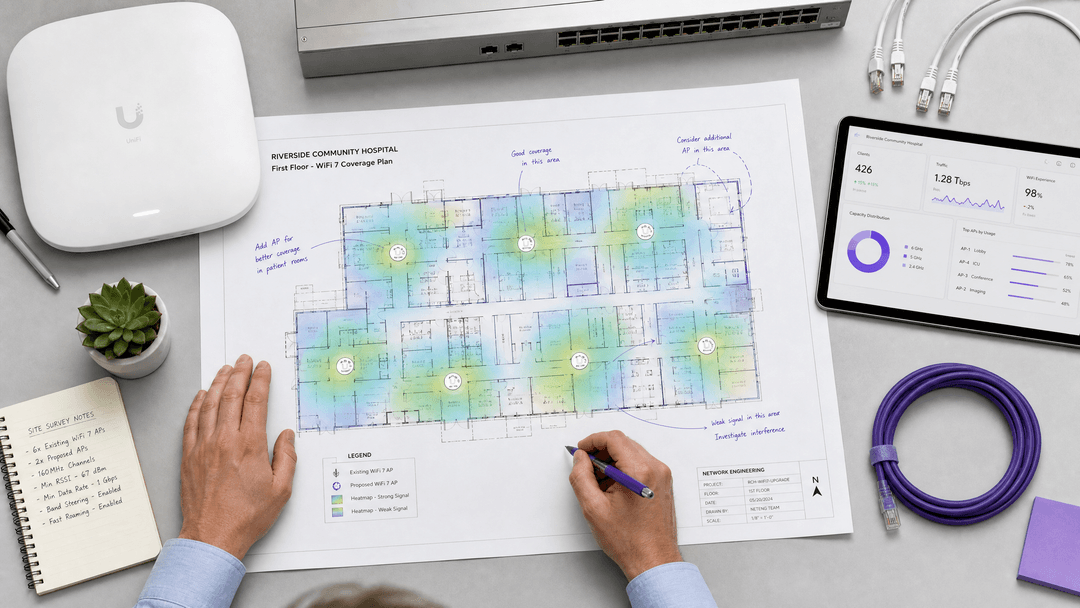
Healthcare is the deployment environment where WiFi 7 delivers the most operationally significant throughput and latency gains - but also the most complex RF and compliance constraints. As IDC reports, WiFi 7 certified device shipments crossed 500 million units globally by April 2026, and Extreme Networks completed the first WiFi 7 stadium deployment in May 2026. Health systems that waited through the WiFi 6E generation are now doing full AP refreshes directly to WiFi 7 802.11be hardware. This guide provides actionable guidance for IT managers, network architects, and CTOs planning a WiFi 7 deployment in a clinical environment. We cover four critical dimensions: 6 GHz band strategy, IoMT device compatibility, RF interference obligations under IEC 60601-1-2, and authentication architecture for mixed fleets using Purple's RADIUS platform.
{{asset:planning_a_wifi_7_deployment_in_a_clinical_environment_iomt_devices_interference_and_hipaa_podcast.mp3}}
Technical Deep-Dive
1. 6 GHz Band Strategy in Clinical Areas
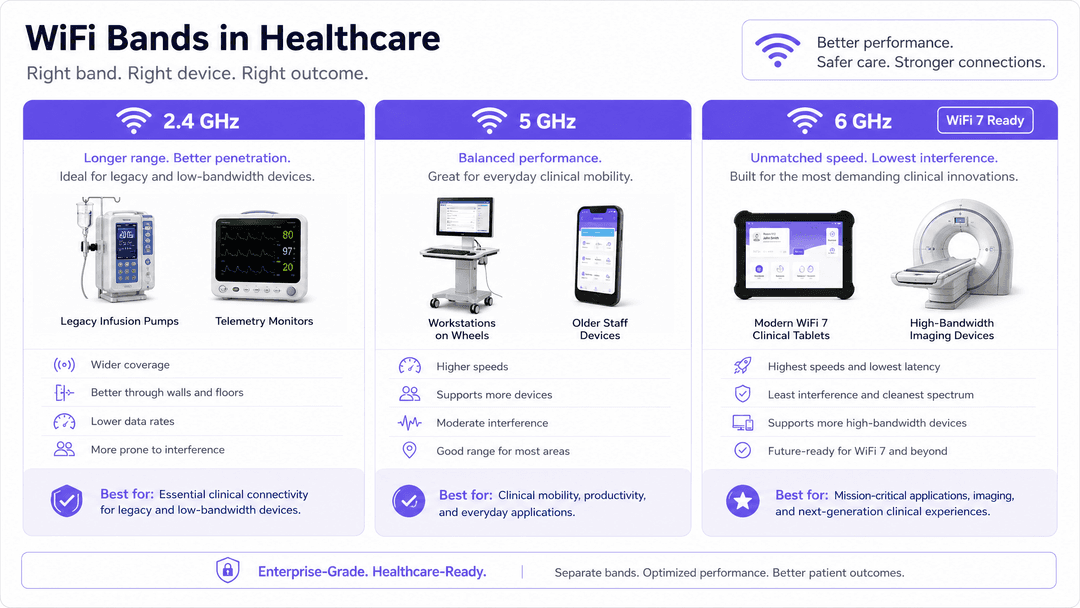
The 6 GHz UNII-5 and UNII-7 spectrum delivers excellent density reduction and channel availability, essential for modern high-bandwidth clinical applications like AI-assisted diagnostics and real-time medical imaging. However, a significant portion of the Internet of Medical Things (IoMT) fleet - such as legacy infusion pumps, patient monitors, and telemetry transmitters - relies on proprietary 802.11g or 802.11n radio stacks that operate exclusively on the 2.4 GHz or 5 GHz bands.
Because these legacy devices cannot associate to WiFi 7 APs operating in 6 GHz mode, a tri-band deployment is mandatory. Network architects must implement an explicit SSID steering policy to prevent legacy devices from attempting to associate to 6 GHz only.
2. IoMT Device Compatibility Matrix
Before procuring WiFi 7 APs, you must inventory your IoMT devices by radio generation. This requires a comprehensive network discovery scan coordinated with Healthcare Technology Management (HTM) and biomedical engineering, cross-referenced against vendor firmware documentation.
A common pitfall is the blanket "turn off 2.4 GHz" policy. While effective in corporate environments, 2.4 GHz thinning in a hospital can strand legacy telemetry monitors in weak RF zones. You must model 2.4 GHz coverage specifically for the lowest-performing device class in your fleet.
3. RF Interference and IEC 60601-1-2 Obligations
WiFi 7 introduces Multi-Link Operation (MLO), which enables devices to transmit simultaneously across multiple frequency bands. This asynchronous simultaneous transmission changes the RF interference signature relative to single-band WiFi 6.
Under IEC 60601-1-2 Edition 4.1, hospitals bear electromagnetic compatibility (EMC) obligations to assess new RF-emitting equipment before deploying it in clinical areas. This includes conducting EMC testing with affected medical devices to ensure that the new WiFi 7 infrastructure does not disrupt critical life-safety equipment.
4. Authentication Architecture for Mixed Fleets
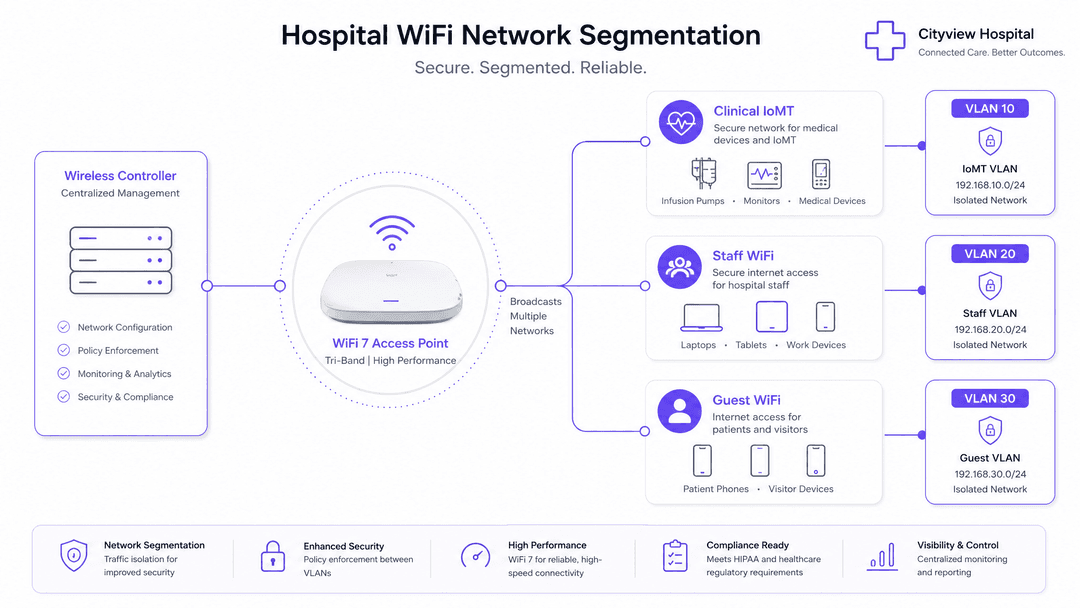
Clinical environments require robust network segmentation to separate patient, staff, and medical device traffic, aligning with HIPAA and DSPT regulatory requirements.
For clinical staff devices (laptops, tablets), implement WPA3-Enterprise with 802.1X EAP-TLS certificate-based authentication. Purple's RADIUS-as-a-Service platform provides identity-bound access, authenticating against your existing identity provider (e.g., Microsoft Entra ID) without the overhead of on-premise RADIUS servers.
For IoMT devices that lack an 802.1X supplicant, use MAC Authentication Bypass (MAB). Purple's platform authenticates these devices against a MAC allow-list and drops them into a dedicated IoMT VLAN. Strict firewall policies must then restrict their access to clinical system endpoints only.
Got questions about your specific setup?
Our team works with venue operators, IT managers, and network engineers across 80,000 venues. Book a 20-minute call and we will show you how others like you solved it.
Implementation Guide
- Traffic Classification and Auditing: Inventory all devices and classify traffic into logical groups (Guest, Staff, IoMT, POS).
- VLAN and Subnet Design: Assign a unique VLAN ID and IP subnet to each class. Implement a default-deny policy for inter-VLAN routing.
- SSID Configuration: Map each SSID to its corresponding VLAN. Enable client isolation on the guest SSID. Keep the total SSID count to four or fewer per radio.
- Authentication Deployment: Roll out EAP-TLS for staff via MDM, configure MAB for IoMT, and deploy Purple's captive portal for guests.
- Validation: Conduct post-install validation surveys and EMC testing to confirm coverage, roaming performance, and biomed coexistence.
Best Practices
- Standardise VLAN IDs Globally: Ensure consistent VLAN numbering across all hospital sites to prevent dynamic assignment failures.
- Implement Fallback Mechanisms: Configure a "critical VLAN" on access points to maintain basic connectivity if the RADIUS server becomes unreachable.
- Coordinate with HTM: Never deploy new RF infrastructure in clinical areas without coordinating access and testing with biomedical engineering.
Troubleshooting & Risk Mitigation
- Legacy Device Disconnection: If legacy IoMT devices drop offline, verify that 2.4 GHz thinning has not created coverage holes. Adjust AP radio profiles to ensure continuous -70 dBm coverage on 2.4 GHz.
- VLAN Bleed: If guest devices receive IP addresses from the clinical scope, audit switch port configurations to ensure AP uplinks are tagged trunk ports, not untagged access ports.
ROI & Business Impact
A well-architected WiFi 7 deployment delivers measurable returns by supporting advanced clinical workflows, reducing IT helpdesk tickets through automated certificate-based onboarding, and mitigating the financial and reputational risks of a data breach via strict network segmentation.
Deployment Readiness Checklist
- IoMT device inventory completed and cross-referenced with vendor specs.
- 2.4 GHz coverage modeled for legacy telemetry devices.
- IEC 60601-1-2 EMC assessment planned with HTM.
- VLAN segmentation architecture documented (Guest, Staff, IoMT).
- EAP-TLS certificates provisioned for staff devices via MDM.
- MAB allow-list populated for headless IoMT devices.
For more information, see our guides on Staff WiFi, PCI DSS 4.0.1 for hotel WiFi, and How to Securely Segment Staff and Guest WiFi Networks.
Key Definitions
Multi-Link Operation (MLO)
A WiFi 7 feature that allows devices to simultaneously send and receive data across different frequency bands and channels.
Improves throughput and latency but changes the RF interference signature, requiring EMC assessment in clinical areas.
IEC 60601-1-2
An international standard defining electromagnetic compatibility (EMC) requirements for medical electrical equipment.
Hospitals must ensure new RF-emitting equipment, like WiFi 7 APs, complies with this standard to avoid disrupting medical devices.
MAC Authentication Bypass (MAB)
A technique used to authenticate devices that do not support 802.1X by using their MAC address as their identity.
Essential for securely onboarding headless IoMT devices like infusion pumps onto the network.
EAP-TLS
An 802.1X authentication method that uses mutual X.509 certificate authentication.
The gold standard for securing managed clinical staff devices, eliminating the risks associated with shared passwords.
Dynamic VLAN Assignment
The process of automatically assigning a device to a specific VLAN based on its identity during authentication.
Reduces manual configuration overhead and ensures strict network segmentation for HIPAA compliance.
Band Steering
A wireless controller feature that encourages dual-band or tri-band clients to connect to a less congested frequency band.
Used to push modern clinical devices to 5 GHz or 6 GHz, leaving 2.4 GHz clean for legacy IoMT equipment.
IoMT (Internet of Medical Things)
The network of connected medical devices, software applications, and health systems and services.
These devices often use legacy radio stacks and require dedicated VLAN segmentation to protect patient data.
Client Isolation
A wireless setting that prevents devices connected to the same SSID from communicating directly with each other.
Crucial for guest patient WiFi networks to prevent peer-to-peer attacks and lateral movement.
Worked Examples
A 400-bed hospital needs to deploy WiFi 7 APs in a new intensive care unit (ICU). The unit uses legacy 802.11n infusion pumps and modern WiFi 6E clinical tablets. How should the RF and authentication architecture be designed?
Deploy tri-band WiFi 7 APs. Configure a dedicated IoMT SSID on 2.4 GHz for the infusion pumps, using MAC Authentication Bypass (MAB) to place them in an isolated IoMT VLAN. Configure a separate Staff SSID on 5 GHz and 6 GHz for the clinical tablets, using 802.1X EAP-TLS authentication via Purple's cloud RADIUS to place them in the Clinical Staff VLAN. Implement explicit SSID band steering to prevent the tablets from associating to 2.4 GHz.
A healthcare trust is replacing its legacy WiFi 5 network with WiFi 7. The biomedical engineering team is concerned about RF interference from Multi-Link Operation (MLO) affecting older patient monitors. What steps must be taken before deployment?
Before deployment, the IT team must coordinate with Healthcare Technology Management (HTM) to conduct an electromagnetic compatibility (EMC) assessment in accordance with IEC 60601-1-2 Edition 4.1. This involves testing the new WiFi 7 APs in a controlled environment with the affected patient monitors to observe any adverse interference from MLO's simultaneous transmission signature. If interference is detected, MLO may need to be disabled on specific APs near sensitive equipment.
Practice Questions
Q1. Your hospital is upgrading to WiFi 7. A vendor suggests disabling the 2.4 GHz radios on all new APs to reduce interference. What is the primary risk of this approach?
Hint: Consider the capabilities of legacy medical equipment.
View model answer
Disabling 2.4 GHz across the board will likely strand legacy IoMT devices, such as older infusion pumps and telemetry monitors, which lack 5 GHz or 6 GHz radios. You must inventory the fleet and model 2.4 GHz coverage specifically to support these legacy devices before thinning the 2.4 GHz band.
Q2. A new fleet of WiFi-enabled patient monitors is being deployed. The devices do not support 802.1X. How should they be authenticated and segmented on the network?
Hint: Think about identity-based access control for headless devices.
View model answer
The devices should be authenticated using MAC Authentication Bypass (MAB). Their MAC addresses should be added to the RADIUS allow-list, which will dynamically assign them to a dedicated, isolated IoMT VLAN with strict firewall ACLs restricting access to clinical endpoints only.
Q3. What regulatory standard must be considered regarding electromagnetic compatibility when deploying new WiFi 7 APs near sensitive medical equipment?
Hint: It relates to EMC and medical electrical equipment.
View model answer
IEC 60601-1-2 Edition 4.1. Hospitals must assess new RF-emitting equipment to ensure it does not cause electromagnetic disturbances that could disrupt the essential performance of medical devices.
Continue reading in this series
How to revoke WiFi access when an employee leaves
This guide shows IT and venue operations teams how to remove Staff WiFi access when an employee leaves without disrupting the rest of the workforce. It compares certificate-based 802.1X, identity-specific iPSK and SCIM-driven deprovisioning, then provides a same-day runbook, test method and audit evidence model.
How to Securely Segment Staff and Guest WiFi Networks: Best Practices for Enterprise LANs
This guide provides IT managers and network architects with a vendor-neutral, technical blueprint for securing enterprise LANs by properly segmenting staff and guest WiFi traffic. It covers 802.1X authentication, cloud RADIUS, VLAN isolation, and the credential lifecycle management required to eliminate shared passphrases and protect corporate assets.
A Network Administrator’s Guide to Configuring RADIUS Authentication for Guest WiFi
A comprehensive technical reference for network administrators on deploying RADIUS authentication for guest WiFi. Covers architecture, vendor-neutral configuration steps, security best practices, and troubleshooting common deployment failures.
Got questions about your specific setup?
Our team works with venue operators, IT managers, and network engineers across 80,000 venues. Book a 20-minute call and we will show you how others like you solved it.