
PPSK 12: comparing features and deployment models
This authoritative technical reference guide breaks down PPSK 12 architecture, comparing cloud, on-premise, and hybrid deployment models. It provides IT managers and venue operations directors with actionable guidance on implementing per-resident WiFi isolation across build-to-rent, MDU, and hospitality environments.
Listen to this guide
View podcast transcript
Executive Summary
For IT managers and network architects managing build-to-rent (BTR), multi-dwelling units (MDU), and hospitality venues, delivering secure, reliable WiFi presents a structural challenge. A shared password exposes all residents to each other, while a full 802.1X enterprise deployment is too complex for consumer IoT devices. Private Pre-Shared Key (PPSK) with a 12-character minimum length solves this by providing each resident with a unique key on a shared SSID, creating an isolated network segment per unit.
This guide details the technical architecture of PPSK 12, compares cloud, on-premise, and hybrid deployment models, and provides actionable implementation strategies. You will learn how to orchestrate key lifecycle management, navigate the transition to WPA3 and 6 GHz, and ensure compliance with data privacy standards. Purple provides the orchestration layer to automate these deployments across Cisco Meraki, HPE Aruba, Ruckus, Juniper Mist, Ubiquiti UniFi, Cambium, Extreme, and Fortinet access points.
Listen to the Briefing
Technical Deep-Dive: The PPSK 12 Architecture
Private Pre-Shared Key (PPSK), known variously as iPSK by Cisco Meraki, MPSK by HPE Aruba, and DPSK by Ruckus, is an authentication architecture that bridges the gap between consumer simplicity and enterprise security. It allows multiple unique pre-shared keys to operate on a single SSID.
The Authentication Flow
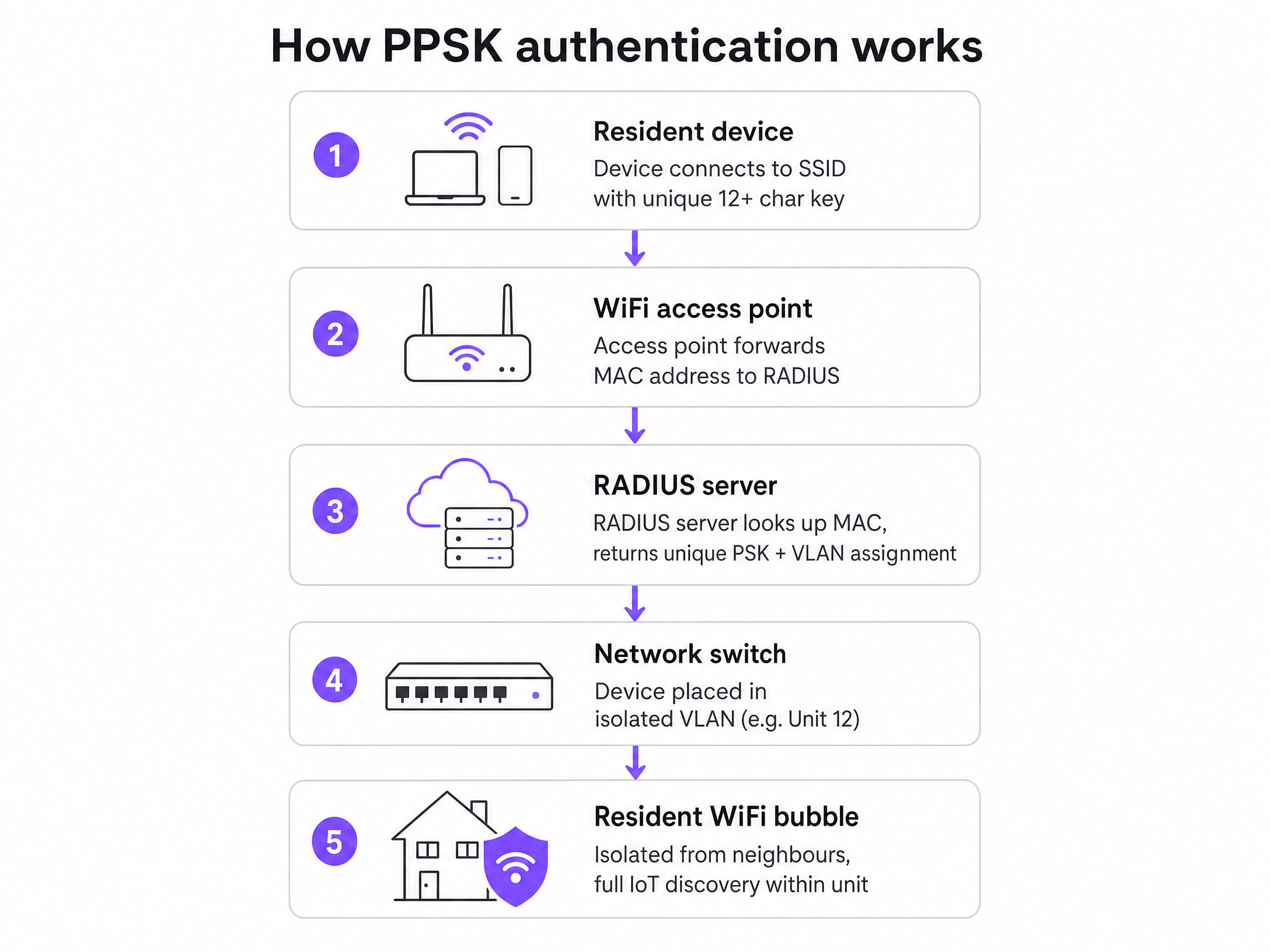
When a device connects to a PPSK-enabled SSID, the authentication process differs significantly from a standard WPA2-Personal network:
- Connection Attempt: The device presents its unique pre-shared key to the access point.
- MAC Forwarding: The wireless LAN controller intercepts the request and forwards the device's MAC address to the RADIUS server.
- Identity Lookup: The RADIUS server queries its database for the MAC address. If found, it returns an Access-Accept response containing the specific pre-shared key assigned to that resident, alongside a VLAN assignment attribute.
- Validation: The controller compares the key provided by the device with the key returned by the RADIUS server. If they match, the connection is authorised.
- Segmentation: The device is placed onto the assigned VLAN, creating a cryptographically isolated network segment.
The 12-Character Minimum Standard
The specification of a 12-character minimum for the pre-shared key is a critical security control. WPA2-PSK keys are derived using the PBKDF2 algorithm with 4,096 iterations of HMAC-SHA1. A standard 8-character key is vulnerable to offline dictionary attacks using modern GPU-accelerated cracking tools. By enforcing a 12-character minimum that includes a mix of uppercase, lowercase, numbers, and symbols, the keyspace expands exponentially, rendering brute-force attacks computationally infeasible.
Comparing Deployment Models
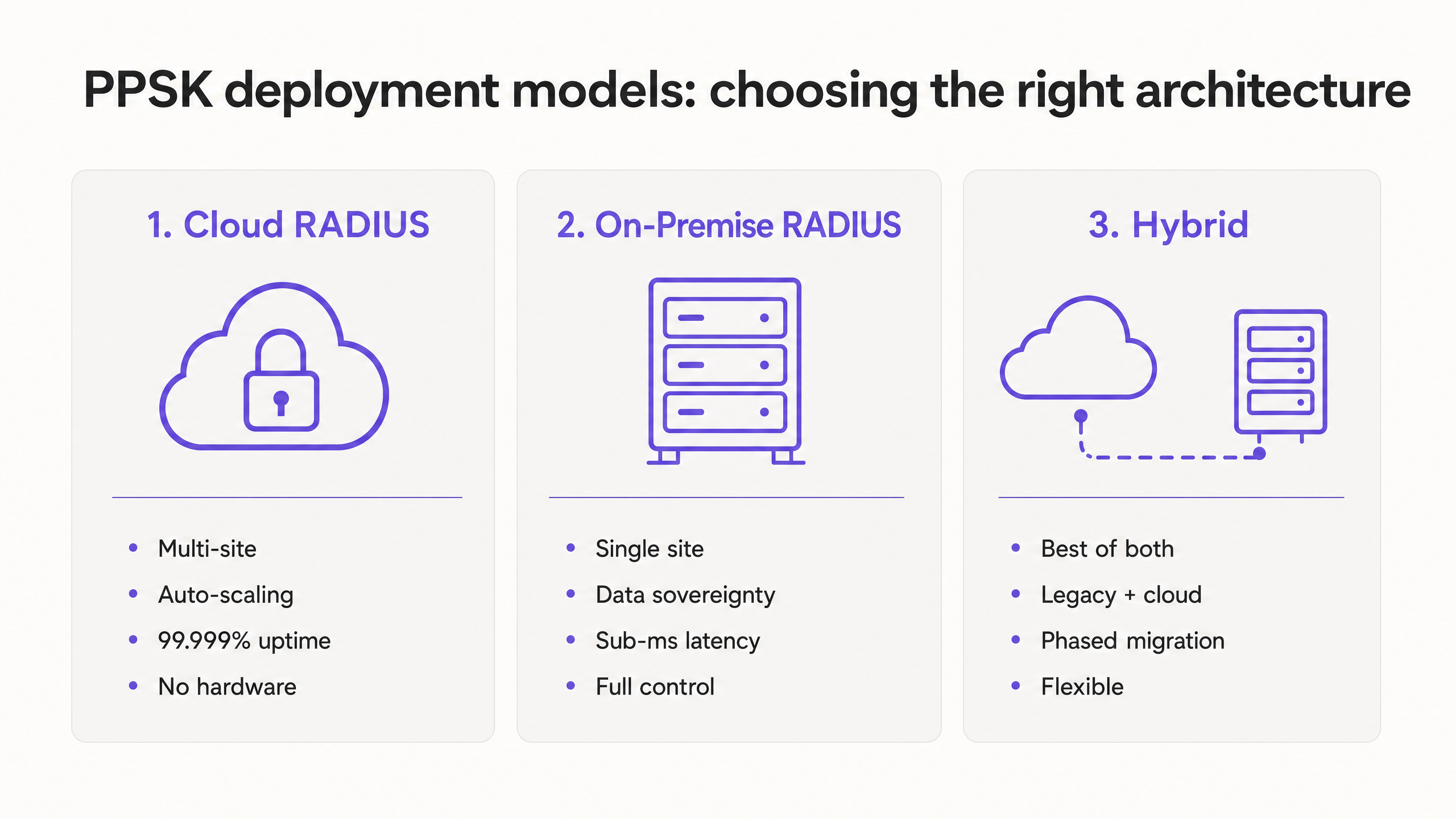
Choosing the correct RADIUS architecture dictates the resilience and scalability of your deployment. There are three primary models to evaluate.
Cloud RADIUS
In a cloud RADIUS model, access points authenticate against a globally distributed authentication service.
- Advantages: Eliminates per-site hardware requirements, automates certificate rotation, and provides elastic scalability. Purple delivers 99.999% uptime on its cloud authentication infrastructure. It is the optimal choice for multi-site BTR operators and retail chains.
- Drawbacks: Introduces a strict dependency on the site's WAN connection. If the internet link fails, new devices cannot authenticate.
- Mitigation: Deploy SD-WAN for link redundancy and configure local credential caching on the wireless controller to survive temporary outages.
On-Premise RADIUS
An on-premise deployment involves running a RADIUS server (such as Microsoft NPS or FreeRADIUS) locally on hardware or a virtual machine at the venue.
- Advantages: Delivers sub-millisecond authentication latency and ensures complete data sovereignty. It removes the WAN dependency, making it suitable for single, massive-scale venues like stadiums or properties with unreliable internet connectivity.
- Drawbacks: Requires significant engineering overhead to manage patching, server health, and certificate rotation.
- Mitigation: Implement automated certificate renewal protocols, as certificate expiry is the leading cause of complete authentication outages in on-premise environments.
Hybrid Architecture
The hybrid model routes guest and resident IoT traffic to a cloud RADIUS service while directing corporate or staff authentication to an on-premise Active Directory. This approach is highly effective for mixed-use developments, such as a residential tower with ground-floor retail or coworking spaces.
Implementation Guide: Key Lifecycle Management
The technical configuration of PPSK is straightforward; the operational challenge lies in managing the key lifecycle. Manual key provisioning is unscalable and introduces security risks.
Automated Provisioning and Revocation
Integrate your network orchestration layer with your Property Management System (PMS). When a tenancy begins, the system should automatically generate a unique 12-character key and distribute it to the resident via email or a resident app. When the tenancy ends, the API must automatically revoke the key. Purple automates this workflow, ensuring that revoking one resident's access has zero impact on their neighbours.
Handling Device Additions
Residents will purchase new devices mid-tenancy. Implement a self-service portal that allows residents to securely retrieve their existing key to connect new devices. This eliminates support tickets for routine device onboarding.
Managing MAC Address Randomisation
Modern operating systems (iOS 14+, Android 10+, Windows 11) use MAC address randomisation by default. Because PPSK relies on MAC address lookups in the RADIUS database, a randomised MAC will result in an authentication failure. You must configure your network to require devices to use their permanent hardware MAC address for the resident SSID, or implement a pre-registration workflow that captures the randomised MAC during onboarding.
WPA3 and the 6 GHz Transition
Network architects planning upgrades must navigate a structural conflict between PPSK and WPA3. WPA3 replaces the WPA2 four-way handshake with Simultaneous Authentication of Equals (SAE). Currently, the SAE standard supports only a single key per SSID. Consequently, a pure WPA3 network cannot natively support PPSK.
This becomes a blocking issue when deploying WiFi 6E or WiFi 7, as WPA3 is mandatory in the 6 GHz band.
The Recommendation: Adopt a dual-band strategy. Deploy your PPSK SSID on the 2.4 GHz and 5 GHz bands using WPA2 or WPA2/WPA3 transition mode to support the bulk of resident devices, including legacy IoT hardware. Deploy a separate WPA3-Enterprise SSID on the 6 GHz band for modern, managed devices that require higher security. Hardware vendors are actively developing WPA3-compatible PPSK implementations, but the dual-band approach is the most stable architecture for current deployments.
ROI & Business Impact
Deploying PPSK 12 transforms WiFi from a basic utility into a managed amenity with measurable returns.
- Rent Premium: Research from the British Property Federation indicates that a high-quality, managed WiFi amenity commands a rent premium of £15 to £30 per unit per month in BTR developments.
- Operational Efficiency: By eliminating shared password rotations and resolving Chromecast discovery issues through per-unit VLAN isolation, operators see a dramatic reduction in IT support tickets.
- Void Reduction: Providing day-one, move-in ready internet access reduces void periods by 5 to 10 days compared to waiting for consumer broadband installations.
Purple provides the software overlay required to orchestrate PPSK 12 across your existing hardware, delivering enterprise-grade isolation and automated lifecycle management without replacing your access points.
Key Definitions
PPSK (Private Pre-Shared Key)
An authentication method that allows multiple unique passwords to be used on a single WiFi network name (SSID), identifying and isolating individual users.
Used to provide enterprise-grade access control and segmentation in environments where devices cannot support 802.1X certificates.
RADIUS
Remote Authentication Dial-In User Service. A networking protocol that provides centralised authentication, authorisation, and accounting management.
The engine that stores the PPSK keys and tells the access point whether a device is allowed to connect and which VLAN it belongs to.
VLAN (Virtual Local Area Network)
A logical subnetwork that groups a collection of devices together, isolating their traffic from other devices on the same physical network.
PPSK uses VLANs to ensure that Resident A's smart TV cannot be seen or controlled by Resident B.
Headless Device
A device without a traditional screen or keyboard interface, such as a smart speaker, thermostat, or IoT sensor.
These devices typically cannot support 802.1X authentication, making PPSK the only secure way to connect them to an enterprise network.
MAC Address Randomisation
A privacy feature in modern operating systems that generates a temporary hardware address for the device when connecting to a network.
This breaks PPSK authentication, which relies on a stable MAC address to look up the correct key. Operators must require devices to use their permanent MAC address.
WPA3 SAE
Simultaneous Authentication of Equals. The new, more secure handshake mechanism introduced in the WPA3 standard.
SAE currently only supports one key per SSID, meaning a pure WPA3 network cannot natively run PPSK. This requires operators to use dual-band strategies.
MDU (Multi-Dwelling Unit)
A building containing multiple separate housing units, such as an apartment block or student accommodation.
The primary target environment for PPSK deployments, as it requires both high device density support and strict tenant isolation.
Layer 2 Isolation
A security measure that prevents devices on the same local network segment from communicating directly with each other.
PPSK uses this to ensure privacy between residents sharing the same physical access point.
Worked Examples
A 250-unit Build-to-Rent operator needs to deploy resident WiFi. They currently use a single shared password across the building. Residents complain that they cannot securely cast to their smart TVs, and IT spends 10 hours a week managing password rotations when tenants move out.
Deploy a Cloud RADIUS PPSK architecture. Configure the wireless LAN controller to forward MAC addresses to the Purple cloud RADIUS. Integrate the Purple API with the operator's Property Management System. When a new lease is signed, the system automatically generates a unique 12-character key and assigns a dedicated VLAN for that apartment. The resident receives the key via the welcome app.
A mixed-use development features 100 residential apartments above a ground-floor corporate coworking space. The operator needs to secure both environments using the same physical Cisco Meraki access points.
Implement a hybrid RADIUS architecture. Configure the access points to broadcast two primary SSIDs. The residential SSID uses iPSK (Meraki's PPSK implementation) authenticated against a Cloud RADIUS service to handle the high volume of consumer IoT devices. The coworking SSID uses 802.1X WPA3-Enterprise, authenticating against an on-premise Active Directory server to secure corporate laptops.
Practice Questions
Q1. A BTR operator with 15 properties across the UK wants to deploy PPSK. They have a lean central IT team of two engineers. Which RADIUS deployment model should they choose?
Hint: Consider the operational overhead of managing servers across multiple physical locations.
View model answer
Cloud RADIUS. With 15 distributed sites and a small IT team, the operational overhead of patching and managing 15 on-premise RADIUS servers is unmanageable. Cloud RADIUS provides centralised management, automated scaling, and removes the hardware maintenance burden.
Q2. You are deploying new WiFi 6E access points in a student accommodation block. The client wants to use the 6 GHz band for all devices using PPSK. How do you advise them?
Hint: Recall the relationship between the 6 GHz band, WPA3, and the SAE handshake mechanism.
View model answer
Advise the client that this is not currently possible. The 6 GHz band mandates WPA3 security. WPA3 uses the SAE handshake, which currently only supports a single key per SSID and therefore does not support PPSK. Recommend a dual-band strategy: PPSK on 2.4/5 GHz using WPA2, and a separate WPA3-Enterprise SSID on 6 GHz for compatible devices.
Q3. A resident reports that their smart speaker cannot connect to the PPSK network, despite entering the correct 12-character key. Their smartphone connected without issue. What is the most likely cause?
Hint: Think about modern operating system privacy features and how RADIUS identifies devices.
View model answer
The smart speaker is likely using MAC address randomisation. Because PPSK relies on the RADIUS server looking up the device's specific MAC address to return the correct key, a randomised MAC will not match the database record. The resident needs to configure the device to use its permanent hardware MAC address.
Continue reading in this series
PPSK unifi: comparing features and deployment models
This guide covers PPSK (Private Pre-Shared Key) deployment on Ubiquiti UniFi infrastructure for multi-tenant environments including Build to Rent, student accommodation, and hospitality. It compares PPSK against 802.1X and standard PSK, details two deployment models - native UniFi and cloud RADIUS overlay - and explains how Purple automates credential management at scale. Property developers, landlords, and BTR operators will find actionable architecture guidance, real-world case studies, and a clear business case for treating WiFi as a managed amenity.
PPSK unifi: comparing features and deployment models
This guide covers PPSK (Private Pre-Shared Key) deployment on Ubiquiti UniFi infrastructure for multi-tenant environments including Build to Rent, student accommodation, and hospitality. It compares PPSK against 802.1X and standard PSK, details two deployment models - native UniFi and cloud RADIUS overlay - and explains how Purple automates credential management at scale. Property developers, landlords, and BTR operators will find actionable architecture guidance, real-world case studies, and a clear business case for treating WiFi as a managed amenity.
Uu PPSK is: comparing features and deployment models
This comprehensive technical reference guide dissects PPSK (Private Pre-Shared Key) architecture, comparing it with iPSK and 802.1X to help venue operators and IT teams select the right authentication model. It provides actionable deployment strategies for multi-tenant environments, ensuring secure, isolated, and manageable WiFi networks.