
PPSK unifi: comparing features and deployment models
This guide covers PPSK (Private Pre-Shared Key) deployment on Ubiquiti UniFi infrastructure for multi-tenant environments including Build to Rent, student accommodation, and hospitality. It compares PPSK against 802.1X and standard PSK, details two deployment models - native UniFi and cloud RADIUS overlay - and explains how Purple automates credential management at scale. Property developers, landlords, and BTR operators will find actionable architecture guidance, real-world case studies, and a clear business case for treating WiFi as a managed amenity.
Listen to this guide
View podcast transcript
Executive summary
For property developers and IT managers running multi-tenant buildings, the central WiFi challenge is this: residents expect a home network experience - devices that discover each other, smart TVs that cast, consoles that connect - but on shared infrastructure that must keep every household isolated from every other. Standard PSK fails on isolation. 802.1X fails on IoT device compatibility. PPSK, or Private Pre-Shared Key, solves both.
PPSK broadcasts a single SSID across the entire building while issuing a unique password to each resident. The network uses that password to assign every connecting device to a dedicated VLAN, creating an isolated micro-network per household. Devices within the same resident's VLAN communicate freely; devices on different VLANs remain invisible to each other.
On Ubiquiti UniFi hardware, PPSK is available natively for small deployments, and via Purple's cloud RADIUS overlay for enterprise scale. This guide covers both models, the protocol constraints you need to know, and the commercial case for deploying managed WiFi as a revenue-generating amenity.
Technical deep-dive: PPSK vs 802.1X vs PSK
Understanding where PPSK fits requires a direct comparison against the two dominant enterprise authentication standards.
Standard PSK
WPA2/WPA3-Personal uses a single password for all clients on an SSID. Every device shares the same broadcast domain. In a multi-tenant building, this means Resident A can see Resident B's devices. You can enable client isolation on the access point to prevent direct device-to-device communication, but doing so breaks local network functionality entirely - smart speakers cannot control smart lights, phones cannot cast to TVs, and game consoles cannot discover local services. Standard PSK is not viable for residential multi-tenant use.
802.1X (WPA-Enterprise)
802.1X authenticates users via a RADIUS server using unique credentials (username and password) or certificates, with EAP-TLS or PEAP as the common authentication methods. It provides strong security and supports dynamic VLAN assignment via RADIUS attributes (specifically, Tunnel-Private-Group-ID). However, 802.1X requires the connecting device to run a supplicant - software that negotiates the authentication handshake. Most consumer IoT devices, smart TVs, and game consoles do not include a supplicant. They accept only a simple password. Mandating 802.1X in a residential environment immediately excludes a significant portion of the devices residents want to connect.
PPSK (Private Pre-Shared Key)
PPSK - also called iPSK (Identity Pre-Shared Key) by Cisco Meraki and Purple, and Personal Private Network by some vendors - bridges the gap. It uses WPA2 encryption, which every device supports, but maps each unique password to a specific VLAN. The access point (or an external RADIUS server) performs this mapping at association time. The result is per-resident isolation without requiring any special client software.
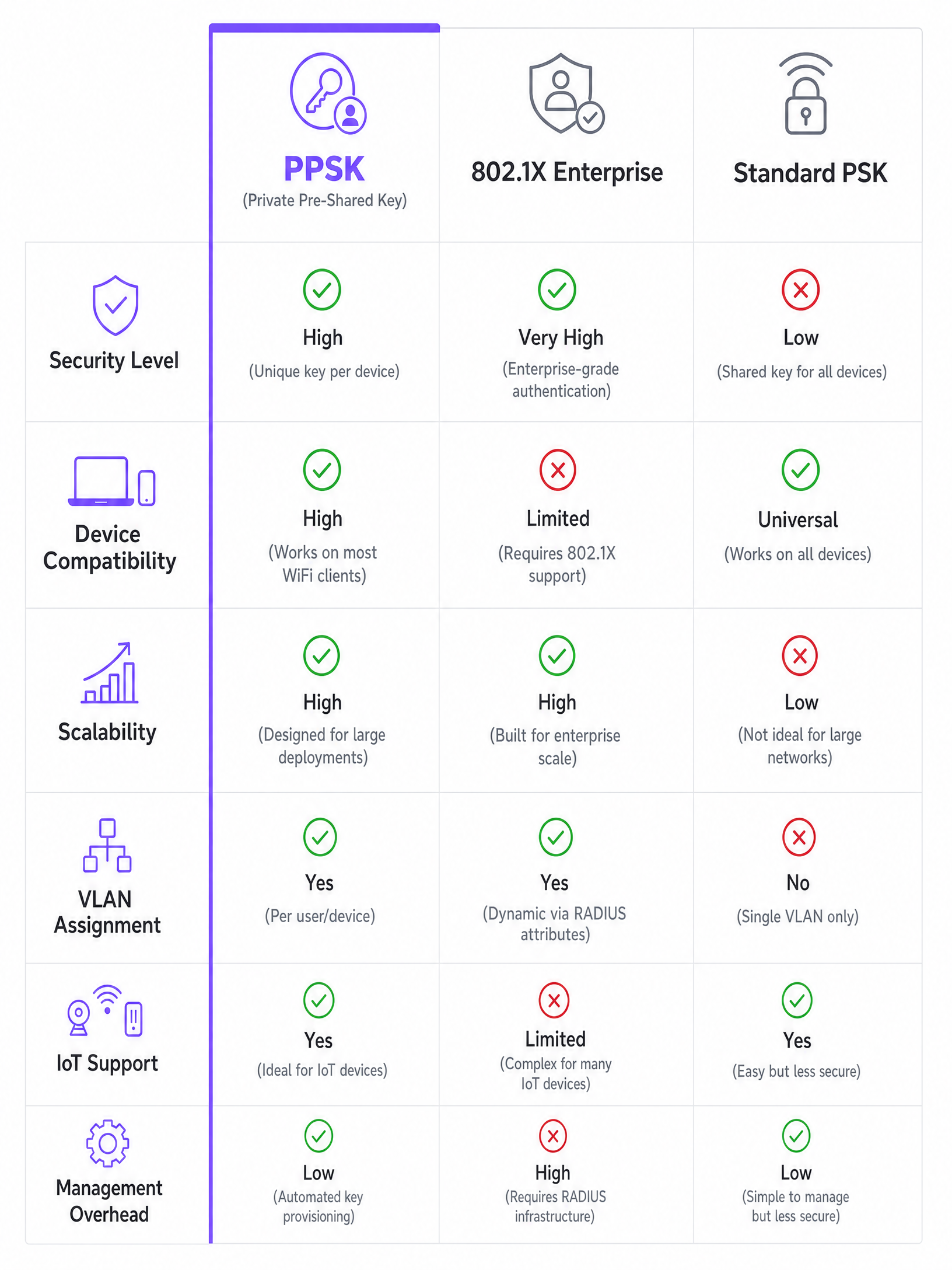
| Dimension | Standard PSK | 802.1X (WPA-Enterprise) | PPSK |
|---|---|---|---|
| Security model | Shared key, no isolation | Per-user credentials, strong | Per-user key, strong |
| IoT device support | Yes | No (requires supplicant) | Yes |
| VLAN assignment | Static, single VLAN | Dynamic via RADIUS | Dynamic via key mapping |
| WPA3 compatible | Yes | Yes | No (WPA2 only) |
| 6 GHz band support | Yes | Yes | No |
| Management overhead | Low (one key) | High (RADIUS infra required) | Medium (key per user) |
| Scalability | Low (shared key) | High | High (with cloud RADIUS) |
The WPA3 constraint. PPSK is fundamentally incompatible with WPA3. WPA3 uses Simultaneous Authentication of Equals (SAE), which requires the access point to know the pre-shared key before the authentication handshake begins. PPSK determines which key is being used during authentication. These requirements are mutually exclusive. If you deploy PPSK on UniFi, you are on WPA2, and you cannot use 6 GHz bands.
Implementation guide: 2 deployment models
Model 1: Native UniFi PPSK (small-scale deployments)
Ubiquiti added native PPSK support to the UniFi Network application in recent firmware releases. This model suits small coworking spaces, boutique MDU buildings, or pilot deployments.
Step 1: VLAN configuration. In the UniFi controller, navigate to Settings > Networks and create a dedicated VLAN for each tenant. Assign each VLAN a unique ID (e.g., VLAN 101 for Unit 1, VLAN 102 for Unit 2).
Step 2: Network creation. Navigate to Settings > WiFi and add a new wireless network. Set the security protocol to WPA2 Personal.
Step 3: Enable PPSK. In the WiFi settings, enable the Private Pre-Shared Keys option. The controller will prompt you to create individual passwords.
Step 4: Key-to-VLAN mapping. For each password you create, assign it to the corresponding VLAN. The access point will use the password to determine VLAN placement at connection time.
Step 5: mDNS configuration. Ensure your UniFi gateway or USG is configured to allow mDNS reflection within each VLAN while blocking cross-VLAN multicast. This is essential for device discovery (Chromecast, Apple Bonjour, Sonos).
Limitations of native PPSK. Manual key management becomes operationally unviable beyond a few dozen units. There is no automated provisioning or revocation. When a tenant moves out, you must manually delete their key from the controller. There is no integration with property management systems.
Model 2: Cloud RADIUS overlay with Purple (enterprise scale)
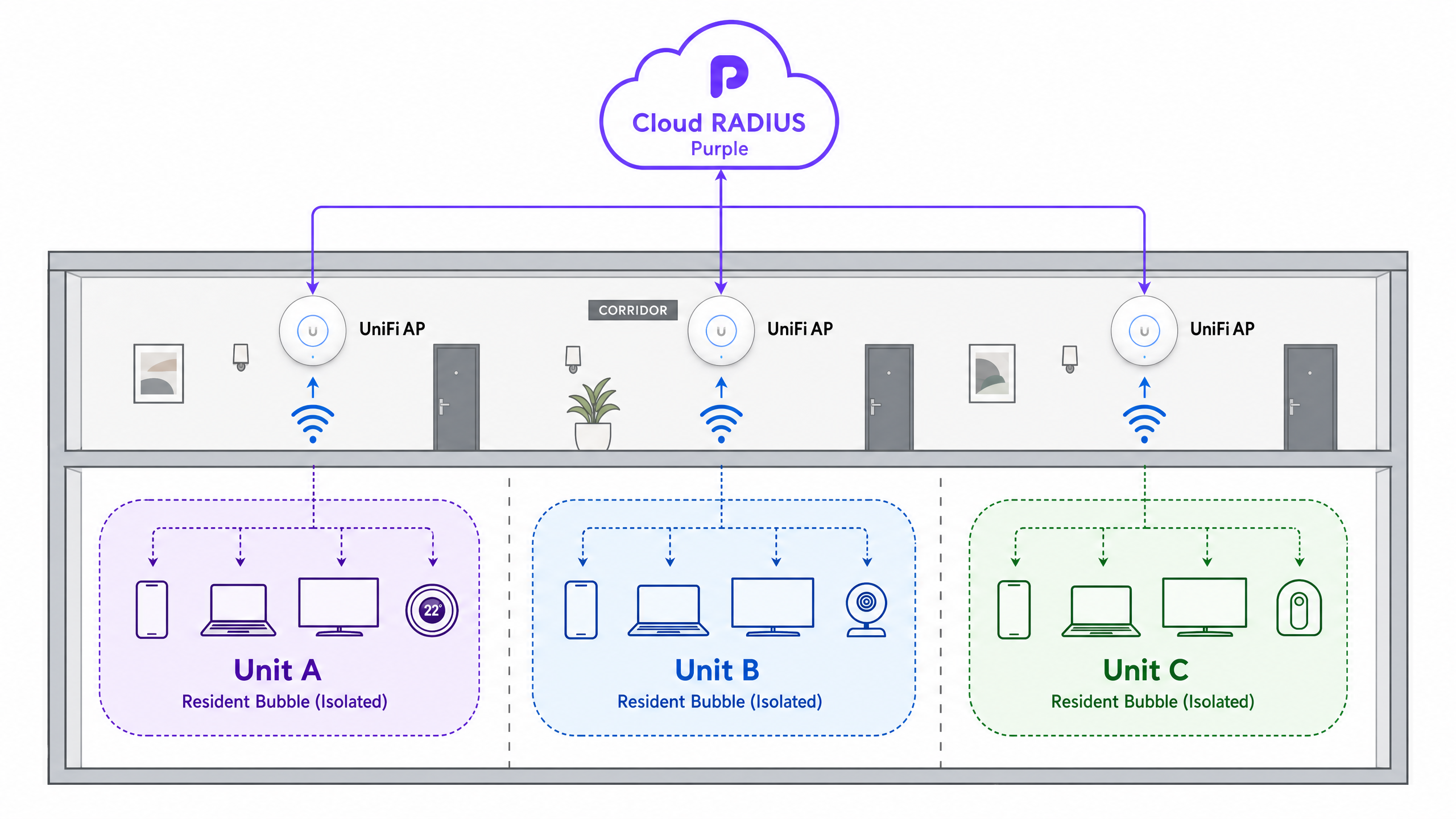
For large BTR or student accommodation properties, Purple provides a hardware-agnostic software overlay that integrates with UniFi access points via RADIUS. This model automates the entire credential lifecycle.
Step 1: RADIUS profile configuration. In the UniFi controller, navigate to Settings > Profiles > RADIUS and create a new profile. Enter Purple's cloud RADIUS server addresses and the shared secret provided during Purple onboarding.
Step 2: SSID configuration. Create a wireless network using WPA2 Enterprise. Select the RADIUS profile created in Step 1. Purple's RADIUS server handles authentication and returns the VLAN assignment via the Tunnel-Private-Group-ID attribute.
Step 3: Property management integration. Connect Purple to your property management system (PMS) via API or webhook. When a new tenancy is created in the PMS, Purple automatically generates a unique PPSK and provisions the corresponding VLAN.
Step 4: Resident onboarding. The resident receives their credentials via the Purple app or a welcome email. They use this single password for all their devices - phones, laptops, smart TVs, consoles, and IoT sensors.
Step 5: Automated offboarding. When the tenancy ends, the PMS triggers Purple to revoke the key. Access is terminated instantly. No other resident is affected.
This model runs on Purple's cloud RADIUS infrastructure, which supports 80,000+ venues and maintained 99.999% uptime in 2024 (Purple internal data). It is compatible with Cisco Meraki, HPE Aruba, Ruckus, Juniper Mist, Ubiquiti UniFi, Cambium, Extreme, and Fortinet access points.
For related network design strategies, see Three SSIDs to rule them all: guest, Passpoint, and IoT WiFi and our comprehensive iPSK: una guía completa para empresas .
Best practices for multi-tenant WiFi design
Design for density. Plan for 15-25 devices per household (Purple internal data from 80,000+ venues). A 200-unit BTR property will see 3,000-5,000 concurrent devices. Select UniFi access points - U6-Enterprise or U7-Pro - with sufficient CPU and memory for high client counts. Place APs in corridors rather than inside units to reduce the number of APs required while maintaining coverage.
Manage mDNS carefully. Multicast DNS is essential for device discovery (Apple Bonjour, Google Cast, Sonos). Configure your network to reflect mDNS traffic within each resident's VLAN while strictly blocking it from crossing VLAN boundaries. UniFi's mDNS repeater feature handles this when configured correctly.
Size DHCP scopes correctly. A /24 subnet (254 usable IPs) per resident is sufficient for most households. Ensure your core routing infrastructure - typically a UniFi Dream Machine Pro or UDM-SE - can handle hundreds of simultaneous subnets without performance degradation.
Minimise SSID count. Every additional SSID you broadcast consumes airtime with management frames, reducing available bandwidth for data traffic. PPSK enables you to consolidate to a single resident SSID. Add a separate Guest WiFi SSID for visitors in common areas, and a Staff WiFi SSID for building management. Three SSIDs is the practical maximum for most deployments.
Implement client isolation between VLANs at the routing layer. Do not rely solely on VLAN tagging. Configure explicit ACLs on your core router to prevent inter-VLAN routing between resident networks. Allow routing only to and from the internet gateway.
Troubleshooting and risk mitigation
The Chromecast problem
The most frequent support ticket in multi-tenant environments is device casting failure. A resident's phone cannot discover their Chromecast or Apple TV. This occurs when the casting device and receiver are on different subnets, or when mDNS traffic is dropped at the VLAN boundary.
Diagnosis: Confirm both devices are using the same PPSK. In the UniFi controller, check the client list and verify both devices are assigned to the same VLAN. If they are on different VLANs, the PPSK mapping is incorrect.
Resolution: Correct the PPSK-to-VLAN mapping in the controller or Purple dashboard. Verify that the UniFi mDNS repeater is enabled and scoped to the correct VLANs.
Password rotation chaos
In standard PSK deployments, when a resident moves out, the building-wide password must be changed, forcing every other resident to update all their devices. This is operationally catastrophic at scale.
Resolution: PPSK eliminates this risk entirely. Revoking one resident's key affects only that resident. Purple automates revocation via PMS integration, so no manual intervention is required.
DHCP exhaustion
In high-density buildings, DHCP pools can exhaust if scoped too small. A /24 subnet provides 254 IPs. With 20+ devices per household, this is sufficient for individual units, but ensure your DHCP lease times are set appropriately (four to eight hours for residential use) to reclaim addresses from disconnected devices.
WPA3 migration planning
As WPA3 becomes the default on new devices, PPSK's WPA2 constraint will become increasingly relevant. Plan your migration path now. For properties where WPA3 is a priority, evaluate 802.1X with a cloud RADIUS overlay that handles IoT device onboarding separately via MAC-based authentication or a dedicated IoT SSID.
ROI and business impact
Treating WiFi as a managed amenity delivers measurable commercial returns for BTR operators. Properties offering high-performance, move-in-ready WiFi command a £15-30 rent premium per unit per month, based on British Property Federation sector benchmarks. Move-in-ready WiFi reduces void periods by five to ten days. Deploying Purple's software overlay on owned UniFi hardware reduces per-door costs by 30-50% compared to negotiating individual broadband contracts with traditional ISPs (Purple internal modelling).
For a 200-unit BTR property, the maths are straightforward. A £20 per unit per month premium generates £48,000 in additional annual revenue. Against a software overlay cost that scales per unit, the payback period is typically under 12 months.
For hospitality operators, the benefit is different but equally measurable. Replacing an open network with a PPSK-secured SSID eliminates the guest experience failures caused by captive portals blocking IoT devices, reduces support calls to the front desk, and enables WiFi Analytics that generate first-party data for loyalty and marketing programmes.
For retail and transport operators, PPSK enables secure staff network segmentation on the same infrastructure as guest WiFi, reducing hardware costs and simplifying network management. For healthcare environments, PPSK provides the patient and visitor isolation required under GDPR and NHS network security standards.
Purple has deployed this architecture across 80,000+ venues globally, including Premier Inn, Whitbread, and Manchester Airports Group (MAG). The platform has processed 440 million logins in 2024 and holds ISO 27001, GDPR, CCPA, and Cyber Essentials certifications.
For more on iPSK architecture and deployment, see Nama ff keren iPSK: a comprehensive guide for businesses and Três SSIDs para a todos governar: o design de WiFi para convidados, funcionários e IoT .
Key Definitions
PPSK (Private Pre-Shared Key)
A wireless security method that allows multiple unique passwords to operate on a single SSID, with each password mapping the connecting device to a specific VLAN. Also called iPSK (Identity Pre-Shared Key) by Cisco Meraki and Purple.
Used in multi-tenant environments to provide secure, isolated networks per resident without the complexity of 802.1X or the RF overhead of multiple SSIDs.
iPSK (Identity Pre-Shared Key)
The vendor-neutral term for PPSK used by Purple and Cisco Meraki. The technology and outcome are identical to PPSK. Ubiquiti uses the term PPSK; HPE Aruba uses the same term.
You will encounter iPSK in Purple documentation and Cisco Meraki configurations. It refers to the same per-user key-to-VLAN mapping mechanism.
VLAN (Virtual Local Area Network)
A logical subnetwork that groups devices from different physical network segments. VLANs isolate broadcast domains and, when combined with routing ACLs, prevent inter-network traffic.
In multi-tenant WiFi, each resident is assigned a dedicated VLAN. Their devices communicate freely within the VLAN but cannot reach devices on other residents' VLANs.
RADIUS (Remote Authentication Dial-In User Service)
A networking protocol providing centralised Authentication, Authorisation, and Accounting (AAA) for network access. In PPSK deployments, the RADIUS server maps credentials to VLAN assignments via the Tunnel-Private-Group-ID attribute.
Purple acts as a cloud RADIUS server. UniFi access points send authentication requests to Purple's RADIUS servers, which return the correct VLAN assignment for each unique PPSK.
mDNS (Multicast DNS)
A protocol that resolves hostnames to IP addresses within local networks without a central DNS server. Used by Apple Bonjour, Google Cast, Sonos, and similar device discovery protocols.
Managing mDNS is critical in multi-tenant networks. It must be reflected within each resident's VLAN to enable device discovery, but must not cross VLAN boundaries to other residents.
SAE (Simultaneous Authentication of Equals)
The WPA3 handshake mechanism that replaces the WPA2 four-way handshake. SAE requires both parties to know the pre-shared key before the handshake begins, making it incompatible with PPSK.
This is the technical reason PPSK cannot operate on WPA3 or 6 GHz bands. Understanding SAE explains why the WPA2 constraint is a protocol limitation, not a vendor choice.
BTR (Build to Rent)
Purpose-built residential properties designed specifically for the rental market rather than for sale. A primary deployment sector for multi-tenant WiFi, where high-quality internet is a top-five amenity factor.
BTR operators are the primary audience for PPSK-based managed WiFi. The combination of high device density, IoT requirements, and frequent tenancy turnover makes PPSK the correct architecture.
Headless device
A network-connected device that lacks a traditional screen or keyboard interface, such as a smart plug, wireless speaker, environmental sensor, or games console. These devices cannot navigate captive portals or negotiate 802.1X authentication.
The prevalence of headless devices in residential environments - 15 to 25 per household on average - is the primary reason 802.1X is impractical for BTR and student accommodation deployments.
Cloud RADIUS overlay
A software-as-a-service architecture where a cloud-hosted RADIUS server handles authentication and VLAN assignment for on-premises access points. The access points do not require local RADIUS infrastructure.
Purple's cloud RADIUS overlay is the mechanism that enables enterprise-scale PPSK management on UniFi hardware without on-premises servers. It integrates with property management systems for automated provisioning.
Worked Examples
A 250-unit Build to Rent property in Manchester is replacing individual broadband routers with a centralised UniFi network. The IT director needs to provide secure WiFi for residents, ensuring smart home devices work within apartments while preventing residents from accessing each other's networks. They also need to automate access revocation when tenancies end, and integrate with the existing property management system.
Deploy UniFi U6-Enterprise access points in the corridors, providing coverage into the apartments. Configure a single resident SSID using WPA2 with Purple's cloud RADIUS overlay. Integrate Purple with the property management system via API. When a resident moves in, Purple automatically generates a unique PPSK and assigns a dedicated VLAN (e.g., VLAN 101 for Unit 1, VLAN 102 for Unit 2). The resident connects their phone, laptop, and smart TV using their unique key. All their devices drop into their specific VLAN. mDNS reflection is enabled within each VLAN so Chromecast and smart speakers function correctly. When the resident moves out, the PMS notifies Purple, which revokes the key instantly without affecting the other 249 units.
A 150-room hotel currently uses an open network with a captive portal for guest WiFi. Guests are complaining that Apple TVs and game consoles in rooms do not connect. The hotel's IT manager wants to provide a secure, home-like WiFi experience while maintaining the ability to expire access at check-out. The hotel uses a standard PMS.
Migrate from the open captive portal network to a PPSK-secured SSID. Integrate the UniFi network with Purple and the hotel's PMS. Upon check-in, the PMS triggers Purple to generate a unique PPSK tied to the guest's room number and departure date. The guest receives the password on their keycard sleeve or via the Purple app. They use this password to connect their phone, laptop, and Apple TV. All devices land in a secure micro-segment. Apple TV and game consoles connect using the simple password - no captive portal navigation required. Upon check-out, the key automatically expires. The hotel retains a separate open SSID with captive portal for lobby and common area guest access.
Practice Questions
Q1. You are deploying WiFi in a 500-bed student accommodation block. The client wants to use 802.1X to ensure enterprise-grade security. However, students will be bringing games consoles, smart TVs, and wireless printers. What is the recommended architectural approach, and what are the key trade-offs?
Hint: Consider the capabilities of consumer IoT devices regarding enterprise authentication protocols, and whether a hybrid approach is viable.
View model answer
Advise against using 802.1X as the sole authentication method. Consumer devices like game consoles and smart TVs lack the 802.1X supplicant required to authenticate. Recommend a PPSK architecture using Purple's cloud RADIUS. This provides WPA2 security with per-student VLAN isolation while allowing headless devices to connect using a simple, unique password. If the client insists on 802.1X for laptops and phones, implement a hybrid: 802.1X for managed devices and a separate PPSK SSID for IoT devices, with both mapped to the same per-student VLAN. This adds SSID count but maintains the security posture the client requires.
Q2. A coworking space manager reports that members cannot cast presentations from their laptops to the smart TVs in meeting rooms. They are currently using a single standard PSK network with client isolation enabled to protect member privacy. How do you resolve this without compromising member privacy?
Hint: Client isolation prevents all device-to-device communication on the AP, including within the same company's devices.
View model answer
The current setup breaks mDNS, which is required for casting. Migrate the network to a PPSK model. Issue a unique password to each member company, mapping each to a dedicated VLAN. Disable client isolation at the AP level - it is no longer needed because VLAN boundaries provide the isolation. Configure routing ACLs to prevent inter-VLAN traffic. Enable mDNS reflection within each VLAN. Each company's laptops can now discover and cast to the TVs within their VLAN, while remaining isolated from other companies. If TVs need to be shared across companies, place them in a shared VLAN and configure mDNS proxy rules accordingly.
Q3. You are configuring native UniFi PPSK for a small 10-unit apartment building. You select WPA3 for the wireless network to provide the strongest available security. The configuration fails to apply. Why does this occur, and what is the correct approach?
Hint: Review the protocol requirements for WPA3's SAE handshake and how they interact with PPSK's authentication mechanism.
View model answer
PPSK is incompatible with WPA3. WPA3 uses Simultaneous Authentication of Equals (SAE), which requires the access point to know the pre-shared key before the authentication process begins. With PPSK, the access point determines which key is being used during authentication - these requirements are mutually exclusive. The correct approach is to configure the network using WPA2 Personal with PPSK enabled. If WPA3 security is a priority for the property, consider 802.1X with a cloud RADIUS overlay for laptops and phones, and a separate WPA2 PPSK SSID for IoT devices. Document this constraint clearly for the client so they understand the security trade-off.
Q4. A 300-unit BTR property is experiencing frequent support calls from residents reporting that their Chromecast devices do not work. The network uses PPSK with Purple's cloud RADIUS overlay on UniFi hardware. What are the three most likely causes and how do you diagnose each?
Hint: Chromecast requires the casting device and receiver to be on the same logical network and able to exchange mDNS traffic.
View model answer
The three most likely causes are: First, incorrect PPSK-to-VLAN mapping - the resident's phone and Chromecast may be using different passwords and landing on different VLANs. Diagnose by checking the client list in the UniFi controller and confirming both devices are on the same VLAN. Second, mDNS not reflected within the VLAN - even if both devices are on the same VLAN, mDNS traffic may be dropped. Diagnose by checking the UniFi mDNS repeater configuration and confirming it is scoped to the resident VLANs. Third, inter-VLAN routing accidentally enabled - if routing ACLs are misconfigured, devices on different VLANs may partially communicate, causing inconsistent behaviour. Diagnose by testing connectivity between two devices on different VLANs and confirming they cannot reach each other.
Continue reading in this series
Logo iPSK: a comprehensive guide for businesses
This guide explains how Identity Pre-Shared Key (iPSK) technology solves the core security challenge in multi-tenant WiFi environments: delivering enterprise-grade isolation and per-user control without breaking compatibility for IoT devices, gaming consoles, and smart home tech. It covers the full technical architecture, deployment strategies, and business case for property developers, BTR operators, and hospitality IT teams.
Logo iPSK: a comprehensive guide for businesses
This guide explains how Identity Pre-Shared Key (iPSK) technology solves the core security challenge in multi-tenant WiFi environments: delivering enterprise-grade isolation and per-user control without breaking compatibility for IoT devices, gaming consoles, and smart home tech. It covers the full technical architecture, deployment strategies, and business case for property developers, BTR operators, and hospitality IT teams.
WiFi managed services: a comprehensive guide for businesses
WiFi managed services shift the full lifecycle of enterprise wireless networks - from RF design and hardware procurement through to daily monitoring and firmware management - to a specialist provider. This guide explains the cloud-managed architectures, VLAN segmentation strategies, and authentication standards that underpin reliable, secure deployments across hotels, retail chains, BTR developments, and public-sector venues. Property developers, landlords, and BTR operators will find actionable guidance on isolating resident traffic, onboarding smart devices, and turning connectivity into a measurable business asset.