
How to Set Up a Captive Portal on Starlink for Guest WiFi
This technical guide explains how to bypass Starlink's native CGNAT limitations to deploy a secure, GDPR-compliant captive portal for guest WiFi. It covers the required architecture, VLAN segmentation, and bandwidth management strategies essential for remote venues, maritime operators, and event spaces.
Video overview
Listen to this guide
View podcast transcript
Part of our core series: Captive Portal Guide →
Executive Summary
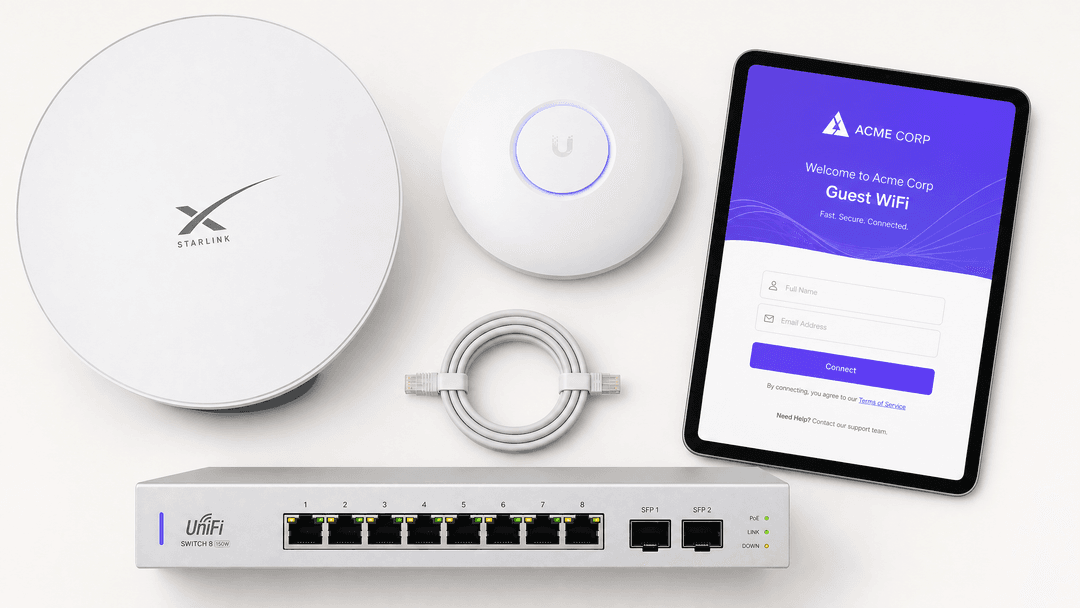
Starlink provides exceptional raw connectivity for remote venues, but its native hardware lacks the authentication, access control, and bandwidth management required for public access. Deploying Guest WiFi on Starlink requires bypassing the proprietary router, overcoming Carrier Grade NAT (CGNAT) constraints, and implementing a cloud-managed captive portal.
This guide details the exact architecture required to build a secure, compliant Guest WiFi network over a Starlink connection. We cover the transition to bypass mode, the reverse-tunnel architecture needed to solve the CGNAT problem, and the VLAN segmentation required to isolate guest traffic from point-of-sale systems. Whether you operate a Highland hotel, a cruise vessel, or a remote retail site, this framework ensures you deliver consistent connectivity while capturing first-party data and maintaining regulatory compliance.
Technical Deep-Dive
The CGNAT Constraint
Starlink issues WAN IP addresses in the 100.64.0.0/10 range, placing your network behind Carrier Grade NAT (CGNAT). This means your venue does not have a public IP address, and inbound connections from the internet are blocked.
Standard captive portal architectures often assume the cloud authentication server can initiate a connection back to your local network controller. On Starlink, this fails. Furthermore, Starlink's Residential and Roam plans enforce a hard limit of 1,200 concurrent sessions, which a busy venue will exhaust rapidly.
The Reverse Tunnel Solution
To solve the CGNAT problem without requiring a static IP, you must use a captive portal that supports a reverse-tunnel architecture.
In this model, your enterprise router initiates an outbound connection to the cloud portal and holds it open persistently. When a guest authenticates, the cloud portal sends the authorisation signal back through this established tunnel. Purple's cloud overlay architecture handles this natively, integrating directly with hardware from Cisco Meraki, HPE Aruba, Ruckus, Juniper Mist, Ubiquiti UniFi, Cambium, Extreme, and Fortinet.
Plan Selection
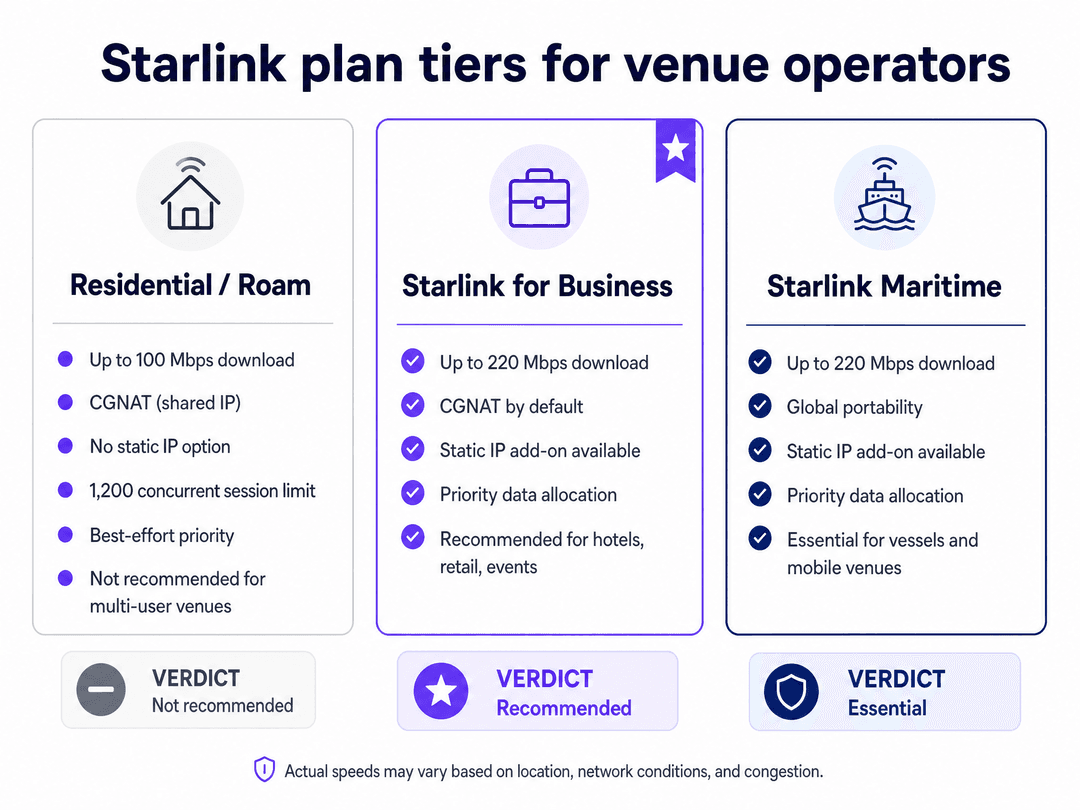
For multi-user environments, the Starlink for Business or Starlink Maritime plans are essential. These tiers provide priority data allocation, higher bandwidth limits (up to 220 Mbps), and the option to purchase a static IP add-on if you require on-premises RADIUS or strict IP allowlisting.
Got questions about your specific setup?
Our team works with venue operators, IT managers, and network engineers across 80,000 venues. Book a 20-minute call and we will show you how others like you solved it.
Implementation Guide
1. Enable Bypass Mode
To use an enterprise router, you must disable the Starlink router's DHCP and NAT functions.
- Open the Starlink app and navigate to Settings.
- Select Bypass Mode and slide the toggle to enable it.
- Connect your enterprise router's WAN port directly to the Starlink ethernet adapter.
Note: If the Starlink dish loses power abruptly or is factory reset, bypass mode will be disabled. Your router will receive a private 192.168.1.x address instead of the 100.64.x.x CGNAT address. You must re-enable bypass mode via the app.
2. Configure VLAN Segmentation
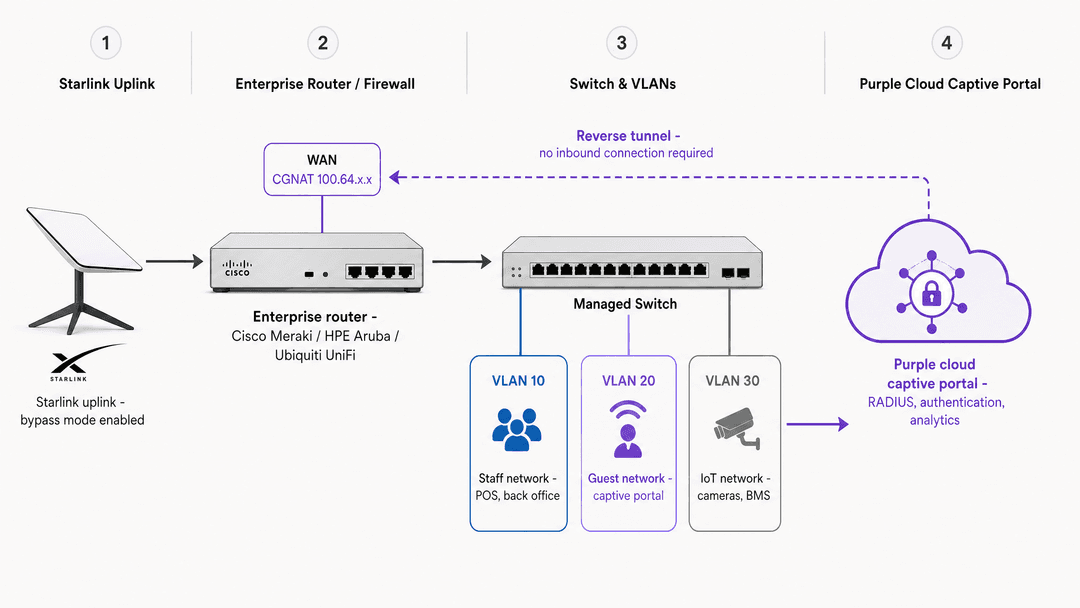
You must isolate guest traffic from your operational systems. Configure at least three VLANs on your switch and access points:
- VLAN 10 (Staff/Operations): POS terminals, back-office PCs, and property management systems.
- VLAN 20 (Guest WiFi): Internet-only access for visitors. Apply client isolation here so guest devices cannot see each other.
- VLAN 30 (IoT): Cameras, smart thermostats, and building management systems.
Configure your firewall to block all inter-VLAN routing. A device on the Guest WiFi VLAN must never be able to reach the Staff VLAN.
3. Configure the Captive Portal
Set up your cloud captive portal to handle the authentication handshake. When deploying Purple, you configure the RADIUS or API integration on your network controller to point to Purple's cloud servers.
Ensure you use a valid SSL/TLS certificate for the captive portal redirect. Modern browsers expect HTTPS; if your router intercepts an HTTPS request using an HTTP redirect, the user will see a security warning. For example, when configuring a Cisco WLC, ensure the Virtual IPv4 Hostname matches the Common Name (CN) specified in the SSL certificate.
Best Practices
Bandwidth Management
Bandwidth is finite. A single user streaming 4K video can consume 25 Mbps. Implement strict bandwidth controls at the router and portal level:
- Per-Device Limits: Cap individual guest speeds (e.g., 5 Mbps download, 2 Mbps upload).
- Data Quotas: Enforce a daily allowance (e.g., 1 GB per 24 hours) to prevent abuse.
- Tiered Access: Offer a free tier for browsing and a paid premium tier for streaming.
Captive Network Assistant (CNA) Handling
Apple and Android devices use a Captive Network Assistant (CNA) to detect captive portals. The CNA opens a limited browser window for login.
Because the CNA environment restricts cookies, ensure your portal architecture supports MAC-based authentication after the initial login. If a user closes the CNA prematurely, advise them to open their standard browser and navigate to neverssl.com to force the redirect.
Troubleshooting & Risk Mitigation
- Certificate Errors: If users see "Your connection is not private," your router is likely attempting an HTTP redirect for an HTTPS request. Install a valid public certificate on your controller.
- Session Timeouts: Starlink's low-Earth orbit constellation has low latency (20-40 ms), but handoffs between satellites can cause brief micro-drops. Set your RADIUS timeout and session keepalive intervals to handle these brief interruptions without forcing the user to log in again.
- Compliance Failures: Operating in a remote location does not exempt you from data privacy laws. Ensure your portal includes explicit, unchecked consent boxes for marketing, in line with GDPR and CCPA requirements.
ROI & Business Impact
Deploying a managed captive portal transforms Starlink from a cost centre into a data acquisition tool. By capturing first-party data (email addresses, demographics) during the login process, venues can build direct marketing lists.
For example, Purple processed 440 million logins in 2024 across 80,000 live venues. Integrating this identity data with your CRM allows for targeted post-visit campaigns, driving repeat visits and direct bookings while maintaining strict ISO 27001 and GDPR compliance.
Key Definitions
Bypass Mode
A configuration setting that disables the Starlink router's internal DHCP and NAT functions, passing the WAN IP address directly to a connected third-party enterprise router.
Required whenever you need to use an enterprise firewall or network controller to manage traffic and VLANs on a Starlink connection.
CGNAT (Carrier Grade NAT)
A method used by ISPs to share a single public IP address among multiple customers. Starlink assigns private IP addresses in the 100.64.0.0/10 range to the dish.
CGNAT prevents inbound connections from the internet, which breaks traditional captive portal architectures that require the authentication server to reach into the local network.
Reverse Tunnel
A network architecture where the local router initiates an outbound connection to a cloud server and keeps it open, allowing the server to send data back through the established tunnel.
The necessary solution for integrating a cloud captive portal with a CGNAT-restricted Starlink connection without requiring a static IP.
VLAN Segmentation
The practice of dividing a single physical network into multiple isolated logical networks.
Mandatory for security. Guest WiFi traffic must be isolated on its own VLAN, separate from staff, POS, and IoT devices.
Captive Network Assistant (CNA)
A mini-browser embedded in iOS and Android operating systems designed specifically to detect and display captive portal login pages when connecting to public WiFi.
IT teams must ensure their portal design functions correctly within the restricted CNA environment, which often limits cookie storage and background scripts.
First-Party Data
Information a company collects directly from its customers with their consent, such as email addresses provided during WiFi login.
Captive portals convert anonymous WiFi users into known contacts, allowing venues to build first-party data assets for marketing.
Client Isolation
A wireless network security feature that prevents devices connected to the same WiFi network from communicating with each other.
Must be enabled on the Guest WiFi VLAN to prevent malicious actors from scanning or attacking other guests' devices.
Static IP Add-on
An optional paid upgrade available on Starlink for Business and Maritime plans that provides a dedicated, publicly routable IP address.
Required only if the venue needs to run an on-premises RADIUS server or requires strict IP allowlisting for corporate VPNs.
Worked Examples
A remote Highland hotel with 40 rooms needs to provide reliable Guest WiFi using a Starlink for Business connection (150 Mbps average). They previously used a 4G bonding router that suffered from severe congestion.
The hotel enabled bypass mode on the Starlink dish and connected an HPE Aruba enterprise router. They configured three VLANs: Staff (VLAN 10), Guest (VLAN 20), and CCTV (VLAN 30). Using Purple's cloud captive portal, they implemented a 5 Mbps per-device speed limit and a 1 GB daily data quota. Guests authenticate via email, accepting the GDPR-compliant terms of service.
A 120-cabin cruise vessel operating in international waters uses Starlink Maritime (220 Mbps). They need to provide tiered internet access to passengers while ensuring ship systems remain secure.
The operator deployed Cisco Meraki access points across the vessel, connecting back to a Meraki MX firewall with the Starlink dish in bypass mode. They integrated Purple's captive portal via the Meraki API. The portal is configured with a Property Management System (PMS) integration, allowing passengers to log in using their cabin number and surname. Standard passengers receive a 2 GB daily allowance; premium passengers receive 10 GB.
Practice Questions
Q1. A retail chain is deploying Starlink Standard at 50 remote locations. They plan to use the native Starlink router to broadcast a 'Guest' network and point it to a cloud RADIUS server. What is the critical flaw in this plan?
Hint: Consider the capabilities of the native hardware and the IP address type provided by Starlink.
View model answer
The native Starlink router does not support enterprise RADIUS integration or VLAN segmentation. Furthermore, the Standard plan uses CGNAT, meaning inbound connections from the cloud RADIUS server will be blocked. They must use an enterprise router in bypass mode and a captive portal that supports reverse tunnelling.
Q2. After a brief power outage, guests at a remote lodge report they can connect to the WiFi but the captive portal does not appear. The IT dashboard shows the enterprise router has a WAN IP of 192.168.1.50. What has happened?
Hint: Look at the IP address range. What does it indicate about the Starlink hardware state?
View model answer
The Starlink dish has reset and disabled bypass mode. It is now acting as a router again, handing out private DHCP addresses (192.168.1.x) and creating a double-NAT situation. The IT team must use the Starlink app to re-enable bypass mode.
Q3. A venue operator wants to collect guest email addresses via the captive portal to send a monthly newsletter. They are located in the UK. They ask you to make the marketing consent checkbox pre-ticked to increase sign-ups. How should you advise them?
Hint: Consider the regulatory requirements for data collection in this region.
View model answer
You must advise them that pre-ticked consent boxes violate the UK GDPR. Consent must be freely given, specific, informed, and unambiguous via a clear affirmative action (an unchecked box). Implementing a pre-ticked box exposes the venue to significant regulatory fines.
Continue reading in this series
Ubiquiti UniFi guest portal not redirecting: causes and fixes
This guide isolates a UniFi guest portal redirect failure by following the guest state, redirect, pre-authorisation route and controller authorisation in sequence. It gives venue IT teams a sourced method to address guest-network versus Hotspot confusion, external portal hand-offs, current UniFi OS account requirements and DNS isolation testing.
Cisco Meraki splash page not working: a troubleshooting flowchart
This practical day-two guide isolates where a Cisco Meraki splash flow has failed: client authorisation, HTTP redirect initiation, walled-garden reachability or RADIUS sign-on. It gives venue IT teams a controlled evidence path, so they can restore Guest WiFi without making broad changes to a live estate.
Enterprise Guest WiFi Setup Guide: VLAN Segmentation, Security, and Captive Portals
This technical guide shows IT teams how to set up Guest WiFi as a controlled internet-access service, using VLAN segmentation, firewall policy and a captive portal. It also explains how Purple's registration forms and onboarding controls support a proportionate visitor experience without weakening the boundary around staff, payment and operational systems.
Got questions about your specific setup?
Our team works with venue operators, IT managers, and network engineers across 80,000 venues. Book a 20-minute call and we will show you how others like you solved it.