
Troubleshooting Captive Portal Redirects: Resolving Guest WiFi Connection Failures
When guests connect to your WiFi but cannot access the internet, the cause is almost always a misconfigured captive portal redirect - not a hardware fault. This guide provides a deep-dive technical reference for IT managers, network architects, and CTOs to diagnose and resolve the full chain of failures: from OS-level connectivity probes and HSTS certificate conflicts through to RADIUS authorisation gaps and DHCP exhaustion. It maps each failure mode to a concrete fix and shows how Purple's hardware-agnostic cloud overlay eliminates these issues across Cisco Meraki, HPE Aruba, Ruckus, Juniper Mist, Ubiquiti UniFi, Cambium, Extreme, and Fortinet deployments.
Video overview
Listen to this guide
View podcast transcript
📚 Part of our core series: Captive Portal Guide →
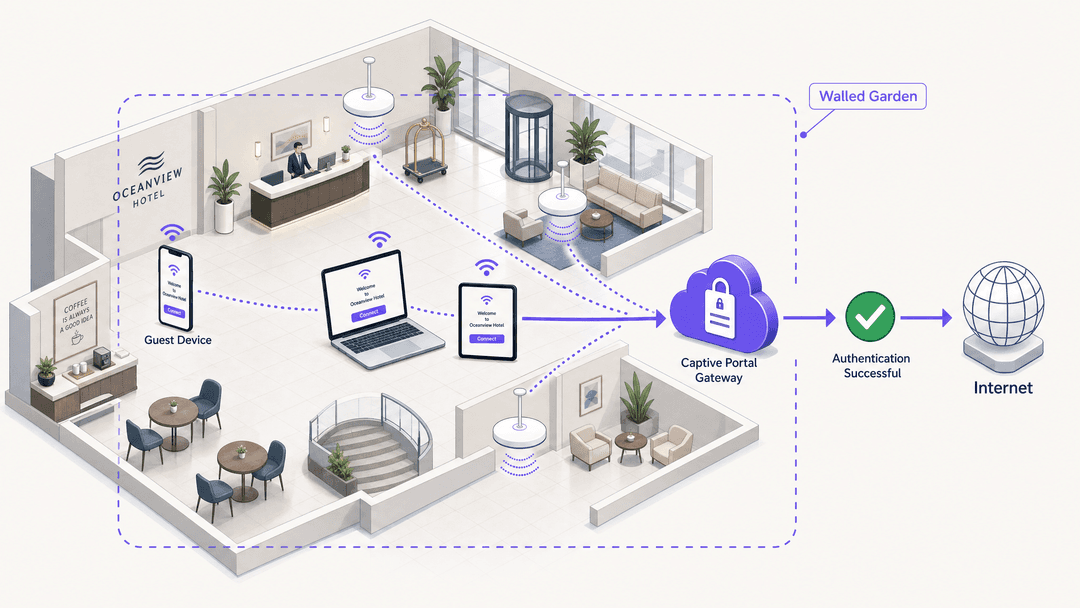
Executive summary
The query 'guest WiFi connected but no internet' is one of the most common support tickets in enterprise networking. The symptom is visible to every visitor; the cause is invisible to most IT teams until they understand the redirect chain. A Captive Portal (also called a splash page or hotspot gateway) intercepts a device's initial HTTP connectivity probe and issues an HTTP 302 redirect to a login page. If any step in that chain breaks - blocked probes, HSTS conflicts, walled garden gaps, RADIUS failures, or DHCP exhaustion - the guest sees nothing but a connected WiFi icon and no internet. This guide walks you through every failure mode, the underlying protocol mechanics, and the configuration changes that resolve them. Purple operates across 80,000+ live venues, processing 440 million logins annually (Purple internal data, 2024), and the patterns described here represent the most frequent root causes we see across hospitality, retail, transport, and public-sector deployments.
Technical deep-dive
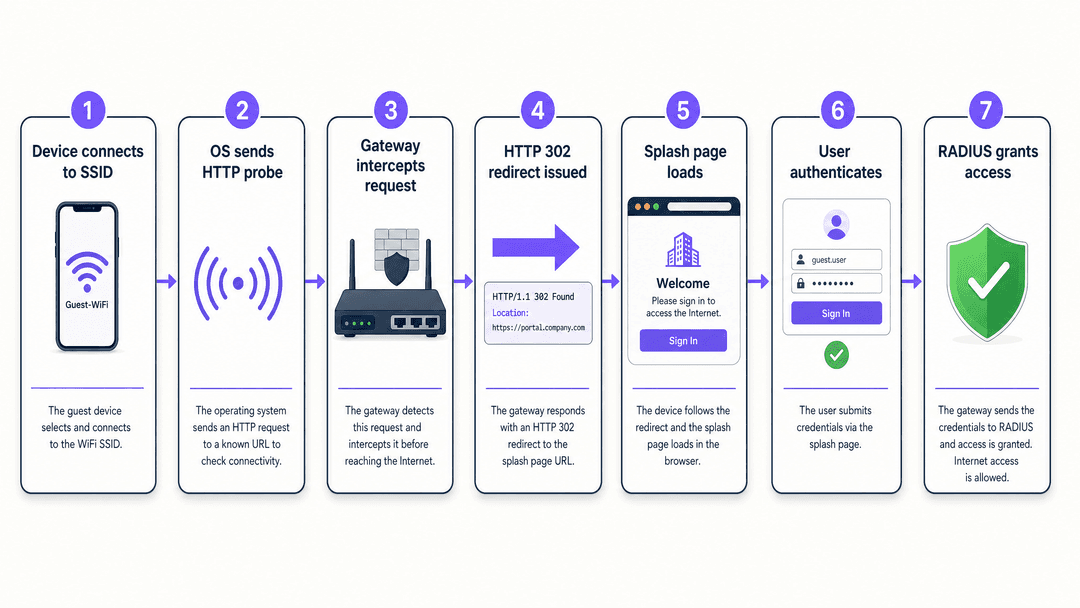
How Captive Portal detection actually works
Every major operating system ships with a built-in mechanism to detect whether a network requires authentication before granting internet access. Understanding these mechanisms is the foundation of all Captive Portal troubleshooting.
When a device associates with an SSID, the OS sends an unencrypted HTTP GET request to a predefined URL. The table below lists the probe URLs by platform.
| Operating system | Probe URL | Expected response |
|---|---|---|
| iOS / macOS | http://captive.apple.com/hotspot-detect.html |
HTTP 200 with specific body |
| Android (Google) | http://connectivitycheck.gstatic.com/generate_204 |
HTTP 204 No Content |
| Windows (NCSI) | http://www.msftconnecttest.com/connecttest.txt |
HTTP 200 with body 'Microsoft Connect Test' |
| Chrome (all platforms) | http://www.gstatic.com/generate_204 |
HTTP 204 No Content |
| Firefox | http://detectportal.firefox.com/success.txt |
HTTP 200 |
If the gateway intercepts one of these requests and returns an HTTP 302 redirect pointing to the Captive Portal URL, the OS recognises it is behind a portal and opens a pseudo-browser (a lightweight WebView) to display the splash page. If the probe is blocked entirely, the OS reports 'No internet connection' and never attempts to open the portal. This is the single most common cause of the 'guest WiFi connected but no internet' symptom.
The HSTS problem
HTTP Strict Transport Security (HSTS) is a web security policy defined in RFC 6797. It instructs browsers to refuse all plain HTTP connections to a domain and to reject any certificate that does not exactly match. Major domains including google.com, facebook.com, and most banking sites are on the HSTS preload list built into Chrome, Firefox, Safari, and Edge.
When a guest opens a browser and types google.com, the browser upgrades the request to HTTPS before it leaves the device. The gateway cannot intercept an HTTPS request and redirect it cleanly - it would have to present a certificate for google.com, which it does not hold. The browser detects the certificate mismatch and displays a hard security warning. The guest cannot proceed to the login page.
The correct architecture relies entirely on the OS-level HTTP probes described above. Those probes use plain HTTP to non-HSTS URLs specifically so that gateways can intercept and redirect them without certificate conflicts. Your gateway must intercept these HTTP probes and issue the 302 redirect. Do not attempt to intercept HTTPS traffic for captive portal purposes.
The walled garden
A walled garden is the set of domains and IP addresses a device can reach before it has authenticated. If the walled garden is too narrow, the splash page may load but authentication will fail. Common gaps include:
- Identity provider domains: If you use Microsoft Entra ID, Okta, or Google Workspace for social or SSO login, their authentication endpoints must be in the walled garden.
- CDN and asset domains: Your splash page may load CSS, JavaScript, or fonts from a content delivery network. If those CDN domains are blocked, the page renders broken.
- Payment processor domains: If you charge for access via Stripe or another processor, their JavaScript SDK domains must be pre-authenticated.
- Purple platform domains: Purple's cloud overlay requires the gateway to reach Purple's RADIUS servers and portal endpoints. These are documented in Purple's hardware integration guides for each supported platform.
RADIUS and the authorization gap
RADIUS (Remote Authentication Dial-In User Service) is the protocol that connects your local gateway to the authentication platform. When a guest completes the login form, the captive portal sends the credentials to the RADIUS server. The RADIUS server returns an Access-Accept or Access-Reject message. The gateway acts on that message by opening or keeping closed the firewall rule that grants internet access.
The authorization gap - where a guest successfully logs in on the splash page but still has no internet - almost always means the gateway did not receive or process the Access-Accept message. Common causes include a mismatched shared secret, UDP ports 1812 and 1813 blocked by a local firewall, or the RADIUS server IP address configured incorrectly on the gateway.
DHCP exhaustion in high-density environments
In stadiums, conference centres, and transport hubs, DHCP exhaustion is a frequent cause of connection failures that looks identical to a captive portal problem. If the DHCP pool is full, a new device associates with the access point but never receives an IP address. Without an IP address, the device cannot send the HTTP probe and never reaches the captive portal. The device shows as connected to the SSID but has no internet.
For venues like Manchester Airports Group (MAG), where passenger volumes peak sharply, subnets must be sized for the maximum concurrent device count, not the average. Short DHCP lease times (15-30 minutes for transient visitor networks) reclaim addresses from departed devices quickly.
Implementation guide
The following steps apply to any hardware platform - Cisco Meraki, HPE Aruba, Ruckus, Juniper Mist, Ubiquiti UniFi, Cambium, Extreme, or Fortinet - when integrated with Purple's cloud overlay.
Step 1: Configure the SSID for external captive portal. In your hardware controller, set the guest SSID to redirect unauthenticated clients to Purple's external portal URL. Disable any local splash page on the controller itself.
Step 2: Define the walled garden. Add the following domains at minimum: Purple's portal and RADIUS endpoints (see your hardware integration guide), the OS detection probe URLs listed above, your identity provider domains (Microsoft Entra ID, Okta, or Google Workspace), and any CDN domains your splash page assets use.
Step 3: Configure RADIUS. Enter Purple's RADIUS server IP addresses, the shared secret from your Purple dashboard, and set the authentication port to 1812 and the accounting port to 1813. Verify that your local firewall permits outbound UDP on these ports.
Step 4: Set session parameters. For hospitality and retail, set session duration to 24 hours with MAC address caching enabled. This prevents guests from being forced to re-authenticate during a single visit. For high-security environments, shorter sessions with re-authentication are appropriate.
Step 5: Size your DHCP scope. Calculate the maximum concurrent device count for your venue at peak capacity. A 500-seat restaurant may see 800 devices during a busy service. Size the DHCP pool to 1,000 addresses with a 30-minute lease time.
Step 6: Test across operating systems. After configuration, test the full flow on iOS, Android, and Windows devices. Each uses a different probe URL and WebView implementation. A failure on one platform while others work is almost always a walled garden gap.
Best practices
The following recommendations reflect standards and patterns across Purple's 80,000+ venue deployments.
Separate guest and staff networks. Run at least three SSIDs: Guest WiFi, Staff WiFi, and an IoT network. Guest traffic must be isolated from internal systems. See our guide on Three SSIDs to rule them all: guest, Passpoint, and IoT WiFi for architecture detail.
Use a dedicated guest VLAN. Segment guest traffic into its own VLAN to prevent lateral movement and simplify firewall policy. This is a PCI DSS requirement if any payment card data traverses the network.
Implement conscious-choice opt-ins. GDPR requires that data collection at the captive portal is based on informed, affirmative consent. Purple's Conscious-choice opt-ins present data collection choices clearly, with separate tick boxes for each purpose. This is not optional for venues operating in the UK or EU.
Monitor portal health proactively. Purple's WiFi Analytics platform provides real-time visibility into login success rates, session counts, and authentication failures. A sudden drop in successful logins is an early warning of a RADIUS or walled garden issue before guests start complaining.
Apply consistent branding. The splash page is the first branded interaction a guest has with your network. A well-designed portal increases opt-in rates and sets expectations for the WiFi experience. See How to make a great first impression with your guest WiFi for design guidance.
-
Troubleshooting and risk mitigation
When a captive portal issue is reported, follow this diagnostic sequence before making any configuration changes.
Isolate the failure point. Ask the guest which OS and browser they are using. Test the same flow yourself on the same OS. If the issue is OS-specific, the cause is almost certainly a missing walled garden entry for that OS's probe URL.
Check DNS resolution. From a device on the guest VLAN, attempt to resolve the captive portal hostname. If DNS resolution fails, the device cannot reach the splash page even if the redirect is issued correctly. Verify that your DHCP server is distributing reliable DNS addresses and that the gateway permits DNS queries in the pre-authentication state.
Capture the redirect. Use browser developer tools (F12) or a packet capture to observe the HTTP exchange. You should see the OS probe request followed by an HTTP 302 response containing the portal URL. If you see the probe request but no 302 response, the gateway is not intercepting correctly. If you see no probe request at all, the OS has already determined it has internet access (possibly from a cached state) and is not sending the probe.
Verify RADIUS communication. On the gateway, check the RADIUS accounting logs. A successful authentication produces an Accounting-Start record. If you see no accounting records after a guest logs in, the RADIUS communication is broken. Check the shared secret, server IP, and firewall rules.
Check DHCP lease utilisation. On the DHCP server, review the current lease count against the pool size. If utilisation exceeds 90%, you are approaching exhaustion. Expand the pool or reduce the lease time immediately.
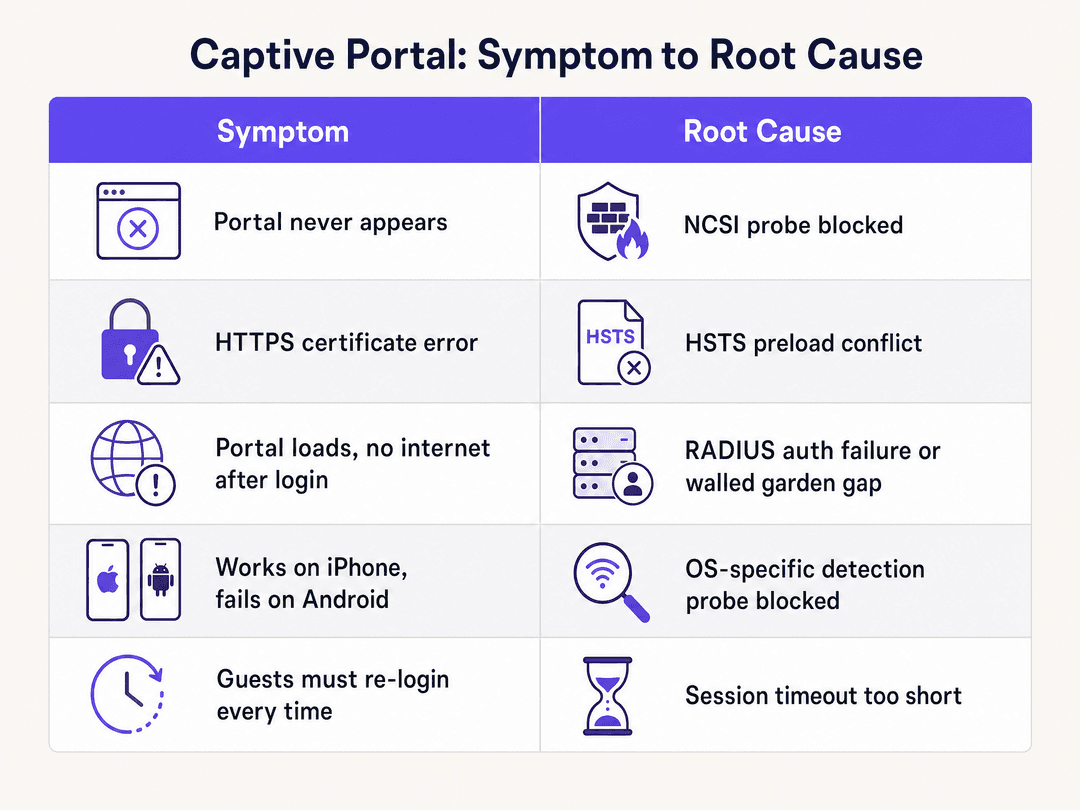
The following table maps the most common symptoms to their root causes and the relevant fix.
| Symptom | Most likely root cause | Fix |
|---|---|---|
| Portal never appears on any device | OS probe blocked by gateway ACL | Add probe URLs to pre-auth allow list |
| Portal appears on iOS, not Android | Android probe URL missing from walled garden | Add connectivitycheck.gstatic.com to walled garden |
| HTTPS certificate error on portal load | Gateway intercepting HTTPS instead of HTTP | Rely on HTTP probe interception only |
| Portal loads, no internet after login | RADIUS Access-Accept not received by gateway | Verify shared secret, ports 1812/1813, RADIUS server IP |
| Social login button fails silently | Identity provider domain not in walled garden | Add Microsoft Entra ID / Google Workspace endpoints |
| Guests must re-authenticate every visit | Session duration too short or MAC caching disabled | Set session to 24 hours, enable MAC address caching |
| Intermittent failures at peak times | DHCP pool exhaustion | Expand subnet, reduce lease time |
ROI and business impact
Every captive portal failure is a missed data capture event. Purple's Guest WiFi platform converts each successful authentication into a first-party data record - name, email, demographic data, and visit frequency - that feeds directly into marketing automation and loyalty programmes.
For a hospitality operator like Premier Inn or Whitbread, a 10% improvement in portal authentication success rates across a 700-property estate translates directly into tens of thousands of additional opt-in records per month. Those records power personalised email campaigns with measurably higher open rates than purchased lists.
For retail operators, the captive portal is the entry point to understanding shopper dwell time, repeat visit frequency, and cross-location behaviour. Purple has collected 29 billion data points (Purple internal data) across its venue network. That data is only as good as the authentication rate that generates it.
For transport hubs like Manchester Airports Group, reliable guest WiFi is a passenger satisfaction metric tracked at board level. A portal that fails intermittently during peak departure periods generates complaints and damages the venue's Net Promoter Score.
For healthcare environments, reliable visitor WiFi reduces pressure on clinical staff who would otherwise field connectivity complaints, and supports patient experience metrics.
Purple's 99.999% uptime SLA ensures that the cloud overlay itself is not the point of failure. When portal issues occur, the cause is almost always local configuration - which this guide equips you to resolve without raising a support ticket.
References
[1] Troubleshooting Tip: General captive portal explanation, flow and troubleshooting. Fortinet Community, November 2024. https://community.fortinet.com/fortigate-3/troubleshooting-tip-general-captive-portal-explanation-flow-and-troubleshooting-188409
[2] RFC 8910: Captive-Portal Identification in DHCP and Router Advertisements. IETF. https://www.rfc-editor.org/info/rfc8910
[3] Network Connectivity Status Indicator overview for Windows. Microsoft Learn, February 2025. https://learn.microsoft.com/en-us/windows-server/networking/ncsi/ncsi-overview
[4] 7 Captive Portal Problems That Break Guest WiFi (And Quick Fixes). Spotipo, February 2026. https://www.spotipo.com/post/troubleshooting-captive-portals-common-issues
[5] Solution for HSTS issues with captive portal. Ubiquiti Community. https://community.ui.com/questions/Solution-for-HSTS-issues-with-captive-portal/17b033e7-3dfe-4830-af8f-bf6ead23d8b0
Key Definitions
Captive portal
A web page presented to a device joining a network before full internet access is granted. The gateway intercepts the device's initial HTTP connectivity probe and redirects it to the portal URL.
The mechanism behind every guest WiFi login page, from hotel lobbies to stadium concourses. Defined in RFC 8910.
Walled garden
The set of domains and IP addresses a device can reach before completing captive portal authentication. Traffic to walled garden destinations bypasses the authentication requirement.
Must include OS probe URLs, identity provider endpoints, CDN domains, and payment processor domains. A misconfigured walled garden is the second most common cause of captive portal failures.
NCSI (Network Connectivity Status Indicator)
A Windows feature that probes `msftconnecttest.com` to determine whether the device has internet access or is behind a captive portal. Defined in Microsoft's networking documentation.
If the gateway blocks this probe, Windows reports 'No internet access' and never triggers the captive portal WebView. The fix is to add the NCSI URL to the pre-authentication allow list.
HSTS (HTTP Strict Transport Security)
A web security policy defined in RFC 6797 that instructs browsers to refuse plain HTTP connections and to reject any certificate that does not exactly match the domain.
Prevents gateways from intercepting HTTPS requests for captive portal redirection. Major domains including google.com are on the HSTS preload list in all major browsers.
HTTP 302 redirect
A standard HTTP response code indicating that the requested resource is temporarily located at a different URI, provided in the Location header.
The mechanism gateways use to divert a device's connectivity probe to the captive portal login page. Some gateways use HTTP 303 or HTTP 200 with a redirect body instead.
RADIUS (Remote Authentication Dial-In User Service)
A networking protocol providing centralised Authentication, Authorisation, and Accounting (AAA) management, operating over UDP on ports 1812 (authentication) and 1813 (accounting).
Purple's cloud platform acts as the RADIUS server. The local gateway (Meraki, Aruba, etc.) sends authentication requests to Purple's RADIUS servers and acts on the Access-Accept or Access-Reject response.
MAC address caching
The process of storing a device's unique hardware identifier to recognise returning devices and maintain session state without requiring re-authentication.
Enables session persistence across brief disconnections and repeat visits within the session window. Essential for hospitality environments where guests move between areas.
Identity-Based Networks
Purple's architecture model in which access policies, VLAN assignment, and analytics are applied based on the authenticated identity of the user rather than the device's IP or MAC address alone.
Enables granular access control, personalised experiences, and accurate attribution of network behaviour to individual users across Cisco Meraki, HPE Aruba, Ruckus, Juniper Mist, Ubiquiti UniFi, Cambium, Extreme, and Fortinet hardware.
DHCP exhaustion
A condition in which all available IP addresses in a DHCP pool have been assigned, preventing new devices from obtaining an address and therefore from reaching the captive portal.
Common in high-density venues during peak periods. Manifests identically to a captive portal failure - device shows connected to SSID but has no internet. Diagnosed by checking DHCP lease utilisation on the server.
Worked Examples
A 200-room hotel using HPE Aruba access points reports that guests on Android devices cannot access the captive portal, while iOS users connect without issue. The IT team has confirmed the portal URL is reachable from the management VLAN.
The IT team should inspect the pre-authentication walled garden on the HPE Aruba controller. iOS devices probe captive.apple.com, which is likely already whitelisted. Android devices probe connectivitycheck.gstatic.com and clients3.google.com/generate_204. These Google domains are almost certainly absent from the walled garden. Adding them to the pre-authentication allow list resolves the issue. The team should also add connectivitycheck.android.com as a secondary Android probe URL. After updating the walled garden, restart the affected SSIDs and test on a factory-reset Android device to confirm the fix, as cached network state on a previously connected device may mask the result.
A retail chain with 150 Cisco Meraki MX appliances reports that guests authenticate on the Purple splash page - the Purple dashboard shows successful logins - but guests still have no internet access after completing the form. The issue affects all locations simultaneously.
Because the Purple cloud platform shows successful logins, the authentication step itself is working. The failure is in the authorisation step - the Meraki appliance is not receiving or acting on the RADIUS Access-Accept message from Purple's RADIUS servers. The team should check three things in sequence: first, verify the RADIUS shared secret on the Meraki dashboard matches the secret in the Purple portal exactly (a single character difference causes silent failure); second, confirm that outbound UDP traffic on ports 1812 and 1813 is permitted from the Meraki appliance to Purple's RADIUS server IP addresses; third, check whether a recent network change introduced a firewall rule or NAT policy that blocks this traffic. Because the issue affects all 150 locations simultaneously, the cause is likely a centralised firewall policy change or a Purple RADIUS server IP address change that was not propagated to the Meraki configurations.
Practice Questions
Q1. During a major conference at a 5,000-seat venue, the IT team receives reports that hundreds of attendees cannot access the guest WiFi portal. Access points show normal association counts. The issue began 45 minutes into the event. What is the most likely cause and what is the immediate fix?
Hint: The issue started after the event was underway, not at launch. Consider what resource becomes constrained as more devices join.
View model answer
The most likely cause is DHCP pool exhaustion. As attendees arrived and associated with the SSID, the DHCP pool filled up. New devices associate with the access point but cannot obtain an IP address, so they never send the HTTP probe required to trigger the captive portal. The immediate fix is to reduce the DHCP lease time to 15 minutes (reclaiming addresses from departed devices faster) and, if possible, expand the pool by adding a second subnet. The longer-term fix is to size the DHCP pool for the maximum concurrent device count at the next event, not the average.
Q2. You have deployed Purple on Ubiquiti UniFi access points at a retail chain. The splash page loads correctly on all devices. Guests complete the email capture form and see a success message. But when they try to browse, they get no internet access. The Purple dashboard shows the logins as successful. What do you check first?
Hint: The cloud platform has recorded the authentication. The failure is in the local enforcement step.
View model answer
Because Purple's dashboard shows successful logins, the cloud authentication step completed correctly. The failure is in the RADIUS authorization step - the UniFi controller is not receiving or acting on the Access-Accept message from Purple's RADIUS servers. Check in this order: (1) the RADIUS shared secret on the UniFi controller matches the secret in Purple's dashboard exactly; (2) outbound UDP on ports 1812 and 1813 is permitted from the controller to Purple's RADIUS server IP addresses; (3) the RADIUS server IP addresses configured on the UniFi controller are current (Purple may have updated them). A packet capture on the controller will confirm whether the Access-Accept message is arriving.
Q3. A hotel IT manager reports that guests using a VPN on their devices cannot access the captive portal at all. Guests without a VPN connect normally. The hotel uses Cisco Meraki MX appliances. Should the IT team change the captive portal configuration to accommodate VPN users?
Hint: Consider what a VPN does to the device's network traffic before the captive portal can intercept it.
View model answer
No - the captive portal configuration does not need to change. A VPN client encrypts all traffic from the device before it leaves the device, including the HTTP connectivity probe. The gateway cannot intercept encrypted VPN traffic, so it never issues the 302 redirect. The guest must disable their VPN, complete the captive portal authentication, and then re-enable the VPN. This is a fundamental architectural constraint of captive portals and VPNs, not a configuration error. The IT team should add a note to the guest WiFi instructions advising VPN users to disable their VPN before connecting.
Continue reading in this series
PCI DSS 4.0.1 for hotel WiFi: what the 2025 deadline means for your guest and POS networks
This guide breaks down the mandatory PCI DSS v4.0.1 requirements for hotel WiFi networks, focusing on the March 2025 deadline. It provides actionable guidance for IT leaders on network segmentation, software patching, and wireless scanning to ensure compliance during 2026 assessments.
Captive Portals vs. Open Networks: Balancing Security and UX
This technical reference guide provides network architects and IT managers with a comprehensive blueprint for deploying guest WiFi networks. It analyses the technical trade-offs between open networks and captive portals, detailing how to balance security protocols with user experience. Readers will learn how to configure resilient redirection mechanisms, manage MAC randomisation, and implement seamless authentication workflows.
Captive portal for Cisco Meraki: set it up with Purple guest WiFi
How to run a Purple captive portal on Cisco Meraki: external web authentication, RADIUS and a walled garden, with a link to Purple's step-by-step setup guide for the exact configuration.
Got questions about your specific setup?
Our team works with venue operators, IT managers, and network engineers across 80,000 venues. Book a 20-minute call and we will show you how others like you solved it.