
Power probe PPSK: comparing features and deployment models
Power Probe PPSK (Private Pre-Shared Key) is the authentication architecture that sits between a shared WiFi password and full 802.1X Enterprise - issuing each user or device a unique passphrase while keeping a single SSID. This guide compares PPSK against PSK and 802.1X across security, deployment complexity, IoT support, and VLAN assignment, then delivers actionable deployment models for Build-to-Rent operators, retail chains, and hospitality venues. Property developers, landlords, and BTR operators will find a clear framework for choosing the right model, integrating with identity providers, and automating key lifecycle management at scale.
Listen to this guide
View podcast transcript

Executive summary
Securing WiFi across a building with hundreds of residents and thousands of devices is harder than it looks. A shared password fails the moment one resident moves out. Full 802.1X Enterprise is too complex for the IoT devices and consumer hardware that dominate modern households. Power Probe PPSK - the term used by HPE Aruba for what Cisco calls iPSK and Ruckus calls DPSK - closes this gap. Every resident gets a unique passphrase. All residents connect to the same SSID. The network automatically assigns each device to the correct VLAN and isolates it from every other household at Layer 2.
Purple operates across 80,000+ venues and has processed 440 million logins in 2024 (Purple internal data). Our Multi-Tenant WiFi platform runs as a hardware-agnostic cloud overlay on Cisco Meraki, HPE Aruba, Ruckus, Juniper Mist, Ubiquiti UniFi, Cambium, Extreme, and Fortinet access points. This guide gives you the technical architecture, deployment models, and operational playbook to deploy PPSK at scale.
Technical deep-dive
The authentication dilemma
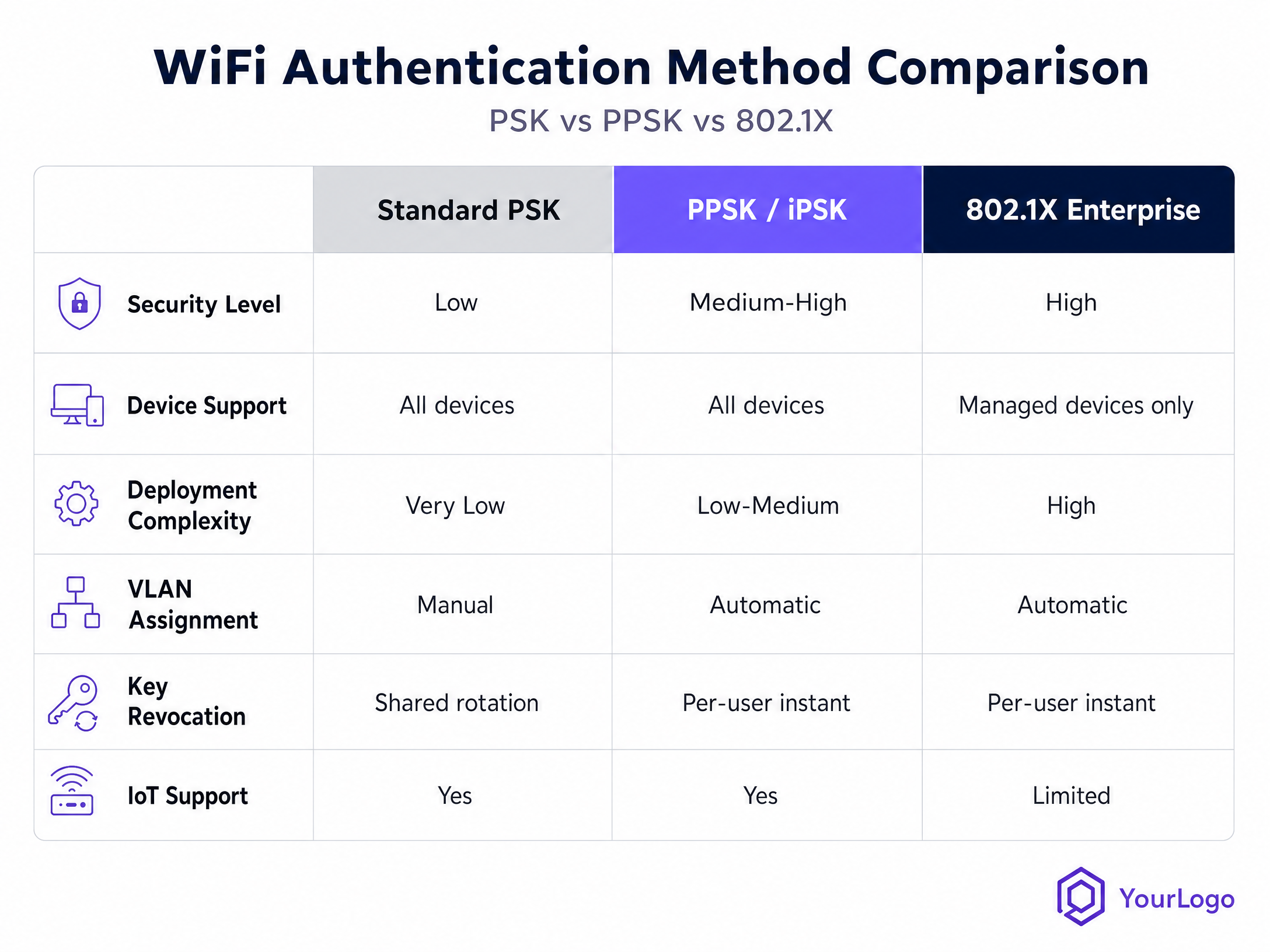
Three WiFi authentication models dominate enterprise and multi-tenant deployments. Each solves a different problem and introduces a different constraint.
Standard PSK (WPA2-Personal) uses a single shared passphrase for every device on the network. Setup takes minutes and every device on the planet supports it. The problem is access control: one compromised credential exposes the entire network. Revoking one user means rotating the password for everyone. In a 200-unit BTR building, that means breaking every resident's smart speaker, gaming console, and streaming device simultaneously.
802.1X Enterprise (WPA2/WPA3-Enterprise) replaces the shared password with individual credentials or digital certificates validated against a RADIUS server, in line with the IEEE 802.1X standard. Security is high. Per-user revocation is instant. But the infrastructure overhead is significant - a Public Key Infrastructure (PKI), certificate management, and supplicant configuration on every device. More critically, headless devices (gaming consoles, smart TVs, IoT sensors, streaming sticks) cannot participate in certificate-based authentication. In a residential or hospitality environment, 802.1X is a non-starter for a meaningful proportion of the device fleet.
Power Probe PPSK sits between these two extremes. Every user or device receives a unique pre-shared key. All devices connect to the same SSID. From the resident's perspective, it feels like a home WiFi network. From the network's perspective, each connection is individually identified, individually encrypted, and individually controllable.
Authentication flow
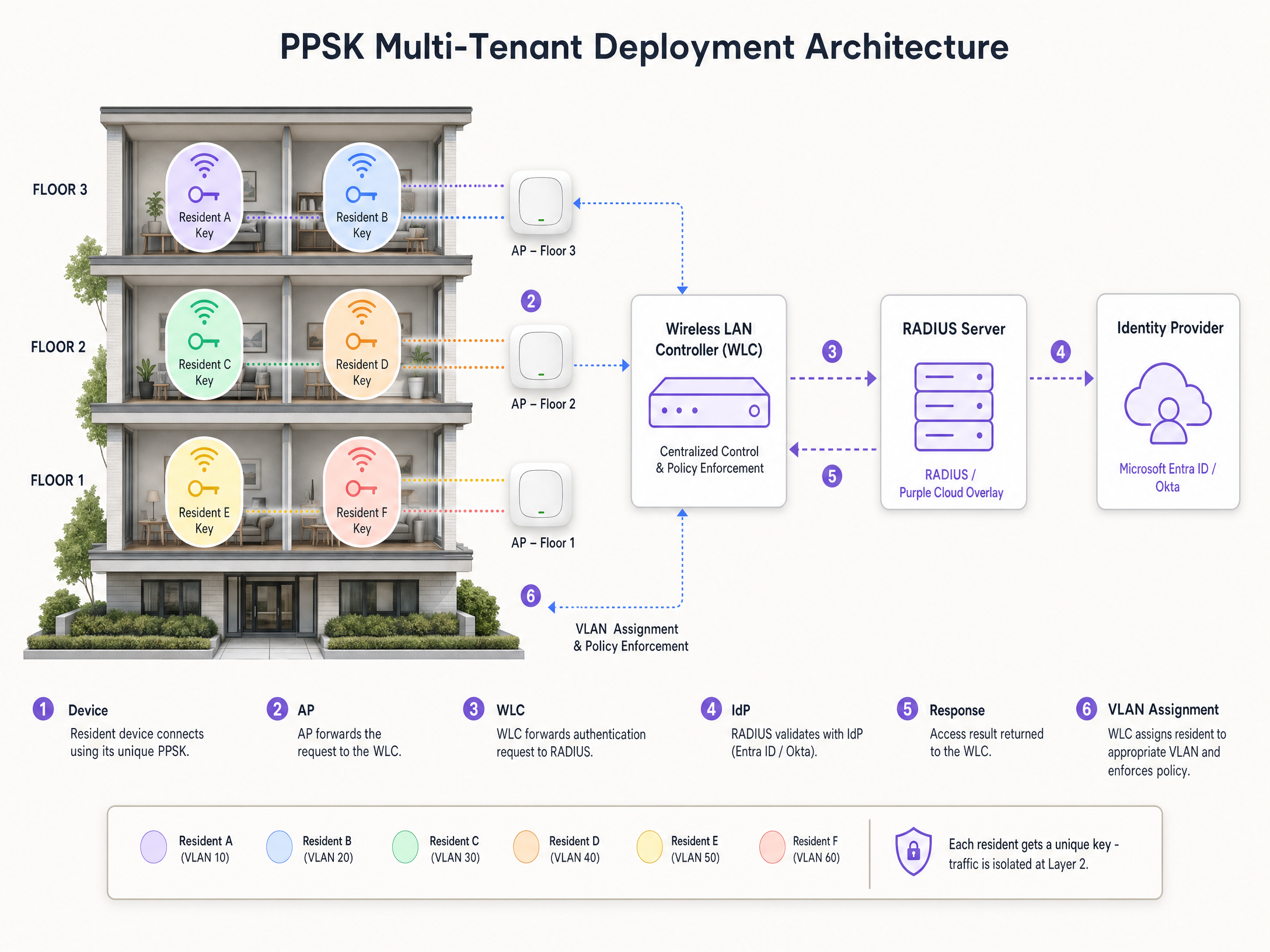
The PPSK authentication sequence runs as follows:
- A device presents its passphrase to the access point during the WPA2-PSK four-way handshake.
- The Wireless LAN Controller (WLC) intercepts the connection attempt and forwards the device's MAC address to the configured RADIUS server.
- The RADIUS server looks up the MAC address in its identity store and, if a match is found, returns an Access-Accept response containing a vendor-specific attribute (VSA) with the unique passphrase for that device.
- The WLC uses the returned passphrase to validate the key the device presented. A match authenticates the device.
- The RADIUS response also carries VLAN assignment and bandwidth policy attributes. The WLC places the device on the correct network segment automatically.
This flow is consistent across vendors, though the specific RADIUS attributes differ. HPE Aruba uses the Aruba-MPSK-Passphrase VSA. Cisco uses the cisco-av-pair attribute with psk-mode and psk values. Ruckus implements DPSK natively within its SmartZone controller. Ubiquiti UniFi supports PPSK with RADIUS-assigned VLANs from firmware 7.x onwards.
Private Area Networks
A defining capability of PPSK in multi-tenant deployments is the Private Area Network (PAN). PPSK enables Layer 2 isolation between users. Even though hundreds of devices share the same physical access points and the same SSID, each resident's traffic is cryptographically isolated from every other resident's traffic. With mDNS reflection enabled at the controller, a resident can still discover and interact with their own devices - casting to a smart TV, pairing a smart speaker, printing to a portable printer - without any risk of their neighbour seeing or accessing those devices.
This is the architecture Purple uses to deliver Multi-Tenant WiFi across BTR, purpose-built student accommodation (PBSA), social housing, and coworking environments. Each resident operates inside their own WiFi bubble. The building operator manages one network.
Implementation guide
Step 1: Infrastructure assessment
Verify that your access point hardware and controller support PPSK with RADIUS-assigned VLANs. Cisco Meraki, HPE Aruba, Ruckus, Juniper Mist, Ubiquiti UniFi, Cambium, Extreme, and Fortinet all support the feature, though configuration paths differ. Check your controller firmware version - PPSK support was added or significantly improved in recent major releases for most vendors.
Assess your RADIUS infrastructure. PPSK authentication is synchronous: every new device connection triggers a RADIUS query. In a 200-unit building with 15-25 devices per household, you need a RADIUS server capable of handling sustained query loads at move-in periods. Purple's cloud RADIUS infrastructure is sized for this load natively.
Step 2: Identity provider integration
Connect your identity provider - Microsoft Entra ID, Okta, or Google Workspace - to your RADIUS infrastructure. This integration is what enables automated key lifecycle management. When a resident is onboarded in your property management system (PMS), a unique PPSK is generated and provisioned automatically. When they move out, the key is revoked without affecting any other resident.
For retail deployments, connect your HR system or identity provider so that staff keys are provisioned at onboarding and revoked at offboarding. Purple's platform acts as the orchestration layer between your IdP and your RADIUS infrastructure, automating this workflow across Cisco Meraki, HPE Aruba, Ruckus, Juniper Mist, Ubiquiti UniFi, Cambium, Extreme, and Fortinet hardware.
Step 3: MAC randomisation handling
Modern operating systems - iOS 14 and later, Android 10 and later, Windows 11 - use MAC address randomisation by default. PPSK relies on MAC address lookups in the RADIUS identity store. A randomised MAC will not match any record, and the authentication will fail.
Two approaches resolve this. The first is to configure your SSID to require clients to use their permanent (hardware) MAC address. Most controllers support this via a per-SSID setting. The second is to implement a pre-registration portal where residents register their device's permanent MAC before connecting. Purple's onboarding portal handles this flow, detecting randomised MACs and guiding the resident through the process.
Step 4: VLAN segmentation design
Map your VLAN strategy before you configure the RADIUS server. A typical BTR deployment might use:
| VLAN | Segment | Policy |
|---|---|---|
| 10-209 | Per-resident private VLANs | Full isolation, mDNS reflection enabled |
| 210 | Building management IoT | Restricted to management subnet |
| 220 | Staff devices | Access to management systems |
| 230 | Guest WiFi (visitors) | Captive portal, internet-only |
For retail, a four-segment model works well: POS terminals on a PCI DSS-isolated VLAN, staff devices on an HR-integrated VLAN, IoT and digital signage on a bandwidth-limited VLAN, and shopper Guest WiFi on a captive portal VLAN. See the retail industry page for more on this architecture.
Step 5: Resilience and redundancy
Your PPSK deployment is only as reliable as your RADIUS infrastructure. Configure primary and secondary RADIUS servers on every WLC, with appropriate timeout and retry values. Purple's cloud RADIUS operates at 99.999% uptime (Purple internal SLA data). For on-premises RADIUS deployments, size your servers for peak load and implement geographic redundancy where possible.
Best practices
Centralise identity management. Use a single identity provider as the source of truth for all user access. Avoid maintaining separate user databases in your RADIUS server, your PMS, and your HR system. Synchronise them via SCIM (System for Cross-domain Identity Management) where your IdP supports it.
Automate key lifecycle from day one. Manual key provisioning and revocation does not scale. A 200-unit building with annual 30% turnover means 60 move-ins and 60 move-outs per year, each requiring key generation and revocation. Automate this via PMS integration before you go live.
Test your IoT device fleet before rollout. Most IoT devices work correctly with PPSK, but some older hardware has quirks around the WPA2-PSK four-way handshake when dynamic VLAN assignment is involved. Run a pre-deployment compatibility test, particularly for any bespoke or legacy devices.
Design for WPA3 transition mode. WPA3-SAE (Simultaneous Authentication of Equals) changes the handshake mechanism in ways that affect PPSK key validation. Most modern controllers support PPSK in WPA2/WPA3 transition mode, which provides backward compatibility. Avoid deploying a pure WPA3 SSID for PPSK until your vendor explicitly confirms support.
Segment IoT devices aggressively. IoT devices are the most common vector for lateral movement attacks on shared networks. Place every IoT device on a dedicated VLAN with no inter-VLAN routing to resident or staff segments. Restrict outbound access to the specific cloud endpoints each device requires.
For a broader discussion of SSID architecture in multi-use venues, see Three SSIDs to rule them all: guest, Passpoint, and IoT WiFi .
Troubleshooting and risk mitigation
Authentication failures from MAC randomisation
Symptom: Devices fail to connect. RADIUS logs show Access-Reject responses with no matching identity record.
Root cause: The device is presenting a randomised MAC address. iOS, Android, and Windows all randomise MAC addresses per-SSID by default.
Fix: Enable permanent MAC enforcement on the SSID, or deploy a pre-registration portal that detects randomised MACs and guides the user to disable the feature for your network. Purple's onboarding portal handles this automatically.
RADIUS server unavailability
Symptom: New devices cannot authenticate. Existing connected devices remain online (the WLC caches their session state), but any device that disconnects and reconnects fails.
Root cause: RADIUS server is offline or unreachable.
Fix: Configure redundant RADIUS servers (primary and secondary) on every WLC. Set appropriate timeout values - typically 5 seconds per server, with two retries - to ensure fast failover. Monitor RADIUS server health continuously.
mDNS not working within a resident's private network
Symptom: A resident cannot cast to their smart TV or pair their smart speaker, even though both devices are connected with the same PPSK.
Root cause: mDNS reflection is not enabled on the controller, or the VLAN configuration is preventing multicast traffic within the resident's private segment.
Fix: Enable mDNS reflection (sometimes called mDNS proxy or Bonjour gateway) on the controller for resident VLANs. Verify that the resident's devices are on the same VLAN and that intra-VLAN traffic is permitted.
Legacy device incompatibility
Symptom: A specific device model fails to connect, even with a valid PPSK.
Root cause: Some older IoT devices have non-standard WPA2-PSK handshake implementations that do not correctly handle dynamic VLAN assignment.
Fix: Maintain a dedicated legacy SSID with a static PSK for devices that fail PPSK authentication. Place this SSID on a heavily restricted VLAN with no access to resident or staff segments.
ROI and business impact
For BTR operators, WiFi quality is a top-five amenity factor in booking research (British Property Federation sector data). Properties with managed, high-quality WiFi command a rent premium of £15-30 per unit per month and experience void periods five to ten days shorter than the sector average (Purple internal data from BTR deployments). At a 200-unit building, a £20 per unit per month premium generates £48,000 in additional annual revenue.
For retail operators, the compliance benefit is equally tangible. PPSK enables PCI DSS-compliant network segmentation - payment processing devices on a cryptographically isolated VLAN - without the infrastructure overhead of a full 802.1X deployment. This reduces the scope of PCI DSS assessment and simplifies audit evidence.
For hospitality venues, PPSK integrated with a property management system eliminates the manual overhead of guest WiFi credential management. Keys are generated at check-in and revoked at check-out automatically. The guest experience improves; the IT team's workload decreases.
Purple's platform runs across 80,000+ venues and has delivered 99.999% uptime across those deployments (Purple internal data). The platform is ISO 27001 certified, GDPR and CCPA compliant, and holds Cyber Essentials certification.
For transport and healthcare operators managing mixed device fleets across large estates, PPSK with Purple's orchestration layer provides the same per-user isolation and automated lifecycle management at scale.
Related guides: Sonda de potencia PPSK: comparación de funciones y modelos de implementación - Sondeo de energía PPSK: comparación de funciones y modelos de implementación
References
[1] Extreme Networks. (2020). Private Pre-Shared Key (PPSK): Effortless WiFi security. https://www.extremenetworks.com/resources/webinar/private-pre-shared-key-ppsk-effortless-WiFi-security [2] SecureW2. (2026). What is PPSK? A Guide to Private Pre-Shared Key Security. https://securew2.com/blog/ppsk-not-alternative-802-1x [3] Purple. (n.d.). IPSK Explained: Identity Pre-Shared Keys for WiFi Access. https://www.purple.ai/en-us/guides/ipsk-explained-identity-pre-shared-keys-for-WiFi-access [4] Cisco. (n.d.). 8.5 Identity PSK Feature Deployment Guide. https://www.cisco.com/c/en/us/td/docs/wireless/controller/technotes/8-5/b_Identity_PSK_Feature_Deployment_Guide.html [5] Purple. (n.d.). Multi-tenant WiFi: a complete guide for residential operators. https://www.purple.ai/en-gb/multi-tenant-WiFi-guide [6] HPE Aruba Networking. (n.d.). Support for MPSK in WLAN SSID. https://arubanetworking.hpe.com/techdocs/central/2.5.8/content/nms/access-points/cfg/security/wpa2_mpsk.htm [7] British Property Federation. BTR sector amenity and rent premium research. https://www.bpf.org.uk
Key Definitions
PPSK (Private Pre-Shared Key)
A WiFi authentication architecture in which each user or device is issued a unique passphrase, all connecting to the same SSID. The network uses RADIUS to validate each unique key and assign the device to the correct VLAN and network policy. Also called iPSK (Cisco), MPSK (HPE Aruba), DPSK (Ruckus), and ePSK (Cambium, Juniper Mist).
IT teams encounter this when evaluating authentication methods for multi-tenant, hospitality, or retail environments where 802.1X is too complex but a shared password is too insecure.
RADIUS (Remote Authentication Dial-In User Service)
A networking protocol that provides centralised authentication, authorisation, and accounting (AAA) for network access. In a PPSK deployment, the RADIUS server holds the identity store mapping MAC addresses to unique passphrases and VLAN assignments.
IT teams configure RADIUS as the backend for PPSK authentication. RADIUS availability is the single point of failure in a PPSK deployment.
VLAN (Virtual Local Area Network)
A logical network segment created within a physical network infrastructure. In PPSK deployments, each user group or resident is assigned to a dedicated VLAN, providing Layer 2 isolation between segments.
Network architects use VLANs to segment traffic between residents, staff, IoT devices, and guest users on a shared physical infrastructure.
MAC address randomisation
A privacy feature in modern operating systems (iOS 14+, Android 10+, Windows 11) that generates a random MAC address for each WiFi network a device connects to, rather than using the device's permanent hardware MAC address.
IT teams must account for MAC randomisation when deploying PPSK, as it breaks the MAC-address-to-PPSK lookup in the RADIUS identity store.
Private Area Network (PAN)
A network architecture in which devices belonging to the same user or household can discover and communicate with each other, while being completely isolated from devices belonging to other users on the same physical network. Enabled by PPSK with Layer 2 isolation and mDNS reflection.
BTR operators use PANs to give each resident a home-like WiFi experience - their smart TV, smart speaker, and phone all see each other - without exposing them to neighbours.
mDNS reflection (Multicast DNS reflection)
A controller feature that forwards mDNS (Multicast DNS) packets between devices on the same VLAN or within the same PPSK group, enabling device discovery protocols (used by AirPlay, Chromecast, AirPrint, and similar services) to work across access points.
IT teams enable mDNS reflection to ensure that residents can cast to their smart TVs and pair their smart speakers, which rely on mDNS for device discovery.
WPA3-SAE (Simultaneous Authentication of Equals)
The authentication handshake mechanism introduced in WPA3, replacing the WPA2 four-way handshake. SAE provides stronger protection against offline dictionary attacks. Its interaction with PPSK key validation varies by vendor implementation.
Network architects evaluating WPA3 migration need to verify that their controller supports PPSK in WPA3 transition mode before disabling WPA2 compatibility.
Key lifecycle management
The operational process of provisioning, distributing, and revoking unique PPSK credentials as users join and leave an organisation or property. Automated lifecycle management - via integration with a property management system or identity provider - is essential for PPSK deployments at scale.
IT teams and property operators encounter this when planning PPSK deployments. Manual lifecycle management is not scalable beyond small deployments.
802.1X
An IEEE standard for port-based network access control, used in WPA2/WPA3-Enterprise deployments. Requires each device to authenticate with individual credentials or digital certificates validated against a RADIUS server. Provides strong per-user security but requires PKI infrastructure and is incompatible with many consumer and IoT devices.
IT teams compare 802.1X against PPSK when designing authentication for mixed device fleets. 802.1X is the right choice for fully managed corporate device fleets; PPSK is the right choice for environments with unmanaged or IoT devices.
VSA (Vendor-Specific Attribute)
An extension to the standard RADIUS protocol that allows vendors to include proprietary data in RADIUS Access-Accept responses. In PPSK deployments, VSAs carry the unique passphrase and VLAN assignment back to the WLC. Each vendor uses different VSA formats.
Network engineers configuring PPSK on multi-vendor infrastructure need to verify that their RADIUS server supports the correct VSA format for each access point vendor.
Worked Examples
A 300-unit build-to-rent development is launching in six months. The developer wants every resident to have a private, home-like WiFi experience from move-in day, with smart home device support and no shared passwords. The building will use HPE Aruba access points. How should the network be designed and what does the operational workflow look like?
Deploy a single SSID using HPE Aruba's MPSK (Multi-PSK) implementation, which is Aruba's term for PPSK. Configure the SSID in WPA2-Personal mode with RADIUS MAC authentication enabled. Point the SSID at Purple's cloud RADIUS server as the primary authentication endpoint, with a secondary RADIUS server configured for failover.
Integrate Purple's platform with the property management system (PMS). When a resident is created in the PMS at move-in, Purple automatically generates a unique passphrase and provisions it in the RADIUS identity store, mapped to the resident's MAC addresses and assigned to their private VLAN (e.g., VLAN 100 for unit 1, VLAN 101 for unit 2, and so on up to VLAN 399 for unit 300).
Enable mDNS reflection on the Aruba controller for all resident VLANs. This allows each resident's devices to discover each other - smart TVs, smart speakers, game consoles - while remaining invisible to devices on other VLANs.
Configure a pre-registration portal that detects MAC randomisation and guides residents to disable it for the building SSID. Distribute the building SSID name and each resident's unique passphrase via the resident welcome pack and the property's resident app.
At move-out, the PMS triggers an automated revocation event in Purple's platform. The resident's PPSK is deleted from the RADIUS identity store. Their devices can no longer authenticate. No other resident is affected.
A retail chain with 80 branches needs to consolidate its WiFi infrastructure. Currently, each branch runs four separate SSIDs: one for POS terminals, one for staff devices, one for IoT and digital signage, and one for shopper guest WiFi. The IT team wants to reduce co-channel interference by collapsing to a single SSID while maintaining PCI DSS-compliant isolation for payment processing devices. The estate runs Cisco Meraki access points.
Deploy a single SSID using Cisco Meraki's iPSK (Identity PSK) implementation with RADIUS authentication. Configure four device groups in Purple's platform, each mapped to a distinct VLAN:
- POS terminals: VLAN 10, restricted to payment processor endpoints only, no internet access, PCI DSS scope documented.
- Staff devices: VLAN 20, access to internal systems and internet, provisioned via Microsoft Entra ID integration.
- IoT and digital signage: VLAN 30, bandwidth-capped at 10 Mbps per device, restricted to specific cloud endpoints.
- Shopper guest WiFi: VLAN 40, captive portal via Purple's Guest WiFi platform, internet-only, GDPR-compliant data capture.
For POS terminals, register each terminal's MAC address in Purple's platform during deployment. The RADIUS server returns VLAN 10 and the POS-specific PPSK for any authenticated POS MAC address. For staff devices, integrate with Microsoft Entra ID so that staff PPSKs are provisioned at onboarding and revoked at offboarding. For IoT devices, use a group PPSK (one key shared across all devices of the same type) mapped to VLAN 30. For shopper guest WiFi, use Purple's captive portal flow.
Document the VLAN 10 isolation in your PCI DSS assessment evidence. The cryptographic isolation provided by PPSK - each POS terminal has a unique key and is on a dedicated VLAN - satisfies the network segmentation requirement under PCI DSS v4.0 section 1.3.
Practice Questions
Q1. A 150-unit purpose-built student accommodation (PBSA) block is upgrading its WiFi infrastructure. The operator wants every student to have a private network for their devices (laptop, phone, gaming console, smart speaker), with automatic key revocation at the end of each academic year. The building runs Ruckus access points. What authentication model should you recommend, and what are the three most important operational decisions to make before go-live?
Hint: Consider the device types students bring, the annual cohort turnover, and the need for smart home device support within each student's private network.
View model answer
Recommend PPSK using Ruckus DPSK (Dynamic PSK). The device fleet - laptops, phones, gaming consoles, smart speakers - includes headless devices that cannot support 802.1X. Per-student key revocation at year-end is a core requirement. DPSK with RADIUS-assigned VLANs delivers both.
The three most important operational decisions before go-live are:
Integrate with the student management system for automated key provisioning at enrolment and revocation at the end of the academic year. Manual management of 150 keys twice per year is feasible but error-prone; automation eliminates orphaned keys.
Plan for MAC randomisation. Students will connect iPhones and Android devices that randomise MAC addresses by default. Deploy a pre-registration portal that detects randomised MACs and guides students through disabling the feature for the building SSID before move-in week.
Enable mDNS reflection on the Ruckus controller for all student VLANs. Without it, smart speakers and gaming consoles will not discover other devices on the student's network, generating support tickets from day one of the academic year.
Q2. A retail chain's IT security team has raised a concern: their current PPSK deployment uses a single group PPSK for all POS terminals across 50 branches. If that key is compromised, all 50 branches are affected. How would you redesign the deployment to reduce this risk without deploying 802.1X certificates to the POS terminals?
Hint: Think about the granularity of key assignment and how RADIUS can enforce different policies per device or per location.
View model answer
Replace the single group PPSK for POS terminals with per-branch group PPSKs - one unique key per branch location, mapped to that branch's POS VLAN. This limits the blast radius of a compromised key to a single branch rather than the entire estate.
For higher security, move to per-device PPSKs: register each POS terminal's MAC address individually in the RADIUS identity store and assign a unique key. This means a compromised key affects only one terminal. The operational overhead is higher, but it is manageable via Purple's platform, which automates key generation and provisioning from a central dashboard.
In both cases, configure the RADIUS server to return VLAN 10 (PCI DSS-isolated) for any authenticated POS MAC address, regardless of which key is used. This ensures that even if a POS key is compromised and used by an unauthorised device, that device is placed on the restricted POS VLAN with no access to other network segments.
Document the per-branch or per-device key architecture in your PCI DSS assessment evidence as part of your network segmentation controls under PCI DSS v4.0 section 1.3.
Q3. A hotel group is evaluating whether to deploy PPSK or 802.1X for their guest WiFi across 20 properties. Each property has 200-400 rooms. Guests connect an average of 3.2 devices per stay (smartphones, laptops, tablets). The IT team is concerned about the operational complexity of 802.1X certificate management. What recommendation would you make, and what conditions would change your answer?
Hint: Consider the device types guests bring, the session duration (hours to days), and the operational model for key provisioning and revocation.
View model answer
Recommend PPSK integrated with the property management system (PMS). Guest devices - personal smartphones, laptops, tablets - are unmanaged. The hotel cannot deploy certificates to them. 802.1X is therefore not viable for guest WiFi.
With PPSK, the PMS generates a unique passphrase at check-in and revokes it at check-out. Guests enter the passphrase once; all their devices connect automatically. The hotel's IT team has zero manual overhead.
The conditions that would change this answer:
If the hotel also needs to authenticate staff devices on the same infrastructure, deploy a hybrid model: PPSK for guest WiFi, 802.1X with EAP-TLS for staff devices enrolled in MDM. Run both on separate SSIDs or use PPSK for staff with IdP integration as a simpler alternative.
If the hotel group has a corporate travel programme where guests are employees of a managed organisation (e.g., a conference centre serving a single corporate client), 802.1X with certificates deployed via MDM becomes viable for that specific user group.
If the hotel's primary concern is compliance with a specific standard (e.g., HIPAA for a healthcare facility hotel), review whether PPSK's security posture meets the standard's requirements before committing to the architecture.
Continue reading in this series
Logo iPSK: a comprehensive guide for businesses
This guide explains how Identity Pre-Shared Key (iPSK) technology solves the core security challenge in multi-tenant WiFi environments: delivering enterprise-grade isolation and per-user control without breaking compatibility for IoT devices, gaming consoles, and smart home tech. It covers the full technical architecture, deployment strategies, and business case for property developers, BTR operators, and hospitality IT teams.
Logo iPSK: a comprehensive guide for businesses
This guide explains how Identity Pre-Shared Key (iPSK) technology solves the core security challenge in multi-tenant WiFi environments: delivering enterprise-grade isolation and per-user control without breaking compatibility for IoT devices, gaming consoles, and smart home tech. It covers the full technical architecture, deployment strategies, and business case for property developers, BTR operators, and hospitality IT teams.
WiFi managed services: a comprehensive guide for businesses
WiFi managed services shift the full lifecycle of enterprise wireless networks - from RF design and hardware procurement through to daily monitoring and firmware management - to a specialist provider. This guide explains the cloud-managed architectures, VLAN segmentation strategies, and authentication standards that underpin reliable, secure deployments across hotels, retail chains, BTR developments, and public-sector venues. Property developers, landlords, and BTR operators will find actionable guidance on isolating resident traffic, onboarding smart devices, and turning connectivity into a measurable business asset.