
Aruba ClearPass vs. Purple WiFi: Comparing Features and Co-deployment
A comprehensive technical guide detailing the co-deployment architecture of Aruba ClearPass and Purple WiFi. It covers RADIUS proxy configuration, dynamic VLAN assignment, and best practices for delivering secure, analytics-driven guest networks alongside enterprise NAC.
Listen to this guide
View podcast transcript
कार्यकारी सारांश
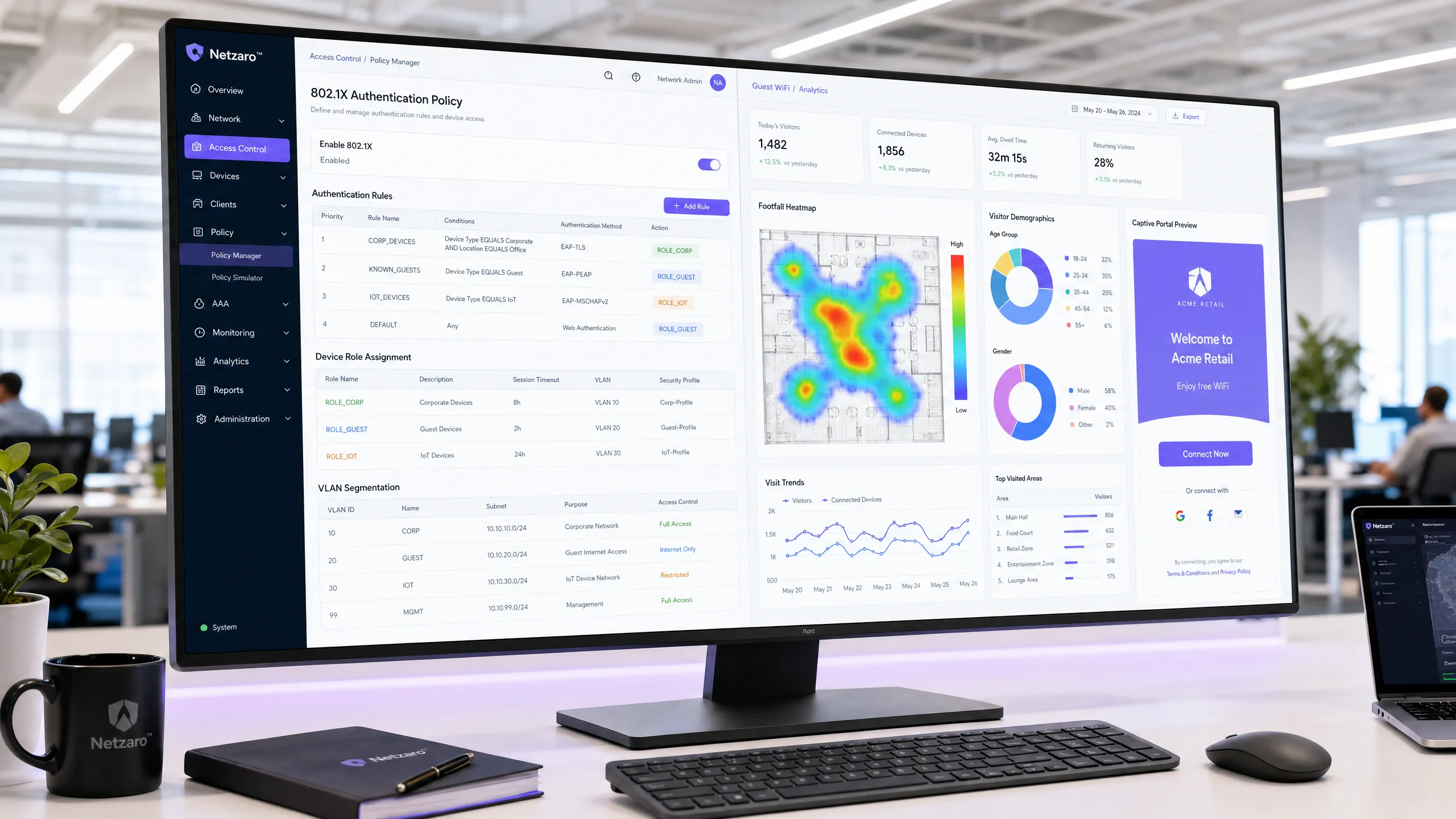
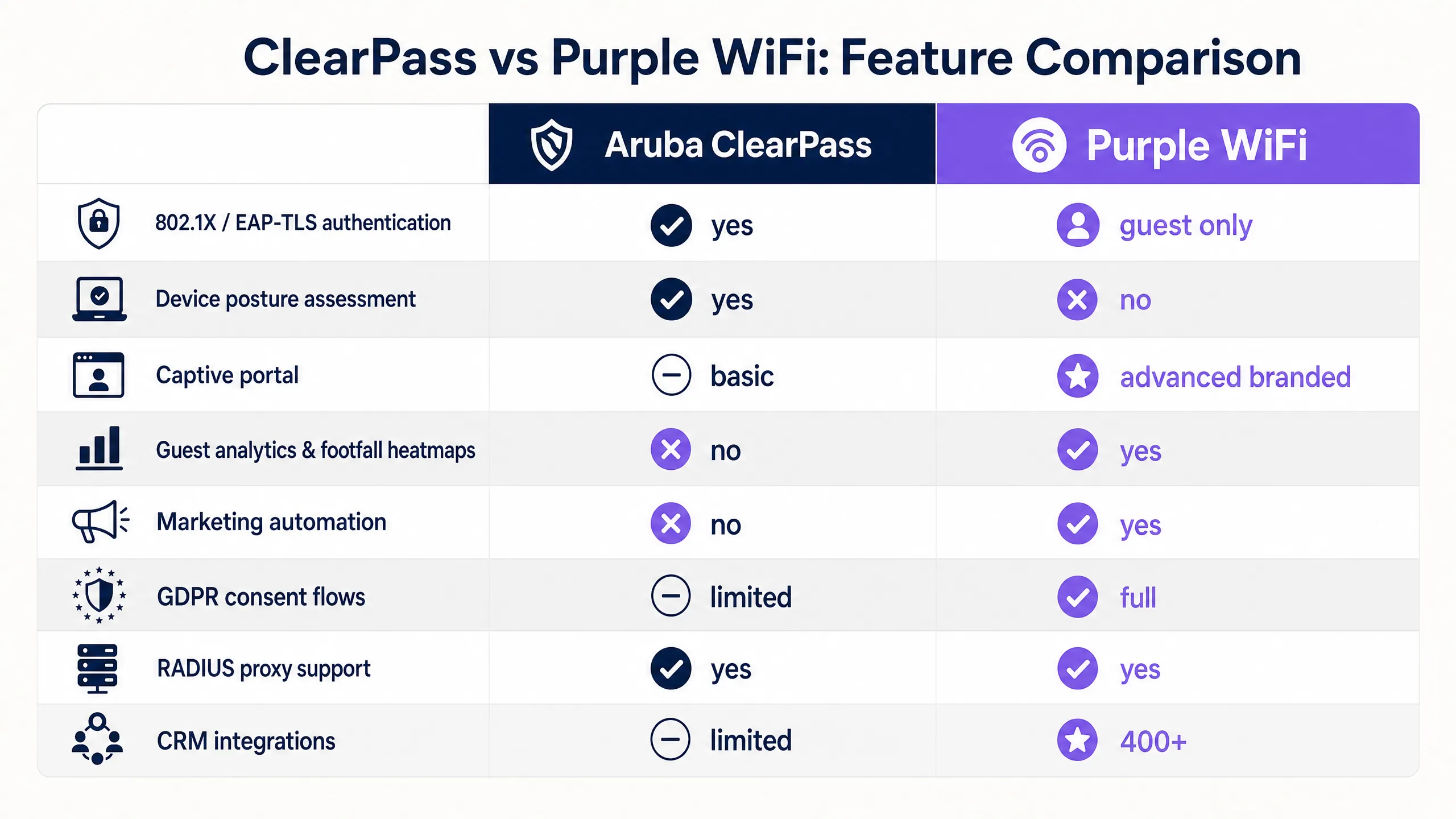
HPE Aruba इन्फ्रास्ट्रक्चरमध्ये मोठ्या प्रमाणावर गुंतवणूक केलेल्या एंटरप्राइझ वातावरणासाठी, अखंड, डेटा-समृद्ध अतिथी WiFi अनुभव प्रदान करताना जटिल नेटवर्क प्रवेश धोरणे व्यवस्थापित करणे एक महत्त्वपूर्ण आर्किटेक्चरल आव्हान सादर करते. Aruba ClearPass पॉलिसी व्यवस्थापक कॉर्पोरेट उपकरणांसाठी नेटवर्क ऍक्सेस कंट्रोल (NAC) आणि 802.1X सुरक्षिततेमध्ये उत्कृष्ट असला तरी, त्याच्या अंगभूत Captive Portal मध्ये आधुनिक ठिकाणांसाठी आवश्यक असलेल्या प्रगत विपणन ऑटोमेशन आणि विश्लेषणेचा अभाव आहे. हे मार्गदर्शक ClearPass सोबत Purple WiFi कसे समाकलित करावे हे तपशीलवार सांगते, ज्यामुळे प्रत्येक प्लॅटफॉर्मला त्यांच्या मुख्य सामर्थ्यावर लक्ष केंद्रित करणे शक्य होते.
ClearPass ला RADIUS प्रॉक्सी म्हणून उपयोजित करून, आपण कॉर्पोरेट आणि IoT उपकरणांसाठी युनिफाइड सुरक्षा ऑडिट ट्रेल आणि डायनॅमिक VLAN असाइनमेंट राखता, तर अतिथी ऑनबोर्डिंग अनुभव Purple कडे सोपवता. हा दृष्टिकोन GDPR-सुसंगत फर्स्ट-पार्टी डेटा कॅप्चर, तपशीलवार फूटफॉल विश्लेषणे आणि ४०० हून अधिक विपणन कनेक्टर्ससह एकत्रीकरण सक्षम करतो—तुमच्या विद्यमान Aruba NAC गुंतवणुकीला न बदलता. हा दस्तऐवज या सह-उपयोजनासाठी तांत्रिक ब्ल्यूप्रिंट प्रदान करतो, ज्यामध्ये आर्किटेक्चर, कॉन्फिगरेशन त्रुटी आणि सर्वोत्तम पद्धतींचा समावेश आहे.
तांत्रिक सखोल विश्लेषण
Aruba ClearPass आणि Purple WiFi चे एकत्रीकरण मानक RADIUS प्रोटोकॉल आणि HTTP रीडायरेक्ट मेकॅनिझमवर अवलंबून आहे, जे RADIUS प्रॉक्सी आर्किटेक्चरभोवती संरचित आहे. हे डिझाइन हे सुनिश्चित करते की ClearPass सर्व नेटवर्क प्रवेशासाठी केंद्रीय धोरण निर्णय बिंदू राहील, तर Purple अतिथी-अनुकूल Captive Portal आणि डेटा संकलन व्यवस्थापित करते.
मुख्य आर्किटेक्चर
मानक सह-उपयोजनामध्ये, तुमचे Aruba मोबिलिटी कंट्रोलर्स किंवा Aruba इन्स्टंट ऍक्सेस पॉइंट्स एकाधिक SSIDs ब्रॉडकास्ट करतात. एक सामान्य डिझाइन पॅटर्न, जसे की Three SSIDs to rule them all: the WiFi design for guest, staff and IoT मध्ये वर्णन केले आहे, तीन समर्पित नेटवर्क वापरतो:
- Corporate SSID: EAP-TLS सह 802.1X वापरते. ClearPass Onboard द्वारे तरतूद केलेल्या प्रमाणपत्रांचा वापर करून उपकरणे प्रमाणीकृत होतात. ClearPass उपकरणाच्या स्थितीचे मूल्यांकन करते, Microsoft Entra ID किंवा Active Directory कडे चौकशी करते आणि उपकरणाला कॉर्पोरेट VLAN (उदा. VLAN 10) मध्ये नियुक्त करते. या फ्लोमध्ये Purple समाविष्ट नाही.
- IoT SSID: MAC ऑथेंटिकेशन बायपास (MAB) वापरते. ClearPass उपकरणाच्या ऑर्गनायझेशनली युनिक आयडेंटिफायर (OUI) चा वापर करून त्याचे प्रोफाइल तयार करते आणि त्याला इंटरनेट प्रवेश नसलेल्या एका वेगळ्या IoT VLAN (उदा. VLAN 30) मध्ये नियुक्त करते.
- Guest SSID: हे एक ओपन किंवा अपॉर्चुनिस्टिक वायरलेस एन्क्रिप्शन (OWE) नेटवर्क आहे जे Purple Captive Portal ट्रिगर करते.

RADIUS Proxy फ्लो
जेव्हा एखादा अभ्यागत (visitor) गेस्ट SSID शी कनेक्ट होतो आणि ब्राउझर उघडतो, तेव्हा Aruba कंट्रोलर HTTP ट्रॅफिक अडवतो आणि सेशन Purple Captive Portal URL कडे रिडायरेक्ट करतो. अभ्यागत सोशल लॉगिन, कस्टम फॉर्म किंवा OpenRoaming (जिथे Purple, Connect प्लॅन अंतर्गत मोफत आयडेंटिटी प्रोव्हाइडर म्हणून काम करते) चा वापर करून Purple द्वारे ऑथेंटिकेट करतो.
एकदा Purple ने अभ्यागताला प्रमाणित (validate) केले की, ते RADIUS Access-Accept संदेश पाठवते. तथापि, Aruba कंट्रोलर थेट Purple च्या क्लाउड RADIUS सर्व्हरशी संपर्क साधण्याऐवजी, ClearPass ला RADIUS proxy म्हणून समाविष्ट केले जाते:
- Aruba कंट्रोलर सर्व RADIUS विनंत्या (requests) ClearPass कडे पाठवतो.
- ClearPass त्याच्या सेवा नियमांच्या (Service Rules) विरुद्ध विनंतीचे मूल्यमापन करते. जर विनंती गेस्ट SSID शी जुळत असेल (
Called-Station-Idकिंवा NAS आयडेंटिफायरद्वारे ओळखली जाणारी), तर RADIUS Routing Policy ही विनंती Purple च्या RADIUS सर्व्हरकडे फॉरवर्ड करते. - Purple एक Access-Accept संदेशासह प्रतिसाद देते.
- ClearPass ला हा प्रतिसाद मिळतो आणि तो स्वतःची Enforcement Policy लागू करतो, कंट्रोलरकडे अंतिम प्रतिसाद फॉरवर्ड करण्यापूर्वी विशिष्ट Vendor-Specific Attributes (VSAs) जोडतो.
डायनॅमिक रोल-आधारित VLAN असाइनमेंट
या आर्किटेक्चरमधील सर्वात महत्त्वाची VSA म्हणजे Aruba-User-Role आहे. जेव्हा ClearPass, Access-Accept संदेश कंट्रोलरकडे फॉरवर्ड करते, तेव्हा वायरलेस नेटवर्कवर अभ्यागताने कोणती नेमकी भूमिका घ्यावी हे स्पष्ट करण्यासाठी ते या ॲट्रिब्यूटचा समावेश करते.
उदाहरणार्थ, ClearPass Aruba-User-Role = guest-authenticated परत करू शकते. Aruba कंट्रोलरवर, हा रोल VLAN 20 शी मॅप केला जातो, जो इंटरनेट प्रवेशाची परवानगी देणाऱ्या परंतु अंतर्गत कॉर्पोरेट सबनेटसाठी राउटिंग ब्लॉक करणाऱ्या फायरवॉल पॉलिसीसह कॉन्फिगर केलेला असतो. PCI DSS [1] सारख्या मानकांचे पालन करण्यासाठी हे सेगमेंटेशन आवश्यक आहे.
अंमलबजावणी मार्गदर्शिका (Implementation Guide)
हे आर्किटेक्चर तैनात करण्यासाठी Aruba इन्फ्रास्ट्रक्चर आणि ClearPass दोन्हीवर अचूक कॉन्फिगरेशन आवश्यक आहे. हे इंटिग्रेशन स्थापित करण्यासाठी खालील विक्रेता-तटस्थ (vendor-neutral) पायऱ्यांचे अनुसरण करा.
पायरी १: ClearPass मध्ये Purple RADIUS सर्व्हर कॉन्फिगर करा
ClearPass मधील Configuration > Network > Devices वर जा आणि Purple चे प्राथमिक आणि दुय्यम RADIUS सर्व्हर नेटवर्क डिव्हाइस म्हणून जोडा. तुम्हाला तुमच्या Purple व्हेन्यू कॉन्फिगरेशन डॅशबोर्डमध्ये दिलेले IP ॲड्रेस आणि शेअर केलेला सिक्रेट कोड (shared secret) आवश्यक असेल.
पायरी २: RADIUS Routing Policy तयार करा
ClearPass मध्ये एक नवीन RADIUS Routing Policy तयार करा. ही पॉलिसी कोणत्या परिस्थितींमध्ये विनंत्या (requests) Purple कडे प्रॉक्सी केल्या जातील हे निश्चित करेल. पायरी १ मध्ये तुम्ही कॉन्फिगर केलेल्या Purple RADIUS सर्व्हरवर प्राथमिक आणि बॅकअप डेस्टिनेशन सेट करा.
पायरी ३: गेस्ट सर्व्हिस व्याख्यात करा
गेस्ट ऑथेंटिकेशनसाठी ClearPass मध्ये एक नवीन सर्व्हिस (Service) तयार करा.
- Type: RADIUS Enforcement (Generic)
- सर्व्हिस नियम: तुमच्या गेस्ट SSID नाव असलेल्या
Radius:IETF:Called-Station-Idशी जुळवा. - राउटिंग पॉलिसी: पायरी २ मध्ये तयार केलेली पॉलिसी निवडा.
- एंफोर्समेंट पॉलिसी: अरुबा कंट्रोलरवरील तुमच्या गेस्ट रोलशी संबंधित असलेल्या व्हॅल्यूसह
Aruba-User-RoleVSA परत करण्यासाठी पॉलिसी कॉन्फिगर करा.
पायरी ४: कंट्रोलरवर वॉल्ड गार्डन कॉन्फिगर करा
वॉल्ड गार्डन ही अशा डोमेन्सची सूची आहे जिथपर्यंत एखादे डिव्हाइस ऑथेंटिकेशनपूर्वी पोहोचू शकते. हे अरुबा कंट्रोलरवर (किंवा ArubaOS 10 मधील ॲक्सेस नियमांद्वारे) कॉन्फिगर केले जाते. आपण Purple च्या मुख्य डोमेन्सचा समावेश करणे आवश्यक आहे:
*.purple.ai*.cloudfront.net*.venuewifi.com
जर तुम्ही सोशल लॉगिन सक्षम करत असाल, तर तुम्ही प्रत्येक प्रदात्यासाठी OAuth डोमेन्स देखील जोडले पाहिजेत (उदा. *.facebook.com, *.google.com, *.microsoftonline.com).
पायरी ५: RADIUS अकाऊंटिंग कॉन्फिगर करा
RADIUS अकाऊंटिंग देखील ClearPass द्वारे Purple कडे प्रॉक्सी केले जात असल्याची खात्री करा. Purple हे सेशनचा कालावधी ट्रॅक करण्यासाठी आणि त्याचे WiFi Analytics डॅशबोर्ड भरण्यासाठी अकाऊंटिंग डेटा (Acct-Start, Acct-Interim-Update, Acct-Stop) वापरते. अरुबा कंट्रोलरवर अकाऊंटिंग अंतराल ५ मिनिटांवर सेट करा.
सर्वोत्तम पद्धती
मजबूत आणि सुसंगत उपयोजन सुनिश्चित करण्यासाठी, खालील उद्योग-मानक शिफारसींचे पालन करा.
- रहदारीचे काटेकोरपणे विभाजन करा: कॉर्पोरेट संसाधनांचा कोणताही मार्ग नसलेल्या समर्पित VLAN वर गेस्ट ट्रॅफिक नेहमी ठेवा. PCI DSS आणि सामान्य नेटवर्क सुरक्षेसाठी ही एक मूलभूत आवश्यकता आहे.
- प्रॉक्सी अकाऊंटिंग डेटा: RADIUS अकाऊंटिंगकडे दुर्लक्ष करू नका. जर अकाऊंटिंग पॅकेट्स Purple पर्यंत पोहोचले नाहीत, तर तुमचे फूटफॉल ॲनालिटिक्स आणि ड्वेल टाइम रिपोर्ट अपूर्ण राहतील.
- WISPr सक्षम करा: अरुबा कंट्रोलरच्या captive portal प्रोफाइलवर, WISPr (Wireless Internet Service Provider roaming) सक्षम असल्याची खात्री करा. हा प्रोटोकॉल मोबाईल ऑपरेटिंग सिस्टम्सना captive portal स्वयंचलितपणे शोधण्याची आणि लॉगिन स्क्रीन अखंडपणे दाखवण्याची परवानगी देतो.
- सचेत-निवड ऑप्ट-इन्स वापरा: GDPR चे पालन करण्यासाठी, तुमचे Purple पोर्टल मार्केटिंग कम्युनिकेशन्ससाठी आधीच टिक केलेल्या बॉक्सऐवजी किंवा गृहीत धरलेल्या संमतीऐवजी स्पष्ट ऑप्ट-इन चेकबॉक्स वापरण्यासाठी कॉन्फिगर करा [2].
त्रुटी निवारण आणि जोखीम कमी करणे
काळजीपूर्वक कॉन्फिगरेशन करूनही, इंटिग्रेशन्स अयशस्वी होऊ शकतात. येथे सर्वात सामान्य बिघाड मोड आणि ते कसे सोडवायचे ते दिले आहे.
वॉल्ड गार्डन चुकीचे कॉन्फिगरेशन
भेट देणाऱ्याच्या डिव्हाइसवर captive portal लोड होण्यात अयशस्वी झाल्यास, त्याचे कारण जवळजवळ नेहमीच वॉल्ड गार्डन असते. सोशल लॉगिन प्रदाते वारंवार त्यांच्या CDN IP श्रेणी आणि डोमेन नावे अपडेट करतात. वॉल्ड गार्डनला सतत बदलणारे कॉन्फिगरेशन समजा. जर एखादे विशिष्ट सोशल लॉगिन अयशस्वी झाले, तर डिव्हाइस कोणत्या डोमेनवर पोहोचण्याचा प्रयत्न करत आहे हे शोधण्यासाठी पॅकेट कॅप्चर वापरा आणि ते अनुमती सूचीमध्ये जोडा.
RADIUS टाइमआउट त्रुटी
बऱ्याच Aruba कंट्रोलर्सवरील डीफॉल्ट RADIUS टाइमआउट ३ सेकंद असतो. प्रॉक्सी आर्किटेक्चरमध्ये, ऑथेंटिकेशन विनंती AP कडून कंट्रोलरकडे, ClearPass कडे, इंटरनेटद्वारे Purple च्या क्लाउड इन्फ्रास्ट्रक्चरकडे आणि परत जाणे आवश्यक आहे. गर्दी असलेल्या नेटवर्कवर, ही राऊंड ट्रिप सहजपणे ३ सेकंदांपेक्षा जास्त असू शकते, ज्यामुळे कंट्रोलर विनंती नाकारू शकतो. Aruba कंट्रोलरवरील RADIUS टाइमआउट किमान १० सेकंदांपर्यंत वाढवा आणि रीट्राय लॉजिक कॉन्फिगर करा.
शेअर्ड सिक्रेट न जुळणे
सुरक्षेसाठी RADIUS शेअर्ड सिक्रेट्सवर अवलंबून असते. जर Aruba कंट्रोलर आणि ClearPass मधील, किंवा ClearPass आणि Purple मधील शेअर्ड सिक्रेट तंतोतंत जुळले नाही, तर ऑथेंटिकेशन गुपचूप अयशस्वी होईल. अभ्यागताला कोणताही अर्थपूर्ण त्रुटी संदेश दाखवला जाणार नाही. ऑथेंटिकेशन अयशस्वी होत असल्यास नेहमी हे सिक्रेट्स एकेक अक्षराने तपासून पहा.
रोल नावातील कॅपिटलायझेशन संवेदनशीलता
ClearPass द्वारे परत केलेल्या Aruba-User-Role VSA चे मूल्य Aruba कंट्रोलरवर परिभाषित केलेल्या रोल नावाशी तंतोतंत जुळले पाहिजे, ज्यामध्ये कॅपिटलायझेशनचा समावेश आहे. जर ClearPass ने guest-authenticated परत केले परंतु कंट्रोलरला Guest-Authenticated हवे असेल, तर अभ्यागत डीफॉल्ट लॉगऑन रोलवर परत जाईल आणि त्याला इंटरनेट ॲक्सेस मिळणार नाही.
ROI आणि व्यावसायिक प्रभाव
मूलभूत स्थानिक Captive Portal च्या ऐवजी Purple WiFi चा वापर केल्याने एकाधिक विभागांमध्ये मोजण्यायोग्य व्यावसायिक मूल्य निर्माण होते.
- मार्केटिंग प्रभाव: पोर्टलद्वारे फर्स्ट-पार्टी डेटा कॅप्चर करून, ठिकाणांच्या मार्केटिंग डेटाबेसमध्ये लक्षणीय वाढ दिसून येते. उदाहरणार्थ, Harrods ने लॉयल्टी प्रोग्राम साइन-अप वाढवण्यासाठी Purple चा वापर करून ५७ पट मार्केटिंग ROI प्राप्त केला [३].
- ऑपरेशनल कार्यक्षमता: RADIUS प्रॉक्सी आर्किटेक्चर IT वरील ऑपरेशनल भार कमी करते. सुरक्षा टीम्स सर्व नेटवर्क ॲक्सेस इव्हेंटसाठी ClearPass मध्ये एकच केंद्रीय डॅशबोर्ड (single pane of glass) व्यवस्थापित करतात, ज्यामुळे अनुपालन रिपोर्टिंग आणि ट्रबलशूटिंग सुलभ होते.
- मॉनेटायझेशन: वाहतूक किंवा आतिथ्य क्षेत्रातील ठिकाणांसाठी, Purple स्तरित (tiered) बँडविड्थ मॉडेल्स सक्षम करते. AGS एअरपोर्ट्सने मोफत मूलभूत स्तरासोबत सशुल्क प्रीमियम WiFi स्तर लागू करून ८४२% ROI निर्माण केला [४].
हे सह-डिप्लॉयमेंट लागू करून, तुम्ही तुमच्या गेस्ट नेटवर्कला एका खर्च केंद्रातून महसूल देणाऱ्या मालमत्तेमध्ये रूपांतरित करता, आणि त्याच वेळी एंटरप्राइझ IT साठी आवश्यक असलेली कठोर सुरक्षा स्थिती राखता.
संदर्भ
[१] PCI Security Standards Council. "Payment Card Industry (PCI) Data Security Standard." [२] Information Commissioner's Office (ICO). "Guide to the General Data Protection Regulation (GDPR)." [३] Purple. "Harrods Guest WiFi Case Study." [४] Purple. "AGS Airports Guest WiFi Case Study."
Key Definitions
RADIUS Proxy
An architecture where an intermediate server (ClearPass) receives authentication requests from a network device (Aruba controller) and forwards them to the appropriate backend server (Purple), allowing the proxy to inspect, log, or modify the traffic.
Used to maintain a single security audit trail in ClearPass while allowing Purple to handle guest authentication.
Walled Garden
A limited environment that controls a user's access to web content before they have fully authenticated on the network.
Essential for captive portals; the walled garden must allow access to the portal's hosting domains and social login providers so the login page can load.
Vendor-Specific Attribute (VSA)
Custom data fields within the RADIUS protocol that allow hardware vendors to support proprietary features not defined in the standard RADIUS RFCs.
ClearPass uses the 'Aruba-User-Role' VSA to tell the Aruba controller exactly which firewall role and VLAN to assign to a guest user.
802.1X
An IEEE standard for port-based network access control that provides an authentication mechanism to devices wishing to attach to a LAN or WLAN.
The primary protocol used by ClearPass to secure corporate devices, typically using EAP-TLS with certificates.
Captive Portal
A web page that the user of a public-access network is obliged to view and interact with before access is granted.
Purple provides the captive portal interface to capture visitor data, display branding, and gather marketing consent.
MAC Authentication Bypass (MAB)
A technique that uses a device's MAC address to authenticate it on the network when the device does not support 802.1X supplicants.
Used by ClearPass to profile and authenticate headless IoT devices like smart TVs or thermostats, placing them in an isolated VLAN.
Dynamic VLAN Assignment
The process of automatically assigning a device to a specific Virtual Local Area Network based on its authentication credentials or role, rather than the SSID it connected to.
Allows a single physical network infrastructure to securely segment corporate, guest, and IoT traffic.
WISPr
Wireless Internet Service Provider roaming; a protocol that allows devices to automatically detect captive portals.
Must be enabled on the Aruba controller so mobile devices automatically pop up the Purple login screen when connecting to the guest WiFi.
Worked Examples
A 500-room hotel needs to deploy secure corporate WiFi for staff and a branded, data-capturing guest portal for visitors, using existing Aruba controllers and ClearPass.
Deploy two SSIDs: 'Hotel_Corp' and 'Hotel_Guest'. Configure 'Hotel_Corp' for 802.1X authentication against Active Directory via ClearPass, assigning staff to VLAN 10. Configure 'Hotel_Guest' as an open network redirecting to the Purple captive portal. Set up ClearPass as a RADIUS proxy for the guest SSID, forwarding requests to Purple. Configure ClearPass to return the 'Aruba-User-Role' VSA upon successful Purple authentication, assigning guests to an isolated VLAN 20.
Visitors are connecting to the guest SSID, but the Purple captive portal page is failing to load on their devices.
Review and update the walled garden configuration on the Aruba controller. Ensure that Purple's core domains (*.purple.ai, *.cloudfront.net, *.venuewifi.com) are explicitly allowed. If social login is enabled, verify that all necessary OAuth domains (e.g., *.facebook.com, *.google.com) are also included in the pre-authentication allowlist.
Practice Questions
Q1. You have configured ClearPass to proxy guest authentication to Purple. The guest authenticates successfully on the Purple portal, but the Aruba controller places them in the default 'logon' role with no internet access instead of the intended 'guest-access' role. What is the most likely configuration error?
Hint: Check how ClearPass communicates the role assignment back to the controller.
View model answer
The role name case sensitivity is mismatched. The value of the Aruba-User-Role VSA returned by ClearPass must exactly match the role name defined on the Aruba controller. If there is a typo or case mismatch (e.g., 'Guest-Access' vs 'guest-access'), the controller will not recognise the role and will drop the user into the default restricted state.
Q2. A retail chain wants to deploy Purple WiFi for guest analytics but their security team insists that all network authentication events must be logged centrally in their existing Aruba ClearPass system for compliance. How should the architecture be designed?
Hint: Consider how RADIUS traffic flows between the access points, ClearPass, and Purple.
View model answer
Implement a RADIUS proxy architecture. Configure the Aruba controllers to send all RADIUS requests to ClearPass. In ClearPass, create a routing policy that forwards requests from the guest SSID to Purple's cloud RADIUS servers. This ensures Purple handles the guest portal and analytics, while ClearPass maintains a complete, centralised audit trail of all authentication events.
Q3. After deploying the integration, the marketing team reports that the Purple analytics dashboard is showing zero data for visitor 'dwell time', even though guests are successfully connecting and using the internet. What configuration step was missed?
Hint: Dwell time calculations require ongoing updates about the session status, not just the initial authentication.
View model answer
RADIUS accounting is not being proxied to Purple. While authentication proxying allows users onto the network, Purple requires RADIUS accounting packets (Acct-Start, Acct-Interim-Update, Acct-Stop) to calculate session duration and dwell time. You must ensure ClearPass is configured to proxy accounting data to Purple, and the controller is set to send interim updates (e.g., every 5 minutes).
Continue reading in this series
Server RADIUS: a comprehensive guide for businesses
This guide provides IT managers, network architects, and CTOs with a definitive technical reference on server RADIUS authentication for enterprise WiFi. It covers the AAA framework, 802.1X architecture, EAP method selection, cloud versus on-premises deployment trade-offs, and dynamic VLAN assignment. Venue operators across hospitality, retail, events, and the public sector will find actionable implementation guidance, real-world case studies, and the decision frameworks needed to migrate from insecure pre-shared keys to a secure, identity-driven network access control architecture.
Server RADIUS: a comprehensive guide for businesses
This guide provides IT managers, network architects, and CTOs with a definitive technical reference on server RADIUS authentication for enterprise WiFi. It covers the AAA framework, 802.1X architecture, EAP method selection, cloud versus on-premises deployment trade-offs, and dynamic VLAN assignment. Venue operators across hospitality, retail, events, and the public sector will find actionable implementation guidance, real-world case studies, and the decision frameworks needed to migrate from insecure pre-shared keys to a secure, identity-driven network access control architecture.
Cisco ISE vs. Purple WiFi: How They Compare and Work Together
This guide explains how Cisco ISE and Purple WiFi serve distinct but complementary roles in enterprise networks. It details how to use Cisco ISE for secure 802.1X corporate access while leveraging Purple for GDPR-compliant guest WiFi, marketing analytics, and CRM integration.