
Automating Enterprise WiFi Security: The SCEP Certificate Deployment Guide
This technical guide explains how to automate enterprise WiFi security using SCEP certificate deployment. It provides a detailed architectural blueprint and implementation steps for deploying 802.1X EAP-TLS authentication across corporate and guest networks.
Video overview
Listen to this guide
View podcast transcript
Part of our core series: Enterprise WiFi Security Guide →

Executive Summary
For enterprises in hospitality, retail and the public sector, relying on pre-shared keys or a basic captive portal for network access introduces serious security vulnerabilities. Modern network architecture demands 802.1X authentication using EAP-TLS, ensuring every device is cryptographically verified before it accesses the network. For IT managers and network architects, the challenge lies in efficiently deploying unique client certificates to thousands of Windows, iOS and Android devices.
This guide provides the definitive architectural blueprint and step-by-step implementation strategy for automated WiFi certificate deployment using the Simple Certificate Enrolment Protocol (SCEP). By integrating your Mobile Device Management (MDM) platform with a SCEP gateway and Certificate Authority (CA), you can silently push trusted root and client certificates to managed endpoints. We explore the critical differences between SCEP and PKCS, detail the precise sequence of steps required for a successful deployment, and outline practical risk mitigation strategies to keep your WiFi network secure and performant.
Listen to the accompanying podcast briefing:
Technical Deep Dive: SCEP Architecture and EAP-TLS
When designing an enterprise WiFi certificate deployment strategy, the core architectural decision is how certificates are delivered securely. The industry standard for this process is SCEP. SCEP automates the certificate enrollment process, allowing devices to securely request certificates from a Certificate Authority using a standardized protocol.
The Advantages of SCEP over PKCS
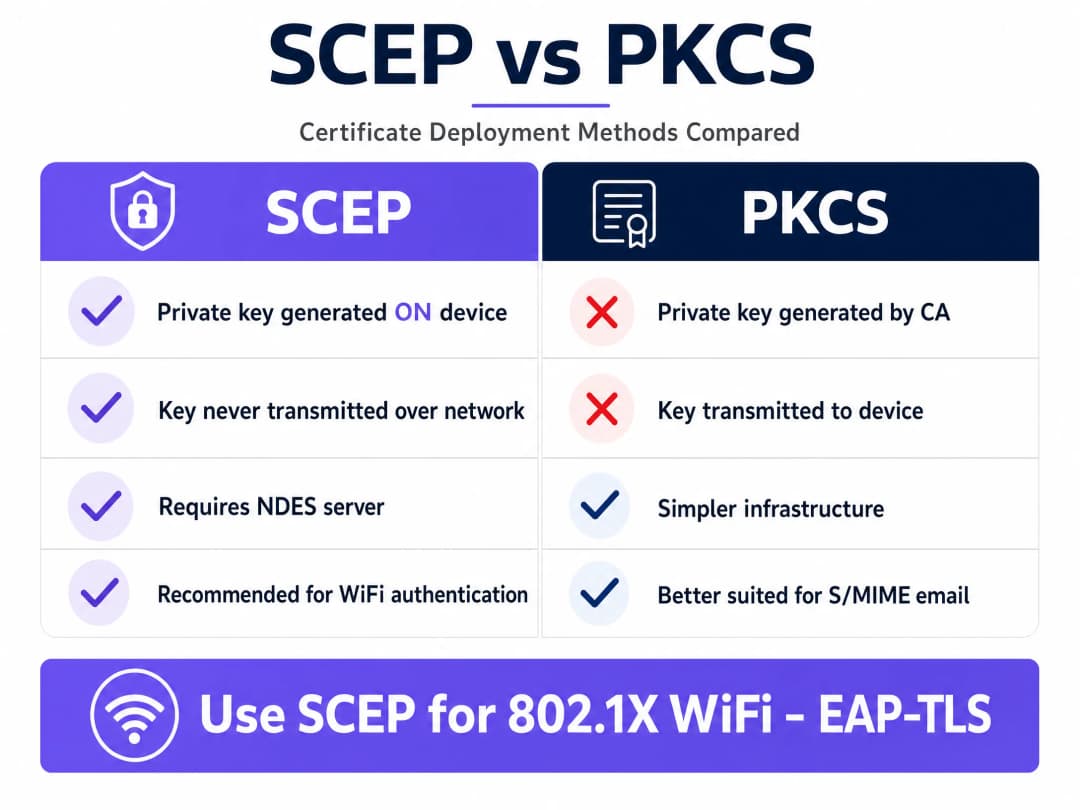
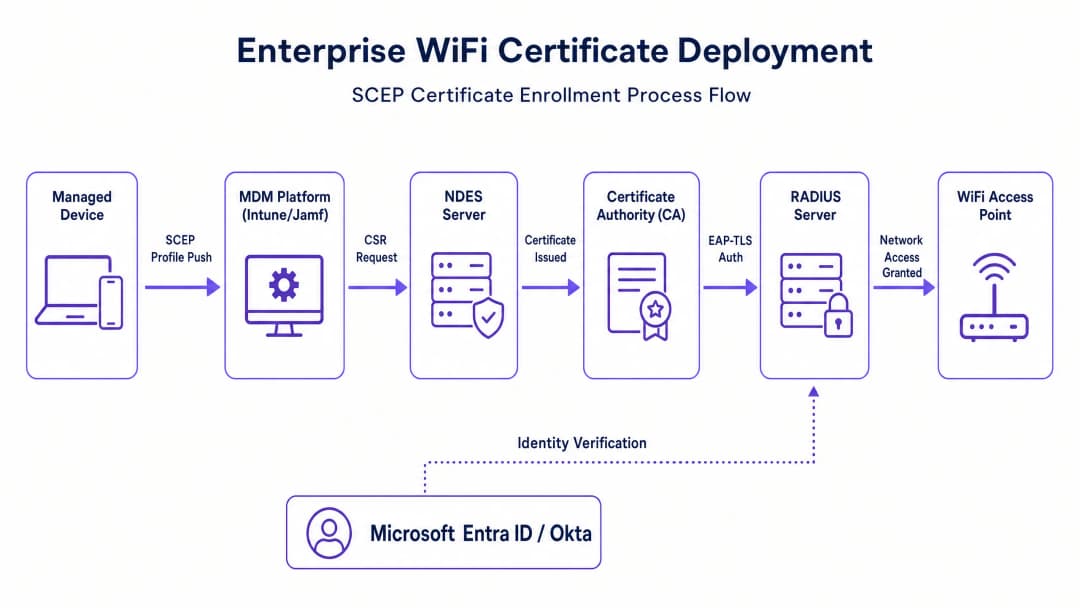
While platforms such as Microsoft Intune support both SCEP and Public Key Cryptography Standards (PKCS), their operating mechanisms are fundamentally different. In the SCEP workflow, the MDM service instructs the endpoint to generate its own private and public key pair. The device then creates a Certificate Signing Request (CSR) and sends it to your CA via a Network Device Enrollment Service (NDES) server. The CA signs the request and returns the public key certificate to the device.
The key security advantage of SCEP is that the private key never leaves the device. It is generated locally and stored in the device's secure enclave. This makes SCEP the strongly recommended method for 802.1X authentication. By contrast, with PKCS the CA generates both keys centrally and transmits them across the network. PKCS is better suited to use cases requiring key escrow (such as S/MIME email encryption) rather than network authentication.
802.1X and EAP-TLS Authentication
The IEEE 802.1X standard provides the framework for centralized network access management. It defines how Extensible Authentication Protocol (EAP) packets are transported over the LAN (EAPoL) to enable authentication between the client, the access point and the authentication server - typically a RADIUS server.
EAP-TLS is the most secure authentication protocol for 802.1X networks. It requires mutual authentication: the client validates the RADIUS server's certificate, and the RADIUS server validates the client's certificate. This rigorous validation process ensures that only authenticated and authorized users on enrolled devices gain access, protecting the network against threats such as Evil Twin attacks.
Got questions about your specific setup?
Our team works with venue operators, IT managers, and network engineers across 80,000 venues. Book a 20-minute call and we will show you how others like you solved it.
Implementation Guide: The Deployment Sequence
Successfully configuring automated certificate deployment for 802.1X requires strict adherence to a specific sequence. Profile dependencies dictate that trust must be established before authentication is configured. This applies whether you are using Microsoft Intune, Jamf or another MDM platform.
Step 1: Deploy the Trusted Root Certificate
Before any device can request a client certificate or trust your RADIUS server, it must trust the Certificate Authority that issues the certificates.
- Export your root CA certificate and any intermediate CA certificates.
- In your MDM platform, create a trusted certificate profile.
- Upload the certificate files and deploy this profile to your target device groups.
Step 2: Configure the SCEP Certificate Profile
With trust established, configure the SCEP profile to instruct devices how to obtain their client certificates.
- Create a new SCEP certificate configuration profile.
- Configure the subject name format. For user-driven authentication, use the User Principal Name (UPN). For device authentication, use the device ID.
- Set the key usage to digital signature and key encipherment.
- Specify client authentication for the extended key usage.
- Link this profile to the trusted root certificate profile created in Step 1.
- Provide the external URL of your SCEP gateway or NDES server.
Step 3: Deploy the 802.1X WiFi Profile
The final step is pushing the WiFi configuration that binds the certificate to the network SSID.
- Create a WiFi configuration profile.
- Enter the SSID exactly as broadcast by your access points.
- Select WPA2-Enterprise or WPA3-Enterprise as the security type.
- Set the EAP type to EAP-TLS.
- Select the SCEP certificate profile created in Step 2 for client authentication.
- Specify the trusted root certificate for server validation, ensuring devices only connect to your legitimate RADIUS server.
Best Practices for Enterprise Environments
When implementing SCEP certificate deployment, follow these vendor-agnostic best practices to ensure compliance and reliability.
Secure the SCEP Gateway
The SCEP gateway or NDES server must be reachable from the internet so that remote devices can provision certificates before they arrive on site. However, exposing an internal server directly to the internet presents a significant security risk. Publish the URL using an application proxy. This provides secure remote access without opening inbound firewall ports and allows you to apply conditional access policies to the enrollment flow.
Enforce Strict CRL Checking
Certificate deployment is only half of the security equation; revocation is equally critical. If an employee leaves, disabling their directory account may not immediately revoke their WiFi access if their client certificate remains valid. Configure your RADIUS server to enforce strict Certificate Revocation List (CRL) checking. Ensure your CRL distribution points are highly available; if the RADIUS server cannot reach the CRL, authentication will fail, causing widespread service disruption.
Hardware Integration
Ensure your network infrastructure supports the required protocols. Purple integrates seamlessly with Cisco Meraki, HPE Aruba, Ruckus, Juniper Mist, Ubiquiti UniFi, Cambium, Extreme and Fortinet hardware. Configure these systems to forward authentication requests to your centralized RADIUS infrastructure.
Troubleshooting and Risk Mitigation
Even with careful planning, certificate deployments can encounter issues. Below are common failure modes and mitigation strategies.
Dependency Failures
A common issue is that a device receives the trusted root and SCEP certificates, but the WiFi profile fails to apply. This is almost always caused by mismatched group targeting within the MDM. If the SCEP profile is assigned to a user group while the WiFi profile is assigned to a device group, the MDM cannot resolve the dependency. Audit your assignments and ensure all related profiles are deployed to exactly the same directory groups.
Enrollment Errors
If devices fail to retrieve SCEP certificates and the gateway logs show HTTP 403 errors, the service account may lack the necessary permissions on the certificate template, or URL filtering on the firewall may be blocking the specific query string parameters used by SCEP. Verify that the connector account has read and enroll permissions on the CA template, and check firewall logs to ensure the SCEP URL is not being blocked.
ROI and Business Impact
Transitioning to automated 802.1X certificate deployment delivers measurable returns in both security and operations.
Password-based WiFi generates a heavy volume of support tickets due to password expirations, lockouts and typing errors. Certificate-based authentication is invisible to the user and typically reduces WiFi-related helpdesk ticket volume by 70% to 80%.
Furthermore, EAP-TLS eliminates the risk of credential theft and man-in-the-middle attacks. This is essential for compliance with frameworks such as PCI-DSS and CCPA/CPRA. For multi-site retail operations or large hotel chains, automating this process ensures a consistent, zero-touch provisioning experience from day one, securing the network perimeter while significantly reducing operational overhead.
Key Definitions
SCEP
Simple Certificate Enrollment Protocol. A protocol that automates the process of requesting and installing digital certificates on devices, where the private key is generated locally.
The recommended method for deploying WiFi authentication certificates at scale via MDM platforms.
PKCS
Public Key Cryptography Standards. A deployment method where the Certificate Authority generates both public and private keys and transmits them to the endpoint.
Often used for S/MIME email encryption but less ideal for WiFi due to the network transmission of the private key.
802.1X
An IEEE standard for port-based network access control that provides an authentication mechanism to devices wishing to attach to a LAN or WLAN.
The mandatory baseline for enterprise WiFi security, replacing vulnerable pre-shared keys.
EAP-TLS
Extensible Authentication Protocol - Transport Layer Security. An authentication protocol that requires both the client and the server to present valid digital certificates.
Considered the most secure authentication method for 802.1X networks, eliminating password-based vulnerabilities.
NDES
Network Device Enrollment Service. A server role that acts as a gateway, allowing devices without domain credentials to obtain certificates via SCEP.
A required infrastructure component when implementing SCEP certificate deployment with Microsoft Intune.
RADIUS
Remote Authentication Dial-In User Service. A networking protocol that provides centralized authentication, authorization, and accounting management.
The server that validates the client certificates against the directory and grants network access.
CRL
Certificate Revocation List. A list published by the Certificate Authority containing the serial numbers of certificates that have been revoked.
RADIUS servers must check the CRL to ensure a presented certificate is still valid and has not been compromised.
CSR
Certificate Signing Request. A block of encoded text given to a Certificate Authority when applying for an SSL/TLS certificate.
Generated by the device during the SCEP enrollment process to request a signed certificate.
Worked Examples
A 200-room hotel needs to deploy secure Staff WiFi to 150 managed iOS devices used by housekeeping and maintenance. They currently use a WPA2-PSK network, but staff keep sharing the password with guests. How should the IT Director implement a secure, automated solution?
The IT Director should migrate the Staff WiFi to WPA2-Enterprise using 802.1X EAP-TLS authentication. They must configure their MDM (e.g., Jamf) to push a SCEP payload to the iOS devices. The deployment sequence is: 1) Push the Root CA certificate so devices trust the network. 2) Push the SCEP profile, instructing devices to request a client certificate from the CA via the SCEP gateway. 3) Push the WiFi profile configured for WPA2-Enterprise and EAP-TLS, linking it to the SCEP certificate. The network access points (e.g., HPE Aruba) are configured to authenticate clients against a central RADIUS server. When staff arrive, their devices automatically authenticate using the certificate, with no password required.
A retail chain is rolling out new point-of-sale (POS) tablets across 50 locations. To comply with PCI DSS requirements, the tablets must connect to a secure wireless network. The network architect plans to use Microsoft Intune for deployment. What architectural choices ensure compliance and security?
To meet PCI DSS requirements for strong cryptography and authentication, the architect must deploy 802.1X EAP-TLS. Using Microsoft Intune, they should select SCEP over PKCS for certificate deployment. This ensures the private key is generated on the POS tablet's TPM and never transmitted over the network. They must set up an NDES server published securely via Azure AD Application Proxy. Finally, they must configure the RADIUS server to enforce strict CRL checking, ensuring that if a POS tablet is compromised, its certificate can be revoked and network access blocked immediately.
Practice Questions
Q1. You are deploying a new 802.1X WiFi network for a corporate campus using Microsoft Intune. You have configured the Trusted Root profile, the SCEP profile, and the WiFi profile. However, during testing, devices receive the certificates but the WiFi profile shows as 'Error' in the Intune console. What is the most likely cause?
Hint: Consider how the MDM resolves dependencies between profiles.
View model answer
The most likely cause is a mismatch in group targeting. Intune requires that dependent profiles be assigned to the exact same Azure AD group. If the SCEP profile is assigned to a User group and the WiFi profile is assigned to a Device group, Intune cannot resolve the dependency, resulting in an error.
Q2. A retail organization wants to automate certificate deployment for their store manager tablets. They are debating between using SCEP or PKCS. Security is their primary concern, specifically protecting the private keys. Which protocol should they choose and why?
Hint: Think about where the private key is generated in each protocol.
View model answer
They should choose SCEP. In a SCEP workflow, the private key is generated locally on the tablet and stored in its secure enclave; it never leaves the device. With PKCS, the Certificate Authority generates the private key and transmits it over the network to the device, which introduces a potential security vulnerability.
Q3. An employee leaves the company, and their Active Directory account is disabled. However, the IT team notices the employee's device is still connected to the corporate WiFi network. The network uses EAP-TLS authentication. What configuration is missing on the RADIUS server?
Hint: Disabling an account doesn't automatically invalidate a previously issued certificate.
View model answer
The RADIUS server is missing strict Certificate Revocation List (CRL) checking. Even if the directory account is disabled, the client certificate remains cryptographically valid until it expires or is explicitly revoked. The RADIUS server must be configured to check the CRL to ensure revoked certificates are denied network access.
Continue reading in this series
How to Securely Segment Staff and Guest WiFi Networks: Best Practices for Enterprise LANs
This guide provides IT managers and network architects with a vendor-neutral, technical blueprint for securing enterprise LANs by properly segmenting staff and guest WiFi traffic. It covers 802.1X authentication, cloud RADIUS, VLAN isolation, and the credential lifecycle management required to eliminate shared passphrases and protect corporate assets.
Best DNS filtering: a comprehensive guide for businesses
This technical reference guide explains how enterprise DNS filtering secures public networks by blocking malicious domains at the resolution layer - before a connection is ever established. It gives IT directors, network architects, and venue operations teams the deployment architecture, firewall configuration, and compliance context they need to protect Guest WiFi across hospitality, retail, and public-sector environments. Purple Shield blocks malware, botnets, and inappropriate content at the DNS level across 80,000+ live venues.
Understanding Cisco SUDI: Hardware-Anchored Identity in Secure Network Access Control
This guide explains how Cisco SUDI provides hardware-anchored, cryptographically secure identity for enterprise network infrastructure. Learn how to replace spoofable MAC addresses with immutable 802.1AR certificates to secure your venue's network access control.
Got questions about your specific setup?
Our team works with venue operators, IT managers, and network engineers across 80,000 venues. Book a 20-minute call and we will show you how others like you solved it.