
PPSK training center: comparing features and deployment models
A definitive technical reference on deploying Private Pre-Shared Key (PPSK) architectures in training centres. This guide compares controller-local, RADIUS-backed, and cloud-orchestrated models, providing actionable implementation steps for network segmentation and key lifecycle automation.
Listen to this guide
View podcast transcript
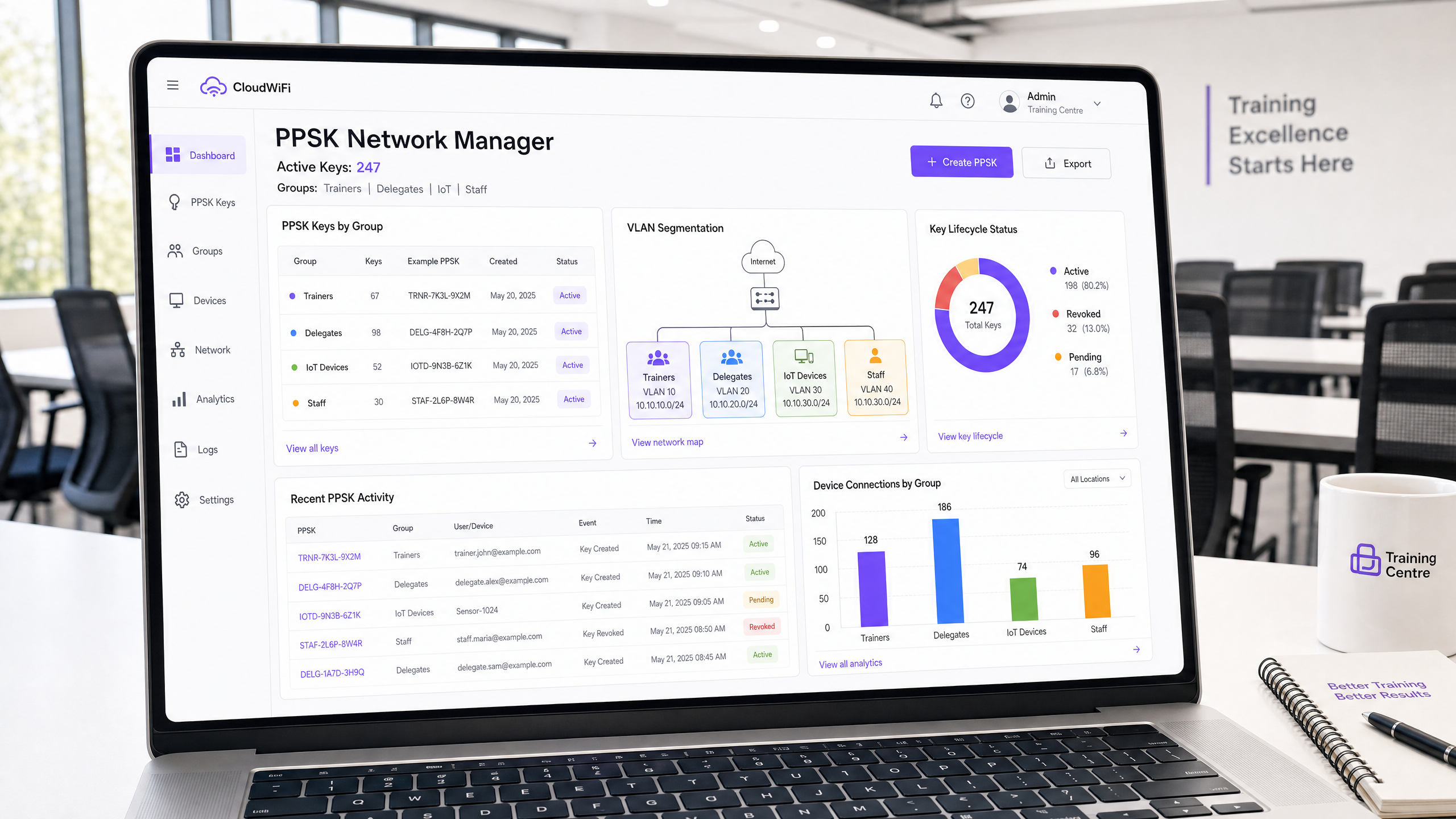
Executive Summary
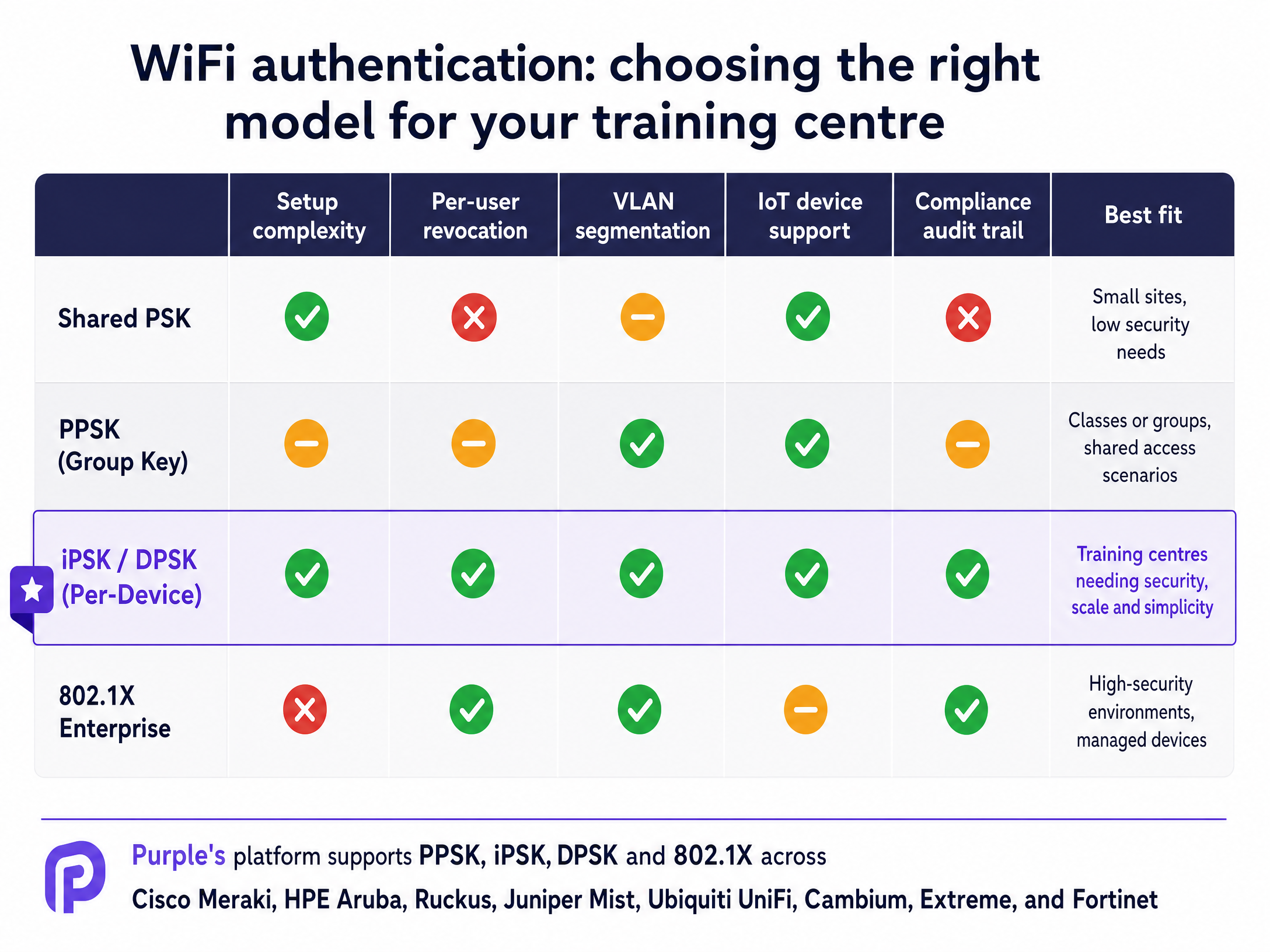
Providing secure, segmented WiFi access in a training centre environment presents a unique architectural challenge. You must balance the high turnover of delegates with the stringent security requirements of corporate trainers and the isolation needs of IoT devices. Traditional shared passwords fail on security and auditability, while full 802.1X enterprise authentication introduces unacceptable friction for unmanaged devices.
Private Pre-Shared Key (PPSK) architectures bridge this gap. By assigning a unique encryption key to each user group or individual device, PPSK enables dynamic VLAN steering and granular access revocation on a single SSID. This guide evaluates the three primary PPSK deployment models - controller-local, RADIUS-backed, and cloud-orchestrated - and provides actionable implementation guidance for IT managers and network architects. We examine vendor-specific implementations across Cisco Meraki, HPE Aruba, Ruckus, and others, delivering the technical clarity needed to deploy a robust, compliant training centre network.
Technical Deep-Dive
The core value proposition of a PPSK training center deployment is delivering enterprise-grade segmentation without the supplicant configuration overhead of 802.1X. When a device associates with the network, it uses what appears to be a standard WPA2-Personal passphrase. However, the wireless infrastructure validates this specific key against an identity store.
The Authentication Flow
In a RADIUS-backed or cloud-orchestrated model, the authentication flow relies on MAC address validation. When the client attempts to connect, the wireless LAN controller (WLC) intercepts the request and forwards the client's MAC address to the RADIUS server. The RADIUS server queries its database for that MAC address, identifies the associated user or group, and returns an Access-Accept message.
Crucially, this response contains vendor-specific Attribute-Value Pairs (AVPs). These AVPs instruct the controller on which encryption key to expect from the client and which VLAN to assign upon successful authentication. If the client's provided key matches the key specified by the RADIUS server, the four-way handshake completes, and the device is placed onto the correct network segment.
WPA3 and the SAE Challenge
As venues upgrade to Wi-Fi 6E and Wi-Fi 7 hardware, the 6 GHz band mandates WPA3 security. WPA3 replaces the four-way handshake with Simultaneous Authentication of Equals (SAE). Because SAE requires both the client and the AP to commit to a shared password element before the association completes, standard RADIUS-based key injection cannot occur mid-flow.
To support PPSK alongside WPA3, vendors employ transition modes. The SSID advertises both WPA2-PSK and WPA3-SAE. Legacy devices use the WPA2 flow and receive unique keys, while WPA3-capable devices use a shared SAE password. Advanced implementations, such as Ruckus DPSK3, integrate tightly with specific policy engines (like Cloudpath) to enable per-device keys in a mixed WPA2/WPA3 environment.
Implementation Guide
Deploying a PPSK architecture requires careful planning around key lifecycle management and device onboarding. The technology is proven, but operational workflows determine the success of the deployment.
1. Select the Deployment Model
Your choice of architecture dictates your scalability and operational overhead:
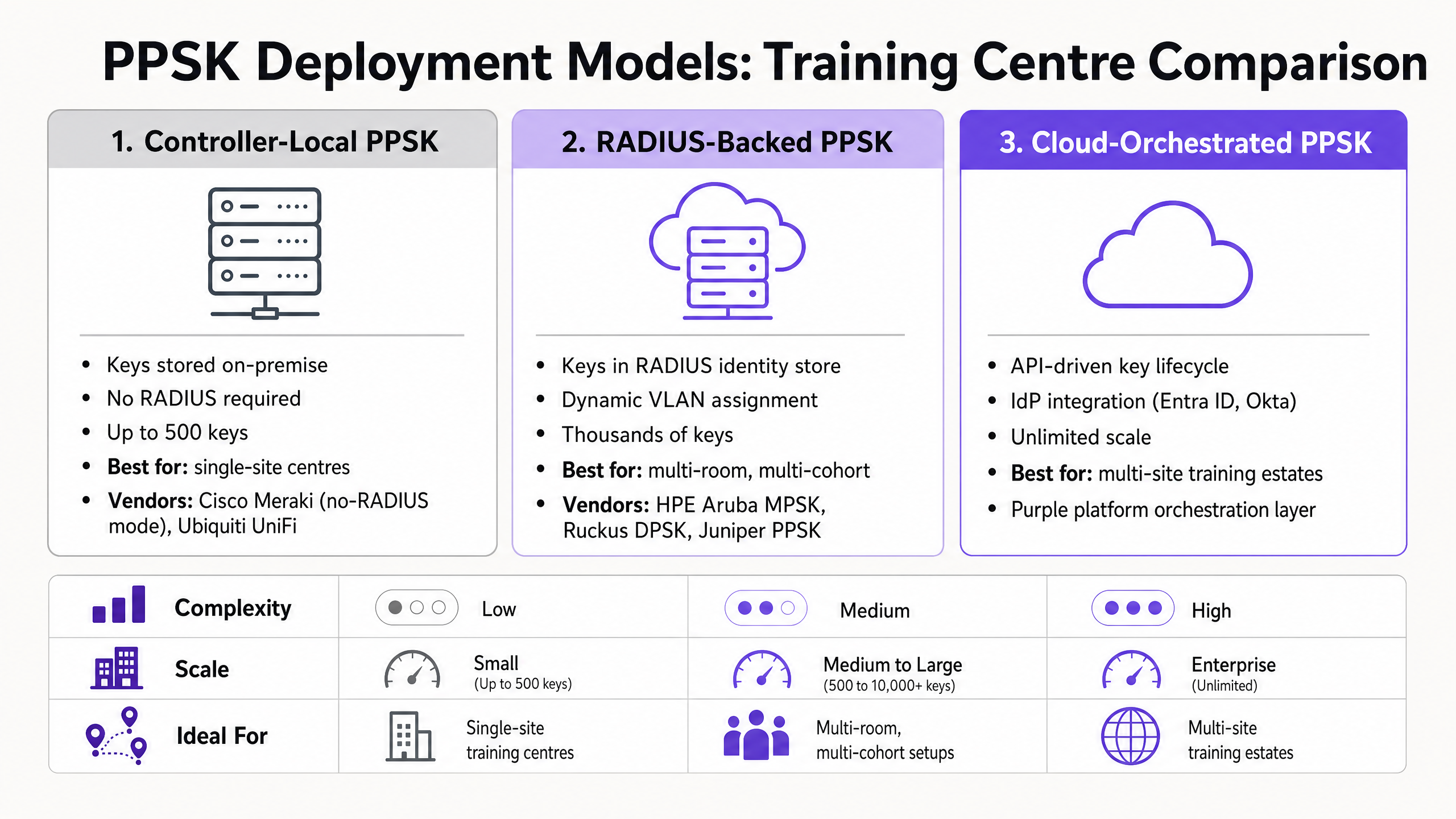
- Controller-Local PPSK: Keys are stored directly on the AP or controller. Ideal for single-site training centres with stable, defined groups (e.g., one key for Trainers, one for IoT). Vendors include Cisco Meraki (without RADIUS) and Ubiquiti UniFi.
- RADIUS-Backed PPSK: Keys reside in an external RADIUS server (Cisco ISE, Microsoft NPS). Supports dynamic VLAN steering and thousands of keys. Best for multi-room centres requiring distinct keys per cohort.
- Cloud-Orchestrated PPSK: An API-driven platform automates the entire lifecycle, integrating with identity providers like Microsoft Entra ID or Okta. Essential for multi-site estates where manual key provisioning is unsustainable.
2. Design the VLAN Architecture
A standard training centre requires at least three isolated segments:
- Delegate Network: Internet-only access with Layer 2 isolation enabled to prevent lateral movement between delegate devices.
- Trainer Network: Access to internal presentation servers, casting devices, and corporate resources.
- IoT Network: Strictly isolated segment for smart displays, HVAC sensors, and room booking panels.
3. Automate the Key Lifecycle
Keys that are never revoked become a security liability. In a training centre, key provisioning must integrate with the course management system. When a delegate registers, the orchestration layer generates a unique key and delivers it via the joining instructions. When the course concludes, the system automatically revokes the key, terminating network access without manual IT intervention.
Best Practices
- Plan for MAC Randomisation: Modern operating systems (iOS 14+, Android 10+, Windows 11) use randomised MAC addresses. Because RADIUS-backed PPSK relies on MAC lookups, you must configure the SSID to require permanent MAC addresses or implement a captive portal pre-registration workflow to capture the randomised address.
- Implement Layer 2 Isolation: On the delegate VLAN, enable client isolation (often called peer-to-peer blocking). This ensures that even if two delegates share the same group key, their devices cannot communicate directly.
- Maintain RADIUS Resilience: Deploy primary and secondary RADIUS servers. If the identity store is unreachable, new devices cannot authenticate.
Troubleshooting & Risk Mitigation
The most frequent failure mode in a PPSK deployment is authentication timeout due to MAC address mismatch. If a delegate registers with their phone's permanent MAC address but the device presents a randomised MAC upon association, the RADIUS server will return an Access-Reject.
To mitigate this, provide clear onboarding instructions. Advise delegates to disable "Private Wi-Fi Address" for the training centre network. Alternatively, use a cloud-orchestrated platform that handles the initial onboarding via a standard open SSID, registers the presented MAC address, and then provisions the unique key for the secure network.
ROI & Business Impact
Transitioning to a PPSK architecture delivers measurable business value. By eliminating the shared password, you remove the administrative burden of periodic password rotations and the associated support tickets.
Furthermore, the granular audit trail provided by unique keys supports compliance with standards such as PCI DSS and GDPR. When an incident occurs, network administrators can trace activity to a specific individual or cohort rather than a generic shared credential. For multi-tenant operators, this level of visibility and control is a fundamental requirement, not an optional upgrade.
Key Definitions
PPSK (Private Pre-Shared Key)
An authentication method where each user or device receives a unique WPA2 passphrase, allowing individual access control on a single SSID.
Used to replace vulnerable shared passwords in environments where 802.1X is too complex to deploy.
Dynamic VLAN Steering
The process of automatically assigning a connecting device to a specific virtual LAN based on its authentication credentials.
Essential for isolating IoT devices, delegates, and corporate staff on the same physical wireless infrastructure.
WPA3-SAE
Simultaneous Authentication of Equals, the secure key establishment protocol mandated by the WPA3 standard.
SAE complicates traditional PPSK deployments because it requires the password to be known before the RADIUS lookup occurs.
Layer 2 Isolation
A wireless controller feature that prevents devices connected to the same SSID and VLAN from communicating directly with each other.
Critical for delegate networks to prevent lateral movement and secure individual devices.
Attribute-Value Pair (AVP)
Data elements within a RADIUS message that carry specific configuration details, such as VLAN ID or bandwidth limits.
The mechanism by which the RADIUS server instructs the wireless controller how to handle a specific PPSK connection.
iPSK
Identity Pre-Shared Key, Cisco Meraki's proprietary term for their PPSK implementation.
Often used interchangeably with PPSK in Cisco-dominated network environments.
MPSK
Multiple Pre-Shared Key, HPE Aruba and Fortinet's term for their per-device key implementations.
Commonly deployed in conjunction with Aruba ClearPass for enterprise policy enforcement.
Key Lifecycle Management
The end-to-end process of generating, distributing, monitoring, and revoking authentication keys.
The operational requirement that determines whether a PPSK deployment is secure and scalable.
Worked Examples
A multi-room corporate training facility needs to provide isolated network access for 5 distinct daily classes, 12 permanent trainers, and 40 IoT room displays. They currently use a single WPA2-Personal password. How should they redesign the architecture?
Deploy a RADIUS-backed PPSK architecture on a single SSID. Configure the RADIUS server to assign keys based on identity groups. Create a static key for the IoT devices mapped to an isolated IoT VLAN. Generate 5 unique group keys daily for the classes, mapped to a Delegate VLAN with Layer 2 isolation enabled. Assign individual keys to the 12 trainers, mapped to the Corporate VLAN. Integrate the key generation with the room booking system to automate daily revocation of the class keys.
A training centre deploying Cisco Meraki access points wants to implement per-device keys for 800 delegates across multiple sites, but the local Meraki dashboard limits iPSK to 50 entries without a RADIUS server. What is the correct implementation path?
Transition from controller-local iPSK to a cloud-orchestrated model. Deploy a cloud RADIUS service integrated with the organisation's identity provider (e.g., Microsoft Entra ID). Configure the Meraki SSID for 'Identity PSK with RADIUS'. The cloud platform will handle the key database, surpassing the 50-key local limit, and automate the provisioning and revocation of the 800 unique delegate keys.
Practice Questions
Q1. You are deploying a PPSK network for a training centre. Delegates complain they cannot connect. You verify the key is correct in the RADIUS database, but the controller logs show 'Access-Reject'. What is the most likely cause?
Hint: Consider how modern mobile operating systems handle network privacy by default.
View model answer
The delegate's device is using a randomised MAC address. Because RADIUS-backed PPSK uses the MAC address as the identity lookup, the randomised MAC does not match the registered permanent MAC in the database, resulting in a rejection. The delegate must disable 'Private Wi-Fi Address' for the training network.
Q2. A venue operator wants to use Ubiquiti UniFi Private PSK for a 2,000-delegate conference spanning three buildings. Why is this deployment model inappropriate?
Hint: Evaluate the architectural differences between local and RADIUS-backed implementations.
View model answer
UniFi Private PSK is a controller-local implementation that does not support external RADIUS integration. It cannot scale to 2,000 unique keys and lacks the API orchestration required to automatically provision and revoke that volume of credentials across a multi-building estate.
Q3. To future-proof the network, the IT director mandates that the new 6 GHz radios must use PPSK. What architectural constraint must you explain to the director?
Hint: Review the mandatory security standards for the 6 GHz spectrum.
View model answer
The 6 GHz band mandates WPA3 security. Standard PPSK relies on WPA2 and the four-way handshake to inject per-device keys via RADIUS. WPA3 uses SAE, which requires a shared password element before the RADIUS lookup occurs. You must explain that 6 GHz requires either a vendor-specific WPA3 transition extension (like Ruckus DPSK3) or a shift to 802.1X Enterprise for that specific band.
Continue reading in this series
PPSK wpa3: comparing features and deployment models
This technical reference guide compares PPSK and WPA3-SAE, explaining their architectural differences and deployment models for multi-tenant environments. It provides actionable guidance for IT managers and property developers on achieving secure, isolated WiFi networks using Purple's identity-based solutions.
PPSK wpa3: comparing features and deployment models
This technical reference guide compares PPSK and WPA3-SAE, explaining their architectural differences and deployment models for multi-tenant environments. It provides actionable guidance for IT managers and property developers on achieving secure, isolated WiFi networks using Purple's identity-based solutions.
PPSK life: comparing features and deployment models
This guide compares PPSK (Private Pre-Shared Key) against standard PSK and 802.1X, detailing implementation models for multi-tenant environments. It equips IT managers and property operators to deploy secure, resident-isolated WiFi that supports smart home devices and drives measurable business value.