
PPSK life: comparing features and deployment models
This guide compares PPSK (Private Pre-Shared Key) against standard PSK and 802.1X, detailing implementation models for multi-tenant environments. It equips IT managers and property operators to deploy secure, resident-isolated WiFi that supports smart home devices and drives measurable business value.
Listen to this guide
View podcast transcript

Executive Summary
For any modern property developer, landlord, or Build to Rent (BTR) operator, the choice of WiFi architecture is a foundational decision. Standard shared passwords fail in high-density residential environments, offering zero isolation between tenants. While 802.1X provides enterprise-grade security, it lacks compatibility with the headless smart home devices and gaming consoles residents expect to use. The solution is Private Pre-Shared Key (PPSK). PPSK delivers the individual accountability of 802.1X without the infrastructure overhead, allowing every resident to operate within their own secure Layer 2 isolated network bubble. This reference compares PPSK features against alternative authentication models, details the technical deployment architecture, and outlines the business case for treating WiFi as a managed amenity. By deploying a cloud overlay on enterprise hardware, operators can capture a measurable rent premium, reduce void periods, and eliminate the support overhead of legacy shared-key networks.
Technical Deep-Dive
Understanding the architectural differences between PPSK, 802.1X, and standard PSK is critical for network architects and IT managers designing multi-tenant environments.
The Failure of Standard PSK in Multi-Tenant Environments
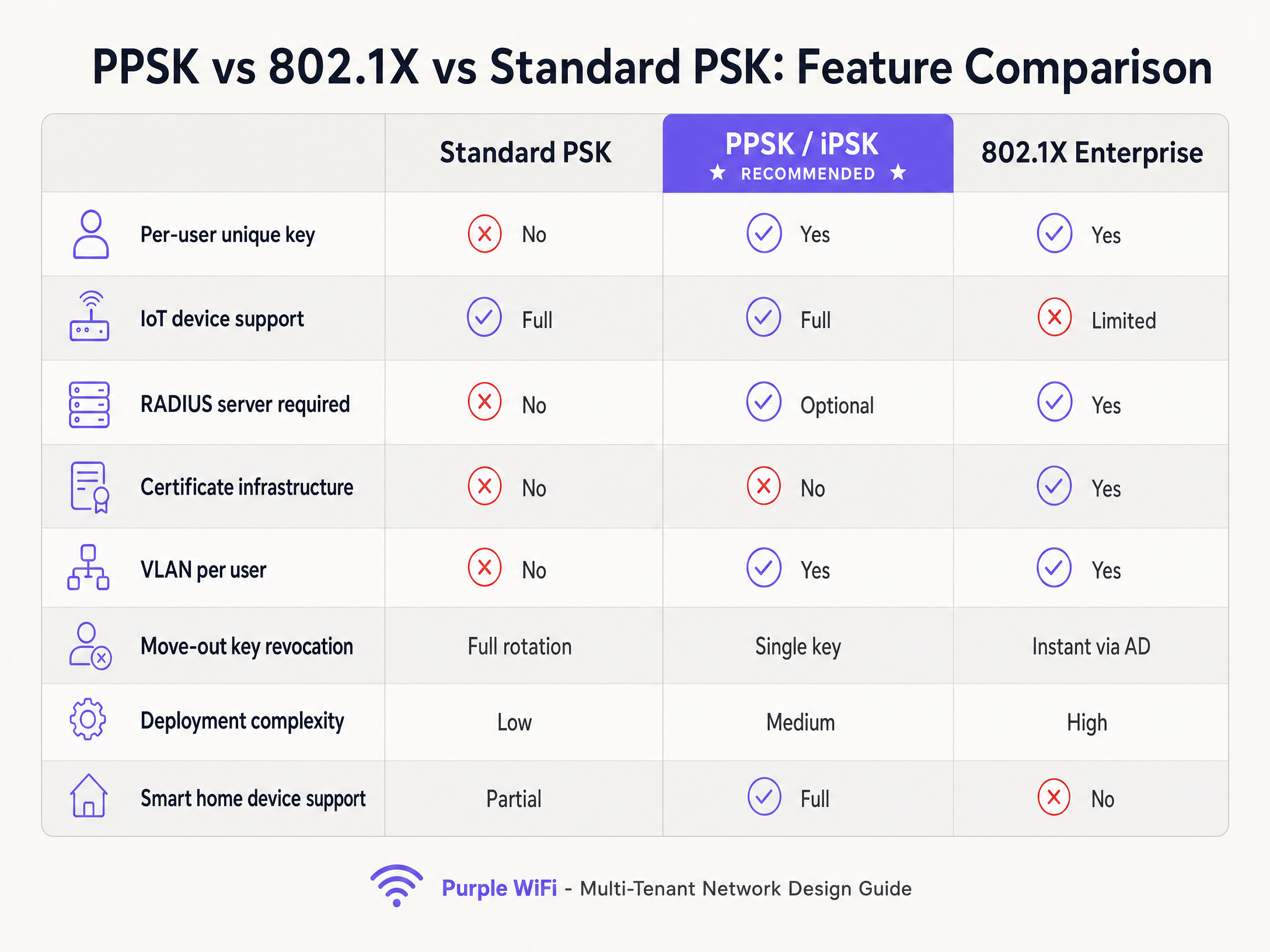
Standard Pre-Shared Key (WPA2/3-Personal) was designed for single households. A single alphanumeric passphrase is configured on the access point and shared among all users. In a BTR development or student accommodation block, this model collapses. There is no individual accountability. Revoking access for a single departing resident requires rotating the key on the access point and forcing every other resident to reconnect their devices. Furthermore, because all devices share the same Layer 2 segment, resident A can cast to resident B's television, creating significant privacy and security risks.
802.1X: High Security, Low Compatibility
The IEEE 802.1X standard provides port-based network access control, generating dynamic, per-session encryption keys for each user via a RADIUS server and an identity store like Microsoft Entra ID. While 802.1X is the defensible standard for corporate staff networks, it is poorly suited for residential environments. The requirement for a client-side supplicant and, often, digital certificates means that headless IoT devices—smart speakers, thermostats, and gaming consoles—cannot connect.
PPSK: The Multi-Tenant Standard
Private Pre-Shared Key (PPSK) bridges the gap. PPSK assigns a unique passphrase to every individual user or device on a single SSID. From the device's perspective, the connection process is identical to a standard home network, ensuring 100% compatibility with IoT devices and gaming consoles. From the network's perspective, the unique key identifies the user and dictates their specific security permissions and VLAN assignment.
When a resident connects, the access point (or controller) maps their unique key to a specific VLAN. This creates a Private Area Network, or "WiFi bubble". Every device on resident A's key sees every other device on resident A's key, allowing their phone to discover their Chromecast and their smart speaker to pair with their bulbs. Devices on different keys remain isolated and invisible to each other, enforcing strict Layer 2 isolation.
Implementation Guide
Translating PPSK theory into a functional deployment requires specific architectural decisions. Purple operates as a hardware-agnostic cloud overlay, managing the key lifecycle across Cisco Meraki, HPE Aruba, Ruckus, Juniper Mist, Ubiquiti UniFi, Cambium, Extreme, and Fortinet.
Architecture and Network Segmentation
The foundation of a PPSK deployment is VLAN segmentation. Each resident segment requires its own VLAN to enforce isolation.
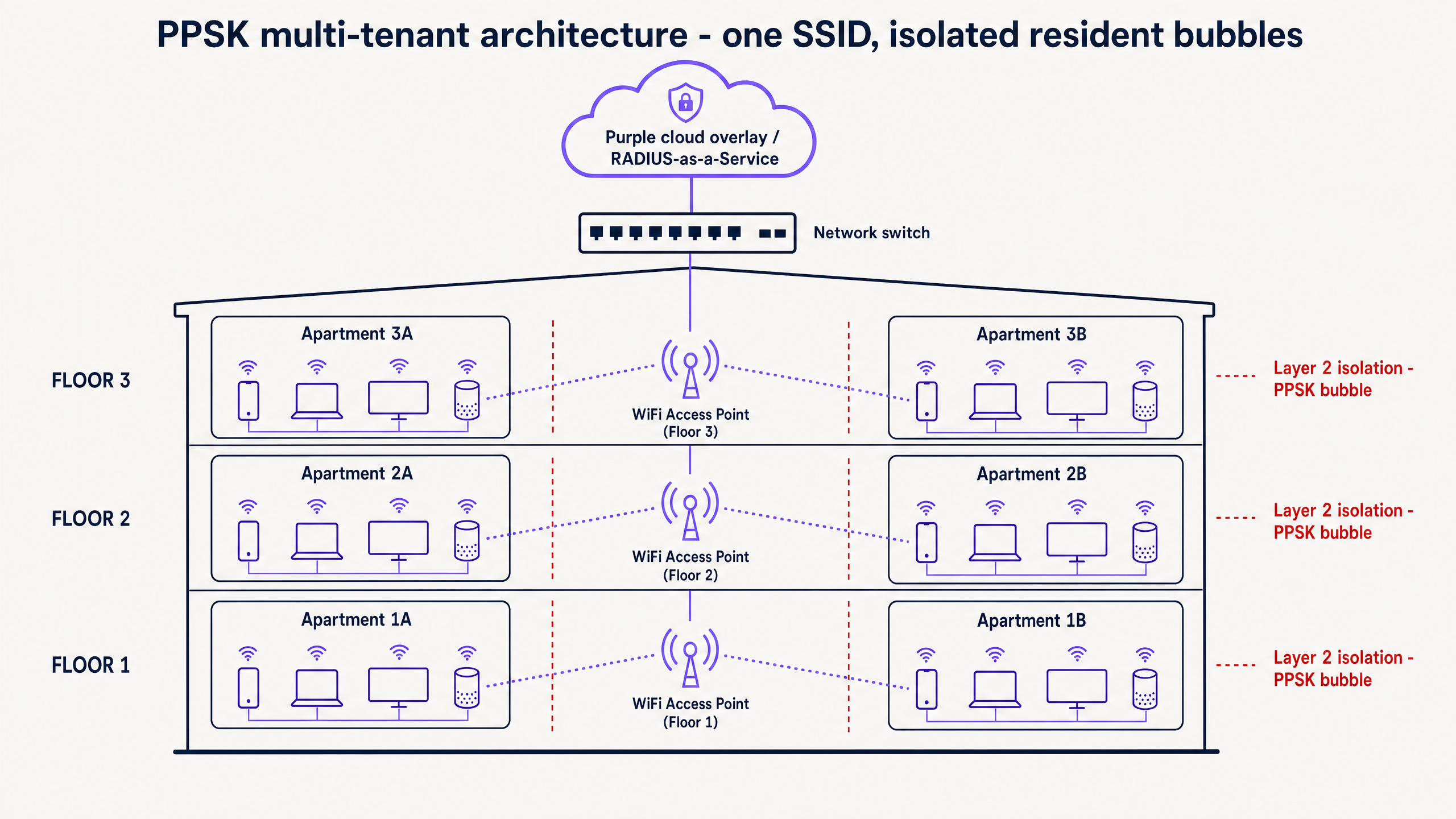
- VLAN Planning: A 200-unit building requires 200 VLANs. Enterprise switches support 4,096 VLANs under the 802.1Q standard, providing ample capacity, but the IP scope and DHCP ranges must be calculated during the design phase.
- RADIUS Integration: While some vendors support a limited number of local keys, enterprise deployments require a RADIUS server for dynamic VLAN assignment and centralised logging. Purple provides RADIUS-as-a-Service, eliminating the need for on-premise infrastructure.
- mDNS Reflection: By default, multicast DNS (mDNS)—the protocol used for device discovery by Chromecast and AirPlay—does not cross VLAN boundaries. To enable discovery within a resident's VLAN while blocking it between different VLANs, mDNS reflection or proxy must be configured on the controller or gateway.
- WPA3 Transition Mode: Modern deployments should utilise WPA3-Personal with Simultaneous Authentication of Equals (SAE). SAE hardens the network against offline dictionary attacks. Deploying WPA3 transition mode ensures compatibility with older WPA2 devices while securing modern hardware.
Best Practices
To ensure a stable and secure PPSK deployment, adhere to the following vendor-neutral best practices.
First, automate the key lifecycle. Manually managing hundreds of keys is unsustainable. Integrate the network with the property management system or identity provider. When a resident signs a lease, automatically provision and email their key. When the tenancy ends, trigger an API call to revoke the key instantly. Purple manages this orchestration, ensuring a Zero Trust approach to access.
Second, enforce key complexity. PPSK keys should be a minimum of 20 characters, cryptographically random, and never reused across different residents. A weak key undermines the entire isolation model.
Third, account for MAC address randomisation. Modern iOS and Android devices randomise their MAC addresses per network to protect user privacy. Because PPSK authentication is key-based rather than MAC-based, it inherently supports randomisation. However, network architects must avoid layering legacy MAC filtering rules on top of the PPSK deployment, as these will break when devices rotate their addresses.
Troubleshooting & Risk Mitigation
Even with a robust design, specific failure modes can occur during deployment and operation.
Issue: Smart Home Device Onboarding Failures Many smart home devices utilise a temporary Bluetooth connection or ad-hoc WiFi network for initial setup before joining the primary network. If a resident's phone is connected to the building's management network rather than their specific PPSK bubble, the IoT device will fail to onboard. Mitigation: Provide clear, illustrated onboarding guides. Ensure residents understand they must connect their phone to their unique PPSK key before attempting to pair headless devices.
Issue: NAT Type Strict on Gaming Consoles Residents complain that their PlayStation or Xbox reports a "Strict" NAT type, preventing online multiplayer matchmaking. Mitigation: This is typically caused by overly aggressive network-wide NAT policies. The fix requires correct Carrier-Grade NAT (CGNAT) and UPnP handling configured specifically per resident segment, rather than a global loosening of firewall rules.
ROI & Business Impact
Deploying PPSK multi-tenant WiFi is a strategic business decision that drives measurable Net Operating Income (NOI).
Research from the British Property Federation indicates that BTR operators command a rent premium of £15 to £30 per unit per month when high-quality WiFi is included as a managed amenity. Furthermore, providing "instant-on" connectivity on move-in day reduces void periods by 5 to 10 days.
Crucially, the financial model depends on architecture. Deploying a software overlay on owned enterprise hardware is typically 30% to 50% lower in per-door cost compared to outsourcing to bundled per-unit residential broadband contracts. By owning the infrastructure and using Purple to manage the PPSK lifecycle, operators retain the margin, differentiate their property, and deliver the seamless connectivity residents demand.
Key Definitions
PPSK (Private Pre-Shared Key)
An authentication method that assigns a unique WiFi passphrase to individual users or devices on a single shared SSID, enabling per-user network policies.
Used by IT teams to provide enterprise-grade isolation in multi-tenant environments without the device compatibility issues of 802.1X.
Layer 2 Isolation
A network configuration that prevents devices on the same local network segment (or connected to the same access point) from communicating directly with one another.
Critical for privacy in BTR and student accommodation, ensuring one resident cannot access another resident's devices.
mDNS Reflection
A feature on network gateways that forwards multicast DNS packets across specific network boundaries, allowing device discovery protocols to function.
Required in PPSK deployments so a resident's phone can discover their Chromecast or Apple TV within their isolated VLAN.
Dynamic VLAN Assignment
The process where a RADIUS server instructs an access point or switch to place a connecting device into a specific Virtual Local Area Network based on their credentials.
The mechanism that physically separates resident traffic when everyone connects to the same building-wide SSID.
WPA3 SAE
Simultaneous Authentication of Equals; the secure key establishment protocol in WPA3 that replaces the WPA2 4-way handshake, providing forward secrecy.
Protects resident networks from offline dictionary attacks, ensuring that even if a handshake is intercepted, the unique PPSK key cannot be brute-forced.
MAC Address Randomisation
A privacy feature in modern operating systems that generates a fake, temporary MAC address for each WiFi network the device connects to.
This feature breaks legacy captive portals and device registration systems, making PPSK (which relies on the key, not the MAC) the necessary standard.
RADIUS-as-a-Service
A cloud-hosted implementation of the RADIUS authentication protocol, eliminating the need for on-premise authentication servers.
Allows property developers to deploy enterprise PPSK architecture without needing to maintain server infrastructure in the building.
Headless Device
An IoT or smart home device that lacks a screen or web browser, such as a smart plug, thermostat, or voice assistant.
These devices cannot navigate captive portals or accept 802.1X certificates, making PPSK the only secure way to onboard them.
Worked Examples
A 300-unit Build to Rent operator needs to provide instant-on WiFi for residents. They currently use a standard shared PSK, which has led to complaints about residents casting to the wrong TVs and security concerns when tenants move out. They are evaluating 802.1X but are worried about IoT support.
The operator must deploy PPSK (Private Pre-Shared Key) over their existing enterprise access points. They will configure one building-wide SSID. Purple will integrate with their property management system to automatically generate a unique, 20-character random key for each unit upon lease signing. The network controller will be configured to map each unique key to a dedicated VLAN, creating 300 isolated Layer 2 segments. mDNS reflection must be enabled to allow Chromecast discovery within each VLAN.
A purpose-built student accommodation (PBSA) block with 800 beds experiences severe network degradation and support ticket spikes during the first week of September when students arrive with gaming consoles and smart speakers. Their current MAC authentication system is failing.
The PBSA operator should replace the MAC authentication system with PPSK. Modern devices use MAC address randomisation, breaking legacy MAC-based registration. With PPSK, each student receives a unique key prior to arrival. Upon connecting, the RADIUS server dynamically assigns their devices to a personal VLAN. To handle the volume, the operator will use Purple to bulk-provision keys via SCIM integration with the university's student management system, and bulk-revoke the previous cohort's keys.
Practice Questions
Q1. A coworking space operator wants to deploy a single SSID for all members. They need to ensure that members from Company A cannot access the local servers or cast to the smart TVs owned by Company B. They are currently using a captive portal with a shared password. What is the required architectural change?
Hint: Consider how to identify the user at the point of connection and how to enforce separation at the network layer.
View model answer
The operator must replace the shared password with PPSK. Each member (or company) is issued a unique key. The network must be reconfigured to use dynamic VLAN assignment via a RADIUS server, mapping Company A's keys to VLAN 10 and Company B's keys to VLAN 20. This enforces Layer 2 isolation, preventing cross-company discovery and access.
Q2. During the commissioning of a new BTR development using PPSK, the network engineer reports that residents can connect to the internet successfully, but their iPhones cannot find their Apple TVs on the network. What configuration is missing?
Hint: Apple TV relies on a specific multicast protocol for discovery that does not cross network boundaries by default.
View model answer
The network is missing mDNS reflection (or an mDNS proxy) configuration. Because PPSK places the resident's devices into an isolated VLAN, multicast discovery packets are dropped by the gateway. Enabling mDNS reflection for the resident VLANs allows the discovery protocol to function within the isolated bubble.
Q3. A property developer argues that providing per-unit residential broadband contracts from an ISP is simpler than deploying a building-wide managed WiFi network with PPSK. What is the commercial counter-argument?
Hint: Consider the impact on Net Operating Income (NOI) and the cost of infrastructure ownership.
View model answer
Outsourcing to an ISP transfers the margin to the provider. Deploying a managed software overlay (PPSK) on owned enterprise hardware is typically 30% to 50% lower in per-door cost. Furthermore, owning the amenity allows the operator to capture a £15-£30 per unit monthly rent premium and reduces void periods by guaranteeing day-one connectivity, directly increasing NOI.
Continue reading in this series
PPSK wpa3: comparing features and deployment models
This technical reference guide compares PPSK and WPA3-SAE, explaining their architectural differences and deployment models for multi-tenant environments. It provides actionable guidance for IT managers and property developers on achieving secure, isolated WiFi networks using Purple's identity-based solutions.
PPSK wpa3: comparing features and deployment models
This technical reference guide compares PPSK and WPA3-SAE, explaining their architectural differences and deployment models for multi-tenant environments. It provides actionable guidance for IT managers and property developers on achieving secure, isolated WiFi networks using Purple's identity-based solutions.
PPSK umpsa: comparing features and deployment models
This technical guide details the deployment of Private Pre-Shared Key (PPSK) and Identity Pre-Shared Key (iPSK) architectures in high-density multi-tenant environments. It provides actionable implementation strategies for property developers and IT managers to secure resident networks, support IoT devices, and generate positive ROI through managed WiFi.