
How to Change Your Router's Default Channel
This authoritative technical reference guide provides IT managers and network architects with actionable strategies for configuring WiFi channels to mitigate interference, maximize throughput, and ensure a stable RF foundation for enterprise applications like Purple Guest WiFi and Analytics.
执行摘要
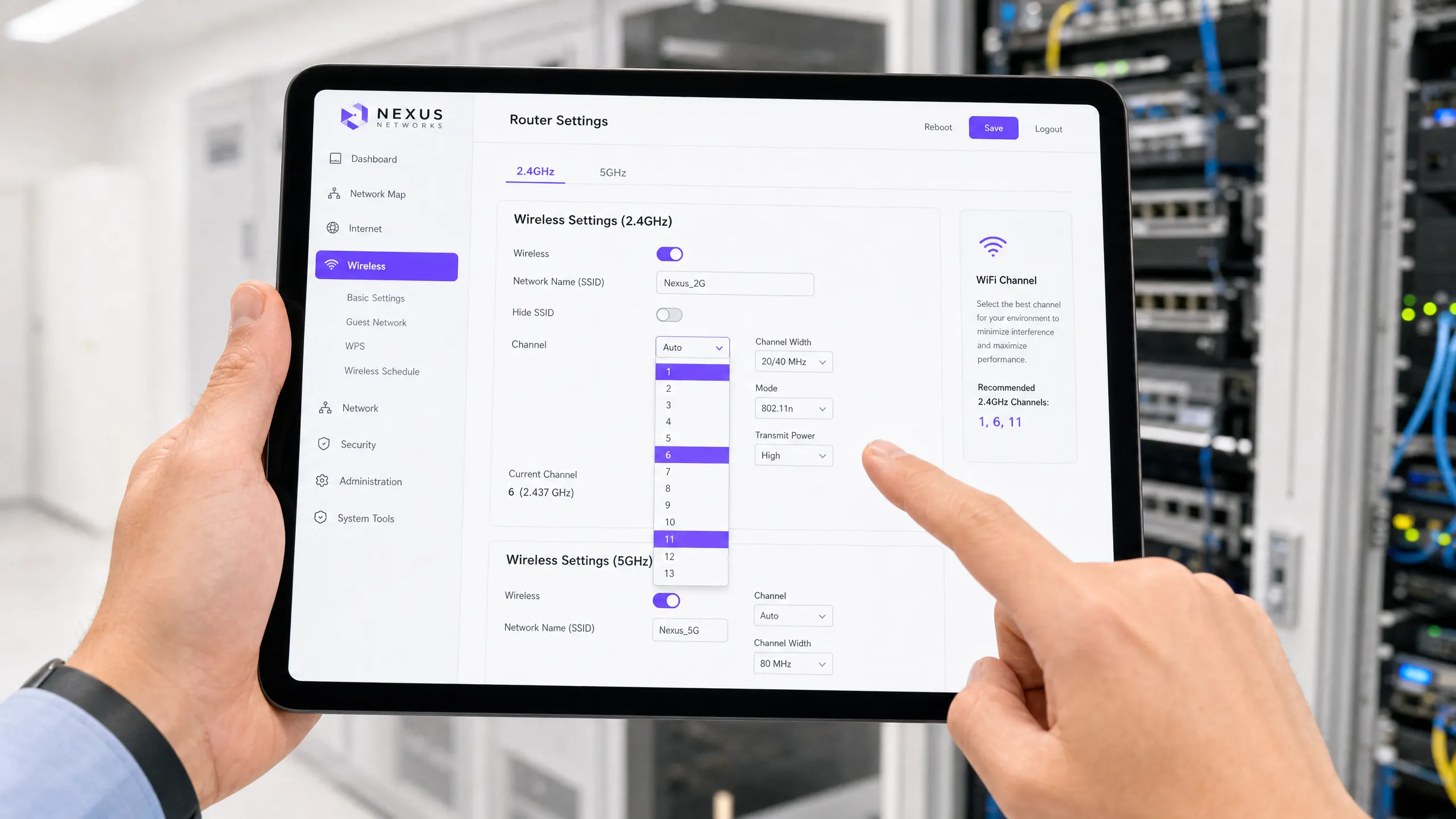
对于管理高密度环境(如连锁零售店、酒店场所和公共部门设施)的CTO和网络架构师而言,依赖默认的路由器信道设置是一个关键漏洞。开箱即用的配置通常会默认使用拥塞的频段,导致严重的同信道干扰、吞吐量下降和糟糕的用户体验。本技术指南探讨了2.4GHz和5GHz信道分配的机制、相邻信道干扰的影响以及非重叠信道的战略部署。通过实施结构化的信道规划,IT团队可以建立稳健的射频基础,这对于可靠的连接、通过 访客WiFi 实现无缝认证,以及通过 WiFi分析 收集精确的空间数据至关重要。
技术深入探讨
2.4GHz频段:缓解拥塞
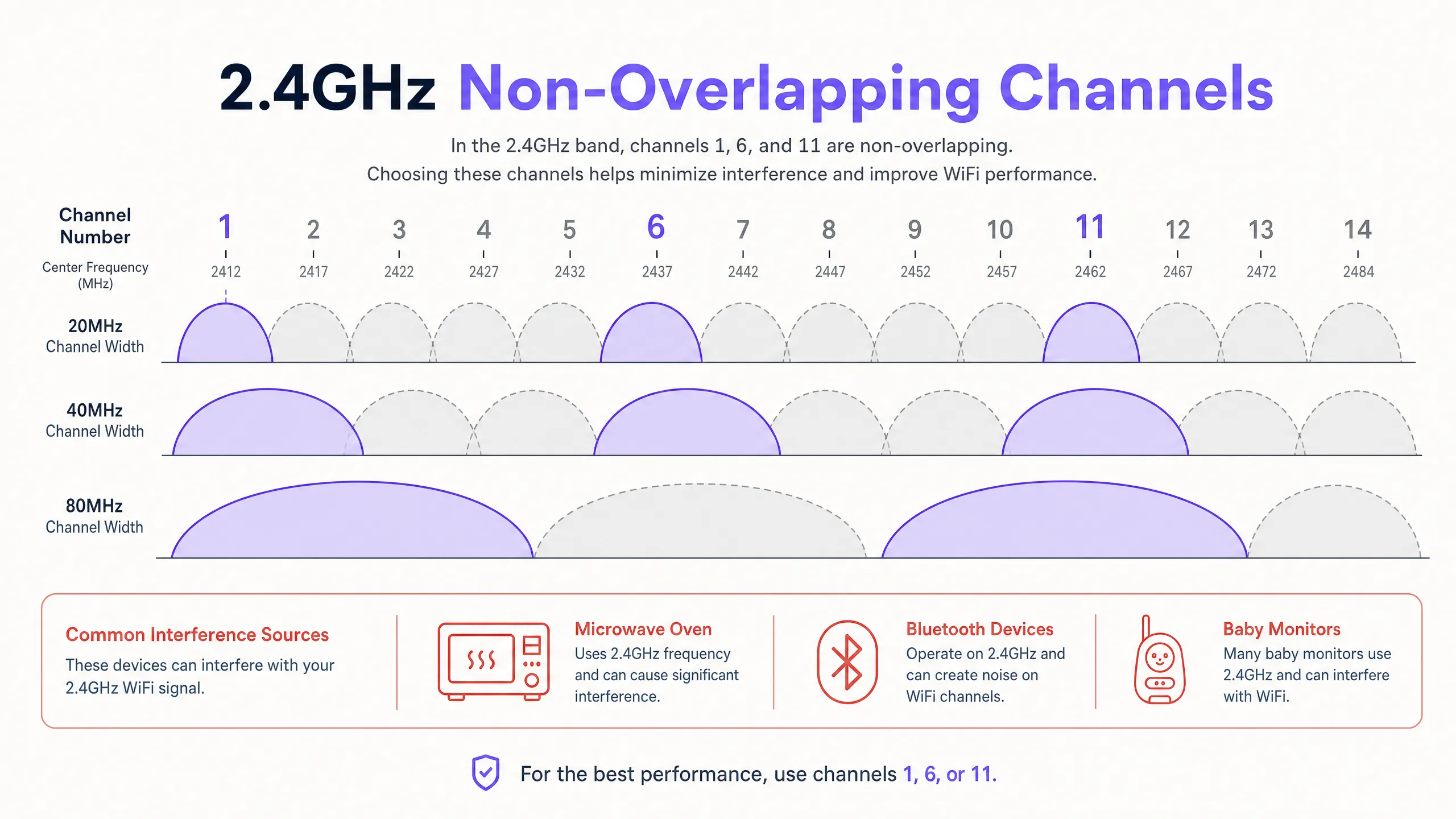
2.4GHz频谱对于传统设备和物联网传感器仍然至关重要,但以拥塞著称。虽然全球有14个信道,但它们之间仅相隔5MHz。标准的WiFi传输需要20MHz的带宽,这意味着相邻信道会严重重叠。这种重叠会导致相邻信道干扰,其破坏性比同信道干扰更大,因为载波侦听机制无法协调传输,从而产生纯粹的射频噪声。
为确保最佳性能,网络管理员必须严格遵循非重叠信道:1、6和11。使用任何其他信道(例如信道3或9)将不可避免地与多个相邻网络产生干扰。
5GHz频段与信道宽度
5GHz频段提供了更多非重叠信道,使其成为高容量企业网络的首选。然而,在高密度部署中,必须抵制通过信道绑定(使用40MHz或80MHz宽度)来提高峰值个体吞吐量的诱惑。信道绑定会使可用非重叠信道数量减半,增加同信道干扰的可能性。在体育场或会议中心等环境中,在5GHz频段上采用20MHz信道宽度作为标准,可最大化整体网络容量和稳定性。
此外,管理员必须谨慎管理动态频率选择(DFS)信道。这些频率与雷达系统共享,接入点在检测到雷达信号时必须腾出信道,从而导致客户端断开连接。要更深入地了解这一监管要求,请参阅我们的综合指南: DFS信道:它们是什么以及何时避免使用 。
实施指南
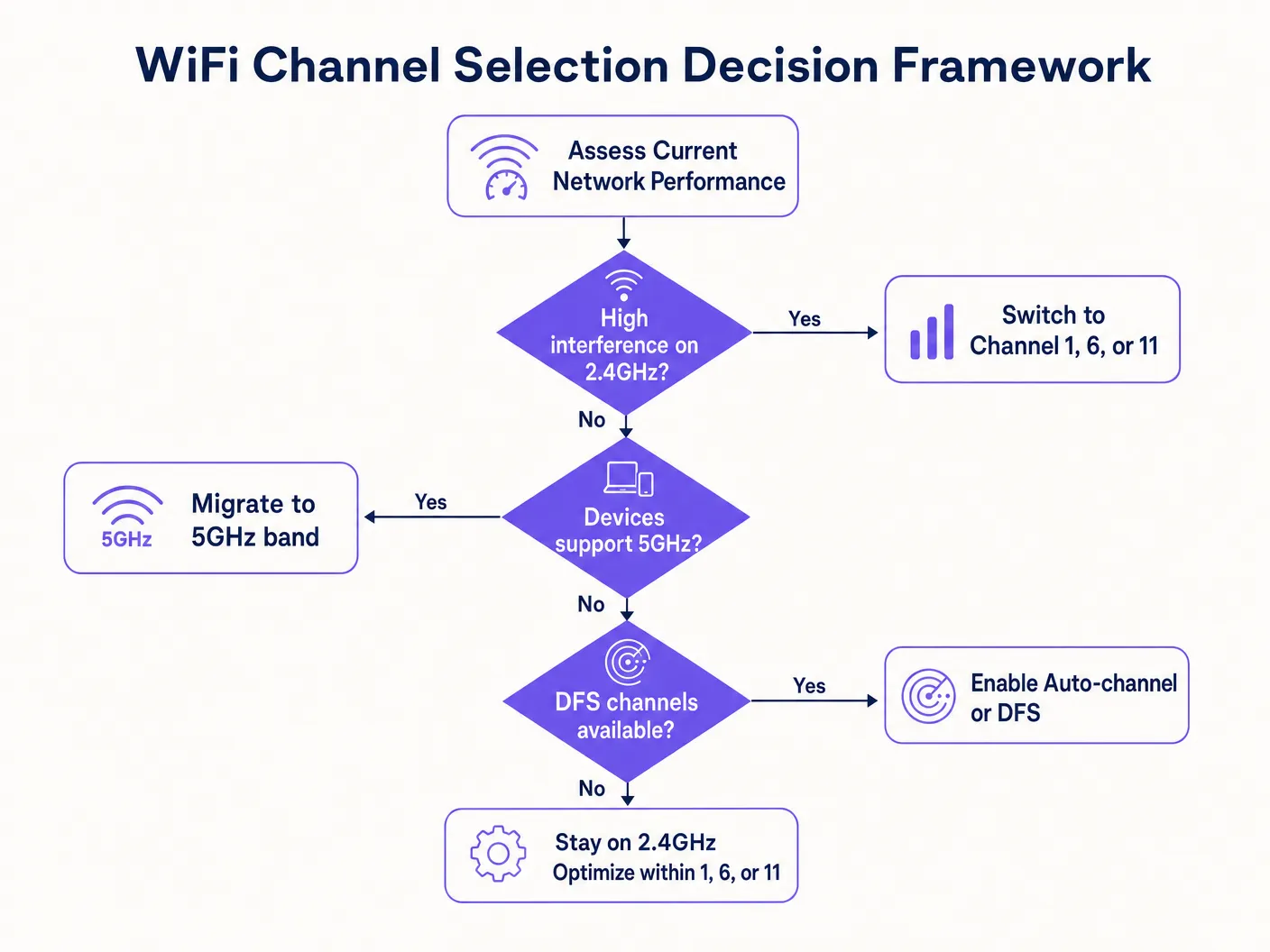
- 进行主动现场勘测:利用频谱分析仪绘制两个频段上现有的射频噪声图,识别来自相邻网络和非WiFi源(例如微波炉、蓝牙)的干扰。
- 定义允许的信道列表:不要依赖于不受限制的“自动”设置,而是明确定义您的无线资源管理(RRM)算法允许使用的信道。在2.4GHz频段,严格将其限制为1、6和11。
- 优化信道宽度:在高密度区域将5GHz信道宽度设置为20MHz,以最大限度地复用非重叠信道。
- 评估DFS使用情况:确定您的场所是否因靠近机场或气象站而无法使用DFS信道。如果雷达事件频繁,请将DFS信道从允许列表中排除。
最佳实践
- 切勿使用重叠的2.4GHz信道:始终使用1、6和11。
- 优先考虑容量而非峰值速度:在密集部署中,在5GHz上使用20MHz信道。
- 限制自动信道算法:不要让RRM自由发挥;提供经过筛选的干净信道列表。
- 监控雷达:主动监控AP日志中的DFS事件,以防止意外的客户端断开连接。
故障排除与风险缓解
- 症状:高信号强度但吞吐量差。
- 诊断:很可能是同信道或相邻信道干扰。确认AP没有共享同一信道或使用重叠的2.4GHz信道。
- 症状:客户端随机从5GHz网络断开。
- 诊断:可能是DFS雷达检测迫使AP更改信道。检查日志并考虑在特定区域禁用DFS信道。
ROI与业务影响
精心规划的射频环境直接影响最终收益。对于 酒店业 或 零售业 的场所,连接不良会导致客户放弃登录流程,减少通过访客WiFi捕获的第一方数据量。此外,不一致的信道性能可能会扭曲位置分析,损害客流量和停留时间指标的准确性。投入时间进行正确的信道配置,可确保底层基础设施能够可靠地支持高级商业智能应用和无缝的用户体验。
收听我们关于此主题的专家简报:
{{asset:how_to_change_your_router_s_default_channel_podcast.wav}}
Key Definitions
Co-Channel Interference (CCI)
Interference that occurs when multiple access points and clients transmit on the exact same frequency channel, forcing them to share the available airtime.
Critical in high-density deployments where APs are placed close together; mitigated by careful channel planning and reducing transmit power.
Adjacent-Channel Interference (ACI)
Interference caused by overlapping frequencies (e.g., using channel 3 on the 2.4GHz band), which corrupts transmissions because carrier sense mechanisms cannot properly coordinate access.
The primary reason why administrators must strictly adhere to channels 1, 6, and 11 on the 2.4GHz band.
Dynamic Frequency Selection (DFS)
A regulatory mechanism that requires WiFi equipment operating in certain 5GHz channels to detect and avoid interfering with radar systems.
Essential for utilizing the full 5GHz spectrum, but requires careful management near airports or weather stations to prevent client disconnects.
Radio Resource Management (RRM)
Automated algorithms used by enterprise WLAN controllers to dynamically adjust channel assignments and transmit power based on the RF environment.
While useful, RRM should often be constrained by administrators to prevent it from making suboptimal choices, such as selecting overlapping 2.4GHz channels.
Channel Bonding
Combining adjacent 20MHz channels to create wider channels (40MHz, 80MHz, or 160MHz) to increase theoretical peak throughput for individual clients.
Generally discouraged in high-density enterprise environments because it drastically reduces the number of available non-overlapping channels.
Airtime Contention
The competition between multiple devices to transmit data over the shared half-duplex WiFi medium.
The fundamental bottleneck in WiFi networks; effective channel planning minimizes contention by distributing devices across multiple clean channels.
Spectrum Analysis
The process of measuring and visualizing RF energy across specific frequency bands to identify sources of interference.
A mandatory prerequisite step before designing or troubleshooting an enterprise wireless network.
Half-Duplex
A communication system where transmission and reception cannot occur simultaneously on the same frequency.
The underlying reason why WiFi is susceptible to contention and why minimizing co-channel interference is paramount.
Worked Examples
A 200-room hotel in a dense urban area is experiencing severe guest complaints regarding WiFi speeds on the 2.4GHz band, despite having an AP in every other room.
The IT team conducted a spectrum analysis and found that the APs were left on default 'Auto' settings, resulting in many APs selecting overlapping channels like 3, 4, and 8. The team implemented a static channel plan, restricting all 2.4GHz radios strictly to channels 1, 6, and 11, ensuring adjacent APs never shared the same channel. They also reduced the transmit power on the 2.4GHz radios to limit cell size and encourage clients to migrate to the 5GHz band.
A large retail chain is rolling out new access points across 50 locations and wants to maximize 5GHz performance for their internal inventory scanners and guest WiFi.
The network architects standardized the deployment template to use 20MHz channel widths on the 5GHz band rather than the default 40MHz or 80MHz. They also enabled DFS channels but implemented a monitoring script to alert the NOC if any AP experienced more than three radar detection events in a 24-hour period, allowing them to statically reassign problem APs to non-DFS channels.
Practice Questions
Q1. You are deploying WiFi in a new hospital wing. The medical equipment vendor requires the use of the 2.4GHz band for their legacy telemetry monitors. A junior engineer suggests using channels 1, 4, 8, and 11 to spread out the devices. How do you respond?
Hint: Consider the required channel width for standard WiFi and the center frequency spacing.
View model answer
Reject the suggestion. Using channels 4 and 8 will cause severe adjacent-channel interference with channels 1 and 11, corrupting the transmissions. You must mandate the strict use of only channels 1, 6, and 11 to ensure reliable communication for the critical telemetry monitors.
Q2. A stadium deployment is experiencing poor performance during events. The APs are currently configured to use 80MHz channel widths on the 5GHz band to provide 'maximum speed' to attendees. What is the recommended architectural change?
Hint: Analyze the trade-off between individual peak throughput and overall aggregate network capacity in high-density environments.
View model answer
Reconfigure the APs to use 20MHz channel widths. While 80MHz provides higher theoretical speeds for a single user, it consumes four standard channels, drastically reducing the number of available non-overlapping channels. In a stadium, minimizing co-channel interference by maximizing the number of independent channels (using 20MHz widths) is essential for aggregate capacity.
Q3. Your enterprise controller logs show that APs in the corporate headquarters are frequently changing channels on the 5GHz band, causing brief connectivity drops for users on VoIP calls. The building is located 5 miles from a regional airport. What is the most likely cause and solution?
Hint: Consider the regulatory requirements for specific frequencies in the 5GHz band.
View model answer
The APs are likely detecting radar signatures from the nearby airport on DFS channels, triggering mandatory channel changes. The solution is to remove the DFS channels from the allowed channel list in the Radio Resource Management configuration for that specific site.
Continue reading in this series
What is a WLC (Wireless LAN Controller) and Do You Still Need One?
This comprehensive guide explores the evolution of Wireless LAN Controllers (WLCs) and provides a technical framework for determining the right architecture in 2026. It covers traditional hardware, cloud-managed, and controller-less models, detailing their impact on compliance, scalability, and guest experience.
What is a WLC (Wireless LAN Controller) and Do You Still Need One?
This comprehensive guide explores the evolution of Wireless LAN Controllers (WLCs) and provides a technical framework for determining the right architecture in 2026. It covers traditional hardware, cloud-managed, and controller-less models, detailing their impact on compliance, scalability, and guest experience.
Power over Ethernet (PoE) for Access Points: An Implementation Guide
This guide provides infrastructure technicians, network architects, and IT decision-makers with a definitive technical reference for deploying Power over Ethernet (PoE) access points across enterprise venues including hotels, retail estates, stadiums, and public-sector facilities. It covers IEEE standards from 802.3af through 802.3bt, power budget calculation, cabling requirements, VLAN segmentation, and security compliance, with concrete implementation scenarios and measurable ROI benchmarks. Understanding PoE architecture is foundational to any [Guest WiFi](/guest-wifi) or [WiFi Analytics](/guest-wifi-marketing-analytics-platform) deployment, as the reliability of the physical layer directly determines the quality of data capture, user experience, and operational uptime.