
How to leverage SMS marketing mailchimp to increase return visits
This guide details how venue operators and IT teams can use Purple's Guest WiFi infrastructure to capture verified phone numbers and SMS consent at the point of connection, then sync that data to Mailchimp to run automated SMS marketing campaigns. It covers the OAuth-authenticated API architecture, tagging taxonomy, Mailchimp Customer Journey configuration, GDPR and TCPA compliance requirements, and the common failure modes that prevent operators from realising the full return-visit uplift available from this channel.
Listen to this guide
View podcast transcript
Executive summary
For enterprise operators managing high-footfall venues, Guest WiFi is fundamentally a data acquisition channel. Every time a visitor connects to a venue's network via a captive portal, they provide explicit consent and contact data - including, where configured, a verified mobile number. The integration between Purple Engage and Mailchimp transforms this passive data collection into an active SMS marketing engine. By establishing a direct OAuth-authenticated API connection, venue operators can automatically pipe GDPR-compliant sign-ups into targeted Mailchimp audiences, apply behavioural segmentation tags, and trigger real-time welcome automations. SMS delivers a 98% open rate against email's 26%, and combined email and SMS campaigns in Mailchimp produce up to 97% higher click rates than email alone (Mailchimp, 2024). This guide provides the technical architecture and strategic deployment frameworks required to build an automated SMS marketing pipeline from your Guest WiFi infrastructure.
Technical deep-dive
The architecture of the sync
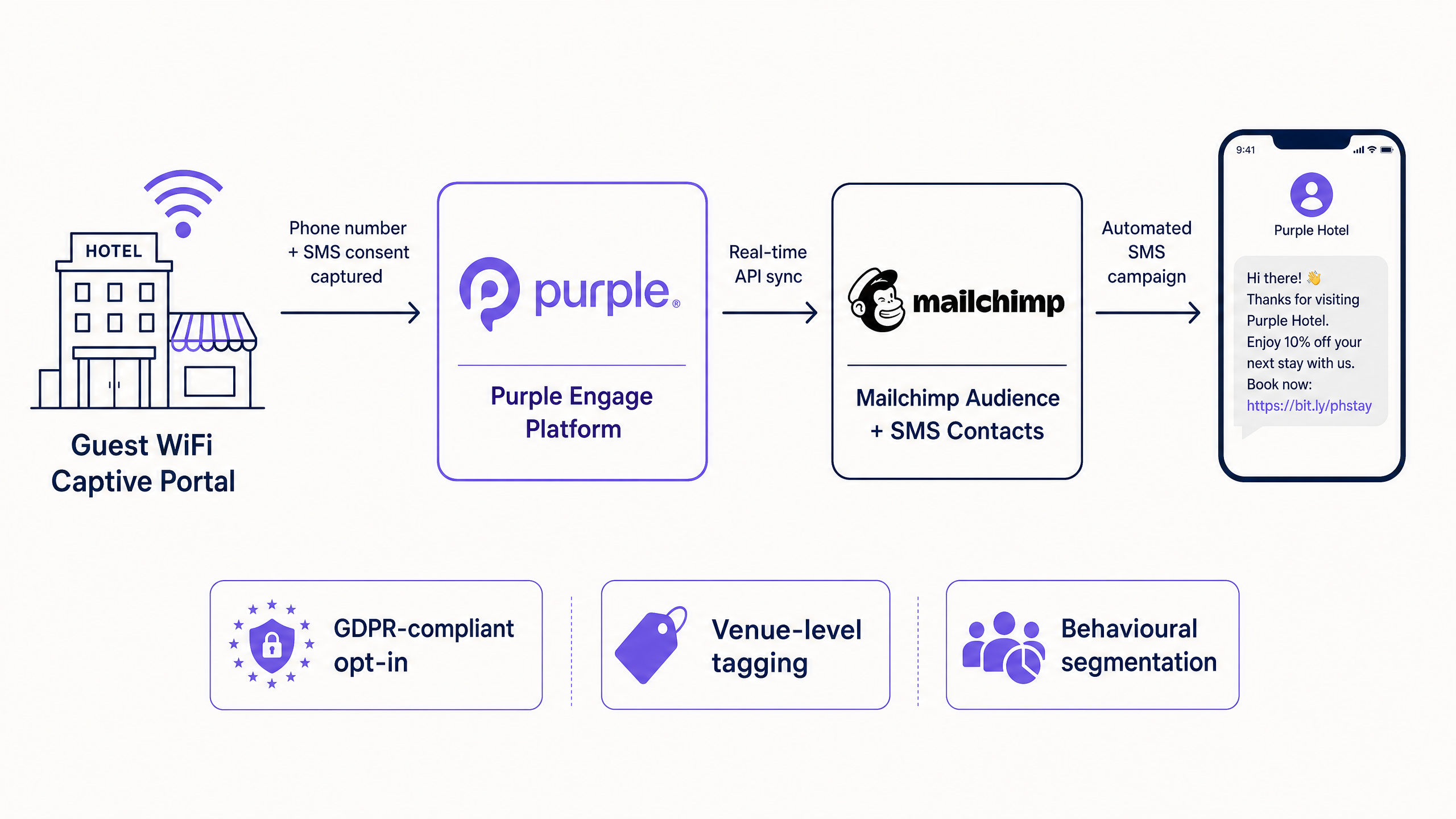
The integration relies on a real-time webhook architecture between Purple's cloud environment and the Mailchimp API. When a visitor successfully authenticates through the Purple captive portal, the platform captures the submitted form data alongside metadata about the connection event - specifically the venue ID, device MAC address, and timestamp.
If the visitor provides explicit SMS marketing consent, Purple immediately triggers an OAuth-authenticated API call to Mailchimp. This call performs an upsert operation: if the phone number does not exist in the designated Mailchimp Audience, a new contact is created. If the contact already exists, their profile is updated and new tags are appended without overwriting existing data. This ensures that a visitor who connects at multiple locations within an estate maintains a single, enriched profile across the entire Mailchimp database.
Purple operates as a hardware-agnostic cloud overlay, meaning the SMS data capture mechanism functions identically regardless of the underlying network infrastructure. The integration is validated across Cisco Meraki, HPE Aruba, Ruckus, Juniper Mist, Ubiquiti UniFi, Cambium, Extreme, and Fortinet. Your network team does not need to reconfigure the access layer to enable this capability.
For enterprise deployments requiring advanced identity management, Purple integrates with Microsoft Entra ID, Okta, and Google Workspace. However, for the specific use case of SMS marketing acquisition, the primary authentication method should be a standard captive portal form requiring mobile number validation. This ensures the captured data is accurate and immediately actionable for Mailchimp SMS campaigns.
Tagging taxonomy and segmentation
Data without context has limited utility. The commercial value of the Purple-Mailchimp integration relies entirely on a robust tagging taxonomy applied at the point of sync. In the Purple integration settings, administrators define a tag string applied to every contact synced from a specific venue.
Best practice is a three-part tag structure:
| Tag Part | Purpose | Example |
|---|---|---|
| Source | Identifies the acquisition channel | source-wifi |
| Venue type | Identifies the category of venue | venue-hotel, venue-retail, venue-stadium |
| Location | Identifies the specific site | location-manchester, location-birmingham |
These tags are permanent attributes in the Mailchimp audience. They enable marketing teams to build dynamic segments. A campaign targeting source-wifi AND venue-retail AND location-manchester ensures that a promotion for a specific store only reaches visitors who have physically entered that location. Without this taxonomy, the database becomes an unsegmentable monolith within six months.
Implementation guide
Deploying the Purple-Mailchimp SMS integration requires coordination between IT and marketing. Follow this deployment sequence.
Step 1: Configure the captive portal for SMS consent
GDPR Article 6 and TCPA require explicit, unbundled consent for SMS marketing. The captive portal must be configured correctly before any data flows to Mailchimp.
- Navigate to the Purple dashboard and access the splash page builder.
- Add a mobile number input field to the authentication form.
- Add an explicit opt-in checkbox for SMS marketing. The copy must clearly state the purpose - for example: "I consent to receive promotional SMS messages from [Brand Name]."
- Ensure this checkbox is unticked by default and is separate from the WiFi Terms of Service acceptance.
For hospitality operators, the splash page is also a brand touchpoint. Read our guide on how to make a great first impression with your guest WiFi for design best practice.
Step 2: Establish the Mailchimp connection
- In the Purple dashboard, navigate to Management > Venues > Integrations.
- Select the Mailchimp connector and initiate the OAuth flow.
- Authenticate with an admin-level Mailchimp account.
- Select the target Mailchimp Audience.
Note: Mailchimp's SMS Marketing is available as an add-on for Essentials plan and above. You must submit an SMS application and receive approval before sending. Supported countries include the United States, Canada, United Kingdom, Belgium, Australia, and most of Europe.
Step 3: Define venue-level tagging
For each venue in the Purple estate, configure the specific tags to be appended upon sync. Apply the three-part taxonomy (Source, Venue Type, Location) consistently. Define the taxonomy in a shared document before going live - retrofitting tags to an existing audience is significantly more complex.
Step 4: Build the Mailchimp Customer Journey
Once data flows into Mailchimp, automation must take over. Build a Customer Journey triggered by the addition of the source-wifi tag.
- Trigger: Contact added to audience with tag
source-wifi. - Action 1 (immediate): Send welcome SMS. Example for retail : "Welcome to [Store Name]. Show this text for 10% off today. Reply STOP to opt out."
- Delay: 24 hours.
- Action 2: Send follow-up SMS requesting a review or introducing a loyalty programme.
- Conditional split: IF contact has tag
repeat-visitor, route to loyalty track. IF not, continue standard welcome journey.
Best practices
Immediate activation is non-negotiable
The highest-converting SMS campaigns are those triggered while the visitor is still on-premise. A welcome SMS sent within 15 minutes of WiFi authentication capitalises on immediate context. If the first message is delayed by 24 hours, the contextual relevance is lost and the visitor has likely forgotten the interaction entirely.
Return visit triggers build loyalty
Purple's WiFi Analytics module tracks dwell time and return visit frequency across 80,000+ live venues. Configure Purple to update the Mailchimp tag on each return visit, appending tags like repeat-visitor or high-frequency. Use these tags in Mailchimp to trigger specific loyalty campaigns, bypassing the standard welcome journey for known visitors. A guest who has visited four times in a month should receive a loyalty reward, not a generic welcome offer.
Omnichannel coordination amplifies results
SMS should not operate in isolation. Coordinate SMS and email campaigns within a single Mailchimp Customer Journey. Use SMS for immediate, time-sensitive offers - in-venue discounts, event reminders, flash sales - and email for longer-form content such as monthly newsletters or detailed product launches. Mailchimp's unified orchestration of both channels within a single journey prevents message duplication and ensures consistent brand communication. For more on multi-channel WiFi strategy, see Three SSIDs to rule them all: guest, Passpoint, and IoT WiFi .
Quiet hours and carrier compliance
Mailchimp enforces quiet hours automatically based on the recipient's local time zone, preventing marketing texts from being delivered outside appropriate hours. Ensure your Mailchimp SMS settings are configured with the correct quiet hours for your sending country. In the US, carrier rate limits apply - AT&T limits sends per minute and T-Mobile limits sends per day. Use Mailchimp's throttling feature to pace delivery and avoid message queuing.
Troubleshooting and risk mitigation
The single-audience problem
Risk: Syncing all venues into a single Mailchimp audience without venue-level tagging. Impact: The database becomes a monolith. Marketing cannot distinguish a hotel guest from a retail shopper, rendering targeted SMS campaigns impossible. Mitigation: Enforce a strict tagging taxonomy before enabling the integration. Audit tags quarterly.
The consent gap
Risk: Capturing mobile numbers without explicit SMS marketing consent. Impact: Severe regulatory penalties under GDPR or TCPA. High unsubscribe rates and carrier blocking. Mitigation: Audit splash screen copy. Ensure the SMS opt-in checkbox is separate from Terms of Service acceptance and is unticked by default. Purple's captive portal tracks and records the date and time of consent, providing an audit trail.
Carrier rate limits and throttling
Risk: Exceeding carrier rate limits when sending bulk SMS campaigns. Impact: Messages are queued, delayed, or blocked entirely. Mitigation: Use Mailchimp's throttling features to pace message delivery. Ensure your brand is properly registered (10DLC in the US, VLN in the UK and Australia) to secure higher throughput limits.
The upsert rejection on re-subscription
Risk: A contact who previously unsubscribed from Mailchimp SMS reconnects to your WiFi. Purple will attempt to re-add them; Mailchimp's API will correctly reject this. Impact: If not handled gracefully, this can generate errors that block other syncs. Mitigation: Test this scenario explicitly during user acceptance testing. Ensure the Purple integration is configured to log the rejection without blocking the overall sync process.
ROI and business impact
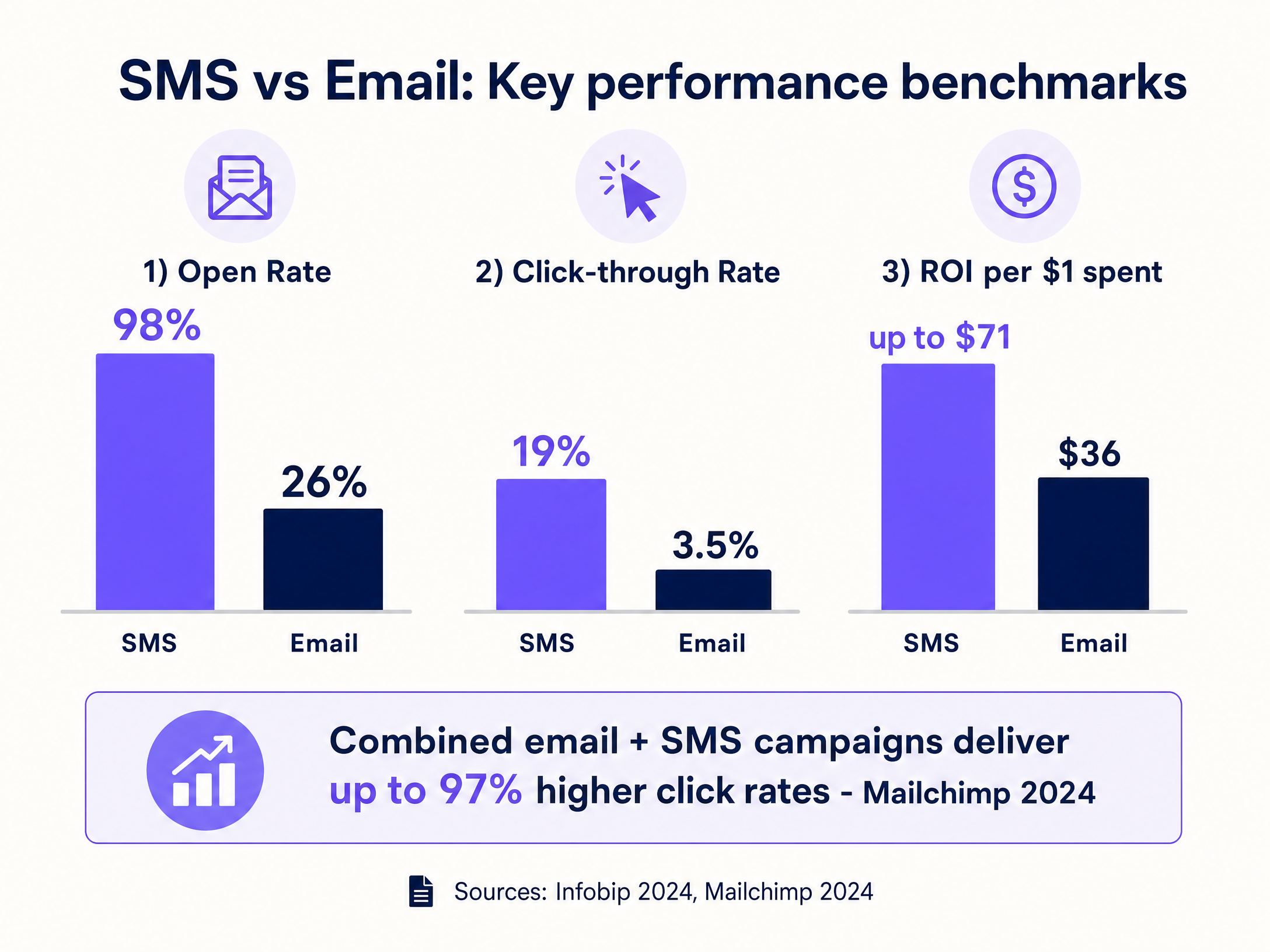
The business case for integrating Purple Guest WiFi with Mailchimp SMS marketing is built on the superior engagement metrics of SMS compared to traditional channels.
SMS delivers a 98% open rate, compared to approximately 26% for email. Click-through rates for SMS average 19%, significantly outperforming email's 3.5% (Infobip, 2024). ROI estimates place SMS returns between $21 and $71 for every $1 spent, with combined email and SMS campaigns in Mailchimp delivering up to 97% higher click rates than email alone (Mailchimp, 2024).
Hospitality scenario: A hotel group captures 500 verified mobile numbers per month via Purple Guest WiFi. A welcome SMS offering a restaurant discount converts at 8%, generating 40 incremental covers per month. At an average spend of £35 per cover, that is £1,400 in directly attributable monthly revenue from a single property.
Retail scenario: A retail chain with 20 locations captures 2,000 verified mobile numbers per month across the estate. A welcome SMS with a same-day 10% discount converts at 6%, generating 120 incremental transactions. At an average basket of £45, that is £5,400 in directly attributable monthly revenue.
For transport and healthcare operators, the return visit metric shifts from revenue to operational efficiency - reduced no-shows, higher rebooking rates, and improved passenger satisfaction scores.
Purple Engage captures verified guest email and phone data at login and automates marketing campaigns across 80,000+ live venues. The platform has processed 440 million logins in 2024 and holds ISO 27001, GDPR, CCPA, and Cyber Essentials certifications. For more on SMS text marketing strategy, see our related guide: How to leverage text SMS marketing to increase return visits .
Key Definitions
Captive portal
A web page that a user of a public access network is obliged to view and interact with before network access is granted. In Purple's implementation, this is the primary data acquisition interface where mobile numbers and SMS consent are captured.
IT teams encounter this as the splash page configuration in the Purple dashboard. Marketing teams encounter it as the brand touchpoint and consent mechanism.
Webhook
An automated, real-time HTTP callback sent from one application to another when a specific event occurs. Purple fires a webhook to the Mailchimp API the moment a visitor authenticates on the WiFi network.
Network architects need to ensure outbound HTTPS traffic from the Purple cloud platform to Mailchimp API endpoints is not blocked by firewall rules.
OAuth
An open standard for access delegation that allows one application to grant another application limited access to its resources without sharing credentials. The Purple-Mailchimp integration uses OAuth to establish a secure, authenticated API connection.
IT teams configure this once during the initial integration setup. The connection persists until the OAuth token is revoked or the Mailchimp account credentials change.
Upsert
A database operation that updates an existing record if it exists, or inserts a new record if it does not. Purple performs an upsert when syncing contacts to Mailchimp, preventing duplicate records while enriching existing profiles with new tags.
This is the mechanism that enables a single visitor profile to accumulate behavioural tags across multiple visits and venues over time.
Tagging taxonomy
A structured, hierarchical system for categorising and labelling data. In the Purple-Mailchimp context, this is the three-part tag structure (Source, Venue Type, Location) applied to every contact at the point of sync.
CRM managers define this taxonomy before go-live. IT teams configure it in the Purple dashboard per venue. Without it, the Mailchimp audience cannot be segmented for targeted SMS campaigns.
Customer Journey
Mailchimp's visual automation builder that allows marketers to create automated marketing paths based on triggers, time delays, and conditional logic. Used to build the automated SMS sequences triggered by WiFi sign-up events.
Marketing directors configure Customer Journeys in Mailchimp. IT teams need to ensure the Purple-Mailchimp integration is correctly applying the trigger tags for journeys to activate.
Throttling
The intentional pacing of message delivery to comply with carrier rate limits and prevent network congestion. Mailchimp applies throttling automatically when SMS send volumes approach carrier limits.
Critical when sending bulk SMS campaigns to large audiences. IT and marketing teams should review the expected send duration in the Mailchimp SMS checklist before launching campaigns to large segments.
First-party data
Information a company collects directly from its own customers or visitors, which it owns and controls. Data captured via Purple Guest WiFi is first-party data - it is not purchased, inferred, or dependent on third-party cookies.
With third-party cookie deprecation accelerating, first-party data captured at the WiFi login point is increasingly valuable. It is also the most defensible data asset under GDPR, as consent is captured directly and documented.
10DLC (10-Digit Long Code)
A US carrier registration standard that allows businesses to send marketing SMS messages from a standard 10-digit phone number. Brands must register their 10DLC number and messaging programme with carriers before sending at scale.
US-based operators must complete 10DLC registration before launching Mailchimp SMS campaigns. Unregistered sends are subject to carrier filtering and significantly lower throughput limits.
Worked Examples
A national retail chain with 50 locations wants to implement an SMS marketing campaign offering a 15% discount to shoppers currently in-store. They use Cisco Meraki access points and have a central Mailchimp account. How should they configure the data flow to ensure shoppers only receive offers relevant to the specific store they are visiting?
- Configure the Purple captive portal on the Meraki network to require a mobile number and include an explicit, unticked SMS marketing opt-in checkbox.
- In the Purple dashboard, authenticate the Mailchimp integration via OAuth and select the central Mailchimp Audience.
- Configure venue-level tagging in Purple. For the Birmingham store, set the tags:
source-wifi,venue-retail,location-birmingham. Repeat for each of the 50 locations with the appropriate location tag. - In Mailchimp, build a Customer Journey triggered by the addition of the
source-wifitag. - Add a conditional split in the Mailchimp journey: IF tag includes
location-birmingham, send the Birmingham-specific SMS offer. Repeat the conditional logic for each location. - Configure quiet hours in Mailchimp SMS settings to prevent messages being sent outside trading hours.
A hotel group uses Purple to provide Guest WiFi across 12 properties. They want to send an SMS requesting a TripAdvisor review 24 hours after a guest connects to the WiFi, but they only want to send this to first-time visitors, not guests who stay regularly.
- Ensure the Purple captive portal captures mobile numbers and explicit SMS consent at each property.
- Configure the Purple-Mailchimp integration to sync contacts to the designated audience with the three-part tag taxonomy.
- In Purple's WiFi Analytics settings, configure the system to append a
repeat-visitortag to the Mailchimp contact upon a guest's second and subsequent authentications at any property in the estate. - In Mailchimp, build a Customer Journey triggered by the
source-wifitag. - Add a 24-hour time delay.
- Add a conditional check: IF contact DOES NOT have tag
repeat-visitor, send the review request SMS. IF contact HAS tagrepeat-visitor, exit the journey or route to a separate loyalty campaign.
Practice Questions
Q1. You are deploying Purple Guest WiFi across a stadium with 40,000 capacity. The marketing director wants to automatically text a merchandise discount code to fans as soon as they connect to the WiFi. However, they are concerned about texting minors. How do you configure the system to mitigate this risk?
Hint: Consider the data fields available on the Purple captive portal and how they can be mapped to Mailchimp conditional logic.
View model answer
Add a Date of Birth field to the Purple captive portal form and make it mandatory. Map this custom field to a merge field in Mailchimp. In the Mailchimp Customer Journey, add a conditional logic step immediately after the trigger: IF the calculated age based on DOB is under 18, exit the journey without sending. IF age is 18 or older, proceed to send the merchandise discount SMS. This approach also enables age-appropriate segmentation for future campaigns.
Q2. A venue operator notices that their Mailchimp audience size is growing rapidly via the Purple integration, but their SMS delivery rates are low, and they are receiving complaints from visitors who say they never agreed to receive texts. What is the most likely configuration error and how do you fix it?
Hint: Review the requirements for lawful processing under GDPR Article 6 and TCPA.
View model answer
The captive portal is missing a specific, unbundled opt-in checkbox for SMS marketing. The operator is likely assuming that acceptance of the WiFi Terms of Service grants marketing consent, which is non-compliant under both GDPR and TCPA. The fix is to update the Purple splash page to include a clear, unticked checkbox that explicitly requests permission to send promotional SMS messages. Only contacts who tick this box should be synced to the Mailchimp SMS contact list. The operator should also audit and suppress existing contacts who were added without explicit SMS consent.
Q3. A retail chain has correctly tagged their WiFi sign-ups with `venue-retail` and `location-london`. They build a Mailchimp Customer Journey to send a welcome SMS immediately. However, analytics show the SMS is being delivered at 3:00 AM, causing customer complaints. What Mailchimp feature needs to be configured, and what additional step should the IT team take?
Hint: Consider both Mailchimp's built-in carrier compliance features and the time zone configuration of the Mailchimp account.
View model answer
The administrator needs to configure Quiet Hours in the Mailchimp SMS settings. Quiet hours prevent marketing text messages from being delivered outside of appropriate daytime hours. The IT team should also verify that the Mailchimp account time zone is set correctly to the recipient's local time zone - if the account is set to US Eastern time but the recipients are in London, the quiet hours window will be miscalculated. Messages triggered during quiet hours are queued and sent when the quiet period ends, so the welcome SMS will still be delivered, but at an appropriate time.