
Understanding Cisco SUDI: Hardware-Anchored Identity in Secure Network Access Control
This guide explains how Cisco SUDI provides hardware-anchored, cryptographically secure identity for enterprise network infrastructure. Learn how to replace spoofable MAC addresses with immutable 802.1AR certificates to secure your venue's network access control.
Video overview
Listen to this guide
View podcast transcript
📚 Part of our core series: Enterprise WiFi Security Guide →
Executive Summary
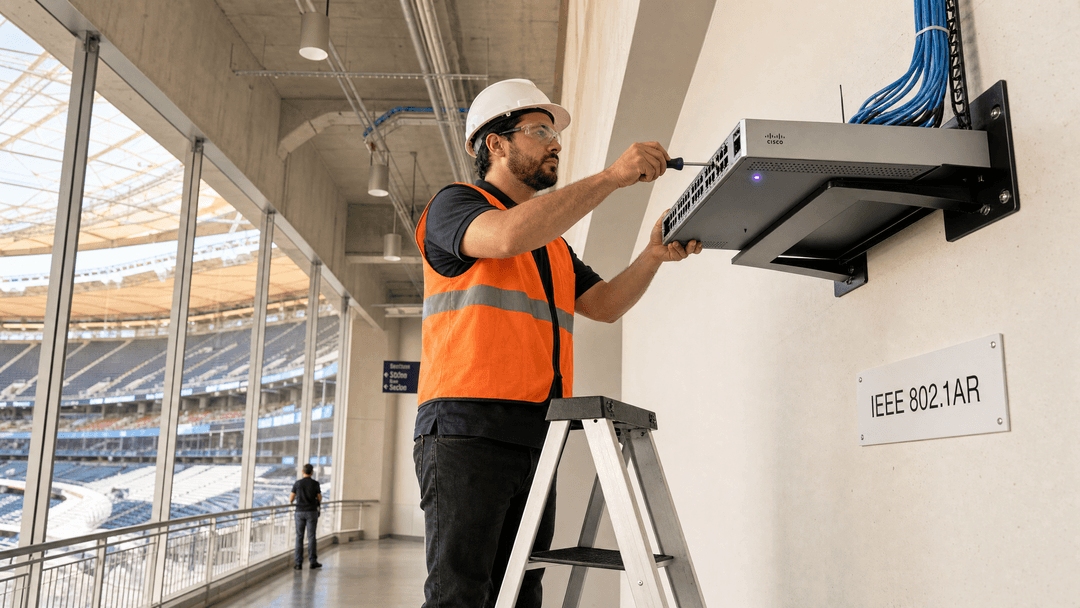
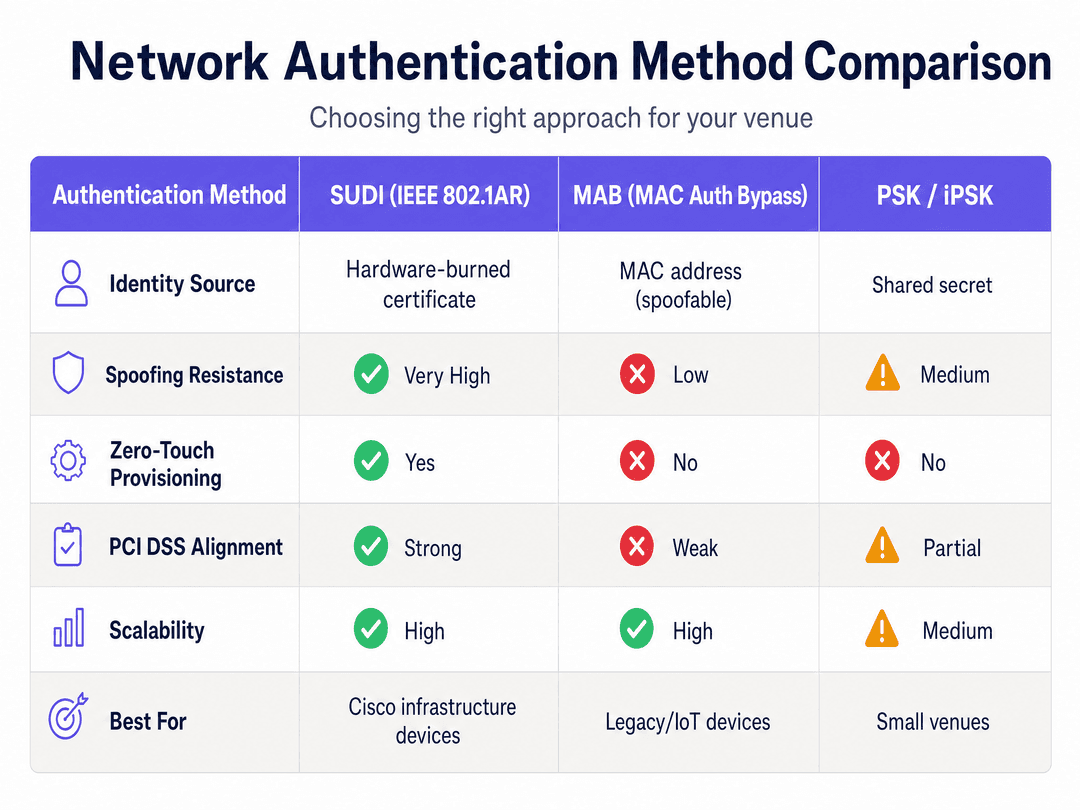
Most enterprise networks still rely on MAC Authentication Bypass (MAB) to identify infrastructure devices. The issue is that MAC addresses are trivially spoofable. A bad actor with a laptop and fifteen minutes can clone the MAC address of a trusted access point and walk straight onto your network. That is a documented attack vector, and one that PCI DSS 4.0 specifically calls out as inadequate for cardholder data environments.
Cisco's Secure Unique Device Identifier (SUDI) solves this. It is an X.509v3 certificate burned into the device's Trust Anchor module (TAm) during manufacturing. It cannot be cloned or exported. By migrating from MAB to SUDI-based EAP-TLS authentication, you replace a shared secret with cryptographic proof of identity. This guide details the technical architecture of Cisco SUDI, explaining how hardware-anchored identity secures network access control and enables Zero Touch Provisioning at scale.
Technical Deep-Dive
SUDI is an implementation of IEEE 802.1AR, the standard for Secure Device Identifiers. In 802.1AR terminology, the SUDI acts as an IDevID (Initial Device Identifier). It is the factory-installed identity that proves the device is a genuine Cisco product, manufactured at a known facility, with a known serial number.
The Authentication Flow
When a Cisco device connects to your network, it acts as an 802.1X supplicant. It presents its SUDI certificate to the network's authenticator (typically a switch port). The authenticator forwards that credential to a RADIUS server, such as Cisco ISE, via EAP-TLS.
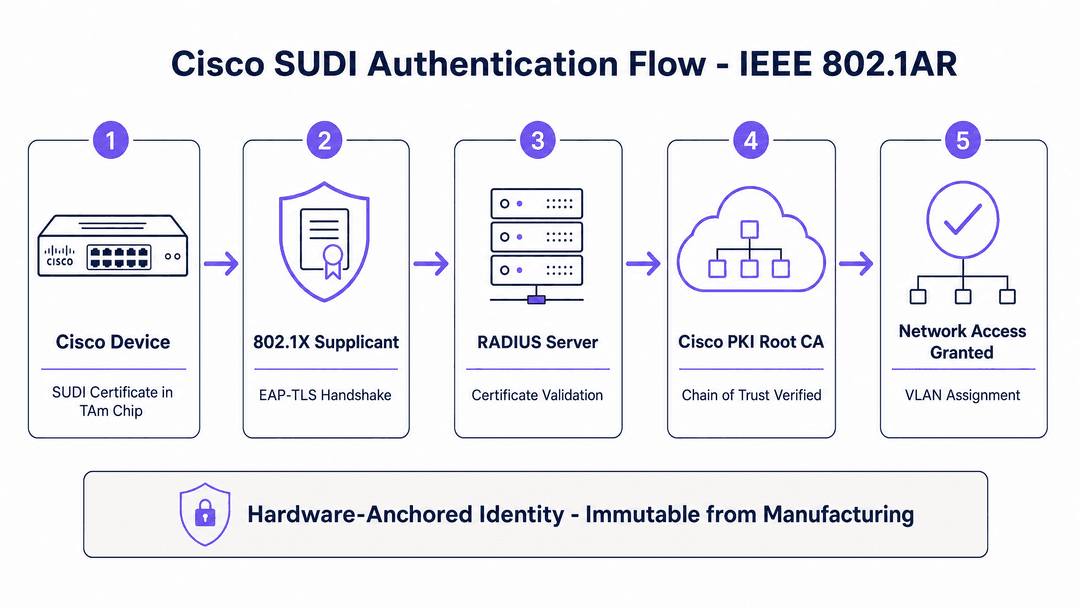
The RADIUS server validates the certificate chain back to Cisco's public root Certificate Authority. If the chain is valid, the device is genuine. Access is granted, and the appropriate VLAN is assigned. This mutual authentication ensures both the device and the network verify each other's identity before passing traffic.
Certificate Expiry and SUDI-2099
Original SUDI certificates were issued with a 10-year validity period from the date of manufacture, capped at 14 May 2029. Devices manufactured after May 2019 have a shorter window. When the SUDI expires, features that rely on it for TLS - such as HTTPS management interfaces, SSH certificate authentication, and Zero Touch Provisioning - may stop working.
Cisco addressed this by introducing SUDI-2099 certificates on newer hardware, valid until December 2099. You must audit your existing inventory to identify devices with expiring certificates and plan your refresh cycles accordingly.
Implementation Guide
Migrating to SUDI requires careful planning to avoid locking out legitimate infrastructure.
1. Audit Your Inventory
Check the expiry dates of existing SUDI certificates on IOS or IOS-XE devices using the show crypto pki certificates command. Document these dates in your CMDB.
2. Configure Your RADIUS Server
Import the Cisco Root CA into your RADIUS server's trusted certificate store. This is required for the server to validate the SUDI certificate chain.
3. Build Serial Number Validation
A valid Cisco certificate proves the device is genuine Cisco hardware, but it does not prove it is the specific device you ordered for that location. You must configure your RADIUS authorisation policy to cross-reference the Subject CN (which contains the serial number) against your approved device inventory.
4. Run Parallel Policies
Run SUDI alongside your existing MAB policy during migration. Use Cisco ISE profiling to identify which devices support 802.1AR and progressively move them to certificate-based authentication. Legacy IoT devices often cannot perform 802.1X, so MAB remains the fallback for those specific endpoints.
Best Practices
When deploying Cisco infrastructure alongside Guest WiFi solutions, segment your traffic cleanly. As discussed in Three SSIDs to rule them all: guest, Passpoint, and IoT WiFi , infrastructure devices should reside on a dedicated management VLAN, completely isolated from visitor traffic.
Use SUDI to authenticate the infrastructure hardware (Cisco Meraki, HPE Aruba, Ruckus, Juniper Mist, Ubiquiti UniFi, Cambium, Extreme, Fortinet). Then, use Purple's cloud overlay to handle the visitor identity layer. Purple integrates with Microsoft Entra ID, Okta, and Google Workspace to provide secure, profile-based authentication for venue users, while SUDI secures the underlying hardware.
Troubleshooting & Risk Mitigation
The most common failure mode is an expired SUDI certificate causing management lockouts. Document expiry dates rigorously.
If a device fails authentication, verify that the RADIUS server has the correct Cisco Root CA installed and that the device's clock is synced via NTP. Certificate validation will fail if the authenticator's time is incorrect.
ROI & Business Impact
SUDI enables Zero Touch Provisioning (ZTP) at scale. For hospitality and retail operators, this is a significant operational saving. When deploying access points across 40 retail locations, ZTP allows you to ship pre-racked hardware directly to the site. The device boots, presents its SUDI identity to the provisioning server, and pulls its encrypted configuration automatically. This reduces a two-day commissioning visit to a two-hour physical installation.
Listen to our 10-minute technical briefing podcast above for a deeper discussion on implementation strategies and how to align SUDI with PCI DSS 4.0 requirements.
Key Definitions
SUDI (Secure Unique Device Identifier)
An X.509v3 certificate and associated private key burned into a Cisco device's hardware during manufacturing, providing an unforgeable cryptographic identity.
Used to replace easily spoofed MAC addresses for authenticating network infrastructure.
IEEE 802.1AR
The industry standard that specifies how Secure Device Identifiers (DevIDs) should be implemented to provide interoperable, cryptographically bound device authentication.
SUDI is Cisco's specific implementation of the 802.1AR standard.
IDevID (Initial Device Identifier)
The factory-installed certificate specified in 802.1AR that proves a device's origin and serial number.
The SUDI certificate functions as the IDevID for Cisco hardware.
EAP-TLS
Extensible Authentication Protocol with Transport Layer Security. A highly secure authentication method that requires both the client and the server to present certificates.
The protocol used when a Cisco device presents its SUDI certificate to a RADIUS server.
MAB (MAC Authentication Bypass)
A network access control method that uses a device's MAC address as its identity credential.
Historically common but inherently insecure, as MAC addresses can be easily cloned by attackers.
TAm (Trust Anchor module)
A proprietary, tamper-resistant hardware chip inside Cisco devices that securely stores the SUDI certificate and its private key.
Ensures the private key can never be exported or cloned, physically binding the identity to the silicon.
Zero Touch Provisioning (ZTP)
An automated process where a device connects to the network, authenticates itself, and downloads its configuration without manual intervention.
SUDI enables secure ZTP by proving the device's identity before pushing sensitive configuration data.
RADIUS
Remote Authentication Dial-In User Service. A networking protocol that provides centralized Authentication, Authorization, and Accounting (AAA) management.
The server (like Cisco ISE) that receives the SUDI certificate and decides whether to grant network access.
Worked Examples
A 200-room hotel needs to deploy 150 new Cisco Meraki access points across its property. The IT team wants to avoid manually configuring each AP on-site while ensuring that only authorised hardware can join the management VLAN.
The team implements Zero Touch Provisioning (ZTP) using SUDI. They upload the serial numbers of the 150 purchased APs into their RADIUS server (Cisco ISE). The APs are shipped directly to the hotel and physically mounted by a local contractor. Upon booting, each AP presents its SUDI certificate via 802.1X EAP-TLS. The RADIUS server validates the Cisco Root CA chain and confirms the serial number matches the inventory list. Access is granted to the management VLAN, and the APs automatically download their configuration from the Meraki cloud.
A large stadium is migrating its network access control from MAB to 802.1X. The environment includes Cisco Catalyst switches, modern IP cameras, and legacy HVAC controllers.
The network architects configure the RADIUS server to accept both EAP-TLS and MAB. They use endpoint profiling to identify the Cisco switches and modern cameras that support 802.1AR and transition them to SUDI/certificate-based authentication. The legacy HVAC controllers, which lack 802.1X supplicants, remain on MAB but are restricted to a heavily locked-down, internet-denied VLAN.
Practice Questions
Q1. You are deploying 50 new Cisco Catalyst switches in a retail environment. You want to use SUDI for authentication. What specific configuration must you add to your RADIUS server to ensure only your purchased switches are allowed on the network?
Hint: A valid SUDI certificate only proves the device was manufactured by Cisco, not who owns it.
View model answer
You must configure the RADIUS authorisation policy to validate the Subject CN (which contains the device serial number) against your specific inventory list. Without this, any genuine Cisco device could authenticate.
Q2. During a network audit, you discover that several Cisco ISR routers manufactured in 2017 are using SUDI certificates for SSH authentication and HTTPS management. What operational risk must you plan for?
Hint: Consider the validity period of original SUDI certificates.
View model answer
Original SUDI certificates expire 10 years from the date of manufacture. These routers' certificates will expire in 2027. When they expire, TLS-dependent services like SSH certificate authentication and HTTPS management will fail, locking administrators out of those interfaces. The devices must be identified and planned for replacement or reconfiguration before expiry.
Q3. You are migrating a hospital network to 802.1X. The network includes modern Meraki APs and legacy MRI monitoring equipment that only supports MAC addresses. How should you structure the authentication policy?
Hint: Do not attempt a hard cutover that forces all devices to use certificates.
View model answer
Run SUDI (EAP-TLS) alongside MAB. Profile the devices in Cisco ISE. Enforce SUDI for the Meraki APs to ensure strong, hardware-anchored identity for infrastructure. Allow the legacy MRI equipment to fall back to MAB, but restrict those MAC addresses to a highly isolated, internet-denied clinical VLAN.
Continue reading in this series
How to Configure SCEP for Automated Enterprise WiFi Certificate Enrollment
This guide explains how to configure SCEP (Simple Certificate Enrollment Protocol) for automated enterprise WiFi certificate enrollment, covering the full architecture from PKI and NDES through to MDM profile deployment and RADIUS validation. It is aimed at IT managers, network architects, and CTOs at hotels, retail chains, stadiums, conference centres, and public-sector organisations who need to move beyond pre-shared keys and implement scalable, identity-based 802.1X EAP-TLS authentication. Purple's hardware-agnostic, cloud overlay platform integrates directly with this architecture, providing the guest and BYOD WiFi layer that sits alongside your certificate-authenticated staff network.
How to Implement SCEP for Automated WiFi Certificate Enrollment
This guide explains how to implement SCEP (Simple Certificate Enrollment Protocol) for automated WiFi certificate enrollment across enterprise venues. It covers the full architectural blueprint - from PKI design and MDM integration to the mandatory three-step deployment sequence - and shows IT managers and network architects how to eliminate shared credentials, automate certificate lifecycle management, and satisfy PCI DSS and GDPR requirements at scale.
Understanding Cisco SUDI: Hardware-Based Device Identity in Network Access Control
This guide details the technical architecture of Cisco SUDI, explaining how hardware-anchored identity secures network access control. It provides actionable implementation steps for IT leaders to deploy 802.1X EAP-TLS authentication and automate Zero Touch Provisioning across enterprise venues.
Got questions about your specific setup?
Our team works with venue operators, IT managers, and network engineers across 80,000 venues. Book a 20-minute call and we will show you how others like you solved it.