
Designing WiFi Networks for Multi-Tenant Office Buildings
This guide provides IT managers, network architects, and CTOs with a vendor-neutral blueprint for designing scalable, secure, and isolated WiFi networks across multi-tenant office buildings. It covers VLAN segmentation under IEEE 802.1Q, Dynamic VLAN Assignment via 802.1X and RADIUS, RF planning for high-density environments, and compliance considerations under CCPA/CPRA and PCI-DSS. Venue operators and building managers will find actionable architecture guidance, real-world case studies, and configuration pitfalls to avoid before deployment.
Video overview
Listen to this guide
View podcast transcript
Part of our core series: Multi-Tenant WiFi Guide →
Executive Summary
For CTOs and network architects managing multi-tenant office buildings, the challenge is clear: how to deliver reliable, secure, isolated connectivity to multiple independent organizations over a single shared physical network. In a multi-tenant environment, a flat network architecture is a serious security liability. It expands your compliance scope under CCPA/CPRA and PCI-DSS, exposes tenants to lateral security threats, and creates an operational burden that scales poorly as tenant numbers grow.
This guide provides a vendor-neutral blueprint for designing multi-tenant WiFi architectures. By implementing IEEE 802.1Q VLAN segmentation, 802.1X-based Dynamic VLAN Assignment, and disciplined RF planning, you can eliminate SSID proliferation, reduce airtime overhead by up to 20%, and enforce strict Layer 2 isolation between tenants. We detail the technical standards, hardware considerations across vendors including Cisco Meraki, HPE Aruba, Ruckus, and Juniper Mist, and the routing policies required to secure the infrastructure. Implemented correctly, this architecture reduces support overhead, simplifies compliance audits, and lets you monetize connectivity as a service.
Technical Deep Dive
The Case Against Flat Networks
A flat network places every device - regardless of tenant, traffic type, or security tier - in a single broadcast domain. Every device receives every broadcast packet. A single compromised guest device can scan for and reach POS terminals, building management systems, and corporate workstations. It puts your entire network in scope for PCI-DSS audit. This is not a theoretical risk; it is the default state of many multi-tenant buildings cabled before wireless density became a design consideration.
The solution is logical segmentation. You do not need separate physical infrastructure per tenant; you need a properly designed VLAN architecture, a well-configured firewall, and a centralized management platform.
IEEE 802.1Q and VLAN Tagging
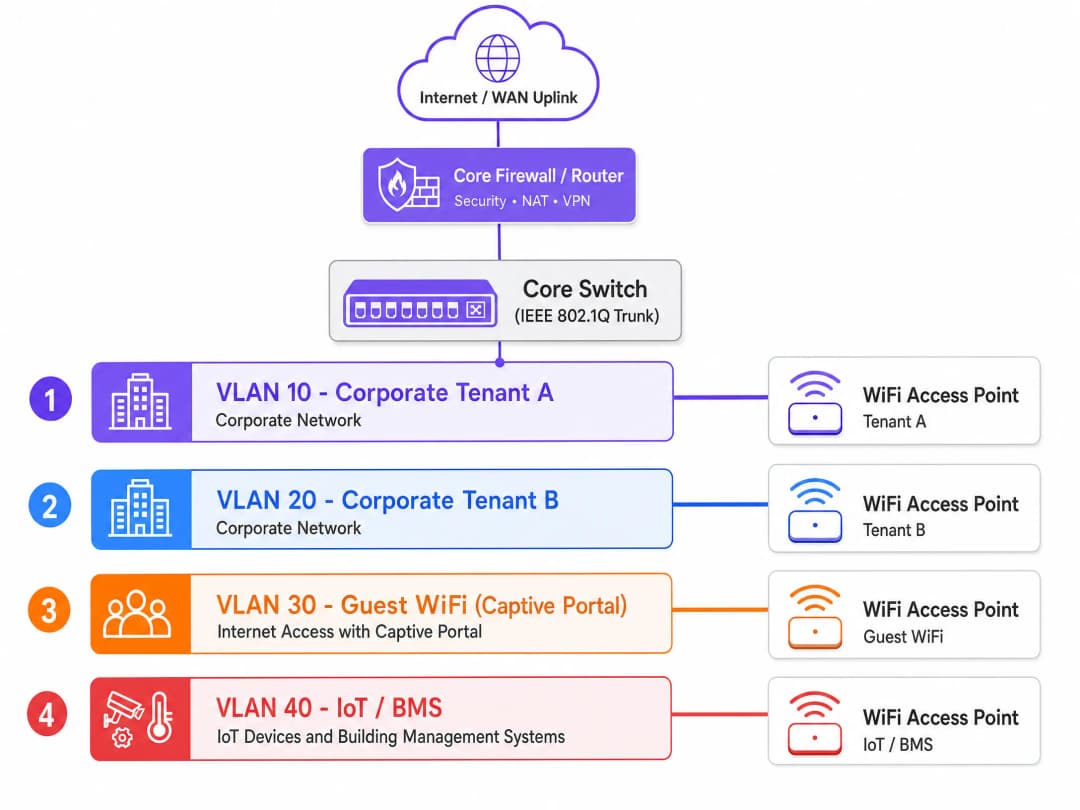
Virtual LANs - standardized as IEEE 802.1Q - allow you to partition a single physical switch fabric into multiple isolated logical networks. When a client connects to a WiFi access point (AP), the AP tags that client's frames with a 12-bit VLAN identifier (VID). The switches read this tag and ensure that traffic from one VLAN is never forwarded to a port on another VLAN unless an explicit firewall routing rule permits it.
A standard multi-tenant office building requires at least four VLANs:
| VLAN | Traffic Class | Routing Policy |
|---|---|---|
| VLAN 10 | Corporate Tenant A | Internet only + tenant-specific resources |
| VLAN 20 | Corporate Tenant B | Internet only + tenant-specific resources |
| VLAN 30 | Guest WiFi (captive portal) | Internet only, no access whatsoever to any tenant VLAN |
| VLAN 40 | IoT and BMS | Egress only to designated management platforms |
For buildings with more tenants, you extend the model. Each additional tenant receives a dedicated VLAN and a corresponding firewall policy. The physical infrastructure remains shared.
Dynamic VLAN Assignment via 802.1X and RADIUS
Historically, network engineers created a separate SSID for every tenant. This approach degrades performance. Every SSID broadcasts management frames (beacons) at the lowest basic mandatory data rate to ensure legacy devices can connect. Broadcasting six or seven SSIDs on a single access point can consume 20% to 30% of available wireless airtime before any user data is transmitted. In a dense multi-tenant building, that is unacceptable.
The modern standard is Dynamic VLAN Assignment. You broadcast a single secure SSID using IEEE 802.1X authentication. When a user connects, their device (the supplicant) exchanges credentials with a RADIUS server via the access point (the authenticator). The RADIUS server validates the credentials against an identity provider - Microsoft Entra ID, Okta, or Google Workspace - and returns an Access-Accept message to the access point. That message contains three IETF-standard RADIUS attributes:
- Tunnel-Type (attribute 64): set to VLAN
- Tunnel-Medium-Type (attribute 65): set to 802
- Tunnel-Private-Group-ID (attribute 81): the specific VLAN ID for that user's organization
The access point receives these attributes and dynamically places that user's traffic into their designated VLAN. An employee of Tenant A and an employee of Tenant B connect to the same SSID. Their traffic is fully isolated at Layer 2. The switches treat them as if they were plugged into entirely separate physical networks.
For the guest segment, route traffic through a dedicated guest VLAN to a captive portal. Purple's Guest WiFi platform handles CCPA/CPRA-compliant consent management, secure onboarding, and WiFi Analytics on the isolated segment, with zero routed access to corporate networks. For a broader overview of access control architecture, see our guide to network access control systems.
WPA3-Enterprise and Encryption Standards
WPA3-Enterprise is the recommended encryption standard for multi-tenant deployments. It offers a 192-bit security mode, eliminates the vulnerabilities in the WPA2 four-way handshake, and mandates Protected Management Frames (PMF) under IEEE 802.11w. For environments handling payment card data or sensitive corporate information, WPA3-Enterprise with EAP-TLS - certificate-based mutual authentication - removes the credential theft vector entirely.
For guest segments where certificates cannot be deployed, WPA3-SAE (Simultaneous Authentication of Equals) provides forward secrecy, ensuring that a compromised key does not expose historical traffic.
RF Planning in High-Density Environments
Co-channel interference (CCI) is the primary cause of poor WiFi performance in multi-tenant office buildings. When adjacent access points broadcast on the same frequency channel, devices must wait for free airtime before transmitting. In a building with multiple tenants and extreme device density, unplanned channel allocation creates a congested RF environment that no amount of bandwidth can fix.
An active on-site RF survey is essential before deployment. Vendor coverage maps are typically optimistic. You need real signal measurements taken in the physical space, accounting for wall materials, floor construction, and the RF environment from neighboring buildings.
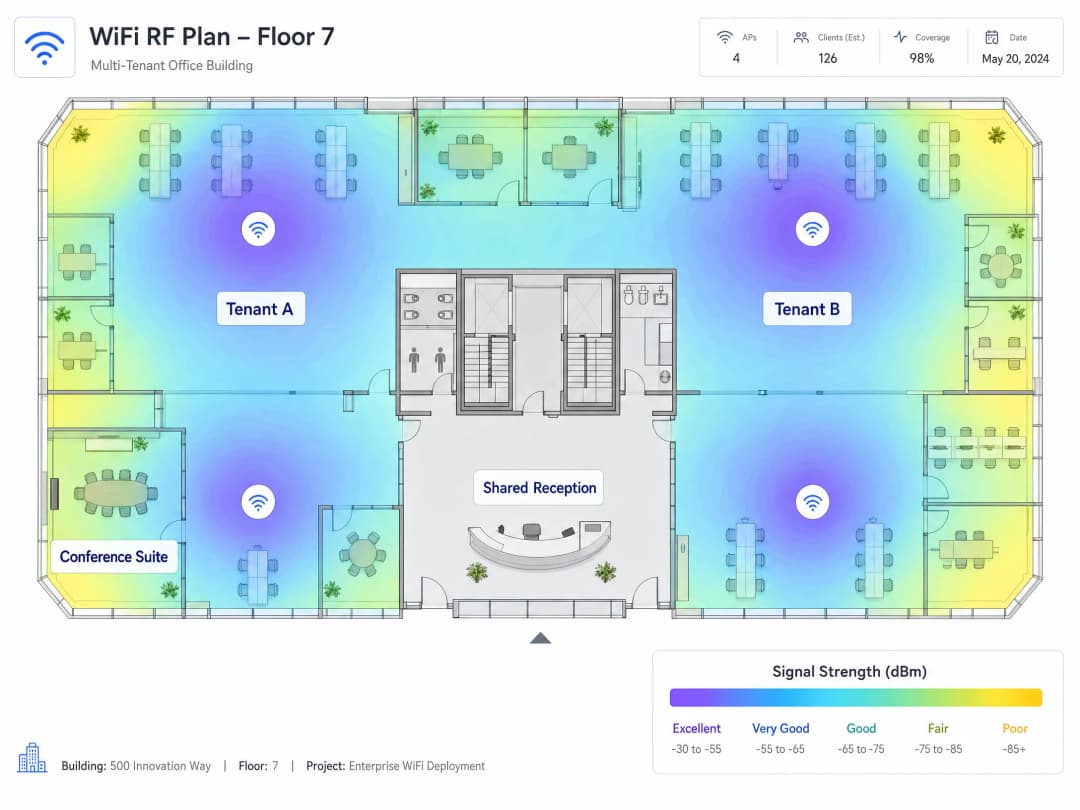
In most regulatory domains, the 2.4 GHz band offers three non-overlapping channels (1, 6, and 11). The 5 GHz band offers significantly more capacity. WiFi 6E extends into the 6 GHz band, providing clean spectrum largely free of legacy device interference. For new multi-tenant deployments, specifying WiFi 6E-capable access points from Cisco Meraki, HPE Aruba, Ruckus, Juniper Mist, or Ubiquiti UniFi provides the spectral headroom that high-density environments demand.
IoT Isolation
Modern office buildings contain building management systems, HVAC controllers, smart lighting, access control, and CCTV. These devices are notoriously difficult to patch and represent a substantial attack surface. They must be isolated on a dedicated VLAN with strict egress filtering, permitting outbound communication only to their designated management platforms. Zero routed access to any tenant VLAN. Zero routed access to the guest VLAN. This is non-negotiable from both a security and a CCPA/CPRA perspective.
Got questions about your specific setup?
Our team works with venue operators, IT managers, and network engineers across 80,000 venues. Book a 20-minute call and we will show you how others like you solved it.
Implementation Guide
Step 1: Design your logical architecture before touching hardware. Map out your tenant count and traffic classes (corporate, guest, IoT, payment, management) and allocate VLANs. Document your IP addressing scheme. Define your inter-VLAN routing policy: what may talk to what, and what is absolutely forbidden.
Step 2: Commission an active RF site survey. Never rely on vendor coverage maps. You need real signal measurements taken in the physical space to inform AP placement and channel allocation.
Step 3: Configure your core firewall with a Default-Deny policy. Block all inter-VLAN routing by default. Add only explicit, port-specific exceptions. Every inter-VLAN path must be justified and documented.
Step 4: Disable VLAN 1 on all trunk ports. Change the native VLAN on trunk ports to an unused, non-routable VLAN ID. This prevents VLAN hopping attacks that exploit the default native VLAN.
Step 5: Verify trunk port configuration. Explicitly permit every required VLAN ID on every trunk link in the path from access point to distribution layer. A missing VLAN tag causes silent traffic drops that take hours to diagnose.
Step 6: Deploy centralized cloud management. Platforms from Cisco Meraki, HPE Aruba, Juniper Mist, and Ruckus provide per-SSID bandwidth policies, per-tenant reporting, and integration with your RADIUS infrastructure. Managing a distributed AP estate without a controller carries an operational overhead that is unsustainable at scale.
Step 7: Set DHCP lease times per segment. Corporate VLANs: 8 to 24 hours. Guest WiFi VLANs: 1 to 2 hours. Short lease times on the guest segment prevent IP address exhaustion in high-turnover environments.
Step 8: Isolate the management plane. Your management VLAN must be completely isolated from all tenant and guest VLANs. Apply strict ACLs to management traffic. If a tenant can reach your management plane, you have a serious security vulnerability.
Best Practices
The table below summarizes the key configuration standards for a compliant multi-tenant WiFi deployment.
| Control | Standard | Rationale |
|---|---|---|
| VLAN segmentation | IEEE 802.1Q | Layer 2 isolation between tenants |
| Authentication | IEEE 802.1X with WPA3-Enterprise | Eliminates credential theft vectors |
| Dynamic VLAN Assignment | RADIUS with tunnel attributes | Reduces SSID count, preserves airtime |
| Guest onboarding | Captive portal with CCPA/CPRA consent | Compliance and data capture |
| IoT isolation | Dedicated VLAN with egress ACLs | Limits attack surface of unpatched devices |
| RF planning | Active site survey | Mitigates co-channel interference |
| Roaming | 802.11r Fast BSS Transition | Seamless handoff between APs |
| Native VLAN | Non-routable, unused VLAN ID | Prevents VLAN hopping attacks |
For hospitality deployments, guest VLAN isolation is critical. For retail environments, isolating POS terminals on a dedicated VLAN directly reduces PCI DSS audit scope. For transportation hubs and healthcare facilities, the same segmentation principles apply, with additional attention to concurrent connection volumes and device type diversity.
For venues considering satellite broadband WAN uplinks, Purple's guide How to Set Up a Captive Portal on Starlink covers the specific considerations for remote and maritime environments.
Troubleshooting and Risk Mitigation
Silent traffic drops. This is the most common failure mode in multi-tenant deployments. The cause is a missing VLAN tag on a trunk port. A user authenticates successfully via 802.1X, the RADIUS server assigns them to VLAN 40, but VLAN 40 is not permitted on the trunk port. The traffic is dropped and the user cannot obtain an IP address. Document trunk configurations meticulously and verify them during commissioning.
SSID proliferation. Every SSID you broadcast consumes beacon frame airtime. In dense environments, 8 to 10 SSIDs per AP degrades network performance for everyone. Keep SSIDs to no more than 4 per radio. Use Dynamic VLAN Assignment via RADIUS attributes rather than separate SSIDs to serve multiple tenants.
Management plane exposure. If your management VLAN is not isolated, a tenant who gains access can modify AP configurations, disrupt service, or intercept management traffic. Use out-of-band management where possible and apply strict ACLs to all management interfaces.
IoT device sprawl. Building operators frequently add IoT devices without notifying the network team. Implement a network access control (NAC) policy requiring explicit authorization before any new device obtains an IP address on the IoT VLAN.
DHCP exhaustion on the guest VLAN. In high-churn environments, devices retain DHCP leases after disconnecting. A /24 subnet provides 254 addresses. In a busy conference center or coworking space, these are exhausted quickly. Set lease times to 1 to 2 hours and size guest VLAN subnets to accommodate peak concurrent device counts.
ROI and Commercial Impact
A properly segmented multi-tenant WiFi architecture delivers measurable outcomes across three dimensions.
Reduced compliance costs. Based on Purple's own deployment data, isolating POS and payment terminals on a dedicated VLAN with strict firewall controls reduces PCI DSS audit scope by approximately 70%. This directly lowers annual audit costs and the time your IT team spends on compliance documentation.
Operational efficiency. Centralized cloud management reduces the OpEx associated with managing a distributed AP estate. Zero-touch provisioning, global policy enforcement, and per-tenant reporting eliminate the need for on-site configuration changes. Tenant onboarding time drops from days to hours. Revenue generation. A secure, high-performance network enables building operators to monetize connectivity as a service. Tiered bandwidth plans, per-tenant SLAs, and analytics-driven insights turn WiFi from a cost center into a revenue stream. Purple operates across more than 80,000 physical venues globally and processed 440 million logins in 2024 (Purple internal data, 2024), providing the analytics infrastructure to support this model at scale.
To explore further how WiFi connectivity supports wider digital inclusion goals, see our article on World WiFi Day 2026. For a primer on the WAN architecture considerations relevant to multi-site deployments, see our guide to the definition of a WAN computer network.
Key Definitions
IEEE 802.1Q
The networking standard that defines VLAN tagging for Ethernet frames. It adds a 4-byte tag to each frame containing a 12-bit VLAN Identifier (VID), allowing switches to maintain multiple isolated broadcast domains over shared physical infrastructure.
The foundational protocol for multi-tenant network segmentation. Every enterprise switch and access point supports 802.1Q. Without it, logical isolation between tenants is impossible.
Dynamic VLAN Assignment
A method where a RADIUS server assigns a specific VLAN to a user or device upon successful 802.1X authentication, using IETF RADIUS attributes (Tunnel-Type, Tunnel-Medium-Type, Tunnel-Private-Group-ID) to instruct the access point which VLAN to place the user into.
The standard approach for serving multiple tenants from a single SSID. Eliminates SSID proliferation and preserves wireless airtime while maintaining full Layer 2 isolation between tenants.
IEEE 802.1X
The IEEE standard for port-based Network Access Control (PNAC). It defines a three-party authentication model: the supplicant (client device), the authenticator (access point or switch), and the authentication server (RADIUS). The authenticator blocks all traffic until the supplicant is authenticated.
The authentication framework used to enforce Dynamic VLAN Assignment. Required for WPA3-Enterprise deployments. Integrates with identity providers including Microsoft Entra ID, Okta, and Google Workspace.
RADIUS
Remote Authentication Dial-In User Service. A networking protocol that provides centralized Authentication, Authorization, and Accounting (AAA) management. In WiFi deployments, the RADIUS server validates user credentials and returns VLAN assignment attributes to the access point.
The server infrastructure that enforces Dynamic VLAN Assignment. Can be deployed on-premises or as a cloud service. Integrates with identity providers via LDAP, SAML, or SCIM.
Co-channel interference (CCI)
Interference caused when two or more access points broadcast on the same frequency channel within range of each other. Devices must wait for clear airtime before transmitting, reducing effective throughput for all users on that channel.
The primary cause of poor WiFi performance in dense multi-family buildings. Mitigated through active RF site surveys and careful channel allocation across the 2.4 GHz, 5 GHz, and 6 GHz bands.
Native VLAN
The VLAN on an 802.1Q trunk port that carries untagged traffic. By default, most switches use VLAN 1 as the native VLAN, creating a well-known attack vector for VLAN hopping.
A security risk that must be addressed in every multi-tenant deployment. Change the native VLAN on all trunk ports to an unused, non-routable VLAN ID to prevent VLAN hopping attacks.
Captive Portal
A web page that a user must interact with before being granted network access. In WiFi deployments, the user connects to an open or WPA2-Personal SSID, is redirected to a splash page for authentication or terms acceptance, and is then granted internet-only access on an isolated VLAN.
The standard onboarding mechanism for Guest WiFi segments. Enables CCPA/CPRA-compliant consent collection, identity verification, and analytics. Must be deployed on a VLAN with zero routing access to corporate or tenant networks.
WPA3-Enterprise
The latest WiFi security protocol for enterprise networks, standardized by the WiFi Alliance. Provides 192-bit cryptographic strength (CNSA suite), requires 802.1X authentication, mandates Protected Management Frames (PMF) under IEEE 802.11w, and eliminates the vulnerabilities in WPA2's four-way handshake.
The recommended encryption standard for multi-tenant corporate WiFi segments. Required for environments handling payment card data or sensitive corporate information. Supported by all major enterprise AP vendors.
EAP-TLS
Extensible Authentication Protocol - Transport Layer Security. A certificate-based 802.1X authentication method that requires both the client and the RADIUS server to present X.509 digital certificates, providing mutual authentication and eliminating password-based credential theft.
The most secure 802.1X authentication method. Used in high-security multi-tenant environments where credential theft is a primary concern. Requires a Public Key Infrastructure (PKI) to issue and manage client certificates.
MAC Authentication Bypass (MAB)
A fallback authentication method that uses a device's MAC address as its identity when the device does not support 802.1X. The RADIUS server looks up the MAC address and assigns the device to a predefined VLAN.
Used for IoT devices, printers, and other equipment that cannot perform 802.1X authentication. Because MAC addresses can be spoofed, MAB must always be combined with strict firewall rules on the assigned VLAN.
Worked Examples
A 350-room hotel group with 12 properties needs to secure its network. Currently, guest smartphones, staff laptops, POS terminals, and building management systems all share a single flat network. The IT team spends 40 hours monthly on PCI-DSS compliance documentation because the entire network is in scope. The CTO wants to reduce compliance overhead and improve security posture before the next audit.
Deploy a four-VLAN architecture using IEEE 802.1Q across all 12 properties via a centralized cloud management platform. Assign VLANs as follows: VLAN 10 for Staff Corporate (802.1X authenticated, routed to internal resources and internet), VLAN 20 for Guest WiFi (Captive Portal, internet only), VLAN 30 for POS Terminals (802.1X authenticated, routed only to payment processor endpoints), and VLAN 40 for IoT and BMS (MAC Authentication Bypass, egress to BMS management platform only). Configure a Default-Deny firewall policy between all VLANs. Integrate Purple's Guest WiFi platform on VLAN 20 for GDPR-compliant consent management and analytics. Validate trunk port configurations on every switch in the path during commissioning.
A coworking operator manages a 15-floor office building with 40 independent member companies. Each company needs its own isolated WiFi network. The current architecture broadcasts a separate SSID per company, resulting in 40 SSIDs per floor. WiFi performance is poor across the building despite a 10 Gbps fiber uplink. The network team wants to resolve performance issues without replacing hardware.
Consolidate to a single secure SSID using WPA3-Enterprise and IEEE 802.1X authentication. Deploy a RADIUS server integrated with the building's identity provider (Microsoft Entra ID or Okta). Configure the RADIUS server to return Dynamic VLAN Assignment attributes (Tunnel-Type, Tunnel-Medium-Type, Tunnel-Private-Group-ID) for each authenticated user, placing them into their company's dedicated VLAN. Retain a separate Guest WiFi SSID with a Captive Portal for visitor access. This reduces the SSID count from 40 to two per radio. Conduct an active RF site survey to validate channel allocation and AP placement following the SSID consolidation.
Practice Questions
Q1. You are deploying WiFi for a new mixed-use building with 20 independent retail tenants on the ground floor and 10 office tenants on floors 1 to 5. The building owner wants each tenant to have their own secure WiFi network, plus a shared Guest WiFi network for visitors. What is the most efficient architectural approach, and what is the maximum number of SSIDs you should broadcast per access point?
Hint: Consider the impact of broadcasting 30 separate SSIDs on wireless airtime. Think about how Dynamic VLAN Assignment can serve multiple tenants from a single SSID.
View model answer
Deploy a single secure SSID using WPA3-Enterprise and IEEE 802.1X authentication for all corporate tenants. Use a RADIUS server integrated with the building's identity provider to perform Dynamic VLAN Assignment, placing each tenant's devices into their own isolated VLAN upon authentication. Deploy a second SSID for Guest WiFi with a Captive Portal. This results in two SSIDs per radio, well within the four-SSID maximum. Each of the 30 tenants receives a dedicated VLAN with a corresponding Default-Deny firewall policy. The Guest WiFi VLAN has zero routing access to any tenant VLAN.
Q2. During a post-deployment audit of a multi-tenant office building, you discover that traffic from the Guest WiFi VLAN (VLAN 30) can successfully ping devices on the IoT VLAN (VLAN 40). Both are on separate VLANs. What is the most likely cause, and what is the immediate remediation step?
Hint: VLANs separate broadcast domains at Layer 2. What handles traffic routing between different subnets at Layer 3?
View model answer
The core router or firewall is missing a Default-Deny inter-VLAN routing policy. By default, routers pass traffic between all connected subnets. The immediate remediation is to configure an explicit Deny rule on the firewall blocking all traffic from VLAN 30 to VLAN 40. Audit all other inter-VLAN routing policies at the same time to confirm no other unintended paths exist. The long-term fix is to implement a Default-Deny policy across all VLANs with only explicit, documented exceptions permitted.
Q3. A tenant in a multi-tenant office building reports that their devices can authenticate to the WiFi network successfully, but they never receive an IP address and cannot access the internet. Other tenants on the same access points are working normally. The RADIUS server logs show successful authentication and a VLAN 50 assignment for the affected tenant. What is the first configuration you should check?
Hint: Think about the physical path that VLAN-tagged traffic takes from the access point to the core switch. What must be configured on that path for VLAN 50 traffic to pass?
View model answer
Check the 802.1Q trunk port configuration on the switch port connected to the access point. Verify that VLAN 50 is explicitly listed as an allowed VLAN on the trunk. If VLAN 50 is not permitted on the trunk, the switch drops all VLAN 50 tagged frames, and the client never receives a DHCP response. Add VLAN 50 to the trunk's allowed VLAN list and verify the client receives an IP address. Also confirm that a DHCP scope exists for the VLAN 50 subnet.
Q4. A building operator wants to add 50 new IoT sensors to monitor energy consumption across a multi-tenant office building. The sensors do not support 802.1X authentication. How should you onboard these devices securely, and what firewall policy should apply to their VLAN?
Hint: Consider the authentication method available for devices that cannot perform 802.1X, and the security implications of that method.
View model answer
Use MAC Authentication Bypass (MAB) to onboard the IoT sensors. Register each sensor's MAC address in the RADIUS server and configure the server to assign authenticated MAC addresses to the dedicated IoT VLAN (e.g., VLAN 40). Because MAC addresses can be spoofed, apply strict egress firewall rules to VLAN 40: permit outbound traffic only to the designated energy management platform IP addresses, and block all other outbound and all inbound traffic. Apply strict ACLs to prevent any device on VLAN 40 from initiating connections to any tenant VLAN or the management VLAN.
Continue reading in this series
Mean time to innocence: how to prove it's not the WiFi
Mean time to innocence (MTTI) is the critical metric defining how long IT teams spend proving a network issue is not their fault. This guide details a five-step observability methodology to eliminate the blame game in multi-tenant environments, replacing finger-pointing with shared evidence to drive down mean time to resolution (MTTR).
Legal and Compliance Requirements for Shared WiFi Infrastructure
This authoritative technical reference guide outlines the critical legal, regulatory, and architectural requirements for deploying and managing shared WiFi infrastructure. It provides IT managers, network architects, and venue operators with actionable frameworks for ensuring robust data protection, strict payment security compliance, and high-performance tenant isolation using enterprise standards.
Bandwidth Management and Quality of Service (QoS) in Coworking Spaces
An authoritative technical reference guide for IT managers, network architects, and venue operations directors on implementing robust Bandwidth Management and Quality of Service (QoS) frameworks in coworking environments. This guide details network segmentation, traffic prioritization, vendor-neutral configurations, and real-world ROI metrics to deliver enterprise-grade connectivity. It covers IEEE 802.11e/WMM standards, VLAN design, per-user rate limiting, and troubleshooting strategies with measurable business outcomes.
Got questions about your specific setup?
Our team works with venue operators, IT managers, and network engineers across 80,000 venues. Book a 20-minute call and we will show you how others like you solved it.