
Cambium Networks cnPilot and cnMaestro Integration with Purple WiFi
This authoritative guide details the integration of Cambium Networks cnPilot access points and cnMaestro cloud controller with the Purple WiFi intelligence platform. It covers architecture, captive portal configuration, walled garden requirements, 802.1X Staff WiFi, and dynamic VLAN segmentation using Cambium ePSK for multi-tenant environments.
Listen to this guide
View podcast transcript

Executive Summary
For enterprise venues standardising on Cambium Networks infrastructure, deploying a production-grade guest WiFi solution requires tight integration between the wireless access layer and the identity management platform. This guide provides a definitive blueprint for integrating Cambium cnPilot access points and the cnMaestro cloud controller with Purple WiFi. By combining Cambium's scalable hardware with Purple's captive portal, RADIUS authentication, and analytics capabilities, IT teams can transform their wireless networks from a cost centre into a strategic asset. The architecture detailed here supports everything from basic guest access to complex multi-tenant segmentation using Cambium Private Pre-Shared Keys (PPSK), delivering secure, compliant, and data-rich connectivity across hospitality, retail, and public-sector environments.
Technical Deep-Dive
The integration between Cambium Networks and Purple relies on standard HTTP redirection and RADIUS protocols. This vendor-neutral approach ensures robust security, cross-platform compatibility, and centralized management via cnMaestro.
Integration Architecture
The core mechanism involves a captive portal redirect managed by the Cambium AP, paired with RADIUS authentication managed by Purple.
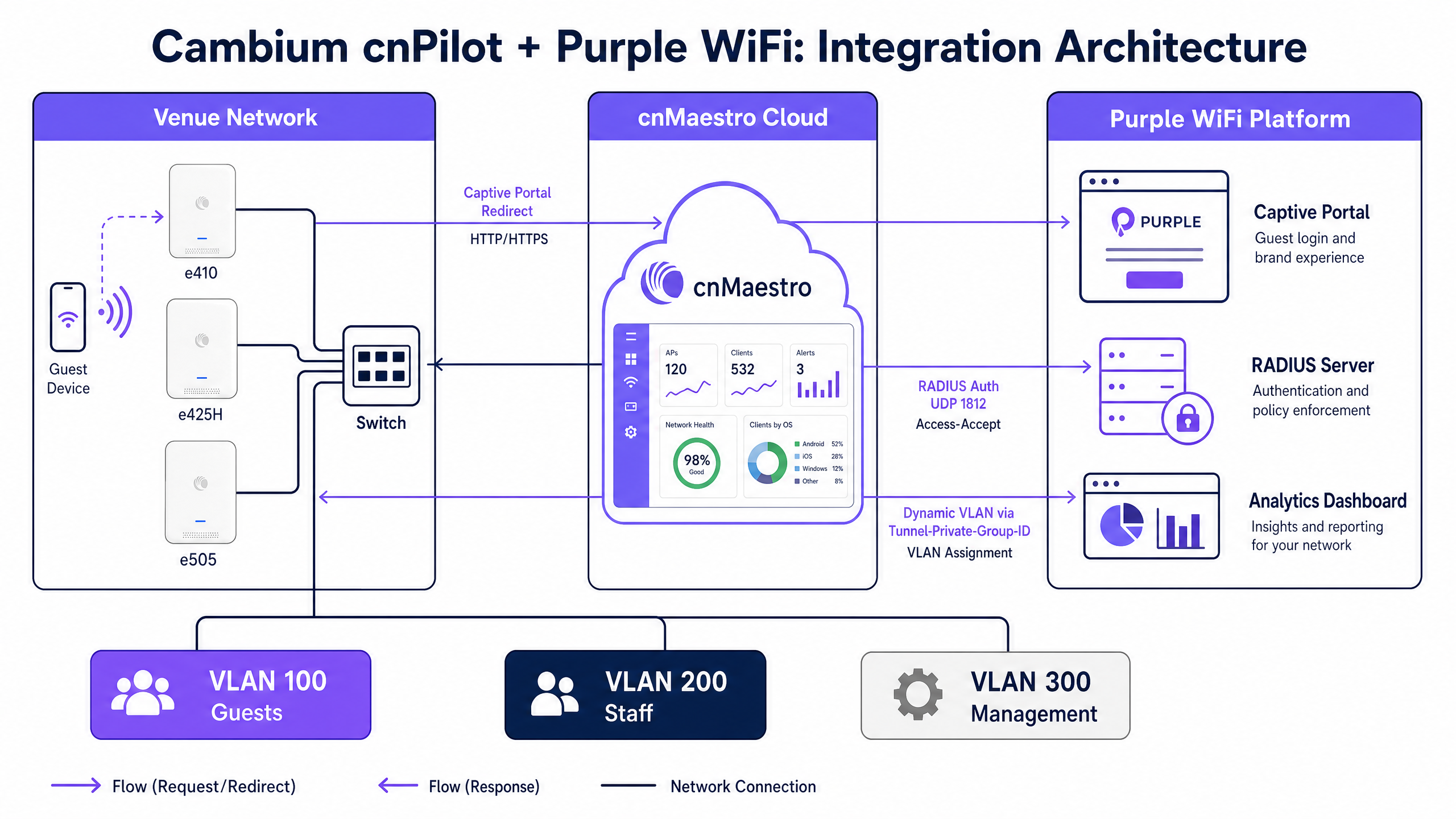
When a guest device associates with an open Guest SSID, the Cambium AP intercepts the initial HTTP request. Instead of routing the traffic to the internet, the AP redirects the device to Purple's hosted captive portal URL. The guest completes the authentication flow on the Purple splash page, which supports social login, email registration, and custom data capture forms.
Upon successful authentication, Purple's backend sends a RADIUS Access-Accept message to the Cambium AP on UDP port 1812. This message signals the AP to transition the client device from the pre-authentication walled garden state to full network access. Concurrently, the AP sends RADIUS accounting data to Purple on UDP port 1813, populating Purple's analytics dashboards with session duration, data usage, and device type information.
Walled Garden Requirements
The walled garden is a critical component of the captive portal flow. It defines the specific IP addresses and domains that an unauthenticated device can reach. If the walled garden is misconfigured, the device cannot load the Purple portal, resulting in a connection timeout.
For the integration to function, the walled garden must include Purple's portal domains, any Content Delivery Network (CDN) endpoints hosting portal assets, and the domains of any supported identity providers (such as Facebook, Google, or Microsoft Entra ID).
Multi-Tenant Segmentation with Cambium ePSK
Cambium's implementation of Private Pre-Shared Keys, branded as ePSK, allows network architects to segment traffic securely without broadcasting multiple SSIDs.
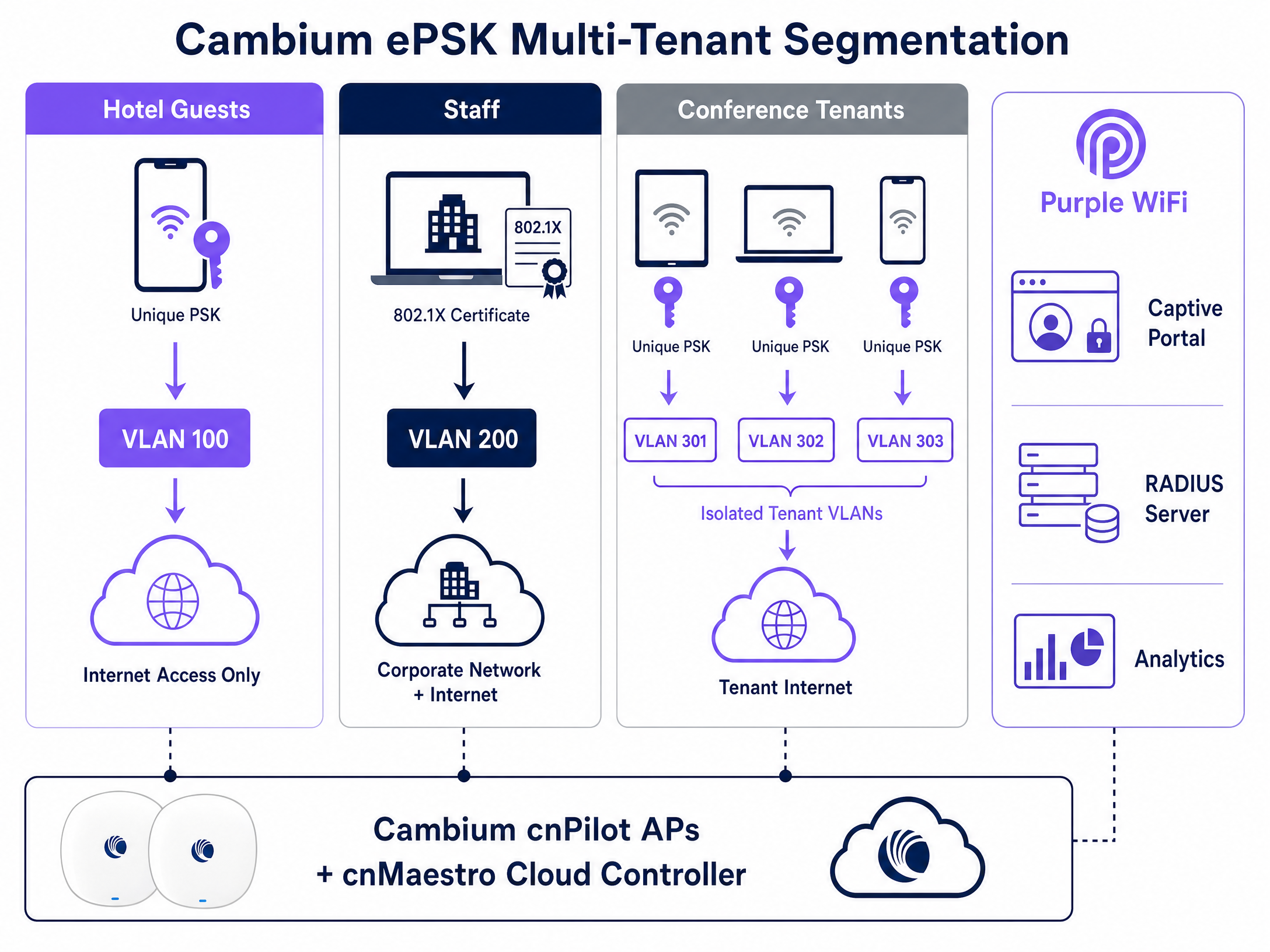
With ePSK, a single SSID supports up to 2,000 unique passphrases. Each passphrase maps to a specific VLAN. When a user connects using their unique key, the Cambium AP automatically places their traffic onto the assigned VLAN. This feature is invaluable for multi-tenant environments, such as coworking spaces or residential buildings, where each tenant requires an isolated network segment. Purple integrates with this architecture by managing the ePSK lifecycle via the cnMaestro API, automating the provisioning, VLAN assignment, and revocation of tenant credentials.
Implementation Guide
Deploying the Cambium and Purple integration requires precise configuration within the cnMaestro cloud console. Follow these steps to establish the baseline Guest WiFi service.
1. Configure the Guest WLAN
Navigate to the Configuration menu in cnMaestro, select WiFi Profiles, and open the WLANs tab. Create a new WLAN profile.
- Name / SSID: Define the guest network name (e.g., "Venue Guest WiFi").
- Security: Set to Open.
- Client Isolation: Set to Enable to prevent guest devices from communicating with each other on the local subnet.
2. Enable the External Hotspot
Within the WLAN configuration, locate the Guest Access section.
- Enable Guest Access: Check this box.
- Portal Type: Select External Hotspot.
- External Page URL: Enter the specific captive portal URL provided by your Purple account manager.
3. Configure RADIUS Authentication and Accounting
In the same Guest Access section, configure the RADIUS parameters.
- Authentication Server: Enter Purple's primary RADIUS server IP address.
- Authentication Port:
1812 - Accounting Server: Enter Purple's primary RADIUS server IP address.
- Accounting Port:
1813 - Shared Secret: Enter the complex shared secret provided by Purple. Ensure this matches exactly on both platforms.
4. Define the Walled Garden
Under the External Hotspot settings, populate the walled garden list. You must add the core Purple domains and the specific domains required for your chosen authentication methods (e.g., social login providers).
5. Configure 802.1X for Staff WiFi
To secure staff access, create a separate WLAN profile in cnMaestro.
- Security: Set to WPA2-Enterprise.
- RADIUS Server: Point to Purple's RADIUS server IP on port 1812.
Staff authenticate using their corporate credentials via Microsoft Entra ID or Google Workspace, which Purple validates. Purple then returns a Tunnel-Private-Group-ID RADIUS attribute, instructing the Cambium AP to place the staff device onto the secure corporate VLAN.
Best Practices
- VLAN Trunking: Ensure that all required VLANs (Guest, Staff, Management) are trunked on the switch ports connecting to the Cambium APs. If the VLAN is missing from the trunk, authenticated clients will fail to obtain an IP address via DHCP.
- Firmware Consistency: Standardise your AP estate on cnPilot firmware version 6.0 or later. This version provides the most stable support for external hotspot redirection and ePSK functionality.
- Accounting is Mandatory: Never disable RADIUS accounting. Purple relies entirely on the UDP 1813 accounting stream to generate dwell time metrics, visit frequency data, and compliance logs.
- Avoid Local PSKs for Staff: Replace legacy shared passwords with 802.1X authentication for staff networks. This approach aligns with ISO 27001 requirements by tying network access to individual, auditable identities.
Troubleshooting & Risk Mitigation
When integration issues arise, they typically manifest during the initial captive portal redirect or the RADIUS authentication phase.
- Portal Fails to Load: This is almost always a walled garden issue. If a guest device connects to the SSID but receives a connection timeout instead of the splash page, the AP is blocking access to the Purple portal domain. Verify your walled garden entries in cnMaestro and ensure DNS resolution is permitted pre-authentication.
- Authentication Fails (Invalid Credentials Error): Check the RADIUS shared secret. A mismatch between cnMaestro and Purple will cause the RADIUS server to silently drop the authentication requests.
- Device Authenticates but Lacks Internet Access: This indicates a failure in the dynamic VLAN assignment or DHCP process. Verify that Purple is returning the correct VLAN ID in the RADIUS response and confirm that the switch port trunking configuration allows that VLAN.
ROI & Business Impact
Deploying Purple WiFi on Cambium Networks infrastructure transforms a standard network utility into a measurable business asset. By capturing first-party data at the point of authentication, venues can build comprehensive visitor profiles and drive targeted marketing campaigns.
For example, Harrods implemented Purple Guest WiFi and achieved a 57x marketing ROI by integrating the captured data with their loyalty program. Similarly, AGS Airports generated an 842% ROI by utilizing tiered bandwidth and targeted passenger engagement. By standardising on Cambium cnMaestro and Purple, IT leaders can deliver secure, compliant connectivity while simultaneously providing the marketing organization with the data required to drive revenue.
Key Definitions
Captive Portal
A customized login page that requires users to authenticate or accept terms before gaining access to a public or enterprise WiFi network.
Used in Guest WiFi deployments to capture first-party data, enforce acceptable use policies, and present venue branding before granting internet access.
RADIUS
Remote Authentication Dial-In User Service; a networking protocol that provides centralized Authentication, Authorization, and Accounting (AAA) management.
The protocol Cambium APs use to communicate with Purple to verify user credentials and report session data.
Walled Garden
A limited environment that controls user access to web content and services pre-authentication.
Required in cnMaestro to allow guest devices to reach the Purple splash page and identity provider domains (like Facebook or Google) before they have full internet access.
ePSK
Enhanced Pre-Shared Key; Cambium's implementation of private pre-shared keys, allowing unique passphrases for individual users on a single SSID.
Used to provide secure, isolated network segments for multi-tenant environments without broadcasting numerous SSIDs.
Dynamic VLAN Assignment
The process of placing an authenticated device onto a specific Virtual Local Area Network based on RADIUS attributes rather than the physical port or SSID.
Allows IT to use a single SSID while securely separating guest traffic from staff or management traffic.
802.1X
An IEEE standard for port-based network access control, providing an authentication mechanism to devices wishing to attach to a LAN or WLAN.
The standard used for secure Staff WiFi, replacing shared passwords with individual corporate credentials validated against an identity provider.
cnMaestro
Cambium Networks' cloud-based or on-premises management platform for centralized control of wireless and wired network infrastructure.
The interface where network architects configure the WLAN profiles, RADIUS settings, and walled gardens required for the Purple integration.
First-Party Data
Information a company collects directly from its customers and owns entirely.
The primary business output of a Purple Guest WiFi deployment, used to drive marketing campaigns and understand visitor behavior.
Worked Examples
A 200-room hotel needs to deploy secure WiFi for guests, staff, and a conference centre. Guests require a branded captive portal, staff need secure access to internal systems, and the conference centre requires isolated networks for different event organizers. How should the network architect configure the Cambium cnMaestro environment to support this using Purple?
The architect should deploy three distinct WLAN profiles in cnMaestro.
- Guest WLAN: Configured as an Open network with 'External Hotspot' enabled. The redirect URL points to the Purple captive portal. RADIUS authentication (UDP 1812) and accounting (UDP 1813) point to Purple's servers. The walled garden includes Purple's domains.
- Staff WLAN: Configured as WPA2-Enterprise (802.1X). RADIUS points to Purple, which integrates with the hotel's Microsoft Entra ID. Staff authenticate with corporate credentials, and Purple assigns them to the Staff VLAN.
- Conference WLAN: Configured with WPA2 Pre-Shared Key and Cambium ePSK enabled. Purple provisions unique ePSK passphrases for each event organizer via the cnMaestro API, assigning each key to an isolated VLAN (e.g., VLAN 301, 302).
A retail chain has deployed Cambium e410 APs and configured the Purple captive portal. However, shoppers report that the splash page never appears on their smartphones; instead, the browser shows a connection timeout. What is the root cause and how is it resolved?
The root cause is an incomplete walled garden configuration in cnMaestro. The Cambium AP is blocking the HTTP/HTTPS traffic required to load the Purple portal before the user is authenticated.
To resolve this, the network engineer must log into cnMaestro, navigate to the Guest WLAN profile, and update the External Hotspot walled garden list. They must add Purple's specific portal domains and any associated CDN endpoints. Once applied, unauthenticated devices will be able to reach the portal and complete the login flow.
Practice Questions
Q1. You are deploying Purple Guest WiFi across 50 retail stores using Cambium e505 APs. Users can connect to the SSID and see the splash page, but after logging in, they cannot access the internet. You verify that Purple is sending the Access-Accept message. What is the most likely infrastructure issue?
Hint: Consider what happens at the switch level when a device tries to obtain an IP address after authentication.
View model answer
The most likely issue is missing VLAN trunking on the switch ports connecting to the Cambium APs. While the AP authorizes the device, if the assigned Guest VLAN is not permitted on the switch trunk, the device cannot reach the DHCP server to obtain an IP address, resulting in no internet access.
Q2. A university campus wants to use a single SSID for all students in the dormitories, but requires that each student's devices are isolated into their own private network segment to allow casting to their specific smart TV. How do you implement this using Cambium and Purple?
Hint: Look at Cambium's implementation of private pre-shared keys.
View model answer
Implement Cambium ePSK (Enhanced Pre-Shared Key) on the dormitory WLAN. Purple will manage the ePSK lifecycle via the cnMaestro API, generating a unique passphrase for each student. When a student connects their devices using their specific key, the Cambium AP assigns them to a unique VLAN, creating an isolated private area network.
Q3. During a pilot deployment, Purple's analytics dashboard shows zero dwell time or data usage metrics for the Cambium test site, even though users are successfully authenticating and browsing the internet. What configuration step was missed in cnMaestro?
Hint: Analytics require session data, which is handled by a specific UDP port in the AAA configuration.
View model answer
RADIUS Accounting was not configured. The network engineer must enable RADIUS Accounting in the cnMaestro Guest WLAN profile and point it to Purple's RADIUS server on UDP port 1813. Without this, Purple only handles authentication and receives no session lifecycle data.
Continue reading in this series
EnGenius Cloud Access Points Integration with Purple WiFi
This technical reference details the step-by-step integration of EnGenius Cloud Access Points and ECS switches with Purple's guest WiFi platform. It covers guest captive portal redirection via an external splash page, Walled Garden configuration, secure staff WiFi using IEEE 802.1X, and multi-tenant network isolation using EnGenius MyPSK with dynamic VLAN assignment. IT installers and network architects will find actionable configuration sequences, real-world case studies, and a troubleshooting framework for deploying Purple across EnGenius hardware estates.
DrayTek Vigor Routers and Access Points Integration with Purple WiFi
This guide provides step-by-step technical instructions for integrating DrayTek Vigor routers and VigorAP access points with Purple's cloud platform. It covers DrayTek captive portal configuration for Guest WiFi, 802.1X authentication for secure Staff WiFi, Walled Garden setup, and DrayTek Multiple PSK (PPSK) configuration for Multi-Tenant network segmentation with dynamic VLAN assignment. Designed for IT installers and SMB network administrators deploying Purple across hospitality, retail, and multi-tenant venues.
DrayTek Vigor Routers and Access Points Integration with Purple WiFi
This guide provides step-by-step technical instructions for integrating DrayTek Vigor routers and VigorAP access points with Purple's cloud platform. It covers DrayTek captive portal configuration for Guest WiFi, 802.1X authentication for secure Staff WiFi, Walled Garden setup, and DrayTek Multiple PSK (PPSK) configuration for Multi-Tenant network segmentation with dynamic VLAN assignment. Designed for IT installers and SMB network administrators deploying Purple across hospitality, retail, and multi-tenant venues.