
Nama ff iPSK: a comprehensive guide for businesses
This guide explains Identity Pre-Shared Key (iPSK) architecture for property developers, BTR operators, and landlords deploying multi-tenant WiFi. It covers RADIUS integration, dynamic VLAN assignment, Layer 2 isolation, and automated credential lifecycle management. It also details the business case for eliminating per-unit consumer routers and delivering an instant-on resident experience at scale.
Listen to this guide
View podcast transcript
Executive summary
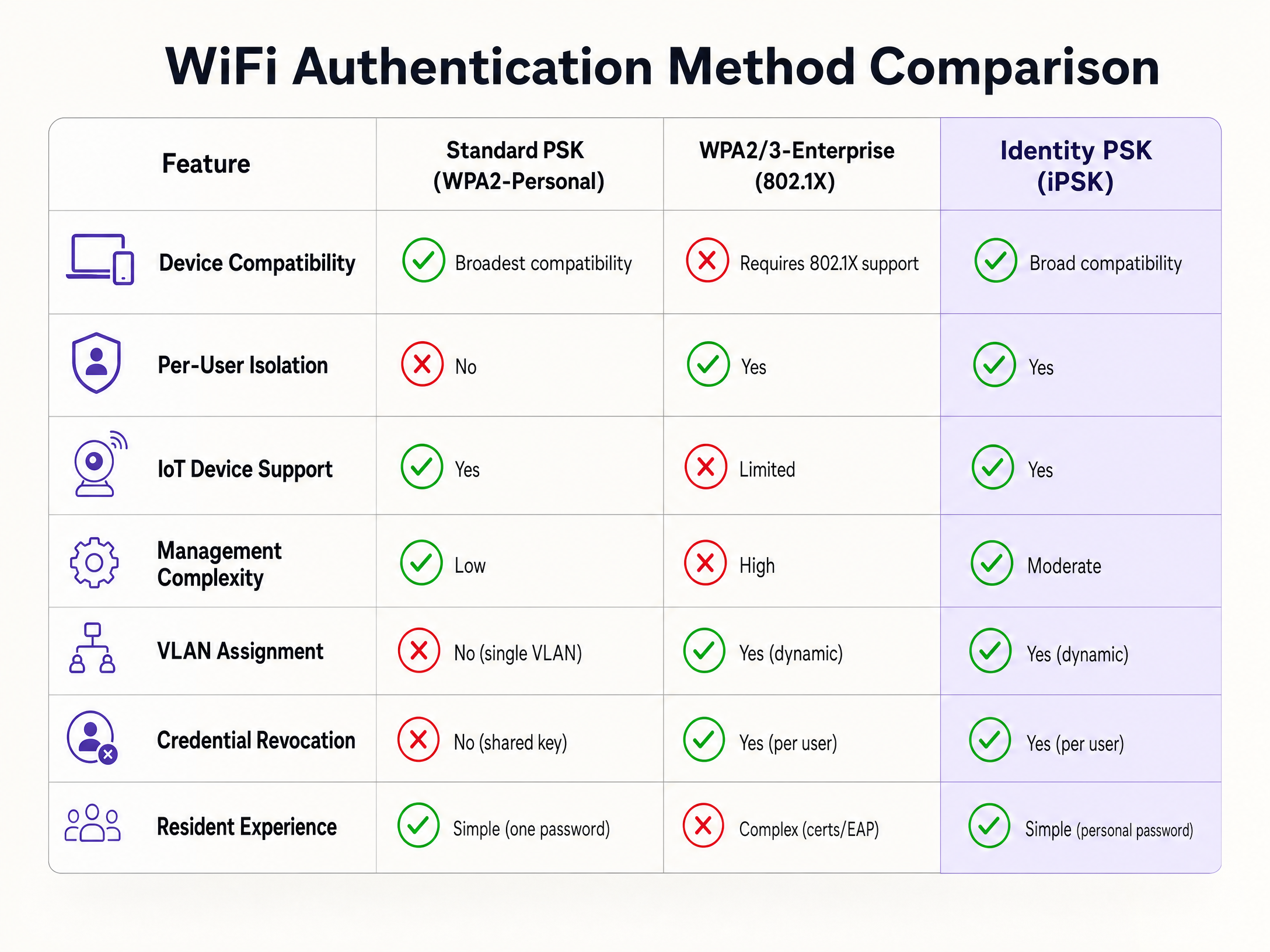
Traditional WiFi security forces a choice between two inadequate options. Standard WPA2-Personal is simple but offers no individual accountability - one leaked password compromises the entire network. WPA2/3-Enterprise (IEEE 802.1X) delivers per-user control but breaks connectivity for gaming consoles, smart TVs, and IoT devices that cannot process digital certificates.
Identity Pre-Shared Key (iPSK) resolves this tension. It assigns a unique password to every individual user or device on a single SSID, enabling dynamic VLAN assignment and Layer 2 isolation via a central RADIUS server. For Build-to-Rent (BTR) operators, property developers, and landlords, iPSK is the definitive standard for multi-tenant connectivity. It supports 100% of resident devices, creates a Private Area Network (PAN) for each unit, and scales through automated lifecycle management integrated with identity providers like Microsoft Entra ID, Okta, or Google Workspace. Purple automates this entire workflow across 80,000+ live venues, integrating with Cisco Meraki, HPE Aruba, Ruckus, Juniper Mist, Ubiquiti UniFi, Cambium, Extreme, and Fortinet.
Technical deep-dive
The mechanics of Identity PSK
iPSK modifies the standard WPA2 four-way EAPOL handshake. When a client device associates with an access point using a specific pre-shared key, the access point does not grant access immediately. Instead, it sends a RADIUS-REQUEST message to the central authentication server. This request contains vendor-specific attributes - for Cisco Meraki, these are the Meraki-IPSK attributes including Meraki-IPSK-Anonce and Meraki-IPSK-EAPOL. The RADIUS server runs a dictionary check against its database of configured iPSKs. If a match is found, it responds with an ACCESS-ACCEPT message containing the Tunnel-Password attribute and, critically, a dynamic VLAN assignment via Tunnel-Private-Group-Id.
This architecture requires no certificate infrastructure. The client device sees a standard WPA2-Personal network and connects with a password. The complexity is handled entirely between the access point and the RADIUS server.
Layer 2 isolation and Private Area Networks
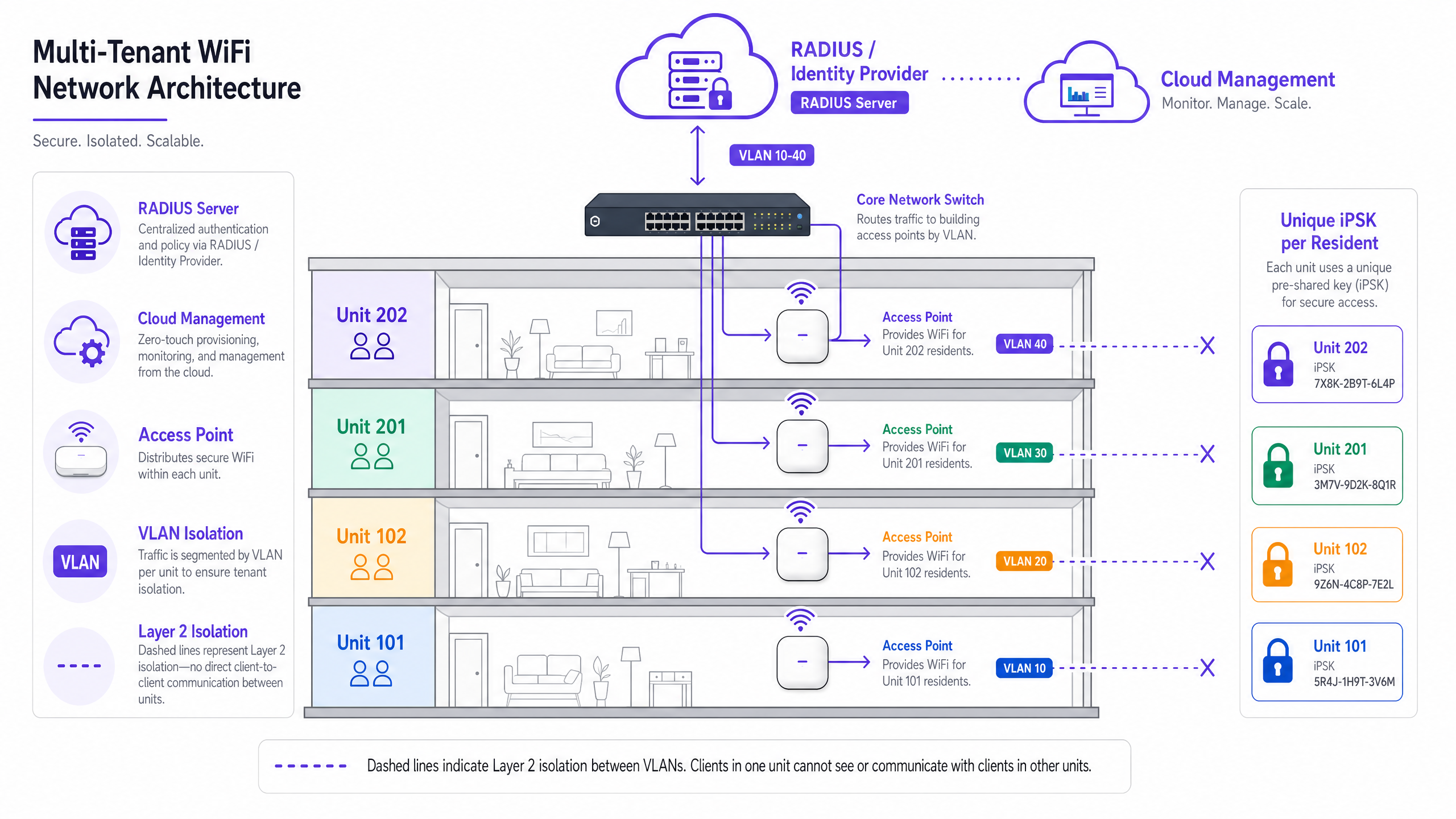
In a multi-tenant environment, a single SSID across hundreds of apartments is efficient for RF planning but creates serious security risks without proper segmentation. iPSK enables the creation of a Private Area Network (PAN) for each resident.
When a resident authenticates with their unique iPSK, the RADIUS server assigns their devices to a specific VLAN. The network infrastructure enforces Layer 2 isolation between these VLANs. Resident A's iPhone can see their own printer or Chromecast, but Resident B in the next apartment cannot discover or interact with those devices. This micro-segmentation is critical for GDPR compliance and for maintaining resident trust.
Because each resident has their own isolated VLAN, you can enable mDNS reflection within that specific VLAN. mDNS is the protocol that enables AirPlay, Chromecast casting, and wireless printing. Enabling mDNS reflection within each resident's private VLAN allows their own devices to communicate with each other, while remaining completely isolated from all other residents. The result is a home-like experience on shared infrastructure.
Hardware vendor implementations
Enterprise hardware vendors use different terminology for per-device PSK, but the underlying RADIUS mechanics are consistent. The table below maps vendor names to the canonical implementation:
| Vendor | Feature Name | Notes |
|---|---|---|
| Cisco Meraki | iPSK (Identity PSK) | Supports Easy PSK via EAPOL params from MR 32.1.3+ |
| HPE Aruba | MPSK (Multi-PSK) | Supports up to 256 PSKs per SSID natively |
| Ruckus | DPSK (Dynamic PSK) | DPSK3 generation supports high-density MDU deployments |
| Juniper Mist | Per-user PSK | Cloud-managed via Mist AI |
| Ubiquiti UniFi | PPSK (Private PSK) | RADIUS-assigned VLAN supported from recent firmware |
| Cambium | Per-client PSK | Supported on cnMaestro cloud platform |
| Extreme | iPSK | Supported via ExtremeCloud IQ |
| Fortinet | MPSK | Supported on FortiAP with FortiGate RADIUS |
Purple is hardware-agnostic and integrates with all of these platforms as a cloud overlay, providing a unified management layer regardless of which hardware you have deployed.
WPA3 and the 6 GHz consideration
iPSK currently operates on WPA2. WPA3 uses Simultaneous Authentication of Equals (SAE), which is not compatible with the standard iPSK dictionary-check approach. If you are deploying WiFi 6E or WiFi 7 access points that operate on the 6 GHz band - which mandates WPA3 - you need a separate strategy for those clients. The practical approach is to maintain WPA2 iPSK on the 2.4 GHz and 5 GHz bands for broad device compatibility, while using WPA3-Enterprise for 6 GHz capable devices. See our related guide Uu PPSK: comparing features and deployment models for a deeper comparison of per-device PSK implementations and WPA3 transition planning.
Implementation guide
Step 1: RADIUS server configuration
The foundation of an iPSK deployment is a robust RADIUS infrastructure. The server must support the vendor-specific attributes required by your access points. For Cisco Meraki, configure the Meraki-IPSK attribute dictionary. For HPE Aruba, configure the Aruba-MPSK-Passphrase attribute. The RADIUS server must be highly available - a RADIUS outage will prevent new client authentications. Use a cloud-hosted RADIUS service with redundant instances rather than an on-premises single server.
Step 2: SSID and VLAN provisioning
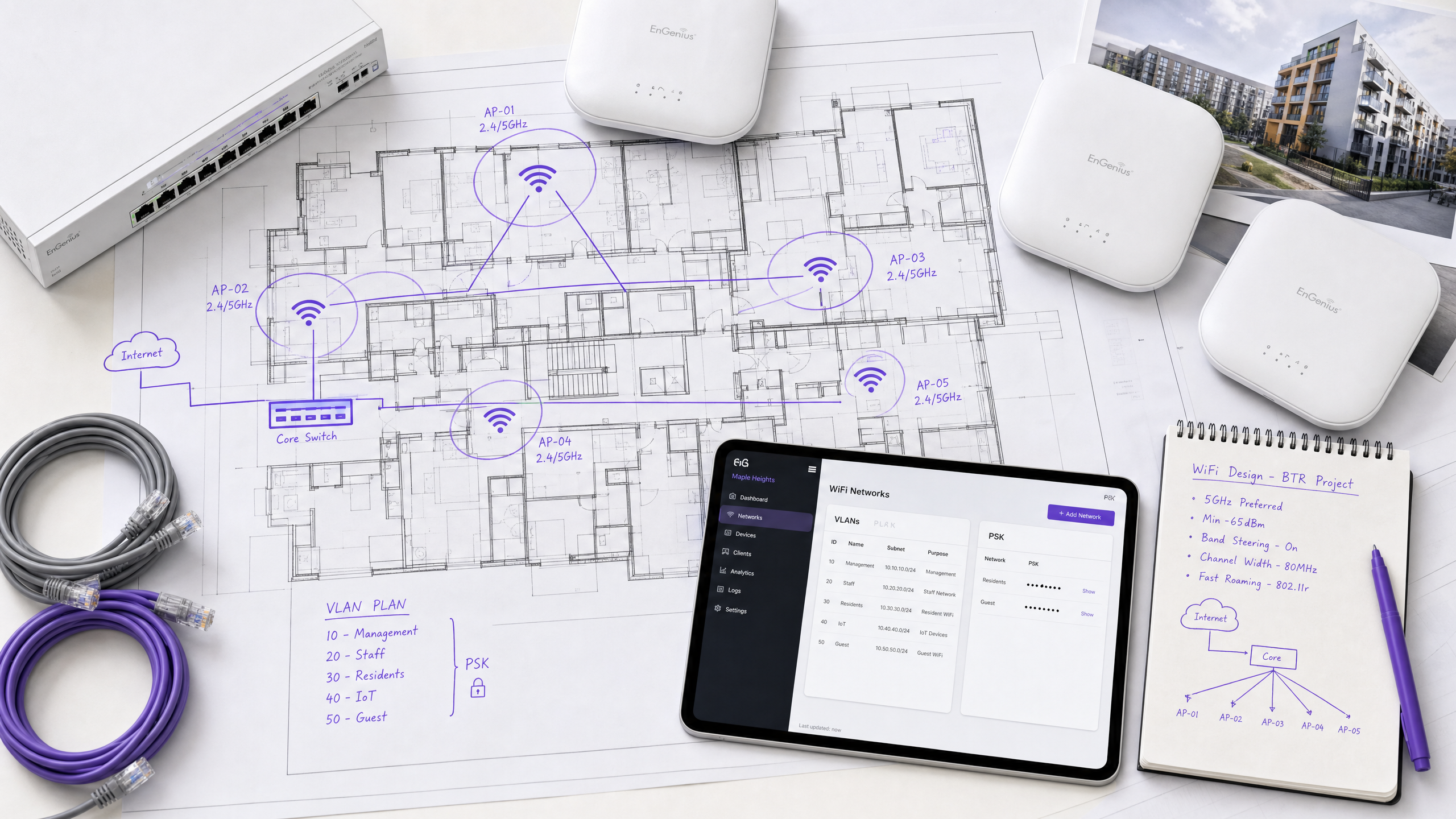
Configure a single SSID across the property. Enable iPSK with RADIUS authentication on the wireless controller or cloud management dashboard. Define the VLAN pool for dynamic assignment - for example, VLAN 100 to VLAN 600 for a 500-unit development. Ensure that the core network switches are configured to trunk all of these VLANs to the access points, and that inter-VLAN routing is strictly controlled by firewall policy to maintain isolation.
For the three-SSID design pattern - Resident WiFi, Staff WiFi, and IoT WiFi - see our related article Three SSIDs to rule them all: guest, Passpoint, and IoT WiFi .
Step 3: Identity provider integration
Manual key management does not scale beyond a handful of units. Integrate your network management platform with an Identity Provider (IdP). Purple integrates with Microsoft Entra ID, Okta, and Google Workspace. When a new resident signs a lease and is added to your property management system, the integration automatically generates a unique iPSK, assigns a VLAN, and emails the credentials to the resident before their move-in date. When their lease ends and they are removed from the system, Purple revokes the key automatically.
Step 4: Change of Authorization (CoA) configuration
Key revocation in the RADIUS database does not immediately disconnect an already-associated device. The RADIUS authentication only occurs during the initial connection handshake. To force immediate disconnection on lease termination, configure your management platform to send a Change of Authorization (CoA) message directly to the wireless controller. This instructs the controller to drop the client session immediately. Verify CoA is working end-to-end in your test environment before go-live.
Step 5: Device onboarding and resident experience
Residents connect their smartphones, laptops, and smart TVs using their unique iPSK. The network automatically places them in their Private Area Network. For headless devices - gaming consoles, smart thermostats, wireless printers - the resident enters the iPSK during the standard WiFi setup process on the device. No captive portal, no certificate, no helpdesk call.
For hospitality deployments, iPSK eliminates the most common guest complaint: the recurring captive portal login. For retail environments, it enables secure staff device segmentation on the same physical infrastructure as Guest WiFi . For healthcare settings, it isolates sensitive medical IoT devices on a dedicated VLAN while providing simple connectivity for patients and visitors.
Best practices
Automate lifecycle management. Never manage keys manually. Use an orchestration layer like Purple to automate key creation and revocation based on lease dates or employment status. Manual management fails at scale and creates security gaps when residents leave.
Enforce strict Layer 2 isolation. Providing unique keys is only half the solution. Verify that Layer 2 isolation is functioning correctly by using network scanning tools to confirm that devices in different VLANs cannot discover each other via mDNS or broadcast traffic. This is the step most commonly skipped in initial deployments.
Plan for MAC address randomisation. Modern smartphones randomise their MAC address to protect user privacy. If your iPSK deployment relies strictly on MAC Address Bypass (MAB), randomisation will break authentication. Ensure your infrastructure uses EAPOL-based iPSK verification, which does not require pre-registering MAC addresses.
Monitor RADIUS performance. iPSK places a heavier load on the RADIUS server than standard 802.1X because of the dictionary checks required during the EAPOL handshake. Monitor authentication latency and scale the RADIUS infrastructure accordingly. In deployments with tens of thousands of keys, ensure the RADIUS database is properly indexed.
Reference IEEE 802.1X and PCI DSS. For properties that include retail or co-working spaces, the network segmentation provided by iPSK supports PCI DSS compliance by isolating payment card environments from general resident traffic. Document your VLAN segmentation and RADIUS access controls as part of your PCI DSS audit trail.
Troubleshooting and risk mitigation
Authentication timeouts
If the RADIUS server takes too long to process the EAPOL parameters and find a matching iPSK, the client device will time out and fail to connect. This is common in deployments with tens of thousands of keys. Mitigate this by ensuring the RADIUS database is indexed on the PSK field, and by using a high-performance cloud RADIUS service. Cisco Meraki documentation notes that an EAPOL handshake timeout after message two is expected behaviour during the initial lookup - the AP restarts the handshake once the RADIUS server returns the PMK.
VLAN assignment failures
If a client connects but does not receive an IP address, the RADIUS server may be failing to pass the correct VLAN attributes, or the network switch may not have the assigned VLAN configured. Verify the Tunnel-Private-Group-Id attribute in the RADIUS ACCESS-ACCEPT message using a packet capture, and check that the switch port is trunking the assigned VLAN to the access point.
MAC randomisation breaking MAB-based iPSK
If residents report intermittent connection failures, particularly after iOS or Android updates, MAC randomisation is the most likely cause. Migrate to EAPOL-based iPSK verification (Cisco Easy PSK from MR 32.1.3+) which does not require pre-registered MAC addresses.
Devices connecting but not reaching the correct VLAN
In Cisco Meraki deployments, VLAN override via RADIUS requires the SSID to be configured in Bridge mode with VLAN tagging enabled and RADIUS override set to "Override VLAN tag". Verify this configuration if clients are landing on the default SSID VLAN rather than their assigned VLAN.
ROI and business impact
iPSK delivers measurable business value for property developers and landlords across three dimensions.
Hardware cost reduction. Eliminating individual consumer-grade routers from every apartment removes a significant capital and operational expense. A 250-unit development deploying one consumer router per unit at £80 each represents £20,000 in hardware alone, plus ongoing replacement and support costs. Shared infrastructure with iPSK eliminates this entirely.
RF environment improvement. Each consumer router broadcasts its own SSID, creating competing WiFi networks that degrade signal quality for all residents. Removing individual routers and replacing them with a professionally planned access point deployment reduces interference and improves throughput for every resident.
Resident satisfaction and retention. Residents receive their unique iPSK before move-in, providing instant-on WiFi from day one. This removes the most common connectivity complaint in BTR developments. Managed WiFi with a clear service level is increasingly a differentiator in the BTR market, where residents compare amenities directly.
Operational efficiency. Automated credential provisioning and revocation eliminates helpdesk tickets related to password resets, move-in setup, and move-out procedures. Purple's WiFi Analytics platform provides usage data and network health monitoring, giving property managers visibility into their infrastructure without requiring dedicated IT staff on site.
For transport and public-sector operators managing multi-tenant environments, the same architecture applies. Purple's 99.999% uptime SLA, ISO 27001 certification, and GDPR compliance make it a credible choice for regulated environments where network availability and data protection are non-negotiable.
Key Definitions
Identity Pre-Shared Key (iPSK)
A security protocol that assigns a unique WiFi password to individual users or devices on a single SSID, enabling granular access control, dynamic VLAN assignment, and individual credential revocation without requiring digital certificates.
Used to secure multi-tenant and IoT networks where WPA2-Enterprise is too complex or incompatible with headless devices.
RADIUS
Remote Authentication Dial-In User Service. A networking protocol that provides centralised Authentication, Authorisation, and Accounting (AAA) management for network access.
The backend server that processes iPSK authentication requests, runs the PSK dictionary check, and returns dynamic VLAN assignments.
Private Area Network (PAN)
A micro-segmented network environment that isolates a specific resident's devices from the rest of the network, simulating a private home router experience on shared infrastructure.
Critical for resident privacy in BTR and student accommodation deployments. Enabled by combining iPSK with dynamic VLAN assignment and mDNS reflection.
Layer 2 isolation
A network security measure that prevents devices on the same local network segment from communicating directly with each other at the data link layer.
Used alongside iPSK to ensure that a compromised device in one apartment cannot discover or attack devices in another, even on the same physical access point.
Dynamic VLAN assignment
The process of placing a user or device into a specific Virtual Local Area Network based on their identity or credentials during the RADIUS authentication process.
The mechanism iPSK uses to separate traffic for different residents on the same physical access point. Carried in the Tunnel-Private-Group-Id RADIUS attribute.
EAPOL
Extensible Authentication Protocol over LAN. The protocol used in the WPA2 four-way handshake to establish secure communication between a client device and an access point.
Modern iPSK implementations pass EAPOL parameters to the RADIUS server to verify the pre-shared key without requiring MAC address pre-registration, solving the MAC randomisation problem.
Change of Authorization (CoA)
A RADIUS extension (RFC 5176) that allows a RADIUS server or management platform to send a message to a wireless controller instructing it to drop an active client session.
Essential for immediate credential revocation. Without CoA, a revoked iPSK only takes effect when the device disconnects and attempts to reconnect.
Headless device
A network-connected device that lacks a screen or web browser, such as a gaming console, smart thermostat, wireless printer, or smart speaker.
These devices cannot navigate captive portals or process 802.1X certificates, making iPSK the only viable secure authentication method for them on an enterprise network.
Build-to-Rent (BTR)
Purpose-built residential developments designed specifically for the rental market, typically managed by a single operator who provides amenities including managed WiFi.
A primary market for iPSK deployments. BTR operators use iPSK to provide instant-on, per-resident isolated WiFi as a premium amenity without deploying individual routers in every unit.
mDNS reflection
A network configuration that forwards multicast DNS traffic within a specific VLAN, enabling device discovery protocols like AirPlay, Chromecast, and Bonjour to function within an isolated network segment.
Required to allow residents to cast video to their smart TV or print to their wireless printer within their Private Area Network, while maintaining isolation from other residents.
Worked Examples
A 250-unit Build-to-Rent development needs to provide secure WiFi for residents. The operator wants to avoid installing individual routers in each apartment to reduce RF interference and hardware costs. Residents need to connect smart TVs, gaming consoles, and smart home devices. Residents must not be able to see devices in other apartments.
Deploy a single property-wide SSID using Cisco Meraki access points configured for Identity PSK with RADIUS authentication. Integrate the property management system with Purple to automatically generate a unique iPSK for each lease. When a resident connects, the RADIUS server assigns them to a dedicated VLAN - for example, VLAN 101 for Unit 101. Configure the core switches to isolate these VLANs at Layer 2. Enable mDNS reflection within each resident VLAN to support AirPlay, Chromecast, and wireless printing within the unit. Configure Change of Authorization (CoA) to drop client sessions immediately on lease termination. Integrate Purple with the property management system so that credentials are provisioned before move-in and revoked automatically on move-out.
A university student accommodation block houses 800 students, each bringing an average of seven devices including laptops, phones, gaming consoles, and smart speakers. The IT department is receiving high volumes of support tickets from students unable to connect their wireless printers and smart speakers to the campus WPA2-Enterprise network.
Maintain the existing 802.1X network for laptops and phones. Create a secondary SSID configured for iPSK specifically for headless IoT devices. Students use a self-service portal to generate a unique iPSK for their devices. The RADIUS server assigns these devices to a student-specific IoT VLAN, isolating them from other students' devices while allowing them to communicate with the student's own devices via mDNS reflection. Integrate the portal with the university's identity provider - Microsoft Entra ID or Google Workspace - so that credentials are tied to the student's university account and revoked automatically at the end of their enrolment.
Practice Questions
Q1. You are designing the network for a 500-unit student accommodation block. Students need to connect laptops, phones, and gaming consoles. The IT team wants individual credential revocation and cannot support a helpdesk queue for certificate issues. How do you structure the authentication?
Hint: Consider the capabilities of gaming consoles versus the security requirements for laptops. Think about whether one SSID or two is more appropriate.
View model answer
Deploy a single SSID using iPSK with RADIUS authentication. This allows laptops and phones to connect securely while also supporting headless devices like gaming consoles that cannot process 802.1X certificates. Use dynamic VLAN assignment to isolate each student's devices. Integrate with the university's identity provider so that credentials are provisioned at enrolment and revoked automatically at the end of each academic year. This eliminates the certificate management overhead while providing individual revocation capability.
Q2. A resident reports that they cannot cast video from their smartphone to their smart TV. Both devices show as connected to the WiFi network. The resident is in Unit 204 of a 200-unit BTR development. What is the most likely cause and how do you resolve it?
Hint: Think about how Layer 2 isolation affects device discovery protocols like mDNS. Consider whether the issue is between VLANs or within the same VLAN.
View model answer
The most likely cause is that the smartphone and smart TV are assigned to different VLANs, or that mDNS reflection is not enabled within the resident's VLAN. First, verify that both devices authenticated with the same iPSK and were assigned to the same VLAN by checking the RADIUS access logs. If they are on different VLANs, the resident may have used different credentials for each device - correct this by ensuring both devices use the same iPSK. If they are on the same VLAN but casting still fails, enable mDNS reflection within that VLAN on the wireless controller to allow AirPlay and Chromecast discovery traffic.
Q3. Your property management system revokes a resident's iPSK when their lease ends at midnight. The next morning, the property manager reports that the former resident's devices are still connected to the network. Why, and what do you do?
Hint: Consider how often a device actually authenticates with the RADIUS server after the initial connection. Think about what mechanism forces immediate disconnection.
View model answer
RADIUS authentication only occurs during the initial connection handshake. Once a device is associated with the network, it does not re-authenticate continuously. Revoking the iPSK in the RADIUS database prevents future connections but does not disconnect active sessions. To force immediate disconnection, the management system must send a Change of Authorization (CoA) message - defined in RFC 5176 - directly to the wireless controller. This instructs the controller to drop the active client sessions for that VLAN or MAC address immediately. Verify that your management platform supports CoA and that it is configured to send disconnect messages on credential revocation, not just on the next authentication attempt.
Q4. You are planning a WiFi 6E deployment for a new BTR development. The access points support the 6 GHz band, which requires WPA3. You want to use iPSK for resident isolation. How do you handle the WPA3 compatibility constraint?
Hint: iPSK operates on WPA2. WPA3 uses SAE. Consider a dual-band strategy.
View model answer
iPSK is not compatible with WPA3-SAE, which is required on the 6 GHz band. Deploy a dual-SSID strategy: one SSID on the 2.4 GHz and 5 GHz bands using WPA2 with iPSK for broad device compatibility, including all IoT and legacy devices. A second SSID on the 6 GHz band using WPA3-Enterprise (802.1X) for modern laptops and phones that support it. Use the same RADIUS infrastructure for both, with the 802.1X SSID using EAP-TLS or PEAP for certificate-based or credential-based authentication. This ensures that legacy and headless devices continue to work on the iPSK SSID while 6 GHz capable devices benefit from WPA3 security.
Continue reading in this series
Spectrum managed WiFi customer service: a comprehensive guide for businesses
This comprehensive guide details how build-to-rent operators and property developers can deploy spectrum managed WiFi to provide secure, isolated network experiences for residents. It covers the technical architecture of cloud RADIUS, VLAN isolation, and iPSK, alongside practical implementation strategies to reduce support overhead.
Spectrum managed WiFi customer service: a comprehensive guide for businesses
This comprehensive guide details how build-to-rent operators and property developers can deploy spectrum managed WiFi to provide secure, isolated network experiences for residents. It covers the technical architecture of cloud RADIUS, VLAN isolation, and iPSK, alongside practical implementation strategies to reduce support overhead.
PPSK lights: comparing features and deployment models
A definitive technical guide comparing PPSK (Private Pre-Shared Key) authentication models for smart buildings and multi-tenant environments. It covers architecture, IoT segmentation, vendor implementations, and the business case for identity-based WiFi in the Build-to-Rent sector.