
Logo guild iPSK: a comprehensive guide for businesses
This comprehensive guide explores Identity Pre-Shared Key (iPSK) architecture, implementation strategies, and business benefits for multi-tenant environments. It provides IT leaders in BTR, hospitality, and retail with actionable steps to deploy secure, segmented WiFi networks without the complexity of 802.1X.
Listen to this guide
View podcast transcript
Executive Summary
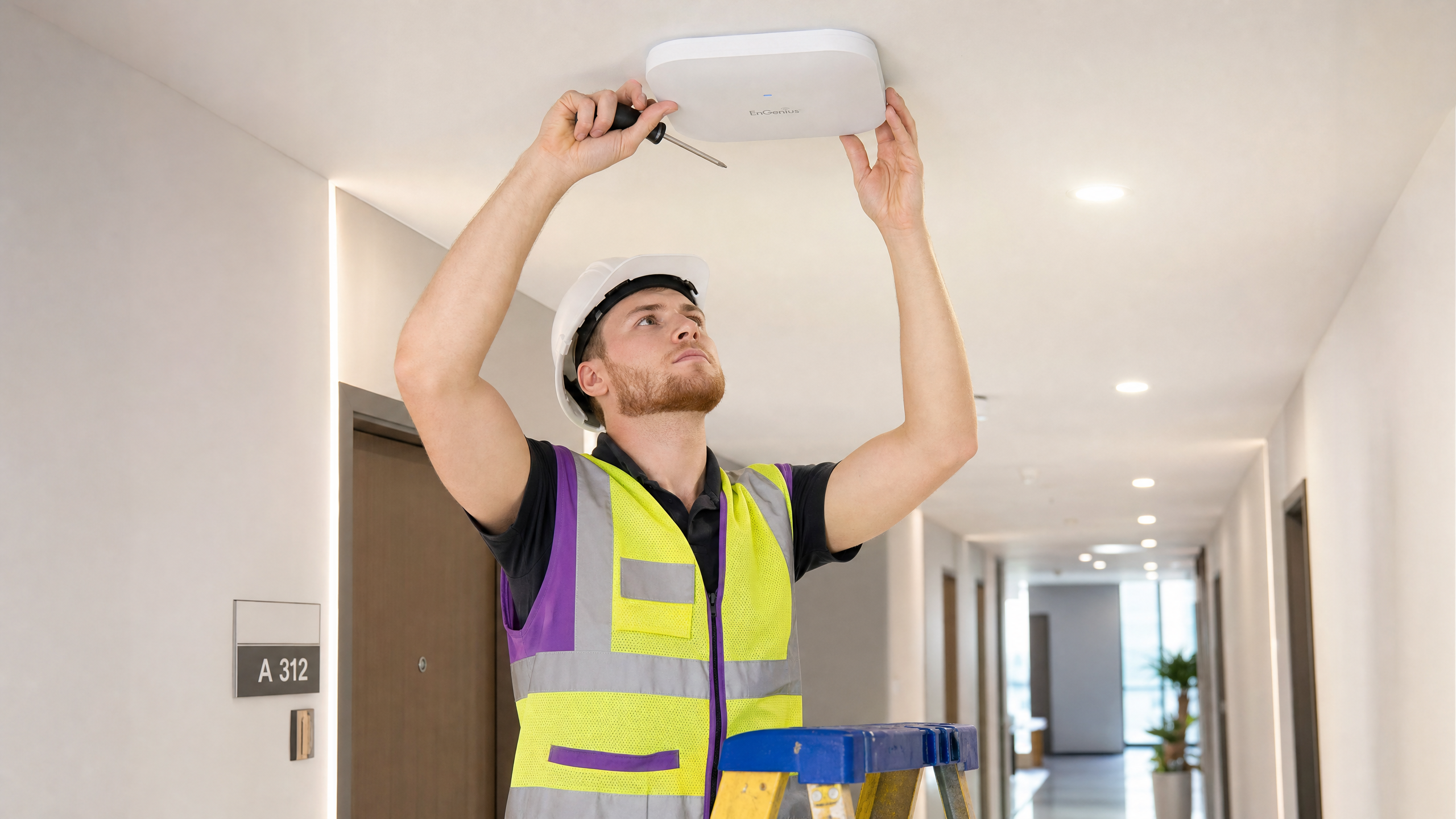
Identity Pre-Shared Key (iPSK) solves the fundamental security compromise in enterprise WiFi: balancing the simplicity of a shared password with the security and segmentation of 802.1X. For IT managers and venue operations directors in Build-to-Rent (BTR), hospitality, and retail environments, iPSK provides a scalable method to isolate traffic, secure IoT devices, and automate network access without burdening the helpdesk.
By assigning a unique passcode to every individual user or device on a single SSID, iPSK enables granular network segmentation through VLAN override via RADIUS. This approach eliminates the risks of standard WPA2-Personal while supporting 100% of headless IoT devices that cannot authenticate via WPA3-Enterprise. This guide details the architecture, deployment strategies, and business impact of implementing iPSK across multi-tenant environments.
Listen to the Briefing
Technical Deep-Dive
The Architecture of iPSK
Traditional WPA2-Personal uses one password for all users on an SSID. Any resident can see any other resident's devices on the same broadcast domain. Rotating the password when a resident leaves affects every other resident. iPSK changes the authentication model entirely.
When a device attempts to associate with the access point using a specific PSK, the wireless controller sends a RADIUS Access-Request to the Purple cloud. The RADIUS server matches the password against the resident record and returns a RADIUS Access-Accept message containing a vendor-specific attribute: the VLAN ID assigned to that resident. The controller drops the client onto that VLAN. The entire exchange takes milliseconds and is invisible to the resident.
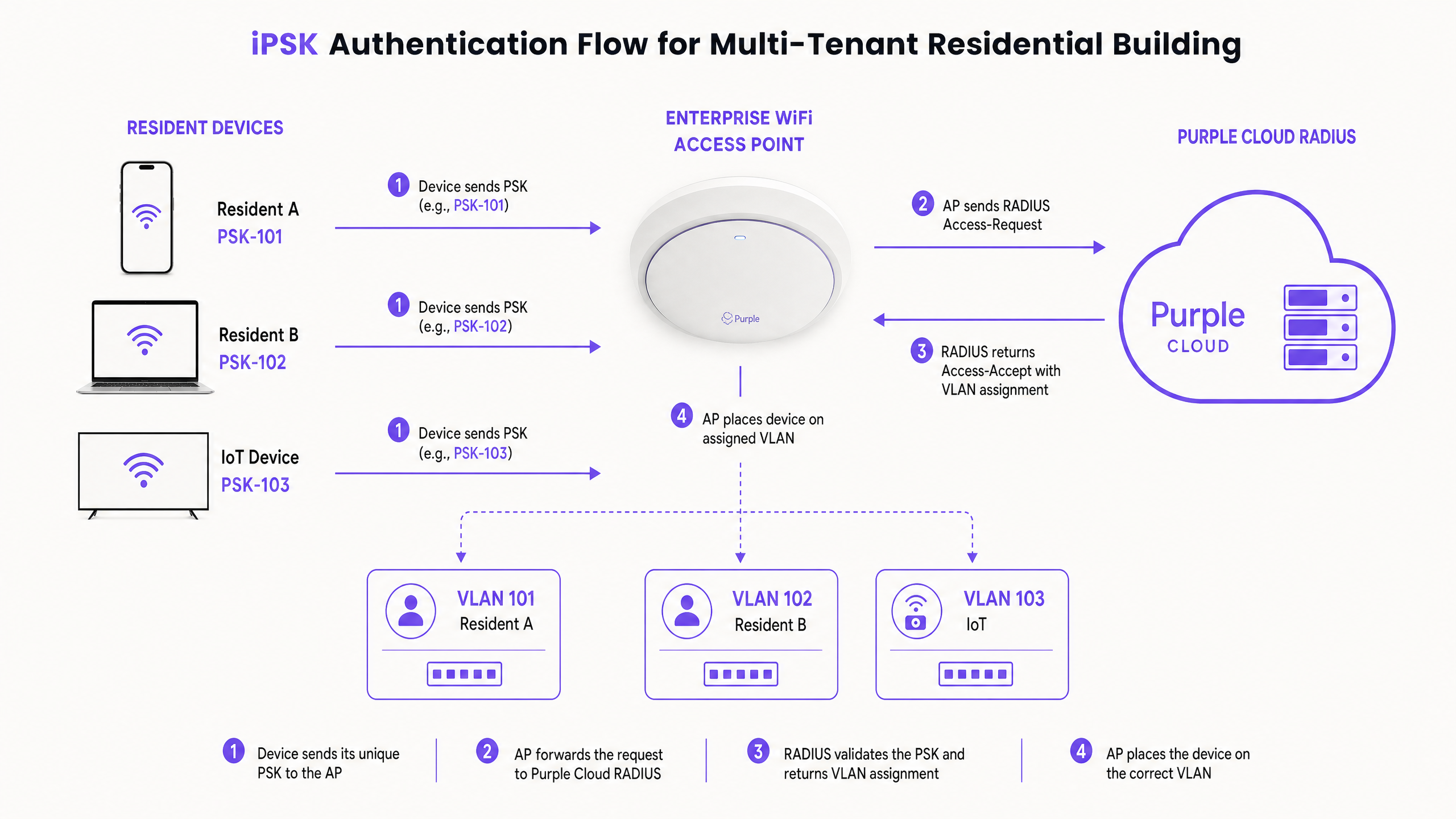
This architecture delivers three outcomes:
- VLAN segmentation: Traffic is isolated at Layer 2. Resident A on VLAN 101 cannot route traffic to Resident B on VLAN 102.
- Broadcast containment: mDNS and Bonjour discovery traffic stays within the resident's VLAN. Chromecast and Sonos work inside the apartment but do not bleed into the corridor.
- Clean key lifecycle: Revoking one key at move-out affects only that resident. The rest of the building stays online.
Vendor terminology varies. HPE Aruba calls this PPSK (Private Pre-Shared Key) or MPSK (Multi-PSK). Cisco Meraki calls it Identity PSK. Ruckus and Juniper Mist use DPSK (Dynamic Pre-Shared Key). The concept is identical across Cisco Meraki, HPE Aruba, Ruckus, Juniper Mist, Ubiquiti UniFi, Cambium, Extreme, and Fortinet hardware.
Comparing Authentication Methods
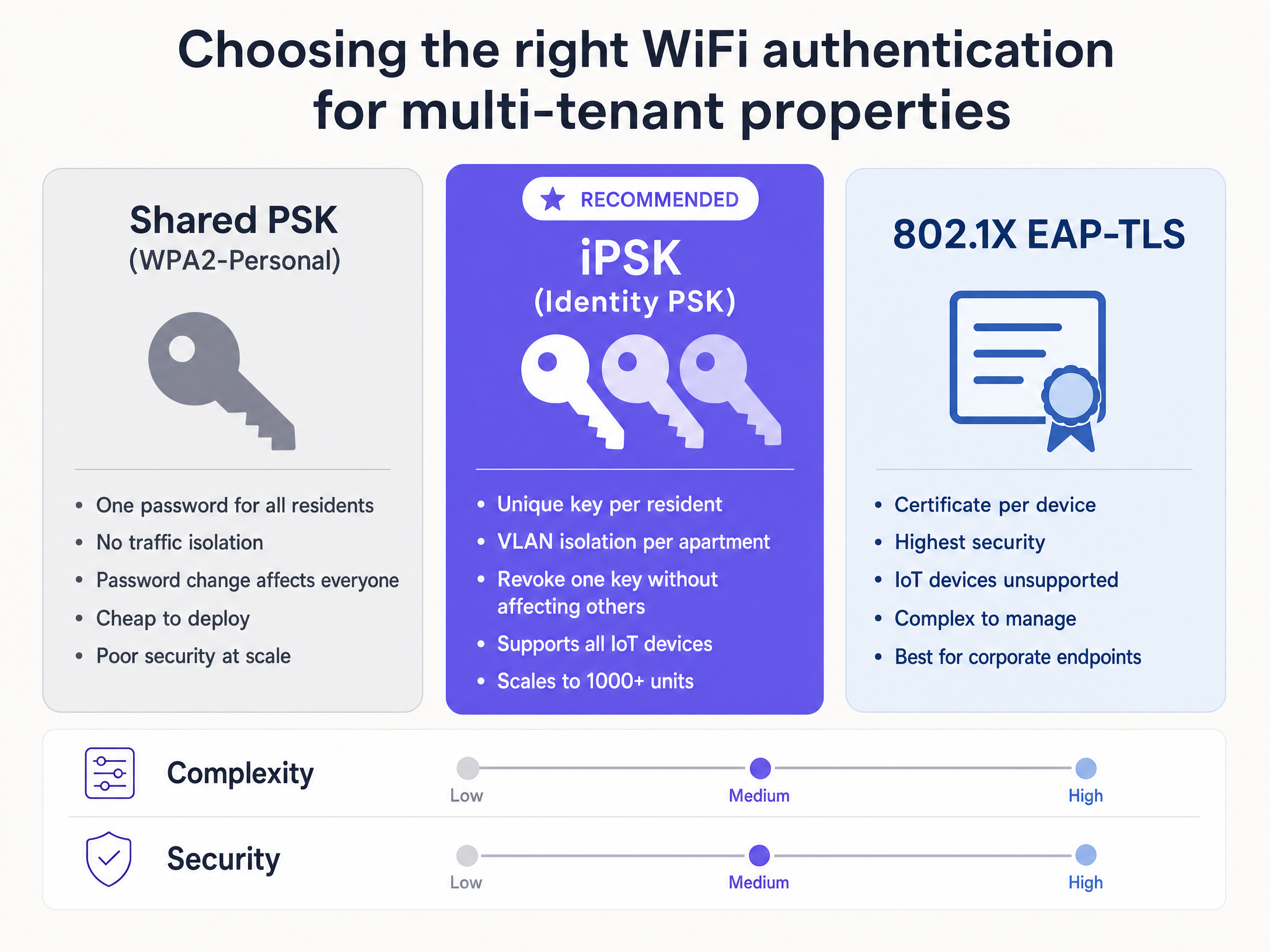
The choice of authentication model dictates your operational overhead.
- Standard PSK (WPA2-Personal) gives you simplicity but no central control. If one resident leaks the password, the entire network is at risk.
- 802.1X EAP-TLS is the high-security corporate standard, providing per-device certificate-based authentication. However, it requires a supplicant on every device. Gaming consoles, smart TVs, and Amazon Alexa devices do not support 802.1X.
- iPSK gives you the per-device identity of 802.1X with the operational simplicity of a home password. It supports all headless IoT devices and scales to thousands of units.
Implementation Guide
Deploying iPSK requires precise configuration. These are the critical steps for a successful rollout.
1. VLAN and Subnet Design
The most common mistake is under-sizing the DHCP scope. Network engineers sometimes assign a /28 subnet per apartment to save IP address space. That provides 14 usable addresses. A modern BTR apartment will exhaust 14 IPs rapidly with phones, laptops, smart TVs, gaming consoles, and smart bulbs. Always default to a /24 subnet per resident, providing 254 usable addresses.
2. Client Isolation Configuration
You must ensure client isolation is disabled within the resident's VLAN. If you leave client isolation enabled, you break the smart home functionality that iPSK is designed to support. Devices on the same key will not be able to communicate with each other, resulting in Chromecast support tickets.
3. Roaming and Trunking
If a resident walks from their apartment down to the communal gym, their connection needs to persist. Their specific VLAN must be trunked to the access point in the gym, or you need to tunnel the traffic back to a central controller. Failing to configure this results in dropped connections in common areas.
4. Handling MAC Randomisation
Apple iOS 14 and Android 10 introduced per-network randomised MAC addresses. In a MAC-based iPSK deployment, the access point sends the randomised MAC to the RADIUS server, which fails to recognise it. If you use Cisco Meraki, implement Easy PSK mode. Easy PSK authenticates via EAPOL parameters rather than MAC lookup, resolving randomisation issues.
Best Practices
Follow these industry-standard recommendations for multi-tenant deployments:
- Automate the Lifecycle: Do not deploy iPSK without a lifecycle management layer. Manually managing thousands of keys is unsustainable. Integrate your property management system (PMS) with Purple to automate key provisioning and revocation.
- Design for WPA3: WiFi 6E and WiFi 7 mandate WPA3 security on the 6 GHz band. WPA3 replaces the four-way handshake with Simultaneous Authentication of Equals (SAE), which currently does not support multiple passwords per SSID. Maintain a WPA2 iPSK SSID on the 2.4 and 5 GHz bands for IoT hardware, and deploy a separate SSID using 802.1X for the 6 GHz band.
- Plan VLAN Architecture Early: The power of iPSK is VLAN override via RADIUS. Design your VLANs (residents, IoT, staff, management) before configuring the wireless controller. Retrofitting VLAN architecture is costly.
Troubleshooting & Risk Mitigation
When deploying iPSK, monitor for these common failure modes:
- Authentication Timeouts: Often caused by RADIUS server latency. Ensure your access points have a reliable path to the Purple cloud.
- IoT Devices Failing to Connect: Verify that 802.11r (Fast BSS Transition) is disabled on the iPSK SSID, as many legacy IoT devices do not support it and will refuse to associate.
- Broadcast Storms: If mDNS reflection is misconfigured, broadcast traffic can overwhelm the network. Ensure mDNS gateways are strictly bound to the resident's specific VLAN.
ROI & Business Impact
Deploying managed WiFi via iPSK is a commercial strategy, not just an IT upgrade.
For BTR operators, providing day-one connectivity eliminates the void period while a resident waits for an ISP engineer. Managed WiFi commands a £15 to £30 rent premium per unit, per month in UK Build-to-Rent developments.
Operationally, iPSK improves the RF environment. Instead of 200 consumer routers competing on overlapping channels, you have a single, clean SSID managed by enterprise access points. Purple automates the entire onboarding and offboarding lifecycle, reducing support tickets and operational overhead for the property management team.
Purple deploys as a cloud overlay on your existing hardware. To explore how Guest WiFi and multi-tenant solutions can drive revenue in Hospitality and Retail , contact our engineering team.
Key Definitions
iPSK (Identity Pre-Shared Key)
A WiFi security model that assigns a unique password to every individual user or device on a single network name (SSID).
Allows IT teams to provide secure, per-device access control without the complexity of 802.1X certificates.
VLAN Override
The process where a RADIUS server returns a specific VLAN ID during authentication, instructing the access point to place the client on that isolated network segment.
This is the core mechanism iPSK uses to isolate Resident A from Resident B on the same physical access point.
Private Area Network (PAN)
A virtual bubble created around a user's specific devices, ensuring Layer 2 isolation from other users on the same infrastructure.
Essential for multi-tenant environments to ensure privacy and security while allowing personal devices to interact.
mDNS Reflection
A network feature that allows multicast discovery protocols (like Apple Bonjour) to function across specific boundaries.
Required so residents can cast to their smart TVs without seeing their neighbour's devices.
802.1X EAP-TLS
The enterprise standard for network authentication, requiring digital certificates on the client device.
Highly secure but incompatible with headless IoT devices like gaming consoles and smart speakers.
Headless IoT Device
A connected device without a traditional screen or web browser interface, such as a smart plug, thermostat, or sensor.
These devices cannot navigate captive portals or install 802.1X certificates, making iPSK the only secure way to connect them.
MAC Randomisation
A privacy feature in iOS and Android that generates a fake MAC address for each WiFi network the device joins.
Breaks traditional MAC-based iPSK deployments, requiring solutions like Cisco Meraki's Easy PSK mode.
Simultaneous Authentication of Equals (SAE)
The secure key establishment protocol used in WPA3, replacing the WPA2 four-way handshake.
The IEEE standard for SAE currently limits the ability to use multiple passwords on a single SSID, complicating 6 GHz deployments.
Worked Examples
A 350-unit Build-to-Rent development needs to provide secure, day-one WiFi for all residents without manual intervention from the facilities team.
Integrate Purple's Multi-Tenant WiFi platform with the property management system (PMS). When a lease is signed, the PMS triggers an API call to Purple, generating a unique iPSK. The resident receives the key via email and connects immediately upon move-in. Upon move-out, the API revokes the key automatically.
A 180-room hotel wants to eliminate the captive portal login that guests complain about, while ensuring in-room smart TVs and guest devices are securely isolated.
Deploy iPSK with PMS integration. Each room receives a unique key printed on the key card or sent via booking confirmation. Guests connect once, and their devices rejoin automatically. In-room IoT devices (smart TVs, tablets) are placed on a separate VLAN via RADIUS override.
Practice Questions
Q1. You are deploying WiFi in a 200-unit BTR building. The client insists on using WPA3 for all devices on the 6 GHz band. How do you design the SSID architecture to support resident smart TVs and gaming consoles?
Hint: Consider the current limitations of SAE in the IEEE 802.11 standard.
View model answer
Deploy a hybrid approach. Because WPA3 SAE does not currently support multiple passwords per SSID natively, you must maintain a WPA2 iPSK SSID on the 2.4 and 5 GHz bands to support legacy and headless IoT devices (like smart TVs and consoles). You can deploy a separate WPA3-Enterprise (802.1X) SSID on the 6 GHz band for managed corporate devices, but residential IoT devices will remain on the 2.4/5 GHz bands.
Q2. A resident reports they cannot cast Netflix from their iPhone to their Chromecast. Both devices are connected to the network using the resident's unique iPSK. What is the most likely configuration error?
Hint: Think about how devices communicate within the same broadcast domain.
View model answer
Client isolation is likely enabled on the resident's VLAN. While iPSK correctly places both devices on the same VLAN, client isolation prevents them from communicating with each other. You must disable client isolation within the VLAN and ensure mDNS reflection is properly configured.
Q3. Your BTR client wants to reduce the operational overhead of managing WiFi access. They currently manually generate and email passwords when residents move in. What is the recommended solution?
Hint: Consider the systems the property management team already uses.
View model answer
Integrate the WiFi management platform (like Purple) with the building's Property Management System (PMS) via API. This automates the lifecycle: when a lease is signed in the PMS, it automatically triggers the generation of an iPSK and emails it to the resident. When the lease ends, the API automatically revokes the key, achieving a zero-touch operational model.
Continue reading in this series
Uu PPSK 2023: comparing features and deployment models
This technical reference guide compares Unique per-User Private Pre-Shared Key (UU PPSK) WiFi architecture against traditional shared PSK and 802.1X deployments, with a specific focus on the 2023 landscape of vendor implementations and platform capabilities. It provides property developers, BTR operators, and MDU landlords with actionable deployment strategies, VLAN architecture guidance, and automated lifecycle management workflows. The guide covers three deployment models, real-world case studies, and the compliance implications of each authentication approach.
Uu PPSK 2023: comparing features and deployment models
This technical reference guide compares Unique per-User Private Pre-Shared Key (UU PPSK) WiFi architecture against traditional shared PSK and 802.1X deployments, with a specific focus on the 2023 landscape of vendor implementations and platform capabilities. It provides property developers, BTR operators, and MDU landlords with actionable deployment strategies, VLAN architecture guidance, and automated lifecycle management workflows. The guide covers three deployment models, real-world case studies, and the compliance implications of each authentication approach.
PPSK xaverius: comparing features and deployment models
This authoritative guide examines PPSK xaverius architecture for multi-tenant environments like Build to Rent and student accommodation. It compares deployment models, details implementation strategies, and explains how per-unit VLAN isolation delivers a home-like WiFi experience while maintaining enterprise security.