
First-party data marketing: a comprehensive guide for businesses
This guide explains how to build a robust first-party data marketing strategy using enterprise Guest WiFi networks. It covers the technical architecture for secure data capture via captive portals, GDPR-compliant consent workflows, CRM integration patterns, and automated campaign deployment. Venue operators across hospitality, retail, events, and public-sector environments will find actionable guidance for turning passive visitors into a high-quality, owned marketing audience.
Listen to this guide
View podcast transcript
📚 Part of our core series: WiFi Marketing Guide →

Executive summary
Third-party cookies are depreciating. Paid acquisition costs are rising. For physical venues, the most valuable marketing asset is already in the building: the guest. First-party data marketing shifts the focus from renting audiences to owning them.
This guide details how to implement a first-party data strategy using Guest WiFi and Purple Engage. We cover the technical architecture required to capture data securely at the network edge, the integration pathways to your existing CRM or Customer Data Platform (CDP), and the automated marketing workflows that drive measurable revenue. You will learn how to build a compliant, high-conversion captive portal and how to activate that data to increase customer lifetime value across hospitality, retail , events, and public-sector venues.
Purple operates across 80,000+ live venues and processed 440 million logins in 2024 (Purple internal data). That scale means the patterns in this guide are validated against real-world deployments, not theory.
Technical deep-dive: the first-party data architecture
A successful first-party data strategy requires a robust underlying architecture. Offering an open SSID is not enough. You must deploy a managed captive portal that authenticates users, captures consent, and routes data securely to your marketing stack.

Authentication and data capture
When a guest connects to the WiFi network, the hardware controller intercepts the traffic and redirects the device to a captive portal hosted by Purple. This portal is the primary data collection point. Rather than asking for a simple password, the portal requires the guest to authenticate using an email address, phone number, or social media profile.
This process captures critical first-party data: verified contact details (email addresses or phone numbers validated during login), demographic information (age, gender, and location data retrieved via social logins where permitted), and device identifiers (MAC addresses used to track repeat visits and dwell times).
For a deeper look at structuring your WiFi network for multiple use cases, see our guide on Three SSIDs to rule them all: guest, Passpoint, and IoT WiFi .
Integration and data flow
Purple acts as a cloud overlay, sitting above your existing hardware infrastructure. We support canonical hardware integrations including Cisco Meraki, HPE Aruba, Ruckus, Juniper Mist, Ubiquiti UniFi, Cambium, Extreme, and Fortinet. You do not need to replace your existing access points.
Once data is captured, it must flow into your broader marketing ecosystem. Purple Engage syncs this data in real-time to your CRM or CDP. This integration ensures your marketing team always has access to current visitor profiles, enabling immediate, context-aware campaigns. According to Salesforce research, 71% of WiFi marketers now have live CRM or CDP sync in place, and those who do see a 33.1% improvement in campaign response rates.
Security and compliance standards
Handling first-party data requires strict adherence to security and privacy standards. The architecture must support secure authentication protocols and comply with global data protection regulations.
Purple maintains ISO 27001 certification and ensures compliance with GDPR, CCPA, and Cyber Essentials. When a guest logs in, the captive portal presents clear terms and conditions, capturing explicit, conscious-choice opt-ins for marketing communications. Pre-ticked boxes are not permitted under GDPR. Data is encrypted in transit and at rest.
Implementation guide: deploying a first-party strategy
Implementing a first-party data marketing strategy involves configuring the network, designing the captive portal, and setting up automated marketing workflows.
Step 1: network configuration
Begin by isolating the Guest WiFi network from your corporate infrastructure. Configure a dedicated VLAN for guest traffic to ensure security. If you operate multiple venues, centralise the management of the captive portal to maintain brand consistency across all locations.
For hospitality operators managing properties with mixed guest, staff, and IoT traffic, refer to our architecture guidance on Three SSIDs to rule them all: guest, Passpoint, and IoT WiFi .
Step 2: captive portal design
The captive portal is your digital front door. It must be visually appealing, mobile-responsive, and optimised for conversion. Use a light background and incorporate your brand colours and logo. Keep the data collection form brief. Ask only for the information you intend to use. Every additional field reduces the conversion rate.
A standard configuration requests an email address and a date of birth - useful for birthday campaigns. Ensure the opt-in checkboxes for marketing communications are clear and unticked by default to maintain GDPR compliance.
Learn more about optimising your portal in our guide: How to make a great first impression with your guest WiFi (and keep your brand consistent) .
Step 3: marketing automation setup
With data flowing into Purple Engage, configure automated campaigns triggered by specific visitor behaviours.
| Campaign type | Trigger | Typical outcome |
|---|---|---|
| Welcome campaign | First-time login | Immediate discount redemption |
| Birthday campaign | Date of birth match | High open rate, loyalty reinforcement |
| Win-back campaign | No login in 90 days | Lapsed visitor recovery |
| Dwell-time upsell | Session exceeds 30 minutes | Incremental spend |
Best practices for data activation
Collecting data is only the first step. To generate ROI, you must activate that data effectively.
Segment your audience
Do not send batch-and-blast emails. Use the behavioural data captured by the WiFi network to segment your audience. Create segments based on visit frequency, dwell time, and the specific venue visited.
For example, a retail chain can segment shoppers who frequently visit a flagship store and send them exclusive invitations to in-store events. A hotel can segment guests who use the WiFi in the conference centre and target them with B2B promotional offers. For transport hubs, segment passengers by route or terminal to deliver relevant retail promotions.
Personalise the communication
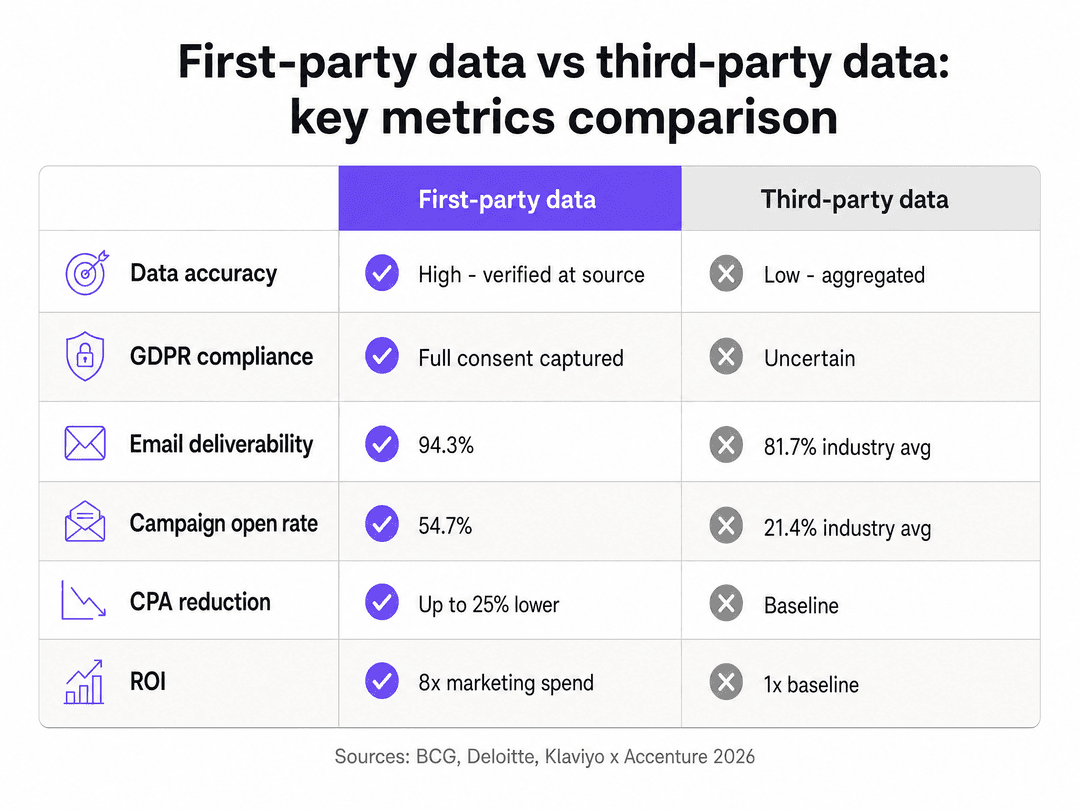
Use the first-party data to personalise your marketing messages. Address the recipient by name and reference their recent visit. Personalisation increases engagement rates significantly. WiFi-triggered campaigns achieve a 54.7% open rate and an 18.3% click-through rate, compared to a 21.4% open rate and 2.9% click-through rate for standard broadcast emails (Klaviyo and Accenture, 2026).
Use retail media
If you operate high-traffic venues, consider monetising the captive portal itself. The portal splash screen is prime digital real estate. You can display targeted advertisements or sponsorships before the guest accesses the internet. This approach generates significant ancillary revenue. One 34-location European mall group generated 4.6 million euros in net new advertising revenue, fully offsetting WiFi infrastructure costs (PwC, 2026).
Troubleshooting and risk mitigation
Deploying a WiFi marketing solution introduces specific technical and operational risks.
Low opt-in rates
If guests are connecting to the network but not opting into marketing communications, review your captive portal design. Ensure the value proposition is clear. Offer a tangible benefit, such as a discount code or free loyalty points, in exchange for the data. A single, clear call-to-action outperforms a portal with multiple options.
Data synchronisation failures
If data is not appearing in your CRM, verify the API connections between Purple and your marketing stack. Check the error logs in the Purple portal to identify authentication failures or rate-limiting issues. Ensure that the data fields mapped in Purple match the corresponding fields in your CRM. The most common failure point is a mismatch between the email field format in Purple and the CRM's required input format.
MAC address randomisation
Modern smartphones use MAC address randomisation to protect user privacy. This feature assigns a temporary MAC address to the device when it scans for networks. To track repeat visitors accurately, rely on the authenticated user profile (email or phone number) rather than the MAC address alone. Once a user logs in, Purple associates the current MAC address with their persistent profile. Passive detection metrics will always overcount unique visitors relative to authenticated profiles.
GDPR consent management
Maintain a clear audit trail of consent records. Purple stores consent timestamps and the specific version of the terms and conditions accepted at login. If a guest requests erasure under GDPR Article 17, the platform must be able to identify and delete all records associated with that individual. Test this workflow before going live.
ROI and business impact
A first-party data strategy delivers measurable business impact across multiple dimensions.
| Metric | First-party data | Third-party data |
|---|---|---|
| Email deliverability | 94.3% | 81.7% industry average |
| Campaign open rate | 54.7% | 21.4% industry average |
| CPA reduction | Up to 25% lower | Baseline |
| Marketing ROI | 8x spend | 1x baseline |
Sources: Retail TouchPoints 2026, Klaviyo and Accenture 2026, BCG, Deloitte.
Increased customer lifetime value
By building a direct relationship with your visitors, you increase their lifetime value. Automated campaigns drive repeat visits and incremental spend. Brands integrating first-party data into their advertising strategies see an 8x return on marketing spend (Deloitte). A 2% improvement in customer retention delivers the same financial benefit as a 10% reduction in costs (Think with Google).
Reduced acquisition costs
Owning your audience reduces reliance on expensive third-party advertising channels. You can reach your existing customers directly via email or SMS at a fraction of the cost of a paid search or social media campaign. McKinsey research shows first-party data strategies reduce customer acquisition costs by up to 50%.
Enhanced operational insights
The data collected provides valuable operational insights. By analysing foot traffic patterns and dwell times via WiFi Analytics , venue operators can optimise staffing levels, adjust store layouts, and measure the impact of physical marketing displays. One Chicago mall operator attributed a 2.3 million dollar annual revenue increase directly to tenant relocations informed by six months of WiFi movement data (JLL, 2026).
Key Definitions
First-party data
Information a company collects directly from its customers or audience based on explicit consent. Includes email addresses, phone numbers, demographic data, and behavioural data such as visit frequency and dwell time.
The core asset captured via the captive portal. Replaces reliance on depreciating third-party cookies and delivers higher accuracy and GDPR compliance.
Captive portal
A web page that a user of a public access network is required to view and interact with before internet access is granted. Used to present terms, capture consent, and collect user data.
The primary mechanism for first-party data collection in physical venues. Conversion rate is the key performance metric.
VLAN (Virtual Local Area Network)
A logical subdivision of a physical network that isolates traffic between different user groups at Layer 2 of the OSI model.
Guest WiFi traffic must be isolated on a dedicated VLAN to prevent guests from accessing corporate systems or other sensitive network segments.
MAC address randomisation
A privacy feature where mobile devices broadcast temporary, changing hardware addresses when scanning for networks, preventing persistent tracking.
IT teams must understand this limitation. Passive tracking metrics will overcount unique visitors. Authenticated profiles are the reliable unit of measurement.
Retail media
Advertising placed on a retailer's or venue operator's digital properties, targeted using the operator's first-party data.
Venue operators use the WiFi splash screen as a retail media asset to generate advertising revenue from tenants or brand partners.
Conscious-choice opt-in
A mechanism requiring the user to take a deliberate, affirmative action - such as ticking an unticked checkbox - to consent to marketing communications.
A strict GDPR requirement. Pre-ticked boxes are not permitted. Purple captures and stores the consent record with a timestamp for audit purposes.
Dwell time
The total duration a device remains connected to or visible to the WiFi network during a single visit.
Used to segment customers - distinguishing a quick coffee buyer from a remote worker - and trigger relevant campaigns based on session length.
Cloud overlay
A software architecture that integrates with existing hardware infrastructure without requiring firmware changes or hardware replacement.
Purple operates as a cloud overlay, allowing deployment across mixed hardware environments including Cisco Meraki, HPE Aruba, and Juniper Mist simultaneously.
Customer Data Platform (CDP)
A software system that aggregates and organises customer data from multiple touchpoints to create a unified, persistent customer profile.
The destination where WiFi-captured data is combined with point-of-sale, e-commerce, and app data to enable cross-channel personalisation.
Worked Examples
A 150-location pub chain needs to build a unified customer database to drive repeat visits, but currently relies on a mix of open WiFi networks and paper loyalty cards. The marketing director wants to launch automated email campaigns within 60 days.
Deploy Purple Engage across all 150 locations using the existing Cisco Meraki hardware. Configure a unified captive portal that requires email authentication or social login. Implement a branded splash screen with a clear value exchange: 'Connect for free WiFi and get 10% off your next visit.' Set up three automated campaigns in Purple Engage: a Welcome campaign triggering immediately on first login, a Birthday campaign using the captured date of birth, and a Win-Back campaign for customers who have not connected in 45 days. Sync all captured data to the central CRM via the Purple API.
A large shopping centre wants to monetise its high foot traffic of 50,000 daily visitors while collecting data to understand shopper movement between different retail zones. The operations director also wants to justify the WiFi infrastructure cost to the board.
Implement a tiered WiFi strategy. Offer a standard free tier supported by a 15-second sponsor video on the splash screen before internet access is granted. Collect email and demographic data during authentication. Use Purple's location analytics to track device movement across the venue, identifying which retail zones share the highest cross-traffic. Package this footfall data as a media product and sell premium splash screen placements to anchor tenants. Price placements based on verified visitor volume to the relevant zone.
Practice Questions
Q1. A stadium CTO is planning to roll out a new WiFi network to 60,000 fans. The marketing director wants to ask for email, phone number, postcode, favourite team, and age on the login screen to build a rich database. What is the correct recommendation?
Hint: Consider the impact of friction on a high-density, time-sensitive network deployment where thousands of devices connect simultaneously.
View model answer
Recommend a progressive profiling approach. The captive portal should ask only for an email address and marketing consent to ensure rapid authentication and prevent network bottlenecking at the portal level during peak ingress. Once the email is captured and synced to the CRM, use automated post-event emails to request the postcode, favourite team, and age in exchange for a merchandise discount or early access to tickets. This approach maximises opt-in volume at the point of connection and enriches the profile over time.
Q2. A retail brand notices a discrepancy between the number of unique MAC addresses detected by their access points and the number of authenticated profiles in their CRM. The MAC address count is 40% higher. The operations director is concerned the WiFi platform is under-reporting visitors. How do you respond?
Hint: Consider modern mobile operating system privacy features and what each metric actually measures.
View model answer
Explain that modern iOS and Android devices use MAC address randomisation. When a device scans for a network, it broadcasts a temporary, randomised MAC address. If the user does not connect and authenticate, the system logs the fake address. The authenticated CRM profiles represent the true number of actual, engaged visitors who completed the captive portal process. The MAC address count includes passers-by and devices that never connected. The authenticated profile count is the accurate and actionable metric for marketing purposes.
Q3. A hotel group wants to trigger a 'Welcome to the bar' SMS when a guest walks into the lobby area. They have existing HPE Aruba access points. What are the prerequisites for this to work accurately?
Hint: Consider what data must be captured first, the physical requirements for location accuracy, and the consent requirements for SMS marketing.
View model answer
Three prerequisites must be met. First, the guest must have previously authenticated via the captive portal and provided their phone number with explicit, conscious-choice opt-in for SMS marketing. Second, the device's current MAC address must be associated with that authenticated profile. Third, the venue must have sufficient AP density in the lobby area to triangulate the device's location to the correct zone, and the Purple platform must be configured to trigger the API webhook to the SMS gateway when the device enters that specific physical zone. Without all three, the trigger will either fail to fire or send to the wrong guest.
Q4. A healthcare trust wants to deploy Guest WiFi for patients and visitors across three hospital sites. The IT director is concerned about GDPR compliance when collecting patient data. What architectural safeguards are required?
Hint: Consider the sensitivity of healthcare data and the specific GDPR requirements for special category data.
View model answer
The captive portal must not ask for any health-related information. Collect only the minimum data required for WiFi access and marketing consent: email address and explicit opt-in. Do not infer or store any health status data. Ensure the terms and conditions clearly state how the data will be used and that it will not be shared with clinical systems. Configure the data retention policy in Purple to automatically delete visitor records after a defined period, in line with the trust's data retention schedule. Maintain a GDPR-compliant consent audit trail. For healthcare environments, consider whether marketing opt-ins are appropriate at all, or whether the portal should operate as a simple access gateway without marketing data collection.
Continue reading in this series
How to leverage SMS in marketing to increase return visits
This technical reference guide outlines how enterprise venues can integrate WiFi analytics with SMS marketing engines to drive repeat visits. It details the architecture required to capture real-time presence data, trigger automated SMS campaigns based on physical behavior, and measure the direct impact on return rates. By aligning network infrastructure with marketing automation, IT and operations teams can establish a high-yield channel for customer retention.
Customer data management platform: a comprehensive guide for businesses
This guide explains how venue operators can deploy a customer data management platform to unify fragmented visitor data. It covers technical architecture, integration strategies, and the critical role of Guest WiFi in building first-party data profiles.
How to Improve Customer Experience in Supermarkets Using WiFi
This technical reference guide details how enterprise WiFi infrastructure can be leveraged to measurably improve the customer experience in supermarkets. It provides actionable implementation strategies for IT leaders covering network architecture, real-time analytics, queue management, in-store navigation, and loyalty integration — with concrete deployment guidance, compliance considerations, and ROI frameworks for grocery retail environments.
Got questions about your specific setup?
Our team works with venue operators, IT managers, and network engineers across 80,000 venues. Book a 20-minute call and we will show you how others like you solved it.