
Meraki iPSK: a comprehensive guide for businesses
This guide details the technical architecture and deployment of Cisco Meraki iPSK (Identity Pre-Shared Key) for enterprise networks. It covers RADIUS integration, Private Area Network design, and the business case for replacing legacy WPA2-Personal with identity-based segmentation. Aimed at property developers, BTR operators, and IT architects managing multi-tenant or multi-site WiFi infrastructure.
Listen to this guide
View podcast transcript
Executive summary
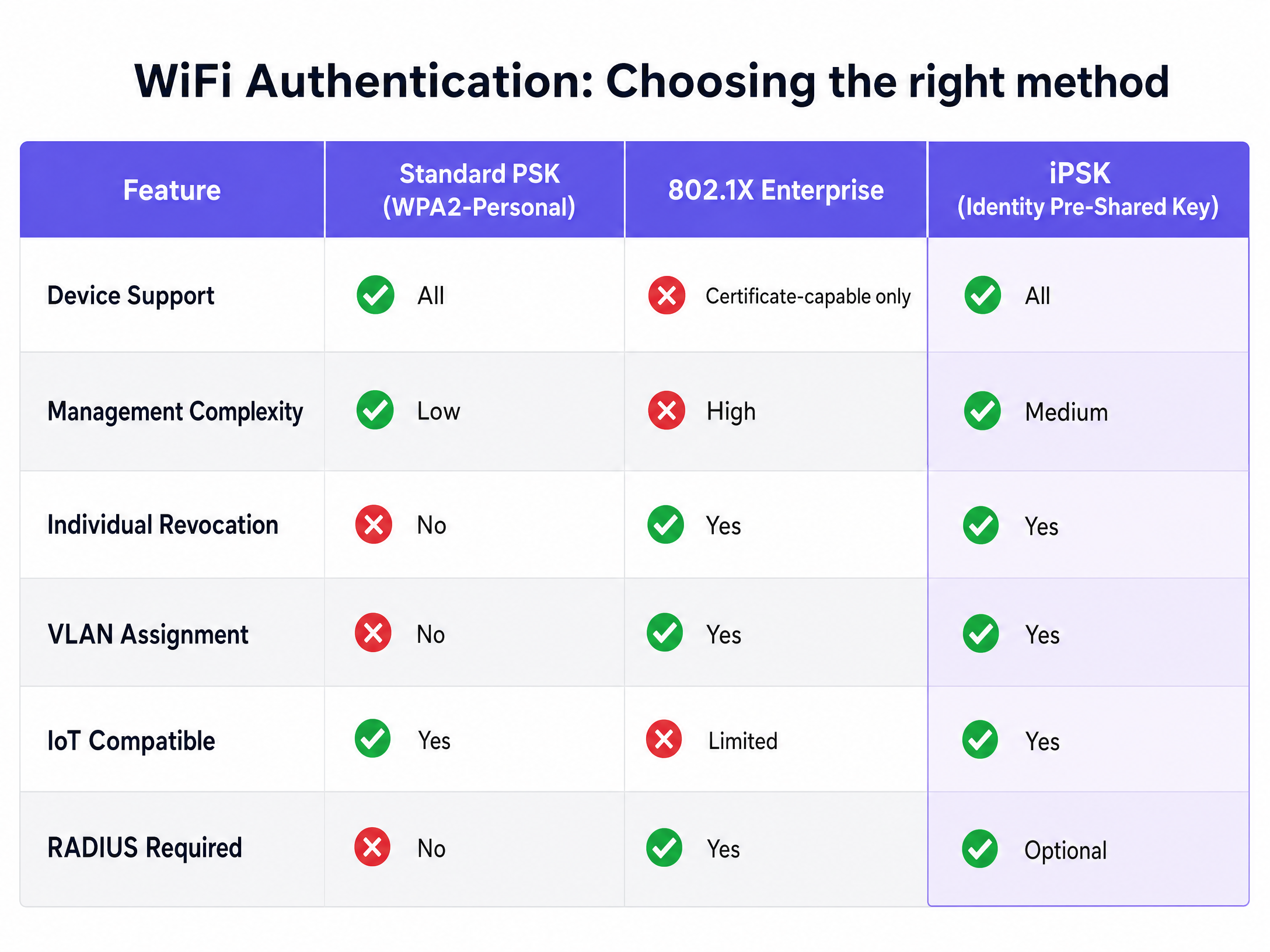
Traditional WiFi security forces a compromise. You either choose the simplicity of a shared password, which creates severe security risks, or the complexity of 802.1X certificates, which break smart devices. Identity Pre-Shared Key (iPSK) resolves this tension. It provides the individual security and visibility of an enterprise network with the simplicity of a standard password.
This guide details the technical architecture of Cisco Meraki iPSK. We cover deployment strategies, RADIUS integration, and the business case for replacing legacy WPA2-Personal with identity-based segmentation. For property developers, landlords, and BTR operators, iPSK transforms WiFi from a basic utility into a secure, managed amenity that commands a measurable rent premium.
Key facts: Meraki supports up to 5,000 unique iPSKs per SSID on firmware MR 30.1+. A single SSID can serve multiple isolated VLANs. Integration with Microsoft Entra ID, Okta, or Google Workspace automates the full credential lifecycle. Purple runs this orchestration layer across 80,000+ venues globally.
Technical deep-dive: understanding iPSK architecture
Identity PSK assigns a unique WiFi password to every individual user or device on a single Service Set Identifier (SSID). While everyone connects to the same network name, their unique key dictates their specific security permissions, bandwidth limits, and Virtual Local Area Network (VLAN) assignment.
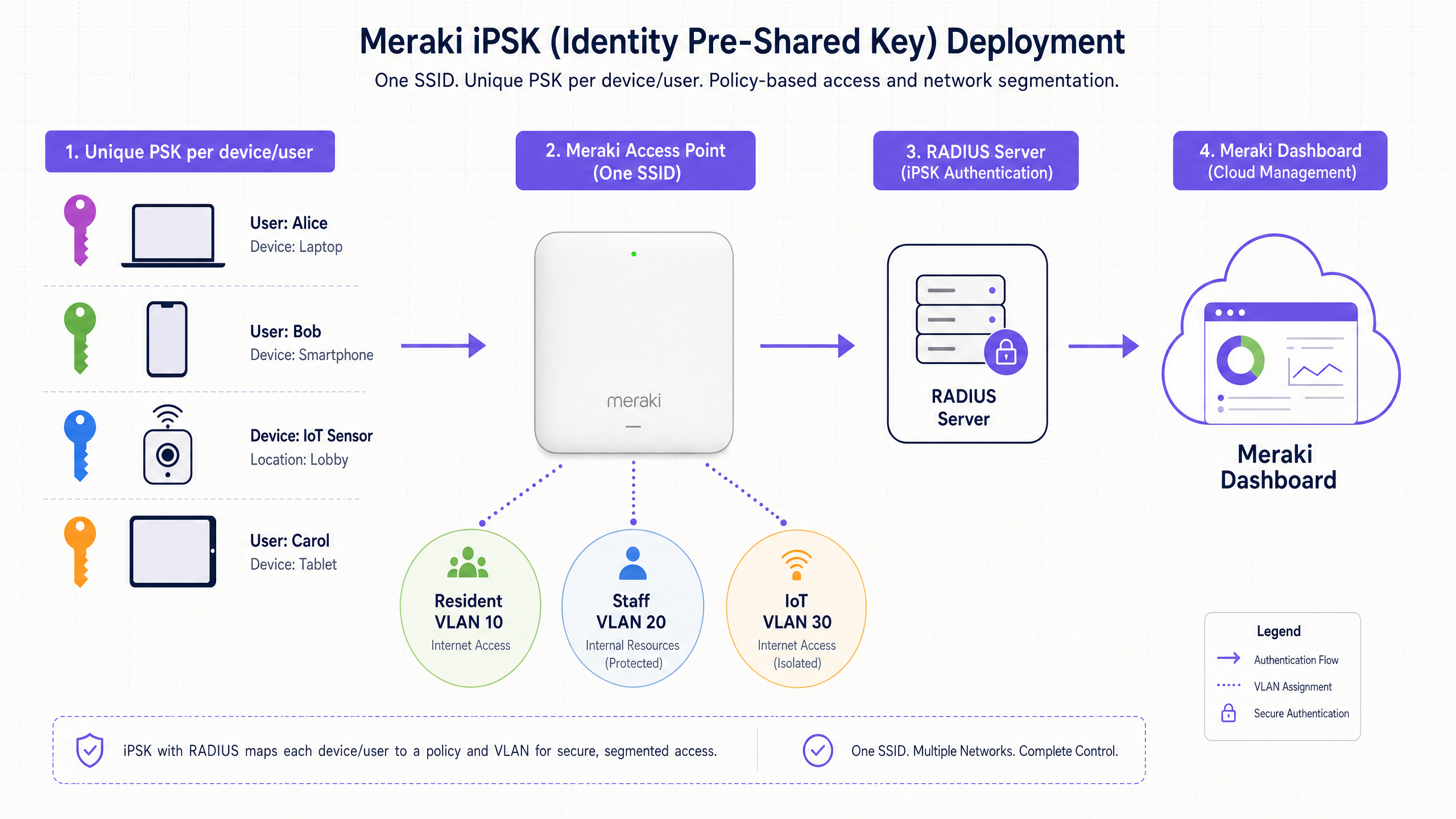
When a device associates with the access point, the Meraki hardware intercepts the authentication request. The access point queries a central RADIUS server - or the Meraki Cloud directly in a controller-less deployment. The RADIUS server validates the specific password provided by the device against the stored credentials. Upon successful validation, the server returns an Access-Accept message containing specific attributes, including the assigned VLAN and group policy.
This architecture fundamentally changes network access control. Instead of authenticating the device based on a complex certificate exchange (EAP-TLS or PEAP), the network authenticates the user based on their unique key. This approach supports 100% of wireless devices, including headless Internet of Things (IoT) sensors, gaming consoles, and smart home appliances that lack 802.1X supplicants.
The role of RADIUS in iPSK deployments
While Meraki supports iPSK without RADIUS - managing keys directly in the dashboard, limited to 50 keys per SSID - enterprise deployments require a central authentication server. Integrating iPSK with RADIUS (such as Microsoft NPS, Cisco ISE, or FreeRADIUS) unlocks dynamic VLAN assignment and central identity management, scaling to 5,000 keys per SSID on MR 30.1+ firmware.
When configuring iPSK with RADIUS on Meraki hardware, the access point acts as the authenticator. It passes the Extensible Authentication Protocol over LAN (EAPOL) parameters exchanged during the handshake to the RADIUS server. The RADIUS server uses these attributes to validate the client. If a match is found, the server responds with the Tunnel-Password attribute, binding the MAC address and the specific pre-shared key.
This mechanism allows network architects to segment traffic at Layer 2. A single SSID can drop a staff member onto a secure internal VLAN, a guest onto an isolated internet-only VLAN, and an IoT sensor onto a restricted device network - all from one broadcast.
For a broader comparison of iPSK and PPSK implementations across vendors including HPE Aruba, Ruckus, and Juniper Mist, see our guide on PPSK comparing features and deployment models .
Implementation guide: deploying Meraki iPSK
Deploying iPSK requires careful planning of your subnet architecture and identity provider integration. Follow these vendor-neutral best practices for a resilient implementation.
Step 1: subnet and VLAN design
Before configuring the Meraki dashboard, define your network topology. Map your user groups to specific VLANs. In a multi-tenant environment, such as a BTR development, you must design a Private Area Network (PAN) architecture.
A PAN creates a virtual bubble around a user's specific devices. iPSK ensures Layer 2 isolation between tenants while enabling mDNS reflection within the specific VLAN. This allows a resident's smartphone to discover their own Chromecast, while remaining completely invisible to the resident in the adjacent apartment.
Calculate your DHCP scopes generously. A modern household connects 15 to 25 devices. A 200-unit building will require IP addresses for up to 5,000 devices simultaneously. Under-provisioning subnets is the most common cause of post-deployment failures in BTR and student accommodation networks.
Step 2: Meraki dashboard configuration
To enable iPSK with RADIUS on your Meraki network:
- Navigate to Wireless > Configure > Access control.
- Select the target SSID from the drop-down menu.
- Under the Security section, select Identity PSK with RADIUS.
- Configure your RADIUS server IP addresses, ports, and shared secrets.
- Under the Client IP and VLAN section, enable VLAN tagging.
- Set the RADIUS override to Override VLAN tag. This step allows the RADIUS server to dictate the network segment based on the authenticated key.
Note: iPSK with RADIUS requires MR 26.5 firmware or above. Easy PSK (which validates EAPOL parameters rather than MAC addresses) requires MR 32.1.3 or newer. Confirm your firmware version before deployment.
Step 3: identity provider integration
Manual key management fails at scale. Integrate your RADIUS server with an Identity Provider (IdP) such as Microsoft Entra ID, Okta, or Google Workspace. Use the SCIM protocol to automate the lifecycle of the pre-shared keys. When HR adds a new employee to the directory, the system automatically generates a unique WiFi key. When the employee departs, the system revokes the key instantly, terminating network access without affecting any other user.
Purple automates this entire lifecycle. The Purple platform acts as the orchestration layer, connecting your Meraki infrastructure with your central directory to manage keys dynamically across 80,000+ venues.
Best practices for enterprise security
Implement these industry-standard recommendations to harden your iPSK deployment.
Enforce strict device isolation
In public-sector environments and retail chains, device isolation is a mandatory security requirement. Use the Meraki dashboard to enable Layer 2 isolation on guest and IoT VLANs. This prevents lateral movement across the network if a single device is compromised. This configuration aligns with ISO 27001 requirements for network segregation.
Segment IoT traffic
Never place IoT devices on the same network segment as corporate data. iPSK simplifies this segmentation. Assign a specific key to your building management systems, HVAC controllers, and security cameras. Map this key to a restricted VLAN with strict firewall rules that only permit outbound traffic to specific vendor domains.
Automate key rotation
While individual keys limit the blast radius of a compromised password, regular rotation remains a best practice. Automate the generation of new keys for long-term contractors and temporary staff. Use the Meraki API or a platform like Purple to distribute these keys securely via SMS or email, eliminating manual helpdesk overhead.
PCI DSS compliance in retail environments
For retail operators, iPSK directly supports PCI DSS network segmentation requirements. By assigning a dedicated key to point-of-sale terminals and mapping it to an isolated VLAN that only routes to the payment processor, you reduce the scope of your cardholder data environment (CDE). Meraki holds PCI DSS Level 1 Service Provider certification, providing an additional compliance baseline. See our Retail industry page for a detailed compliance walkthrough.
Troubleshooting and risk mitigation
Even with careful planning, iPSK deployments encounter specific failure modes.
The EAPOL handshake timeout
When using iPSK with RADIUS, the RADIUS server must validate the EAPOL parameters against the database of known keys. If the database is large and the server is under-resourced, it may take too long to find a match, resulting in an EAPOL handshake timeout. The access point drops the connection.
To mitigate this risk, ensure your RADIUS infrastructure is adequately resourced. If using cloud-hosted RADIUS, monitor the latency between the Meraki access points and the authentication servers. High latency will consistently cause handshake failures at scale.
MAC randomisation challenges
Modern operating systems (iOS 14+, Android 10+, Windows 11) use randomised MAC addresses to protect user privacy. If your RADIUS deployment relies strictly on MAC Authentication Bypass (MAB) tied to a specific iPSK, these devices will fail to connect when their MAC address rotates.
To resolve this, either instruct users to disable the "Private Wi-Fi Address" feature for your specific corporate or residential SSID, or upgrade to the Easy PSK feature in Meraki MR 32.1.3+ firmware, which relies on the EAPOL parameters rather than a static MAC address binding.
WPA3 compatibility
Meraki iPSK does not currently support WPA3 encryption. If your long-term roadmap includes WPA3 or Wi-Fi 6E deployment, factor this limitation into your planning. Monitor Cisco Meraki release notes for updates to this constraint.
Case study: 250-unit BTR development
A major Build-to-Rent operator in London deployed Meraki iPSK across a 250-unit development using Purple's Multi-Tenant WiFi platform. The operator replaced a legacy system of individual apartment routers, which generated an average of 12 support tickets per month related to Chromecast pairing failures and password resets.
Post-deployment, each resident received a unique key before their move-in date. All 250 residents connected their devices - including smart TVs, wireless printers, and Amazon Echo devices - without any manual IT intervention. Support tickets related to WiFi dropped to fewer than two per month. The operator attributed a £20-per-unit monthly rent premium to the "Instant-On" WiFi amenity, generating an additional £60,000 per year in revenue from the single development.
For more on the Hospitality use case and how iPSK removes guest friction, see our guide on creating a great first impression with your guest WiFi .
Case study: national retail chain
A national retail chain with 400 locations needed to segment point-of-sale terminals, digital signage, and staff tablets across their estate while maintaining PCI DSS compliance. They were running three separate SSIDs per location, creating significant RF overhead and degrading throughput.
By deploying Meraki iPSK, they consolidated to a single SSID per location. Three distinct keys were created: one for POS terminals (mapped to a restricted payment VLAN), one for digital signage (internet-only VLAN), and one for staff tablets (corporate VLAN). The Meraki dashboard API pushed these configurations to all 400 locations simultaneously. The RF environment improved measurably, and the PCI DSS audit scope was reduced by isolating the cardholder data environment at the wireless edge.
For more on WiFi Analytics and how data from these networks drives business intelligence, see our analytics platform overview.
ROI and business impact
Transitioning to iPSK requires investment in RADIUS infrastructure and integration. The operational returns justify the capital expenditure across three dimensions.
Rent premium. Research from the British Property Federation indicates that high-quality, frictionless WiFi commands a rent premium of £15 to £30 per unit per month in BTR developments. By deploying iPSK on owned hardware rather than bundling consumer broadband contracts, operators capture this Net Operating Income directly.
Support cost reduction. iPSK eliminates the most common multi-tenant support tickets: Chromecast pairing failures, password resets, and device onboarding issues. Operators consistently report a reduction of 80% or more in WiFi-related support contacts post-deployment.
Void period reduction. Move-in-day WiFi readiness reduces void periods by five to ten days on average, according to BTR sector benchmarks. Residents who can connect immediately are less likely to delay move-in or request early termination.
For a full architecture walkthrough of how Purple's Multi-Tenant WiFi platform integrates with Meraki, Ruckus, HPE Aruba, Juniper Mist, Ubiquiti UniFi, Cambium, Extreme, and Fortinet hardware, speak to our team .
For a comparison of iPSK with PPSK and other vendor-specific implementations, see our Three SSIDs to rule them all guide.
Key Definitions
iPSK (Identity Pre-Shared Key)
A wireless security mechanism that assigns a unique password to individual users or devices on a single SSID, allowing for granular policy enforcement and VLAN assignment without requiring 802.1X certificates.
Used when IT teams need to secure headless IoT devices or provide private networks in multi-tenant environments without the complexity of 802.1X. Cisco Meraki's implementation; equivalent to Ruckus DPSK and HPE Aruba MPSK.
RADIUS (Remote Authentication Dial-In User Service)
A networking protocol that provides centralised Authentication, Authorisation, and Accounting (AAA) management for users connecting to a network service.
The central engine that validates iPSK passwords and tells the Meraki access point which VLAN to assign to the connecting device. Common implementations include Microsoft NPS, Cisco ISE, and FreeRADIUS.
VLAN (Virtual Local Area Network)
A logical subnetwork that groups a collection of devices from different physical LANs, isolating their traffic at Layer 2.
Crucial for network segmentation in iPSK deployments. The RADIUS server dynamically assigns users to specific VLANs based on the password they use to connect, enabling one SSID to serve multiple isolated network segments.
802.1X
An IEEE standard for port-based network access control, requiring devices to authenticate via a central server using credentials or digital certificates before gaining network access.
The traditional enterprise security standard. iPSK is often deployed as an alternative to 802.1X to support smart devices that lack the necessary supplicant software, including IoT sensors and gaming consoles.
EAPOL (Extensible Authentication Protocol over LAN)
A network port authentication protocol used in IEEE 802.1X to encapsulate EAP messages between the supplicant (client device) and the authenticator (access point).
In Meraki Easy PSK deployments (firmware MR 32.1.3+), the access point passes EAPOL parameters to the RADIUS server to validate the client's pre-shared key without relying on the MAC address, resolving MAC randomisation issues.
mDNS (Multicast DNS)
A protocol that resolves hostnames to IP addresses within small networks that do not include a local name server, enabling device discovery on local segments.
The technology that allows devices like Apple TVs, Chromecasts, and wireless printers to be discovered on a local network. iPSK deployments must configure mDNS reflection to ensure residents can see their own devices but not their neighbours'.
Captive portal
A web page that a user of a public access network is obliged to view and interact with before access is granted.
A common source of friction in hospitality and residential WiFi. iPSK eliminates the need for captive portals by authenticating the user seamlessly via their unique key. For guest WiFi use cases where data capture is required, Purple supports conscious-choice opt-ins alongside iPSK.
MAC Authentication Bypass (MAB)
A technique that uses a device's MAC address as its identity to grant network access, typically used for devices that do not support 802.1X.
Historically used alongside iPSK to bind a specific key to a specific device. This approach is becoming unreliable due to MAC address randomisation in iOS 14+, Android 10+, and Windows 11. Easy PSK resolves this by using EAPOL parameters instead.
Private Area Network (PAN)
A virtual network segment created around a specific user's devices within a shared infrastructure, enabling device discovery within the segment while maintaining isolation from all other users.
The defining feature of Multi-Tenant WiFi. In a BTR development, each resident's PAN allows their smart home devices to communicate with each other while remaining invisible to neighbours on the same physical access points.
Worked Examples
A 250-unit Build-to-Rent development needs to provide secure, home-like WiFi to all residents. The operator wants to use a single building-wide SSID to reduce RF interference, but residents must be able to connect smart TVs and wireless printers securely without other apartments seeing their devices.
Deploy Meraki access points broadcasting a single SSID configured for Identity PSK with RADIUS. Integrate the Meraki network with a central RADIUS server managed by the Purple platform. When a resident signs their lease, the system automatically generates a unique PSK and assigns it to a dedicated VLAN specific to their apartment. The resident uses this single key for all their devices (phones, laptops, smart speakers). The network enforces Layer 2 isolation between different VLANs, ensuring complete privacy between apartments, while enabling mDNS reflection within the resident's specific VLAN so their devices can discover each other. Configure DHCP scopes for a minimum of 25 addresses per unit to accommodate IoT device density.
A national retail chain needs to deploy new point-of-sale (POS) terminals, digital signage displays, and staff tablets across 400 locations. They must maintain PCI DSS compliance while reducing RF overhead from multiple SSIDs.
Implement Meraki iPSK to segment the devices at the wireless edge. Create three distinct keys for each location: one for POS terminals mapped to a restricted VLAN that only routes to the payment processor, one for digital signage on an internet-only VLAN, and one for staff tablets on a corporate VLAN with access to inventory systems. Use the Meraki dashboard API to push these configurations to all 400 locations simultaneously. This consolidates three SSIDs into one, reducing RF overhead and improving throughput. The PCI DSS cardholder data environment is isolated at the wireless edge, reducing audit scope.
Practice Questions
Q1. You are designing the network for a 500-bed student accommodation block. The client wants to use 802.1X for security, but also requires support for PlayStation 5 consoles and Amazon Echo speakers. How do you resolve this conflict?
Hint: Consider the limitations of 802.1X supplicants on consumer hardware and the device density requirements of a student environment.
View model answer
Deploy Meraki iPSK instead of 802.1X. Generate a unique pre-shared key for each student during enrolment. This provides individual accountability and security equivalent to an enterprise network, but uses a standard password mechanism that is fully compatible with gaming consoles and smart speakers. Configure the network to isolate each student's devices into their own Private Area Network (PAN) using VLAN assignment via RADIUS. Ensure firmware is MR 32.1.3 or newer to handle MAC randomisation via Easy PSK. Design DHCP scopes for at least 25 devices per student to accommodate the full device stack.
Q2. A retail client using Meraki iPSK with a central RADIUS server reports that some newer Android and iOS devices are failing to connect, even when using the correct password. Older devices connect without issue. What is the likely cause and solution?
Hint: Think about privacy features introduced in mobile operating systems since 2020 and how they affect MAC-based authentication.
View model answer
The issue is caused by MAC address randomisation (Private Wi-Fi Address) on the newer devices. If the RADIUS server is configured to bind the iPSK to a specific MAC address via MAC Authentication Bypass, authentication will fail when the device rotates its MAC. The solution is to upgrade the Meraki firmware to MR 32.1.3 or newer and enable Easy PSK, which validates the EAPOL parameters rather than relying on a static MAC binding. As an interim measure, instruct users to disable the private address feature for this specific network SSID.
Q3. A BTR operator wants to offer Instant-On WiFi where residents have network access the moment they move in. They currently rely on manual password generation by the building manager, which causes delays of one to three days. How can this process be improved?
Hint: Consider how identity providers and APIs can automate network access provisioning and tie it to the lease management workflow.
View model answer
Automate the key lifecycle by integrating the property management system with the RADIUS server via SCIM or API. When a lease is signed and the resident is added to the system, a script automatically generates the unique iPSK, assigns it to the correct apartment VLAN, and emails the credentials to the resident before their move-in date. Purple's platform orchestrates this entire workflow, connecting the Meraki infrastructure with the identity provider to eliminate manual intervention. The resident receives their key before they arrive, enabling true Instant-On connectivity on move-in day.
Q4. A conference centre wants to provide secure, isolated WiFi to ten simultaneous corporate events, each requiring their own private network segment. They want to avoid broadcasting ten separate SSIDs. What is the correct architecture?
Hint: Consider how iPSK VLAN assignment can create logical separation without requiring multiple SSIDs.
View model answer
Deploy a single SSID configured for iPSK with RADIUS. Create ten unique keys, one per event. Map each key to a dedicated VLAN in the RADIUS server configuration. When event organisers distribute their unique key to attendees, all devices from that event land on the same isolated VLAN, with no visibility to other events. This eliminates the RF overhead of ten SSIDs, which would significantly degrade throughput in a dense venue environment. After each event, revoke the key and recycle the VLAN for the next booking.
Continue reading in this series
Uu PPSK pdf: comparing features and deployment models
This technical reference guide compares Private Pre-Shared Key (PPSK) WiFi architecture against traditional 802.1X and standard PSK deployments. It provides network architects and IT managers with vendor-neutral implementation strategies for multi-tenant residential, IoT, and BTR environments.
Uu PPSK pdf: comparing features and deployment models
This technical reference guide compares Private Pre-Shared Key (PPSK) WiFi architecture against traditional 802.1X and standard PSK deployments. It provides network architects and IT managers with vendor-neutral implementation strategies for multi-tenant residential, IoT, and BTR environments.
Uu PPSK 2023: comparing features and deployment models
This technical reference guide compares Unique per-User Private Pre-Shared Key (UU PPSK) WiFi architecture against traditional shared PSK and 802.1X deployments, with a specific focus on the 2023 landscape of vendor implementations and platform capabilities. It provides property developers, BTR operators, and MDU landlords with actionable deployment strategies, VLAN architecture guidance, and automated lifecycle management workflows. The guide covers three deployment models, real-world case studies, and the compliance implications of each authentication approach.