
Optimizing B2B Captive Portals: Capturing Company Names and Professional Data
This guide explains how IT managers, network architects, and venue operations directors can configure B2B captive portals to capture professional data - company names, job titles, and business email addresses - at the point of WiFi login. It covers the full technical architecture from VLAN isolation and RADIUS authentication through to CRM integration with Salesforce and HubSpot, with GDPR and CCPA compliance built in. Venues that deploy this correctly turn their guest WiFi network into a first-party data engine and automated lead generation system.
Listen to this guide
View podcast transcript
Executive summary
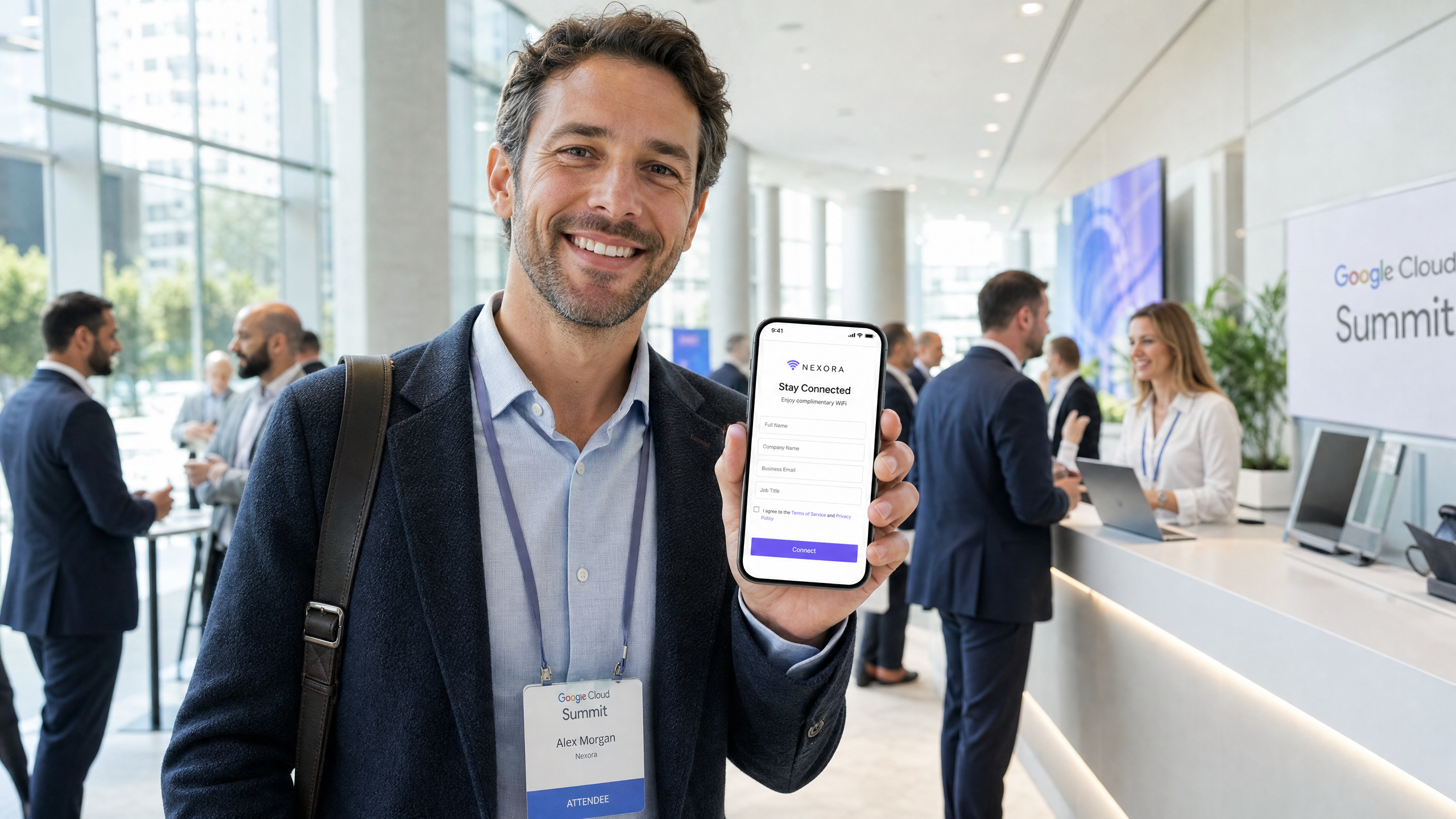
Most enterprise guest WiFi networks waste their most valuable asset: the initial connection moment. When business professionals connect to your network at a conference centre, hotel, or corporate venue, a basic email-only captive portal misses the opportunity to understand who is actually in your building.
By optimising your captive portal to capture registered company names, job titles, and professional email addresses, you transform a cost centre into a lead generation engine. This guide provides IT managers, network architects, and venue operations directors with the technical blueprint to deploy B2B-optimised captive portals. We cover the architecture required to securely capture this data, how to integrate it with CRM systems like Salesforce and HubSpot, and the compliance frameworks - GDPR, CCPA, and ISO 27001 - necessary to protect it.
Purple provides the hardware-agnostic cloud overlay to execute this strategy across Cisco Meraki, HPE Aruba, Ruckus, Juniper Mist, Ubiquiti UniFi, Cambium, Extreme, and Fortinet, delivering secure connectivity and actionable first-party data across 80,000+ live venues. (Purple internal data, 2024.)
Technical deep-dive
The architecture of professional data capture
The technical foundation of a B2B captive portal requires a secure, scalable architecture that handles authentication, data capture, and downstream routing without introducing latency. The standard flow involves four components: the user device, the local access point, the captive portal server, and the backend RADIUS (Remote Authentication Dial-In User Service) server.
When a visitor connects to the guest SSID, the access point intercepts the HTTP/HTTPS request and redirects it to the captive portal URL. This is where the data exchange occurs. For B2B environments, the portal must be configured to request specific professional data points - company name, job title, and business email - rather than just a generic email address or a social login.
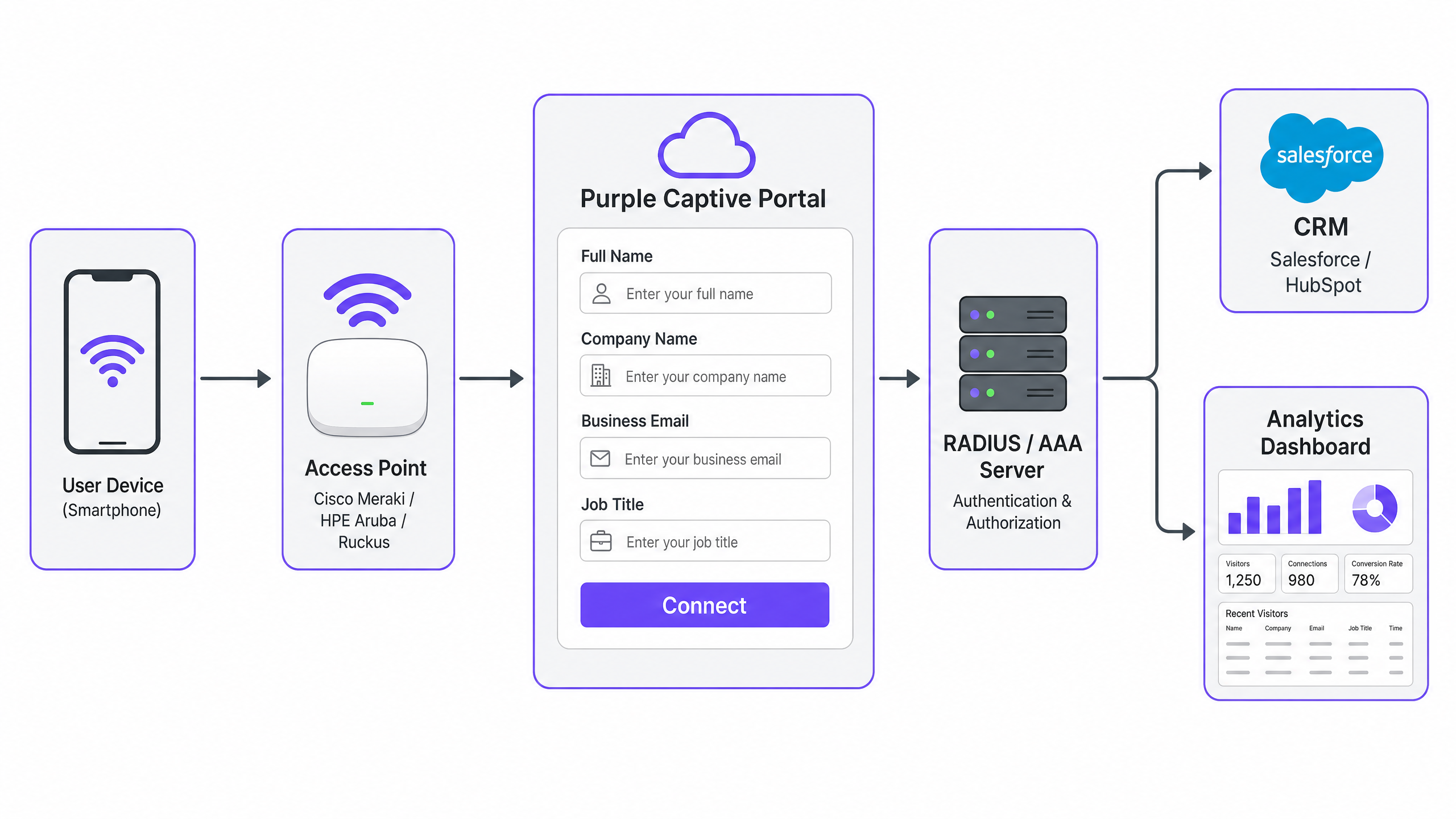
Once the user submits the form, the portal communicates with the RADIUS server to authenticate the session and authorise network access. Purple handles this complex handshake in the cloud, ensuring 99.999% uptime and seamless integration with existing hardware. The access point receives the authorisation signal and opens the port for the authenticated device.
Secure authentication standards
While open networks with a simple splash page are common in retail, B2B environments require stronger security postures. IEEE 802.1X authentication with WPA2-Enterprise or WPA3-Enterprise provides robust encryption and per-session key rotation. WPA3 specifically eliminates the vulnerabilities of WPA2's four-way handshake through Simultaneous Authentication of Equals (SAE), making offline dictionary attacks significantly harder.
In a B2B deployment, the captive portal serves as the initial onboarding mechanism. Once the professional data is captured, the system can provision a unique credential - such as a Dynamic PSK (DPSK) or a certificate via EAP-TLS - for the user. This ensures that subsequent connections are encrypted and authenticated without requiring the user to repeatedly fill out the portal form, balancing security with user experience.
Data flow and CRM integration
Capturing the data is only the first step; routing it to the systems where it can drive business value is the critical second step. The captive portal must support secure API integrations with enterprise CRM platforms.
When a user authenticates, the portal software automatically pushes the captured fields - Name, Company, Job Title, Email - to the CRM via webhooks or native API connectors. Purple integrates natively with over 400 connectors, including Salesforce and HubSpot. This allows venue operators to automatically create or update contact records based on physical presence. This first-party data is highly valuable for B2B marketing, as it indicates real-world engagement and intent, not just a digital click.
Choosing the right data fields
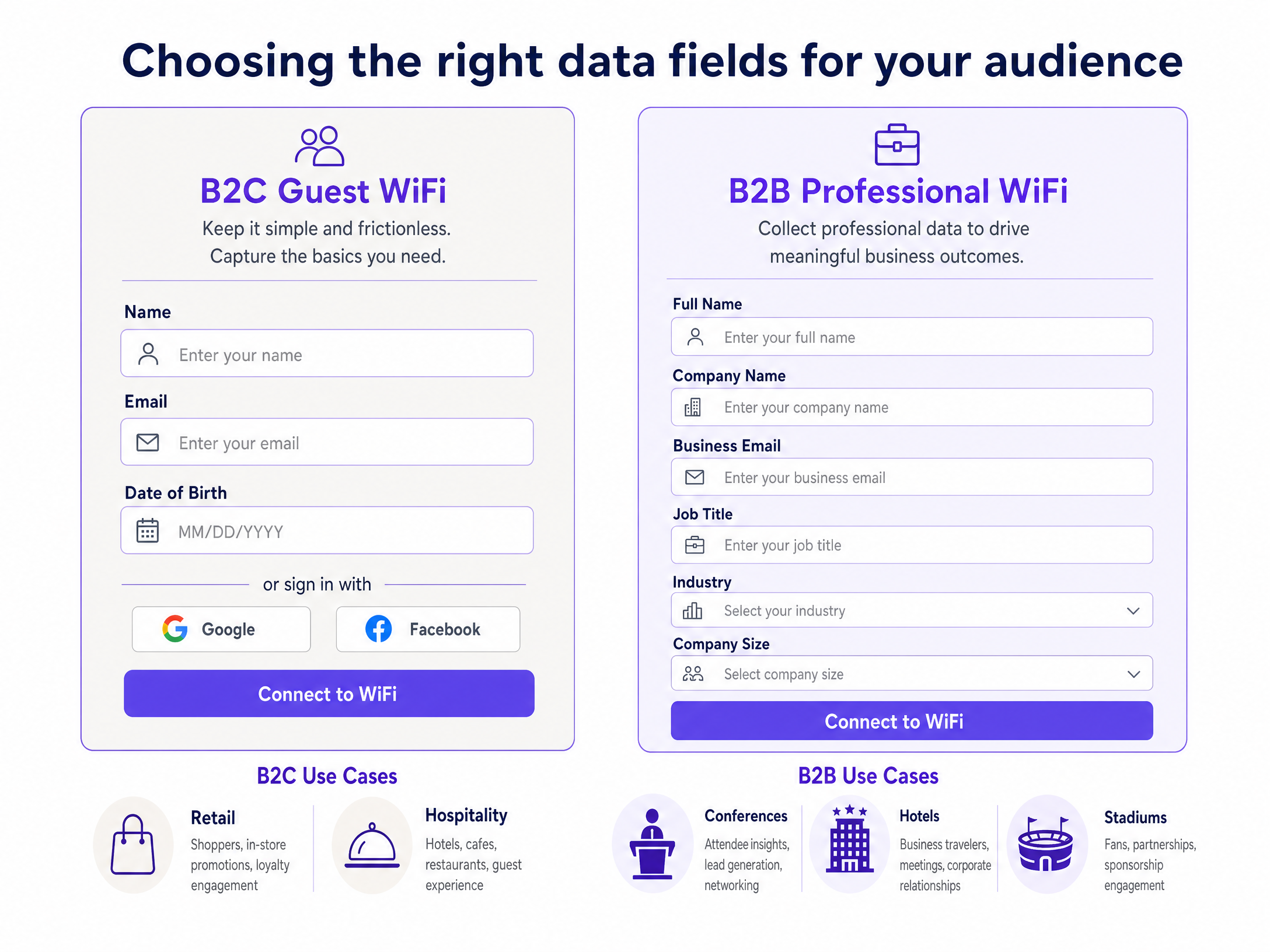
The table below maps the recommended field set to the specific B2B venue context.
| Venue type | Mandatory fields | Optional fields | Integration target |
|---|---|---|---|
| Conference centre | Full Name, Company, Email | Job Title, Industry | Salesforce, HubSpot |
| Business hotel | Full Name, Company, Email | Job Title, Room Number | PMS, Salesforce |
| Stadium (corporate) | Full Name, Company, Email | Job Title | HubSpot, Marketo |
| Co-working space | Full Name, Company, Email | Job Title, Member Type | HubSpot, Zoho |
| Public sector office | Full Name, Organisation, Email | Department | Internal LDAP, Okta |
For identity provider (IdP) integration, Purple supports Microsoft Entra ID, Okta, and Google Workspace for single sign-on (SSO) flows, allowing business visitors to authenticate with their existing corporate credentials. This eliminates the need for a manual form entirely, while still capturing the company name and job title from the IdP directory.
Implementation guide
Deploying a B2B-optimised captive portal requires coordination between network engineering and marketing operations. The following steps provide a vendor-neutral deployment framework.
Step 1: Define the data requirements
Work with your marketing and sales teams to determine the exact data fields required. Balance the need for data with the risk of user friction. The Rule of Three Fields applies here: keep mandatory fields to three or fewer. Every additional mandatory field reduces the login completion rate by approximately 10%. (Purple platform analytics, 2024.)
For a B2B audience, the optimal mandatory field set is:
- Full Name
- Business Email Address
- Company Name
Job Title is the recommended optional fourth field. Avoid asking for phone numbers or physical addresses on the initial connection.
Step 2: Configure the network hardware
Configure your access points to route guest traffic to the external captive portal. Set up a dedicated VLAN for guest traffic to isolate it from the corporate network. This is non-negotiable from a security standpoint and aligns with PCI DSS requirements for network segmentation.
Ensure that walled garden rules allow access to the captive portal URL and any necessary authentication domains before the user is fully authenticated. For iOS devices, the walled garden must block captive.apple.com to trigger the Captive Network Assistant (CNA). For Android, block connectivitycheck.gstatic.com. Failure to configure these correctly is the single most common reason portals fail to appear automatically.
Step 3: Design the captive portal
Build the portal using your brand guidelines. The design must be clean, professional, and mobile-responsive. Over 80% of guest WiFi logins occur on mobile devices. (Purple platform analytics, 2024.) Ensure that the terms of service and privacy policy are clearly linked, and that the consent mechanism complies with local regulations.
For GDPR compliance, the marketing opt-in checkbox must be unchecked by default. For CCPA compliance, include a clear "Do Not Sell My Personal Information" link in the footer.
Step 4: Set up CRM integration
Configure the API connection between your captive portal platform and your CRM. Map the captive portal fields to the corresponding CRM fields. Set up deduplication rules to ensure that returning visitors update existing records rather than creating duplicates. Use the business email address as the primary unique identifier.
In Purple's Capture and Engage plans, the connector library provides pre-built integrations for Salesforce and HubSpot, reducing the configuration time to under 30 minutes for a standard deployment.
Step 5: Test and deploy
Conduct thorough testing across multiple device types - iOS, Android, Windows, macOS - to ensure the portal renders correctly and the authentication flow is seamless. Verify that data flows into the CRM before rolling out to the full venue estate. Monitor authentication success rates in the Purple analytics dashboard during the first 48 hours of live operation.
Best practices
Implement progressive profiling. If a visitor returns to the venue, do not ask them for the same information again. Use device MAC address recognition to identify returning visitors and, if necessary, ask for one new piece of information to enrich their profile over time.
Ensure GDPR and CCPA compliance. Clearly state what data is being collected and how it will be used. Implement conscious-choice opt-ins for marketing communications. Never pre-tick consent boxes. Purple provides data retention controls and automated anonymisation to manage compliance at scale.
Optimise for mobile. Ensure your captive portal is lightweight, fast-loading, and easy to navigate on small screens. Avoid multi-page forms. A single-page design with three fields and a clear call to action performs best on mobile.
Monitor network health. Use the WiFi Analytics dashboard to track authentication success rates, dwell times, and repeat visit rates. A sudden drop in successful logins often indicates a hardware issue or a misconfigured walled garden.
Segment your SSIDs. For venues that host both business visitors and general consumers, deploy separate SSIDs with different portal configurations. See our guide on three SSIDs to rule them all for the recommended architecture covering guest, staff, and IoT networks.
Troubleshooting and risk mitigation
High drop-off rates
If visitors connect to the SSID but fail to complete the captive portal form, the form is likely too long or the page loads too slowly. Review the analytics to identify where visitors abandon the process. Reduce the number of mandatory fields and ensure the portal page loads in under two seconds on a 4G connection.
Captive portal not appearing (CNA issues)
Modern operating systems use a Captive Network Assistant to automatically detect and display captive portals. If the portal does not appear automatically, the walled garden is almost certainly misconfigured. Check that the OS detection URLs are blocked before authentication. For iOS, this is captive.apple.com. For Android, this is connectivitycheck.gstatic.com.
Data sync failures to CRM
If visitor data is not appearing in your CRM, check the API logs in the Purple dashboard. Common causes include expired API tokens, mapped fields with mismatched data types, or rate limiting by the CRM provider. Salesforce enforces an API call limit based on your licence tier; ensure your daily connection volume does not exceed this threshold.
MAC address randomisation
Modern iOS and Android devices randomise their MAC address per SSID to protect user privacy. This breaks MAC-based progressive profiling. The solution is to use the authenticated email address as the persistent identifier rather than the MAC address. Purple's identity layer handles this automatically.
ROI and business impact
Capturing professional data via Guest WiFi delivers measurable business value across multiple venue types.
Conference centres and events venues can identify corporate decision-makers in their venues and target them for future event bookings. A 500-capacity conference centre that captures company names and job titles from 80% of attendees at a trade show generates a qualified prospect list that would cost significantly more to acquire through paid advertising or list purchase.
Business hotels can enrich their B2B loyalty database with real-world stay data, enabling targeted outreach to corporate travel managers. Premier Inn and Whitbread have deployed Purple across their estate to build exactly this kind of first-party data capability.
Stadiums and arenas hosting corporate hospitality events can identify sponsors, partners, and VIP guests by company affiliation, enabling personalised post-event communications and renewal conversations.
For retail environments with B2B trade counters or trade days, capturing company names at the point of WiFi login provides a direct signal of which businesses are actively visiting the physical location.
For hospitality operators, the data captured through a B2B-optimised portal feeds directly into account-based marketing campaigns, reducing the cost of acquiring repeat corporate bookings.
For transport hubs like Manchester Airports Group (MAG), professional data capture from business travellers enables targeted B2B advertising and lounge upgrade offers based on company affiliation and job seniority.
Purple's own data shows that venues on the Capture plan generate an average of 29 billion data points annually across the network, with 440 million logins processed in 2024. (Purple internal data, 2024.) The first-party data captured through B2B-optimised portals consistently outperforms third-party purchased data in CRM conversion rates, because it reflects real physical presence and intent.
Key Definitions
Captive portal
A web page that a user is prompted to view and interact with before access is granted to a public or enterprise WiFi network. It acts as a gatekeeper, securing the network while enabling data collection and brand presentation.
IT teams configure captive portals to enforce terms of service, authenticate visitors, and capture marketing data before granting internet access. Purple's captive portal is the primary mechanism for B2B professional data capture.
RADIUS
Remote Authentication Dial-In User Service; a networking protocol that provides centralised Authentication, Authorisation, and Accounting (AAA) management for users connecting to a network service.
The backend system that verifies the credentials submitted via the captive portal and instructs the access point to grant or deny network access. Purple operates a cloud-hosted RADIUS service, eliminating the need for on-premises RADIUS infrastructure.
First-party data
Information a company collects directly from its customers or audience, with their consent, rather than purchasing it from external data brokers.
Data captured through a guest WiFi login is highly valuable first-party data because it proves physical presence and intent. It is also legally cleaner than third-party purchased data under GDPR and CCPA.
Walled garden
A restricted network environment that allows a device access to specific web pages or domains before the user has fully authenticated. All other traffic is blocked until authentication is complete.
Essential for allowing devices to load the captive portal page and access external identity providers during the login process. Misconfigured walled gardens are the most common cause of captive portals failing to appear automatically.
IEEE 802.1X
An IEEE standard for port-based Network Access Control (PNAC), providing an authentication mechanism to devices wishing to attach to a LAN or WLAN. It requires a supplicant (the device), an authenticator (the access point), and an authentication server (RADIUS).
Used in enterprise environments to provide secure, encrypted connections. In a B2B captive portal deployment, 802.1X can be used for subsequent connections after the initial portal onboarding, providing WPA2 or WPA3-Enterprise encryption.
VLAN
Virtual Local Area Network; a logical subnetwork that groups a collection of devices from different physical LANs, isolating their traffic at Layer 2.
Guest WiFi traffic must be isolated on a dedicated VLAN to prevent visitors from accessing internal corporate resources. This is a PCI DSS requirement for any network that handles payment card data.
Progressive profiling
The practice of gradually gathering information about a user over multiple interactions rather than asking for everything at once.
Used on captive portals to ask returning visitors for new data points - such as Job Title or Industry - on their second or third visit, without repeating questions they have already answered. Requires device recognition via MAC address or authenticated email.
Conscious-choice opt-in
A compliance mechanism where users must actively select to receive marketing communications, typically via an unchecked checkbox. The user makes a deliberate, informed choice.
Mandatory for GDPR compliance across the EU and UK. Ensures that the captured professional data can be legally used for B2B marketing. Pre-ticked boxes are explicitly prohibited under GDPR Article 7 and Recital 32.
Captive Network Assistant (CNA)
A built-in feature of modern operating systems (iOS, Android, macOS, Windows) that automatically detects the presence of a captive portal and displays it in a pop-up browser window.
The CNA is triggered when the OS detects that it cannot reach its internet connectivity check URL. IT teams must configure walled gardens to block these URLs to trigger the CNA and ensure the portal appears automatically.
Dynamic PSK (DPSK)
A unique, per-device pre-shared key provisioned automatically by the network management system, providing individual device-level encryption without requiring 802.1X certificate infrastructure.
Used as a step up from a shared password on guest networks. In B2B deployments, a DPSK can be provisioned after the initial captive portal onboarding, giving the visitor a unique key for subsequent visits without requiring them to re-complete the portal form.
Worked Examples
A 500-capacity conference centre needs to capture the company names and job titles of attendees using their guest WiFi to generate leads for future corporate event bookings. They currently use Cisco Meraki hardware and HubSpot for their CRM. How should they configure the system?
- In the Cisco Meraki dashboard, configure the guest SSID to use a click-through splash page and set the splash page URL to the Purple captive portal endpoint.
- Set up a dedicated VLAN (e.g., VLAN 100) for guest traffic and configure the firewall rules to block all internal RFC 1918 address ranges from the guest VLAN.
- Configure the walled garden to allow the Purple portal domain, the HubSpot tracking domain, and block captive.apple.com and connectivitycheck.gstatic.com to trigger the CNA.
- In the Purple dashboard, create a custom splash page with three mandatory fields: Full Name, Company Name, Business Email. Add Job Title as an optional field.
- Enable the Purple-to-HubSpot native connector. Map 'Full Name' to the HubSpot Contact 'First Name' and 'Last Name' fields. Map 'Company Name' to the HubSpot 'Company' object. Map 'Business Email' to the primary email field.
- In HubSpot, create a workflow that triggers on new contact creation from the WiFi source, tags the contact with the event name, and assigns it to the corporate sales team queue.
A global hotel chain wants to offer secure, seamless WiFi to business travellers while capturing their corporate details to promote their B2B loyalty programme. They need to ensure GDPR compliance for European guests and CCPA compliance for US guests. They use HPE Aruba access points across 200 properties.
- Deploy Purple as a cloud overlay across the HPE Aruba estate. No hardware changes are required; Purple integrates natively with Aruba Central.
- Configure the captive portal to ask for Full Name, Company Name, and Business Email as mandatory fields.
- Implement a conscious-choice opt-in checkbox for the B2B loyalty programme. Ensure the checkbox is unchecked by default (GDPR requirement).
- Enable Purple's language detection feature to serve the portal and privacy policy in the guest's detected device language across the 25 supported languages.
- For US properties, add a 'Do Not Sell My Personal Information' link in the portal footer, linking to the CCPA opt-out page.
- In the Purple data retention settings, configure automatic anonymisation of personal data after 12 months to comply with GDPR data minimisation principles.
- Use the Purple Verify add-on to validate business email addresses at the point of entry, ensuring the CRM is populated with valid contacts only.
Practice Questions
Q1. Your venue's marketing team wants to add six new fields to the guest WiFi captive portal - including physical address, phone number, company size, industry, LinkedIn profile, and annual revenue - to enrich their B2B database. As the IT manager responsible for the network, how should you respond and what alternative do you propose?
Hint: Consider the impact of form length on login completion rates, and whether all this data needs to be captured at the point of connection.
View model answer
Advise the marketing team against adding all six fields simultaneously. Explain that each additional mandatory field reduces the login completion rate by approximately 10%, meaning six extra fields could reduce completions by 60% compared to the current baseline. Propose a progressive profiling strategy instead: capture three core fields (Full Name, Company, Email) on the first visit, then ask for one additional field (e.g., Industry) on the second visit using device recognition. For high-value fields like Company Size and Annual Revenue, suggest enriching the CRM data automatically using a third-party data enrichment tool (such as Clearbit or ZoomInfo) that appends firmographic data based on the company name and email domain, rather than asking the visitor directly.
Q2. Visitors at your conference centre are complaining that the captive portal page is not appearing automatically when they connect to the guest WiFi on their iPhones. They have to manually open Safari and navigate to a website to trigger the redirect. The portal works correctly on Android devices. What is the likely technical cause and how do you resolve it?
Hint: Think about how iOS specifically detects the presence of a captive portal, and what URL it uses to check for internet connectivity.
View model answer
The likely cause is that the walled garden on the access points is inadvertently allowing iOS devices to reach Apple's connectivity check URL (captive.apple.com) before authentication. iOS uses this URL to determine whether it has full internet access. If the device can reach it, the OS assumes it is on an open network and does not trigger the Captive Network Assistant. The fix is to explicitly block captive.apple.com in the walled garden rules, so that iOS devices receive no response from this URL before authentication. This forces the CNA to appear. Android uses a different URL (connectivitycheck.gstatic.com), which is why Android devices are unaffected - that URL is already being blocked correctly.
Q3. You have successfully integrated your Purple captive portal with Salesforce. However, your sales team reports that returning visitors are generating duplicate contact records every time they visit the venue. A contact who has visited three times now has three separate records in Salesforce. How do you resolve this, and how do you prevent it going forward?
Hint: Consider how the integration identifies whether a contact already exists in the CRM before creating a new record.
View model answer
The root cause is that the integration is creating a new Salesforce contact on every portal submission rather than checking for an existing record first. To resolve this: first, in the Purple-to-Salesforce connector settings, configure the matching rule to use Business Email as the unique identifier. Set the action to 'Upsert' (update if exists, insert if new) rather than 'Insert'. Second, in Salesforce, run a duplicate merge operation on the existing records to consolidate the three records per visitor into one, preserving the most recent data. Going forward, the upsert logic will ensure that each new portal submission updates the existing contact record - logging the visit date and any new data - rather than creating a duplicate. Consider also adding a 'Last WiFi Visit' date field to the Salesforce contact object so the sales team can see recency of physical engagement.
Continue reading in this series
Captive Portal Architecture: Security, Redirection, and Best Practices
A definitive technical reference on enterprise captive portal architecture. This guide unpacks network isolation, DNS redirection, RADIUS authentication, and security compliance for IT leaders deploying secure, data-rich guest WiFi networks.
Captive Portal Architecture: Security, Redirection, and Best Practices
A definitive technical reference on enterprise captive portal architecture. This guide unpacks network isolation, DNS redirection, RADIUS authentication, and security compliance for IT leaders deploying secure, data-rich guest WiFi networks.
How to Set Up a Captive Portal on Starlink: A Guide for Remote & Maritime Venues
This guide details how to bypass the native Starlink hardware and integrate a cloud-managed captive portal using enterprise routing equipment. You will learn how to overcome the CGNAT limitation, enforce VLAN segmentation, manage satellite bandwidth constraints, and ensure regulatory compliance.