
Customer data platform for marketing: a comprehensive guide for businesses
This guide explains how to deploy and optimise a customer data platform for marketing within physical venues - hotels, retail chains, stadiums, and public-sector sites. It covers the technical architecture that bridges enterprise Guest WiFi with CRM and marketing automation, the compliance requirements under GDPR and CCPA, and the implementation steps that turn a network cost centre into a measurable revenue engine. Marketing directors, CRM managers, and venue operators will find concrete deployment guidance, real-world case studies, and ROI frameworks they can apply this quarter.
Listen to this guide
View podcast transcript

Executive summary
The depreciation of third-party cookies and the tightening of global privacy regulations have forced a fundamental shift in marketing strategy. For physical venues, the answer lies in existing infrastructure. A customer data platform for marketing, when integrated with enterprise Guest WiFi , transforms an IT cost centre into a measurable revenue generator.
This guide details how IT managers, network architects, and venue operations directors can deploy a customer data platform to capture, unify, and activate first-party data. You will learn the technical architecture required to bridge network telemetry and marketing automation, the compliance standards you must meet, and the implementation steps to ensure high opt-in rates. We cover identity resolution in the era of MAC randomisation, integration with existing CRM systems, and real-world deployment scenarios across hospitality, retail, and public sectors.
Purple Engage captures verified guest email and phone data at login and automates marketing campaigns. Purple has processed 440 million logins in 2024 across 80,000+ live venues, proving this architecture scales. Harrods achieved a 57x ROI using Purple's Guest WiFi to promote its loyalty programme. Avanti West Coast delivered a 463% return on investment by targeting repeat passengers with upsell offers.
Technical deep-dive
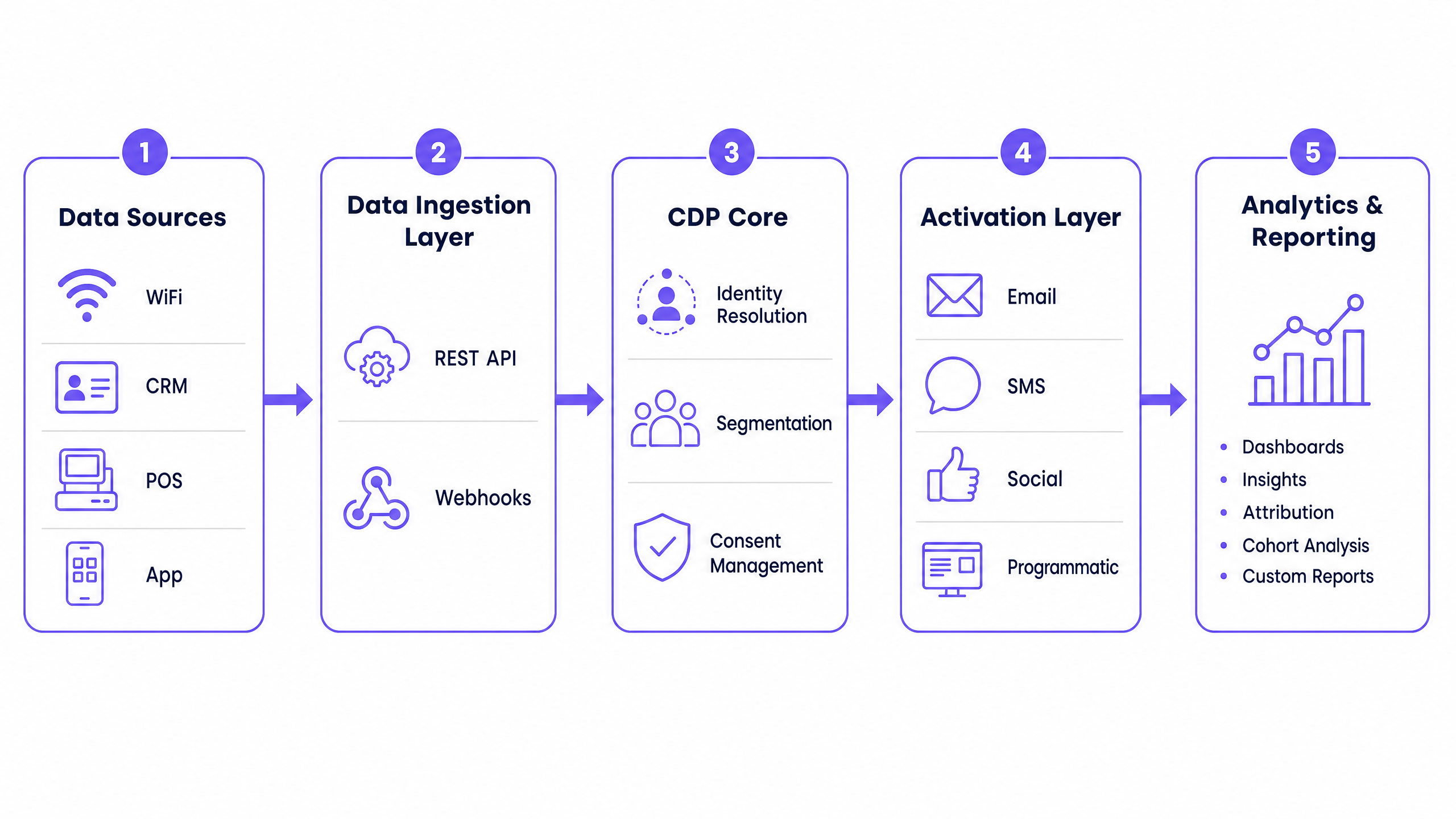
A customer data platform for marketing relies on three layers: a data ingestion layer, a central identity resolution engine, and an activation layer. When applied to physical venues, the primary data source is the Guest WiFi network.
The ingestion layer and edge authentication
The process begins at the network edge. When a device associates with an access point, the wireless LAN controller redirects the unauthenticated client to a captive portal. This portal serves as the primary interface for data capture and consent management. You must configure your Walled Garden to allow authentication endpoints to load before the user completes the login process. This is critical when using social OAuth providers like Microsoft Entra ID, Okta, or Google Workspace.
Purple integrates natively with Cisco Meraki, HPE Aruba, Ruckus, Juniper Mist, Ubiquiti UniFi, Cambium, Extreme, and Fortinet, so you do not need to replace existing hardware to deploy this architecture.
Overcoming MAC randomisation
Modern mobile operating systems implement MAC randomisation to prevent device tracking across different wireless networks. iOS 14 and above, and Android 10 and above, generate a unique, temporary MAC address for each wireless network the device connects to. If your analytics rely on hardware MAC addresses, your returning visitor metrics will fail - you will see artificially inflated new-visitor counts while repeat-visit data collapses.
You must shift from device-centric tracking to identity-centric tracking. When a user authenticates via the captive portal, the Purple platform links their session data to their CRM profile. On subsequent visits, the new randomised MAC address is tied back to the existing identity. The identity is the anchor, not the device.
Passpoint and profile-based authentication
To streamline the user experience, deploy Passpoint (Hotspot 2.0) using the IEEE 802.11u standard. After the initial authentication, Passpoint provisions a secure profile to the user's device. On future visits, the device connects automatically and securely via WPA3 enterprise encryption. The user is recognised and data is captured without requiring portal interaction. This is the foundation of Identity-Based Networks. Read Three SSIDs to rule them all: guest, Passpoint, and IoT WiFi for detailed SSID architecture guidance.
Integration and data flow
Once data is captured, it must flow into your marketing stack. The Purple platform normalises the data, handles deduplication, and pushes it downstream via REST APIs or Webhooks. Webhooks provide real-time activation. When a user authenticates, a JSON payload is sent immediately to your CRM or marketing automation platform. This enables triggered communications - such as a welcome email sent while the guest is still on-site - that batch exports cannot support.
The WiFi Analytics platform aggregates behavioural signals including dwell time, visit frequency, and zone-level movement. These signals feed directly into audience segmentation within the CDP.
Implementation guide
Deploying a customer data platform for marketing requires coordination between IT and marketing teams. The following steps apply to any hardware-agnostic deployment.
Step 1: Standardise the network edge
Ensure your wireless infrastructure supports captive portal redirection and Walled Garden configuration. Configure three distinct networks: Guest WiFi, Staff WiFi, and Multi-Tenant WiFi. This isolates traffic and ensures security. For venues in the Hospitality sector, isolating guest traffic from operational systems is a PCI DSS requirement where payment terminals share the same physical network.
Step 2: Design the captive portal
The captive portal must load in under three seconds. Minimise JavaScript and compress images. The portal should clearly state the value exchange: high-speed internet access in return for data and marketing consent. Implement progressive profiling - ask for an email address or phone number on the first visit, then gather additional details such as postal code or date of birth on subsequent visits. A well-designed portal achieves opt-in rates of 60-80% of authenticated users, based on Purple's own data across 80,000+ venues. Read How to make a great first impression with your guest WiFi (and keep your brand consistent) for design guidance.
Step 3: Configure consent management
You must comply with GDPR, CCPA, and local privacy regulations. Do not bundle marketing consent with the Terms of Service acceptance. Under GDPR, consent must be freely given, specific, informed, and unambiguous. Use separate, unticked checkboxes for email and SMS marketing. Purple maintains ISO 27001, GDPR, CCPA, and Cyber Essentials certifications, ensuring your data capture process is compliant by design.
Step 4: Map data to the CRM
Configure Webhooks to send data from Purple to your CRM. Map fields accurately, ensuring the primary identifier - usually email address - matches your existing database schema. For Retail deployments, cross-reference WiFi-captured profiles with POS transaction data to build a complete picture of shopper behaviour.
Step 5: Activate across channels
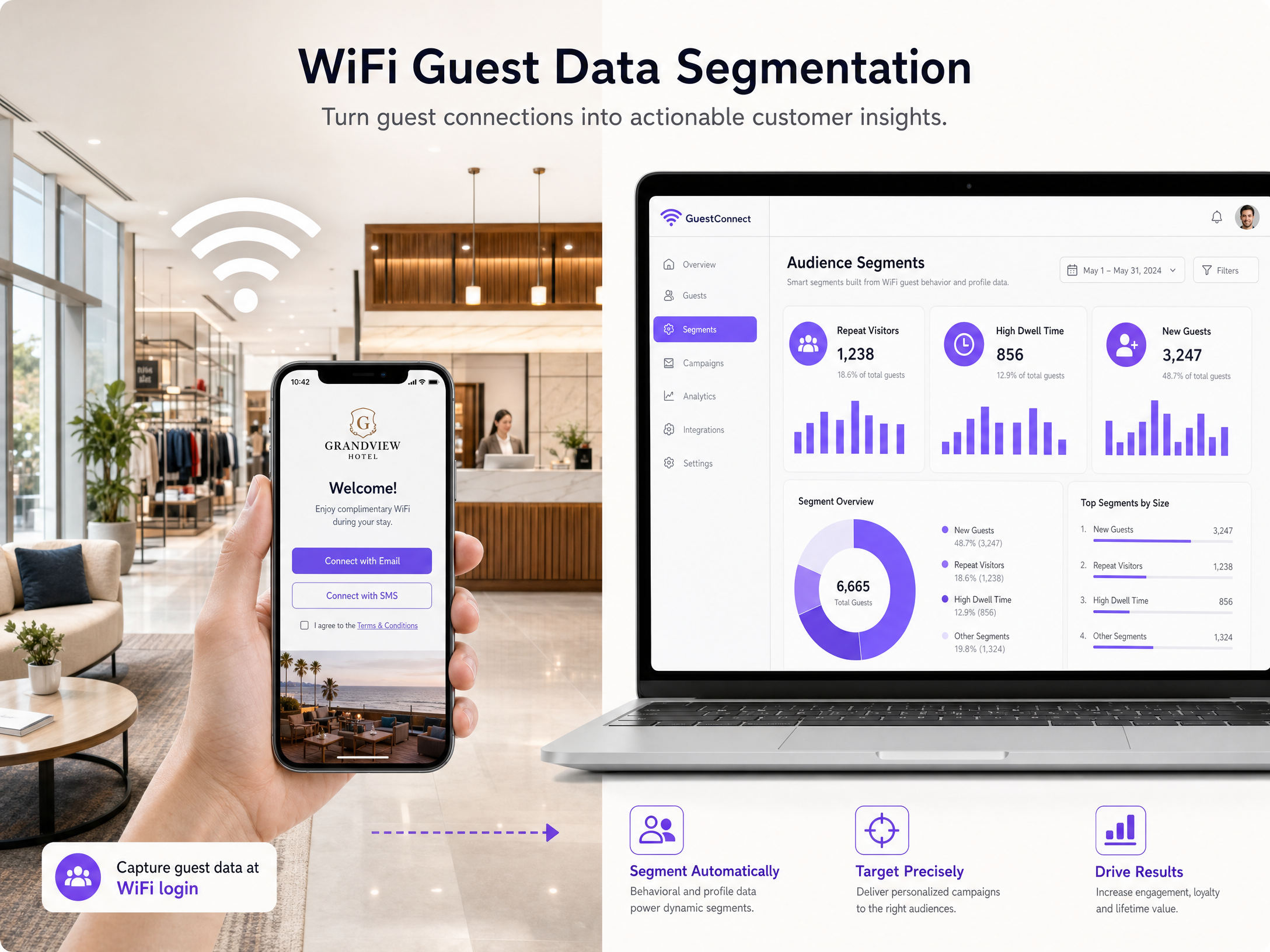
Use the unified profiles to drive campaigns across four channels. Email is the most mature channel - triggered welcome emails and post-visit surveys are highly effective. SMS is the highest-intent channel for in-venue activation, reaching visitors while they are physically present. For social advertising, export hashed email segments to create custom and lookalike audiences. For Transport operators, programmatic display campaigns targeting known passengers after their journey reinforce brand loyalty. See How to leverage SMS marketing net in to increase return visits for SMS campaign configuration.
Best practices
The following recommendations reflect industry standards and Purple's operational experience across 80,000+ live venues.
Segment by behaviour, not just demographics. A retail shopper who visits three times a week requires different messaging than a tourist visiting a hotel once. Build segments based on visit frequency, dwell time, and zone-level behaviour. Purple's WiFi Analytics surfaces these signals automatically.
Automate real-time triggers. Use Webhooks to trigger communications based on physical presence. If a fan connects to the stadium WiFi, send a welcome SMS with a discount code for merchandise. If a hotel guest connects on arrival, send a welcome email with the restaurant menu. Timing matters - in-venue messages convert at significantly higher rates than post-visit messages.
Maintain brand consistency. The captive portal is often the first digital interaction a visitor has with your physical venue. Ensure the design matches your brand guidelines. For Healthcare environments, the portal must also communicate clearly about data use to meet patient and visitor expectations.
Prioritise first-party data. Rely on data you collect directly through conscious-choice opt-ins. This data is more accurate, more compliant, and more durable than third-party data. Purple has collected 29 billion data points across its network, demonstrating the scale this approach can reach.
Troubleshooting & risk mitigation
Even with careful planning, deployments encounter issues. The following are the most common failure modes and their resolutions.
| Failure mode | Symptom | Resolution |
|---|---|---|
| Bundled consent | Marketing opt-in rate is high but GDPR audit fails | Separate Terms of Service and marketing consent into distinct, unticked checkboxes |
| Slow captive portal | Abandonment rate above 40% before login | Compress images, minimise JavaScript, verify Walled Garden allows portal resources to load |
| MAC randomisation not handled | Returning visitor count drops; new visitor count spikes | Enable identity-centric tracking; anchor profiles to email or social login, not MAC address |
| Webhook failures | CRM profiles not updating in real time | Verify endpoint accessibility, implement retry logic, monitor payload volume |
| Over-collection on first visit | Form completion rate below 30% | Reduce first-visit form to email only; use progressive profiling for subsequent visits |
| Poor Walled Garden config | Social OAuth login fails before authentication | Add authentication endpoints for Microsoft Entra ID, Okta, and Google Workspace to the Walled Garden allowlist |
ROI & business impact
A customer data platform for marketing delivers measurable business impact. By capturing first-party data, you reduce reliance on expensive third-party advertising and build direct relationships with your visitors.
Measure these metrics to track success:
| Metric | Description | Target |
|---|---|---|
| Verified profiles captured | Total authenticated users with marketing consent | Grows month-on-month |
| Opt-in rate | % of authenticated users who consent to marketing | 60-80% (Purple benchmark) |
| Email open rate | % of triggered emails opened | Above 30% for welcome emails |
| Repeat visit rate | % of users who return within 90 days | Baseline + 10% after 6 months |
| Campaign revenue attribution | Revenue directly linked to WiFi-triggered campaigns | Positive ROI within 90 days |
McDonald's captured 2.5 million unique Guest WiFi users in their CRM within two years of deploying Purple, with four million annual visits resulting in a WiFi login. Harrods achieved a 57x ROI by using Guest WiFi to promote its loyalty programme. Avanti West Coast delivered a 463% ROI by targeting repeat passengers with upsell offers. AGS Airports saved €2.6 million by using WiFi surveys rather than traditional feedback methods, achieving a 10,630% ROI.
These results share a common pattern: a well-configured captive portal, real-time Webhook integration with a CRM, and automated triggered campaigns. The infrastructure investment is minimal because Purple deploys as a cloud overlay on existing hardware. The return is measurable within the first quarter of operation.
Key Definitions
Customer data platform (CDP)
Software that aggregates and organises customer data across multiple touchpoints to create a single, unified profile for marketing activation.
IT teams deploy CDPs to break down data silos between network analytics, CRM, and marketing automation tools. In physical venues, the Guest WiFi network is the primary data source.
Captive portal
A web page that users must view and interact with before accessing a public WiFi network. It serves as the primary data capture and consent interface.
This is the primary data capture mechanism at the network edge. Load speed and form design directly determine opt-in rates.
MAC randomisation
A privacy feature in modern operating systems that generates a temporary, unique MAC address for each wireless network connection, preventing persistent device tracking.
iOS 14+ and Android 10+ both implement this. It breaks device-centric analytics and requires venues to shift to identity-centric tracking via authenticated sessions.
Passpoint (Hotspot 2.0)
A standard based on IEEE 802.11u that allows devices to automatically discover and securely connect to WiFi networks without manual authentication after the initial setup.
IT teams deploy Passpoint to provide a cellular-like experience. It ensures consistent data capture on repeat visits without requiring the user to interact with the captive portal again.
First-party data
Information a company collects directly from its customers through its own channels, with explicit consent.
As third-party cookies depreciate, marketing teams rely on IT to capture first-party data via Guest WiFi. This data is more accurate, more compliant, and more durable than purchased data.
Webhook
An automated HTTP callback triggered by a specific event, sending a structured JSON payload to another application in real time.
Used to instantly push a user profile from the WiFi platform to a CRM when a guest logs in. This enables real-time triggered campaigns that batch exports cannot support.
Walled Garden
A restricted network environment that allows access only to specific websites or IP addresses before a user completes full authentication.
Network architects must configure this to allow social login providers - Microsoft Entra ID, Okta, Google Workspace - to load on the captive portal before the user has authenticated.
Identity-Based Networks
A network architecture where access policies and analytics are tied to a verified user identity rather than a physical device or MAC address.
This is Purple's core methodology. It resolves the MAC randomisation problem and enables accurate, persistent visitor profiles across multiple visits and locations.
Progressive profiling
A data collection strategy that gathers basic information on the first interaction and enriches the profile with additional data points on subsequent interactions.
Venues use this to maintain high opt-in rates on the captive portal while building detailed CRM profiles over time. Asking for too much data on the first visit reduces completion rates.
Worked Examples
A 200-room hotel wants to increase direct bookings and reduce reliance on Online Travel Agencies. They have Cisco Meraki access points but currently offer open, unauthenticated WiFi.
Deploy Purple Engage on the existing Cisco Meraki hardware using the cloud overlay. Configure a captive portal requiring an email address or social login for access. Implement separate checkboxes for Terms of Service and marketing consent to ensure GDPR compliance. Set up a Webhook to send authenticated profiles to the hotel's CRM in real time. Create an automated email campaign that triggers 24 hours after checkout, offering a 15% discount on the guest's next direct booking. On the second visit, use progressive profiling to capture the guest's postal code and date of birth to enrich the profile. After 90 days, export the segment of guests who have stayed more than once to create a lookalike audience on social advertising platforms.
A retail chain with 50 locations wants to understand cross-store shopping behaviour and send targeted SMS offers to high-value shoppers while they are in-store.
Implement Purple across all 50 locations using the cloud overlay on existing HPE Aruba or Cisco Meraki infrastructure. Enable Passpoint to ensure shoppers connect automatically when visiting any store in the chain without re-entering credentials. Configure the platform to segment users who visit more than three times a month as 'Frequent Shoppers'. Integrate with an SMS gateway via Webhooks. When a user in the Frequent Shopper segment connects to the network, trigger an immediate SMS with a time-sensitive in-store offer. Cross-reference WiFi session data with POS transaction data to measure the conversion rate of SMS-triggered purchases.
Practice Questions
Q1. Your marketing director wants to send an SMS to shoppers five minutes after they enter your retail store. You have an existing CRM and Guest WiFi on Cisco Meraki hardware. What is the most critical technical requirement to make this work?
Hint: Consider how data moves between systems in real time, and what triggers the SMS send.
View model answer
You must configure Webhooks from the Purple platform to the CRM or SMS gateway. Scheduled batch exports will be too slow - the data must be pushed instantly upon authentication. The Webhook fires a JSON payload to the SMS gateway endpoint the moment the shopper's device authenticates, triggering the message while they are physically in-store.
Q2. A stadium IT manager notices that on match days the captive portal takes 8 seconds to load, resulting in a 60% drop-off rate before login. What should they investigate first?
Hint: Look at the resources required to render the page before authentication is complete, and how the network handles pre-authentication traffic.
View model answer
They should investigate the Walled Garden configuration and the portal's asset size. Ensure external resources - social login scripts from Google and Apple, web fonts, and analytics tags - are permitted in the Walled Garden so they load before authentication. Compress all images on the splash page and minimise JavaScript. On high-footfall match days, the portal must handle thousands of simultaneous requests, so the page must be as lightweight as possible.
Q3. Your legal team audits the Guest WiFi and finds that users must tick a single checkbox agreeing to both the Terms of Service and receiving marketing emails to access the internet. Why is this a problem, and how do you fix it?
Hint: Review GDPR requirements for valid consent, specifically the conditions of 'freely given' consent.
View model answer
This violates GDPR Article 7 because consent is not freely given if it is a condition of service. Bundling marketing consent with Terms of Service acceptance also means the consent is not specific or unambiguous. You must separate the two into distinct checkboxes. The Terms of Service acceptance can be required for access. The marketing opt-in must be optional, unticked by default, and clearly labelled for each channel - email and SMS should be separate checkboxes.