
Ppsk-kiosk: comparing features and deployment models
This guide compares PPSK-kiosk architecture against captive portals and 802.1X for enterprise WiFi deployments. It provides network architects and property developers with implementation strategies for Multi-Tenant WiFi, Build to Rent (BTR), and hospitality environments.
Listen to this guide
View podcast transcript
Executive Summary
Private Pre-Shared Key (PPSK) combined with a self-service kiosk fundamentally changes how IT teams deliver WiFi in high-turnover environments. In a traditional WPA2 Personal network, all devices share one password. When a resident vacates a Build to Rent (BTR) apartment or a guest checks out of a hotel, you must either rotate the password for the entire building or leave the old credential active. Neither is acceptable.
PPSK solves this by issuing a unique WiFi key to each resident or guest. All users connect to the same SSID, but the access point maps each unique key to a separate VLAN. A self-service kiosk automates the distribution of these keys, removing the front desk from the IT support path. This guide details the architecture, compares it against captive portals and 802.1X, and provides vendor-agnostic deployment strategies for Cisco Meraki, HPE Aruba, Ruckus, Juniper Mist, Ubiquiti UniFi, Cambium, Extreme, and Fortinet hardware.
Technical Deep-Dive: PPSK vs Alternatives
When designing Guest WiFi or Multi-Tenant WiFi , network architects typically choose between three authentication models.
The Captive Portal Model
Captive portals remain the standard for public venues like Retail and transport hubs. They require an open network or a single shared PSK, followed by browser-based authentication.
While excellent for data capture, captive portals fail in residential or long-stay hospitality environments. Headless IoT devices - smart TVs, game consoles, thermostats - lack the browser required to complete the captive portal sign-in.
The 802.1X Model
802.1X (WPA2/WPA3-Enterprise) is the gold standard for corporate staff networks. It requires a RADIUS server, an identity provider (Microsoft Entra ID, Okta, Google Workspace), and a supplicant on the client device to handle the EAP-TLS or PEAP exchange.
802.1X provides exceptional security and individual accountability. However, it cannot serve BTR residents or hotel guests because consumer IoT devices do not support 802.1X supplicants.
The PPSK Model
PPSK operates at the WPA-Personal layer. To the client device, the network appears as a standard home WiFi connection. Behind the scenes, the access point or cloud controller intercepts the WPA four-way handshake, validates the unique PSK, and assigns the device to a specific VLAN.
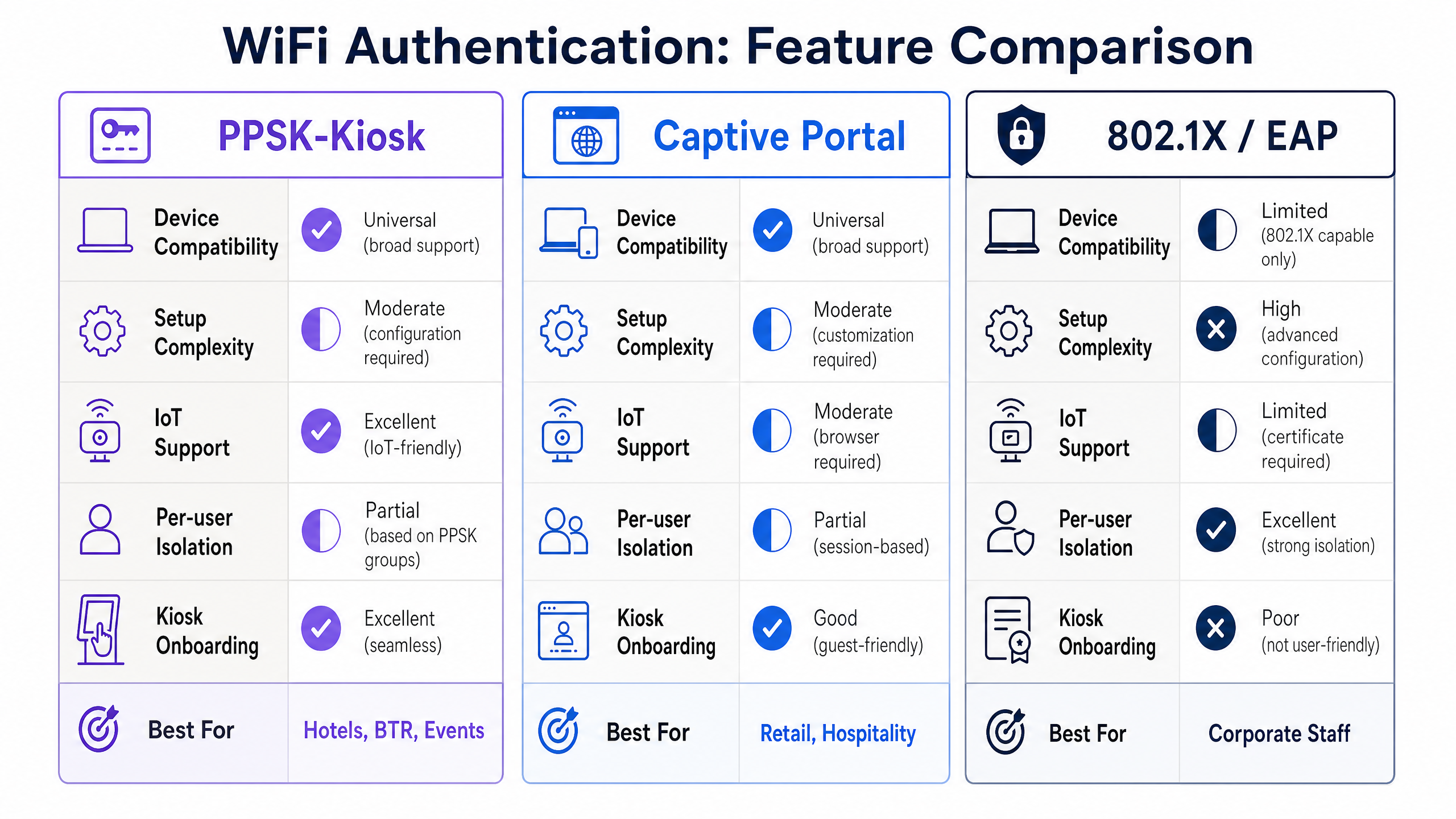
This architecture delivers three specific outcomes:
- Universal Compatibility: Every WiFi-enabled device supports a standard PSK.
- Per-Household Isolation: Devices using the same key (e.g., within one apartment) can communicate with each other, allowing Chromecasts and smart speakers to function normally. Devices using different keys are isolated.
- Granular Revocation: IT teams revoke access by deleting a single key, without affecting any other user on the network.
Implementation Guide: The Kiosk Workflow
The technical capability of PPSK is only half the solution. The operational challenge is securely distributing unique 16-character strings to users without creating a massive support burden. This is where the kiosk model applies.
Architecture Overview
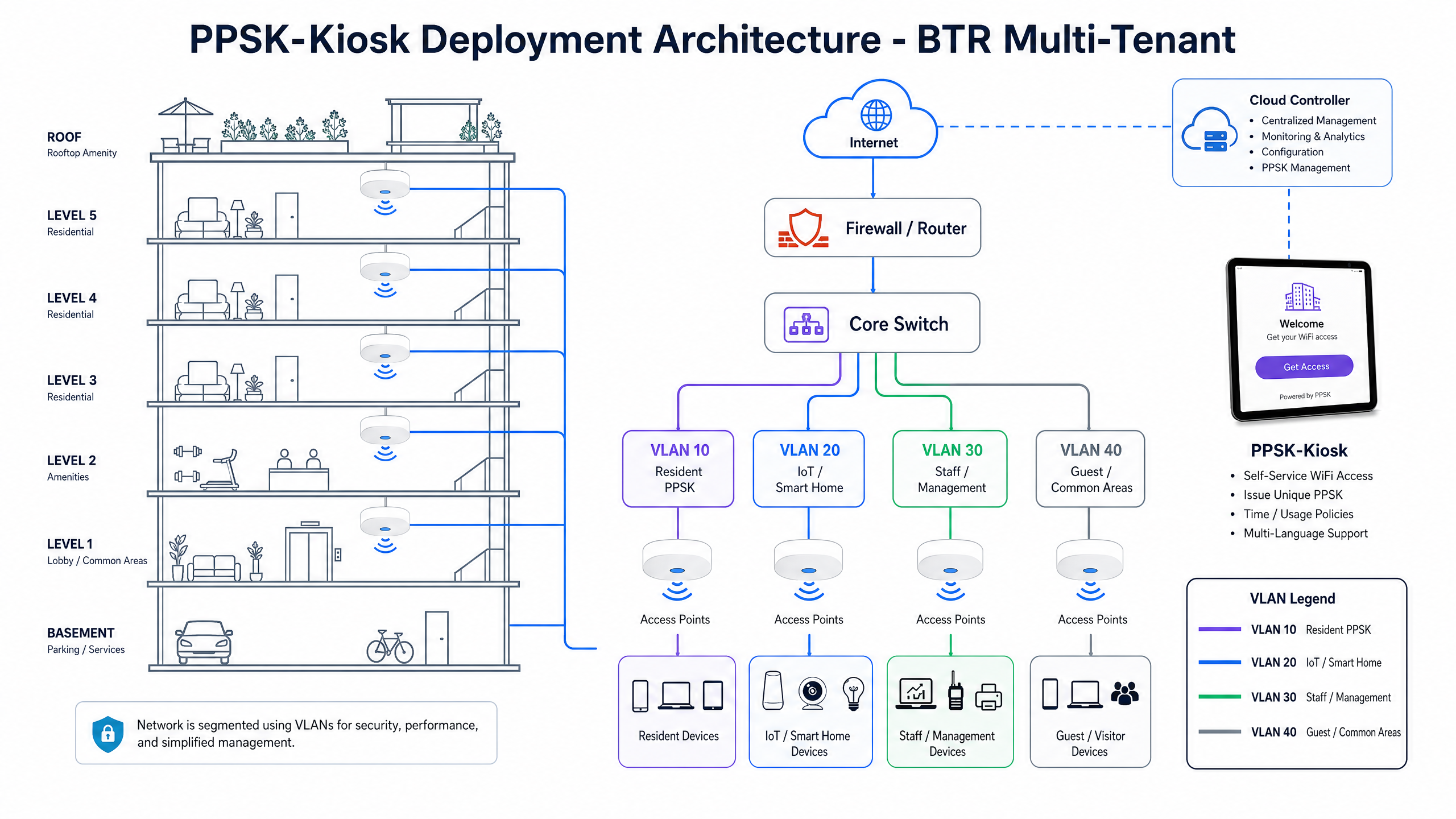
A PPSK-kiosk deployment requires three components:
- The Wireless Infrastructure: Access points capable of dynamic VLAN assignment via PPSK.
- The Policy Engine: A cloud controller or RADIUS server that stores the keys and maps them to VLANs.
- The Kiosk Terminal: A locked-down tablet running a self-service application, communicating with the policy engine via API.
The User Journey
- A visitor arrives at the property and approaches the kiosk.
- The visitor enters their details (name, email) or scans a pre-issued QR code.
- The kiosk application calls the policy engine API to generate a unique PPSK.
- The kiosk displays the key and a QR code on screen, and emails the credential to the user.
- The policy engine pushes the new key to the access points.
- The user connects their devices.
Best Practices for Deployment
When deploying a PPSK-kiosk solution for Hospitality or BTR, adhere to these vendor-neutral guidelines.
1. Limit SSID Proliferation
Every SSID broadcast consumes airtime for beacon frames. Broadcasting separate SSIDs for every apartment degrades RF performance for the entire building. You must use a single SSID for all residents, relying on PPSK to handle the logical separation into VLANs.
2. Standardise on WPA3-SAE Where Possible
While PPSK operates over WPA2, WPA3-SAE adds forward secrecy and protects against offline dictionary attacks. If your hardware and client base support it, deploy PPSK over WPA3. Note that some platforms (such as older Ubiquiti UniFi firmware) may restrict PPSK to WPA2.
3. Implement Three Distinct SSIDs
Do not mix authentication models on a single SSID. Purple recommends a three-SSID design:
- Resident/Guest SSID: Using PPSK for per-user isolation.
- Staff SSID: Using 802.1X for corporate devices and individual accountability.
- IoT/Facilities SSID: Hidden, using PPSK for building management systems, HVAC, and security cameras.
For more detail on this architecture, see our guide: Three SSIDs to rule them all: guest, Passpoint, and IoT WiFi .
Troubleshooting & Risk Mitigation
The Trunk Port Failure
The most common failure in a PPSK deployment occurs at the wired edge. The access point successfully authenticates the client and assigns VLAN 45, but the switch port connecting the AP is not configured to trunk VLAN 45. The client connects to WiFi but receives no IP address. You must ensure all dynamically assigned VLANs are permitted on the trunk links between the access layer and the core.
DHCP Pool Exhaustion
A 200-unit BTR development will see 3,000 to 5,000 devices on the network. If you assign multiple apartments to a shared VLAN to conserve subnets, you must size the DHCP scopes accordingly. A /24 subnet provides 254 addresses and will exhaust rapidly. Use /23 or /22 subnets for shared VLANs, or implement a strict one-VLAN-per-apartment architecture.
The Smart Home Dilemma
Residents frequently bring consumer IoT devices. While PPSK allows these devices to connect, a compromised IoT device poses a risk to other devices on that specific resident's key. Educate residents on securing their devices, and consider implementing client isolation within the VLAN if device-to-device communication (like casting) is not required.
ROI & Business Impact
Deploying a PPSK-kiosk architecture requires investment in hardware and software overlays. The return on investment stems from three areas:
- Support Ticket Reduction: Automating onboarding and eliminating shared-password rotations reduces IT support tickets by 30% to 50%.
- Rent Premiums: In the BTR sector, providing secure, home-like WiFi as a day-one amenity supports rent premiums of £20 to £40 per unit per month.
- First-Party Data: The kiosk workflow captures verified contact details, feeding into WiFi Analytics platforms to build a CRM database of visitors and residents.
For further reading on deployment models, consult the PPSK directory: comparing features and deployment models .
Listen to the Briefing
For a deeper dive into the operational realities of PPSK deployments, listen to our 10-minute technical briefing podcast.
Key Definitions
PPSK (Private Pre-Shared Key)
An authentication method where multiple unique passwords operate on a single SSID, with each password mapping the user to a specific VLAN or policy.
Used to provide secure, isolated network access without the complexity of 802.1X or the device limitations of captive portals.
Captive Portal
A web page that users must view and interact with before accessing a public WiFi network.
Excellent for coffee shops and retail data capture, but unsuitable for residential IoT devices that lack web browsers.
802.1X
An IEEE standard for port-based network access control, requiring a RADIUS server and a client supplicant for authentication.
The enterprise standard for staff networks, providing high security but requiring managed devices.
VLAN (Virtual Local Area Network)
A logical subnetwork that groups a collection of devices from different physical LANs.
PPSK uses VLANs to isolate residents from each other; Flat 10 is on VLAN 10, Flat 11 is on VLAN 11.
Supplicant
A software client on an end-user device that handles the authentication exchange in an 802.1X network.
Laptops and smartphones have supplicants; smart fridges and game consoles typically do not, necessitating PPSK.
BTR (Build to Rent)
Purpose-built residential developments designed specifically for renting rather than sale.
A primary market for PPSK deployments, as operators must provide managed WiFi as a day-one amenity.
SSID (Service Set Identifier)
The public name of a wireless network.
Broadcasting too many SSIDs degrades network performance; PPSK allows you to serve hundreds of isolated users from a single SSID.
WPA3-SAE
The latest WiFi security protocol, using Simultaneous Authentication of Equals to protect against dictionary attacks.
The recommended encryption standard for modern PPSK deployments, providing stronger security than legacy WPA2.
Worked Examples
A 250-unit Build to Rent (BTR) development requires WiFi included in rent. The property manager wants residents to have immediate access upon move-in, with full support for smart TVs and voice assistants. They want to eliminate IT support tickets related to password changes when tenancies end.
Deploy a single 'Resident WiFi' SSID using PPSK. Integrate the property management system with the WiFi controller via API. When a lease is signed, the API generates a unique PPSK and assigns it to a dedicated VLAN for that apartment. The key is emailed to the resident. All devices in the apartment use this key, allowing them to communicate locally (e.g., phone casting to TV). When the lease terminates, the API revokes the key. No other residents are affected.
A large conference centre hosts three distinct events simultaneously in different halls. They need to provide secure WiFi to delegates, but printing a shared password on badges leads to delegates from Event A accessing the network in Event B's hall.
Deploy self-service PPSK kiosks at the registration desk for each hall. When a delegate scans their event ticket, the kiosk issues a unique PPSK valid only for the duration of that specific event, mapped to a VLAN restricted to that hall's access points.
Practice Questions
Q1. You are designing the network for a 500-bed student accommodation block. The client wants to issue a unique WiFi password to every student. A junior engineer suggests creating 500 separate SSIDs, one for each room. What is your response?
Hint: Consider the impact of beacon frames on RF performance.
View model answer
Reject the proposal. Broadcasting 500 SSIDs will cause severe co-channel interference and consume all available airtime with management frames (beaconing), rendering the network unusable. Recommend deploying a single SSID and using PPSK to issue 500 unique keys, mapping each student to their own VLAN.
Q2. A hotel IT director wants to replace their captive portal with 802.1X for guest WiFi to improve security. Why will this fail?
Hint: Think about the types of devices guests bring to hotels.
View model answer
This will fail because 802.1X requires a supplicant on the client device. While guests' laptops and phones support 802.1X, their headless devices (Chromecasts, Apple TVs, Nintendo Switches) do not. These devices will be unable to connect. PPSK is the correct secure alternative for guest networks.
Q3. A PPSK deployment is live. A resident connects their phone using their unique key. The phone shows 'Connected' but receives an IP address of 169.254.x.x (APIPA) and has no internet access. What is the most likely configuration error?
Hint: The AP has authenticated the user, but DHCP traffic is failing to reach the router.
View model answer
The most likely error is that the VLAN assigned to that specific PPSK is not permitted on the trunk port connecting the access point to the access switch. The AP successfully authenticates the client and tags the traffic with the correct VLAN, but the switch drops the frames because the VLAN is not allowed on the trunk.
Continue reading in this series
Uu PPSK pdf: comparing features and deployment models
This technical reference guide compares Private Pre-Shared Key (PPSK) WiFi architecture against traditional 802.1X and standard PSK deployments. It provides network architects and IT managers with vendor-neutral implementation strategies for multi-tenant residential, IoT, and BTR environments.
Uu PPSK pdf: comparing features and deployment models
This technical reference guide compares Private Pre-Shared Key (PPSK) WiFi architecture against traditional 802.1X and standard PSK deployments. It provides network architects and IT managers with vendor-neutral implementation strategies for multi-tenant residential, IoT, and BTR environments.
Uu PPSK 2023: comparing features and deployment models
This technical reference guide compares Unique per-User Private Pre-Shared Key (UU PPSK) WiFi architecture against traditional shared PSK and 802.1X deployments, with a specific focus on the 2023 landscape of vendor implementations and platform capabilities. It provides property developers, BTR operators, and MDU landlords with actionable deployment strategies, VLAN architecture guidance, and automated lifecycle management workflows. The guide covers three deployment models, real-world case studies, and the compliance implications of each authentication approach.