
PPSK mun: comparing features and deployment models
This technical reference guide compares Private Pre-Shared Key (PPSK) architecture against traditional 802.1X and standard PSK deployments. It provides network architects and IT managers with vendor-neutral implementation strategies for multi-tenant residential, IoT, and BTR environments.
Listen to this guide
View podcast transcript

Executive Summary
Providing secure, reliable WiFi in multi-unit properties requires more than standard residential hardware. In the Build-to-Rent (BTR) and Multi-Dwelling Unit (MDU) sectors, high-speed internet is the most critical utility. The 2024 National Multifamily Housing Council survey found that more than 58% of renters rate managed WiFi as very important or absolutely essential. However, traditional deployment models fail at scale. Standard Pre-Shared Key (PSK) networks lack per-unit security, while 802.1X Enterprise authentication blocks consumer smart home devices.
Private Pre-Shared Key (PPSK) resolves this tension. By mapping unique WiFi passwords to isolated Virtual Local Area Networks (VLANs) on a single Service Set Identifier (SSID), PPSK delivers enterprise-grade segmentation with consumer-grade simplicity. This guide compares PPSK against legacy architectures, outlines vendor-neutral deployment models, and provides practical implementation steps for IT managers and property developers.
Technical Deep-Dive: PPSK vs Legacy Architectures
When designing a network for a multi-tenant environment, architects typically evaluate three authentication methods. Understanding the technical mechanics of each is essential for deploying a robust, scalable solution.
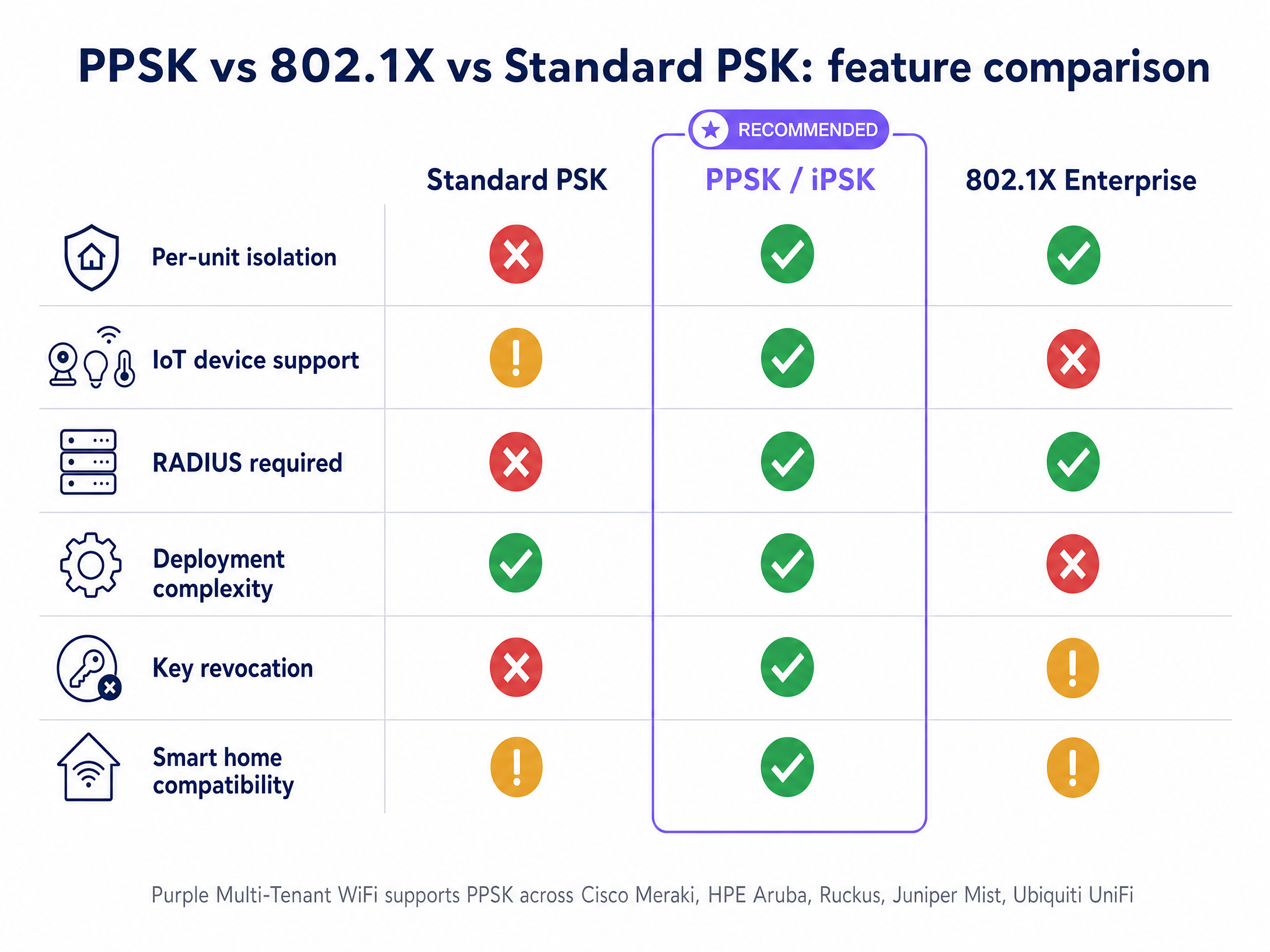
The Problem with Standard PSK
Standard WPA2-Personal relies on a single password shared across all devices. In a 200-unit BTR development, this architecture creates unacceptable security and privacy risks. Because all devices share the same broadcast domain, residents can see and interact with their neighbours' hardware, such as smart TVs, printers, and casting devices. Furthermore, when a resident vacates the property, revoking their access requires changing the password for the entire building, which disconnects every other resident's devices.
The Limitation of 802.1X Enterprise
WPA2/3-Enterprise (802.1X) is the standard for corporate staff networks. It provides excellent security by requiring individual user credentials (username and password) or digital certificates, validated against a RADIUS server and an identity provider like Microsoft Entra ID or Okta. While perfect for managed corporate laptops, 802.1X fails in residential environments. Consumer Internet of Things (IoT) devices, smart speakers, gaming consoles, and smart thermostats lack the 802.1X supplicant software required to negotiate the authentication exchange.
The PPSK Solution
Private Pre-Shared Key (PPSK) operates at the WPA-Personal layer but provides enterprise segmentation. The access point broadcasts a single SSID. When a device connects, it presents its unique pre-shared key during the WPA2 four-way handshake. The access point or cloud controller checks the key against a database, identifies the associated VLAN, and tags the device's traffic accordingly.
To the resident, the connection process is identical to a home router. To the network architect, the traffic is securely isolated into Private Area Networks (PAN). Flat 12 connects to VLAN 10; Flat 13 connects to VLAN 20. The underlying mechanism is identical across vendors, though terminology varies: Cisco Meraki uses Identity PSK (iPSK), HPE Aruba uses PPSK, Juniper Mist uses ePSK, and Ubiquiti UniFi uses PPSK.
Implementation Guide: Deployment Models
Deploying PPSK requires a clear architectural strategy. There are three primary deployment models in production today.
Model 1: Cloud Controller Management
This is the most common model for new BTR and MDU deployments. Access points connect to a cloud management platform where the PPSK key store resides. When you provision a new resident, you generate a key in the portal and assign it to a specific VLAN. The controller pushes this policy to every access point. Purple Multi-Tenant WiFi automates this workflow across Cisco Meraki, HPE Aruba, Ruckus, Juniper Mist, Ubiquiti UniFi, Cambium, Extreme, and Fortinet.
Model 2: Local RADIUS Backend
For environments requiring centralised logging and audit trails, PPSK credentials can be stored and validated on a RADIUS server. This adds infrastructure overhead but provides the accountability of 802.1X alongside the device compatibility of PPSK. It is suitable for mixed-use spaces, such as coworking environments with both managed corporate devices and member-owned hardware.
Model 3: The Hybrid Architecture
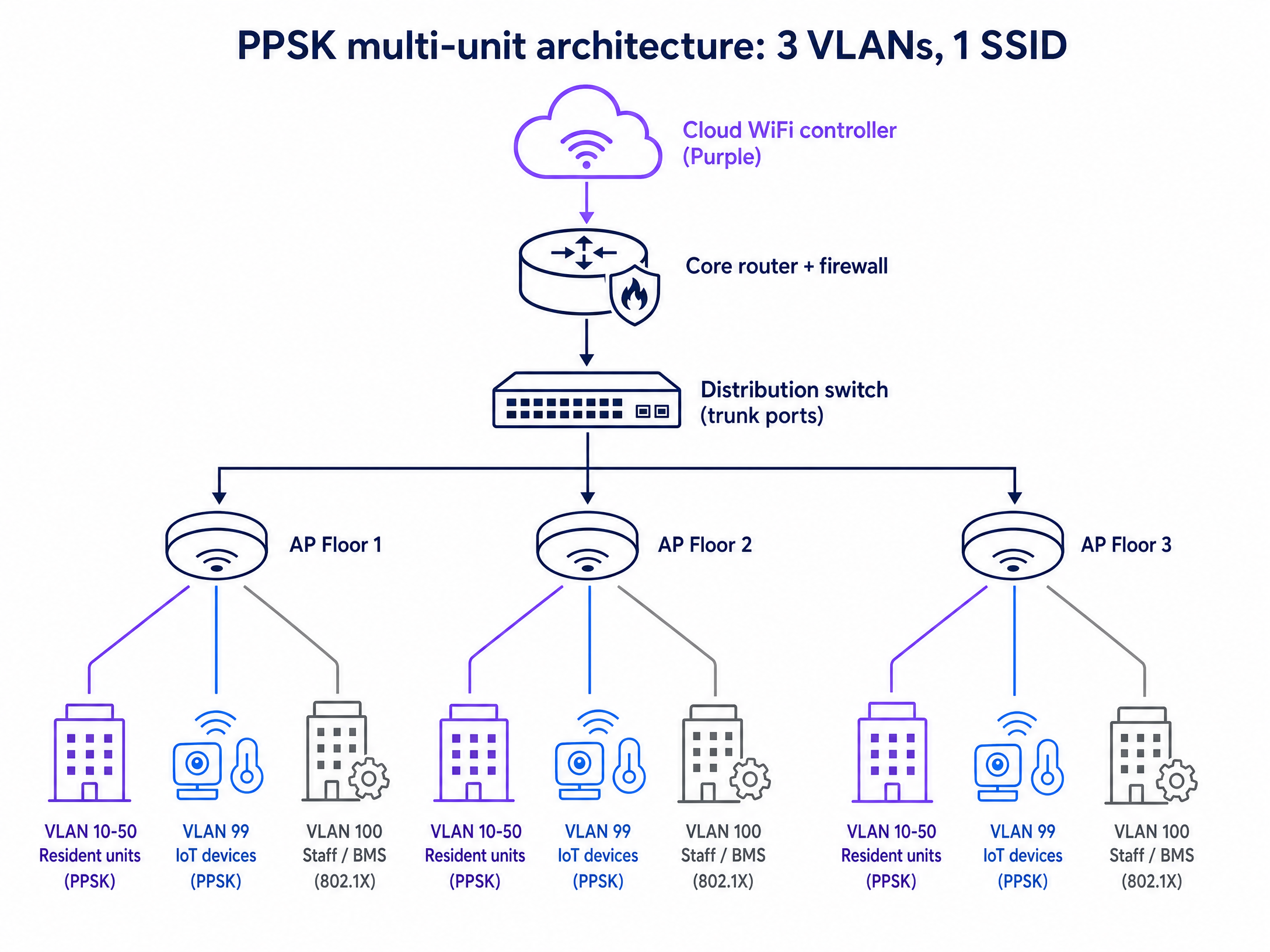
The hybrid model is the architecture Purple recommends for BTR and MDU deployments. It segments the network into three distinct authentication zones on a single physical infrastructure:
- Residents: Use PPSK for personal devices and smart home equipment, with each unit assigned a unique VLAN.
- IoT and Building Systems: Use a separate PPSK on a dedicated IoT VLAN for CCTV, access control, and HVAC controllers.
- Staff and Management: Use 802.1X against an identity provider for the property management team's devices.
Best Practices for Network Design
Successful PPSK deployment requires strict adherence to layer 2 segmentation principles and RF management.
Logical Segmentation Strategy Map out your resident count, IoT categories, and staff systems before configuring hardware. Assign VLANs logically: VLANs 10-250 for resident units (one per flat), VLAN 99 for IoT, VLAN 100 for building management, and VLAN 200 for Guest WiFi in common areas.
IP Addressing and DHCP Scope British Property Federation research indicates 15 to 25 connected devices per household. In a 200-unit building, expect up to 5,000 active devices. Size your DHCP scopes accordingly using RFC 1918 private addressing. A /24 subnet provides 254 usable addresses per VLAN, which is sufficient for individual flats.
SSID Consolidation Every SSID broadcast consumes airtime for beacon frames. Limit your configuration to a maximum of four SSIDs per radio. Use PPSK to serve multiple resident segments from a single SSID rather than creating separate SSIDs for each floor or flat.
Troubleshooting & Risk Mitigation
Even with a solid design, specific failure modes can disrupt a deployment. Mitigate these risks proactively.
Insufficient Trunk Port Configuration A common failure occurs when traffic silently drops because the relevant VLANs are not permitted on trunk links between the distribution switch and the access layer. Validate and document every trunk port during commissioning.
Key Distribution Workflows Generating keys is trivial; distributing them securely is complex. Avoid manual distribution. Integrate your Property Management Software (PMS) with a platform like Purple to automate key generation at tenancy sign-up. Keys should be delivered via email or SMS with a QR code for immediate "Instant-On" access.
IoT Security Risks Placing high-risk smart home devices on the resident's primary PPSK segment can expose other personal devices. For critical building infrastructure, mandate a separate IoT VLAN with strict egress filtering to prevent lateral movement in the event of a device compromise.
ROI & Business Impact
Moving to a managed WiFi model with PPSK transforms internet access from a cost centre into a revenue-generating asset.
By eliminating individual routers in every flat, you reduce hardware capital expenditure and mitigate massive Radio Frequency (RF) interference. Operators using Purple's platform report a 30% reduction in WiFi-related support tickets compared to legacy shared-password deployments, directly lowering operational costs.
Furthermore, managed WiFi enables tiered service models. Property managers can offer basic connectivity as an included amenity, while upselling "Gamer" or "Pro" tiers with higher bandwidth limits. Because PPSK is identity-based, speed upgrades are provisioned instantly via the software dashboard, requiring no truck rolls or hardware swaps.
For further insights into optimising your venue's connectivity and leveraging first-party data, explore our WiFi Analytics platform and read our guide on What is PPSK: comparing features and deployment models .
Key Definitions
PPSK (Private Pre-Shared Key)
An authentication method that allows multiple unique passwords on a single SSID, with each password mapping the connecting device to a specific VLAN or policy group.
Used by IT teams to provide secure, isolated networks for individual units in multi-tenant buildings without requiring complex enterprise authentication.
iPSK (Identity PSK)
Cisco Meraki's proprietary term for Private Pre-Shared Key functionality.
Encountered when designing networks using Meraki hardware in BTR or hospitality environments.
802.1X
An IEEE standard for port-based network access control that provides an authentication mechanism to devices wishing to attach to a LAN or WLAN.
The gold standard for corporate staff networks, but unsuitable for residential WiFi due to its incompatibility with consumer smart home devices.
VLAN (Virtual Local Area Network)
A logical subnetwork that groups a collection of devices from different physical LANs, isolating their broadcast traffic.
The underlying mechanism PPSK uses to keep Flat A's traffic separate from Flat B's traffic on the same physical access point.
MDU (Multi-Dwelling Unit)
A classification of housing where multiple separate housing units for residential inhabitants are contained within one building or several buildings within one complex.
The primary real estate sector driving the adoption of managed WiFi and PPSK technologies.
BTR (Build-to-Rent)
Purpose-built residential properties designed specifically for renting rather than for sale, typically owned and managed by institutional investors.
A rapidly growing sector where high-quality, managed WiFi is marketed as a core utility to attract and retain tenants.
RADIUS (Remote Authentication Dial-In User Service)
A networking protocol that provides centralised Authentication, Authorization, and Accounting (AAA) management for users who connect and use a network service.
Required for 802.1X deployments, and optionally used in enterprise PPSK deployments to store and validate keys.
PAN (Private Area Network)
A secure, isolated network segment created for an individual user or household within a larger shared infrastructure.
The resident experience delivered by PPSK; allowing their devices to communicate with each other while remaining invisible to neighbours.
Worked Examples
A 180-unit Build-to-Rent development in a city centre needs to provide 'Instant-On' WiFi included in rent, supporting both resident smart home devices and secure building management systems. The operator wants to eliminate password rotation issues when tenants move out.
Deploy HPE Aruba access points managed through Aruba Central using a hybrid architecture. Broadcast a single SSID for residents using PPSK, mapping each flat to a unique VLAN (VLANs 10-190). Broadcast a second hidden SSID for building management using 802.1X. Integrate the Property Management Software (PMS) with Purple Multi-Tenant WiFi. At tenancy sign-up, the system automatically generates a unique PPSK and emails a QR code to the resident. When the tenancy ends, the API automatically revokes the key.
A 400-bed purpose-built student accommodation block faces severe network degradation during cohort move-in week when hundreds of students attempt to connect dozens of devices simultaneously to a standard WPA2-Personal network.
Migrate to Ruckus access points with SmartZone controllers using PPSK. Pre-generate one unique key per room and include it in the digital welcome pack sent prior to arrival. Configure the distribution switches to permit the corresponding VLANs on all trunk ports to the access layer. Limit the AP configuration to broadcast a maximum of three SSIDs to preserve airtime.
Practice Questions
Q1. You are designing the network for a 50-unit luxury apartment building. The property manager wants residents to use 802.1X with Entra ID credentials for maximum security. Why should you advise against this approach?
Hint: Consider the types of devices residents typically bring into their homes.
View model answer
While 802.1X provides excellent security, it requires an 802.1X supplicant on the client device. Most consumer IoT devices, smart TVs, gaming consoles, and smart speakers do not support 802.1X authentication. Implementing it would prevent residents from connecting their smart home equipment, leading to high frustration and support volume. PPSK is the correct approach here, offering device compatibility with enterprise-grade isolation.
Q2. During commissioning of a new MDU network using PPSK, devices successfully authenticate and associate with the access point, but fail to receive an IP address via DHCP. What is the most likely configuration error?
Hint: Think about the path between the access point and the core router.
View model answer
The most likely cause is an insufficient trunk port configuration. The access point is successfully assigning the device to the correct VLAN based on the PPSK, but the distribution or core switches have not been configured to permit that specific VLAN across their trunk links. The DHCP discover packets are being dropped at the switch port.
Q3. A property developer suggests broadcasting a separate SSID for each of the 10 floors in their building to 'keep things organised'. What is the technical impact of this design?
Hint: Consider the RF environment and management overhead.
View model answer
Broadcasting 10 SSIDs will severely degrade network performance due to beacon frame overhead. Every SSID requires management frames that consume valuable airtime, reducing the available capacity for actual client data transmission. The best practice is to broadcast a single SSID and use PPSK to logically segment users into different VLANs on the backend.
Continue reading in this series
Uu PPSK pdf: comparing features and deployment models
This technical reference guide compares Private Pre-Shared Key (PPSK) WiFi architecture against traditional 802.1X and standard PSK deployments. It provides network architects and IT managers with vendor-neutral implementation strategies for multi-tenant residential, IoT, and BTR environments.
Uu PPSK pdf: comparing features and deployment models
This technical reference guide compares Private Pre-Shared Key (PPSK) WiFi architecture against traditional 802.1X and standard PSK deployments. It provides network architects and IT managers with vendor-neutral implementation strategies for multi-tenant residential, IoT, and BTR environments.
Uu PPSK 2023: comparing features and deployment models
This technical reference guide compares Unique per-User Private Pre-Shared Key (UU PPSK) WiFi architecture against traditional shared PSK and 802.1X deployments, with a specific focus on the 2023 landscape of vendor implementations and platform capabilities. It provides property developers, BTR operators, and MDU landlords with actionable deployment strategies, VLAN architecture guidance, and automated lifecycle management workflows. The guide covers three deployment models, real-world case studies, and the compliance implications of each authentication approach.