
What is PPSK: comparing features and deployment models
This guide provides a definitive technical reference on Private Pre-Shared Key (PPSK) WiFi architecture for property developers, BTR operators, and landlords. It compares PPSK against shared PSK and 802.1X deployments, covering per-unit VLAN isolation, IoT device compatibility, and automated key lifecycle management. IT managers and network architects will find actionable deployment guidance, vendor-specific implementation notes, and real-world case studies demonstrating measurable operational outcomes.
Listen to this guide
View podcast transcript
Executive summary
For IT managers and network architects deploying WiFi in multi-tenant environments, the choice of authentication architecture dictates both security posture and operational overhead. This guide examines Private Pre-Shared Key (PPSK) technology - what it is, how it works, and where it is the right tool. By assigning a unique cryptographic key to each resident or device group, PPSK enables per-unit VLAN isolation on a single SSID. This eliminates the blast radius of a shared password, provides seamless support for headless IoT devices that cannot run an 802.1X supplicant, and automates the key lifecycle from move-in to move-out. We provide vendor-neutral deployment guidance across Cisco Meraki, HPE Aruba, Ruckus, Juniper Mist, Ubiquiti UniFi, Cambium, Extreme, and Fortinet. Purple's Multi-Tenant WiFi solution integrates with all of these platforms via a cloud RADIUS overlay, giving BTR operators and landlords the orchestration layer to manage keys, VLANs, and resident onboarding at scale. Founded in 2012, Purple serves 80,000+ live venues and processed 440 million logins in 2024, maintaining 99.999% uptime.

Technical deep-dive
What is PPSK?
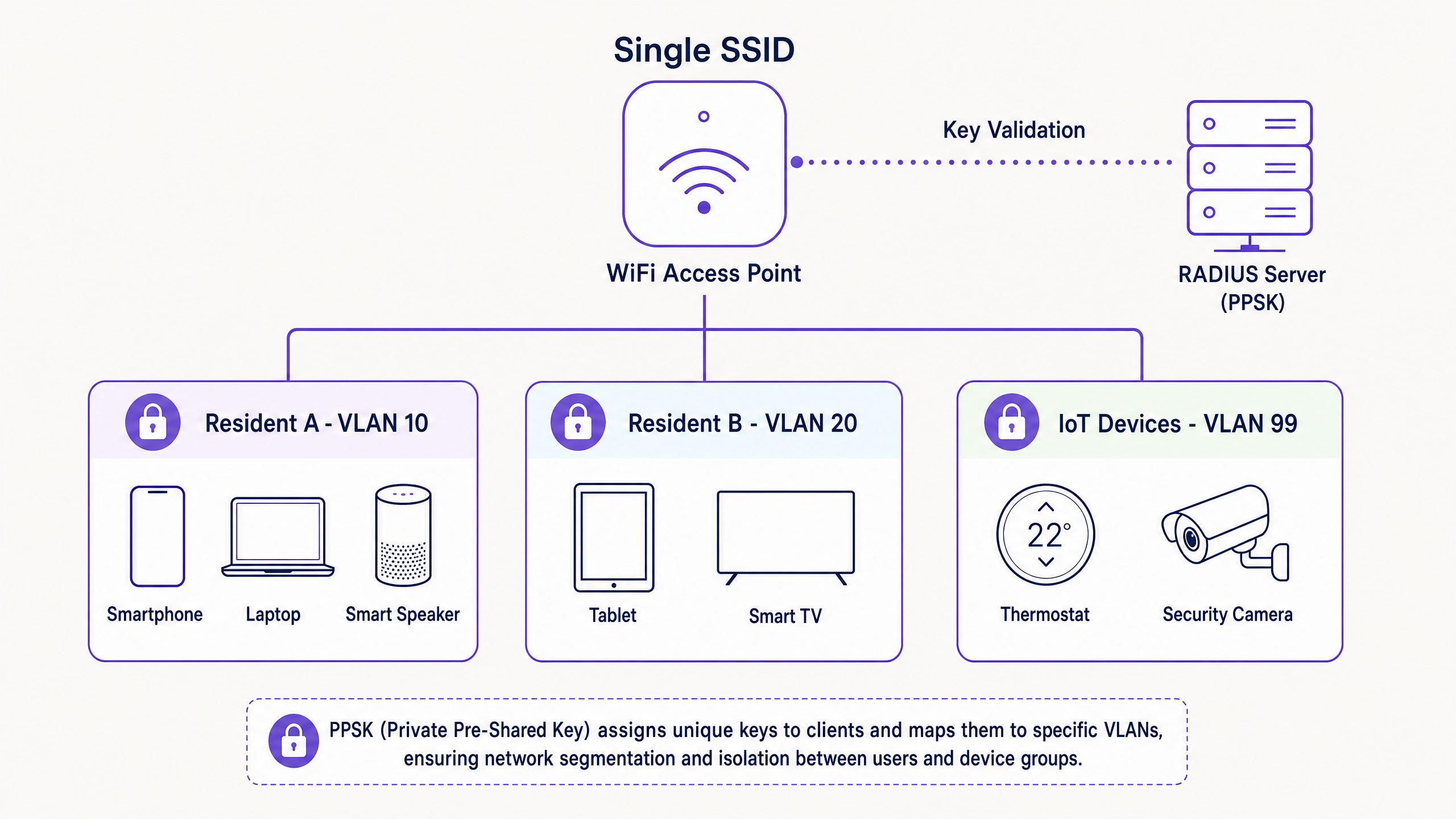
Private Pre-Shared Key (PPSK) - also referred to as iPSK (Cisco Meraki), MPSK (HPE Aruba), DPSK (Ruckus), and ePSK (Juniper Mist) - is a WiFi authentication method in which each user or device group is assigned a unique passphrase on a shared SSID. The access point or cloud controller maps each key to a specific VLAN, creating a private, isolated network segment for that user. From the resident's perspective, they enter a password and connect. From the network's perspective, their traffic is tagged to a dedicated VLAN, completely invisible to every other resident on the same physical infrastructure.
The standard pre-shared key (PSK) model, as defined under WPA2/WPA3-Personal, uses a single shared secret across all devices on a network. This is operationally straightforward but creates a flat, undifferentiated network. In a 200-unit Build to Rent development, a single shared password means every resident can see every other resident's devices, revoking access for a departing tenant requires a building-wide password rotation, and a single compromised credential exposes the entire network.
PPSK resolves this at the association layer. When a device connects, it presents its pre-shared key during the WPA2 or WPA3 four-way handshake. The wireless controller intercepts the connection and either validates the key locally (controller-local PPSK) or forwards the device's MAC address to a RADIUS server for lookup. The RADIUS server returns the correct PPSK for that user along with a VLAN assignment attribute. If the keys match, the device is authenticated and placed on its dedicated VLAN. The entire process is transparent to the end user and requires no special software on the device.
PPSK vs 802.1X vs shared PSK
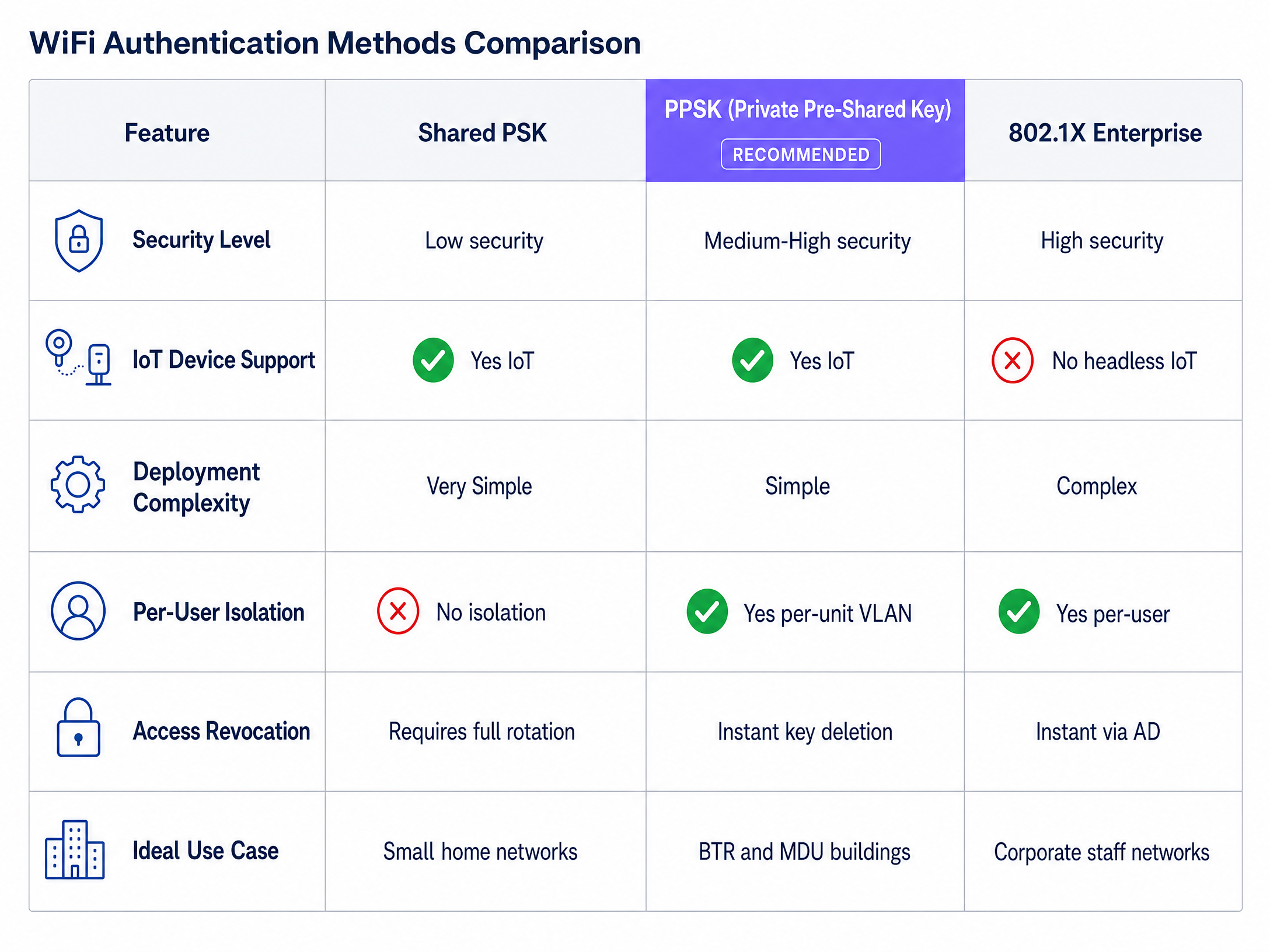
Understanding where PPSK fits requires a clear comparison with the two alternatives it sits between.
Shared PSK is the simplest model: one password, all devices on the same network. It requires no infrastructure beyond the access point itself. The security limitations are severe in any multi-tenant context. There is no per-user isolation, no individual accountability, and revoking access for a single user requires rotating the key for everyone.
802.1X (WPA2/3-Enterprise), as defined by the IEEE 802.1X standard, provides the highest security. It requires a RADIUS server, an identity provider (Microsoft Entra ID, Okta, or Google Workspace), and a supplicant on every client device. The supplicant handles the Extensible Authentication Protocol (EAP) exchange. Every managed laptop and corporate smartphone has a supplicant. Headless IoT devices - smart TVs, wireless speakers, HVAC controllers, security cameras - do not. This makes 802.1X unworkable as the sole authentication method for residential networks.
PPSK sits between these two models. It provides per-user isolation and instant access revocation without requiring a supplicant on the client device. It supports every IoT device your residents own. It does not provide the individual certificate-based accountability of 802.1X, which is why the recommended architecture for BTR and MDU deployments uses PPSK for residents and IoT, and 802.1X for property management staff.
| Dimension | Shared PSK | PPSK | 802.1X Enterprise |
|---|---|---|---|
| Security level | Low - shared static key | Medium-high - unique key per user | High - individual dynamic keys |
| IoT device support | Yes | Yes | No - requires supplicant |
| Deployment complexity | Very simple | Simple | Complex - RADIUS, PKI, IdP |
| Per-user isolation | No | Yes - per-unit VLAN | Yes - per-user |
| Access revocation | Requires full rotation | Instant key deletion | Instant via directory disable |
| Ideal use case | Small home networks | BTR, MDU, student accommodation | Corporate staff networks |
How PPSK authentication works
At the technical level, PPSK operates within the WPA Personal authentication framework. When a device connects to the SSID, the access point initiates the four-way handshake. In a standard PSK deployment, the AP validates the key locally. In a PPSK deployment, the AP or cloud controller intercepts the connection and performs one of two operations depending on the deployment model.
In a controller-local PPSK deployment, the key database is stored directly on the wireless controller. The controller validates the presented key against its local store and assigns the corresponding VLAN. This model requires no external RADIUS server and is suitable for deployments up to approximately 200 units, depending on the controller platform's local key capacity.
In a RADIUS-backed PPSK deployment, the controller forwards the device's MAC address to an external RADIUS server. The RADIUS server looks up the MAC in its identity store, retrieves the assigned PPSK, and returns it to the controller via a RADIUS Access-Accept response. The controller validates the key the device presented against the returned key. If they match, the RADIUS response also carries the VLAN assignment as a Tunnel-Private-Group-ID attribute. The device is authenticated and placed on the correct VLAN automatically. This model scales to thousands of units and is the recommended architecture for large BTR and MDU deployments.
For more detail on how PPSK compares across specific hardware platforms, see our PPSK directory: comparing features and deployment models .
Implementation guide
Deploying PPSK successfully requires rigorous planning across VLAN architecture, DHCP scoping, hardware selection, and key lifecycle management. Follow this sequence for a production-ready deployment.
Step 1: Logical network design
Do not configure hardware until the logical design is documented. In a multi-tenant environment, VLAN assignment is the primary security boundary. A typical BTR deployment uses the following VLAN structure:
- Resident VLANs (10 to N): One unique VLAN per flat. This creates the isolated network segment where a resident's devices can discover each other via mDNS (enabling Chromecast, Apple TV, and Sonos), but remain invisible to neighbours.
- IoT/BMS VLAN (99): Isolates building management systems, CCTV, and landlord-owned IoT devices with strict egress filtering to the internet only.
- Staff/Corporate VLAN (100): Uses 802.1X against Microsoft Entra ID for property management staff.
- Guest WiFi VLAN (200): Open or captive portal access for common areas and visitor use.
Step 2: IP addressing and DHCP
Modern BTR households average 15 to 25 connected devices. A 200-unit building will see 3,000 to 5,000 concurrent devices on the network. Size your DHCP scopes accordingly. Use RFC 1918 private addressing. A /24 subnet provides 254 usable addresses per VLAN, which is sufficient for individual flats. Central IoT VLANs may require a /22 or /23 depending on device density.
Step 3: Hardware selection and PPSK configuration
PPSK is supported across all major enterprise access point platforms, with vendor-specific implementation notes:
- Cisco Meraki (iPSK): Managed through the Meraki Dashboard. Supports up to 5,000 iPSK entries per network. Integrates with the Meraki API for automated key provisioning.
- HPE Aruba (MPSK): Implemented natively in ArubaOS and Aruba Central. Supports MPSK on WPA2 and WPA3 configurations. Integrates with Aruba ClearPass for enterprise-scale RADIUS-backed deployments.
- Ruckus (DPSK): Supported through SmartZone and Ruckus Cloud. DPSK with SmartZone scales to thousands of keys via external RADIUS.
- Juniper Mist (ePSK): Cloud-managed with AI-driven RF optimisation. ePSK is configured per WLAN in the Mist portal.
- Ubiquiti UniFi (PPSK): Supports up to 1,000 PPSK entries per network. Note: UniFi PPSK is currently WPA2 only and does not support the 6 GHz band.
- Cambium and Extreme: Both support PPSK through their respective cloud management platforms.
One critical constraint: UniFi's PPSK implementation is WPA2 only. If you are specifying WiFi 6E access points and want to use the 6 GHz band for PPSK clients, use Aruba, Ruckus, or Meraki, which support PPSK on WPA3 configurations.
Step 4: Key distribution and lifecycle management
Generating keys is trivial. Distributing them securely and managing their lifecycle is the operational challenge that determines whether PPSK delivers its promised benefits.
- Move-in onboarding: Integrate the WiFi provisioning with the property management system. When a tenancy begins, automatically generate the PPSK and email a QR code to the resident. The resident scans the QR code, and all their devices connect to the correct VLAN immediately.
- Ongoing management: Provide a resident portal where they can retrieve their key and register additional devices.
- Move-out revocation: When a tenancy ends, the API must immediately revoke the key. The departing resident's devices lose access without any impact on other tenants.
Purple's Multi-Tenant WiFi solution provides the cloud RADIUS, API orchestration, and resident portal required to automate this lifecycle across all supported hardware platforms. For related guidance on Guest WiFi and WiFi Analytics , see the linked resources.
Best practices
Limit SSID proliferation. Broadcast a maximum of three SSIDs per radio: one for residents (PPSK), one for staff (802.1X), and one for guests (captive portal). Every additional SSID consumes airtime for beacon frames, degrading performance for all users. PPSK allows hundreds of isolated networks to exist under a single SSID, eliminating the need for per-floor or per-flat SSIDs. See our guide on Three SSIDs to rule them all: guest, Passpoint, and IoT WiFi for the full architecture rationale.
Account for MAC randomisation from day one. iOS 14+, Android 10+, and Windows 11 use randomised MAC addresses by default. If your PPSK deployment relies on MAC-based RADIUS lookups, build a pre-registration workflow into the resident onboarding process. Guide residents to disable "Private WiFi Address" or "Use randomised MAC" in their device settings for your specific SSID, or implement a captive portal pre-registration step that captures the permanent hardware MAC.
Validate trunk ports before go-live. Design a clean VLAN scheme, deploy the access points, then verify that every trunk link between the access layer switches and the distribution core permits the full range of resident VLANs. Traffic will silently drop if a VLAN is missing from the trunk allowed list. Test with a device on each VLAN before residents move in.
Enable mDNS reflection per VLAN. Residents expect their smart home devices to work. Chromecast, Apple TV, Sonos, and similar devices rely on mDNS (Multicast DNS) to discover each other on the local network. Ensure your wireless controller is configured to allow mDNS traffic within each resident VLAN while blocking it between VLANs.
Use WPA3 where client devices support it. WPA3-SAE (Simultaneous Authentication of Equals) provides significantly stronger protection against offline dictionary attacks than WPA2-PSK. Deploy PPSK on WPA3 transition mode to support both WPA2 and WPA3 clients. The exception is Ubiquiti UniFi, which is currently WPA2 only for PPSK.
For guidance on the guest WiFi experience in hospitality environments, see How to make a great first impression with your guest WiFi .
Troubleshooting and risk mitigation
Failure mode 1: Device fails to authenticate
Symptom: A resident's device cannot connect to the SSID despite using the correct key.
Most likely cause: The device is presenting a randomised MAC address. The RADIUS server performs a MAC lookup, finds no matching entry for the randomised address, and returns an Access-Reject.
Resolution: Guide the resident to open their device's WiFi settings for your specific SSID and disable "Private WiFi Address" (iOS) or "Use randomised MAC" (Android/Windows). Alternatively, implement a pre-registration captive portal that captures the permanent hardware MAC during onboarding.
Failure mode 2: Smart home devices cannot discover each other
Symptom: A resident's Chromecast, Apple TV, or smart speaker cannot be found by their phone or laptop, despite both being connected to the same SSID.
Most likely cause: Client isolation is enabled on the SSID, or mDNS reflection is not configured correctly across the wireless controller.
Resolution: Disable client isolation for the resident SSID. Enable mDNS reflection or proxy within each resident VLAN on the wireless controller. Verify that the controller is not blocking intra-VLAN multicast traffic.
Failure mode 3: Controller key limit reached
Symptom: New residents cannot be provisioned because the PPSK key store is full.
Most likely cause: The deployment is using controller-local PPSK without an external RADIUS server. Most controllers cap local PPSK entries at 500 to 1,000 keys.
Resolution: For deployments exceeding 100 units, always use a RADIUS-backed PPSK architecture. Purple's cloud RADIUS service scales to tens of thousands of concurrent keys with no hardware to manage.
Failure mode 4: VLANs not passing through trunk links
Symptom: Devices on certain resident VLANs can connect to the SSID but cannot reach the internet or other services.
Most likely cause: The VLAN IDs for those residents are not permitted on the trunk link between the access layer switch and the distribution or core switch.
Resolution: Audit every trunk port in the path from the access point to the internet gateway. Ensure all resident VLAN IDs are in the allowed VLAN list on each trunk. Document the trunk configuration and include it in the commissioning checklist.
ROI and business impact
Deploying PPSK transforms WiFi from a problematic utility into a secure, managed amenity. For BTR operators and landlords, the business impact is measurable across three dimensions.
Reduced support overhead. Eliminating shared password rotations and resolving IoT connectivity issues typically reduces WiFi-related support tickets by 40% to 60%. A 180-unit BTR operator who migrated from a shared PSK to HPE Aruba MPSK reported a 50% reduction in support tickets in the first six months of operation. The primary driver was eliminating the smart home device pairing issues that plagued the shared PSK deployment.
Increased resident retention. Providing a secure, home-like network experience that supports smart home devices is a measurable differentiator in the premium BTR market. Residents who can connect their full device ecosystem - including smart speakers, streaming sticks, and gaming consoles - on move-in day report significantly higher satisfaction scores than those who experience connectivity friction.
Regulatory compliance. GDPR requires that you can demonstrate accountability for data processing. In a WiFi context, that means being able to identify which resident generated which network traffic and respond to a subject access request with accurate, resident-specific data. With a shared PSK, every device on the network is indistinguishable from the RADIUS server's perspective. With PPSK, every connection is tied to a specific resident key, which is tied to a specific tenancy record. Your audit trail is complete.
For sector-specific guidance on how WiFi intelligence drives business outcomes, see our resources on Hospitality and Retail .
Key Definitions
PPSK (Private Pre-Shared Key)
A WiFi authentication method in which each user or device group is assigned a unique passphrase on a shared SSID. Each key maps to a specific VLAN, providing network isolation without requiring a supplicant on the client device.
The primary authentication model for multi-tenant residential environments where 802.1X is too complex or incompatible with IoT devices. Known as iPSK (Cisco Meraki), MPSK (HPE Aruba), DPSK (Ruckus), and ePSK (Juniper Mist).
802.1X
An IEEE standard for port-based network access control. It uses a RADIUS server to authenticate users via individual credentials or certificates, providing per-user dynamic encryption keys and instant access revocation.
The correct authentication model for corporate staff networks. Requires a supplicant on every client device, making it unsuitable as the sole authentication method for residential or IoT-heavy environments.
VLAN (Virtual Local Area Network)
A logical grouping of network devices that act as if they are on the same physical network, defined by the IEEE 802.1Q standard. VLANs create separate broadcast domains on shared physical infrastructure.
The fundamental mechanism for isolating tenant traffic in a multi-tenant deployment. Each resident PPSK key maps to a unique VLAN, creating the 'WiFi bubble' that prevents residents from seeing each other's devices.
RADIUS (Remote Authentication Dial-In User Service)
A networking protocol providing centralised authentication, authorisation, and accounting management. In a PPSK deployment, the RADIUS server stores the key database and returns VLAN assignment attributes to the wireless controller.
Required for PPSK deployments exceeding approximately 200 units, where controller-local key storage is insufficient. Purple provides a cloud RADIUS service that eliminates the need for on-premise RADIUS infrastructure.
Supplicant
The software component on a client device that handles the EAP (Extensible Authentication Protocol) exchange in an 802.1X authentication flow. It presents credentials or certificates to the authenticator (access point).
Present on every managed laptop and corporate smartphone. Absent on headless IoT devices, which is why 802.1X cannot be the sole authentication method for residential networks.
SSID proliferation
The practice of broadcasting too many network names (SSIDs) from a single access point. Each SSID requires beacon frames transmitted at the lowest basic rate, consuming airtime and degrading performance for all users.
A common mistake in multi-tenant deployments where operators create a separate SSID per floor or per tenant type. PPSK resolves this by enabling hundreds of isolated networks under a single SSID.
mDNS (Multicast DNS)
A protocol that resolves hostnames to IP addresses within a local network without a dedicated DNS server, using multicast UDP packets on port 5353.
Essential for consumer IoT devices to discover each other on a resident's VLAN. Chromecast, Apple TV, Sonos, and similar devices rely on mDNS. Must be enabled within each resident VLAN and blocked between VLANs.
MAC randomisation
A privacy feature in modern operating systems (iOS 14+, Android 10+, Windows 11) that generates a temporary, randomised MAC address for each WiFi network, preventing tracking across networks.
Causes authentication failures in PPSK deployments that rely on permanent hardware MAC addresses for RADIUS lookups. Requires a pre-registration workflow or device-level configuration to disable for specific SSIDs.
WPA3-SAE (Simultaneous Authentication of Equals)
The authentication protocol used in WPA3-Personal networks. It replaces the WPA2 four-way handshake with a Dragonfly key exchange, providing forward secrecy and resistance to offline dictionary attacks.
The recommended encryption standard for new PPSK deployments. Supported on Cisco Meraki, HPE Aruba, and Ruckus. Not yet supported for PPSK on Ubiquiti UniFi as of 2025.
Captive portal
A web page that a network user must view and interact with before being granted access to a public WiFi network. It enforces terms of service, captures marketing data, and manages session parameters.
Used on Open or Guest WiFi networks in common areas of BTR buildings, hotels, and retail environments. A business control layer, not a security control - it does not encrypt WiFi traffic.
Worked Examples
A 150-unit Build to Rent operator currently uses a single shared WiFi password across the building. Residents complain that their smart speakers do not work, the operator cannot revoke access when a tenant moves out, and a departing tenant recently shared the password publicly online. They have specified HPE Aruba access points. What is the correct architecture?
Deploy HPE Aruba MPSK (Multiple PSK) backed by a cloud RADIUS server. Configure a single resident SSID ('Residents_WiFi') on WPA2/WPA3 transition mode. In the RADIUS database, map each flat to a unique VLAN (VLANs 10 to 160 for 150 units). Integrate the RADIUS provisioning API with the property management system so that when a tenancy begins, a unique 16-character MPSK is automatically generated and emailed to the resident as a QR code. Enable mDNS reflection within each resident VLAN so that Chromecast, Apple TV, and Sonos function correctly. Disable client isolation on the resident SSID. When a tenancy ends, the property management system calls the RADIUS API to delete the key. The departing resident's devices lose access within seconds. No other resident is affected.
A 400-bed purpose-built student accommodation provider experiences severe network degradation every September during move-in week. They currently broadcast six SSIDs to separate traffic by floor and accommodation type. They use Cisco Meraki hardware. How should the network be redesigned?
Consolidate the six SSIDs into three: 'Student_Secure' (iPSK), 'Staff' (802.1X), and 'Guest' (captive portal). Implement Meraki iPSK on the 'Student_Secure' SSID. Pre-provision 400 unique iPSK keys via the Meraki Dashboard API before move-in week, mapping each key to a specific room VLAN. Distribute keys via the student portal during pre-arrival registration, with a QR code included in the welcome email. Size DHCP scopes for 10 devices per student (a /25 per VLAN provides 126 usable addresses). Validate all trunk ports permit the full VLAN range before move-in day.
Practice Questions
Q1. A property developer is specifying network hardware for a new 300-unit BTR building. Their IT consultant recommends broadcasting a separate SSID for each floor to 'keep things organised'. Why is this a poor architectural decision, and what is the correct approach?
Hint: Consider the impact of management frames on wireless airtime, and how PPSK eliminates the need for per-floor SSIDs.
View model answer
Broadcasting multiple SSIDs causes SSID proliferation. Every SSID requires the access point to transmit beacon frames at the lowest basic rate (typically 1 Mbps), consuming airtime before any user data is transmitted. In a dense residential building with 10 or more access points per floor, broadcasting one SSID per floor across 10 floors creates 100 SSIDs in the RF environment, severely degrading performance for all users. The correct approach is to broadcast a single resident SSID and use PPSK to assign each flat to its own isolated VLAN. This delivers per-unit isolation without any beacon overhead beyond a single SSID.
Q2. A hotel IT manager wants to deploy 802.1X for all guest rooms to ensure maximum security. They plan to issue usernames and passwords at check-in. What critical technical barrier makes this approach unviable for a hospitality environment, and what is the recommended alternative?
Hint: Think about the types of devices guests bring with them, specifically those without screens or operating systems.
View model answer
802.1X requires a supplicant on the client device to handle the EAP authentication exchange. While laptops and smartphones have supplicants, headless IoT devices - smart TVs, gaming consoles, streaming sticks, and wireless speakers - do not. Guests would be unable to connect these devices to the network. The recommended alternative is PPSK: issue each guest a unique key at check-in (via the property management system integration), which connects all their devices to a dedicated VLAN. When the guest checks out, the key is revoked automatically.
Q3. During a PPSK deployment on Juniper Mist, residents report that they can connect their smartphones to the WiFi, but their smart speakers fail to connect during the initial setup process. The smart speaker shows as attempting to connect but never completing authentication. What are the two most likely causes, and how do you resolve each?
Hint: Consider both how the network identifies the device during the initial connection, and whether the device can complete the authentication handshake.
View model answer
The two most likely causes are MAC randomisation and the absence of a pre-registration workflow. First, the smartphone may have been pre-registered with its permanent hardware MAC, while the smart speaker is presenting a randomised MAC that does not match any entry in the RADIUS database. Resolution: configure the SSID to request permanent MAC addresses, or add the smart speaker's permanent MAC to the resident's PPSK profile. Second, some smart speakers require the device to be on the same network as the controlling phone during initial setup. If client isolation is enabled, the phone and speaker cannot communicate even if both are connected. Resolution: disable client isolation on the resident SSID and verify that mDNS reflection is enabled within the resident VLAN.
Q4. A 500-unit BTR operator has deployed PPSK using controller-local key storage on their Ubiquiti UniFi infrastructure. After six months of operation, the network team discovers that new residents cannot be provisioned because the key store is full. What went wrong, and what is the correct remediation?
Hint: Consider the scalability ceiling of controller-local PPSK and the correct architecture for large-scale deployments.
View model answer
The operator deployed controller-local PPSK, which stores keys directly on the UniFi controller. UniFi supports a maximum of 1,000 PPSK entries per network. A 500-unit building with multiple devices per resident will exhaust this limit rapidly. The correct remediation is to migrate to a RADIUS-backed PPSK architecture. An external RADIUS server - such as Purple's cloud RADIUS service - stores the key database and scales to tens of thousands of concurrent keys. The UniFi access points query the RADIUS server for each new connection, eliminating the controller-local key limit. As a general rule, any deployment exceeding 100 units should use RADIUS-backed PPSK from the outset.
Continue reading in this series
Uu PPSK pdf: comparing features and deployment models
This technical reference guide compares Private Pre-Shared Key (PPSK) WiFi architecture against traditional 802.1X and standard PSK deployments. It provides network architects and IT managers with vendor-neutral implementation strategies for multi-tenant residential, IoT, and BTR environments.
Uu PPSK pdf: comparing features and deployment models
This technical reference guide compares Private Pre-Shared Key (PPSK) WiFi architecture against traditional 802.1X and standard PSK deployments. It provides network architects and IT managers with vendor-neutral implementation strategies for multi-tenant residential, IoT, and BTR environments.
Uu PPSK 2023: comparing features and deployment models
This technical reference guide compares Unique per-User Private Pre-Shared Key (UU PPSK) WiFi architecture against traditional shared PSK and 802.1X deployments, with a specific focus on the 2023 landscape of vendor implementations and platform capabilities. It provides property developers, BTR operators, and MDU landlords with actionable deployment strategies, VLAN architecture guidance, and automated lifecycle management workflows. The guide covers three deployment models, real-world case studies, and the compliance implications of each authentication approach.