
PPSK usm: comparing features and deployment models
This technical guide details the deployment architecture and business impact of PPSK and the Unified Security Model (USM) for multi-tenant WiFi environments. It provides IT managers and property operators with a clear comparison against 802.1X and shared PSK, complete with real-world implementation scenarios and vendor-agnostic recommendations.
Listen to this guide
View podcast transcript
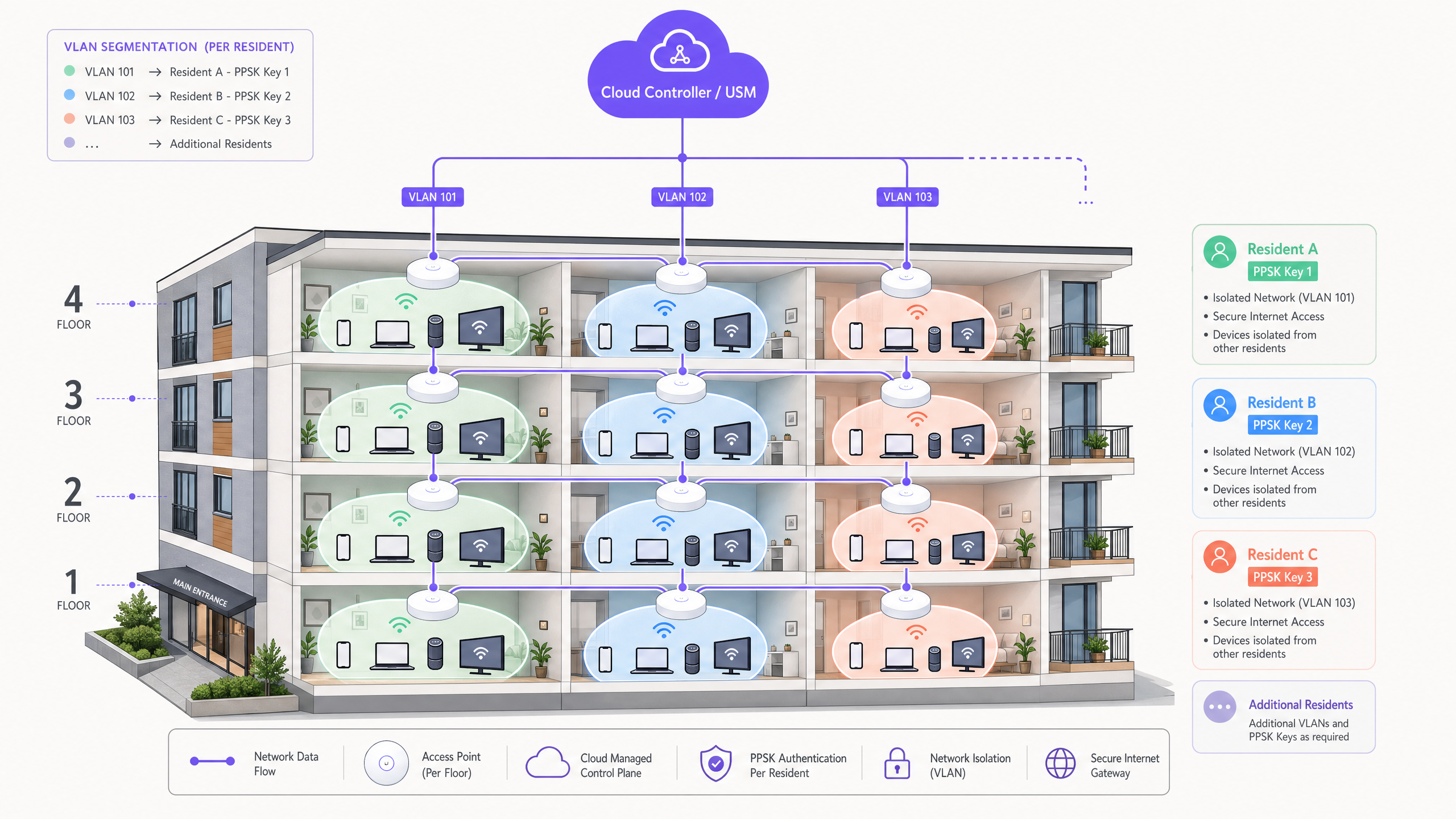
Executive Summary
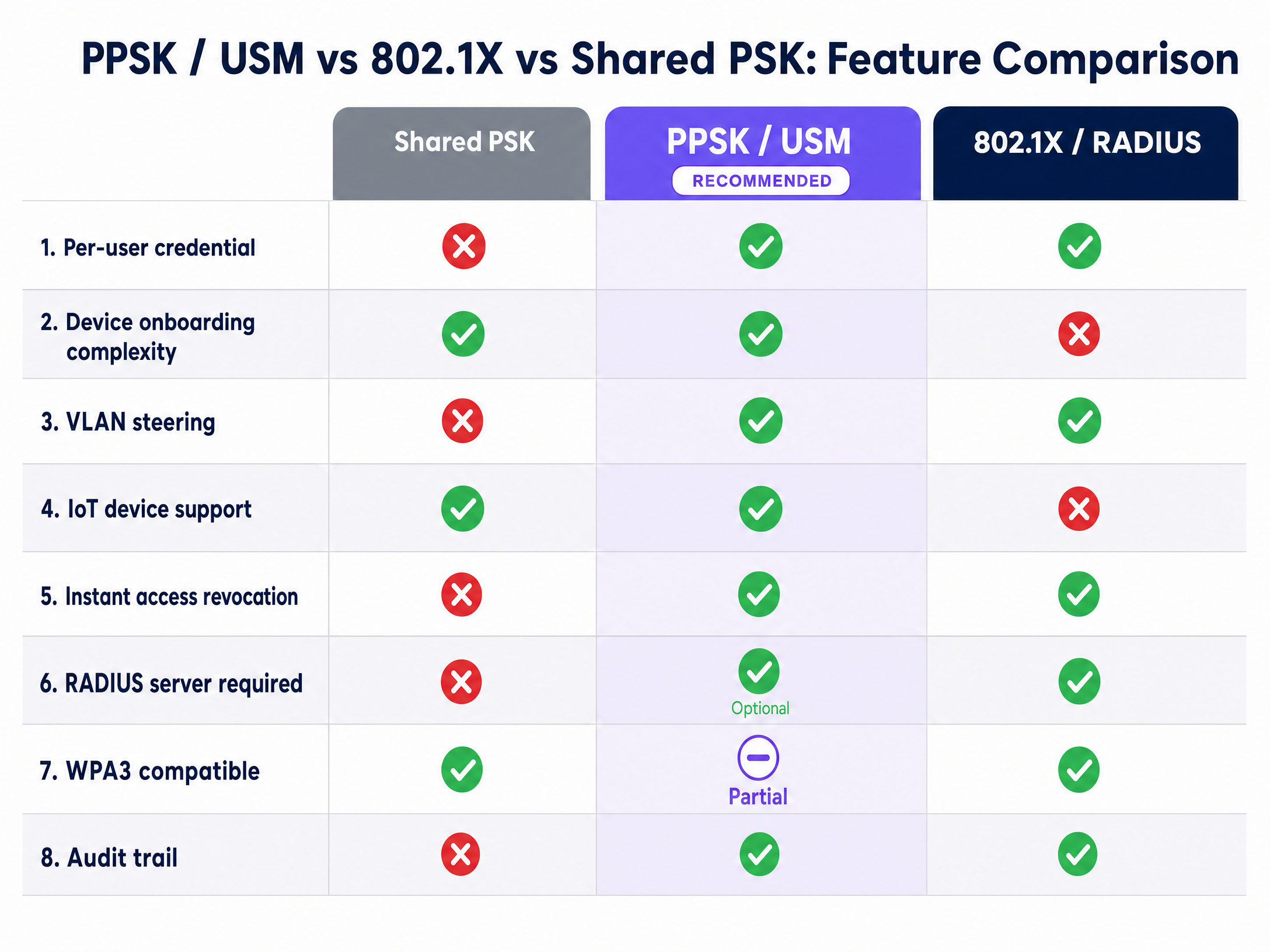
Managing wireless access across multi-dwelling units (MDUs), build-to-rent (BTR) properties, and student accommodation presents a distinct architectural challenge. You must balance the consumer-grade onboarding experience residents expect with the enterprise-grade security, accountability, and network segmentation required for compliance. Standard WPA2-Personal (a single shared password) fails to provide user accountability or dynamic network segmentation. Enterprise 802.1X (RADIUS) provides excellent security but introduces significant friction when onboarding common headless devices like gaming consoles, smart TVs, and IoT hardware in a residential setting.
Private Pre-Shared Keys (PPSK), managed through a Unified Security Model (USM), bridges this gap. It delivers the seamless onboarding of WPA2-Personal alongside the per-user accountability reserved for 802.1X architectures. This guide compares PPSK/USM against alternative deployment models, details the underlying architecture, and provides actionable implementation strategies for property operators looking to deploy multi-tenant WiFi.
Technical Deep-Dive
The Limitations of Shared PSK and 802.1X
In a standard WPA2-Personal deployment, every device connecting to the SSID uses the same pre-shared key. In a 200-unit BTR development, this means residents, staff, and IoT devices all authenticate with the same credential. If one resident shares the password externally, you lose control of the network perimeter. Revoking access requires changing the password for everyone, forcing all other residents to reconnect their devices.
Conversely, 802.1X relies on port-based network access control, using user credentials or certificates for authentication. While highly secure, it requires a RADIUS server infrastructure and supplicant configuration on every device. For a residential environment where residents bring personal devices with limited 802.1X support, the onboarding experience is unworkable.
The PPSK Architecture
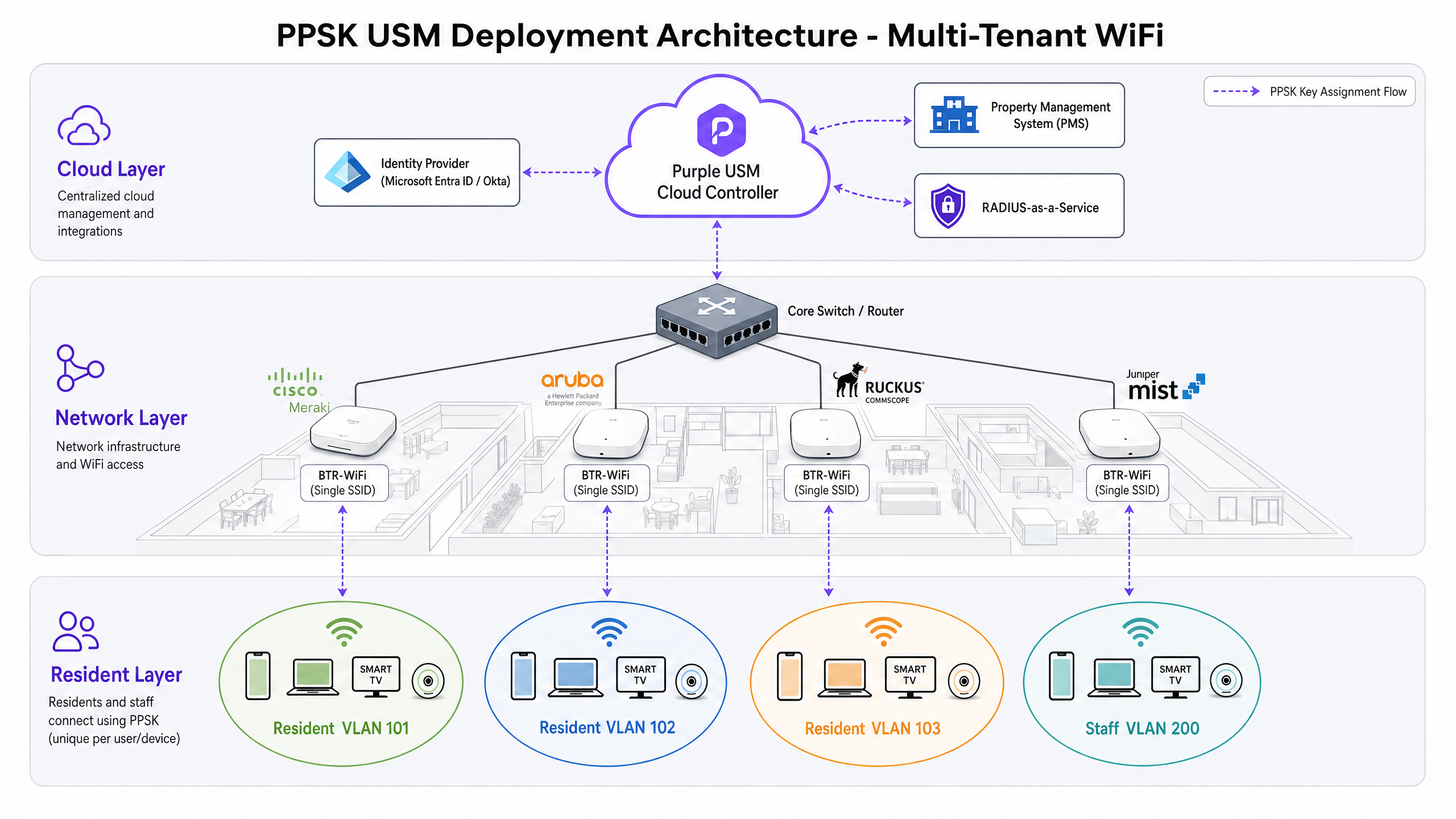
PPSK operates within the WPA2-Personal framework, making it compliant with the IEEE 802.11 standard. From the device perspective, it connects to a standard WiFi network using a pre-shared key. No certificates or RADIUS supplicants are required.
Behind the scenes, the wireless controller maintains a database of unique pre-shared keys. When a device connects, the controller matches the presented key to an identity record and applies the corresponding network policy. The uniqueness of the credential happens at the controller level, not the device level.
Vendors use different terminology for this concept: Cisco Meraki calls it Identity PSK (iPSK), HPE Aruba uses Multi-PSK (MPSK), and Ruckus uses Dynamic PSK (DPSK). The underlying architecture remains the same.
The Unified Security Model (USM)
USM is the management layer that sits above the PPSK credential store. It handles key generation, distribution, lifecycle management, policy assignment, and revocation. Without USM, PPSK is a collection of passwords. With USM, it becomes an automated, auditable, policy-driven access control system.
In a USM deployment, when a resident signs a tenancy agreement, the Property Management System (PMS) triggers an API call to the USM platform. The platform generates a unique PPSK, assigns it to the resident's VLAN, sets bandwidth policies, and distributes the credential. When the tenancy ends, the integration triggers automatic revocation.
Dynamic VLAN Steering
PPSK with USM enables dynamic VLAN steering from a single SSID. In a BTR development, you typically require separate network segments: a resident VLAN, a staff VLAN, an IoT VLAN, and a guest VLAN. A single SSID dynamically steers each connecting device into the correct VLAN based on the presented key. This reduces radio frequency congestion and management overhead compared to deploying multiple SSIDs.
Implementation Guide
Key Generation and Distribution
PPSK keys must be cryptographically secure, random strings with a minimum length of 20 characters (ideally 32). Do not allow residents to choose their own keys. Automate distribution through integration with your PMS, delivering keys via secure email links or QR codes in welcome packs.
Controller Support and Scale
Validate the maximum number of unique keys supported per SSID on your wireless controller. Enterprise platforms from Cisco Meraki, HPE Aruba, Ruckus, and Juniper Mist support thousands of keys, but older platforms may have inadequate limits for large MDU deployments.
Managing MAC Address Randomisation
Modern operating systems (iOS 14+, Android 10+, Windows 11) use MAC address randomisation by default. If your PPSK implementation relies on MAC address lookups in the RADIUS identity store, devices presenting randomised MACs will fail authentication. Configure your SSID to require clients to use their permanent MAC address, or implement a pre-registration workflow.
Enforcing Device Limits
Configure a per-key device limit (typically four to six devices) and enforce it at the controller. Without this policy, a single PPSK can proliferate across dozens of devices, undermining network attribution and audit integrity.
Best Practices
Automate the Key Lifecycle
Deploying PPSK without a documented, automated key lifecycle process creates a security liability. Unrevoked keys accumulate over time. Build the revocation workflow before going live, integrating the USM platform directly with your PMS.
Design for RADIUS Resilience
Your PPSK deployment relies on your RADIUS infrastructure. If the RADIUS server is unavailable, new devices cannot authenticate. Design for redundancy with primary and secondary RADIUS servers, and configure appropriate failover on your wireless controller.
WPA3 Transition
Specify WPA3-compatible access points for new deployments. WPA3-SAE adds forward secrecy and resistance to offline dictionary attacks. Most modern controllers support PPSK in WPA2/WPA3 transition mode, future-proofing your network infrastructure.
Troubleshooting & Risk Mitigation
Authentication Failures
The most common cause of authentication failure in a PPSK deployment is MAC address randomisation. Ensure your onboarding documentation clearly instructs residents to disable private WiFi addresses for the building network.
Key Proliferation
If device limits are not enforced, residents may share their PPSK with non-residents. Monitor concurrent device counts per key and implement automated alerts for keys exceeding the defined threshold.
Smart Home Device Discovery
Residents frequently report issues with Chromecast or smart speakers failing to connect. This occurs when the casting device and the smart speaker are assigned to different VLANs. Ensure all devices using a specific resident's PPSK are steered to the same isolated resident VLAN.
ROI & Business Impact
Deploying managed WiFi as an amenity with PPSK/USM drives measurable commercial returns for BTR and PBSA operators.
- Rent Premium: Operators can command a £15-30 per unit per month rent premium for high-performance, move-in ready WiFi.
- Reduced Void Periods: Immediate connectivity reduces void periods by 5-10 days.
- Operational Efficiency: Automating onboarding and revocation through USM reduces WiFi-related support tickets by up to 90% compared to shared PSK networks.
- Compliance: PPSK provides the per-user audit trail required for GDPR compliance, attributing network activity to specific tenancy records.
Purple's multi-tenant WiFi solution isolates traffic securely and supports resident smart devices, providing the USM orchestration layer that automates the full PPSK key lifecycle.
Key Definitions
PPSK (Private Pre-Shared Key)
An authentication method that provides each user or device with a unique pre-shared key on a single SSID, allowing for individual accountability and dynamic policy assignment without 802.1X complexity.
Used in multi-tenant environments to replace insecure shared passwords while avoiding the onboarding friction of certificate-based authentication.
USM (Unified Security Model)
The management and orchestration layer that automates the generation, distribution, lifecycle management, and revocation of PPSK credentials.
Essential for scaling PPSK deployments in BTR and student accommodation, integrating directly with property management systems.
Dynamic VLAN Steering
The process of automatically assigning a connecting device to a specific Virtual Local Area Network (VLAN) based on the unique PPSK it presents.
Allows operators to broadcast a single SSID while securely isolating resident traffic, staff traffic, and building IoT systems.
802.1X
An IEEE standard for port-based network access control that provides authenticated access to enterprise networks, typically requiring a RADIUS server and device supplicants.
Highly secure but often unsuitable for residential WiFi due to the difficulty of onboarding headless devices like gaming consoles and smart TVs.
MAC Address Randomisation
A privacy feature in modern operating systems that generates a temporary, random MAC address for each WiFi network the device joins.
Can cause authentication failures in PPSK deployments that rely on MAC address lookups, requiring operators to instruct residents to use permanent addresses.
iPSK / MPSK / DPSK
Vendor-specific terminology for Private Pre-Shared Keys. iPSK (Cisco Meraki), MPSK (HPE Aruba), and DPSK (Ruckus).
IT teams evaluating hardware vendors must understand that these terms refer to the same underlying architectural concept.
Headless Device
A network-connected device that lacks a traditional screen or user interface for complex configuration, such as a smart speaker, IoT sensor, or gaming console.
These devices struggle with 802.1X authentication but connect seamlessly using PPSK.
WPA3-SAE
Simultaneous Authentication of Equals, the secure key establishment protocol used in WPA3 that provides forward secrecy and protects against offline dictionary attacks.
The modern security standard that should be specified for new PPSK deployments to ensure long-term infrastructure viability.
Worked Examples
A 300-unit BTR development in Manchester is currently running a single shared WiFi password across the entire building. Every six months, when a significant number of residents move out, the operator rotates the password. This results in two weeks of high-volume support calls from residents who cannot reconnect their devices, particularly smart home hardware like Chromecast and Amazon Echo. How should the operator resolve this?
The operator must migrate from a shared PSK to a PPSK architecture managed by a USM platform.
- Integrate the USM platform with the building's Property Management System (PMS) via API.
- Configure the wireless controller to support PPSK on a single building-wide SSID.
- Define dynamic VLAN steering rules to assign each resident's PPSK to an isolated resident VLAN.
- During the next tenancy cycle, the PMS will automatically trigger the USM to generate and distribute unique PPSKs to new residents.
- When residents move out, the PMS integration automatically revokes their specific PPSK, causing zero disruption to remaining residents.
A 500-bed purpose-built student accommodation block experiences severe network congestion and support escalations during the August cohort turnover, when 500 students move out and 500 new students move in within the same week. The current 802.1X deployment causes onboarding friction for headless devices like gaming consoles. What is the recommended architecture?
The operator should deploy PPSK with USM, integrated into the student management system.
- Generate unique PPSKs for the entire incoming cohort prior to arrival.
- Distribute the keys as part of the digital pre-arrival welcome pack.
- Configure the wireless controller to enforce a strict device limit (e.g., 5 devices per key) to prevent credential sharing.
- Set the USM platform to automatically revoke the outgoing cohort's keys on their contract end date.
Practice Questions
Q1. You are deploying WiFi for a new 150-unit BTR property. The hardware vendor recommends broadcasting three separate SSIDs: 'BTR-Resident', 'BTR-Staff', and 'BTR-IoT'. What is the architectural flaw in this recommendation, and how does PPSK resolve it?
Hint: Consider the impact of multiple SSIDs on radio frequency performance and management overhead.
View model answer
Broadcasting multiple SSIDs increases management overhead and creates unnecessary radio frequency congestion (beacon overhead), degrading overall network performance. The recommended approach is to broadcast a single SSID and use PPSK with dynamic VLAN steering. The wireless controller will automatically assign resident devices to the resident VLAN, staff devices to the staff VLAN, and building systems to the IoT VLAN based on the unique key presented during authentication.
Q2. A resident reports that they can connect their smartphone to the network using their assigned PPSK, but their new smart TV fails to authenticate. The IT team confirms the PPSK is valid and active. What is the most likely cause of this issue?
Hint: Think about security policies that restrict the number of hardware addresses associated with a single credential.
View model answer
The most likely cause is that the resident has hit the concurrent device limit configured on the wireless controller for their specific PPSK. If the limit is set to four devices and the resident has already connected a phone, laptop, tablet, and smart speaker, the controller will reject the smart TV. The operator must either increase the device limit policy or instruct the resident to disconnect an older device.
Q3. During a compliance audit, the property operator is asked to prove that network activity originating from a specific IP address on a specific date can be attributed to a single resident. Why does a shared PSK network fail this audit, and how does PPSK/USM satisfy the requirement?
Hint: Focus on the relationship between the authentication credential and the identity record.
View model answer
A shared PSK network fails the audit because all users authenticate with the identical credential; there is no mechanism to differentiate which resident generated the traffic. PPSK/USM satisfies the requirement because each resident is issued a unique, cryptographically secure key tied to their identity record in the USM platform. The wireless controller logs the specific PPSK used to obtain the IP lease, providing a definitive audit trail linking the network activity to the individual resident.
Continue reading in this series
Power probe PPSK: comparing features and deployment models
Power Probe PPSK (Private Pre-Shared Key) is the authentication architecture that sits between a shared WiFi password and full 802.1X Enterprise - issuing each user or device a unique passphrase while keeping a single SSID. This guide compares PPSK against PSK and 802.1X across security, deployment complexity, IoT support, and VLAN assignment, then delivers actionable deployment models for Build-to-Rent operators, retail chains, and hospitality venues. Property developers, landlords, and BTR operators will find a clear framework for choosing the right model, integrating with identity providers, and automating key lifecycle management at scale.
Power probe PPSK: comparing features and deployment models
Power Probe PPSK (Private Pre-Shared Key) is the authentication architecture that sits between a shared WiFi password and full 802.1X Enterprise - issuing each user or device a unique passphrase while keeping a single SSID. This guide compares PPSK against PSK and 802.1X across security, deployment complexity, IoT support, and VLAN assignment, then delivers actionable deployment models for Build-to-Rent operators, retail chains, and hospitality venues. Property developers, landlords, and BTR operators will find a clear framework for choosing the right model, integrating with identity providers, and automating key lifecycle management at scale.
Cloud-managed WiFi solutions: a comprehensive guide for businesses
This guide gives property developers, BTR operators, and IT leaders a technical framework for deploying cloud-managed WiFi solutions across multi-tenant residential and commercial buildings. It covers iPSK network architecture, tenant isolation, VLAN design, and the business case for treating connectivity as a managed amenity that drives measurable NOI uplift.