
Cloud-managed WiFi solutions: a comprehensive guide for businesses
This guide gives property developers, BTR operators, and IT leaders a technical framework for deploying cloud-managed WiFi solutions across multi-tenant residential and commercial buildings. It covers iPSK network architecture, tenant isolation, VLAN design, and the business case for treating connectivity as a managed amenity that drives measurable NOI uplift.
Video overview
Listen to this guide
View podcast transcript
Part of our core series: Multi-Tenant WiFi Guide →

Executive summary
In the Build-to-Rent (BTR) and Multi-Dwelling Unit (MDU) sectors, high-performance internet is no longer an optional upgrade - it is the most critical utility. The traditional model of forcing residents to source their own broadband contracts and install consumer-grade routers creates severe radio frequency (RF) interference, delays move-ins, and leaves significant revenue on the table.
Cloud-managed WiFi solutions represent the modern standard for residential operators. By separating the management plane from the physical access points, you gain single-pane-of-glass visibility across your entire portfolio without deploying expensive controller hardware on-site. Purple operates across 80,000+ live venues with 99.999% uptime, serving 350 million unique users and recording 440 million logins in 2024 (Purple internal data, 2024).
Crucially, when paired with Identity Pre-Shared Key (iPSK) technology, a cloud-managed network allows you to provide a true "instant-on" experience. Residents move in, connect immediately using a unique credential, and enjoy a private, secure network that supports all their smart devices. This approach reduces vacancy periods, commands a measurable rent premium, and transforms a utility cost into a net operating income driver.
Technical deep-dive
Cloud architecture vs on-premise controllers
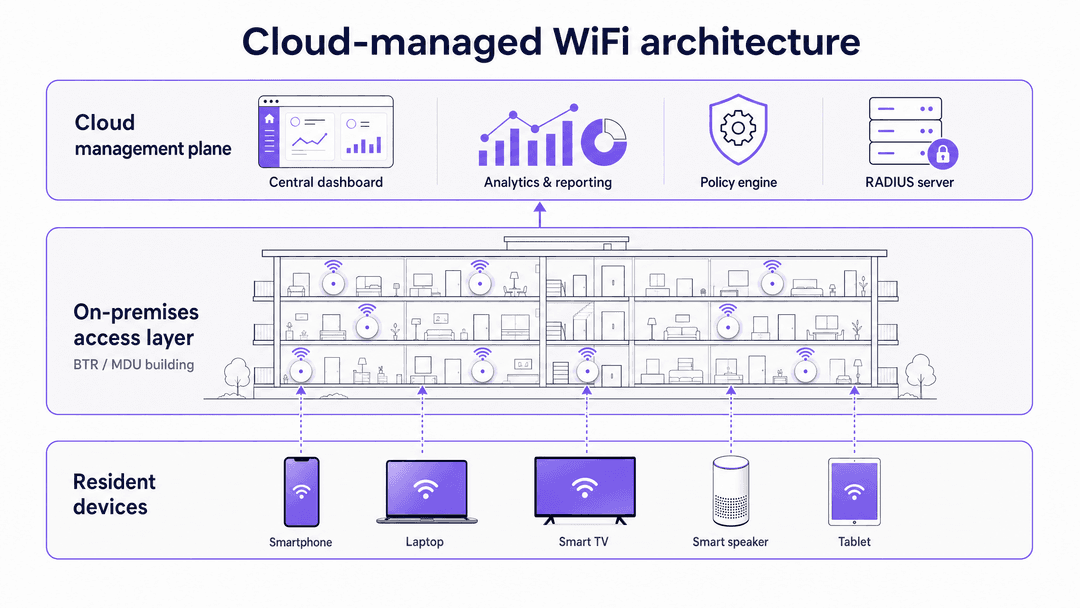
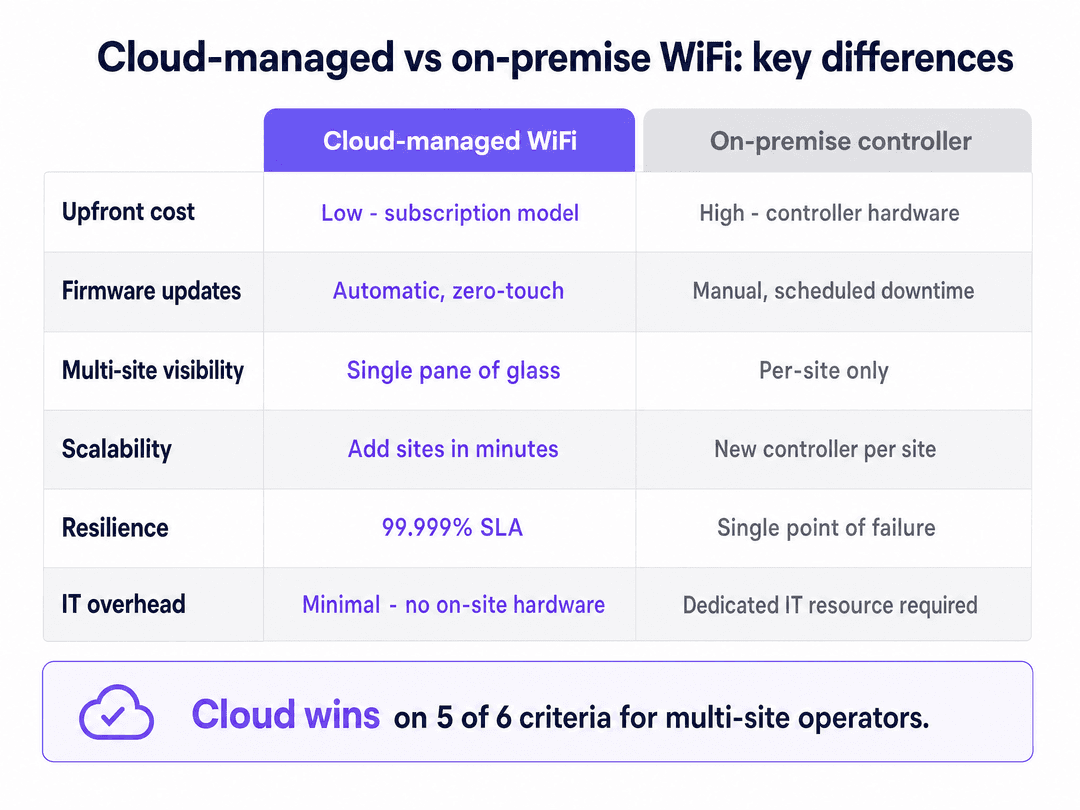
Enterprise WiFi architecture has fundamentally shifted. Historically, deploying an enterprise-grade network required on-premise Wireless LAN Controllers (WLCs) to manage traffic, enforce policies, and coordinate roaming between access points. This model required dedicated IT resource per building and introduced a single point of failure in the comms room.
Cloud-managed WiFi solutions move the control and management planes to hosted data centres. The access points (APs) handle the data plane locally. If the connection to the cloud controller drops, the APs continue to route local traffic and authenticate known devices using cached policy. This architecture delivers 99.999% uptime and allows network architects to manage dozens of properties from a central dashboard.
The WiFi as a Service market is projected to grow from $9.27 billion in 2025 to $21.96 billion by 2030, at a CAGR of 18.8% (MarketsandMarkets, 2025). Cloud-managed WLAN services recorded 6% year-on-year revenue growth in 2024, significantly outperforming the broader networking market (650 Group, 2024).
The iPSK requirement for multi-tenant environments
The defining technical challenge in a BTR property is tenant isolation at scale. You have hundreds of households sharing the same physical infrastructure.
Standard WPA2/WPA3-Personal uses a single Pre-Shared Key (PSK) for the entire network. This is fundamentally insecure for an MDU: one leaked password compromises the building, and residents can see each other's devices on the same network segment. Conversely, WPA3-Enterprise with IEEE 802.1X provides excellent security but fails in residential settings because smart TVs, gaming consoles, and IoT devices do not support username and password authentication - they have no browser or keyboard to complete the flow.
The solution is Identity Pre-Shared Key (iPSK), referred to by vendors as PPSK (HPE Aruba) or Personal Private Network (Cisco Meraki). iPSK allows the network to issue a unique password to every resident. The RADIUS server links that specific password to a dedicated Virtual Local Area Network (VLAN).
When a resident connects their smartphone, laptop, and smart speaker using their unique key, the network groups them into a Private Area Network (PAN). The resident's devices can discover and communicate with each other natively - allowing seamless casting and smart home control - while remaining completely isolated from every other resident in the building. A 200-unit building running iPSK typically manages between 3,000 and 5,000 connected devices simultaneously (Purple internal data, 2024).
Hardware and physical layer design
For the physical layer, WiFi 6 (IEEE 802.11ax) is the baseline standard. WiFi 6 introduces Orthogonal Frequency Division Multiple Access (OFDMA), which allows a single AP to communicate with multiple devices simultaneously by dividing channels into sub-channels. This dramatically improves performance in high-density environments where legacy WiFi 5 access points would queue clients sequentially.
AP placement is critical and frequently mishandled. The legacy approach of placing APs in corridors forces the signal to penetrate fire-rated doors and bathrooms, causing severe attenuation. Best practice dictates in-room placement - typically one AP per unit, or one AP per two units - hardwired back to a PoE switch via Cat 6A cabling. Every AP must be wired; mesh backhaul is unsuitable for enterprise residential deployments.
Implementation guide
Step 1: RF planning and site survey
Before cabling begins, execute a predictive RF survey using tools like Ekahau or iBwave. In an MDU, co-channel interference is the primary threat to performance. Configure 20 MHz channels on the 2.4 GHz band and 40 MHz channels on the 5 GHz band to maximise non-overlapping channels. Document your channel plan before deployment and review it quarterly as the RF environment changes.
Step 2: Select hardware and software overlay
Deploy enterprise-grade access points from the canonical list: Cisco Meraki, HPE Aruba, Ruckus, Juniper Mist, Ubiquiti UniFi, Cambium, Extreme, or Fortinet. Apply Purple's hardware-agnostic cloud overlay to manage iPSK authentication, resident onboarding flows, and analytics. Purple's software overlay runs on all eight vendors without requiring hardware replacement.
Step 3: Design your VLAN architecture
Map out your network segments before configuring anything. A standard BTR deployment requires four VLANs at minimum: a Resident WiFi VLAN (per-resident iPSK isolation), a Guest WiFi VLAN (for visitors, delivery drivers, and contractors using a captive portal), a Building Systems VLAN (CCTV, access control, BMS), and a Management VLAN (AP management traffic, isolated from all user traffic). Get this architecture approved and documented before deployment begins.
Step 4: Automate the resident lifecycle
Integrate the WiFi management platform with your Property Management Software (PMS). When a lease is signed, the system generates an iPSK and emails it to the resident automatically. When the tenancy ends, the system revokes that specific key without affecting any other resident. This eliminates manual password management entirely and ensures the network remains secure through every tenancy transition.
Step 5: Size the internet uplink correctly
Provision 5 to 10 Mbps of dedicated leased-line bandwidth per unit at peak concurrency. Do not use contended broadband products for the building uplink. A leased line provides symmetrical bandwidth, a guaranteed SLA, and no contention with other customers on the same circuit. For a 200-unit building at 80% occupancy, plan for a minimum of 800 Mbps to 1.6 Gbps of committed bandwidth.
Got questions about your specific setup?
Our team works with venue operators, IT managers, and network engineers across 80,000 venues. Book a 20-minute call and we will show you how others like you solved it.
Best practices
For Guest WiFi in common areas such as lobbies, gyms, and co-working spaces, deploy a separate SSID with a captive portal to capture visitor data and consent. This is distinct from the resident iPSK network and should sit on its own VLAN. Purple's WiFi Analytics platform connects this data layer to your CRM and marketing tools, enabling you to understand how residents and visitors use your shared spaces.
For IoT and smart home devices that use Bluetooth or a temporary local network for initial setup, ensure your resident VLAN configuration allows the device to complete its pairing flow. Most smart home devices need to be on the same logical network as the controlling app, which iPSK handles natively. Refer to Three SSIDs to rule them all: guest, Passpoint, and IoT WiFi for a detailed breakdown of SSID architecture across use cases.
For security compliance, ensure your building systems VLAN is firewalled from all resident traffic. If you process card payments anywhere on the property (parking, amenity bookings), PCI DSS requires that payment systems are isolated from any network segment accessible to residents or guests. Maintain audit logs of all network access for a minimum of 90 days to satisfy GDPR and Cyber Essentials requirements.
Troubleshooting and risk mitigation
The Chromecast problem. If residents cannot cast to their TVs, verify that client isolation is disabled within their specific VLAN while remaining enforced between VLANs. iPSK creates the per-resident bubble, but the VLAN configuration must allow intra-VLAN device discovery for casting to work.
Strict NAT on gaming consoles. PlayStation, Xbox, and Nintendo Switch require Open or Type 2 NAT for online multiplayer. Ensure your firewall rules for resident VLANs handle UPnP and CGNAT correctly. Tightening NAT globally to reduce attack surface will break gaming for residents and generate significant support volume.
Rogue access points. Residents may plug in their own routers out of habit, creating interference and security gaps. Enable rogue AP detection on your cloud controller. When a rogue AP is detected, the system alerts your central IT team and can automatically block the offending device's MAC address from the network.
Consumer hardware at scale. The most common deployment failure is using consumer-grade mesh hardware to reduce upfront costs. Consumer hardware lacks the processing power to handle 15 to 25 devices per household across a 200-unit building, and it does not support the VLAN capabilities required for iPSK isolation. Enterprise hardware from the canonical vendor list is non-negotiable for BTR deployments.
ROI and business impact
Deploying managed WiFi as an amenity drives measurable returns. Industry benchmarks indicate a $20 to $40 per unit per month rent premium for buildings offering premium, instant-on connectivity (National Apartment Association, 2024). Buildings with managed WiFi also see vacancy periods reduced by 5 to 10 days, as units are immediately ready for occupancy on move-in day.
When calculating the business case, compare the per-door cost of a managed software overlay on owned hardware against the revenue generated by the amenity fee. The model is consistently NOI-positive for operators who retain control of the infrastructure rather than outsourcing it to a retail broadband provider, who captures the value instead.
For retail and hospitality operators managing mixed-use developments, the same cloud-managed infrastructure serves both resident and commercial tenant connectivity, with Purple's Multi-Tenant WiFi isolating each business's traffic as securely as it isolates individual households. Transport hubs and healthcare facilities using Purple's platform benefit from the same hardware-agnostic architecture, with Purple's ISO 27001, GDPR, CCPA, and Cyber Essentials certifications covering all deployments.
Tiered service models and revenue uplift
A cloud-managed platform enables tiered service delivery without hardware changes. You can offer a standard residential tier at a base speed, and a premium tier (marketed as a Gamer Tier or Work From Home Tier) at higher throughput, with the speed policy enforced at the VLAN level via the cloud controller. Upgrading a resident from standard to premium takes seconds in the dashboard and requires no engineer visit. This model converts a flat amenity cost into a tiered revenue stream.
Purple's platform supports this via per-VLAN QoS policies, allowing operators to set download and upload rate limits per resident segment. Combined with the PMS integration, tier upgrades can be self-served by residents through a resident portal, with billing handled by the property management system.
Compliance and data residency
Cloud-managed WiFi platforms that handle resident identity data must comply with GDPR in the UK and EU, and CCPA in California. Purple stores data in EU, UK, or US regions, chosen at provision time. Resident-identifiable network logs should be retained only as long as required for security and operations - six months is a common ceiling for residential deployments.
For mixed-use developments that include retail or food and beverage tenants processing card payments, PCI DSS compliance requires that payment terminals are isolated from any network segment accessible to residents or guests. The building systems VLAN must be firewalled from all resident and guest traffic, with access control lists (ACLs) enforced at the distribution switch layer.
Purple holds ISO 27001, GDPR, CCPA, Cyber Essentials, and B Corp certifications. These certifications apply across all deployments and are available for review in due diligence processes.
Network design for mixed-use BTR developments
Modern BTR developments increasingly combine residential units with ground-floor retail, co-working spaces, and food and beverage outlets. A single cloud-managed WiFi platform can serve all of these use cases from one hardware estate, with logical separation enforced by VLAN and SSID policy.
For the residential floors, deploy the iPSK Multi-Tenant WiFi architecture described above. For the commercial ground floor, deploy a separate Guest WiFi SSID with a captive portal, giving retail shoppers and co-working members a distinct network experience with its own branding and data capture flow. Purple's platform manages both SSIDs from the same cloud dashboard, with separate analytics views per zone.
For co-working members who require persistent, credential-based access across multiple visits, Purple's SecurePass add-on provides certificate-based authentication via EAP-TLS, eliminating the captive portal entirely for members while retaining it for day visitors. This mirrors the enterprise WiFi experience that corporate tenants expect, without requiring a separate network infrastructure.
The key design principle is that every user population - resident, retail shopper, co-working member, building staff, and IoT device - sits on its own VLAN with its own access policy. The cloud controller enforces these policies consistently across every access point in the building, regardless of which vendor's hardware you have deployed.
Key Definitions
Identity Pre-Shared Key (iPSK)
A security mechanism that assigns unique WiFi passwords to individual users or devices on the same SSID, routing each to a specific VLAN via RADIUS authentication. Vendors market it as PPSK (HPE Aruba) or Personal Private Network (Cisco Meraki).
Essential for MDU and BTR deployments to provide tenant isolation without requiring complex 802.1X certificate infrastructure. Supports all consumer devices including headless IoT hardware.
Virtual Local Area Network (VLAN)
A logical subnetwork that groups a collection of devices, isolating their traffic from other devices on the same physical network infrastructure.
Used in BTR deployments to separate resident traffic from building systems, and to isolate individual residents from each other. Also required for PCI DSS compliance when payment systems share physical infrastructure.
Cloud management plane
The hosted infrastructure that handles network configuration, policy enforcement, firmware updates, and monitoring - separate from the physical access points that handle radio traffic.
Allows IT teams to manage multiple properties remotely without on-site controller hardware. Enables zero-touch provisioning: ship an AP to site, plug it in, it configures itself.
Private Area Network (PAN)
A personal network environment where a specific user's devices can communicate with each other securely, while remaining isolated from all other users on the same physical network.
Created dynamically by iPSK to allow residents to use casting devices, smart speakers, and smart home automation securely in a shared building.
IEEE 802.1X
An IEEE standard for port-based Network Access Control, requiring robust authentication via username and password or digital certificates (EAP-TLS, PEAP) before granting network access.
Highly secure for staff and enterprise networks, but generally unsuitable for residential IoT devices that lack the ability to present credentials. iPSK provides an equivalent security outcome without the compatibility constraints.
Captive portal
A web page that a user must view and interact with before access is granted to a network. Commonly used for terms acceptance, data capture, and payment on public WiFi networks.
Appropriate for retail shoppers and hotel guests to capture first-party data and consent. Incorrect for permanent residents because headless IoT devices cannot complete the browser-based authentication flow.
Orthogonal Frequency Division Multiple Access (OFDMA)
A feature of WiFi 6 (IEEE 802.11ax) that allows a single access point to serve multiple clients simultaneously by dividing channels into smaller sub-channels called Resource Units.
Critical for maintaining performance in high-density MDU environments where 15 to 25 devices per household compete for airtime on the same access point.
RADIUS (Remote Authentication Dial-In User Service)
A networking protocol that provides centralised authentication, authorisation, and accounting (AAA) for users connecting to a network. In iPSK deployments, the RADIUS server maps each unique pre-shared key to a specific VLAN.
The authentication engine behind iPSK. In a cloud-managed deployment, the RADIUS server runs in the cloud rather than on-premise, eliminating a hardware dependency in the comms room.
Worked Examples
A property developer is finalising the network design for a 250-unit Build-to-Rent tower. They plan to install access points in the central corridors to save on cabling costs and intend to use a standard WPA3-Personal password for the whole building, changed monthly when a resident moves out.
The developer must redesign both the physical and logical layers before construction begins. Physically, APs must move from corridors to in-unit locations - minimum one AP per two units - to avoid signal degradation through fire-rated doors and en-suite bathroom walls. Logically, the single WPA3-Personal password must be replaced with a cloud-managed iPSK deployment. Each of the 250 units receives a unique key tied to a dedicated VLAN, ensuring resident privacy and supporting smart home devices without requiring monthly building-wide password rotations. The PMS integration automates key generation at lease signing and revocation at move-out. Cabling costs for in-unit AP placement are offset within 12 months by the $20 to $40 per unit monthly amenity premium.
A student housing operator is preparing for the September intake at a 400-bed development. They have a cloud-managed network but currently require students to log in via a captive portal every 24 hours. Students are complaining that their gaming consoles and smart speakers will not connect, and the IT helpdesk is overwhelmed.
The operator must transition from a captive portal (guest WiFi model) to an iPSK (multi-tenant model). Captive portals require a browser to authenticate, making them incompatible with headless devices like consoles and smart speakers. The operator should issue each student a unique iPSK prior to arrival - emailed with their accommodation confirmation - so that on move-in day, students connect all their devices exactly as they would at home. Devices remain connected persistently for the full academic year. The cloud controller handles the September cohort provisioning in bulk via a CSV import from the student records system, eliminating the helpdesk queue entirely.
Practice Questions
Q1. You are the IT director for a BTR operator deploying WiFi across a new 150-unit development. The operations team wants to use a captive portal to collect resident email addresses for marketing. How do you advise them?
Hint: Consider the device types residents will bring - smart TVs, consoles, smart speakers - and how captive portals authenticate users.
View model answer
Advise against using a captive portal for residents. Captive portals require a browser to complete the authentication flow, which breaks headless IoT devices (smart speakers, consoles, smart TVs) because they cannot render the login page. Instead, deploy an iPSK architecture for residents and integrate it with the PMS to capture resident details at lease signing. Reserve the captive portal exclusively for transient visitors in the lobby, gym, and co-working spaces, where data capture and consent collection are appropriate.
Q2. A resident in a 200-unit BTR building reports they cannot play online multiplayer on their PlayStation 5, receiving a 'Strict NAT' or 'NAT Type 3' error. The network uses iPSK and per-resident VLAN isolation. What is the likely configuration issue and how do you resolve it?
Hint: Look at how outbound traffic exits the resident VLAN to the internet, specifically the NAT and UPnP configuration.
View model answer
The firewall rules governing the resident VLANs are likely too restrictive for gaming traffic. PlayStation online multiplayer requires Open or Type 2 NAT. You must adjust the Carrier-Grade NAT (CGNAT) configuration and enable UPnP for the resident VLAN range to allow the required ports for gaming traffic. Do not loosen NAT globally - apply the change specifically to the resident VLAN subnet to maintain isolation between residents.
Q3. To reduce costs, a contractor proposes placing WiFi 6 access points exclusively in the hallways of a 120-unit student accommodation block, spacing them every 15 metres. Why should you reject this design, and what should you specify instead?
Hint: Think about the physical barriers between the hallway AP and the devices inside the rooms, and the signal loss caused by each barrier.
View model answer
Reject the design because hallway placement forces the RF signal to penetrate heavy, fire-rated corridor doors and en-suite bathroom walls before reaching the user's device. Each fire door causes 15 to 20 dB of signal attenuation, which is the difference between excellent and unusable connectivity. Specify in-room AP placement instead - one AP per room or one AP per two rooms - mounted in the ceiling or above the door, hardwired via Cat 6A to the floor IDF. Conduct a predictive RF survey with Ekahau to validate placement before cabling begins.
Continue reading in this series
How to deploy iPSK on Cisco Meraki, HPE Aruba and Ruckus
This hands-on reference guide shows how to deploy iPSK on Cisco Meraki, MPSK on HPE Aruba Central and DPSK on Ruckus SmartZone, with a short UniFi PPSK appendix. It focuses on key issuance, VLAN or policy placement, RADIUS decision flows and revocation tests that prove a deployment works in a live venue.
Bulk internet agreement vs managed WiFi: which model fits your building
A practical procurement reference for property, IT and operations leaders comparing resident-paid retail broadband, a bulk internet agreement and managed WiFi. It clarifies ownership, resident move-in, security, cost scope and contractual exit, using US bulk-internet framing and UK equivalents.
Apartment WiFi solutions: a comprehensive guide for businesses
This guide covers the architecture, deployment, and business case for apartment WiFi solutions in Build to Rent and multi-dwelling unit properties. It explains how Identity Pre-Shared Key (iPSK) technology creates secure, isolated network bubbles for each resident while supporting smart devices and IoT. Property developers, landlords, and BTR operators will find actionable deployment guidance, ROI data, and worked implementation scenarios.
Got questions about your specific setup?
Our team works with venue operators, IT managers, and network engineers across 80,000 venues. Book a 20-minute call and we will show you how others like you solved it.