
PPSK usm kubang kerian: comparing features and deployment models

This guide compares PPSK (Private Pre-Shared Key) against standard PSK and 802.1X, detailing implementation models for multi-tenant environments like the USM Health Campus in Kubang Kerian. It equips IT managers and property operators with the technical architecture required to deliver secure, per-user isolated WiFi at scale.

📖 5 min read📝 1,026 words🔧 2 worked examples3 practice questions📚 8 key definitions

Listen to this guide

View podcast transcript
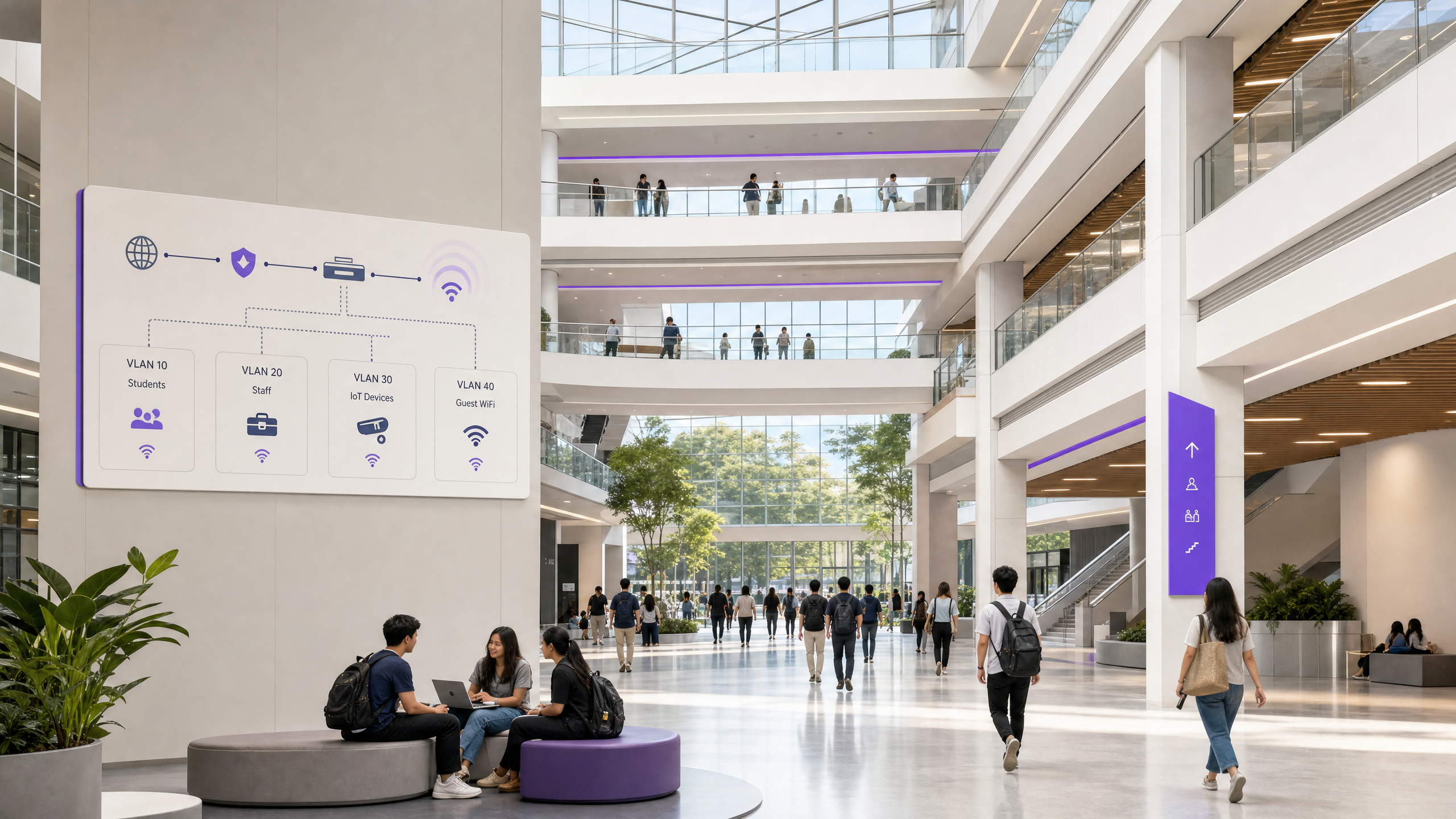
Welcome to the Purple Technical Briefing. Today we are covering PPSK at USM Kubang Kerian - what it is, how it compares to the alternatives, and what a practical deployment actually looks like on a large health sciences campus. Let us start with context. Universiti Sains Malaysia's Health Campus in Kubang Kerian, Kelantan, is one of the most complex WiFi environments you will encounter in South-East Asia. You have a 747-bed teaching hospital, multiple medical and health sciences schools, student accommodation, research laboratories, and clinical facilities - all on a single campus, all sharing the same physical network infrastructure. The user population spans medical students, clinical staff, administrative teams, visiting researchers, patients, and their families. The device population is even more varied: managed laptops, personal phones, medical equipment, IoT sensors, CCTV systems, and smart building controllers. The question every IT director at a campus like this eventually faces is: how do you give each of those user groups a secure, isolated network experience without deploying a separate SSID for every segment? Because if you do that - if you broadcast eight or ten SSIDs across a campus of this scale - you degrade WiFi performance for everyone. Every SSID consumes airtime for beacon frames. In a dense environment, SSID proliferation is a performance killer. The answer, increasingly, is PPSK. Private Pre-Shared Key. And that is what we are going to unpack today. So what is PPSK, exactly? It is a WiFi authentication model in which each user, each device group, or each department gets its own unique pre-shared key. They all connect to the same SSID - the same network name - but each key maps to a separate VLAN. The access point handles the key-to-VLAN mapping automatically. The terminology varies by vendor, and that causes genuine confusion in the market. HPE Aruba calls it PPSK - Private Pre-Shared Key. Cisco Meraki calls it iPSK - Identity PSK. Juniper Mist uses ePSK. Ruckus calls it DPSK - Dynamic PSK. Extreme Networks, who developed the concept under the Aerohive brand, call it Private PSK. Ubiquiti UniFi simply calls it PPSK. The underlying mechanism is identical: one SSID, multiple unique keys, each key tied to a VLAN or a policy group. Now, let us compare PPSK against the two alternatives you will most commonly be asked about. The first is standard PSK - one shared password for the entire network. This is what most legacy campus deployments still run. It is simple to deploy, but it is a single point of failure. One compromised password means the entire network is exposed. You cannot revoke access for a single user without changing the password for everyone. At a campus with thousands of users, that is simply not manageable. The second alternative is 802.1X Enterprise - the gold standard for corporate device authentication. 802.1X uses a RADIUS server, an identity provider such as Microsoft Entra ID, Okta, or Google Workspace, and a supplicant on every device. That supplicant is the software component that handles the EAP authentication exchange. Every managed laptop has one. Your student's smart fridge does not. Your clinical IoT sensor does not. Your building management controller does not. 802.1X is the right answer for staff networks and managed device fleets. It is the wrong answer for IoT devices, personal devices, and the kind of mixed-use environment you find on a health sciences campus. PPSK sits in the middle. It gives you per-user isolation and VLAN assignment without requiring certificate infrastructure or a supplicant on every device. It works with any WiFi-capable device, including legacy medical equipment that cannot support WPA Enterprise. That is its key advantage in a healthcare and education environment. Let us look at the technical authentication flow. When a device connects to the SSID, it presents its pre-shared key during the WPA2 four-way handshake. The access point - or the cloud controller behind it - looks up that key in the PPSK store, identifies which VLAN it maps to, and tags the device's traffic accordingly from that point forward. The device sees a normal WiFi connection. It has no idea it has been placed in an isolated segment. Its applications work. Its services pair. Everything behaves as expected. In a RADIUS-backed deployment - which is what Purple recommends for any campus above 200 concurrent users - the controller queries an external RADIUS server for each new connection. The RADIUS server returns an Access-Accept response containing both the key validation and the VLAN assignment. This gives you centralised logging, audit trails, and the ability to revoke access instantly by removing the key from the RADIUS store. The device is disconnected at next re-authentication. No manual intervention at the access point level required. Now let us talk about deployment models, because there are three distinct approaches in production today, and the right choice depends on your campus size, your IT resource, and your existing hardware. The first is controller-local PPSK. The unique keys are stored directly on the wireless controller, with no external RADIUS server required. This works for smaller deployments - up to around 200 concurrent users - and it is the simplest to operate. Ubiquiti UniFi supports this natively. The limitation is scalability. Most controllers cap out at a few hundred local PPSK entries, and you lose the centralised lifecycle management that makes PPSK operationally viable at scale. For a campus the size of USM Kubang Kerian, this model is not appropriate. The second model is RADIUS-backed PPSK. The keys are stored in an external RADIUS server, and the controller queries the RADIUS server for every new connection. This scales to thousands of users. Ruckus SmartZone, HPE Aruba ClearPass, and Cisco ISE all support this model. The operational overhead is higher, but the scalability and lifecycle management capabilities are significantly better. This is the right model for a large campus deployment. The third model - and the one Purple recommends for institutions without dedicated RADIUS infrastructure - is cloud RADIUS as a service. The RADIUS infrastructure is hosted and managed externally, and you connect your access points to it via a cloud overlay. Purple's platform sits on top of your existing hardware - whether that is Cisco Meraki, HPE Aruba, Ruckus, Juniper Mist, Ubiquiti UniFi, Cambium, Extreme, or Fortinet - and provides the orchestration layer for key provisioning, lifecycle management, and user onboarding. The key lifecycle is fully automated. A student enrols, their key is provisioned via the student management system integration. They graduate or withdraw, their key is revoked instantly. No manual intervention, no security gaps. For USM Kubang Kerian specifically, the recommended architecture is a hybrid model: PPSK for students, residents, and IoT devices, with 802.1X for clinical staff and administrative teams using managed devices. Three distinct authentication models, three distinct VLAN segments, one physical infrastructure. Students on VLAN 10 through whatever the cohort size requires. Clinical staff on 802.1X against the university's identity provider. IoT and building management systems on a dedicated IoT VLAN with egress filtering. Guest WiFi in public areas via a captive portal on a separate VLAN. One critical constraint to flag before you specify hardware: Ubiquiti UniFi's PPSK implementation is currently WPA2 only. If you are deploying WiFi 6E access points and want to use the 6 gigahertz band for PPSK clients, you need a platform that supports WPA3-SAE with PPSK - Aruba, Ruckus, and Meraki all support this. The 6 gigahertz band is exclusive to WPA3, so any PPSK deployment on 6 gigahertz requires WPA3-SAE compatibility. Plan for this in your hardware specification before you commit to a vendor. Let me walk through the implementation pitfalls, because these are the failure modes I see repeatedly in production deployments. The first is SSID proliferation. Every SSID you broadcast consumes airtime for beacon frames. In a dense campus environment, if you are broadcasting six or eight SSIDs per access point, you are degrading performance for everyone. Keep it to a maximum of four SSIDs per radio. Use PPSK to serve multiple user segments from a single SSID rather than creating a separate SSID per department or per floor. The second pitfall is insufficient trunk port configuration. You design a clean VLAN scheme, you deploy the access points, and then traffic silently drops because someone forgot to permit the relevant VLANs on a trunk link between the distribution switch and the access layer. Validate every trunk port during commissioning. Document it. Test it with a device on each VLAN before users go live. The third pitfall is MAC address randomisation. Since iOS 14, Android 10, and Windows 11, devices use randomised MAC addresses by default for privacy reasons. If your RADIUS server is doing a MAC lookup and the device presents a randomised address, the lookup fails and the device cannot connect. The solution is to configure your SSID to request that clients use their permanent hardware MAC address, or to implement a pre-registration workflow where users register their device before connecting. Purple's platform handles this automatically as part of the user onboarding flow. The fourth pitfall is key distribution. Generating keys is straightforward. Getting them to users in a way that is secure and operationally manageable is harder. A QR code in the welcome pack works well for move-in day. A self-service portal where users can retrieve their key and add new devices is better for ongoing operations. Build the key distribution workflow before you deploy, not after. Now let us look at two real-world scenarios that are directly relevant to a campus like USM Kubang Kerian. Scenario one: a 400-bed purpose-built student accommodation block. The challenge is annual cohort turnover. Every academic year, hundreds of students move out and hundreds of new students move in, often within the same week. With a shared PSK model, that means a building-wide password rotation affecting every returning resident. With PPSK, it means revoking the outgoing cohort's keys and provisioning new ones for the incoming cohort - all automated via the student management system integration. One operator using this model reported a 70% reduction in WiFi-related support tickets in the first term, primarily because the device pairing issues that had plagued the previous shared PSK deployment were completely eliminated. Scenario two: a clinical research facility with mixed device types. The challenge here is supporting both managed clinical workstations on 802.1X and legacy medical equipment that cannot support WPA Enterprise. The hybrid model - 802.1X for managed devices, PPSK for legacy and IoT equipment - solves this without requiring separate physical infrastructure. Clinical workstations authenticate via EAP-TLS against the university's identity provider. Legacy equipment gets a dedicated PPSK key mapped to a restricted VLAN with egress filtering to the clinical systems it needs to reach, and nothing else. The security posture is maintained. The operational complexity is manageable. Let me give you three practical rules of thumb before we move to the rapid-fire questions. Rule one: if your campus or building has more than 200 concurrent users, use RADIUS-backed PPSK, not controller-local PPSK. The scalability ceiling of controller-local PPSK will cause you problems within 12 months of go-live. Rule two: plan for MAC address randomisation from day one. Build a pre-registration workflow into your user onboarding process. Do not assume devices will present their permanent MAC address by default. They will not. Rule three: automate the key lifecycle. The operational value of PPSK over a shared PSK is entirely dependent on keys being provisioned and revoked automatically. Manual key management at scale is not viable. Integrate with your student management system or HR system from the outset. Right. Rapid-fire questions. These are the ones that come up most often. Does PPSK work with WPA3? Yes, on most enterprise platforms. WPA3-SAE provides stronger protection against offline dictionary attacks compared to WPA2-PSK, so deploying PPSK on WPA3 where your client devices support it is the right approach. The exception is Ubiquiti UniFi, which is currently WPA2 only for PPSK. How many PPSK keys can a single SSID support? With an external RADIUS server, the practical limit is your RADIUS database capacity. Cisco Meraki supports up to 5,000 iPSK entries per network. Purple's cloud RADIUS service scales to tens of thousands of concurrent keys. Is PPSK a replacement for 802.1X? No. For fully managed corporate device fleets where individual accountability and certificate-based authentication matter, 802.1X is still the right answer. PPSK is the right answer for IoT devices, personal devices, and mixed-use environments where 802.1X is impractical. Can I integrate PPSK with my student management system? Yes, through the vendor's API. Aruba Central, Meraki, Ruckus, and Mist all expose REST APIs for PPSK key management. Purple's platform provides pre-built integrations that automate provisioning and revocation based on enrolment status. To summarise. PPSK is the right authentication model for a complex, mixed-use campus like USM Kubang Kerian. It gives you per-user isolation and VLAN assignment without requiring certificate infrastructure on every device. The hybrid model - PPSK for students and IoT, 802.1X for staff - is the architecture that delivers both security and operational simplicity at scale. Automate the key lifecycle from day one. Plan for MAC randomisation. Keep your SSID count below four per radio. And if you are deploying at scale, use a cloud RADIUS service rather than managing the infrastructure yourself. That is the Purple Technical Briefing on PPSK for USM Kubang Kerian. If you want to go deeper on any of these topics, the full written guide is available at purple.ai. Thanks for listening.

header_image.png

Executive Summary

Universiti Sains Malaysia's Health Campus in Kubang Kerian operates one of the most complex wireless environments in South-East Asia. A 747-bed teaching hospital, research laboratories, and student accommodation all share a single physical network. Deploying a separate SSID for every department, student block, and IoT category degrades performance for everyone.

Private Pre-Shared Key (PPSK) solves this. PPSK gives each user or device group a unique WiFi key that maps directly to an isolated VLAN, all from a single SSID. It delivers the per-device isolation of 802.1X without requiring a supplicant or certificate infrastructure, making it the only viable architecture for mixed-use environments containing legacy medical equipment, resident smart devices, and building management systems.

This guide details the technical architecture, deployment models, and implementation strategies for PPSK in complex multi-tenant environments, using the USM Health Campus as a practical reference model.

Technical Deep-Dive

The Authentication Mechanism

In a standard WPA2-Personal network, every device shares identical credentials. In an 802.1X WPA-Enterprise network, devices use individual credentials or certificates via the Extensible Authentication Protocol (EAP). PPSK sits between these models.

When a device connects to a PPSK-enabled SSID, it presents its unique key during the WPA four-way handshake. The access point or controller intercepts this and queries the key store. If valid, the response includes the VLAN assignment for that specific key. The device is placed on its designated VLAN, completely isolated from other users on the same SSID.

The device itself is unaware of this process. It sees a standard WiFi connection, which is why PPSK supports headless IoT devices, legacy clinical equipment, and consumer smart home hardware that cannot run an 802.1X supplicant.

Vendor Terminology

The underlying mechanism is identical, but vendor terminology varies:

  • HPE Aruba: PPSK (Private Pre-Shared Key) or MPSK (Multiple Pre-Shared Key)
  • Cisco Meraki: iPSK (Identity PSK)
  • Juniper Mist: ePSK (Multiple PSK)
  • Ruckus: DPSK (Dynamic PSK)
  • Ubiquiti UniFi: PPSK

Architecture Comparison
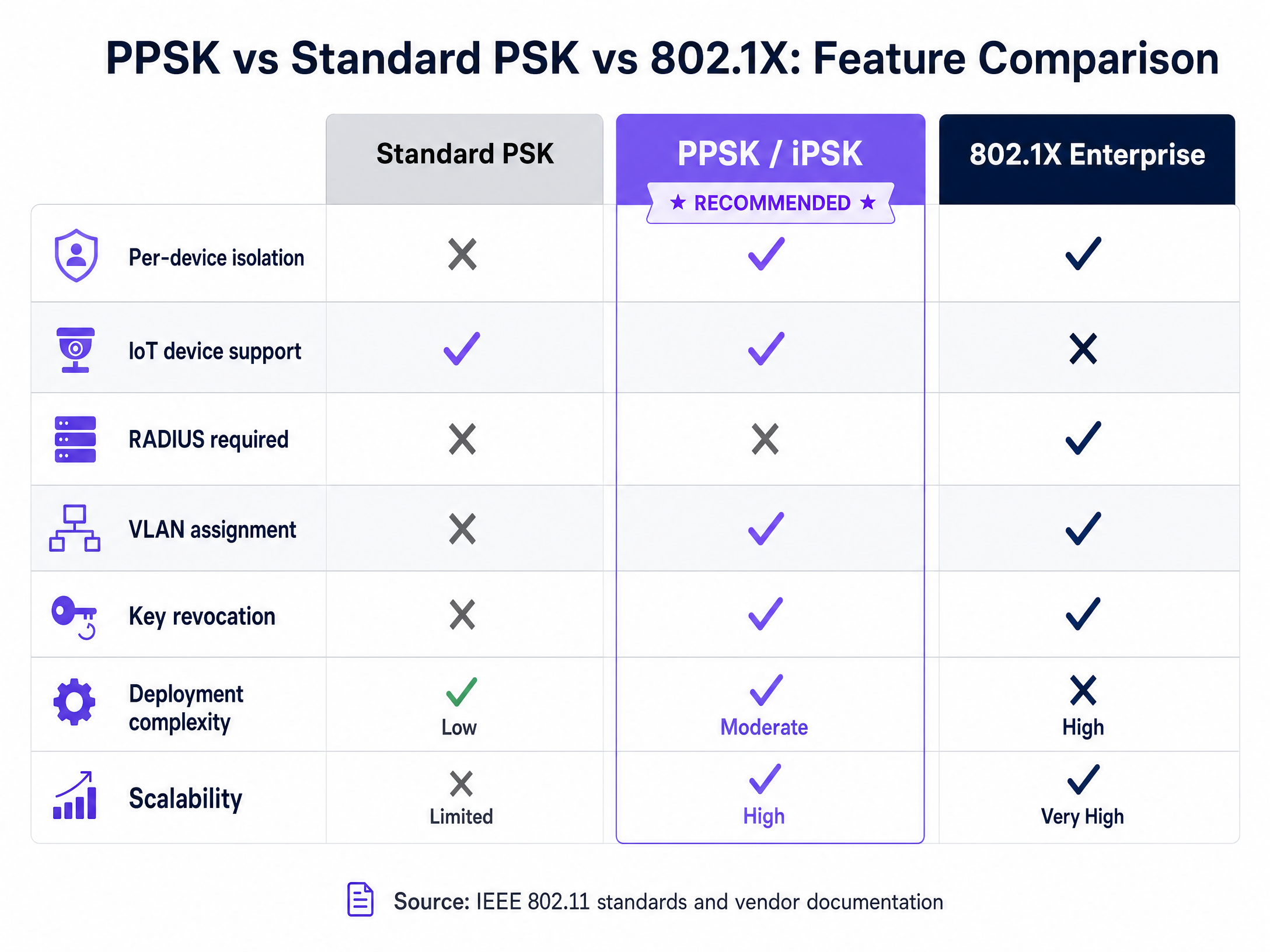
comparison_chart.png

Feature Standard PSK PPSK 802.1X Enterprise
Per-Device Isolation No Yes Yes
IoT Device Support Yes Yes No
RADIUS Required No Optional (Recommended) Yes
VLAN Assignment No Yes Yes
Key Revocation Global only Per-user Per-user
Deployment Complexity Low Moderate High

Implementation Guide

Deploying PPSK at scale requires a structured approach. The following model applies to multi-tenant residential blocks, large Healthcare campuses, and Hospitality environments.
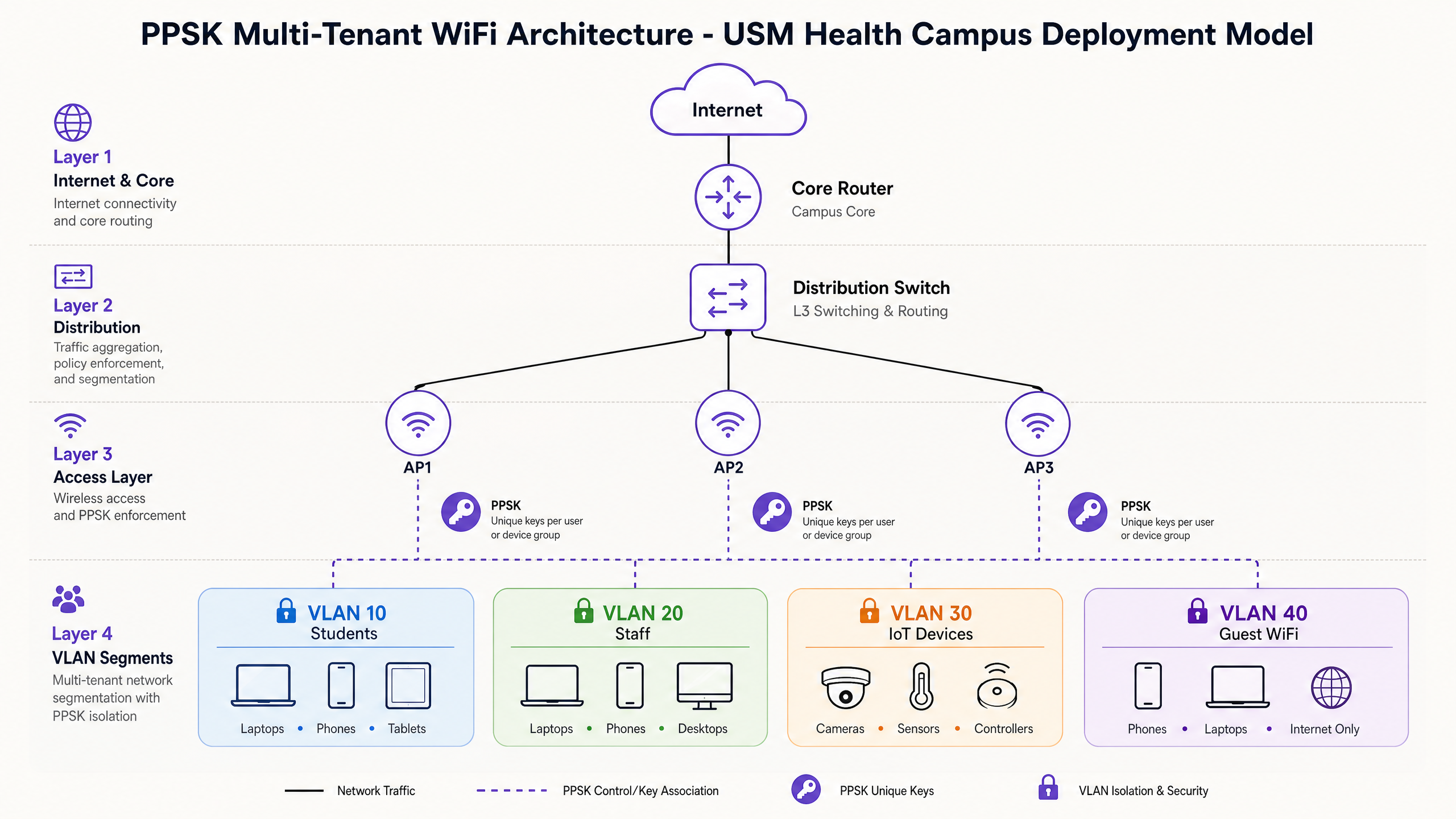
architecture_overview.png

1. Select the Deployment Model

Controller-Local PPSK: Keys are stored on the wireless controller. Suitable for small deployments (under 200 users). Scalability is limited, and lifecycle management is manual.

RADIUS-Backed PPSK: Keys are stored in an external RADIUS server. The controller queries the RADIUS server for every connection. This is the required model for large deployments.

Cloud RADIUS-as-a-Service: The infrastructure is hosted externally (e.g., Purple's cloud overlay). This provides the scalability of RADIUS-backed PPSK without the operational overhead of running on-premise RADIUS servers. It integrates with existing hardware from Cisco Meraki, HPE Aruba, Ruckus, Juniper Mist, Ubiquiti UniFi, Cambium, Extreme, and Fortinet.

2. Design the VLAN Architecture

A campus like USM Kubang Kerian requires strict segmentation. A typical hybrid architecture includes:

  • VLAN 10-49 (Students/Residents): One VLAN per accommodation block or floor, using PPSK.
  • VLAN 50 (Clinical Staff): 802.1X authentication against Microsoft Entra ID.
  • VLAN 99 (IoT & Building Management): PPSK with strict egress filtering.
  • VLAN 100 (Guest WiFi): Captive portal with Purple Guest WiFi for analytics and compliance.

3. Automate the Key Lifecycle

Manual key management fails at scale. Integrate the PPSK provisioning engine with the student management system or property management software. When a student enrols, the system generates a key and emails it to them. When they graduate, the system revokes the key.

Best Practices

1. Limit SSID Broadcasts Every SSID consumes airtime. Keep the SSID count below four per radio. Use PPSK to serve multiple user segments from a single SSID.

2. Plan for MAC Randomisation Modern operating systems use randomised MAC addresses by default. If your RADIUS server relies on MAC lookups, connections will fail. Implement a pre-registration workflow or use a platform that handles randomisation natively.

3. Verify WPA3 Compatibility WPA3-SAE provides stronger protection against offline dictionary attacks. Deploy PPSK on WPA3 where client devices support it. Note that some platforms (e.g., Ubiquiti UniFi) currently only support PPSK on WPA2. The 6 GHz band requires WPA3, so PPSK deployments on WiFi 6E access points must support WPA3-SAE.

Troubleshooting & Risk Mitigation

Traffic Silently Dropping If a device authenticates successfully but cannot reach the internet, verify the trunk port configuration. The distribution switch must permit the dynamically assigned VLAN on the trunk link to the access point.

Legacy Device Failures Some legacy medical equipment may fail the WPA2 four-way handshake if the access point enforces strict 802.11w (WPA3) transition mode. Maintain a dedicated WPA2-only PPSK SSID for these specific devices if necessary.

IoT Device Compromise Do not place high-risk IoT devices on resident VLANs. A compromised smart TV on a resident VLAN can attack other devices on that segment. Isolate building management systems and high-risk IoT hardware on dedicated VLANs with strict egress filtering.

ROI & Business Impact

For property developers, landlords, and BTR operators, PPSK delivers measurable business value.

  1. Reduced Support Overhead: Automating the key lifecycle and eliminating shared password rotation reduces WiFi-related support tickets by up to 70%.
  2. Enhanced Security Posture: Per-user isolation prevents lateral movement across the network. If one resident's device is compromised, the threat is contained within their VLAN.
  3. Improved User Experience: Residents get a private, home-like network where their smart devices pair seamlessly. This drives resident satisfaction and retention in multi-tenant environments.
  4. Compliance and Accountability: Every connection is tied to a specific user key, providing the audit trail required for GDPR and PCI DSS compliance.

For further reading on network design, see our guide on Three SSIDs to rule them all: guest, Passpoint, and IoT WiFi .

Key Definitions

PPSK (Private Pre-Shared Key)

An authentication method where each user or device receives a unique passphrase that connects to a common SSID but maps to an isolated VLAN.

Used to provide secure, isolated access for IoT and personal devices in multi-tenant environments.

802.1X

The IEEE standard for port-based network access control, requiring a RADIUS server and a client-side supplicant.

The enterprise standard for authenticating managed corporate devices.

VLAN (Virtual Local Area Network)

A logical subnetwork that groups a collection of devices, isolating their traffic from other devices on the same physical infrastructure.

The mechanism PPSK uses to separate resident traffic in a BTR or student accommodation block.

RADIUS

A networking protocol that provides centralised Authentication, Authorization, and Accounting management.

The backend database that stores and validates PPSK keys in enterprise deployments.

SSID (Service Set Identifier)

The primary name associated with an 802.11 wireless local area network.

PPSK allows multiple isolated user groups to share a single SSID, improving overall network performance.

MAC Randomisation

A privacy feature in modern operating systems that generates a temporary MAC address for different WiFi networks.

A critical consideration for PPSK deployments that rely on MAC-based authentication workflows.

WPA3-SAE

The latest WiFi security protocol, using Simultaneous Authentication of Equals to prevent offline dictionary attacks.

Required for PPSK deployments operating on the 6 GHz band (WiFi 6E).

Supplicant

The software client on a device that communicates with the authenticator in an 802.1X network.

Because IoT devices lack a supplicant, they cannot use 802.1X and require PPSK.

Worked Examples

A 400-bed student accommodation block experiences high support volume during the annual move-in week. Returning students complain about password changes, and new students struggle to pair smart TVs on the shared network.

Deploy a single SSID using RADIUS-backed PPSK. Integrate the RADIUS provisioning engine with the student management system. Generate unique keys prior to arrival and distribute them via the welcome pack. Assign each key to a dedicated VLAN.

Examiner's Commentary: This approach eliminates the blast radius of a shared password. When a cohort graduates, their specific keys are revoked without affecting returning students. The per-user VLAN isolation ensures smart devices pair seamlessly, directly addressing the primary cause of support tickets.

A clinical research facility needs to support managed staff laptops alongside legacy medical sensors that cannot authenticate via 802.1X.

Implement a hybrid authentication architecture on a single physical infrastructure. Configure 802.1X against Microsoft Entra ID for the staff laptops on VLAN 50. Configure PPSK for the medical sensors on VLAN 99, with strict egress filtering at the firewall to restrict traffic to necessary clinical servers only.

Examiner's Commentary: This maintains the rigorous security posture required for managed devices while accommodating the technical limitations of legacy hardware. It avoids the performance degradation of broadcasting multiple SSIDs while ensuring strict network segmentation.

Practice Questions

Q1. A BTR operator is planning a 300-unit development. They intend to use Ubiquiti UniFi access points with controller-local PPSK to save costs on external RADIUS licensing. Is this the recommended approach?

Hint: Consider the scalability limits of controller-local storage and the operational requirements of managing 300 units.

View model answer

No. For a deployment exceeding 200 units, controller-local PPSK presents scalability and management risks. The operator should use RADIUS-backed PPSK (such as a cloud RADIUS service) to ensure automated key lifecycle management and reliable performance at scale.

Q2. A hospital IT team needs to secure new WiFi 6E access points. They want to deploy PPSK for medical sensors on the 6 GHz band. What specific protocol compatibility must they verify?

Hint: The 6 GHz band has strict security protocol requirements.

View model answer

They must verify that their chosen hardware platform supports PPSK with WPA3-SAE. The 6 GHz band requires WPA3, and not all vendors currently support PPSK on WPA3 configurations.

Q3. During commissioning of a new student accommodation block, devices authenticate successfully via PPSK but fail to receive an IP address or reach the internet. What is the most likely configuration error?

Hint: Consider the path between the access point and the core network.

View model answer

The most likely error is an insufficient trunk port configuration. The distribution switch is likely not configured to permit the dynamically assigned VLANs across the trunk link to the access point.