
PPSK wpa3: comparing features and deployment models

This technical reference guide compares PPSK and WPA3-SAE, explaining their architectural differences and deployment models for multi-tenant environments. It provides actionable guidance for IT managers and property developers on achieving secure, isolated WiFi networks using Purple's identity-based solutions.

📖 4 min read📝 854 words🔧 2 worked examples3 practice questions📚 8 key definitions

Listen to this guide

View podcast transcript
Welcome to the Purple Technical Briefing. I'm your host, and today we're tackling a question that lands on the desk of almost every network architect working in multi-tenant property, hospitality, or retail right now: how do PPSK and WPA3 actually compare, and which deployment model fits your environment? Let's start with context. If you're a property developer, a build-to-rent operator, or a landlord managing a residential block with shared WiFi infrastructure, you've probably heard both terms thrown around. PPSK, which stands for Private Pre-Shared Key, and WPA3, the latest generation of WiFi security from the Wi-Fi Alliance. They're often discussed as if they're competing technologies. They're not. They solve different problems. And in many deployments, you need both. So let's define our terms clearly before we go any further. WPA3 is a security certification standard, ratified by the Wi-Fi Alliance in 2018. It comes in two main flavours. WPA3-Personal, which replaces the old Pre-Shared Key mechanism with something called SAE - Simultaneous Authentication of Equals. And WPA3-Enterprise, which builds on the 802.1X framework and introduces an optional 192-bit cryptographic suite for high-security environments. The critical improvement in WPA3-Personal is that SAE eliminates offline dictionary attacks. In WPA2, if an attacker captured the four-way handshake when a device connected to your network, they could take that data away and run brute-force cracking tools against it indefinitely, without ever touching your network again. SAE stops that cold. Every password guess requires active interaction with the access point. It makes offline cracking practically infeasible. WPA3 also mandates Protected Management Frames, or PMF, defined in IEEE 802.11w. This protects the management traffic between devices and access points from spoofing and replay attacks. In WPA2, PMF was optional. In WPA3, it is not negotiable. Now, PPSK. Private Pre-Shared Key is a proprietary technology - and that word proprietary matters, so we'll come back to it. The core concept is simple: instead of every device on an SSID sharing one password, each device or each user gets a unique passphrase. Different vendors brand it differently. Cisco calls it iPSK. Extreme Networks calls it PPSK. Ruckus calls it DPSK. Juniper Mist calls it Multi-PSK. HPE Aruba calls it MPSK. Cambium calls it ePSK. The underlying mechanism is the same across all of them. Here's how it works technically. In standard WPA2-Personal, the Pre-Shared Key is derived from your passphrase using a formula defined in the 802.11i standard. Every device using the same password derives the same PSK. In a PPSK implementation, each unique passphrase derives a different PSK. When a device connects, the access point or a RADIUS server tries each stored PSK against the Message Integrity Check in the four-way handshake until it finds a match. That's the device identified. The practical result is that you can assign each resident in a BTR building, each member of staff in a hotel, or each IoT device category its own unique passphrase, and map that passphrase to a specific VLAN. Resident in flat one gets passphrase A, which maps to VLAN 10. Resident in flat two gets passphrase B, which maps to VLAN 20. Their traffic is isolated at Layer 2. They share one SSID, one set of access points, one infrastructure - but they cannot see each other's devices. Now here's where the tension between PPSK and WPA3 becomes architecturally important. And this is the bit most guides gloss over. PPSK, in its traditional form, runs on WPA2. The multi-PSK mechanism relies on the four-way handshake defined in 802.11i, the standard underpinning WPA2. WPA3-Personal replaces that handshake with SAE. The two mechanisms are fundamentally incompatible at the protocol level. This means that if you configure a pure WPA3-Personal SSID on most access points today, you cannot simultaneously run PPSK on that same SSID. The SAE handshake doesn't support the multi-PSK trial-and-match workflow. However - and this is important - the industry is actively solving this. Juniper Mist's Access Assurance platform now supports WPA3 Multi-PSK, using a RADIUS-based approach where the access point operates in WPA3-SAE mode and the RADIUS server handles the per-device key lookup. Cisco's iPSK solution similarly supports WPA3-SAE with an external RADIUS server storing MAC address to PSK mappings. The 6GHz band, introduced with Wi-Fi 6E under 802.11ax, mandates WPA3. So any deployment targeting 6GHz must find a WPA3-compatible PPSK solution. The practical upshot for your deployment decision is this: if you're on Cisco Meraki, HPE Aruba, Ruckus, Juniper Mist, Ubiquiti UniFi, Cambium, Extreme, or Fortinet hardware, check your vendor's current firmware for WPA3 plus multi-PSK support before finalising your security architecture. The landscape is moving fast. Let's talk deployment models. There are three primary patterns we see in the field. The first is PPSK without RADIUS, sometimes called local PPSK or controller-based PPSK. The PSK pool is stored directly on the access point or wireless controller. This is the simplest deployment. No external authentication server required. It works well for smaller sites - a single retail branch, a coworking space with under 500 members, or a small residential block. The limitation is scale. Most controller-based implementations cap the number of PSKs at a few hundred to a few thousand. Key management becomes manual. And because the keys are stored locally, revoking a compromised key requires touching the controller directly. The second model is PPSK with RADIUS. Here, the PSK pool lives in an external RADIUS server. When a device connects, the access point forwards the authentication request to RADIUS, which looks up the correct PSK for that device and returns it to the AP. This model scales to tens of thousands of devices. It integrates with identity providers - Microsoft Entra ID, Okta, Google Workspace - so you can automate provisioning and deprovisioning. When a resident moves out of a BTR building, you revoke their entry in the identity provider, and their WiFi access disappears within seconds. No manual key rotation. This is the architecture Purple's Multi-Tenant WiFi platform is built on. The third model is WPA3-Enterprise with 802.1X. No PSKs at all. Each device authenticates using a certificate or credential via EAP-TLS or PEAP. This is the gold standard for corporate environments, healthcare, and anywhere with strict compliance requirements like PCI DSS or ISO 27001. The overhead is higher - you need a Public Key Infrastructure for certificate management, and every device must be enrolled. For a BTR building where residents bring their own devices, this is rarely practical. For a hotel's staff network or a hospital's clinical device fleet, it's the right answer. Now let's look at two real-world scenarios to make this concrete. Scenario one. A 200-unit build-to-rent development. The operator wants each resident to have their own private network segment, with no visibility into neighbouring flats. They also need to support smart home devices - thermostats, video doorbells, smart speakers - which are typically WPA2-only. And they want the network management overhead to be as low as possible. The right architecture here is PPSK with RADIUS on a WPA2 or WPA2/WPA3 transition mode SSID. Each resident gets a unique passphrase on move-in, provisioned automatically via the property management system integrated with the RADIUS server. Their devices - phones, laptops, smart TVs - connect using that passphrase and land on their dedicated VLAN. Their IoT devices connect using a separate IoT passphrase that maps to a restricted IoT VLAN with no access to the main residential segment. When they move out, the property management system triggers deprovisioning. Their passphrase is revoked. Access ends. Purple's Multi-Tenant WiFi platform handles exactly this workflow, integrating with hardware from Cisco Meraki, HPE Aruba, Ruckus, Juniper Mist, Ubiquiti UniFi, Cambium, Extreme, and Fortinet. The cloud overlay means you manage the entire estate from one dashboard, regardless of which hardware is on site. Scenario two. A 150-room hotel property. The hotel needs three distinct network segments: guest WiFi for hotel visitors, staff WiFi for operational devices, and a building management network for CCTV, door access, and HVAC. The guest network needs to be frictionless. The staff network needs to be secure and auditable. The building management network needs to be completely isolated. Here, the architecture is a three-SSID design. The guest SSID uses WPA3-Personal with SAE, or Enhanced Open with Opportunistic Wireless Encryption for a truly passwordless experience, combined with Purple's captive portal for consent-based onboarding. The staff SSID uses WPA3-Enterprise with 802.1X, authenticated against Microsoft Entra ID. The building management SSID uses PPSK with a dedicated VLAN, isolated from all other traffic at the firewall. Let me now cover the most common implementation pitfalls, because this is where deployments go wrong. The first is PMF compatibility. WPA3 mandates Protected Management Frames. If you have legacy devices - older barcode scanners, point-of-sale terminals, some medical equipment - that don't support PMF, they will fail to connect to a pure WPA3 SSID. The symptom is the device sees the network but cannot associate. The fix is either WPA3 Transition Mode, which allows both WPA2 and WPA3 clients on the same SSID, or a dedicated WPA2 SSID on an isolated VLAN for those legacy devices. Transition Mode is a valid migration strategy, but it is vulnerable to downgrade attacks, so treat it as temporary. The second pitfall is key sprawl. In a PPSK deployment without proper lifecycle management, you accumulate stale keys. Former residents, ex-employees, decommissioned devices - they all leave orphaned PSKs in your RADIUS database. Each one is a potential attack vector. Automate provisioning and deprovisioning from day one, and audit your PSK database quarterly. The third pitfall is 6GHz planning. If you're deploying Wi-Fi 6E or Wi-Fi 7 access points and want to use the 6GHz band, WPA3 is mandatory. You cannot run WPA2 on 6GHz. So if your PPSK strategy relies on WPA2, your 6GHz radios will be unused or running a separate SSID. Plan your security architecture before you finalise your hardware procurement. Now for a rapid-fire Q and A. Question: Can I run PPSK and WPA3 on the same SSID? Answer: On most hardware today, not natively. But Juniper Mist and Cisco both support WPA3-SAE with RADIUS-based multi-PSK. Check your vendor's current firmware. Expect broader support across all vendors within the next 12 to 18 months. Question: Is PPSK compliant with PCI DSS? Answer: PPSK can satisfy PCI DSS network segmentation requirements if each cardholder data environment device is on its own isolated VLAN, and access is controlled and auditable. For cardholder data environments, WPA3-Enterprise with 802.1X and EAP-TLS is the safer long-term choice. Question: What happens if a resident shares their PPSK with a neighbour? Answer: Their neighbour lands on the same VLAN as the resident. The neighbour cannot access other residents' traffic. But it does mean the property operator is providing service to an unauthorised user. Mitigate this by binding PSKs to MAC addresses where the hardware supports it, or by implementing usage monitoring and anomaly alerting. To summarise. PPSK and WPA3 are complementary, not competing. PPSK solves the multi-tenant isolation problem - one SSID, unique credentials per resident or device, automatic VLAN assignment. WPA3 solves the authentication security problem - SAE eliminates offline dictionary attacks, PMF protects management frames, and the 192-bit suite satisfies high-security compliance requirements. For BTR operators and landlords deploying shared WiFi infrastructure today, the recommended architecture is PPSK with RADIUS for resident isolation, running on WPA2 or WPA3 Transition Mode for broad device compatibility, with a clear migration path to WPA3-native PPSK as vendor support matures. Pair that with a dedicated WPA3-Enterprise SSID for staff and operational devices, and an isolated IoT VLAN for smart building systems. Purple's Multi-Tenant WiFi platform sits across all of this as a hardware-agnostic cloud overlay. We manage the RADIUS integration, the provisioning workflows, the analytics, and the compliance reporting - across 80,000 live venues and 350 million unique users. ISO 27001 certified, GDPR and CCPA compliant, 99.999% uptime. Until next time.

header_image.png

Executive Summary

For IT managers and network architects overseeing enterprise WiFi deployments, the transition from WPA2 to WPA3 is a critical security mandate. However, deciding how to integrate Private Pre-Shared Key (PPSK) architectures with WPA3 requires a nuanced understanding of your venue's device ecosystem and compliance posture. While WPA3-Personal introduces Simultaneous Authentication of Equals (SAE) to mitigate offline dictionary attacks, traditional PPSK relies on the older WPA2 four-way handshake. This guide provides a vendor-neutral technical comparison, helping operations directors in retail, hospitality, and public sectors choose the optimal security mode, manage legacy device compatibility, and deploy isolated multi-tenant networks using Purple.

Technical Deep-Dive

The Architecture of WPA3-Personal and SAE

WPA3-Personal replaces the vulnerable Pre-Shared Key (PSK) mechanism of WPA2 with Simultaneous Authentication of Equals (SAE). SAE is a variant of the Dragonfly key exchange protocol, designed to provide forward secrecy and protect against offline dictionary attacks. When a device connects using WPA3-Personal, SAE ensures that even if an attacker captures the handshake traffic, they cannot brute-force the password offline. Each authentication attempt requires active interaction with the access point, severely rate-limiting automated attacks.

For venue operators managing Guest WiFi networks, WPA3-Personal offers a significant security upgrade without requiring the complex infrastructure of an 802.1X deployment.

PPSK and Multi-Tenant Isolation

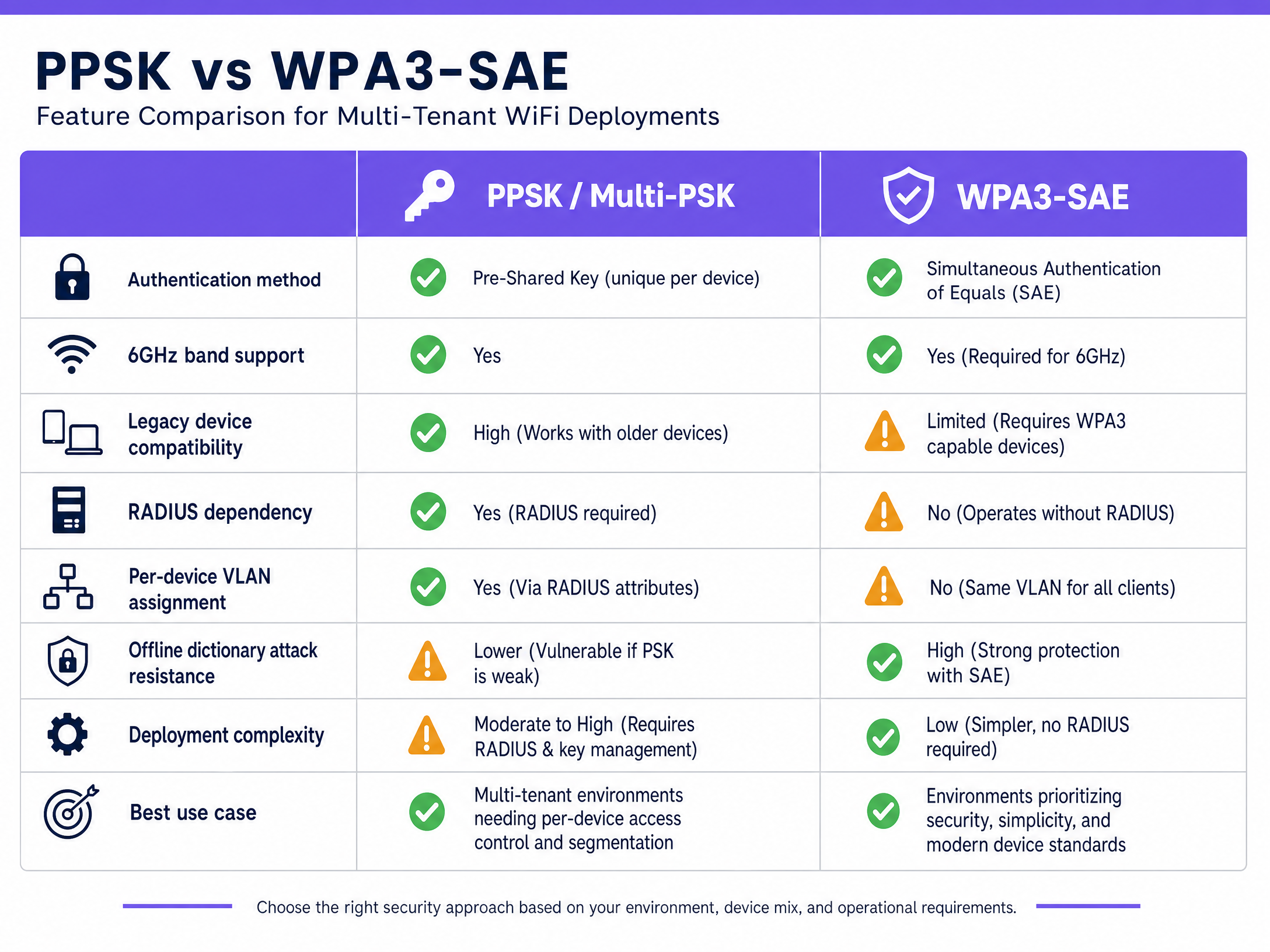
Private Pre-Shared Key (PPSK) is a proprietary technology that allows an access point to support multiple passphrases on a single SSID. Instead of every device sharing one password, each device or user gets a unique passphrase. When a device connects, the access point or an external RADIUS server matches the passphrase to a specific VLAN.

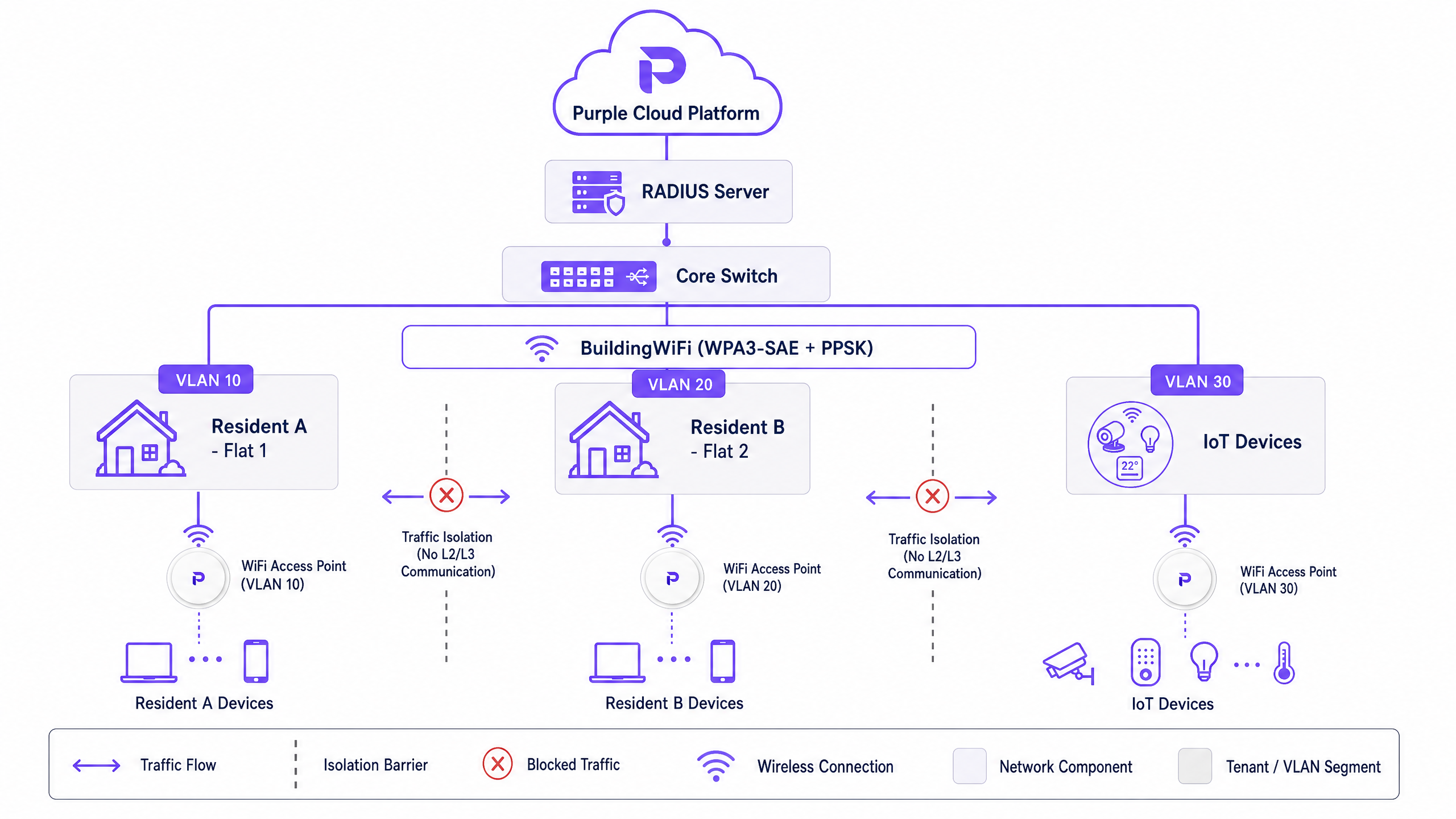
This architecture is foundational for Build-to-Rent (BTR) and Multi-Dwelling Unit (MDU) operators. It allows property developers to assign each resident a unique passphrase that maps to an isolated VLAN. Residents share the same physical infrastructure but their traffic is isolated at Layer 2, providing a private home-network experience. Purple's hardware-agnostic cloud overlay manages this provisioning workflow automatically.
comparison_chart.png

The WPA3 and PPSK Protocol Conflict

PPSK, in its traditional form, relies on the four-way handshake defined in the IEEE 802.11i standard underpinning WPA2. Because WPA3-Personal replaces this handshake with SAE, the two mechanisms are fundamentally incompatible at the protocol level on older firmware. If you configure a pure WPA3-Personal SSID on legacy access points, you cannot simultaneously run PPSK on that same SSID.

However, modern enterprise hardware vendors—including Cisco Meraki, HPE Aruba, and Juniper Mist—now support WPA3-SAE with RADIUS-based multi-PSK. In this model, the access point operates in WPA3-SAE mode, and the RADIUS server handles the per-device key lookup. This is particularly critical for 6GHz deployments (Wi-Fi 6E and Wi-Fi 7), which mandate WPA3.

Implementation Guide

Assessing Your Device Fleet

Before deploying WPA3, IT teams must audit their device fleet. While modern smartphones support WPA3 natively, legacy IoT devices, point-of-sale terminals, and older barcode scanners may not. WPA3 mandates Protected Management Frames (PMF). If a legacy device does not support PMF, it will fail to associate with a pure WPA3 network.

Deployment Models

  1. PPSK with RADIUS (Recommended for BTR/MDU): The PSK pool lives in an external RADIUS server. When a device connects, the access point forwards the request to RADIUS, which returns the VLAN assignment. This integrates with identity providers (Microsoft Entra ID, Okta) for automated provisioning when a resident moves in or out.
  2. WPA3-Enterprise (Recommended for Staff/Corporate): Uses 802.1X port-based access control with EAP-TLS certificates. This is the gold standard for secure corporate environments but introduces too much friction for resident or guest networks.
  3. Enhanced Open (OWE) (Recommended for Public Guest WiFi): Uses a Diffie-Hellman key exchange to encrypt wireless traffic without requiring credentials. Ideal for Retail environments gathering WiFi Analytics securely.
architecture_overview.png

Best Practices

  • Automate Key Lifecycle Management: In a PPSK deployment, automate provisioning and deprovisioning via your property management system to prevent stale keys and security risks.
  • Segment IoT Devices: Legacy IoT devices that do not support WPA3 should be isolated on a dedicated WPA2-PSK SSID on a separate VLAN.
  • Plan for 6GHz: If you are deploying Wi-Fi 6E, WPA3 is mandatory. Ensure your PPSK strategy is supported by your vendor's WPA3 firmware implementation.

Troubleshooting & Risk Mitigation

  • PMF Incompatibility: If devices fail to connect to a new WPA3 SSID, check if they support Protected Management Frames. Use WPA3 Transition Mode temporarily, or deploy a dedicated legacy SSID.
  • Downgrade Attacks: WPA3 Transition Mode is susceptible to downgrade attacks. Monitor your network using Wireless Intrusion Prevention Systems (WIPS) and treat Transition Mode as a migration step, not a permanent state.
  • Key Sprawl: Audit your RADIUS database quarterly to remove orphaned PSKs from former residents or decommissioned devices.

ROI & Business Impact

Deploying a centralised PPSK architecture via Purple allows property developers to consolidate network hardware. Instead of installing individual routers in every apartment, operators deploy enterprise access points in corridors and use PPSK to segment traffic. This reduces hardware capital expenditure by up to 40% and cuts ongoing maintenance costs. Furthermore, it enables landlords to offer "instant-on" WiFi as a premium utility, increasing rental yields and resident satisfaction.

Key Definitions

WPA3

The third generation of Wi-Fi Protected Access security certification, introducing SAE and mandatory PMF.

Required for all new 6GHz deployments and highly recommended for mitigating dictionary attacks.

PPSK (Private Pre-Shared Key)

A mechanism allowing multiple unique passphrases on a single SSID, with each passphrase mapping to a specific VLAN or policy.

Used heavily in BTR, student accommodation, and coworking spaces to provide private networks on shared infrastructure.

SAE (Simultaneous Authentication of Equals)

The secure key establishment protocol used in WPA3-Personal that replaces the WPA2 four-way handshake.

Protects networks from brute-force password guessing by requiring active AP interaction.

PMF (Protected Management Frames)

A standard (802.11w) that encrypts management traffic between devices and access points.

Mandatory in WPA3; its absence is the primary reason legacy devices fail to connect to modern networks.

RADIUS

A networking protocol that provides centralised Authentication, Authorization, and Accounting management.

Used in enterprise PPSK deployments to look up passphrases and return VLAN assignments dynamically.

VLAN (Virtual Local Area Network)

A logical subnetwork that groups a collection of devices from different physical LANs.

Used in conjunction with PPSK to isolate resident traffic in multi-tenant buildings.

OWE (Opportunistic Wireless Encryption)

A standard providing unauthenticated encryption for open WiFi networks.

Ideal for guest WiFi in retail or hospitality where passwords introduce friction but data privacy is required.

WPA3 Transition Mode

A configuration allowing an access point to accept both WPA2 and WPA3 clients on the same SSID.

Used as a migration strategy for environments with legacy devices, though vulnerable to downgrade attacks.

Worked Examples

A 200-unit build-to-rent development needs to provide private network segments for each resident, support legacy smart home devices, and minimise management overhead.

Deploy a single building-wide SSID using PPSK with RADIUS on a WPA2/WPA3 Transition Mode network. Integrate the property management system with Purple's RADIUS server. When a resident moves in, they are automatically assigned a unique passphrase mapped to a dedicated VLAN. They receive a secondary passphrase for IoT devices mapped to an isolated IoT VLAN.

Examiner's Commentary: This approach balances security with compatibility. Transition mode supports legacy smart devices, while RADIUS integration automates the lifecycle management of the passphrases, preventing key sprawl and reducing IT helpdesk tickets.

A 150-room hotel requires frictionless guest access, highly secure staff access, and an isolated building management network for CCTV.

Implement a three-SSID architecture. SSID 1 (Guest): Enhanced Open (OWE) combined with Purple's captive portal. SSID 2 (Staff): WPA3-Enterprise using 802.1X and EAP-TLS certificates authenticated against Microsoft Entra ID. SSID 3 (Building Management): PPSK mapping devices to a firewalled VLAN.

Examiner's Commentary: This design strictly isolates traffic types based on risk profile. OWE provides unauthenticated encryption for guests, 802.1X provides non-repudiation for staff, and PPSK securely segments headless operational devices.

Practice Questions

Q1. You are deploying WiFi in a new hospital wing. You need to secure clinical devices (infusion pumps, mobile workstations) that handle sensitive patient data. Which security model should you choose?

Hint: Consider the compliance requirements for healthcare data and the operational environment of the devices.

View model answer

WPA3-Enterprise with 802.1X and EAP-TLS certificates. This provides the highest level of security, eliminates the risk of shared passwords, and meets strict healthcare compliance standards.

Q2. A coworking space with 300 members is experiencing frequent WiFi disconnects on older laptops after upgrading to a pure WPA3-Personal SSID. What is the most likely cause and the recommended solution?

Hint: Think about the mandatory requirements introduced in WPA3 that were optional in WPA2.

View model answer

The older laptops likely do not support Protected Management Frames (PMF), which is mandatory in WPA3. The solution is to enable WPA3 Transition Mode to allow WPA2 connections, or to create a dedicated WPA2 SSID for legacy devices.

Q3. A BTR operator wants to use 6GHz (Wi-Fi 6E) access points to provide gigabit speeds to residents, while maintaining strict Layer 2 isolation between flats using PPSK. What architectural constraint must they address?

Hint: Consider the security requirements mandated by the Wi-Fi Alliance for the 6GHz band and how traditional PPSK operates.

View model answer

The 6GHz band mandates WPA3. Traditional PPSK relies on the WPA2 four-way handshake. The operator must ensure their chosen hardware vendor supports WPA3-SAE with RADIUS-based multi-PSK to achieve both 6GHz speeds and per-device isolation.